
Both ChatGPT and Perplexity claim to help developers write better code, but how do they actually perform in real-world tasks?
In this guide, we put them head-to-head across six practical coding scenarios— from building UI components to debugging logic and extending features.
Using the same prompt for each tool, we evaluated their output on quality, clarity, and usefulness.
Whether you're a beginner or experienced developer, this hands-on comparison will help you decide when to use ChatGPT, when to go with Perplexity— and when to use both.
Ready to code with the best? Join Index.dev’s global talent network, get matched with top companies, and supercharge your remote developer career!
ChatGPT vs Perplexity – Which One Should You Use?
ChatGPT is better for fast, clean UI code and quick feature builds, while Perplexity shines in debugging, logic-heavy tasks, and detailed explanations.
Now, let’s break down how each AI performed across six real-world coding tasks to see where each one excels—and where it falls short.
How We Tested Them
To keep the comparison fair and focused, we used the exact same prompt for both ChatGPT and Perplexity in each task. Every prompt was designed to reflect real-world developer scenarios, like building components, fixing bugs, or adding features.
After receiving the responses, we evaluated each one based on how well it performed in practice — not just whether the code worked, but how useful it would be in an actual development workflow.
We judged each AI assistant across key parameters like:
- Code Correctness – Does the code run and produce the right output?
- Debugging Skill – Can it identify and fix logical or functional bugs?
- Code Quality – Is the code clean, readable, and well-structured?
- UI Responsiveness – Does the output work well on screen, especially for frontend tasks?
- Feature Integration – Can it extend or modify existing code without breaking it?
- Input Validation & Error Handling – Does it account for edge cases or user mistakes?
Each task gave us a chance to see how these tools think, how they build, and how they handle feedback.
Let’s dive into the tasks.
Task 1: Build a Budget Estimator (HTML + JavaScript)
Test Prompt:
“Create a responsive budget calculator where users can select a project type (Website, App, Dashboard), enter the number of pages (1–10), and choose urgency (Normal or Express). Display live total cost.”
Parameters Tested: Code Correctness
Why it’s important:
This tests if the AI can produce functional, error-free code that runs as expected — the most fundamental benchmark. If it can’t build something simple and dynamic that works in-browser, it won’t be useful to most developers. And if you want to see how interactive elements can be presented in other formats, here’s a clean example of interactive PDFs.
ChatGPT:
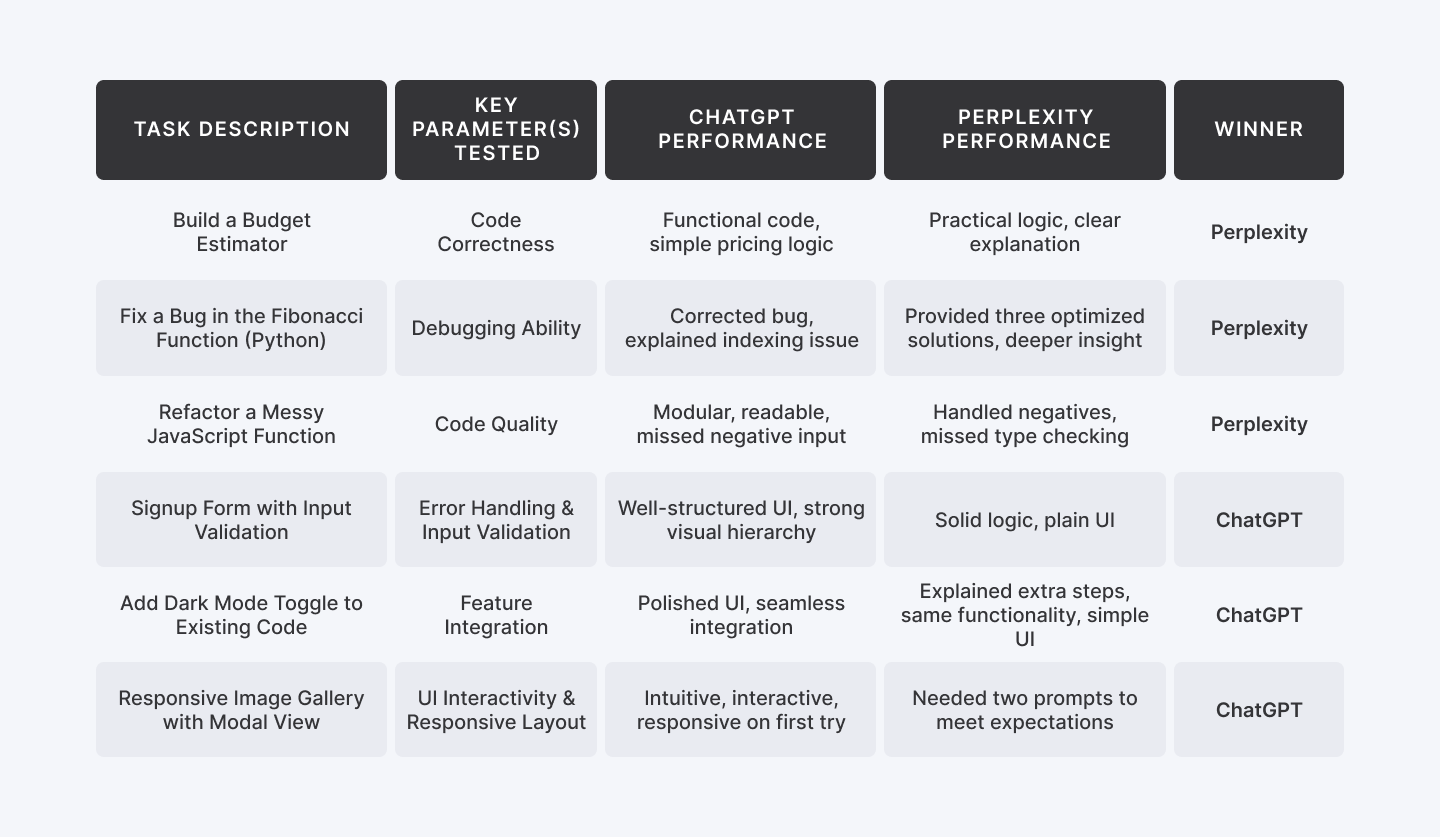
ChatGPT delivered the code block, almost instantly, covering every detail requested. Each section was neatly separated using code comments, making it easy to locate and modify specific parts as needed.
However, the cost estimation formula it used was overly simplistic and not quite aligned with real-world freelance or agency pricing models.
Here’s what it used:
Total Cost = Base Price × Number of Pages × Urgency Multiplier
In real client scenarios, pricing tends to be more subtle.

Outcome:

Perplexity:
Perplexity took a structured approach—first of explaining which parameters it considered, what base values it used, and how it calculated the final cost.

It then followed up with the code block. The formula it used was practical, closely aligned with real-world use cases, and functioned accurately. While the UI was somewhat plain, that’s easily fixable with a separate prompt focused on styling.
Outcome:

Winner: Perplexity
Task 2: Find and Fix a Bug in a Sorting Function (Python)
Test Prompt:
“Can you review this code and suggest optimizations?
def fibonacci(n):
fib_seq = [0, 1]
for i in range(2, n):
fib_seq.append(fib_seq[i - 1] + fib_seq[i - 2])
return fib_seq[n]”
Parameters Tested: Debugging Ability
Why it’s important:
Bug fixing is part of daily dev life. This tests if the AI can not only fix broken logic but explain why it was wrong. It reflects real-world maintenance and refactoring needs.
ChatGPT:
ChatGPT identified a bug in the function and pointed out a few problematic areas. It noted that the current implementation would raise an IndexError when n is 0 or 1, or when n equals the length of the list—since list indexing is 0-based and range(2, n) stops before n.
For example, calling fibonacci(5) would attempt to return fib_seq[5], but the list only has indices from 0 to 4, resulting in an IndexError.

Perplexity:
Perplexity offered a deeper analysis of the functional flaw and shared more efficient, optimized solutions in response.

Three optimized code solution are:
1. Correct Indexing and Validation

2. Space Optimization (Only store last two numbers)

3. Using Memoization (for recursive approach)

Winner: Perplexity
Also Check Out: Llama 4 vs ChatGPT-4 for Coding
Task 3: Refactor a Messy JavaScript Function
Test Prompt:
“Refactor this JavaScript code to be modular, cleaner, and more readable. Add meaningful comments:
function calc(p, t, r){return (p*t*r)/100;}”
Parameters Tested: Code Quality
Why it’s important:
Readable, well-structured code is essential in team environments. This task checks if the AI can follow best practices, break down logic into reusable parts, and improve maintainability.
ChatGPT:
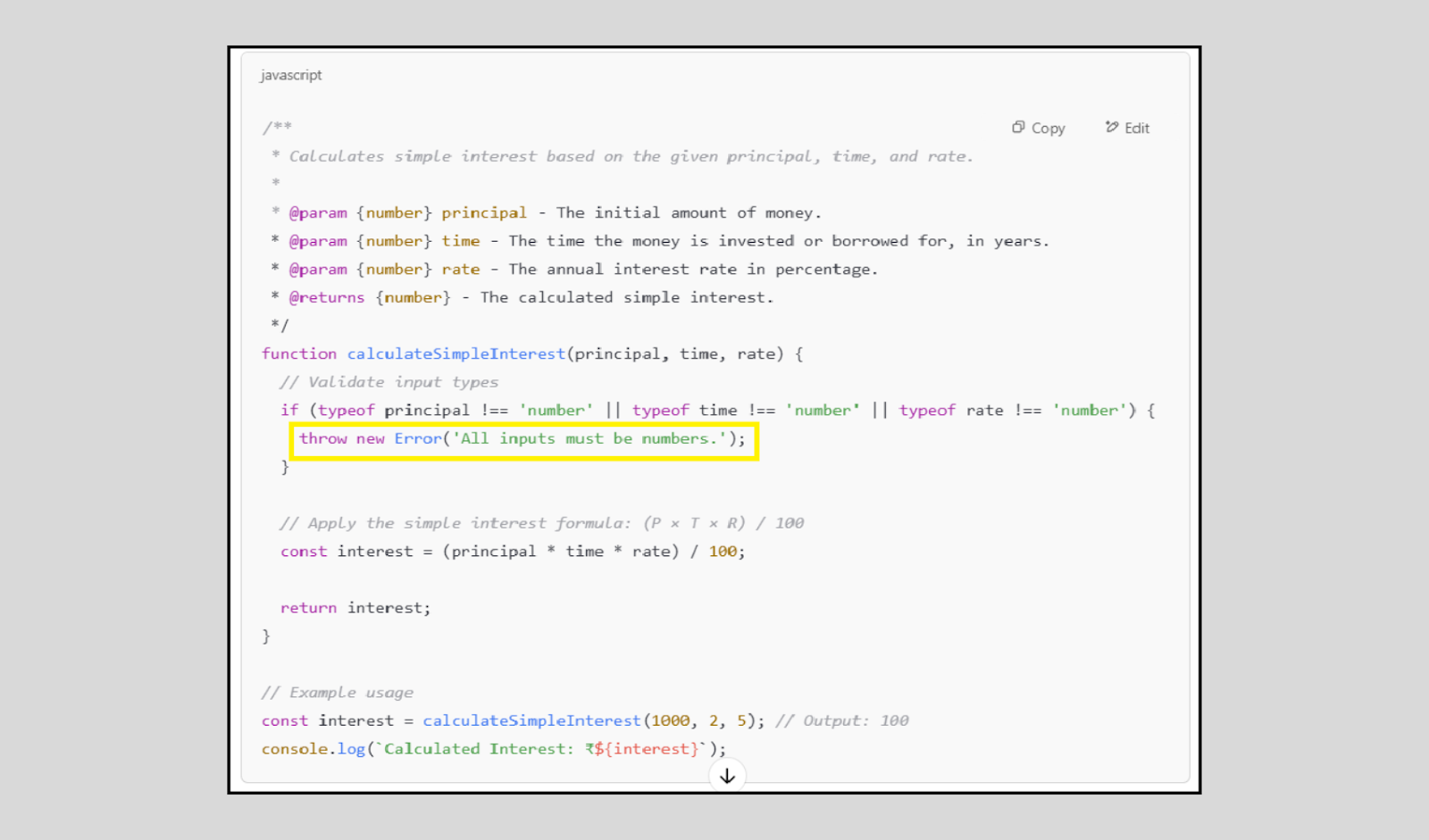
ChatGPT successfully implemented the task but didn’t fully address all edge cases. It improved the code’s readability, added detailed structure, and included meaningful comments. While it did perform input validation to ensure the inputs were numbers, it overlooked an important scenario—handling negative number inputs.
Perplexity:
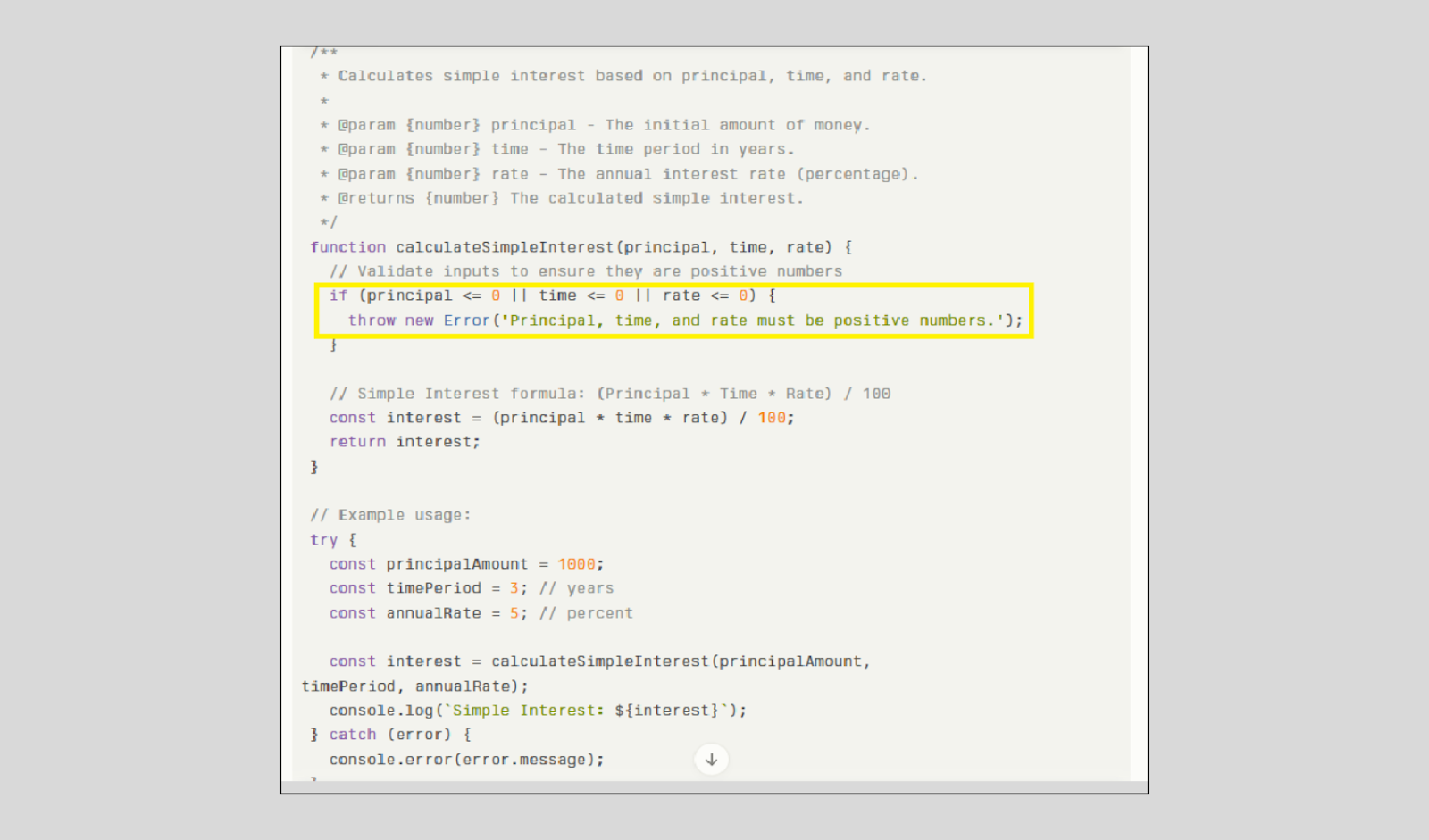
The version shared by Perplexity handled negative inputs well by raising an appropriate error.
However, it missed a critical check—verifying whether the inputs were numeric. Since we're calculating interest, it's essential that all inputs are numbers and strictly positive.
While both checks are important, ensuring the inputs are positive should be prioritized in this context, as negative or non-numeric values would invalidate the calculation entirely.
Winner: Perplexity
Task 4: Create a Signup Form with Input Validation (HTML + JS)
Test Prompt:
“Build a basic signup form (name, email, password) with frontend validation. Show errors if fields are empty or invalid.”
Parameters Tested: Error Handling and Input Validation
Why it’s important:
Handling user errors gracefully is crucial for security and UX. This task tests whether the AI proactively adds input checks, and fails safely — which is the difference between working code and reliable code.
ChatGPT:
It provided a complete and well-organized signup form code, covering all essential details—from input fields to basic validation—making it ready for real-world use.

ChatGPT also created a clean and user-friendly UI, featuring a bold, visually distinct sign-up button that stands out clearly—enhancing both usability and overall design appeal.

Perplexity:
Perplexity also shared a similar code block, complete with clear and descriptive inline comments that made the logic easy to follow.

However, in terms of UI, the design appeared quite basic—especially the sign-up button, which looked rather dull and lacked visual emphasis.

Winner: ChatGPT
Task 5: Add a New Feature to Existing Code
Test Prompt:
Add a dark mode toggle button to this webpage. When the button is clicked, the background and text colour should toggle between light and dark themes.
Note: We are using the previous task code as a demo code to add an extra feature.
Parameters Tested: Feature Integration
Why it’s important:
Most real-world development involves extending existing codebases rather than starting from scratch. This task evaluates whether the AI can read the structure, understand current logic, and integrate a new feature without breaking anything — a critical skill in fast-paced teams and agile environments.
ChatGPT:
ChatGPT designed a bright, responsive dark mode toggle button that not only functioned well but also added to the overall polish of the user interface.

Perplexity:

In this task, both assistants performed similarly in terms of functionality. However, Perplexity went a step further by explaining the additional features it included and why they were useful.

Winner: ChatGPT
Task 6: Build a Responsive Image Gallery with Modal View
Test Prompt:
“Create an image gallery where clicking on a photo opens it in a modal with a close button.”
Parameters Tested: UI Interactivity and Responsive Layout
Why it’s important:
Modern UIs require seamless interaction and responsiveness. This task evaluates the AI’s ability to handle DOM manipulation, event listeners, modal logic, and responsive design — all essential for real-world frontend development. It’s highly visual and makes for an impressive, easy-to-understand client demo.
ChatGPT:
It created a webpage featuring four clickable image icons, each opening in a modal window when clicked—providing an interactive and visually engaging user experience.

Later, it was prompted to use demo images as placeholders, and it responded with an enhanced version of the output—incorporating representative visuals for better presentation.

Perplexity:
Initially, it shared three separate code blocks for HTML, CSS, and JavaScript. While the code generated a basic photo gallery layout, it wasn’t responsive, and the images were not clickable—meaning there was no modal view or interactive functionality.
As a result, the gallery felt incomplete and not ready for practical use.
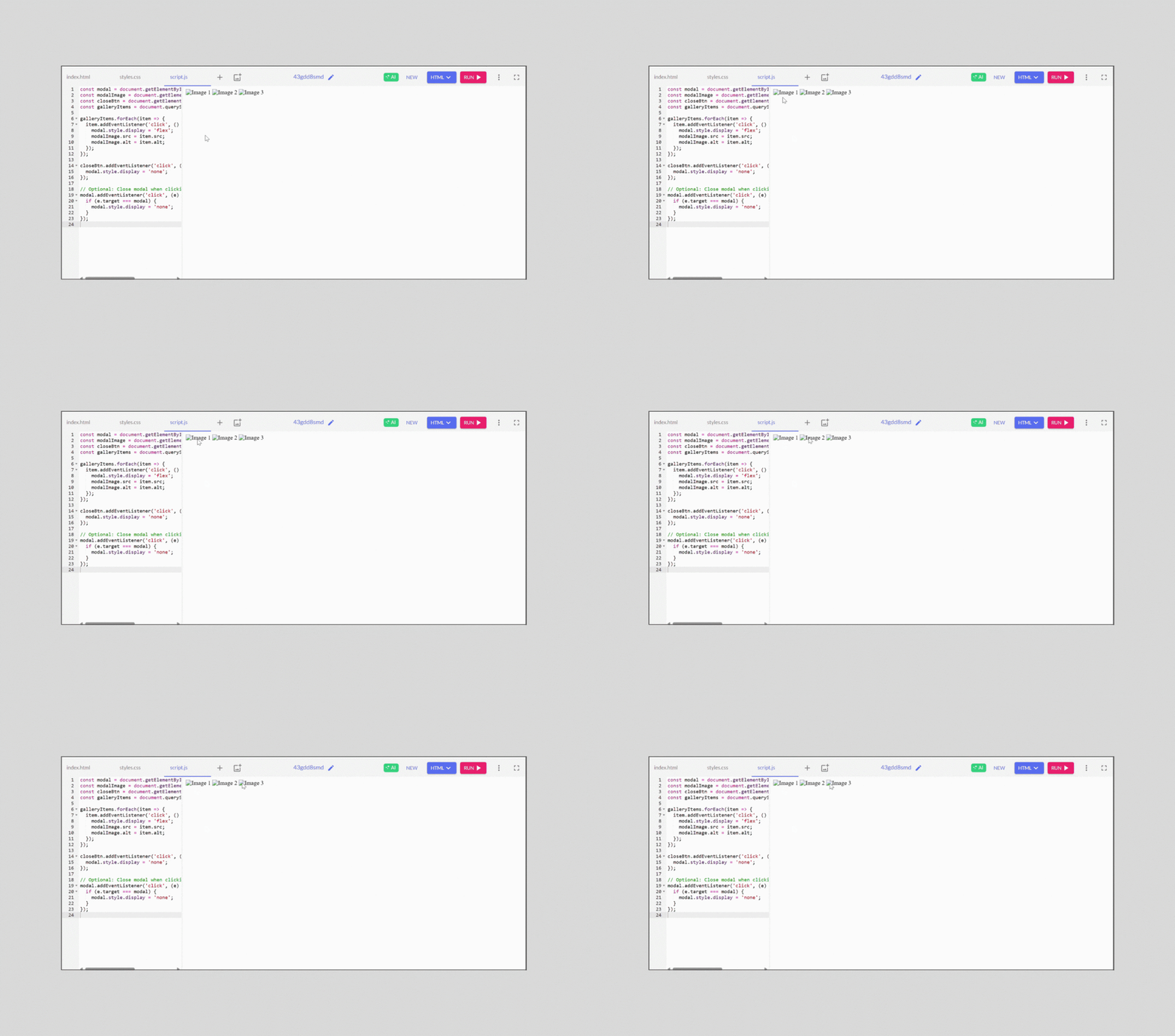
We then asked the AI assistant to generate a single, combined code block that included HTML, CSS, and JavaScript.
This time, it worked smoothly. Without even being prompted for demo images, it intuitively displayed a functional photo gallery with images opening in a modal or lightbox view—exactly as we intended.

While the final output functioned exactly as expected, the main drawback was that it required two rounds of prompting to get there—indicating it didn’t fully understand the requirements in the first attempt.
Winner: ChatGPT
When Should You Use ChatGPT vs Perplexity?
Not sure which AI assistant to choose?
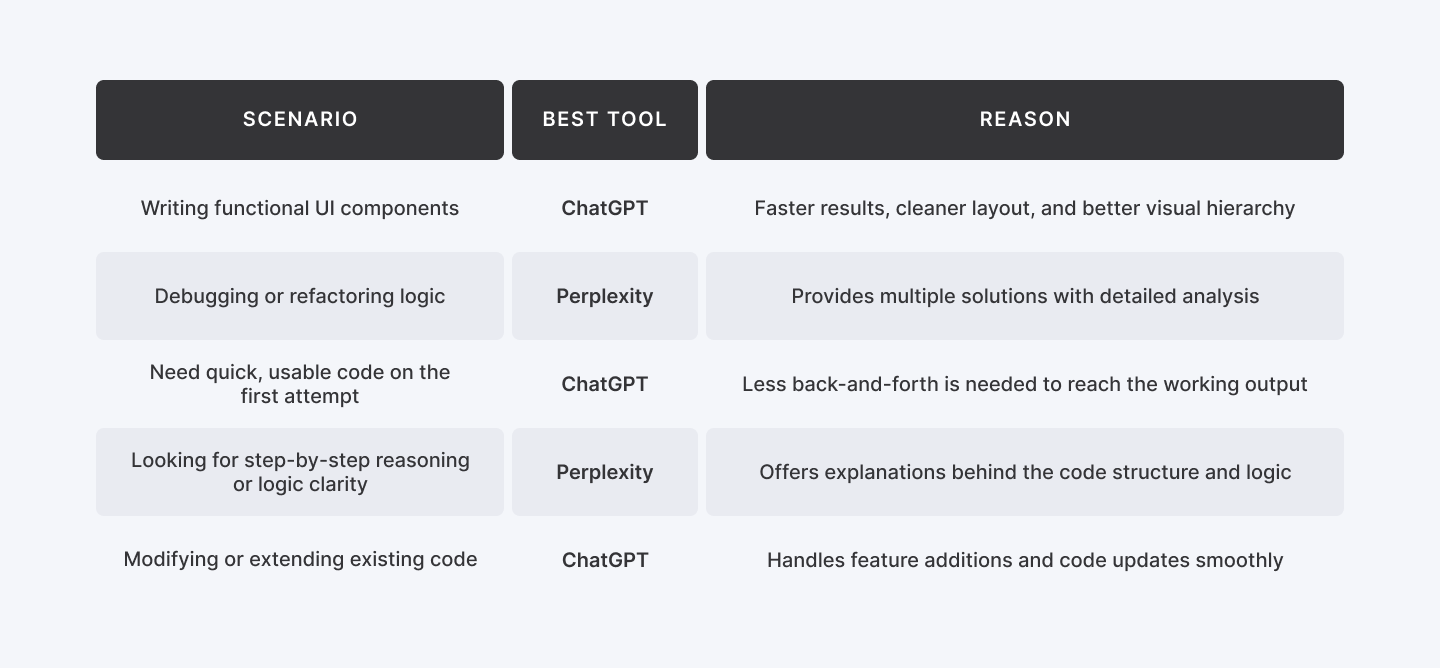
Here's a quick comparison of when to use ChatGPT vs Perplexity based on common development scenarios.
Scenario | Best Tool | Reason |
| Writing functional UI components | ChatGPT | Faster results, cleaner layout, and better visual hierarchy |
| Debugging or refactoring logic | Perplexity | Provides multiple solutions with detailed analysis |
| Need quick, usable code on the first attempt | ChatGPT | Less back-and-forth is needed to reach the working output |
| Looking for step-by-step reasoning or logic clarity | Perplexity | Offers explanations behind the code structure and logic |
| Modifying or extending existing code | ChatGPT | Handles feature additions and code updates smoothly |
Learn More: Grok 3 vs Deepseek R1 | Which AI Tool Wins?
Final Thoughts
There’s no one-size-fits-all answer when it comes to AI coding assistants — and that’s exactly the point.
ChatGPT is your go-to when you need polished, frontend-friendly code that just works — fast. It’s ideal for building UI components, adding features, or generating production-ready output with minimal back-and-forth.
Perplexity, on the other hand, excels when you're deep in the logic layer. It’s stronger at debugging, explaining code behaviour, and optimizing logic — perfect for developers who want to understand what’s happening under the hood.
The best developers don’t just pick one tool — they pick the right one for the task.
Need speed and clean UI? Use ChatGPT. Need depth and smarter logic? Choose Perplexity.
Want to work smarter? Use both.


