
Have you ever wondered why your computer can run multiple programs at once? Or how your app handles so many user requests simultaneously? There are two powerful concepts in play here: concurrency and parallelism.
These terms get mixed up all the time, even by experienced developers. And yes, they both aim to make our programs faster and more efficient, but they work in fundamentally different ways.
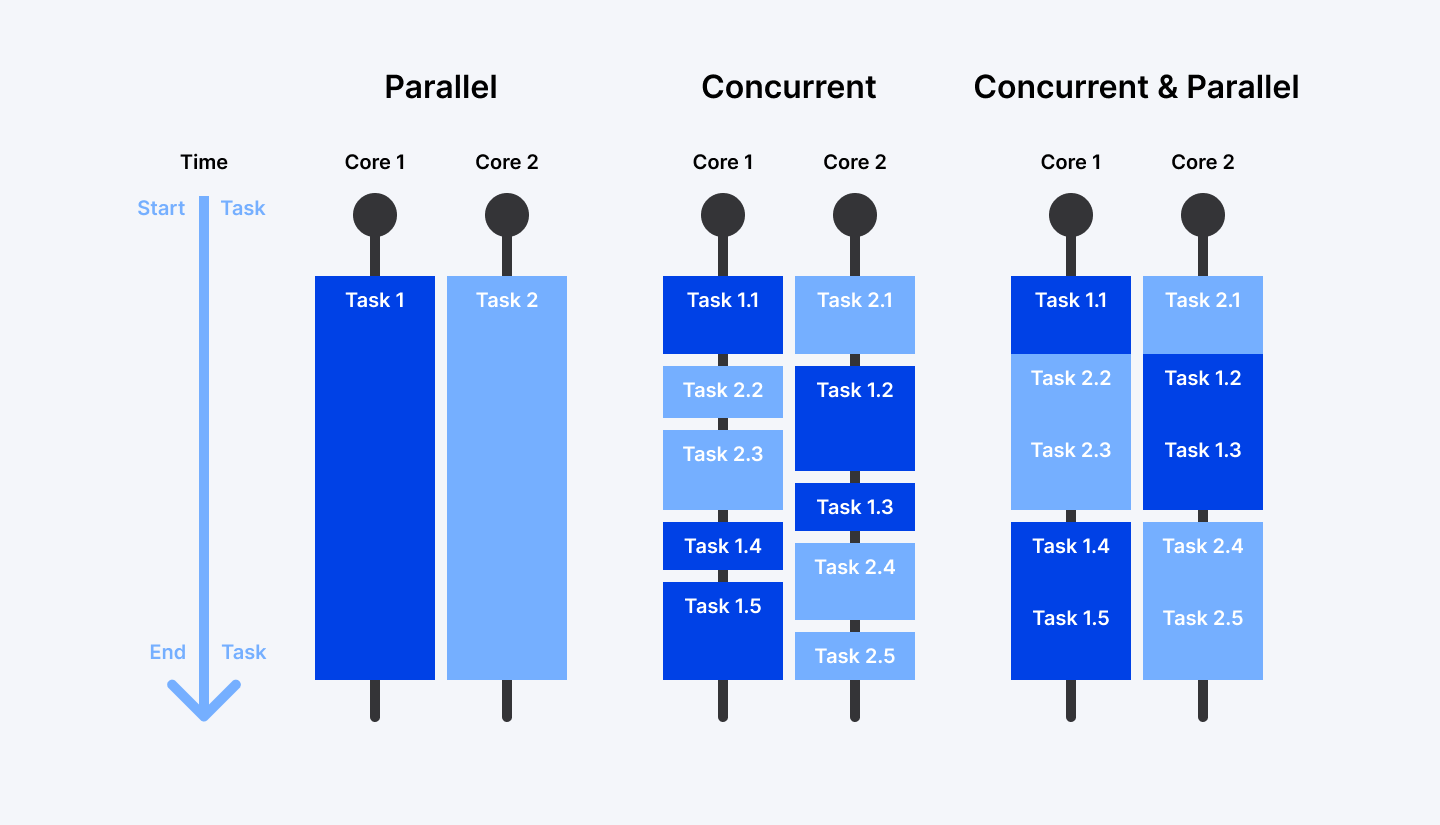
Think of it like this: concurrency is about dealing with lots of things at once, while parallelism is about doing lots of things at once. Subtle difference, right? But understanding this distinction can completely change how you approach problem-solving in your code.
What if I told you that sometimes you need concurrency without parallelism? Or that throwing more CPU cores at a problem isn't always the answer?
Let's break down these concepts in simple terms, see how they work in the real world, and figure out which approach makes the most sense for your next project. Ready to untangle this confusion once and for all?
Ready to build faster, more efficient apps? Join Index.dev and match with top global companies seeking your concurrency and parallelism expertise. Apply now!
What Is Concurrency?
Concurrency is about structuring your program to handle multiple tasks that overlap in time. But here's the key: these tasks don't necessarily run at the exact same moment. Instead, the system switches between them, giving each task a little attention before moving to the next.
Let's look at that web server example:
User 1 requests data from the server.
User 2 uploads a file.
User 3 retrieves images.
Without concurrency, each request would have to wait until the previous one is finished. But with concurrency:
The server starts processing User 1’s request.
While waiting for the database to respond, it moves on to User 2’s file upload.
While waiting for the file to upload, it starts fetching User 3’s images.
The CPU keeps switching between these tasks until they’re all complete.
This makes the system much faster, especially on single-core processors, where only one task can truly run at a time. But concurrency is also useful in multi-core environments.
Here’s a simple example using Python’s asyncio module to run multiple tasks concurrently:
import asyncio

async def fetch_data():
    print("Fetching data...")
    await asyncio.sleep(2)  # Simulate network delay
    print("Data retrieved!")

async def upload_file():
    print("Uploading file...")
    await asyncio.sleep(3)  # Simulate file upload
    print("File uploaded!")

async def main():
    await asyncio.gather(fetch_data(), upload_file())  # Run tasks concurrently

asyncio.run(main())
How it works:
fetch_data() and upload_file() are asynchronous functions.
Instead of waiting for one to finish before starting the other, asyncio.gather() lets them run concurrently.
The program switches between tasks while waiting, making better use of time and system resources.
This approach makes applications like web servers, chat apps, and data processing pipelines much more efficient.
Different Concurrency Models
As applications become more complex, developers have evolved different approaches to handling concurrent tasks. Each model has its own strengths and ideal use cases:
1. Cooperative Multitasking
Think of this as a friendly system where tasks voluntarily take turns. Each task runs until it reaches a natural stopping point (like waiting for user input or network data). Then, it hands over control to another task. This makes it easy to manage since the tasks themselves decide when to step aside.
Where Is It Used?
- Lightweight embedded systems
- Early versions of Microsoft Windows (Windows 3.x) and Classic Mac OS
- Coroutines in languages like Python (asyncio) and Kotlin
Example
If you’ve used Python’s asyncio, you’ve worked with cooperative multitasking. Here’s a simple coroutine example:
import asyncio

async def task1():
    print("Task 1 started")
    await asyncio.sleep(2)
    print("Task 1 finished")

async def task2():
    print("Task 2 started")
    await asyncio.sleep(1)
    print("Task 2 finished")

async def main():
    await asyncio.gather(task1(), task2())

asyncio.run(main())
Here, task1 and task2 voluntarily pause (await asyncio.sleep()) so other tasks can run, making the program more efficient.
2. Preemptive Multitasking
Unlike cooperative multitasking, this model doesn’t rely on tasks playing nice. Instead, the operating system decides when to pause one task and switch to another. This ensures all tasks get a fair share of CPU time, even if some tasks don’t want to give up control.
Where Is It Used?
- Modern operating systems (Windows, macOS, Linux)
- Web servers
- Java threads (Thread class) and Python’s threading module
Example
A web server needs to handle multiple client requests at the same time. Here’s an example using Python’s threading module:
import threading
import time

def handle_request(client_id):
    print(f"Handling request from Client {client_id}")
    time.sleep(2)
    print(f"Finished handling Client {client_id}")

threads = []
for i in range(5):
    thread = threading.Thread(target=handle_request, args=(i,))
    thread.start()
    threads.append(thread)

for thread in threads:
    thread.join()
Here, multiple client requests are handled concurrently, ensuring no single request blocks the entire server.
3. Event-Driven Concurrency
Imagine a restaurant kitchen where the chef only works when there’s an order. Instead of constantly checking if food is ready, the chef responds to new tasks as they arrive. That’s event-driven concurrency. Tasks are triggered by events rather than running continuously.
Where Is It Used?
- JavaScript (Node.js event loop)
- Python’s asyncio
- Real-time chat applications
Example
Here’s a simple event-driven web server (Node.js):
const http = require('http');

const server = http.createServer((req, res) => {
    res.writeHead(200, {'Content-Type': 'text/plain'});
    res.end('Hello, world!\n');
});

server.listen(3000, () => {
    console.log('Server running at http://localhost:3000/');
});
Node.js uses an event loop to handle multiple requests efficiently without blocking execution.
4. Reactive Programming
What if you could create a stream of data and react to changes automatically? That’s the core idea of reactive programming. Instead of manually checking for updates, you define how the system should respond to changes dynamically.
Where Is It Used?
- RxJava (for Java applications)
- Reactor (for Spring WebFlux)
- ReactiveX (used across multiple languages)
- Real-time data pipelines and dashboards
Example
Here’s a simple example of reactive programming in Python with RxPY:
from rx import from_iterable
from rx.operators import map, filter

data_stream = from_iterable(range(10))
processed_stream = data_stream.pipe(
    filter(lambda x: x % 2 == 0),  # Keep even numbers
    map(lambda x: x * 10)          # Multiply by 10
)

processed_stream.subscribe(lambda x: print(f"Received: {x}"))
This program processes a stream of numbers reactively, meaning each number is handled as soon as it arrives rather than waiting for all numbers to be processed first.
How Models Compare
Model | Strengths | Weaknesses | Best For |
| Cooperative | Simple, low overhead | Vulnerable to task greed | Embedded systems, async I/O |
| Preemptive | Fair resource sharing | Synchronization complexity | Multi-core CPU workloads |
| Event-Driven | High I/O scalability | Single point of failure | Web servers, real-time apps |
| Reactive | Clean data flow management | Steep learning curve | Real-time UIs, data streams |
Use Cases of Concurrency
Concurrency is the backbone of how modern apps stay responsive and efficient. It shines in situations where your program needs to handle multiple tasks that spend a lot of time waiting, whether for user input, network responses, or disk operations.
Let’s explore how it powers everyday tools and systems.
1. Web Browsers
A browser juggles multiple tasks at once, like:
- Rendering pages while fetching images/scripts.
- Handling user interactions (scrolling, typing, clicking).
- Background updates (e.g., auto-refreshing tabs).
2. Web Servers
Think about a busy website, like an online store during a holiday sale. Thousands of users are requesting pages, adding items to carts, and checking out—all at the same time.
- Web servers like Apache/Nginx use threads or async I/O to process requests without blocking.
- Rate limits prevent overload (e.g., browsers cap concurrent connections to avoid DoS attacks).
3. Chat Apps
Slack, WhatsApp, or Discord rely on concurrency to keep conversations flowing:
- Processing messages while updating the UI.
- Sending/receiving data without delays.
4. Video Games
Video games are a perfect example of concurrency in action. While you’re playing, multiple things happen at the same time:
- Graphics render continuously (so you see the game world).
- User input is processed (e.g., moving a character, firing a weapon).
- Physics simulations run (so objects interact realistically).
- Background music & sound effects play seamlessly.
What Is Parallelism?
Parallelism means actually executing multiple tasks simultaneously by using multiple processing units—typically different CPU cores or processors. Nothing is being faked or switched between; real work is happening in parallel.
The key difference from concurrency? Parallelism requires multiple physical processors or cores to truly run things simultaneously. It's about having enough hands on deck to do multiple things at once.
Think about that data processing example:
When you need to analyze data, generate reports, and run simulations, parallelism lets you assign each task to a different processor. Core 1 crunches the analysis, Core 2 generates the reports, and Core 3 handles the simulations—all happening genuinely at the same time.
Parallelism shines when you can break a problem into completely independent pieces. The less these pieces need to talk to each other, the better parallelism works.
Here's a simple example using Python's multiprocessing module:
import multiprocessing
import time

def analyze_data(dataset_id):
    print(f"Analyzing dataset {dataset_id}...")
    time.sleep(3)  # Simulates complex analysis
    print(f"Analysis of dataset {dataset_id} complete!")
    return f"Results from dataset {dataset_id}"

def generate_report(report_type):
    print(f"Generating {report_type} report...")
    time.sleep(2)  # Simulates report generation
    print(f"{report_type} report complete!")
    return f"{report_type} report data"

def run_simulation(simulation_params):
    print(f"Running simulation with parameters {simulation_params}...")
    time.sleep(4)  # Simulates complex simulation
    print(f"Simulation {simulation_params} complete!")
    return f"Simulation results: {simulation_params}"

if __name__ == "__main__":
    # Create a pool of processes
    with multiprocessing.Pool(processes=3) as pool:
        # Start all tasks in parallel
        analysis_result = pool.apply_async(analyze_data, ("customer_behavior",))
        report_result = pool.apply_async(generate_report, ("quarterly",))
        simulation_result = pool.apply_async(run_simulation, ("market_growth",))

        # Get the results (this will wait until tasks complete)
        analysis_data = analysis_result.get()
        report_data = report_result.get()
        simulation_data = simulation_result.get()

    print("All tasks completed!")
    print(f"Final results: {analysis_data}, {report_data}, {simulation_data}")
How it works
Each task runs in a separate process using different CPU cores.
All tasks run simultaneously, reducing the total execution time.
Unlike concurrency (which switches between tasks), these tasks actually execute in parallel.
This method is ideal for CPU-bound tasks where heavy computation is required.
Different Parallelism Models
Parallelism is all about doing multiple things at the same time. Unlike concurrency, which is about managing multiple tasks efficiently, parallelism actually runs tasks simultaneously, utilizing multi-core processors or distributed computing resources. Let's explore some key parallelism models and how they are used in code and hardware.
1. Data Parallelism
Ever wondered how large-scale computations, like image processing or deep learning, happen so fast? That’s data parallelism at work. This model splits large datasets into smaller chunks and processes them simultaneously across multiple processors. Each processor performs the same operation on its respective subset of data.
When Is It Used?
- SIMD (Single Instruction, Multiple Data) operations
- Parallel array processing
- MapReduce framework
Real-World Applications
- Image and signal processing
- Large-scale data analysis (Big Data)
- Scientific simulations
2. Task Parallelism
Task parallelism takes a different approach. Instead of dividing data, it breaks the overall job into smaller, independent tasks that run in parallel. Each task performs a different operation, allowing multiple processes to work simultaneously without interfering with each other.
When Is It Used?
- Thread-based parallelism in Java
- Parallel Tasks in .NET
- POSIX threads
Real-World Applications
- A web server handling API requests, database writes, and logging at once.
- Rendering a game’s physics, audio, and UI in separate threads.
Example
Here is an example of parallel implementation of an algorithm in Python with multiprocessing:
import multiprocessing

def compute_square(num):
    return num * num

if __name__ == "__main__":
    numbers = [1, 2, 3, 4, 5]
    with multiprocessing.Pool(processes=4) as pool:
        results = pool.map(compute_square, numbers)
    print(results)  # Output: [1, 4, 9, 16, 25]
This example divides the task of squaring numbers across multiple CPU cores, speeding up execution.
3. Pipeline Parallelism
Imagine a car assembly line: each stage completes a specific task before passing it on. Pipeline parallelism works the same way. Tasks are divided into stages, and each stage processes a portion of the workload concurrently, improving efficiency.
When It Is Used?
- Unix pipeline commands (cat file.txt | grep 'error' | sort)
- Image processing pipelines
- ETL (Extract, Transform, Load) pipelines in data engineering
Real-World Applications
- Video and audio processing
- Real-time data streaming applications
- Manufacturing and assembly line automation
4. GPU Parallelism
GPUs aren’t just for gaming! They’re built for massive parallelism, capable of executing thousands of threads simultaneously. This makes them ideal for tasks requiring heavy computations, like AI and deep learning.
When It Is Used?
- CUDA (Compute Unified Device Architecture) by NVIDIA
- OpenCL (Open Computing Language)
- TensorFlow and PyTorch for deep learning
Real-World Applications
- Machine learning and deep learning
- Real-time graphics rendering
- High-performance scientific computing
Example
The following is a code snippet that illustrates GPU parallelism in Deep Learning (using TensorFlow & GPU acceleration):
import tensorflow as tf

# Check if GPU is available
print("GPU Available:", tf.config.list_physical_devices('GPU'))

# Sample Neural Network using GPU Acceleration
model = tf.keras.models.Sequential([
    tf.keras.layers.Dense(128, activation='relu'),
    tf.keras.layers.Dense(64, activation='relu'),
    tf.keras.layers.Dense(10, activation='softmax')
])

model.compile(optimizer='adam', loss='sparse_categorical_crossentropy', metrics=['accuracy'])
print("Model ready for GPU training!")
This snippet ensures TensorFlow uses the available GPU to accelerate deep learning model training.
When to Use Which Model
Model | Strengths | Weaknesses | Best For |
| Data Parallelism | Simple for uniform tasks | Needs identical operations | ML training, image processing |
| Task Parallelism | Flexible for diverse tasks | Coordination complexity | Web servers, real-time apps |
| Pipeline | Efficient for streaming data | Bottlenecks stall flow | Video encoding, ETL |
| GPU Parallelism | Raw speed for math-heavy work | Limited by GPU memory | Deep learning, simulations |
Use Cases of Parallelism
Parallelism is what makes modern computing insanely fast. From AI training to large-scale simulations, parallel processing is everywhere. Here are some real-world examples:
1. Machine Learning Training
Without parallelism, training deep learning models would take months or even years.
- Data parallelism splits datasets into batches and trains them across GPUs.
- TensorFlow’s data parallelism lets researchers train models on distributed clusters.
Real-world example: NVIDIA’s M4 chip processes 38 trillion operations/second for AI tasks like image recognition.
2. Video Rendering
Have you ever wondered why professional animation studios have rooms full of powerful computers? It's all about parallel rendering:
- Each frame in an animated movie can require hours of computation.
- By rendering different frames on different machines simultaneously, studios can produce complex animations in reasonable timeframes.
- A scene that might take weeks to render on a single computer can be completed overnight when distributed across hundreds of machines.
Real-world example: Apple’s M4 chip renders 3D graphics in iPad Pro games by distributing tasks across its 10-core GPU.
3. Web Crawlers
Search engines need to constantly index billions of web pages. Parallelism makes this enormous task manageable:
- Search engine crawlers like Googlebot split up the internet into manageable chunks.
- Different crawler instances process different websites simultaneously.
Real-world example: Aptos Labs’ Block-STM validates 160,000+ blockchain transactions/second by parallelizing smart contract execution.
4. Data Processing
When companies analyze massive datasets to derive business insights, parallelism is essential:
- Frameworks like Apache Spark distribute data processing across clusters.
- Analyzing logs from millions of users becomes feasible.
- Real-time analytics for fraud detection or ad targeting.
Real-world example: IBM’s Summit supercomputer processes mental health data to predict at-risk children, leveraging parallelism for faster insights.
5. Scientific Simulations
Some of the most impressive applications of parallelism occur in scientific computing:
- Weather forecasting models divide the atmosphere into a 3D grid, with different regions calculated on different processors.
- Pharmaceutical companies simulate molecular interactions in parallel to discover potential new drugs.
- Physics researchers model particle collisions by distributing calculations across supercomputer clusters.
Real-world example: The University of Chicago’s pSIMS project models climate impacts using parallel supercomputers.
Learn More: 15 Best AI Tools for Developers To Improve Workflow

Concurrency vs. Parallelism
Now that we've explored both concepts in depth, let's compare concurrency and parallelism to better understand when and how to use each approach.
Resource Utilization
- Concurrency: Runs multiple tasks within a single core by rapidly switching between them. When Task A is waiting for a database query, the CPU jumps to Task B instead of sitting idle.
- Parallelism: Uses multiple cores or processors to execute tasks at the same time. Imagine multiple cashiers at different registers, each serving a customer simultaneously.
Focus
- Concurrency: Focuses on structure—it's about how we organize and manage multiple tasks to progress simultaneously.
- Parallelism: Focuses on execution—it's about physically performing multiple computations at the exact same time.
Task Execution
- Concurrency: Creates an illusion of simultaneity through rapid task switching. Tasks are actually taking turns using the CPU, but the switching happens so quickly that it appears simultaneous to users.
- Parallelism: Offers true simultaneity—different tasks actually execute at the same instant in time on different processors.
Context Switching
- Concurrency: Involves frequent context switching, where the CPU rapidly jumps between tasks. While this helps keep things moving, excessive switching can slow things down.
- Parallelism: Avoids this overhead since each task runs uninterrupted on its own processor. The trade-off is that you need multiple physical processing units, which increases hardware costs.
When to Use What?
- Concurrency is great for I/O-bound tasks:
- Handling multiple network requests
- Reading and writing files
- Managing user input in interactive applications
- Parallelism is best for CPU-bound tasks:
- Complex mathematical computations
- Image and video processing
- Machine learning and data analysis
Concurrency vs. Parallelism: Table Comparison
Aspect | Concurrency | Parallelism |
| Definition | It's all about juggling multiple tasks, interleaving their execution. Think of it as rapidly switching between tasks, so they seem to run at the same time. | It's about simultaneous execution of multiple tasks. They are actually running at the same time on separate resources. |
| Execution | Achieved with context switching on a single core or thread. | Needs multiple cores or processors to execute tasks simultaneously. |
| Focus | Managing multiple tasks and making the most of available resources. | Splitting one big task into smaller sub-tasks that can be executed at the same time. |
| Use Case | Great for I/O-bound tasks. Think handling tons of network requests or file operations. | Perfect for CPU-bound tasks. Like heavy-duty data processing or training a machine learning model. |
| Resource Needs | Can run on a single core or thread. | Needs multiple cores or threads to make it happen. |
| What You Get | Improves responsiveness. Tasks are managed smoothly, making things feel faster. | Reduces overall execution time by doing tasks at the same time. |
| Examples | Asynchronous APIs, chat apps, web servers handling lots of requests. | Video rendering, machine learning training, scientific simulations. |
How Can Concurrency and Parallelism Work Together
Many modern applications use both approaches together:
- Web servers use concurrency to manage thousands of connections while using parallelism to process requests across multiple cores
- Game engines use concurrency to handle input, networking, and audio while using parallelism to maximize physics and rendering performance
- Database systems use concurrency to handle multiple client connections while using parallelism to execute queries faster
So, how can this all play out in real-world scenarios? Let’s explore a few examples.
Financial Data Processing:
Scenario: A stock trading app needs real-time data and complex analysis.
- Concurrency: Fetch stock prices from APIs without blocking.
- Parallelism: Run Monte Carlo simulations across cores to predict risks.
- Result: Traders get instant updates and deep insights.
Video Processing:
Scenario: A TikTok-like app handles uploads and encoding.
- Concurrency: Let users upload videos while others are processed.
- Parallelism: Encode videos in parallel using GPU cores.
- Result: No lag, no crashes—just smooth uploads and fast playback.
Data Scraping:
Scenario: A marketing tool scrapes websites and analyzes trends.
- Concurrency: Fetch 100 websites at once (async I/O).
- Parallelism: Parse data across cores to spot trends.
- Result: Faster insights, broader coverage.
Explore More: Automate Your Daily Workflow with These 19 Useful Python Scripts
Conclusion
So there you have it! Concurrency and parallelism might sound similar, but they solve different problems in different ways.
Remember: concurrency is about juggling multiple tasks and making progress on all of them, even with limited resources. Parallelism is about throwing more resources at your problem to get things done faster.
Your applications probably need both approaches. When your code is waiting for things (like user input or network responses), concurrency keeps things moving. When your code needs raw processing power, parallelism delivers the speed.
The next time your app feels sluggish or unresponsive, ask yourself: Is this a concurrency problem or a parallelism problem? The answer will point you toward the right solution.
For Developers:
Ready to put your concurrency and parallelism skills to work? Join Index.dev's talent network today and get matched with global companies looking for developers who understand these crucial concepts. Build a global remote career!
For Clients:
Need developers who truly understand concurrency and parallelism? Index.dev connects you with the top 5% of vetted developers in just 48 hours. Start your 30-day free trial today and build your team with experts who can optimize your applications for maximum efficiency.


