
AI tools now sit in almost every developer’s workflow—around 84% of developers use or plan to use them for coding, testing, and debugging. Used well, they speed up everything from boilerplate to PR reviews; used badly, they create more bugs and busywork.
This guide ranks the 15 best AI tools for developers in 2025 by what they actually help you do: get AI‑driven code suggestions in your editor, turn designs into clean code, automate dev workflows and pull requests, and plug AI search into your GitHub, docs, and CMS.
Let’s dive in!
🚀Join Index.dev and get matched with top global companies for high-paying remote jobs!
Quick Reference: Best AI Tools for Developers
Short on time? Start here. This quick reference table shows the best AI tools for developers by primary use case, so you can pick a starting point and then jump to the deep‑dive section that matches your workflow.
Tool | Best For | Key Feature | Price |
|---|---|---|---|
GitHub Copilot | Code completion | In-editor AI suggestions | $10-19/mo |
Cursor | Multi-file editing | AI-driven code suggestions | $20/mo |
ChatGPT | General assistance | Versatile coding help | $20/mo |
Tabnine | Privacy-first teams | On-premise option | $12/mo |
Locofy.ai | Design-to-development | Figma to code | Custom |
Mintlify | Documentation | Auto-generated docs | Free tier |
Codeium | Free alternative | Code completions | Free |
Amazon CodeWhisperer | AWS developers | Cloud-optimized | Free tier |
AI Tools for Developers: Categories & Use Cases
Most developers don’t need 15 tools—they need 3–5 that cover coding, search, and automation. Use this breakdown to understand where each AI tool fits, then layer them instead of trying everything at once. Here's how to categorize the best AI tools for developers by use case:
By Primary Function:
Category | Tools | Best For |
|---|---|---|
Code Completion | Copilot, Cursor, Tabnine, Codeium | Writing code faster |
Design-to-Development | Locofy.ai, Anima, Builder.io | Converting designs to code |
Documentation | Mintlify, Swimm, Readme.so | Auto-generating docs |
Testing | Codium AI, Testim, Mabl | Automated test generation |
Code Review | CodeRabbit, Sourcery, PR-Agent | AI-powered PR reviews |
Debugging | Cursor, Tabnine, Snyk | Finding and fixing bugs |
Workflow Automation | Sweep, Cody, GitHub Actions AI | Automating dev tasks |
First, decide what you want AI to do (code suggestions, documentation, testing, search). Then decide where you want it to live: inside your IDE, inside your browser, or inside your CI/CD and GitHub workflows.
By Integration Type:
Integration | Tools | Workflow Impact |
|---|---|---|
In-Editor (IDE) | Copilot, Cursor, Tabnine | Minimal changes |
Web-Based | ChatGPT, Claude, Perplexity | Context switching |
CI/CD Pipeline | CodeRabbit, Sweep, Snyk | Automated checks |
Design Tools | Locofy.ai, Anima | Figma/Sketch plugins |
1. GitHub Copilot
Best for: Writing code faster with AI-driven suggestions and auto-completion
GitHub Copilot is an AI-powered code completion tool that helps you write code faster and with fewer errors. Like your AI pair programmer, it can write scripts, functions, and entire applications in different programming languages and frameworks. As you type, it suggests whole lines, blocks of code, or even complex structures based on your coding context.
Trained on a vast dataset of public code, it adapts to your style, reducing repetitive work and allowing you to focus on problem-solving instead of boilerplate coding.
Why You’ll Love It
- Gives you smart code completions and real-time suggestions based on your coding style and context.
- Works with various languages like Python, JavaScript, TypeScript, Go, Rust, and Ruby.
- Helps generate documentation for your code automatically.
- Improves suggestions over time by learning from the individual developer’s code patterns and preferences.
How It Improves Your Workflow
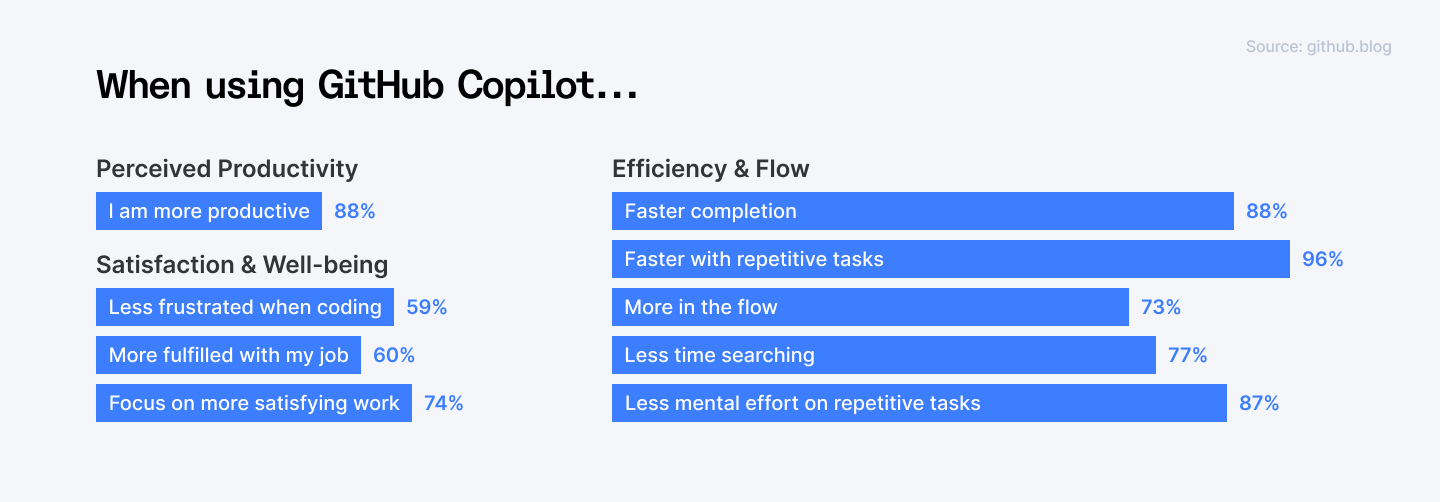
By providing real-time suggestions based on your coding style and context, Copilot speeds up your development with instant, context-aware code completions. It helps you reduce syntax errors and the time spent on repetitive tasks. You can focus on higher-level problem-solving instead of getting bogged down in syntax.
When to Use It
Use GitHub Copilot during coding sessions when writing new features without reinventing the wheel or when tackling complex algorithms.
Example Use Case
You’re building a new API in Node.js. Instead of manually writing all the route handlers and middleware, Copilot suggests the structure based on your existing code. You accept the suggestions, tweak the logic, and have a working API in minutes instead of hours.
2. Cursor
Best for: AI-driven debugging, code generation, and workflow automation.
Cursor is more than just an AI code completion tool—it’s an intelligent coding assistant that helps you debug, refactor, and even build applications faster. Think of it as an AI-powered extension of your workflow, helping you write cleaner code while automating repetitive tasks.
Why You’ll Love It
- Provides relevant code completions based on your current work.
- Helps identify and fix bugs instantly with AI-powered error detection.
- Automates repetitive tasks like formatting, documentation, and testing.
How It Improves Your Workflow
Cursor understands your coding habits and offers AI-driven suggestions, which debugs and refactors code, speeds up your coding process and helps you avoid common errors.
When to Use It
Best used when developing entire applications and need AI-generated scaffolding or during debugging sessions to strengthen productivity.
Example Use Case
You’re troubleshooting a performance issue in your React app. Instead of manually analyzing each function, Cursor suggests optimizations based on best practices. It highlights inefficient code, refactors it, and even explains why the new version is better. You fix the issue and ship a faster, cleaner app.
3. Amazon CodeWhisperer
Best for: Writing secure, high-quality code with AI-driven suggestions.
Amazon CodeWhisperer is your AI-powered coding companion that not only helps you generate code faster but also ensures it’s secure. Whether you’re writing a new feature, debugging an issue, or refactoring code, CodeWhisperer provides smart suggestions based on natural language prompts. Plus, its built-in security scans help you catch vulnerabilities early, making it a great choice for enterprise-level development.
Why You’ll Love It
- Generates complete functions or suggest improvements as you type, adapting to your coding style.
- Detects common vulnerabilities like SQL injection and hardcoded secrets.
- Works with Amazon CodeGuru to perform security checks on your code, highlighting potential vulnerabilities.
- Offers AI-powered code suggestions tailored for AWS services like Lambda, DynamoDB, and S3.
How It Improves Your Workflow
Amazon CodeWhisperer generates entire functions or blocks of code from simple comments and works seamlessly with AWS services, making cloud-based development easier.
When to Use It
CodeWhisperer is best utilized for running security scans to catch vulnerabilities before deploying to production or when working on AWS-based applications and need AI-generated code optimized for the cloud. It's particularly useful in enterprise environments where security is a top priority.
Example Use Case
You’re developing a serverless application using AWS Lambda and need a function to process user data from an S3 bucket. Instead of writing it from scratch, you type a comment:
“Function to fetch and process JSON files from S3 and store results in DynamoDB.”
CodeWhisperer instantly generates the function, complete with AWS SDK calls and error handling. You review the code, make minor tweaks, and move on—saving hours of work.
4. Sourcegraph Cody
Best for: Navigating, searching, and refactoring large codebases with AI.
Cody by Sourcegraph is your AI-powered assistant for working with complex or legacy codebases. Instead of manually searching through thousands of lines of code, Cody helps you find what you need in seconds, explains unfamiliar logic, and even suggests refactoring improvements. Whether you’re debugging, updating, or optimizing code, Cody makes the process faster.
Why You’ll Love It
- Allows you to search your entire codebase efficiently, retrieving relevant files and documentation that help inform your coding decisions.
- Improves your code's structure without manual intervention, ensuring more maintainable code.
- Provides detailed explanations of code snippets, helping you understand complex logic.
How It Improves Your Workflow
Cody provides context-aware suggestions and insights from your entire codebase and allows you to quickly understand unfamiliar codebases. This means you can find relevant code snippets quickly and understand the implications of your changes, reducing the time spent searching for information.
When to Use It
Use Cody when working on large projects or legacy systems where understanding the existing code structure is crucial. It's particularly helpful during refactoring sessions or when implementing new features that require a deep understanding of the current codebase.
Example Use Case
You’ve just joined a team working on a massive enterprise application with years of legacy code. Instead of manually searching for where a specific function is defined, you use Cody’s AI search to find it instantly. Need to refactor an old function? Cody suggests a cleaner, more efficient version, which you apply with a single click. Now, you can focus on new features instead of wasting hours on code archaeology.
Read More: 15 Best AI-Powered Coding Assistants for Developers in 2025
5. Mutable.ai
Best for: Automating and maintaining accurate code documentation.
Mutable.ai takes the hassle out of writing and updating code documentation. Instead of manually maintaining docstrings and comments, it analyzes your codebase and generates clear, structured documentation that evolves with your project.
Why You’ll Love It
- Writes clear, concise documentation for functions and classes.
- Adjusts documentation as code evolves.
- Works with popular IDEs and version control systems.
How It Improves Your Workflow
This tool saves you time by generating documentation automatically, allowing you to focus on coding rather than maintaining documents. It keeps documentation accurate, reducing outdated or missing explanations.
When to Use It
Use Mutable.ai whenever you're making significant changes to your complex codebase or onboarding new team members who need clear documentation.
Example Use Case
You’ve just refactored a critical function in your backend service. Instead of manually updating the docstrings, Mutable.ai automatically detects the changes and updates the documentation accordingly. Now, your team has accurate, up-to-date explanations without extra effort.
6. Qodo
Best for: Automating code-level testing with AI-generated test suites.
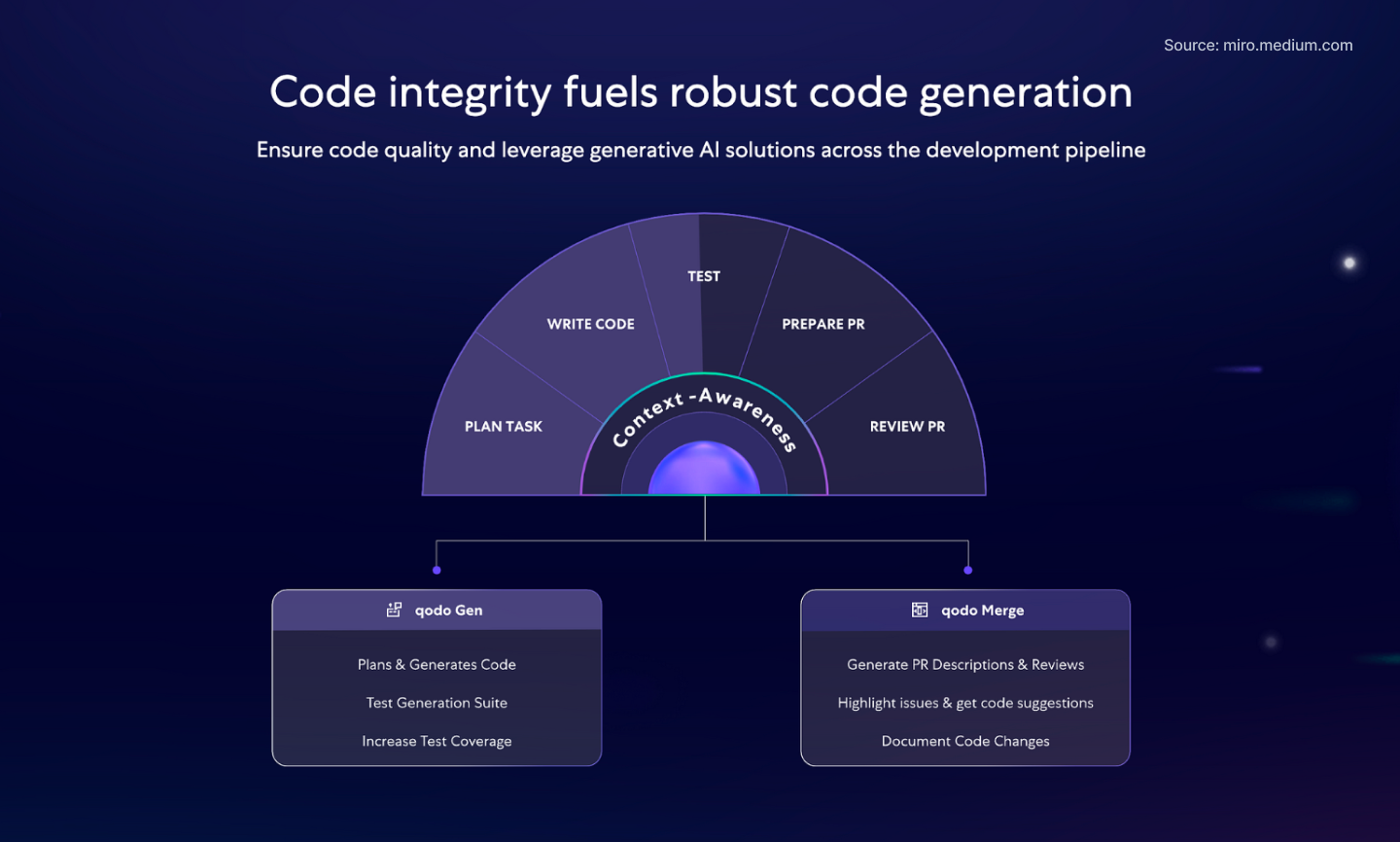
Qodo takes the hassle out of writing tests by automatically generating tailored test suites for your codebase. Instead of spending hours crafting unit tests, Qodo analyzes your code, understands its logic, and creates high-quality tests that improve coverage and reliability.
Why You’ll Love It
- Creates test cases that match your code structure and logic.
- Ensures key functions and edge cases are tested.
- Works with popular testing frameworks like Jest, Mocha, and PyTest.
How It Improves Your Workflow
By automating testing processes, Qodo allows you to catch potential bugs early, reducing post-release issues and improving overall software quality without extensive manual testing efforts.
When to Use It
Use Qodo when you need to quickly improve test coverage without writing tests manually or when working on large or fast-moving projects where testing speed matters.
Example Use Case
You’re adding a new feature to a Node.js app and want to ensure it doesn’t break existing functionality. Instead of manually writing test cases, you run Qodo, which analyzes your new code and generates a complete test suite. You review the tests, run them, and confidently push your changes.
7. Scribe
Best for: Automatically capturing and documenting workflows in real-time.
Scribe takes the pain out of creating process documentation by automatically recording your workflows as you perform them. Whether you’re onboarding a new developer, sharing internal processes, or documenting a step-by-step guide, Scribe captures everything in real-time and turns it into clear, easy-to-follow instructions.
Why You’ll Love It
- Converts workflows into step-by-step instructions.
- Adds visual elements automatically, making guides easy to follow.
- Allows team members to edit documents simultaneously.
How It Improves Your Workflow
Scribe simplifies the documentation process by automatically recording steps as you work, ensuring accurate guides without extra effort from you. It helps teams standardize workflows and improve knowledge sharing.
When to Use It
Best used for sharing repeatable workflows like API integrations or deployment steps or when onboarding new developers and need to document setup processes.
Example Use Case
You need to document the deployment process for your team. Instead of manually writing down each step, you run Scribe while deploying the application. It captures every action, adds relevant screenshots, and generates a detailed guide. You review it, make minor edits, and share it with the team.
8. Ponicode
Best for: Automatically generating unit tests to improve code quality.
Ponicode helps you write robust unit tests with minimal effort. Instead of manually crafting test cases, it analyzes your code, suggests relevant test scenarios, and even generates test scripts automatically. By catching potential issues early, Ponicode helps you build more stable and reliable applications.
Why You’ll Love It
- Suggests and writes unit tests based on your code logic.
- Identifies and tests scenarios that might be overlooked.
- Works with popular testing frameworks like Jest, PyTest, and JUnit.
How It Improves Your Workflow
You can use Ponicode to maintain high test coverage with minimal manual effort and to increase the stability of your code by identifying edge cases and potential problems.
When to Use It
Use Ponicode when writing new code and need quick, reliable test coverage or when improving an existing codebase by adding missing unit tests.
Example Use Case
You’ve just written a new function in your backend service and need to create unit tests. You use Ponicode to generate them automatically. It suggests multiple scenarios, including edge cases, and writes the test scripts for you. You review and refine them, ensuring your code is well-tested and ready for production.
9. Tabnine
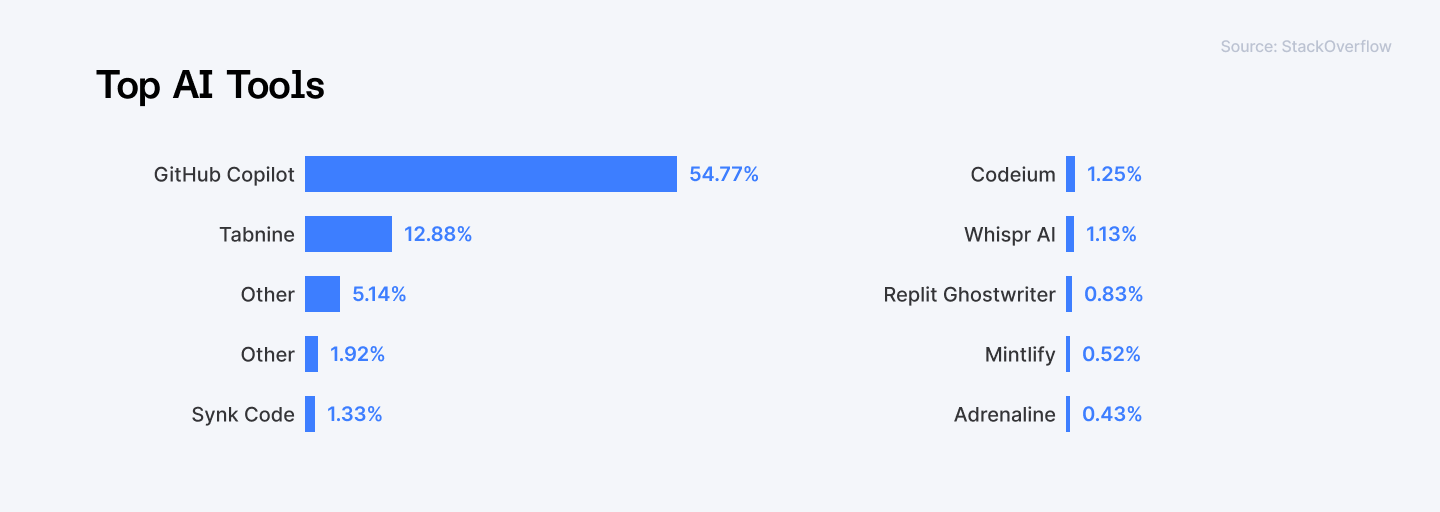
Best for: Strengthening productivity with intelligent code auto-completion
Tabnine is an AI-driven coding assistant designed to speed up your development process by offering relevant code suggestions as you type. It learns from your coding style and adapts to provide personalized auto-completion, which reduces errors and helps you write code more efficiently. With support for various programming languages and IDEs, Tabnine becomes a versatile companion for any developer.
Why You Will Love It
- Learns your coding style and offers relevant completions.
- Works with numerous programming languages, including JavaScript, Python, Java, C++, TypeScript, and more.
- Integrates with popular IDEs like Visual Studio Code, IntelliJ, and others.
How It Improves Your Workflow
Tabnine allows you to focus on writing code instead of remembering syntax or searching for functions. This speeds up your coding process and helps maintain consistency across your projects.
When to Use It
Tabnine is best used during active coding sessions when you need quick suggestions or when learning new libraries and frameworks. It's especially useful when working across multiple languages and needing a unified solution.
Example Use Case
You're building a new feature in your Python application. As you type, Tabnine suggests relevant code snippets based on your previous coding patterns and the context of your current work. It helps you write functions faster and reduces errors by providing accurate code completions. With less time spent on typing and debugging, you can focus on solving the actual problems in your project.
10. v0
Best for: AI-powered UI/UX design and automated prototyping.
v0 is an AI-driven design tool that transforms the way designers approach user interfaces and prototypes. It goes beyond simple layout assistance; it actively leads the design process by generating intuitive designs, offering automated layout suggestions, and producing production-ready code. Whether you’re sketching your first concept or refining a polished prototype, v0 speeds up the entire design process and ensures your designs are user-friendly.
Why You’ll Love It
- Analyzes your design and offers layout suggestions that are both intuitive and visually appealing.
- Converts your design directly into corresponding HTML and CSS code that developers can use.
- Generates responsive designs, ensuring optimal viewing across devices, from mobile to desktop.
How It Improves Your Workflow
With v0, you can quickly turn ideas into visually appealing designs. By simply inputting text prompts or images, v0 generates sleek, modern UI designs tailored to your specific needs.
When to Use It
Use v0 when you need to prototype quickly or when working on complex projects that require rapid iteration and testing of design ideas. It's particularly useful in collaborative environments where designers and developers need to work closely together.
Example Use Case
You’re designing a mobile app interface. Instead of manually arranging elements, v0 automatically suggests a clean, user-friendly layout based on the app’s requirements. Once you finalize the design, v0 generates the production-ready HTML and CSS, ready for developers to integrate. You can review the design, make adjustments if needed, and then seamlessly integrate the generated code into your mobile application. Your design process is faster, and the collaboration between design and development is seamless.
Read More: Top 6 StackOverflow Alternatives for Software Developers
11. Outerbase
Best for: AI-powered database management, querying, and data visualization.
Outerbase is an AI-powered platform that simplifies database management and data analysis. It takes the complexity out of managing large datasets by providing an intuitive interface for querying, managing, and visualizing your data with ease. Whether you’re a developer working with backend databases or an analyst digging deep into data trends, Outerbase makes data tasks faster, more efficient, and less error-prone.
Why You’ll Love It
- Uses AI to help you write complex queries with minimal input, reducing errors.
- Generates visualizations and charts based on your queries, helping you analyze data trends.
- Converts natural language into SQL queries effortlessly, so non-experts can access and analyze data without deep SQL knowledge.
How It Improves Your Workflow
Outerbase allows you to interact with databases using natural language through its EZQL™ feature. It also provides visualizations that make data analysis more accessible and improves collaboration between developers and analysts by offering a unified platform for data management.
When to Use It
Outerbase is best utilized when you manage large or complex datasets and need tools to query, organize, and optimize data quickly or when you collaborate with data analysis teams on database-heavy projects.
Example Use Case
You’re working on a data-heavy application and need to extract insights from a massive database. Instead of spending hours writing queries, you use Outerbase’s AI-powered platform to generate queries quickly and visualize the results in interactive charts. This speeds up your workflow, enabling you to focus on making data-driven decisions rather than wrestling with the data itself.
12. Mintlify
Best for: AI-powered documentation generation for developers.
Hate writing documentation? Mintlify is an AI-powered tool that makes creating documentation easier and more efficient. Whether you’re working on an open-source project, a company product, or personal code, Mintlify helps you generate clear, concise, and well-organized documentation.
Why You’ll Love It
- Generates documentation directly from your code and keeps your documentation synchronized with code updates.
- Offers flexible templates for different types of documentation, whether it's API docs, README files, or internal guides.
- Supports interactive code snippets, live demos, and multimedia elements.
How It Improves Your Workflow
Mintlify streamlines documentation by automating code analysis, allowing you to focus on your core development tasks. With its user-friendly interface, you can create documentation that is not only informative but also enjoyable for users to read.
When to Use It
Use Mintlify for maintaining large codebases where keeping documentation up-to-date manually would be time-consuming or when you’re updating or creating new documentation for APIs, user manuals, or technical guides.
Example Use Case
Imagine you're working on a software project that requires detailed API documentation. Instead of manually writing each section, you use Mintlify to analyze your codebase. You input a few commands, and Mintlify generates a comprehensive API reference with examples and explanations. You can then add interactive elements like live code demos to help users understand how to use the API effectively.
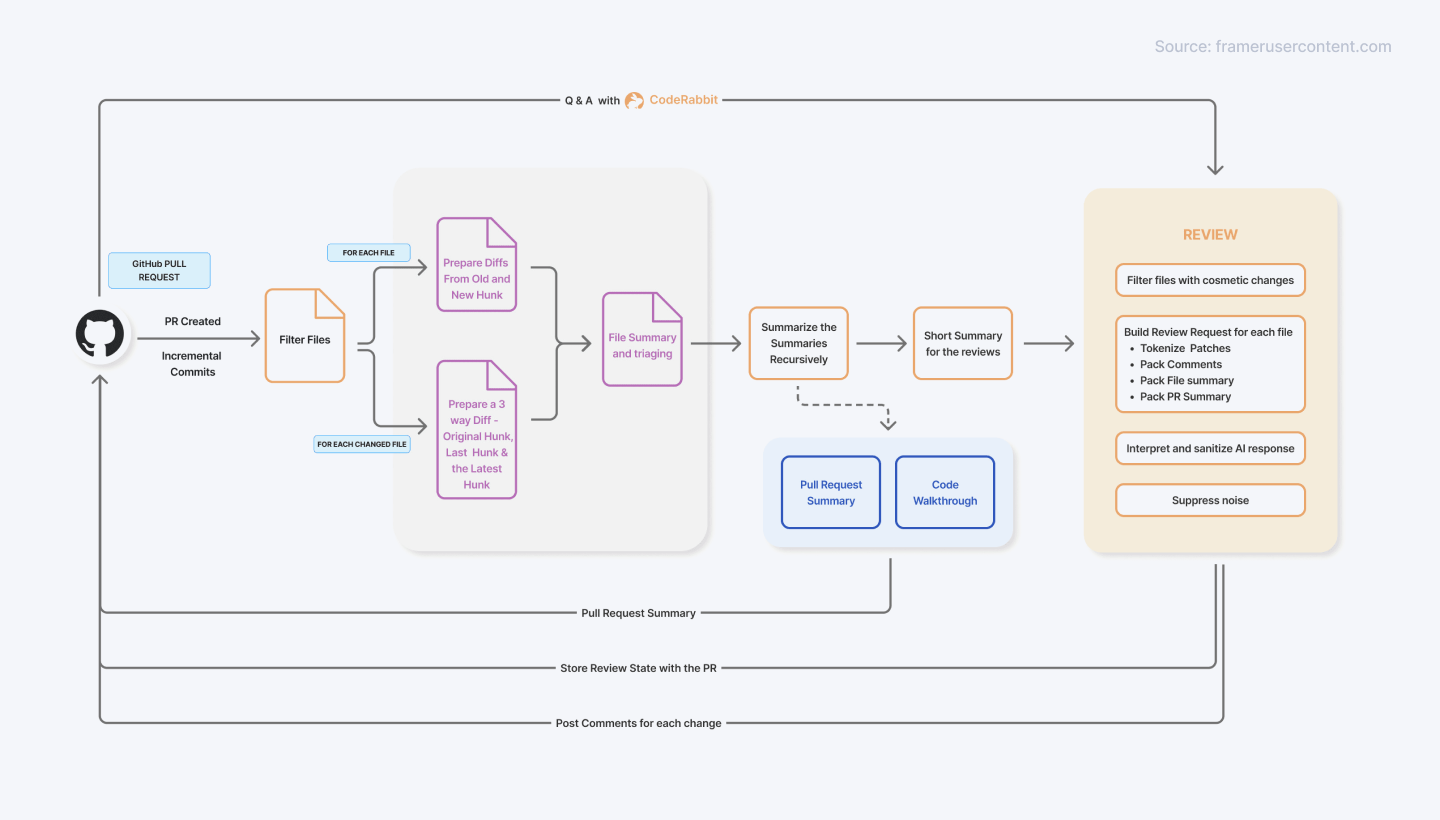
13. CodeRabbit
Best for: AI-assisted code reviews and bug detection.
CodeRabbit revolutionizes the code review process with AI-powered assistance. By analyzing pull requests, CodeRabbit detects potential bugs and offers actionable suggestions for improvement, ensuring that your codebase remains clean, consistent, and bug-free.
Why You’ll Love It
- Scans pull requests to spot potential bugs and issues before they become problems.
- Provides automated, line-by-line feedback on code changes.
- Allows team members to review and discuss code together in real-time.
How It Improves Your Workflow
CodeRabbit automates the repetitive aspects of code reviews, allowing you to focus on more critical tasks. Its real-time feedback and collaborative features strengthens productivity and improves your code quality by catching issues that might be missed during traditional reviews.
When to Use It
Use CodeRabbit to speed up your CI/CD pipeline or during the pull request process when you need quick feedback on code changes. It’s particularly useful in agile environments.
Example Use Case
Imagine you’ve just submitted a pull request for a new feature in your application. Instead of waiting for a teammate to review your changes manually, CodeRabbit analyzes your code in real-time, providing immediate feedback on potential bugs and suggesting improvements. You can interact with the AI directly within the pull request to clarify any points or ask for additional insights.
14. Chorus
Best for: AI-driven comparison of responses from different models.
Chorus is a unique tool that lets you compare answers from multiple AI models side by side, making it like having a panel of experts to choose from. When you need the most accurate, relevant, or creative response, Chorus allows you to gather insights from various AI models and pick the best one.
Why You’ll Love It
- Allows you to quickly compare and evaluate answers in one place, saving time on research and analysis.
- Helps you gather multiple perspectives on the same question.
How It Improves Your Workflow
Chorus reduces the guesswork by helping you compare multiple AI-generated answers to find the most effective solution to a software problem you encounter.
When to Use It
Use Chorus when you need to ensure you’re getting the most accurate or creative solution for complex software development problems.
Example Use Case
You’re writing a technical article and want to ensure the accuracy of certain claims. Instead of relying on just one AI model, you use Chorus to compare answers from multiple models. The responses help you identify the most accurate and well-rounded information, which you can confidently include in your article.
15. Locofy.ai
Best for: Converting design files into production-ready code.
Locofy.ai is a game-changing platform that simplifies the process of turning your design into functional, production-ready code. With its powerful LocoAI and Large Design Models (LDMs), Locofy.ai translates designs into high-quality code, bridging the gap between designers and developers. Whether you’re working on web or mobile applications, this tool speeds up the development process, ensuring your designs are implemented exactly as envisioned.
Why You’ll Love It
- Supports multi-format code export in React, React Native, Next.js, and HTML/CSS.
- Works with tools like Figma, Adobe XD, and Storybook, enabling quick transitions from design to code.
- Supports real-time collaboration among team members, allowing for efficient feedback management and version tracking.
How It Improves Your Workflow
Locofy.ai accelerates the development process by allowing designers and developers to convert their designs from popular tools like Figma and Adobe XD into clean, responsive code with minimal manual coding. This ensures that the final product closely resembles the original design.
When to Use It
Locofy.ai is best utilized during the early stages of development when you need to quickly prototype ideas or when working on projects that require frequent design iterations. It's particularly beneficial for teams looking to bridge the gap between designers and developers and reduce the back-and-forth.
Example Use Case
You're part of a startup launching a new application. After designing the user interface in Figma, you can upload your design files directly to Locofy.ai. The platform analyzes your designs and generates production-ready code almost instantly. You can then review and refine the generated code as needed before deploying it to your hosting service.
Explore More: ChatGPT vs Claude for Coding: Which AI Model is Better?
Summary Table: Top AI Tools for Developer Workflows
Name | Best for | Pros | Cons |
| GitHub Copilot | AI-powered code suggestions and auto-completion | - Context-aware code suggestions - Multi-language support - Automated documentation | - May suggest incorrect code - Dependent on internet connectivity for real-time suggestions |
| Cursor | AI-driven code editor and workflow automation | - Contextual code suggestions - AI-driven debugging - Helps with workflow automation | - Can be overwhelming for beginners - May require customization for specific workflows |
| Amazon CodeWhisperer | AI-powered code generation and security checks | - Generates code from natural language prompts - Includes security vulnerability checks - Great for enterprise-level development | - Can be too generic in some cases - Requires AWS ecosystem integration |
| Sourcegraph Cody | AI-driven code search and refactoring | - Smart code search capabilities - Auto-refactoring features - In-depth code explanations | - Can become slow with very large codebases - Struggles with uncommon code patterns |
| Mutable.ai | Automated documentation creation for codebases | - AI autocomplete for code - Auto-generated documentation - Integrates with GitHub and other platforms | - Requires regular integration with your project repository - May not cover all edge cases |
| Qodo | Automated unit test generation | - Multi-language support - Automatically generates test suites - Customizes tests based on the codebase | - May require manual adjustments - Needs a properly structured codebase |
| Scribe | Process documentation automation | - Automated documentation creation - Customizable instructions - Easy integration with tools like Slack and GitHub | - May miss complex workflows - Limited to specific use cases |
| Ponicode | AI-powered unit test generation | - Automated test generation - Contextual test scenario suggestions - Ensures stable, bug-free code | - May not cover all edge cases in tests - Requires manual adjustments |
| Tabnine | AI-driven code auto-completion | - AI-powered completions - Works across multiple languages and IDEs - Context-aware suggestions | - Can be inaccurate at times - Requires learning period |
| v0 | AI-powered design tool for UI and prototype generation | - Text-to-design generation - Responsive design features - Production-ready code | - May require manual tweaks - Limited to certain design types (e.g., UI-focused) |
| Outerbase | AI-powered data management and querying | - Natural language queries - Automated chart generation - Integration with major data sources | - May require training - Limited support for very complex or highly specific queries |
| Mintlify | Simplifying documentation creation | - AI-powered documentation generation - Integrates with your codebase for real-time updates - Markdown support | - Not all features may be intuitive - Can generate overly generic documentation |
| CodeRabbit | AI-assisted code reviews and bug detection | - AI-powered automated reviews - Real-time collaboration - Automates bug detection | - May miss subtle issues in complex code - Still requires human oversight for nuanced code reviews |
| Locofy.ai | Design to functional code conversion | - Seamless integration with design tools - Multi-format code export - Responsive, production-ready code | - Limited to specific design tools (e.g., Figma) - May need manual adjustments on generated code |
Final Thoughts
AI tools are no longer just experimental—they’re a must for modern developers. By integrating them into your workflow, you can write better code, debug faster, and get more done with less effort.
Think of AI as your smartest teammate that’s always there to help. It can speed up your work, simplify tricky tasks, spark new ideas, and even free up time for what truly matters: building, learning, and innovating. But AI isn’t perfect. The key is to use it wisely. Don’t just accept every suggestion—understand what it’s doing and make sure it fits your needs. That way, you stay in control.
The real power of AI isn’t in replacing developers—it’s in empowering you to do more. So, try out the tools above, experiment, and see how AI can make your work easier, faster, and better. Now’s the time to build, learn, and grow with AI by your side.
For Developers:
Join Index.dev and get matched with top global companies for high-paying remote developer roles.
For Clients:
Hire elite, vetted developers through Index.dev and build your team in just 48 hours with a 30-day risk-free trial.


