
This blog, originally published on Medium, is written by a QA tester from the Index.dev talent network who has worked on client projects like Poq, sharing hands-on insights on AI-assisted QA impact analysis.
Helping QA Engineers Instantly Understand What a Pull Request Might Break
Every QA engineer knows the moment.A new ticket lands. A pull request is ready to test. You open the requirements, scan the changes, maybe glance at the diff, and start thinking through test cases.
- What should I test?
- What could this change affect?
- Did the developer touch anything risky?
In the high-pressure window between a PR being opened and a release, ‘intelligent guesswork’ is a QA engineer’s greatest risk.
The Hidden Problem in QA Testing
When developers implement a requirement, they usually focus on one specific feature.
But code changes rarely stay isolated.
A small modification can ripple through the application:
- a component changes rendering logic
- a function adds new behavior
- a shared utility changes side effects
- a new import modifies how code loads
- a CSS/Style Leakage
- a Z-Index collisions
These changes can affect areas that are not mentioned in the original requirement.
QA engineers try to catch this by:
- reading the requirement
- scanning the code changes
- designing tests around expected behavior
But there are two major problems:
1. Diff analysis is hard
Pull requests often contain dozens of file changes. Even experienced QA engineers cannot always see the full impact immediately.
2. Regression testing is too late
If an issue is only caught during regression testing, it is already late in the cycle. Fixes become slower and more expensive.
Even worse, if the affected area is not part of the regression suite, the bug may go straight to production.
So the question becomes:
What if QA could instantly see what areas of the application might be affected by a pull request?
The Idea: Let AI Analyze the Diff
Instead of forcing QA engineers to manually interpret raw git diffs, we can let AI analyze them.
The concept is simple:
Use AI to read the git diff of a pull request and generate a structured QA Affected Areas Report.
This report gives QA engineers a starting point for:
- defining test objects
- generating test cases
- focusing testing effort on the most impacted areas
Rather than guessing what might break, QA gets an AI-assisted impact analysis.
What the Report Looks Like
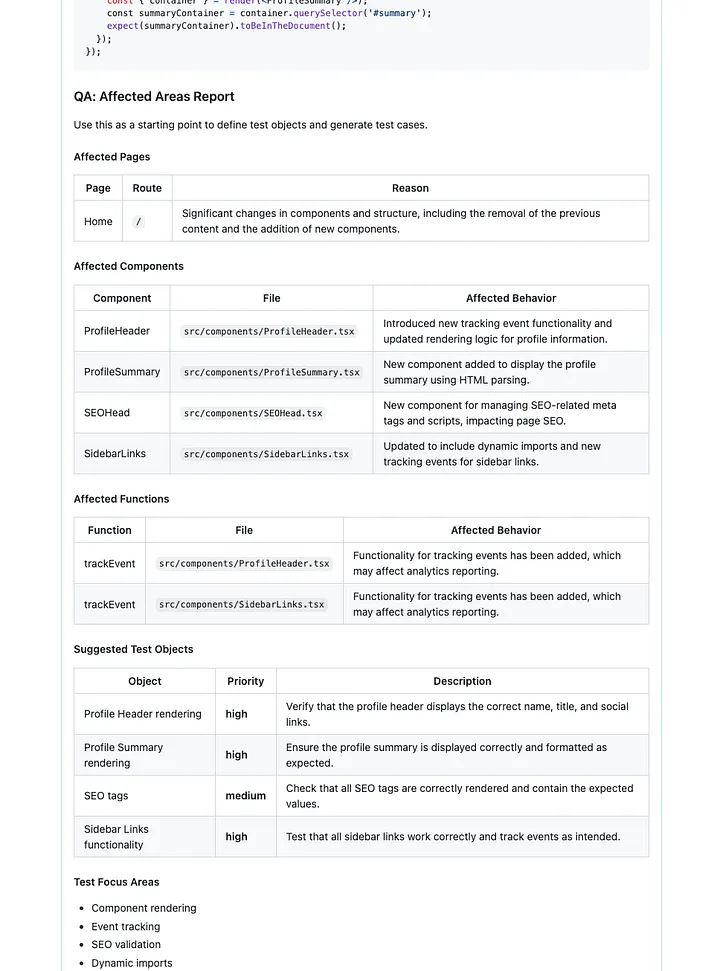
The report summarizes the pull request from a QA perspective. It identifies:
Affected pages
Routes that may be impacted by the change.
Affected components
Components whose behavior or rendering has changed.
Affected functions
Functions that were added, modified, or whose behavior changed.
Suggested test objects
Concrete items QA should verify, with priorities such as high, medium, or low.
Test Focus Areas
High-level areas where the change might introduce side effects or indirect regressions.
These are not always obvious from the requirement itself. A small code change can sometimes affect other logic paths or shared functionality.
Examples include:
- Business logic dependencies — a change in one calculation or rule may affect other calculations that reuse the same logic (for example, updating a promotion calculation might also impact loan or pricing calculations).
- Shared services or utilities — updates to common helpers or services can affect multiple features across the application.
- Data flow and state management — changes in how data is passed or stored may influence multiple components or pages.
- Integration points — updates may affect analytics, APIs, background jobs, or external services.
- Performance and loading behavior — new imports, queries, or processing logic may impact page load or runtime behavior.
These focus areas help QA engineers think beyond the immediate change and explore possible ripple effects in the system.
Example Output
The report is posted directly as a comment in the pull request.
It includes structured sections like:
- affected pages
- affected components
- affected functions
- suggested test objects
- test focus areas
This makes the analysis visible to both developers and QA during the review process.
Example shown in the screenshot below.
How I Built It
I integrated the feature directly into our CI pipeline using Danger.js. Danger.js is already commonly used to automate pull request checks, which made it the perfect place to add AI-based analysis.
The system follows a four-step automated flow:
1. Input
The pipeline collects the git diff of changed source files. Test files are excluded because the goal is to analyze application behavior changes.
2. AI Analysis
The diff is sent to an LLM (for example GPT-4o-mini) with instructions to behave like a senior QA engineer. The model analyzes the changes and identifies potential impact areas.
3. Structured Output
The AI returns a response using a strict JSON schema.
This schema ensures the output is:
- consistent
- machine-parseable
- easy to convert into Markdown tables
4. PR Comment
Finally, the report is formatted and posted directly into the pull request. No extra steps are required from developers or QA engineers.
Everything happens automatically in CI.
Technical Details
The implementation lives in dangerfile.ts. The pipeline runs inside GitHub Actions and can be toggled with the environment variable:
AI_REVIEW_ENABLED=trueKey characteristics:
- Uses the same git diffs as the existing AI code review
- Integrates with the OpenAI API
- Generates Markdown tables for quick scanning
- Enforces a strict JSON schema for reliability
The result is a repeatable and automated QA impact analysis.
The Core Function Behind the QA Impact Report
At the heart of this system is a small function that sends the pull request diff to an LLM and asks it to behave like a senior QA engineer performing impact analysis.
The function receives a list of diffs from the pull request, prepares them for analysis, and sends them to the OpenAI API.
Here is the simplified implementation:
async function aiQAImpactReport(
 diffs: ReviewDiff[]
): Promise<QAImpactReport | null> {
 const key = process.env.OPENAI_API_KEY;
 if (!key) return null;
 const client = new OpenAI({ apiKey: key });

 const joined = diffs
   .map(d => `# FILE: ${d.file}\n\`\`\`diff\n${d.diff.slice(0, 8000)}\n\`\`\``)
   .join('\n\n');
 const trimmed = joined.slice(0, AI_REVIEW_MAX_CHARS);

 const systemPrompt =
   'You are a senior QA Engineer and Test Analyst. Analyze the git diff and produce an "Affected Areas Report" for QA engineers.\n\n' +
   'Return ONLY a single JSON object. No prose, no markdown code fences. Valid JSON only.\n' +
   'Structure:\n' +
   '{\n' +
   '  "affectedPages": [\n' +
   '    { "page": "Page display name", "route": "/path", "file": "src/pages/...", "reason": "Why this page is affected" }\n' +
   '  ],\n' +
   '  "affectedComponents": [\n' +
   '    { "name": "ComponentName", "file": "src/components/...", "affectedBehavior": "What changed or may break" }\n' +
   '  ],\n' +
   '  "affectedFunctions": [\n' +
   '    { "name": "functionName", "file": "src/...", "affectedBehavior": "What the function does that may be impacted" }\n' +
   '  ],\n' +
   '  "suggestedTestObjects": [\n' +
   '    { "object": "What to test", "priority": "high|medium|low", "description": "Brief test focus" }\n' +
   '  ],\n' +
   '  "testFocusAreas": ["Area 1", "Area 2", ...]\n' +
   '}\n\n' +
   'Rules:\n' +
   '- Infer pages from file paths (e.g. src/pages/index.tsx → route "/", src/pages/practice.tsx → route "/practice")\n' +
   '- For shared components, list all pages that likely use them\n' +
   '- suggestedTestObjects: concrete things QA should verify (e.g. "Contact form submission", "Resume download link")\n' +
   '- testFocusAreas: high-level categories (e.g. "Form validation", "Accessibility", "API integration")\n' +
   '- Be concise but actionable for QA engineers';

 const userPrompt = `Analyze these diffs and produce the Affected Areas Report as JSON:\n\n${trimmed || 'N/A'}`;

 try {
   const res = await client.chat.completions.create({
     model: OPENAI_MODEL,
     temperature: 0.1,
     messages: [
       { role: 'system', content: systemPrompt },
       { role: 'user', content: userPrompt },
     ],
   });
   const raw = res.choices[0]?.message?.content ?? '{}';
   const jsonText = (() => {
     const m = /```(?:json)?\s*([\s\S]*?)```/m.exec(raw);
     return m && m[1] ? m[1].trim() : raw.trim();
   })();
   const parsed = JSON.parse(jsonText) as unknown;
   if (typeof parsed !== 'object' || parsed === null) return null;

   const o = parsed as Record<string, unknown>;
   return {
     affectedPages: Array.isArray(o.affectedPages) ? o.affectedPages : [],
     affectedComponents: Array.isArray(o.affectedComponents)
       ? o.affectedComponents
       : [],
     affectedFunctions: Array.isArray(o.affectedFunctions)
       ? o.affectedFunctions
       : [],
     suggestedTestObjects: Array.isArray(o.suggestedTestObjects)
       ? o.suggestedTestObjects
       : [],
     testFocusAreas: Array.isArray(o.testFocusAreas) ? o.testFocusAreas : [],
   };
 } catch {
   return null;
 }
}
How It Works
The function performs four simple steps.
1. Collect the pull request diff
Danger.js provides the list of changed files. The function combines them into a single prompt:
# FILE: src/components/ProfileHeader.tsx
```diff
...git diff...
This helps the model understand which file each change belongs to.
2. The Prompt Design: Engineering Consistency
The true “secret sauce” here isn’t just the prompt — it’s how we constrain the model’s behavior to make it production-ready.
- The Persona: By explicitly instructing the model to act as a Senior QA Engineer and Test Analyst, we nudge it away from generic code summaries and toward risk-aware test planning.
- Controlling Creativity: Notice the temperature: 0.1 setting. In many LLM use cases, you want "creative" responses; in a CI/CD pipeline, you want the exact opposite. A low temperature minimizes the model's tendency to hallucinate or deviate from the schema, ensuring the output remains deterministic enough for programmatic parsing.
- JSON-First Architecture: Because we force the model to return only a valid JSON object, we eliminate the need for brittle regex parsing. If the model starts “chatting” or adding markdown prose, the JSON.parse() call fails, and the pipeline gracefully falls back to a no-op, preventing bad data from polluting your PR comments.
3. Handling Large-Scale Pull Requests
One of the most common questions I get is, “What happens when the PR is massive?”
When dealing with large diffs, we implement a safety valve:
const trimmed = joined.slice(0, AI_REVIEW_MAX_CHARS);In practice, simply slicing the raw string can leave the model with “orphaned” code snippets. To optimize this, I prioritize the header information (file paths and diff metadata) while truncating the actual diff content. By ensuring the model always sees the file path and the context lines surrounding the changes, it can still infer the architectural impact even if it doesn’t see every single line of code in a 50-file PR.
If the diff exceeds our AI_REVIEW_MAX_CHARS limit, the system is designed to provide an analysis based on the files it did process, rather than failing entirely. This ensures that even for large refactors, QA still receives a targeted starting point for their testing strategy.
4. Enforce Structured Output
The response must follow a strict JSON schema.
This ensures the output can be reliably parsed and converted into Markdown tables for the pull request comment.
If the model returns anything unexpected, the function simply returns null.
Why This Works Well in CI
The entire feature adds very little complexity to the pipeline. It:
- runs automatically in CI
- requires no manual interaction
- produces consistent output
- helps QA engineers start testing faster
Most importantly, it helps teams identify potential side effects earlier in the development cycle.
Benefits
Adding AI-powered impact analysis to pull requests produced several benefits.
QA starts with context
Instead of beginning with raw diffs, QA engineers immediately see which areas might be affected.
Testing becomes more consistent
The AI report helps standardize how QA approaches pull requests.
Impact analysis is automated
Every pull request receives the same level of analysis automatically.
Developers and QA collaborate earlier
Because the report appears directly in the PR, developers can review the impact analysis together with QA.
No workflow changes
Everything runs inside existing CI pipelines. No additional tools or manual steps are required.
Limitations of AI
While AI can significantly speed up impact analysis, it is important to understand its limitations. The report should be treated as guidance for QA engineers, not as a complete source of truth.
AI lacks global context
The model analyzes the code changes provided in the pull request. It does not have full awareness of the entire codebase, runtime behavior, or historical context. Because of this, it may miss dependencies that are not visible in the diff.
Indirect dependencies can be hard to detect
Some changes introduce subtle side effects that are difficult to infer from static code changes. For example:
- Modifying a promotion calculation might indirectly affect loan or pricing calculations if both rely on the same shared logic.
- A change to a utility function might impact multiple services that reuse it.
- Updates to data models may influence background jobs or reporting pipelines.
- AI can sometimes infer these relationships, but not always reliably.
It complements QA expertise, it does not replace it
The report should be used as a starting point for thinking about impact, not as a substitute for human testing expertise. Experienced QA engineers still provide the most important piece: critical thinking about risk and edge cases. The goal of this tool is simply to make that process faster and more informed.
Learn More
If you’re interested in how I integrated AI into our CI pipeline using Danger.js, OpenAI, and SonarCloud, you can read more here.
You can also see a real example of the QA Impact Report in this pull request.
➡︎ At Index.dev, we connect high-performing engineers with project-leading roles. Apply to join our talent network today.


