
In R programming, checking the data type of variables is important. This helps ensure the program works correctly. Different data types include numeric, character, logical, factor, and more.
Join Index.dev’s talent network to work remotely on data science and R programming projects with top global companies.
Quick Reference: Check Data Type in R
Need to quickly check a data type in R? Here's the fastest method:
r
# Check data type in R - Quick Method
x <- 42
class(x)      # Returns: "numeric"
typeof(x)     # Returns: "double"
is.numeric(x) # Returns: TRUE
R Data Types at a Glance:
Data Type | Example | class() Returns | typeof() Returns |
Numeric | 42, 3.14 | "numeric" | "double" |
Integer | 42L | "integer" | "integer" |
Character | "hello" | "character" | "character" |
Logical | TRUE, FALSE | "logical" | "logical" |
Factor | factor("A") | "factor" | "integer" |
Date | Sys.Date() | "Date" | "double" |
List | list(1, "a") | "list" | "list" |
Data Frame | data.frame() | "data.frame" | "list" |
Read More: AI vs Machine Learning vs Data Science: What Should You Learn in 2025?
What Are Data Types in R Programming?
Data types in R programming define what kind of value a variable can hold. Understanding R data types is essential for data analysis, statistical computing, and avoiding errors in your code.
The 6 basic data types in R are:
- Numeric — Decimal numbers (e.g., 3.14, 42.0)
- Integer — Whole numbers with L suffix (e.g., 42L)
- Character — Text strings (e.g., "hello", "R programming")
- Logical — Boolean values (TRUE or FALSE)
- Complex — Complex numbers (e.g., 3+2i)
- Raw — Raw bytes (rarely used)
R data structures that use these types:
Structure | Description | Example |
Vector | 1D collection of same type | c(1, 2, 3) |
Matrix | 2D array of same type | matrix(1:6, nrow=2) |
Array | Multi-dimensional | array(1:24, dim=c(2,3,4)) |
List | Collection of any types | list(1, "a", TRUE) |
Data Frame | Table with columns | data.frame(x=1:3, y=c("a","b","c")) |
Factor | Categorical data | factor(c("low","med","high")) |
Here are six methods to check data types in R with examples and clear explanations.
1. How to Check Data Type in R Using class()
The class() function is the most common way to check data type in R. It returns the high-level class of any R object.
Syntax:
r
class(object)
Examples — Check data type in R with class():
r
# Check numeric data type
x <- 42.5
class(x)  # Output: "numeric"

# Check character data type
name <- "R Programming"
class(name)  # Output: "character"

# Check logical data type
flag <- TRUE
class(flag)  # Output: "logical"

# Check data frame type
df <- data.frame(a = 1:3, b = c("x", "y", "z"))
class(df)  # Output: "data.frame"

# Check vector type
vec <- c(1, 2, 3, 4, 5)
class(vec)  # Output: "numeric"

# Check factor type
categories <- factor(c("low", "medium", "high"))
class(categories)  # Output: "factor"
When to use class():
- Quick type identification
- Working with data frames and lists
- Checking object classes in S3/S4 systems
- General-purpose data type checking
Read more on R programming and catch up on R developer interview questions.
2. R Check Data Type Using typeof()
The typeof() function returns the internal storage mode of an R object. This is how to check variable type in R at the lowest level.
Syntax:
r
typeof(object)
Examples — R check data type with typeof():
r
# Numeric stored as double
x <- 42.5
typeof(x)  # Output: "double"

# Integer stored as integer
y <- 42L
typeof(y)  # Output: "integer"

# Character type
text <- "Hello R"
typeof(text)  # Output: "character"

# Logical type
is_valid <- TRUE
typeof(is_valid)  # Output: "logical"

# List type
my_list <- list(1, "a", TRUE)
typeof(my_list)  # Output: "list"

# Function type
my_func <- function(x) x + 1
typeof(my_func)  # Output: "closure"
class() vs typeof() — Which to use?
Scenario | Use class() | Use typeof() |
General type check | ✅ |
|
Data frame columns | ✅ |
|
Internal storage mode |
| ✅ |
Memory optimization |
| ✅ |
S3/S4 class identification | ✅ |
|
Numeric vs double distinction |
| ✅ |
Key difference:
r
x <- 42
class(x)   # "numeric" — high-level type
typeof(x)  # "double"  — internal storage

y <- factor(c("a", "b"))
class(y)   # "factor"  — high-level type
typeof(y)  # "integer" — factors stored as integers
3. Check Variable Type in R Using is.* Functions
R provides is.*() functions to check if a variable is a specific type. These return TRUE or FALSE, making them perfect for conditional logic.
Function | Checks For | Example |
is.numeric() | Numeric (double or integer) | is.numeric(42) → TRUE |
is.integer() | Integer only | is.integer(42L) → TRUE |
is.double() | Double precision | is.double(3.14) → TRUE |
is.character() | Character string | is.character("hi") → TRUE |
is.logical() | TRUE/FALSE | is.logical(TRUE) → TRUE |
is.factor() | Factor | is.factor(factor("a")) → TRUE |
is.list() | List | is.list(list(1,2)) → TRUE |
is.vector() | Vector | is.vector(c(1,2,3)) → TRUE |
is.matrix() | Matrix | is.matrix(matrix(1:4,2)) → TRUE |
is.data.frame() | Data frame | is.data.frame(df) → TRUE |
is.null() | NULL value | is.null(NULL) → TRUE |
is.na() | NA value | is.na(NA) → TRUE |
Examples — Check variable type in R:
r
# Check if numeric
x <- 100
if (is.numeric(x)) {
  print("x is numeric")
}

# Check multiple conditions
data <- "Hello"
if (is.character(data)) {
  print(paste("Length:", nchar(data)))
} else if (is.numeric(data)) {
  print(paste("Value:", data))
}

# Check data frame column types
df <- data.frame(
  id = 1:3,
  name = c("A", "B", "C"),
  active = c(TRUE, FALSE, TRUE)
)

is.numeric(df$id)      # TRUE
is.character(df$name)  # TRUE
is.logical(df$active)  # TRUE

# Validate function input
calculate_mean <- function(x) {
  if (!is.numeric(x)) {
    stop("Input must be numeric")
  }
  return(mean(x))
}
When to use is.*() functions:
- Input validation in functions
- Conditional type handling
- Data cleaning pipelines
- Type assertions before operations
4. Check Data Type in R Using mode()
The mode() function returns the basic type of an R object. It's similar to typeof() but provides a simpler classification.
Syntax:
r
mode(object)
Examples:
r
# Numeric mode
x <- c(1, 2, 3)
mode(x)  # Output: "numeric"

# Character mode
text <- "R data types"
mode(text)  # Output: "character"

# Logical mode
flag <- TRUE
mode(flag)  # Output: "logical"

# List mode
my_list <- list(a = 1, b = "text")
mode(my_list)  # Output: "list"

# Function mode
my_func <- mean
mode(my_func)  # Output: "function"
mode() vs typeof() vs class():
Object | mode() | typeof() | class() |
42 | "numeric" | "double" | "numeric" |
42L | "numeric" | "integer" | "integer" |
"hi" | "character" | "character" | "character" |
TRUE | "logical" | "logical" | "logical" |
factor("a") | "numeric" | "integer" | "factor" |
list(1,2) | "list" | "list" | "list" |
mean | "function" | "closure" | "function" |
5. Check Data Type in R Using attributes()
The attributes() function returns metadata about an R object, including class, dimensions, and names. Use it to check variable type in R along with additional properties.
Syntax:
r
attributes(object)
Examples:
r
# Attributes of a factor
categories <- factor(c("low", "medium", "high"))
attributes(categories)
# Output:
# $levels
# [1] "high" "low" "medium"
# $class
# [1] "factor"

# Attributes of a matrix
mat <- matrix(1:6, nrow = 2, ncol = 3)
attributes(mat)
# Output:
# $dim
# [1] 2 3

# Attributes of a data frame
df <- data.frame(x = 1:3, y = c("a", "b", "c"))
attributes(df)
# Output:
# $names
# [1] "x" "y"
# $class
# [1] "data.frame"
# $row.names
# [1] 1 2 3

# Attributes of a named vector
scores <- c(math = 95, english = 88, science = 92)
attributes(scores)
# Output:
# $names
# [1] "math" "english" "science"
Common attributes in R:
Attribute | Description | Found In |
class | Object class | Most objects |
names | Element names | Vectors, lists, data frames |
dim | Dimensions | Matrices, arrays |
dimnames | Row/column names | Matrices, arrays |
levels | Factor levels | Factors |
row.names | Row identifiers | Data frames |
6. Check Data Type in R Using str()
The str() function displays the internal structure of any R object, including data types of all elements. This is the best way to check variable type in R for complex objects.
Syntax:
r
str(object)
Examples:
r
# Structure of a vector
vec <- c(10, 20, 30, 40, 50)
str(vec)
# Output: num [1:5] 10 20 30 40 50

# Structure of a list
my_list <- list(
  name = "John",
  age = 30,
  scores = c(85, 90, 78)
)
str(my_list)
# Output:
# List of 3
#  $ name  : chr "John"
#  $ age   : num 30
#  $ scores: num [1:3] 85 90 78

# Structure of a data frame
df <- data.frame(
  id = 1:4,
  name = c("Alice", "Bob", "Charlie", "Diana"),
  salary = c(50000, 60000, 55000, 70000),
  active = c(TRUE, TRUE, FALSE, TRUE)
)
str(df)
# Output:
# 'data.frame': 4 obs. of 4 variables:
#  $ id    : int 1 2 3 4
#  $ name  : chr "Alice" "Bob" "Charlie" "Diana"
#  $ salary: num 50000 60000 55000 70000
#  $ active: logi TRUE TRUE FALSE TRUE
str() output interpretation:
Abbreviation | Data Type |
num | Numeric (double) |
int | Integer |
chr | Character |
logi | Logical |
Factor | Factor with levels |
List | List object |
'data.frame' | Data frame |
When to use str():
- Exploring unfamiliar datasets
- Debugging data type issues
- Understanding complex nested objects
- Quick overview of data frame columns
Working across Python and R? Our Python Data Types Guide breaks down how core types translate between the two languages.
Type of R: Complete Data Type Reference
Here's a complete reference for every type of R data type and how to check them:
Atomic Types (Basic Building Blocks):
Type | Storage | Example | Check With |
Logical | logical | TRUE, FALSE | is.logical() |
Integer | integer | 1L, 100L | is.integer() |
Double | double | 3.14, 2.5 | is.double() |
Complex | complex | 1+2i | is.complex() |
Character | character | "text" | is.character() |
Raw | raw | charToRaw("A") | is.raw() |
Compound Types (Data Structures):
Type | Description | Check With |
Vector | 1D same-type collection | is.vector() |
List | Collection of any types | is.list() |
Matrix | 2D same-type array | is.matrix() |
Array | N-dimensional array | is.array() |
Data Frame | Table structure | is.data.frame() |
Factor | Categorical data | is.factor() |
Special Values:
Value | Meaning | Check With |
NA | Missing value | is.na() |
NULL | Empty/undefined | is.null() |
NaN | Not a Number | is.nan() |
Inf | Infinity | is.infinite() |
Additional Examples for Complex Data Types
Checking Data Frames
Data frames are widely used in R for tabular data. Use the methods above to explore their structure and types.
data <- data.frame(name = c("Alice", "Bob"), age = c(25, 30), married = c(TRUE, FALSE))

class(data)  # Output: "data.frame"
str(data)    # Output: 'data.frame':  2 obs. of  3 variables:
             #  $ name   : chr  "Alice" "Bob"
             #  $ age    : num  25 30
             #  $ married: logi  TRUE FALSE
Checking Factors
Factors are used for categorical data in R. Use is.factor() or class() to identify them.
factor_var <- factor(c("Low", "Medium", "High"))

class(factor_var)  # Output: "factor"
is.factor(factor_var)  # Output: TRUE
levels(factor_var)  # Output: "High", "Low", "Medium"
Checking Lists
Lists can hold different types of data. Use str() to understand their structure.
nested_list <- list(numbers = c(1, 2, 3), text = "Hello", flag = TRUE)

class(nested_list)  # Output: "list"
str(nested_list)    # Output: List of 3
                   #  $ numbers: num [1:3] 1 2 3
                   #  $ text   : chr "Hello"
                   #  $ flag   : logi TRUE
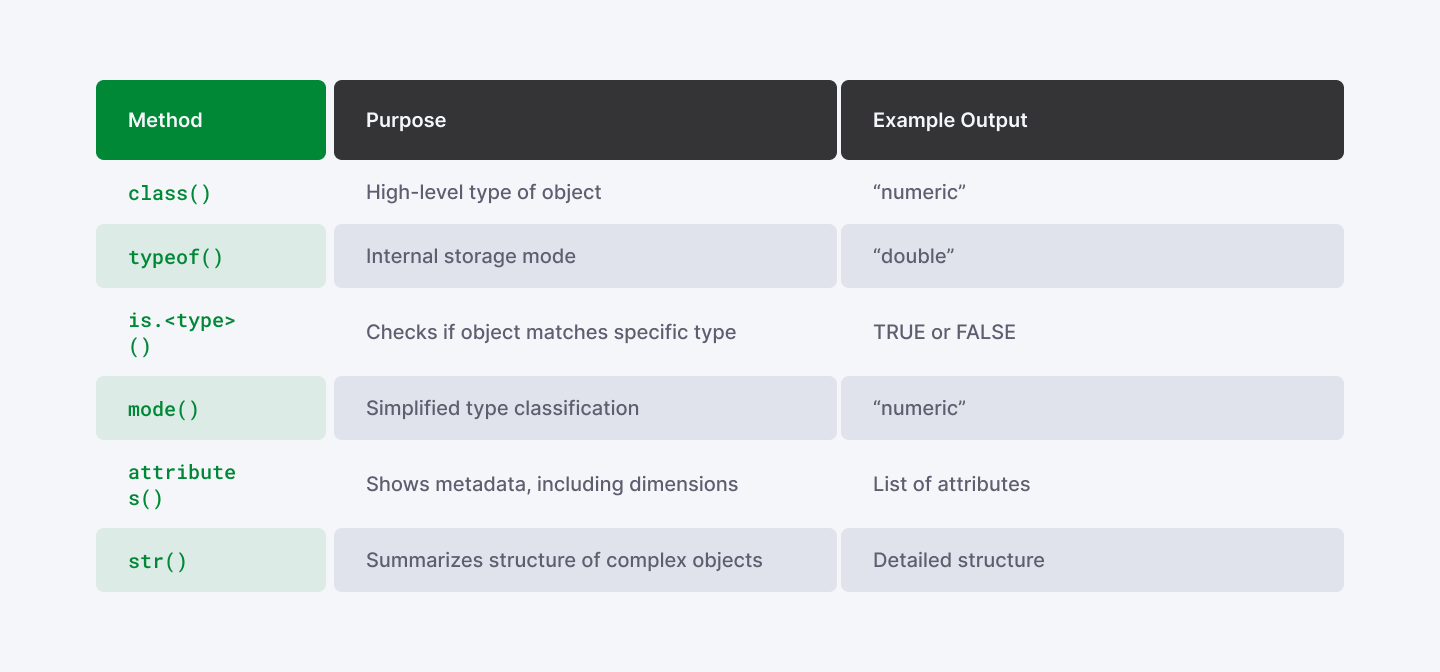
Comparison Table of Methods
Read More: 7 Most In-Demand Programming Languages for Data Science
Summary: How to Check Data Type in R
Here's when to use each method to check data type in R programming:
Method | Use Case | Returns |
class() | Quick type identification | Class name (e.g., "numeric") |
typeof() | Internal storage mode | Storage type (e.g., "double") |
is.*() | Conditional type checks | TRUE or FALSE |
mode() | Simple type classification | Basic mode |
str() | Complex object exploration | Full structure |
attributes() | Object metadata | Names, dimensions, class |
Quick decision guide:
- "What type is this?" → Use class()
- "Is this numeric?" → Use is.numeric()
- "How is this stored?" → Use typeof()
- "What's inside this data frame?" → Use str()
- "What attributes does this have?" → Use attributes()
Best practices for R data types:
- Always check data types when loading external data
- Use str() to explore unfamiliar datasets
- Validate function inputs with is.*() functions
- Remember: factors are stored as integers internally
- Use sapply(df, class) to check all data frame columns
Understanding R data types is fundamental to writing efficient, error-free R code. Master these 6 methods and you'll be able to debug type-related issues quickly.
Want to work with expert R developers? Hire R programmers from Index.dev for your data science and statistical computing projects.
Advance your R programming skills by joining Index.dev's global network and work on impactful remote data science projects with leading companies worldwide.


