
Python is dynamically typed, so you never declare a variable's type. The type is set at runtime from the value you assign. That keeps code short, but it also means a wrong type can slip through until it crashes in production. Knowing how to inspect and constrain types is a core skill, and it has changed a lot since the old typing.List days.
This guide shows every practical way to check a variable's type in Python in 2026. We start with the two runtime tools, type() and isinstance(). We then move to modern type hints with built-in generics, the static type checkers that catch bugs before runtime, and structural typing with Protocol. Each method has a code example, a clear explanation, and a note on when to use it. By the end you will know which tool fits which job, and which habits to drop.
5 Key Takeaways
- type() returns the exact class and ignores inheritance. Use it only when an exact match matters.
- isinstance() respects subclasses and accepts a tuple of types, so
isinstance(x, (int, float))works. It is the default for runtime checks. - Built-in generics replaced
typing.List,Tuple, andDict. Since Python 3.9 you writelist[int]anddict[str, int], and since 3.10 you write unions asint | None. - Type hints do not run at runtime. A static checker like mypy, Pyright, or Astral's ty is what actually catches type bugs before you ship.
- Heavy runtime type checking is usually a smell. Prefer hints plus a checker, and use
Protocolfor duck typing instead of longisinstancechains.
Method 1: Using the type() function
The simplest way to find a variable's type is the built-in type() function. It tells you the exact class of the value the variable holds.
# Using type()
a = 5
b = 5.0
c = "Hello, World!"
d = [1, 2, 3]
e = (1, 2, 3)
f = {'a': 1, 'b': 2}

print(type(a))  # <class 'int'>
print(type(b))  # <class 'float'>
print(type(c))  # <class 'str'>
print(type(d))  # <class 'list'>
print(type(e))  # <class 'tuple'>
print(type(f))  # <class 'dict'>
When to use it: type() is quick and exact. It returns the class object, so type(a) is int is a clean exact-match test. The catch is that it ignores inheritance, so it returns False for any subclass. That makes it the wrong tool when subclasses should count.
Method 2: Using the isinstance() function
isinstance() checks whether an object is an instance of a class or any subclass of it. This matters the moment you work with inheritance.
# Using isinstance()
a = 5
c = "Hello, World!"

print(isinstance(a, int))   # True
print(isinstance(c, str))   # True

# One call can check several types
print(isinstance(a, (int, float)))  # True

# isinstance respects inheritance
class Animal:
    pass

class Dog(Animal):
    pass

dog = Dog()
print(isinstance(dog, Dog))     # True
print(isinstance(dog, Animal))  # True
When to use it: Use isinstance() for almost all runtime checks. It handles inheritance, and you can pass a tuple of types to test several at once. It is also the safe way to guard a function's inputs at a boundary, such as parsing data from an API or a file.
Method 3: type() versus isinstance(), and how to choose
Both tools answer a different question. type() asks "is this the exact class?" while isinstance() asks "is this that class or a child of it?" The example makes the gap clear.
class Animal:
    pass

class Dog(Animal):
    pass

dog = Dog()

# type() is exact
print(type(dog) is Dog)     # True
print(type(dog) is Animal)  # False

# isinstance() includes subclasses
print(isinstance(dog, Dog))     # True
print(isinstance(dog, Animal))  # True
Use type() when you must reject subclasses, which is rare. Use isinstance() the rest of the time. One small style note: compare with is, not ==, when matching a type, because classes are singletons and is states the intent.
Method 4: Type hints and annotations
Since Python 3.5, you can annotate variables and function signatures with their expected types. Hints do not change how the code runs. They make intent clear to readers and let tools catch mistakes.
# Function annotations
def add(x: int, y: int) -> int:
    return x + y

print(add(3, 5))  # 8

# Variable annotations
count: int = 10
ratio: float = 20.5

# You can read annotations back at runtime
print(add.__annotations__)
# {'x': <class 'int'>, 'y': <class 'int'>, 'return': <class 'int'>}
When to use it: Add hints to every public function and to any variable whose type is not obvious. They are the foundation that the static checkers in the next section depend on. To resolve hints safely at runtime, prefer typing.get_type_hints(obj) over reading __annotations__ directly, because it handles string annotations and forward references for you.
Method 5: Modern typing with built-in generics
This is the biggest change from older tutorials. You no longer import List, Tuple, and Dict from typing. Since Python 3.9 (PEP 585) the built-in containers are generic, so you write list[int] directly. Since Python 3.10 (PEP 604) you write unions with the pipe, as int | None instead of Optional[int].
# Modern, 2026 style. No typing imports needed for these.
def process_list(numbers: list[int]) -> int:
    return sum(numbers)

def get_coordinates() -> tuple[float, float]:
    return 1.0, 2.0

def get_user_info() -> dict[str, int]:
    return {'age': 30, 'id': 123}

def find_user(uid: int) -> str | None:   # was Optional[str]
    return None

print(process_list([1, 2, 3]))  # 6
print(get_coordinates())        # (1.0, 2.0)
The old form still works, but it is deprecated and reads as dated. If you maintain a codebase that still imports typing.List, a single pass to built-in generics is a quick, safe modernisation. For your own reusable generic types, Python 3.12 added the cleaner type statement and the class Box[T] syntax (PEP 695), so you rarely need TypeVar by hand any more.
![Old versus modern Python typing: List[int] versus list[int], Optional[str] versus str | None](https://dx1ienyxpbg1x.cloudfront.net/index_dev/articles/gallery_images/1781027409662981128_1_image_png)
Modern Python typing replaced the old typing imports with built-in generics.
Structural typing with Protocol
Sometimes you do not care what class an object is. You care what it can do. That is duck typing, and typing.Protocol lets you express it without long isinstance chains.
from typing import Protocol

class SupportsClose(Protocol):
    def close(self) -> None: ...

def shutdown(resource: SupportsClose) -> None:
    resource.close()   # any object with a close() method is accepted
A Protocol matches any object that has the right methods, even if it never inherits from the protocol. This is the modern, Pythonic answer to "check the type" when what you really mean is "check the capability".
Hiring strong Python engineers? Clean typing is a fast signal of code quality. Index.dev connects companies with the top 1% of senior engineers from LATAM and CEE, around 30,000 human-vetted developers, with matches in 48 hours.
Static type checking in 2026: mypy, Pyright, and ty
Here is the point most tutorials miss. Type hints do nothing at runtime. They are only useful if a tool reads them. In 2026, three checkers do most of the work, and you run them in your editor and in CI.
| Checker | Built by | Best for |
|---|---|---|
| mypy | Python community | The reference checker. Strict, well documented, widely supported. |
| Pyright | Microsoft | Very fast, powers Pylance in VS Code. Great editor feedback as you type. |
| ty | Astral (makers of Ruff and uv) | A new Rust-based checker built for speed on large codebases. |
A simple workflow: add hints, run mypy your_module.py or point Pyright at the repo, and fix what it flags. The checker finds the bug where a function can return None but the caller assumes a string. That is the class of error a runtime type() check would only catch after it already broke something.
type() vs isinstance() vs hints: a decision table
Use this table to pick the right tool for the job instead of reaching for the same one every time.
| You want to... | Use | Why |
|---|---|---|
| Match the exact class, reject subclasses | type(x) is X | Exact identity, ignores inheritance |
| Guard a function input at runtime | isinstance(x, X) | Accepts subclasses and tuples of types |
| Document intent and catch bugs early | Type hints + a checker | Found before the code runs, zero runtime cost |
| Accept anything with the right methods | Protocol | Structural typing, true to duck typing |
| Read a function's declared types | get_type_hints(fn) | Resolves strings and forward references |
A contrarian take: stop checking types at runtime
New Python developers often fill functions with isinstance guards. It feels safe. In practice it is usually a sign that the types are unclear higher up. Runtime checks add noise, run on every call, and still miss most errors because they only fire on the paths you remembered to guard.
The stronger pattern is the opposite. Add type hints, let a static checker prove the whole program before it runs, and keep runtime isinstance checks only at the edges where untyped data enters, such as JSON from an API, a CSV row, or user input. Inside that boundary, trust your types. This is how large Python teams keep big codebases safe without drowning in defensive checks.
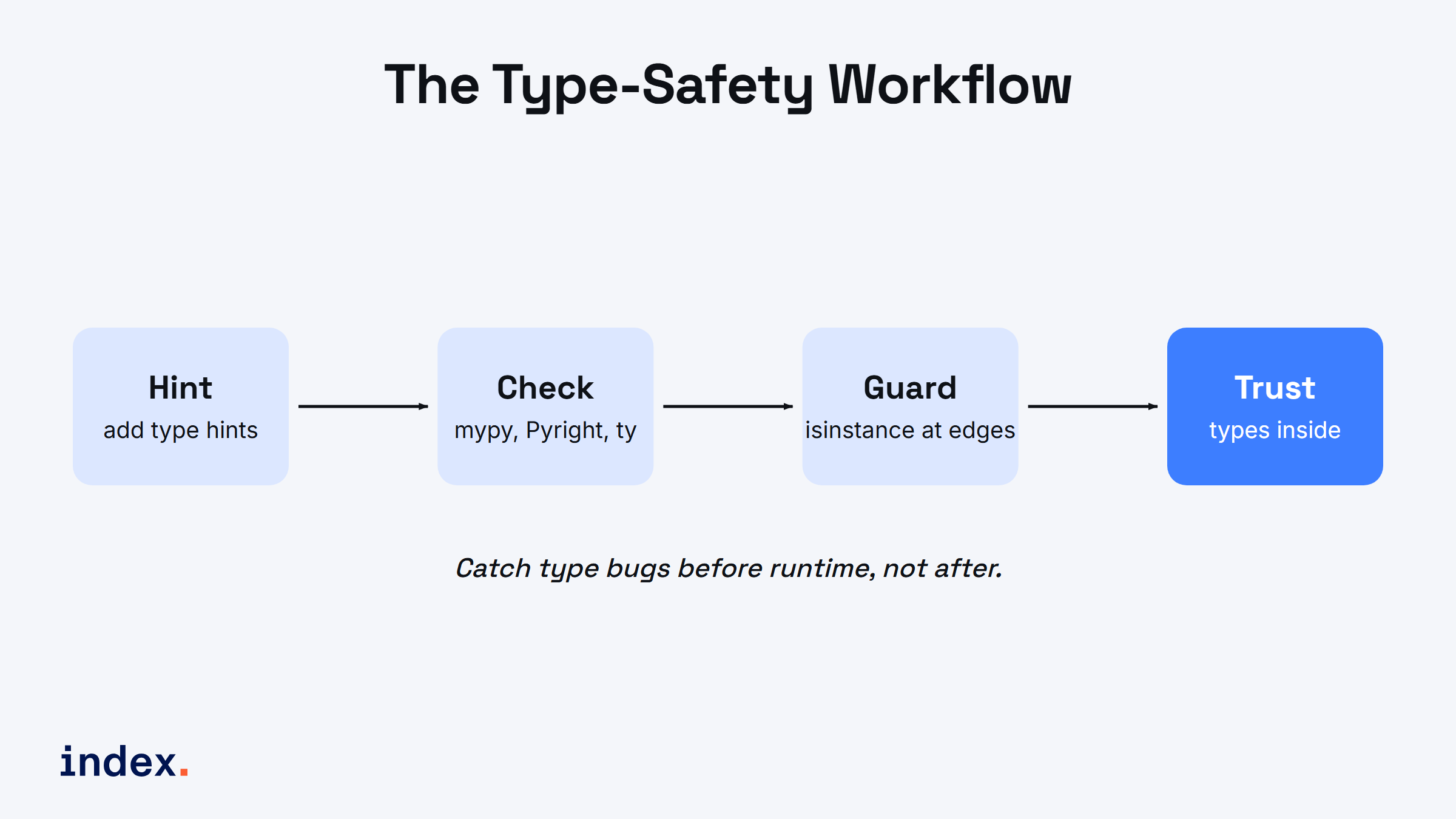
The type-safety workflow: hint, check, guard at the boundary, then trust your types.
What the data says about Python typing skills
Python remains one of the most used and most wanted languages in the Stack Overflow Developer Survey 2025, driven by data work and AI. As codebases grew, typed Python became the norm, not a nice-to-have. The JetBrains State of Developer Ecosystem 2025 shows type hints and static checkers in steady, rising use across professional teams.
For hiring, this matters. When we screen senior Python engineers, clean type hints and a passing checker config are a quick read on code quality. Candidates who reach for Protocol and built-in generics, rather than deep isinstance chains, tend to write code that scales. If you are leveling up, learning the static-typing workflow is one of the highest-return skills you can add this year.
Conclusion
Python gives you a clear ladder of tools. Use type() for exact class checks, isinstance() for runtime checks that respect inheritance, and type hints with built-in generics to document and constrain your code. Then let a static checker such as mypy, Pyright, or ty turn those hints into real safety. Reserve runtime checks for the boundary where untyped data comes in, and use Protocol when you care about behavior, not class. Master that flow and your Python gets easier to read, safer to change, and ready for production.
For deeper reference, see the official Python typing documentation and the mypy docs. Both are kept current and full of practical examples.
For developers
Want to work on typed, modern Python with teams that care about code quality? Index.dev is an AI-first engineering talent platform that connects companies with the top 1% of senior engineers from LATAM and CEE, around 30,000 developers, each human-vetted through technical and live interviews from a pool of 2.5M+. Roughly a 1.2% acceptance rate, with matches in 48 hours. Join Index.dev and get access to exclusive remote roles in the UK, EU, and US.
For clients
Need senior Python engineers who ship clean, typed, production-ready code? Index.dev matches you with the top 1% of senior engineers from LATAM and CEE, drawn from 2.5 million professionals, in 48 hours. Teams cut 40 to 60% on engineering costs versus US in-house rates, and 97% of clients return for a second engagement. Hire through Index.dev and build with vetted talent that fits your stack.


