
Look, I get it. When your code works, why mess with it? But here's what happens when you skip refactoring:
- Your code becomes impossible to read (even your own code from last month)
- Adding new features feels like performing surgery with oven mitts
- Bug fixes break three other things
- Your app runs slower than a Windows 95 machine
- New team members take forever to understand anything
But when you refactor regularly? Your code becomes clean, fast, and enjoyable to work with. You spend less time debugging and more time building cool stuff.
I'm about to walk you through 9 refactoring methods that will genuinely change how you write code. These are practical tools you can start using tomorrow morning. Each technique comes with real code examples and shows you exactly when to use it.
Want to work on clean, scalable code with global tech teams? Join Index.dev’s talent network and get matched with elite projects today!
What Exactly Is Code Refactoring?
Imagine you’ve got a working app, but the code is a messy closet. Refactoring is simply tidying up that closet: moving things into the right drawers, tossing the duplicates, and adding labels, without throwing away a single outfit.
The features stay the same, but the internals get:
- leaner (less bloat)
- clearer (you can actually follow the flow)
- faster to fix (bugs pop out instead of hiding)
- easier to grow (adding new stuff hurts less)
Refactoring is also your #1 weapon against technical debt. Do it regularly and you’ll:
- Cut down code complexity.
- Make intent obvious at a glance.
- Spot bugs sooner.
- Ship features quicker.
How to Integrate Refactoring?
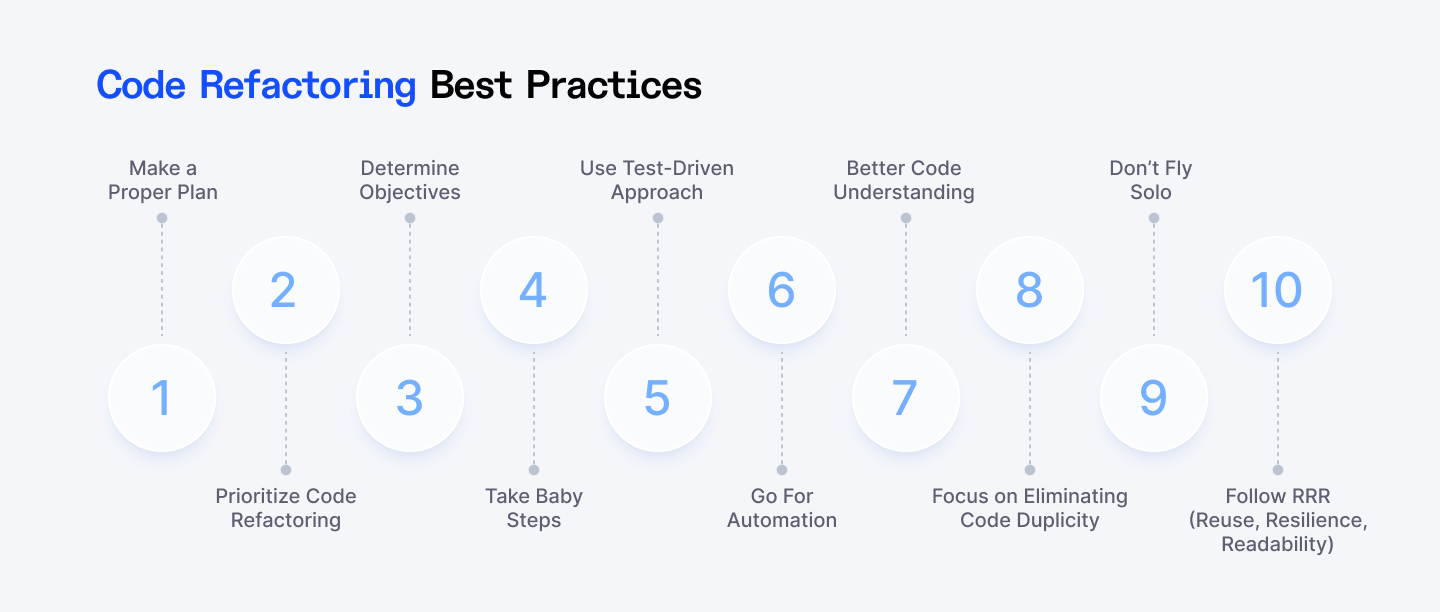
Refactoring is a habit. Here’s a simple playbook:
- Block time for it. Treat refactoring like any other task in the sprint, not an after‑thought.
- Slice big jobs small. Break a scary refactor into bite‑size commits you can review and test.
- Refactor as a team sport. Pair up, review each other’s changes, share tricks.
- Lean on tooling. Linters, IDE hints, static analyzers, and test coverage reports catch the easy stuff so you can focus on the tricky bits.
Get that rhythm going and refactoring stops feeling like a chore.
Code Refactoring Methods in Depth
1. Red-Green Refactor Method
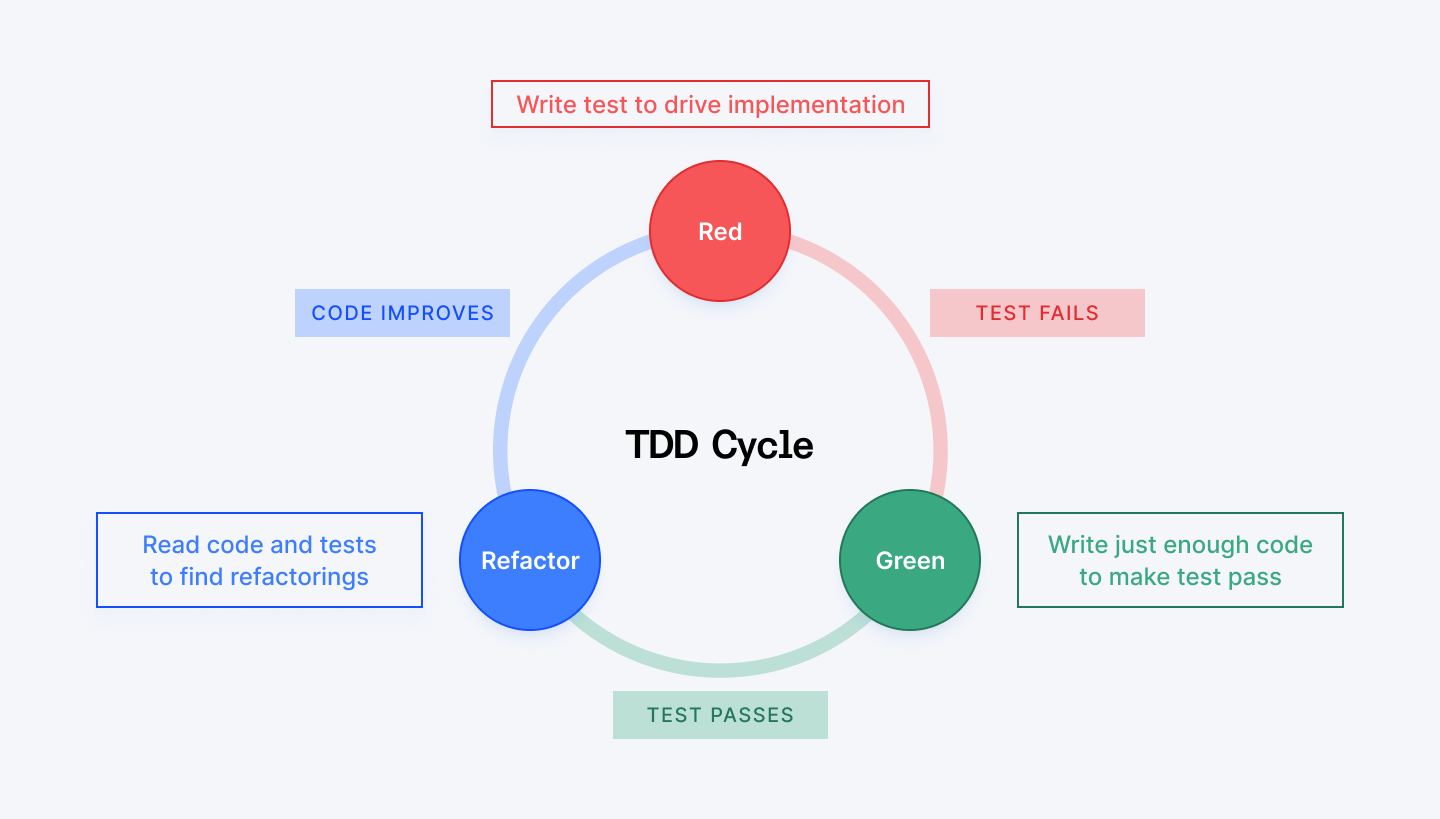
This technique is the backbone of Test-Driven Development (TDD):
- Red: Write a test that fails. Yeah, you heard right: you want it to fail initially. This proves your test actually works and will catch problems.
- Green: Write just enough code to make that test pass. Don't worry about making it pretty yet, just make it work.
- Refactor: Now clean up your code. Optimize it, make it readable, all while keeping that test green.
You repeat this cycle over and over as you build your app. It keeps your code solid and your bugs low.
Where you’ll bump into it
- Unit‑heavy worlds: backend services, API layers, data‑processing pipelines.
- Any stack that ships with a good test runner: Python + pytest, Java + JUnit, C# + xUnit, Ruby + RSpec, etc.
- Teams that swear by continuous delivery: short loops = fewer Friday deploy heart attacks.
Why bother?
- Fewer bugs in production. Your tests catch issues before users do.
- Forces you to think about usage first, implementation second.
- Confidence to make changes. With tests backing you up, refactoring becomes fearless.
- Better code design. Writing tests first forces you to think about how your code should work.
Works with…
- JavaScript/TypeScript: Jest, Mocha, Jasmine
- Python: pytest, unittest
- Java: JUnit, TestNG
- C#: NUnit, xUnit
- Ruby: RSpec, Minitest
- PHP: PHPUnit
Quick demo in Python
Let’s pretend we need a fizz_buzz(n) helper.
Red (Write the failing test)
# test_fizzbuzz.py
from fizzbuzz import fizz_buzz

def test_returns_fizz_for_multiples_of_three():
    assert fizz_buzz(3) == "Fizz"
Run pytest; it explodes with ImportError: cannot import name 'fizz_buzz'. The test is red.
Green (Make it pass)
# fizzbuzz.py
def fizz_buzz(n):
    if n == 3:
        return "Fizz"
The single test now passes. Green light achieved.
Refactor (Clean it up while staying green)
# fizzbuzz.py
def fizz_buzz(n: int) -> str:
    result = ""
    if n % 3 == 0:
        result += "Fizz"
    if n % 5 == 0:
        result += "Buzz"
    return result or str(n)
Add more tests, repeat the loop, and keep polishing.
What changed?
- We generalized from “only works for 3” to “works for any number”.
- Added type hints and a fallback str(n) to stay user‑friendly.
- Tests still pass, so the refactor is legit.
Tip
Write a failing test ➜ hack till it passes ➜ tidy up ➜ back to step one.
2. Composing Methods
Ever look at a giant chunk of code and think "What the heck is this supposed to do?" This technique helps you clean that up by breaking it into bite-sized pieces.
The idea is simple: if a method or block of code is doing too much, split it. If something’s too tiny or pointless, merge it back in.
Where you’ll bump into it?
- Web development: Breaking down complex React components or Vue.js templates.
- Backend development: Splitting massive API handlers into smaller functions.
- Mobile apps: Organizing complex user interface logic.
- Game development: Separating game mechanics into manageable chunks.
- Data processing: Breaking down complex algorithms into digestible steps.
Why bother?
- Makes your code easier to read and understand.
- Helps you find bugs faster because each method does one thing.
- Lets you reuse code without copying it.
- Makes testing easier. You can test small methods individually.
Works with…
- JavaScript/TypeScript: Node.js, React, Angular
- Python: Django, Flask, or data science projects
- Java: Spring Boot applications
- C#: .NET applications
- PHP: Laravel or WordPress development
- Ruby: Rails applications
The two main approaches
There are two ways to tackle this, and they're kind of opposites:
- Extract Method: Take a big chunk of code and pull out pieces into separate functions.
- Inline Method: Take tiny functions that aren't really worth it and merge them back in.
1. Extract method
This is the "cut-and-paste into a new function" trick. If a chunk of code is doing something specific, like formatting a date or filtering data, yank it out into its own function with a name that says what it does.
Why you’ll love it
- Makes long methods shorter and easier to follow.
- Gives your code names that explain what’s happening.
- Easier to reuse, test, and debug.
Code example in JavaScript
Before refactoring:
function createUser(name, email) {
  // validate email
  if (!email.includes('@')) {
    throw new Error("Invalid email");
  }

  // format name
  const formattedName = name.trim().toLowerCase();

  // return user object
  return {
    name: formattedName,
    email: email
  };
}
After refactoring:
function isValidEmail(email) {
  return email.includes('@');
}

function formatName(name) {
  return name.trim().toLowerCase();
}

function createUser(name, email) {
  if (!isValidEmail(email)) {
    throw new Error("Invalid email");
  }

  const formattedName = formatName(name);

  return {
    name: formattedName,
    email
  };
}
What happened?
We extracted the email validation and name formatting into their own functions. Now createUser() reads like a story. Easy to follow, easy to maintain.
2. Inline method
This is the opposite move. If a method’s name doesn’t add value, like it’s just one line and called in one place, you might as well just inline it.
When to use it
- When the method is too short or only used once.
- When the method name is confusing or redundant.
- When you’re cleaning up unnecessary abstraction.
Code example in Python
Before refactoring:
def is_user_logged_in(user):
    return user.session is not None

def show_dashboard(user):
    if is_user_logged_in(user):
        print("Welcome to your dashboard!")
After refactoring:
def show_dashboard(user):
    if user.session is not None:
        print("Welcome to your dashboard!")
Why this works?
is_user_logged_in() didn’t really need to exist. It just hid a super simple condition. Now show_dashboard() is clearer and we have one less hop to trace.
TL;DR
- Extract Method: If your function is doing multiple things, split the work into named methods.
- Inline Method: If your function isn’t pulling its weight, fold it back in.
- Use these like a toggle switch to keep your code sharp and snappy.
3. Merge Duplicated Code
Copy-pasted code might feel like a quick win, but it's tech debt in disguise. If you spot similar chunks of code in multiple places (even if they’re not exact copies) it’s time to merge and reuse.
Where you’ll bump into it?
Duplicate code loves to sneak into:
- Web development (form validation, API calls)
- Backend logic (data processing, error handling)
- Scripts and automation
Why bother?
- Makes your code cleaner and DRY (Don’t Repeat Yourself).
- Easier to maintain and update (fix once, fix everywhere).
- Reduces the risk of bugs that sneak in when you forget to change one copy of the code.
- Faster development (reuse instead of rewrite).
Works with…
- JavaScript/TypeScript: React components, Node.js utilities
- Python: Django views, data processing functions
- Java: Spring Boot services, utility classes
- C#: .NET controllers, business logic
- PHP: Laravel controllers, WordPress functions
- Swift: iOS view controllers, utility functions
Code example in Python
Let's say you're building a user management system and validation logic is scattered everywhere:
Before refactoring:
# In user registration
def register_user(email, password, name):
    # Email validation
    if not email or '@' not in email or '.' not in email:
        return {"error": "Invalid email format"}
    if len(email) > 254:
        return {"error": "Email too long"}

    # Password validation
    if not password or len(password) < 8:
        return {"error": "Password must be at least 8 characters"}
    if not any(c.isupper() for c in password):
        return {"error": "Password must contain uppercase letter"}
    if not any(c.isdigit() for c in password):
        return {"error": "Password must contain a number"}

    # Name validation
    if not name or len(name.strip()) < 2:
        return {"error": "Name must be at least 2 characters"}

    # Create user...
    return create_new_user(email, password, name)

# In user profile update
def update_profile(user_id, email, name):
    # Same email validation copy-pasted
    if not email or '@' not in email or '.' not in email:
        return {"error": "Invalid email format"}
    if len(email) > 254:
        return {"error": "Email too long"}

    # Same name validation copy-pasted
    if not name or len(name.strip()) < 2:
        return {"error": "Name must be at least 2 characters"}

    # Update user...
    return update_user_profile(user_id, email, name)

# In password reset
def reset_password(email, new_password):
    # Email validation again!
    if not email or '@' not in email or '.' not in email:
        return {"error": "Invalid email format"}
    if len(email) > 254:
        return {"error": "Email too long"}

    # Password validation again!
    if not new_password or len(new_password) < 8:
        return {"error": "Password must be at least 8 characters"}
    if not any(c.isupper() for c in new_password):
        return {"error": "Password must contain uppercase letter"}
    if not any(c.isdigit() for c in new_password):
        return {"error": "Password must contain a number"}

    # Reset password...
    return reset_user_password(email, new_password)

# See the pattern? Same validation logic everywhere!
After refactoring (DRY and Clean):
# Centralized validation functions
def validate_email(email):
    """Validate email format and length."""
    if not email:
        return "Email is required"
    if '@' not in email or '.' not in email:
        return "Invalid email format"
    if len(email) > 254:
        return "Email too long"
    return None  # Valid

def validate_password(password):
    """Validate password strength requirements."""
    if not password:
        return "Password is required"
    if len(password) < 8:
        return "Password must be at least 8 characters"
    if not any(c.isupper() for c in password):
        return "Password must contain uppercase letter"
    if not any(c.isdigit() for c in password):
        return "Password must contain a number"
    return None  # Valid

def validate_name(name):
    """Validate name format and length."""
    if not name or len(name.strip()) < 2:
        return "Name must be at least 2 characters"
    return None  # Valid

def validate_user_data(email=None, password=None, name=None):
    """Master validation function for user data."""
    errors = []

    if email is not None:
        email_error = validate_email(email)
        if email_error:
            errors.append(email_error)

    if password is not None:
        password_error = validate_password(password)
        if password_error:
            errors.append(password_error)

    if name is not None:
        name_error = validate_name(name)
        if name_error:
            errors.append(name_error)

    return errors if errors else None

# Now our functions are clean and simple
def register_user(email, password, name):
    validation_errors = validate_user_data(email=email, password=password, name=name)
    if validation_errors:
        return {"errors": validation_errors}

    return create_new_user(email, password, name)

def update_profile(user_id, email, name):
    validation_errors = validate_user_data(email=email, name=name)
    if validation_errors:
        return {"errors": validation_errors}

    return update_user_profile(user_id, email, name)

def reset_password(email, new_password):
    validation_errors = validate_user_data(email=email, password=new_password)
    if validation_errors:
        return {"errors": validation_errors}

    return reset_user_password(email, new_password)
What Just Happened?
We went from having the same validation logic scattered across three different functions to having it centralized in reusable functions.
- Before: If you wanted to change email validation (like adding a new rule), you'd have to hunt down every place it was duplicated and update each one. Miss one? Your app becomes inconsistent.
- After: Change the validation rule once in validate_email(), and it's automatically updated everywhere it's used.
We even created a master validate_user_data() function that can handle any combination of validations, making it super flexible for different scenarios.
Quick tip
Whenever you find yourself copying and pasting code, stop. Ask yourself:
"Could this be a single reusable function instead?"
Keep an eye out for these red flags:
- Copy-paste patterns: If you're copying code and tweaking it slightly
- Similar logic: Different functions doing almost the same thing
- Repeated comments: Same explanatory comments in multiple places
- Similar variable names: validateEmailForRegistration() and validateEmailForLogin()
4. Simplifying Methods
Simplifying methods is all about making your code easier to read and understand. You do that by:
- Reducing how many parameters a method needs
- Breaking big, bulky methods into smaller, focused ones
- Giving methods clear, meaningful names
Where you’ll bump into it?
Complex methods love to hide in:
- Web applications: Controllers that handle too many different requests
- Data processing: Functions that transform, validate, filter, and save all in one go
- Mobile apps: View controllers that manage UI, data, networking, and business logic
- API development: Endpoints that validate, process, transform, and respond all at once
Why bother?
- Cleaner, shorter methods = less chance of bugs
- Easier to debug, test, and reuse
- Makes onboarding new devs (or future you) way easier
- Keeps your project maintainable long-term
Works with…
- JavaScript/TypeScript: React components, Express route handlers
- Python: Django views, data analysis functions
- Java: Spring Boot services, utility classes
- C#: .NET controllers, business logic methods
- PHP: Laravel controllers, WordPress functions
- Ruby: Rails actions, service objects
Code example in JavaScript
Before refactoring:
function createUser(name, age, email, address, isAdmin) {
  // do stuff
  console.log(name, age, email, address, isAdmin);
}
This function takes five parameters. That’s a lot. Imagine calling this function, you'd easily mess up the order or forget something.
After refactoring:
function createUser(user) {
  const { name, age, email, address, isAdmin } = user;
  console.log(name, age, email, address, isAdmin);
}

// Usage
createUser({
  name: "Anna",
  age: 30,
  email: "anna@example.com",
  address: "123 Main St",
  isAdmin: false,
});
What’s better now?
We simplified the method by using an object instead of passing in 5 separate values. It’s easier to read, harder to mess up, and lets us pass optional values if needed.
Also, it’s easier to extend later.
Simple rules for Simplification
- The Parameter Rule: If your method needs more than 3-4 parameters, consider grouping them into an object.
- The Line Count Rule: If your method is longer than your screen, it's probably doing too much.
- The Comment Rule: If you need comments to explain different sections of your method, those sections should probably be separate methods.
- The Name Rule: If you can't give your method a simple, clear name, it's probably doing too much.
5. Using Lazy Load
Lazy loading is a smart trick where your app or website only loads parts of itself when they’re actually needed, instead of loading everything upfront.
This saves memory, speeds up loading times, and makes your app feel snappier.
Where you’ll bump into it?
- Web applications: Loading React/Vue components only when users navigate to them
- E-commerce sites: Loading product images as users scroll (ever notice how Amazon does this?)
- Mobile apps: Loading screens and data only when users tap on them
- Gaming: Loading game levels, textures, and assets as players progress
- Data-heavy apps: Loading charts, reports, and analytics on demand
Why bother?
- Faster initial loading. Users see the important stuff right away without waiting for everything to load.
- Saves bandwidth. Only loads what users actually need, which is great for people on slow or limited internet.
- Better performance. Less memory and CPU usage means smoother apps, especially on low-end devices.
- Improved user experience. No long waits or frozen screens (content appears just in time as you interact).
Works with…
- React/Next.js: React.lazy() and dynamic imports
- Vue.js: Async components and route-based code splitting
- Angular: Lazy loading modules and components
- Node.js: Dynamic module loading with import()
- Python Django: Lazy QuerySets and select_related optimization
- iOS/Swift: Lazy image loading and view controllers
- Android: ViewPager with fragments, lazy RecyclerView loading
Code example in Python
Let’s see lazy loading in Python with a simple example of loading a big dataset only when needed.
Before refactoring (loads data immediately):
class DataProcessor:
    def __init__(self):
        print("Loading big dataset...")
        self.data = self.load_data()

    def load_data(self):
        # Imagine this loads a huge file or database
        return [i for i in range(1000000)]

    def process(self):
        print(f"Processing {len(self.data)} items")
Every time you create a DataProcessor, it loads the big dataset right away (slow and wasteful if you don’t always need it).
After refactoring (lazy loading the data):
class DataProcessor:
    def __init__(self):
        self._data = None

    @property
    def data(self):
        if self._data is None:
            print("Loading big dataset lazily...")
            self._data = self.load_data()
        return self._data

    def load_data(self):
        return [i for i in range(1000000)]

    def process(self):
        print(f"Processing {len(self.data)} items")
Now, the big dataset only loads the first time you actually access data. If you never call process(), the data never loads, saving time and memory.
What just happened?
We changed the code so the heavy data only loads when you really need it. That’s lazy loading in action. This makes your app faster and lighter.
Pro tips for Lazy Loading
- Route-based splitting: Load entire page components only when users navigate to them.
- Image optimization: Use placeholder images or skeleton loaders while real images load.
- Preload strategically: Load commonly-accessed components on hover or during idle time.
- Monitor performance: Use browser dev tools to see how much your bundle size improved.
6. Pull-Up / Push-Down Method
This one’s for when you’re dealing with inheritance, and things are getting messy.
- Pull-Up Method = move code up into a parent class when it's duplicated across child classes.
- Push-Down Method = move code down into a child class when only some subclasses need it.
Where you’ll bump into it?
- OOP-heavy environments (Java, C#, C++, Python with classes).
- When working with class hierarchies, inheritance trees, or frameworks like Spring, Django, .NET, etc.
Why bother?
- Less duplicate code. Write it once, use it everywhere.
- Easier updates. Change the logic in one place, not ten.
- Cleaner structure. Each class does what it’s supposed to, nothing more, nothing less.
- Better reusability. Shared stuff is easy to reuse in new classes.
Works with…
Java, C#, Python, JavaScript, TypeScript, Swift, Kotlin, and basically any language that does inheritance properly.
Code example in Java
Let’s say you have two employee types doing the same thing.
Before (duplicated logic):
class Developer {
    public void logWork() {
        System.out.println("Logging 8 hours of work");
    }
}

class Designer {
    public void logWork() {
        System.out.println("Logging 8 hours of work");
    }
}
They're both doing the same thing. That’s a red flag.
After (pull-up method):
abstract class Employee {
    public void logWork() {
        System.out.println("Logging 8 hours of work");
    }
}

class Developer extends Employee {
    // inherits logWork()
}

class Designer extends Employee {
    // inherits logWork()
}
You’ve pulled up the logWork() method into the shared superclass. Now it’s in one place, and every subclass gets it for free.
Code example in Python (Push-down method)
Before:
class Animal:
    def make_sound(self):
        pass  # Not every animal makes a sound
But let's say only Dog and Cat make sound, not Fish.
After (push-down):
class Animal:
    pass

class Dog(Animal):
    def make_sound(self):
        print("Woof!")

class Cat(Animal):
    def make_sound(self):
        print("Meow!")
Now the make_sound() method only lives where it makes sense. No useless placeholders.
TL;DR
- Use Pull-Up to avoid repeating yourself.
- Use Push-Down to keep things where they belong.
7. Moving Features Between Elements
Sometimes, your code ends up in the wrong place. These refactoring techniques help you move methods, fields, or logic between classes so your code is better organized, easier to read, and more maintainable.
You might:
- Move a method to a different class where it actually belongs
- Move a field (like a variable or property) to a more logical spot
- Create a new class to hold specific responsibilities
- Hide implementation details by changing their visibility (think: private instead of public)
Where you’ll bump into it?
You’ll run into these methods in any object-oriented programming, whether you’re building web apps, desktop software, or mobile apps. It’s especially useful in big projects where responsibilities can get mixed up over time.
Why bother?
- You reduce code coupling (stuff relying on other stuff too much)
- You increase cohesion (each class does one clear job)
- Easier to test, debug, and extend later
Works with…
All object-oriented languages: Java, C#, Python, Ruby, etc.
Code example in C#
Imagine you have a method inside a class where it doesn’t really belong.
Before (weird placement):
class Customer {
    public string Name;
    public string Address;

    public double CalculateShippingCost(Order order) {
        return order.Weight * 0.5;
    }
}
Here, CalculateShippingCost() feels out of place. It’s using info from the Order... so shouldn’t it be in the Order class?
After (move method to Order class):
class Customer {
    public string Name;
    public string Address;
}

class Order {
    public double Weight;

    public double CalculateShippingCost() {
        return Weight * 0.5;
    }
}
What just happened?
Now CalculateShippingCost() lives with the data it actually uses. That’s a cleaner separation of concerns.
TL;DR
- If a method or variable feels out of place, move it.
- If too much is happening in one class, split it up.
- If something doesn’t need to be public, hide it.
8. Making Method Calls Simpler
When methods get too many parameters, confusing names, or strange behaviors, it gets hard to figure out what’s going on. This refactoring approach is all about:
- Cleaning up messy method signatures
- Making method names more descriptive
- Reducing parameters
- Removing unnecessary indirection (like calling a method that calls another method that... yeah, too much)
When to use this?
- You have method calls that are hard to read or understand
- You’re passing too many arguments into a method
- You see methods with vague names like doTask() or processInfo()
- You want to improve code readability, especially for new devs or teammates
Why bother?
- Cleaner code. Easier to read and understand.
- Less error-prone. Fewer parameters mean less chance of mixing things up.
- Improved encapsulation. Hide complex details inside methods.
Code example in Python
Before: (Too many parameters, unclear method)
def send(email, subject, message, smtp_server, port, use_tls, retry_count):
    # Logic to send an email
    pass

send("test@example.com", "Hello", "Hi there", "smtp.mail.com", 587, True, 3)
You look at that and think: “What do all these arguments even mean?”
After: (Simpler, clearer method)
class EmailSettings:
    def __init__(self, smtp_server, port, use_tls, retry_count):
        self.smtp_server = smtp_server
        self.port = port
        self.use_tls = use_tls
        self.retry_count = retry_count

def send_email(to, subject, body, settings):
    # Logic to send an email using settings
    pass

email_config = EmailSettings("smtp.mail.com", 587, True, 3)

send_email("test@example.com", "Hello", "Hi there", email_config)
Now, instead of 7 separate parameters, you group related settings into a class. It’s neater, easier to read, and more future-proof.
Common techniques to Simplify Method Calls
1. Introduce Parameter Object
If a method takes a bunch of parameters, bundle them into a single object.
Before (JavaScript)
function createUser(name, age, email, address) {
  // ...code
}

createUser('Alice', 30, 'alice@example.com', '123 Main St');
After
function createUser(user) {
  // ...code
}

createUser({
  name: 'Alice',
  age: 30,
  email: 'alice@example.com',
  address: '123 Main St'
});
Now the call is cleaner, and it’s easier to add or remove user info later.
2. Hide Delegate
If you find yourself calling methods on objects returned by other methods (like a.getB().getC().doSomething()), hide that chain behind a single method.
Before (Python)
price = order.get_customer().get_discount().apply(price)After
price = order.apply_discount(price)Inside order.apply_discount(), you handle the details. The client code stays clean and simple.
3. Rename Method
Sometimes just giving a method a clearer name makes calls easier to understand.
Before (Java)
user.calc();What’s calc()? No clue.
After
user.calculateAnnualSalary();Now it’s crystal clear what the method does.
Pro tips
- Stop writing method calls like a puzzle.
- Give them clear names, pass fewer arguments, and group related info.
- Make life easier for you (and your teammates).
9. User Interface (UI) Refactoring
Clean code meets clean design. UI refactoring is all about improving the look and feel of your app.
It’s not redesigning the whole thing from scratch. It’s small, thoughtful tweaks that make your interface easier to use and more consistent.
Use it when:
- Your app looks messy or inconsistent
- Some buttons are different sizes or colors for no reason
- Font styles jump around
- You’ve hardcoded UI styles in random places
- Users struggle to understand how to navigate your app
Where you’ll bump into it?
UI refactoring is a must-have in web apps, mobile apps, desktop software, basically anywhere users click, tap, or scroll. It’s especially important when your app grows over time and the UI starts feeling messy or inconsistent.
Why bother?
- Better user experience. Users find your app easier and more pleasant to use.
- Accessibility. Makes your app usable for everyone.
- Consistent design. Uniform buttons, fonts, and colors make your app look professional.
- Easier maintenance. Cleaner UI code means faster updates and fewer bugs.
- Improved performance: Sometimes refactoring UI code can speed up your app.
Works with…
React, Vue, Angular, Swift, Kotlin, Flutter, CSS/SCSS, Styled Components, or any frontend technology stack benefits from this approach.
Code example (standardizing button styles in React)
Before refactoring
function App() {
  return (
    <div>
      <button style={{ padding: '10px', fontSize: '14px', backgroundColor: '#4CAF50' }}>
        Save
      </button>
      <button style={{ padding: '8px', fontSize: '12px', backgroundColor: '#2196F3' }}>
        Cancel
      </button>
    </div>
  );
}
Buttons have different sizes and colors. Looks inconsistent.
After refactoring
const buttonStyle = {
  padding: '10px',
  fontSize: '14px',
  borderRadius: '4px',
  border: 'none',
  color: 'white',
  cursor: 'pointer',
};

function App() {
  return (
    <div>
      <button style={{ ...buttonStyle, backgroundColor: '#4CAF50' }}>
        Save
      </button>
      <button style={{ ...buttonStyle, backgroundColor: '#2196F3' }}>
        Cancel
      </button>
    </div>
  );
}
What changed?
We created a shared buttonStyle object to keep padding, font size, and other styles consistent. Each button only changes the background color now. This makes your UI look cleaner and easier to update.
Quick tips for UI refactoring
- Use a design system or style guide (like Material UI or Tailwind)
- Standardize fonts, spacing, and color palettes
- Use semantic HTML and ARIA labels for accessibility
- Don’t overuse animations (subtle is smooth)
- Test your UI on different devices and screen sizes
How to Refactor
Okay, so you’re ready to refactor. Awesome. But how do you actually do it without breaking everything? Let me walk you through the process that'll keep you from accidentally nuking your entire codebase.
1. General tips before you dive in
Take small steps
Don’t refactor huge chunks at once. Tweak one little thing, test it, then move on. Think “baby steps,” not “mountain leap.”
TDD is Your Friend
Test-Driven Development (TDD) makes refactoring less scary. Write the test first, then change the code. If the test still passes after you refactor, you’re golden.
2. TDD in 3 quick steps
This is how it works:
- Write a failing test for what you want to improve.
- Write just enough code to make it pass.
- Refactor the code to make it cleaner, without breaking the test.
Simple, powerful, and it forces you to keep things tight.
3. Have a plan
Don’t just dive in and start renaming things randomly. Make a plan. Know what you want to improve and why. Set some goals and try not to break stuff along the way. Sit down and figure out:
- What exactly needs fixing?
- How long will it take?
- What could go wrong?
- Who needs to be involved?
4. Use the right tools
Why make your life harder than it needs to be? There are amazing tools out there that'll do the heavy lifting:
- ESLint for JavaScript
- SonarQube for code quality
- Prettier for formatting
- ReSharper for .NET
Tools make the job faster and safer.
5. Stick to DRY
If you see the same piece of code showing up more than once, stop. Pull it out into a function or a reusable module. Duplication = maintenance hell. DRY code = cleaner, leaner, and easier to update later.
6. Stop when you’re unsure
If you’re halfway into a refactor and start feeling lost—pause. Don’t just keep going and hope for the best. Step back, take a breath, maybe even roll back. Better safe than sorry.
7. Try pair programming
Refactoring with a buddy? Brilliant. Two sets of eyes spot issues faster. One types, one thinks. You switch. It’s efficient and makes the whole process more fun.
Refactoring checklist
Before you wrap it up, check these off:
- Code looks cleaner than before
- You didn’t add any new features (this isn’t feature time!)
- All your tests still pass
- You understand the code better now
If you tick all these boxes, you did it right.
Wrapping It Up
Refactoring is a practical habit that keeps your codebase healthy, your team sane, and your product moving fast.
- Cleaner code means faster debugging and easier onboarding.
- Less duplication means fewer bugs to chase.
- Smaller, clearer methods mean you actually understand what’s going on six months from now.
We walked through nine dead‑simple techniques (Red‑Green‑Refactor, Extract/Inline, Lazy Loading, and the rest. None of them are rocket science. You can start using them today:
- Pick one messy file.
- Apply one technique that resonated with you.
- Run the tests, commit, high‑five yourself.
Do that every time you touch the code and you’ll chip away at technical debt instead of piling it up.
Remember: progress beats perfection. Small, consistent clean‑ups outshine one massive “someday” overhaul that never happens.
For Developers:
Ready to showcase your clean code skills? Join Index.dev's talent network and get matched with global companies that value quality developers who write maintainable, refactored code. Build your remote career today.
For Clients:
Need developers who write clean, refactored code? Access Index.dev's elite 5% of vetted developers. Get matched in 48 hours, enjoy a 30-day free trial, and hire developers who actually care about code quality.


