
Lists are the workhorse of Python. You use them to hold many values in one variable, and sooner or later you need to compare items inside one list. That comes up when you sort, filter, remove duplicates, check if a sequence is increasing, or find the largest gap between values. Python gives you several clean ways to do it, and the one you pick changes both how readable your code is and how fast it runs.
This guide walks through every practical way to compare two elements of a list in 2026. We start with simple index comparison and relational operators, then move to loops with zip and itertools.pairwise, list comprehensions, built-in functions, and set operations. Along the way we show real benchmark numbers, the pitfalls around floats and identity that bite beginners, and a decision table so you always reach for the right tool. Every section has a short code example and a clear note on when to use it.
5 Key Takeaways
- Index comparison with
a[i]anda[j]plus a relational operator (==,<,>) is the clearest tool for one known pair. - Use
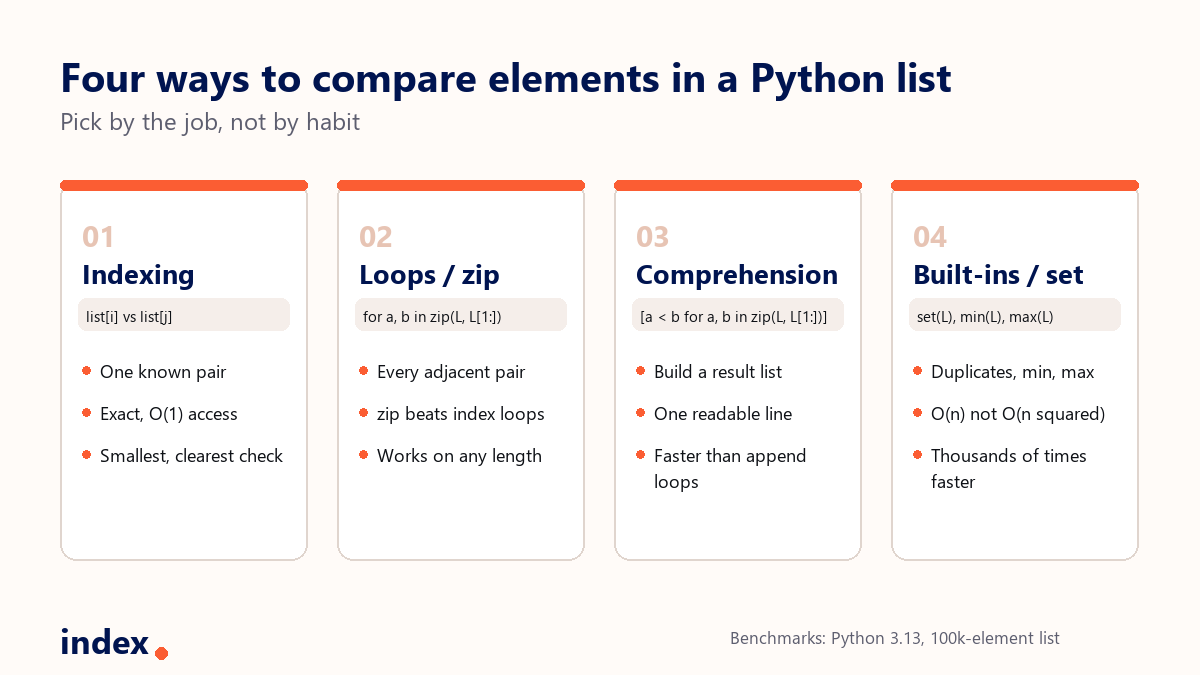
zip(L, L[1:])oritertools.pairwise(L)to compare adjacent items. In our benchmark it ran about 3x faster than afor-loop withappendon a 100,000-element list. - List comprehensions turn pairwise comparisons into one readable line and beat manual append loops on speed.
- For duplicates, min, or max, use
set()and built-ins. A set check is O(n) and was thousands of times faster than a nested O(n squared) loop in our test. - Watch the traps: use
==notisfor value equality, and usemath.isclose()when comparing floats, since0.1 + 0.2 != 0.3.
Understanding Python lists first
A list is one of Python's built-in data structures. It is ordered, changeable, and allows duplicates. A list can hold items of different types, including numbers, strings, and even other lists, which are called nested lists. You write a list with square brackets and commas between items.
my_list = [10, 20, 30, 40]Lists are ordered, so every item has an index that starts at zero. my_list[0] is 10 and my_list[3] is 40. That index is the key to most comparisons, because comparing two elements really means picking two positions and testing their values.
Method 1: Compare elements by index
The simplest way to compare two elements is to read them by their index positions and apply a relational operator. This is the right tool when you know exactly which two items you want to compare.
my_list = [5, 10, 15, 20]

if my_list[1] > my_list[2]:
    print(f"{my_list[1]} is greater than {my_list[2]}")
else:
    print(f"{my_list[1]} is not greater than {my_list[2]}")
# 10 is not greater than 15
Here we compare the second and third items, at index 1 and index 2. Python gives you the full set of relational operators for this: == (equal), != (not equal), > (greater than), < (less than), >= (greater than or equal), and <= (less than or equal). They work on numbers, strings, and any objects that define an ordering.
When to use it: Index comparison is best for small, specific checks where you already know the two positions. It is exact and easy to read. For comparing many pairs across a long list, move to a loop or comprehension below.
Method 2: Compare with loops, zip, and itertools.pairwise
When you need to compare many items, a loop is the natural fit. A common task is comparing each item to the next one, for example to check if a list is sorted. The classic version uses an index loop.
my_list = [3, 5, 8, 10, 2]

for i in range(len(my_list) - 1):
    if my_list[i] < my_list[i + 1]:
        print(f"{my_list[i]} is smaller than {my_list[i + 1]}")
    else:
        print(f"{my_list[i]} is not smaller than {my_list[i + 1]}")
This works, but reaching into the list by index twice on every pass is noisy and slower than it needs to be. The modern Python way is to pair the list with itself, shifted by one, using zip.
my_list = [3, 5, 8, 10, 2]

for current, nxt in zip(my_list, my_list[1:]):
    print(f"{current} < {nxt}: {current < nxt}")
Since Python 3.10, the standard library has an even cleaner tool for exactly this, itertools.pairwise. It yields consecutive overlapping pairs without building a second list, so it is both readable and memory friendly.
from itertools import pairwise

my_list = [3, 5, 8, 10, 2]

is_sorted = all(a <= b for a, b in pairwise(my_list))
print(is_sorted)  # False
Using a while loop
A while loop reaches the same result when you need manual control over the index, for example to skip ahead or stop early.
my_list = [5, 10, 15, 20, 25]

i = 0
while i < len(my_list) - 1:
    if my_list[i] < my_list[i + 1]:
        print(f"{my_list[i]} < {my_list[i + 1]}")
    i += 1
When to use it: Use a loop when you compare across the whole list and may need to break early or carry state between steps. Prefer zip or itertools.pairwise over an index loop for adjacent pairs. It reads better and, as the benchmark below shows, it runs faster.
Method 3: Compare with list comprehensions
List comprehensions are a shorter, clearer way to compare items and collect the result in one pass. They are ideal when you want a new list of comparison outcomes rather than a printed log.
my_list = [2, 4, 6, 8, 10]

# True where each item is greater than the next
comparisons = [a > b for a, b in zip(my_list, my_list[1:])]
print(comparisons)  # [False, False, False, False]
This builds a list of boolean values, one per adjacent pair. Comprehensions are not only more compact than an append loop, they also run faster because the looping happens in optimised C internals instead of Python bytecode. You can wrap the result in all() or any() to answer questions like "is the list strictly increasing?" in a single expression.
Hiring strong Python engineers? The way a candidate compares list elements, an index loop versus zip and pairwise, is a quick read on code quality. Index.dev connects companies with the top 1% of senior engineers from LATAM and CEE, around 30,000 human-vetted developers, with matches in 48 hours.
Method 4: Compare with built-in functions and sets
Sometimes you do not need to compare pairs by hand at all. Python's built-in functions compare every element for you in fast C code. Use min() and max() for the smallest and largest values, and sorted() to order the whole list.
my_list = [10, 3, 15, 7]

print(f"Smallest: {min(my_list)}, Largest: {max(my_list)}")  # Smallest: 3, Largest: 15
print(f"Sorted: {sorted(my_list)}")  # Sorted: [3, 7, 10, 15]
For membership and overlap questions, the set type is the right tool. Sets compare items by hash in roughly O(1) per lookup, so testing whether two lists share elements is fast even on large data.
a = [1, 2, 3, 4, 5]
b = [4, 5, 6, 7, 8]

common = set(a) & set(b)       # shared items
only_in_a = set(a) - set(b)    # items in a but not b
print(common)     # {4, 5}
print(only_in_a)  # {1, 2, 3}
When to use it: Reach for built-ins and sets whenever the question is about the list as a whole, such as the minimum, maximum, sorted order, shared items, or whether a value exists. They are shorter and far faster than writing the comparison loop yourself.
Finding duplicates: why the algorithm matters more than the syntax
A very common reason to compare elements is to find duplicates. The beginner approach compares every item with every other item using two nested loops. That is O(n squared), so the work grows with the square of the list length.
# Slow: nested loop, O(n squared)
def has_duplicates_slow(L):
    for i in range(len(L)):
        for j in range(i + 1, len(L)):
            if L[i] == L[j]:
                return True
    return False
The fast approach compares items through a set, which is O(n). If turning the list into a set changes its length, a duplicate existed.
# Fast: set membership, O(n)
def has_duplicates_fast(L):
    return len(set(L)) != len(L)
The difference is not small. On an all-unique list of 4,000 items, the nested loop took about 787 milliseconds in our test, while the set check took about 0.10 milliseconds. That is roughly 8,000 times faster, and the gap widens as the list grows. This is the single most important lesson in element comparison: the data structure you choose usually matters more than the syntax.
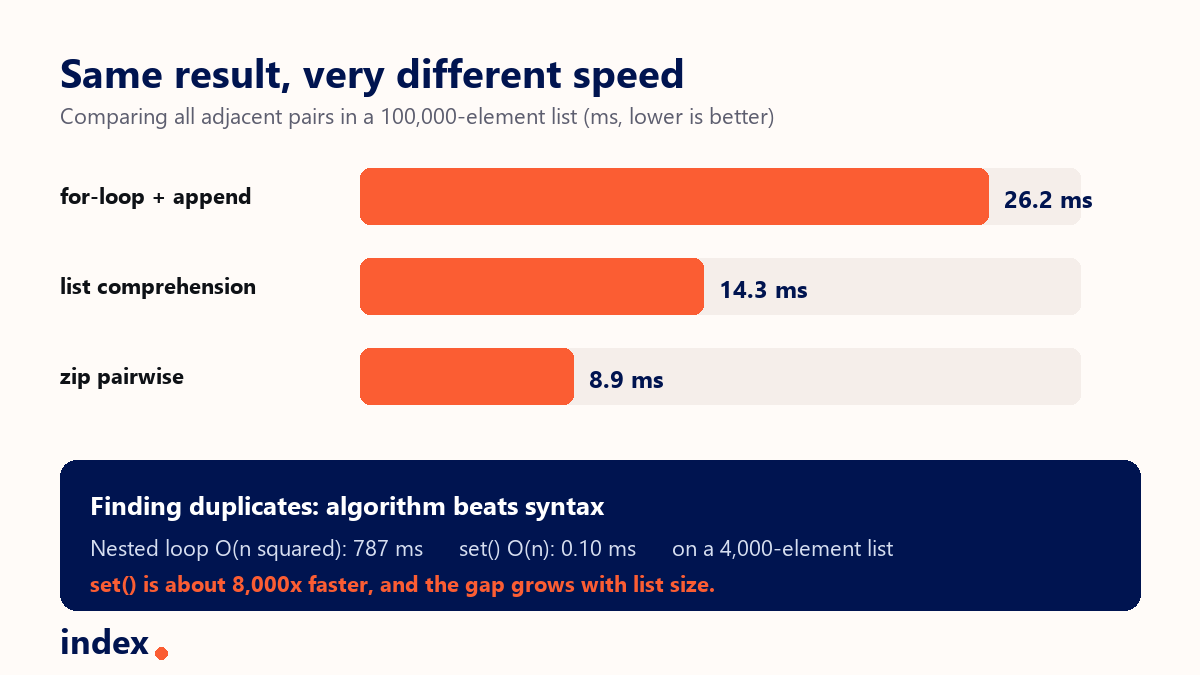
The bar chart above shows comparing all adjacent pairs in a 100,000-element list. The for-loop with append took about 26 ms, the list comprehension about 14 ms, and the zip version about 9 ms. Same result, very different cost. Numbers are from CPython 3.13 on a typical laptop and will vary by machine, but the ranking holds.
Comparing elements in nested lists
Nested lists, which are lists inside lists, need one more layer of looping. To compare items inside each sublist, loop over the outer list and index into each inner one.
nested_list = [[1, 2], [3, 4], [5, 6]]

for sublist in nested_list:
    if sublist[0] < sublist[1]:
        print(f"{sublist[0]} < {sublist[1]}")
This compares the first and second items of every sublist. If you need to compare items across different sublists, add another loop, or flatten the structure first. For nested lists of uneven depth, a small recursive function is the cleanest fit, since you do not know in advance how many levels you must walk.
Common pitfalls when comparing list elements
Two traps catch almost every Python beginner. Both produce code that looks correct and passes on small examples, then fails on real data.
Use == for value, not is
== tests whether two values are equal. is tests whether two names point to the exact same object in memory. They often agree for small integers and short strings because Python caches those, which hides the bug, then they disagree for larger values or freshly built objects.
a = [1, 2, 3]
b = [1, 2, 3]

print(a == b)  # True, same contents
print(a is b)  # False, different objects

x = 1000
y = 1000
print(x == y)  # True
print(x is y)  # may be False, do not rely on it
Rule of thumb: use == to compare element values, and reserve is for checks against None, such as if value is None.
Compare floats with math.isclose
Floating point numbers cannot represent every decimal exactly, so direct == comparison can surprise you. The classic example is 0.1 + 0.2, which is not exactly 0.3.
import math

print(0.1 + 0.2 == 0.3)             # False
print(math.isclose(0.1 + 0.2, 0.3)) # True
When list elements are floats, compare them with math.isclose(), which allows a small tolerance, rather than the exact == operator.
Handling edge cases
Comparisons can raise errors if the list is too short or holds mixed types. Guard the length before you index, so an empty or single-item list does not cause an IndexError.
my_list = []

if len(my_list) > 1:
    if my_list[0] == my_list[1]:
        print("First two elements are equal")
else:
    print("List has fewer than two elements")
One more change since Python 3: you can no longer order-compare different types with < or >. Running 1 < "2" raises a TypeError instead of returning a result like it did in Python 2. If a list might mix numbers and strings, convert to a common type, or sort with a key function, before you compare.
type of comparison vs tool: a decision table
Use this table to pick the right approach instead of defaulting to the same loop every time.
| You want to... | Use | Why |
|---|---|---|
| Compare one known pair | a[i] and a[j] with == or < | Exact, clearest, O(1) access |
| Compare every adjacent pair | zip(L, L[1:]) or itertools.pairwise(L) | Readable and about 3x faster than an index loop |
| Build a list of comparison results | List comprehension | One line, runs in optimised C internals |
| Find min, max, or sorted order | min(), max(), sorted() | Built-in, compares every element for you |
| Find duplicates or shared items | set() and set operators | O(n), thousands of times faster at scale |
| Compare floats | math.isclose() | Tolerates floating point rounding error |
What the data says about Python skills
Python remains one of the most used and most wanted languages in the Stack Overflow Developer Survey 2025, pulled forward by data work and AI. That means clean, idiomatic list handling is a baseline expectation, not a bonus. The JetBrains State of Developer Ecosystem 2025 shows comprehensions, generators, and the itertools module in steady use across professional teams.
For hiring, the small choices give a lot away. When we screen senior Python engineers, a candidate who reaches for zip, itertools.pairwise, and set rather than nested index loops tends to write code that scales and reads well. If you are leveling up, practising these patterns on real data is one of the highest-return habits you can build this year.
Conclusion
Python gives you a clear ladder of tools for comparing list elements. Use index comparison for one known pair, loops with zip or itertools.pairwise for adjacent items, comprehensions to collect results in one line, and built-ins with sets for duplicates, min, max, and overlap. Mind the two classic traps, == versus is and exact float comparison, and guard short lists against index errors. The headline lesson is simple: the right data structure usually beats clever syntax, so a set check can be thousands of times faster than a nested loop. Pick the tool that fits the job and your list code stays fast, correct, and easy to read.
For deeper reference, see the official Python itertools documentation and the data structures tutorial. Both are kept current and full of practical examples.
For developers
Want to work on clean, modern Python with teams that care about code quality? Index.dev is an AI-first engineering talent platform that connects companies with the top 1% of senior engineers from LATAM and CEE, around 30,000 developers, each human-vetted through technical and live interviews from a pool of 2.5M+. Roughly a 1.2% acceptance rate, with matches in 48 hours. Join Index.dev and get access to exclusive remote roles in the UK, EU, and US.
For clients
Need senior Python engineers who ship clean, efficient, production-ready code? Index.dev matches you with the top 1% of senior engineers from LATAM and CEE, drawn from 2.5 million professionals, in 48 hours. Teams cut 40 to 60% on engineering costs versus US in-house rates, and 97% of clients return for a second engagement. Hire through Index.dev and build with vetted talent that fits your stack.


