
Reading user input from the console is something every Java developer deals with, whether you're building a quick CLI tool or a more complex app. Picking the right approach matters—it affects performance, flexibility, and how easy your code is to work with.
Java gives you a few solid options for handling console input, each with its pros and cons. I’ll walk you through the best methods, focusing on real-world use cases and what works best in production. Let’s get into it.
Join Index.dev to find top remote Java developer jobs and grow your career with global companies!
1. Using Scanner: The Swiss Army Knife
Scanner provides you with a convenient way to parse both primitive types and strings. While it's versatile, it comes with performance implications that developers should understand.
Implementation
import java.util.Scanner;
import java.util.InputMismatchException;
public class EnhancedScannerExample {
private static Scanner scanner;
public static void main(String[] args) {
try {
scanner = new Scanner(System.in);
processUserInput();
} finally {
if (scanner != null) {
scanner.close();
}
}
}
private static void processUserInput() {
try {
System.out.print("Enter your name: ");
String name = scanner.nextLine().trim();
System.out.print("Enter your age: ");
int age = getValidIntegerInput();
System.out.printf("Hello %s! You are %d years old.%n", name, age);
} catch (IllegalStateException e) {
System.err.println("Scanner is closed or unavailable: " + e.getMessage());
}
}
private static int getValidIntegerInput() {
while (true) {
try {
return scanner.nextInt();
} catch (InputMismatchException e) {
System.out.print("Please enter a valid number: ");
scanner.nextLine(); // Clear the invalid input
}
}
}
}
Why Use Scanner?
- Easy to use for basic input tasks
- Supports various data types (e.g., int, double, String)
- Built-in delimiter handling
Key Technical Points
- Implements robust error handling for InputMismatchException
- Uses resource management best practices
- Separates concerns into distinct methods
- Handles input validation comprehensively
Common Pitfalls
- Performance overhead: Scanner has significant overhead due to internal buffering.
- Resource management: Failing to close Scanner may lead to resource leaks.
- Handling input mismatches: Scanner may throw InputMismatchException if incorrect data types are entered.
2. Using BufferedReader: The Performance Champion
The BufferedReader class, in combination with InputStreamReader, provides a faster alternative to Scanner due to efficient buffering. It is ideal for high-performance scenarios or when you are dealing with large inputs.
Implementation
import java.io.BufferedReader;
import java.io.IOException;
import java.io.InputStreamReader;
public class EnhancedBufferedReaderExample {
private static final int BUFFER_SIZE = 8192; // Optimal buffer size for most use cases
public static void main(String[] args) {
try (BufferedReader reader = new BufferedReader(
new InputStreamReader(System.in), BUFFER_SIZE)) {
System.out.print("Enter your name: ");
String name = readValidInput(reader);
System.out.print("Enter a number: ");
int number = parseInteger(reader);
System.out.printf("Hello %s! Your number is: %d%n", name, number);
} catch (IOException e) {
System.err.println("Error reading input: " + e.getMessage());
}
}
private static String readValidInput(BufferedReader reader) throws IOException {
String input;
while ((input = reader.readLine()) != null && input.trim().isEmpty()) {
System.out.print("Input cannot be empty. Please try again: ");
}
return input.trim();
}
private static int parseInteger(BufferedReader reader) throws IOException {
while (true) {
try {
return Integer.parseInt(reader.readLine().trim());
} catch (NumberFormatException e) {
System.out.print("Please enter a valid number: ");
}
}
}
}
Why Use BufferedReader?
- Faster than Scanner due to larger buffer size
- Useful for reading large text inputs
Key Technical Points
- Utilizes try-with-resources for automatic resource management
- Implements custom buffer size optimization
- Includes robust input validation and error handling
- Provides utility methods for common parsing scenarios
Common Pitfalls
- Does not support parsing primitive data types directly
- Requires explicit exception handling (IOException)
3. Using Console - The Security-First Option
When you are handling sensitive input like passwords, the Console class provides built-in security features that make it the preferred choice as it does not echo characters back to the terminal. Once captured, these credentials should be stored in a secure password vault.
Implementation
import java.io.Console;
import java.util.Arrays;
public class EnhancedConsoleExample {
public static void main(String[] args) {
Console console = System.console();
if (console == null) {
System.err.println("Console is not available. Please run from a terminal.");
System.exit(1);
}
try {
String username = getValidUsername(console);
char[] password = getSecurePassword(console);
// Process the credentials
processCredentials(username, password);
// Clear sensitive data
Arrays.fill(password, '\0');
} catch (IllegalStateException e) {
System.err.println("Error processing input: " + e.getMessage());
}
}
private static String getValidUsername(Console console) {
String username;
do {
username = console.readLine("Enter username: ").trim();
if (username.isEmpty()) {
console.format("Username cannot be empty.%n");
}
} while (username.isEmpty());
return username;
}
private static char[] getSecurePassword(Console console) {
char[] password;
do {
password = console.readPassword("Enter password: ");
if (password.length < 8) {
console.format("Password must be at least 8 characters long.%n");
Arrays.fill(password, '\0'); // Clear the invalid password
}
} while (password.length < 8);
return password;
}
private static void processCredentials(String username, char[] password) {
// Simulate credential processing
console.format("Processing credentials for user: %s%n", username);
// Add your authentication logic here
}
}
Why Use Console?
- Best for secure password input
- Does not echo input back to the screen
Key Technical Points
- Implements secure password handling
- Clears sensitive data from memory
- Includes input validation with meaningful feedback
- Uses proper error handling and console availability checking
Common Pitfalls
- Does not work in IDEs like Eclipse and IntelliJ
- Limited to interactive console environments
Read More: How to Run an Autohotkey Script from Java
Alternative Approach: Using DataInputStream
While DataInputStream is primarily designed for reading binary data, it can be used for console input in legacy applications. However, modern applications should prefer Scanner or BufferedReader.
Implementation
import java.io.DataInputStream;
import java.io.IOException;
import java.io.BufferedInputStream;
public class EnhancedDataInputStreamExample {
private static final int BUFFER_SIZE = 8192;
public static void main(String[] args) {
try (DataInputStream dis = new DataInputStream(
new BufferedInputStream(System.in, BUFFER_SIZE))) {
processUserInput(dis);
} catch (IOException e) {
System.err.println("Error reading input: " + e.getMessage());
}
}
private static void processUserInput(DataInputStream dis) throws IOException {
try {
System.out.print("Enter your name: ");
String name = readLine(dis);
System.out.print("Enter a number: ");
int number = readInteger(dis);
System.out.printf("Hello %s! Your number is: %d%n", name, number);
} catch (IllegalArgumentException e) {
System.err.println("Invalid input: " + e.getMessage());
}
}
private static String readLine(DataInputStream dis) throws IOException {
StringBuilder input = new StringBuilder();
int ch;
while ((ch = dis.read()) != -1 && ch != '\n') {
if (ch != '\r') {
input.append((char) ch);
}
}
String result = input.toString().trim();
if (result.isEmpty()) {
throw new IllegalArgumentException("Input cannot be empty");
}
return result;
}
private static int readInteger(DataInputStream dis) throws IOException {
String input = readLine(dis);
try {
return Integer.parseInt(input);
} catch (NumberFormatException e) {
throw new IllegalArgumentException("Invalid number format");
}
}
}
Why Use DataInputStream?
- Works with legacy Java versions
- Useful when working with binary data alongside text input
- Can be combined with BufferedInputStream for better performance
Key Technical Points
- Uses BufferedInputStream for improved performance
- Implements custom readLine() method for better control
- Includes proper resource management with try-with-resources
- Handles platform-specific line endings (\r\n vs \n)
- Provides input validation and error handling
- Uses StringBuilder for efficient string concatenation
Common Pitfalls
- Deprecated in favor of BufferedReader and Scanner
- readLine() method is deprecated
- Less efficient for text processing compared to modern alternatives
- Requires more manual handling for basic operations
- Limited built-in parsing capabilities
The enhanced version addresses several limitations of the basic implementation while maintaining compatibility with legacy systems. However, for new applications, we strongly recommend using Scanner or BufferedReader instead.
Learn More: 4 Ways to Configure Environment Variables in Spring Boot
Common Pitfalls & Best Practices
Pitfall | Solution |
| Using Scanner in loops causes input errors | Always call nextLine() after nextInt() to clear the buffer |
| BufferedReader requires exception handling | Use try-with-resources to ensure proper closure |
| Console not supported in IDEs | Run the application in a terminal or command prompt |
| Mixing nextInt() and nextLine() | Use Integer.parseInt(scanner.nextLine()) instead |
Not handling null input | Always validate input with Objects.requireNonNull() |
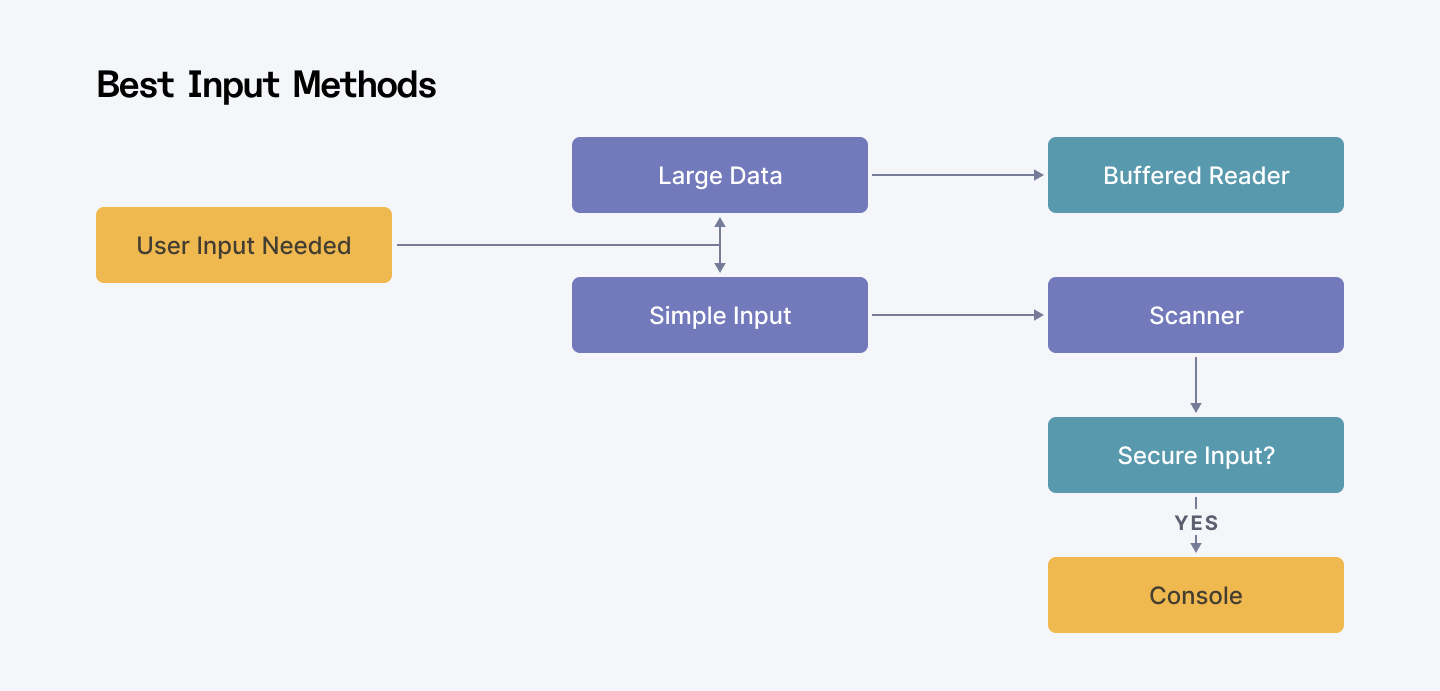
Here’s a flowchart summarizing the best input methods for different scenarios:
Conclusion
Picking the right way to read user input in Java depends on what you’re building. If you just need a simple solution, Scanner works well. For handling large text inputs efficiently, BufferedReader is the way to go. And if you need secure input (like passwords), Console is your best bet.
Older options like DataInputStream still exist, but they’re mostly outdated. Knowing these choices—and their pitfalls—helps you write cleaner, faster, and more secure code. Java keeps evolving, so staying up to date with best practices ensures your apps stay reliable and scalable.
For Developers:
Strengthen your Java expertise and master efficient console input handling. Join Index.dev to access global remote opportunities and work on enterprise-level projects with leading tech companies. Take your remote career to the next level!
For Companies:
Need skilled Java developers who can build efficient, high-performing applications? At Index.dev, we connect you with senior remote tech talent within 48 hours—backed by a risk-free 30-day trial. Simplify your hiring process and accelerate project success with qualified engineers.


