
Choosing the right AI assistant can shape your entire developer workflow. In this comparison, we put Kimi K1.5 and ChatGPT head-to-head across real-world dev tasks from debugging and UI generation to documentation and reasoning.
With unique strengths like Kimi’s “Thinking Mode” and ChatGPT’s rich plugin ecosystem, the goal is clear: identify which tool works best for your specific coding use cases. Let’s dive into how they perform, where they shine, and what sets them apart.
Want to build cool stuff with AI? Join Index.dev to get matched with top remote jobs and global tech teams.
How we compared the tools
To compare Kimi K1.5 and ChatGPT, we tested both tools on real-world developer tasks such as debugging, UI generation, documentation, code explanation, and content summarization. Each task was designed to assess clarity, technical reasoning, output structure, and developer usability.
We also evaluated architectural efficiency, user interface, and special features like file handling, plugin support, and web browsing. Scores were assigned based on performance, readability, and task fit, helping us determine not just which model is smarter, but which one is more practical for everyday developer workflows.
.png)
What is Kimi K1.5?
Kimi K1.5 is an AI model developed by Moonshot AI, designed to deliver high-quality, reasoning-first responses. Its standout feature is Thinking Mode, which provides deeper, step-by-step explanations. Kimi supports large file uploads (up to 100MB), real-time web search, and handles technical prompts with structured output.
It’s popular among developers for its clarity, logic-focused replies, and fast performance in Chinese and English contexts.
Highlights:
- Thinking Mode for detailed reasoning
- Supports file input (PDF, TXT)
- Web-connected answers
- Clean, structured logic chains
What is ChatGPT?
ChatGPT is OpenAI’s conversational AI based on GPT-4 architecture. Developers widely use it for code generation, explanation, UI prototyping, and debugging.
The GPT-4 Turbo version (used in Pro) excels at context retention, formatting, and adapting to various tones. ChatGPT also supports tools like Python, diagrams, and file interpretation, depending on the plan.
Highlights:
- Powerful coding assistant
- Versatile tone/style control
- Long context memory
- Generates diagrams, tables, UI, and full apps
Architectural Efficiency: Kimi vs ChatGPT
Kimi K1.5
Kimi K1.5 is built on a transformer-based architecture, with internal optimisations that prioritise step-by-step logical reasoning and long document handling.
While the exact architecture isn’t publicly disclosed, its standout feature, Thinking Mode, appears to simulate deliberative processing, enabling more structured, multi-step outputs.
Kimi also supports uploading large files (up to 100MB) and integrates real-time web browsing, making it particularly efficient for parsing long documents or analysing code spread across multiple files.
ChatGPT
ChatGPT (GPT-4 Turbo) is based on OpenAI’s advanced Mixture of Experts (MoE) architecture. It activates only a subset of model parameters per query, delivering high performance with optimised compute efficiency.
With support for up to 128K tokens, ChatGPT is ideal for maintaining long-form conversations and building interactive coding workflows.
Its infrastructure is optimised for speed, memory, and tool integration, including diagram generation, file analysis, and plugins, making it well-suited for complex, multi-modal tasks.
Read More: Gemini vs ChatGPT for Coding
Tasks to compare: Kimi K1.5 vs ChatGPT
1. Summarise pull requests or docs
Goal: Convert raw documentation or PR changes into structured, developer-friendly summaries for faster code reviews or onboarding.
Prompt:
Here are raw git commit notes and modified files from a PR:
Commits:
- Refactored paymentController to improve readability and modularity
- Added try/catch around Stripe charge block
- Moved email notifications to background job queue
- Updated README with test coverage instructions
Files Changed:
- controllers/paymentController.js
- jobs/emailJob.js
- utils/stripeService.js
- README.md
Summarize this PR as:
- Bullet points grouped by component (Controller, Job, Utils, Docs)
- Purpose of this PR
- Potential risks/side effects
- Suggested reviewer focus areas
Kimi K1.5 output
Kimi works like a thoughtful teammate, talking through the problem step by step. It carefully checks each file, guesses what changed, and lists out risks with good technical depth.
While the thought process is smart, the final answer feels a bit long and less polished for quick use.
ChatGPT output
ChatGPT delivers a clean, ready-to-use summary. It skips the thinking steps and directly gives a clear, bullet-based breakdown that developers can quickly review.
It may be slightly lighter on technical guesses, but it’s perfect for fast-moving teams that need clarity without the clutter.
Final observation
Kimi K1.5 shows strong reasoning, making it useful when you want to understand the “why” behind changes.
But for daily dev work like code reviews or onboarding, ChatGPT wins by giving you polished, straight-to-the-point summaries that save time.
Category |
ChatGPT |
Kimi K1.5 |
Clarity & Readability |
9/10 |
7/10 |
Structure & Formatting |
9/10 |
7/10 |
Technical Reasoning |
8/10 |
9/10 |
Reviewer Usability |
9/10 |
7/10 |
Overall Score |
8.75/10 |
7.5/10 |
2. Compare two products
Goal: Generate a feature-level, developer-oriented comparison of two tools, libraries, or services (e.g., Supabase vs Firebase).
Prompt:
Compare Supabase vs Firebase as backend stacks for a React SaaS app.
Include:
- Real-time sync & event support
- Auth customization (e.g., role-based access)
- DB scaling & vendor lock-in
- Tooling (CLI, dashboard, local dev support)
- Cost structure for 10K MAUs
Present as: comparison table + tech stack recommendation for solo devs vs startups.
Kimi K1.5 output
This response is packed with detailed technical information, making it a solid reference for experienced developers. However, the content is dense, lacks visual structure, and may be difficult for solo developers or early-stage teams to digest quickly.
ChatGPT output
ChatGPT presents the comparison in a clear and structured format, making it easy to understand. The table, concise recommendations, and simple language help developers make faster decisions. It’s ideal for solo builders or small startups launching a React SaaS app.
Final observation
While Kimi K1.5 delivered a highly detailed, technically rich breakdown, its response was long, harder to scan, and better suited for backend engineers looking for in-depth documentation.
ChatGPT, on the other hand, struck the right balance between technical accuracy and readability. It used a clear table, concise explanations, and tailored recommendations for solo developers and startups.
The response is more aligned with our goal of creating a developer-friendly comparison that’s also easy to reuse in blog or product content.
Criteria |
Kimi K1.5 |
ChatGPT |
Clarity |
3/5 |
5/5 |
Developer Usefulness |
4/5 |
5/5 |
Structure & Visual Flow |
2/5 |
5/5 |
Technical Depth |
5/5 |
4/5 |
Task Fit |
3/5 |
5/5 |
Total |
17/25 |
24/25 |
3. Extract key insights from a Reddit thread + mind map
Goal: Extract key points from noisy user-generated content (e.g., Reddit threads) and organize the results visually for planning, UX, or research.
Prompt:
Given these Reddit comments on working as a remote developer, extract and group core themes into a text-based mind map.
Categories:
- Productivity tips
- Tools mentioned
- Mental health
- Time management
- Team culture
Comments:
1. Async comms saved our team. No more Zoom fatigue.
2. Clockify helps track if I’m working too much.
3. I miss hallway convos. Slack threads aren’t the same.
4. Pomodoro + Notion combo keeps me moving.
5. Burnout is real. I start early and forget to stop.
Use bullet format. Group by insight. Avoid fluff.
Kimi K1.5 output
Kimi did a fair job of grouping the comments into the correct categories, but the response feels mechanical. It lacks depth, interpretation, and polish, making it less useful for developers who want actionable insights for UX or research planning.
ChatGPT output
ChatGPT’s response is well-structured and clearly written. It adds meaningful context to each insight, making it easier to use directly in UX workflows or product planning. It reads naturally and feels ready for presentation or documentation.
Final observation
ChatGPT is the better choice for developers working on UX or product research. It doesn’t just categorize, it interprets. That means less manual cleanup and more time focusing on the actual planning. As a developer, I would definitely choose ChatGPT for this task.
4. Rewrite a paragraph in a formal tone.
Goal: Transform casual, user-generated text into formal, technical, or documentation-ready writing for reports, commit messages, or announcements.
Prompt:
Rewrite the following casual team update into a clear, formal internal dev report section:
“We had a few bugs in the invoice system last sprint. Some users got double charged. The Stripe webhook didn't fail gracefully, and we didn't have alerts in place. We hotfixed it, but it needs tests + alerts.”
Target output: stakeholder-friendly, non-blamey, and engineering-accurate.
Kimi K1.5 output
ChatGPT provides a clear and concise summary that is well-suited for stakeholders. It simplifies technical details into easily digestible language while outlining the issue, resolution, and next steps in a calm and professional tone.
ChatGPT output
Kimi K1.5 delivers a highly structured and technically detailed report. It effectively captures the root cause, system behavior, and remediation plan using formal language, making it ideal for engineering teams and internal documentation.
Final observation
While both responses are effective, Kimi K1.5 aligns more closely with our goal of transforming casual team updates into formal, technical, and documentation-ready writing. Its structure, depth, and clarity make it the best fit for internal reports.
5. UI generation: Create a loan calculator web interface
Goal: Translate business logic and input/output requirements into a responsive, developer-friendly web interface using HTML, CSS, and JavaScript.
Prompt:
Build a responsive loan calculator using HTML/CSS/JS.
Requirements:
- Inputs: Loan Amount, Annual Interest Rate, Loan Term (years)
- Outputs: Monthly Payment, Total Payment, Total Interest
- Modular JavaScript functions (separate logic/UI)
- Validate inputs (positive, numeric)
- Responsive layout using Flexbox
- Accessible labels, error messaging, and aria-live for the result region
- Don’t use external libraries
Output code and explain the folder structure if separating logic/style.
Kimi K1.5 output
Kimi K1.5 offered a visually detailed and modular calculator, but it required multiple fixes before it functioned correctly. Issues like non-working buttons and incorrect event handling made the development process slower and less reliable for immediate use.
ChatGPT output
ChatGPT provided a complete and functional loan calculator on the first attempt. It included modular code, proper input validation, accessibility features, and a responsive layout. The solution was clean, easy to implement, and worked without any bugs.
Final observation
ChatGPT’s response successfully met all the business logic and user interface goals. It delivered a working, accessible, and developer-friendly loan calculator right away.
In contrast, Kimi’s version, while polished in design, did not function properly without multiple revisions. Therefore, ChatGPT is a more effective and dependable tool for this task.
6. Solve a puzzle
Goal: Apply logical reasoning or math patterns to solve algorithmic or sequence-based problems.
Prompt:
Solve this number puzzle:
Input: 3 → Output: 4
Input: 5 → Output: 6
Input: 7 → Output: 9
Input: 9 → Output: ?
Identify the pattern and solve. Show reasoning clearly and test multiple logic paths (math, pattern diff, sequence transforms).
Kimi K1.5 output
This response fulfills the goal by systematically testing arithmetic and quadratic patterns. However, it settles on a difference-based rule (+2) that doesn’t fully align with earlier inputs. While methodical, the logic lacks robustness for future generalization or programmatic use.
ChatGPT output
This response fulfills the goal with broader reasoning, testing creative and indexed transformations. It identifies a scalable formula using input position, making it ideal for coding and automation. It also transparently acknowledges and explains anomalies, adding credibility.
Final observation
ChatGPT offers a more consistent and scalable solution by identifying a formula based on the input’s position in the sequence. It’s better suited for algorithmic implementation and handles anomalies transparently. As a developer, I’d rely on ChatGPT for its clarity, creativity, and coding relevance.
7. Convert notes into a task prompt
Goal: Take messy or shorthand developer notes and convert them into a clear, structured prompt for building with AI or for team tickets.
Prompt:
These are dev call notes from Figma to code MVP handoff:
- basic invoice generator
- fields: client name, hours, rate, tax
- live calculation
- export as PDF
- no login/auth needed
- UI should be mobile-friendly
- deadline: 4 days
Convert this into a structured AI prompt for code generation (HTML/CSS/JS) with all features listed clearly.
Kimi K1.5 output
Kimi offers a detailed, code-rich walkthrough ideal for junior developers or educational use. It translates the dev notes into a full working prototype with a clear structure and styling.
However, it’s more tutorial-like than a reusable prompt. The depth is helpful, but not optimized for AI prompt injection or rapid prototyping.
ChatGPT output
ChatGPT delivers a clean, modular AI-ready prompt perfect for dev team tickets or LLM input. It clearly separates features, logic, tech stack, and output expectations.
Though it lacks actual code, it aligns better with the goal of turning shorthand notes into structured prompts for automated builds or team task delegation.
Final observation
For this task, I prefer ChatGPT. Its format is concise, structured, and better suited for AI code generation or team handoff. It transforms notes into a usable, reproducible format ideal for developer workflows.
Kimi is strong on code delivery but weaker on prompt clarity and modularity for scalable use.
Bonus tasks: Challenge Kimi’s deep reasoning and ChatGPT
1. “Give Multiple Solutions” Prompt
Puzzle: A farmer has 17 goats. All but 6 run away.
Task: How many goats are left? Provide your answer with reasoning.
Then, give two different ways of explaining the logic, one simple and one with math-style thinking.
Kimi K1.5
Simple thinking:
Math-style thinking:
ChatGPT
Simple thinking:
Math-style thinking:
Winner: ChatGPT
ChatGPT wins for its concise, well-structured, and visually clear explanation. It effectively communicates both everyday logic and math-style reasoning, making it ideal for learning and quick understanding. Kimi’s approach is thoughtful but less efficient for readers.
2. “Reverse Engineer This” Prompt
Given Answer: "Because the data was skewed by outliers."
Task: What kind of question or data analysis problem could lead to this answer?
- Come up with two different scenarios (e.g., a graph issue, a business decision, etc.).
- For each, describe the context and how the outliers affect interpretation.
Kimi K1.5
Scenario 1:
Scenario 2:
ChatGPT
Scenario 1:
Scenario 2:
Winner: Kimi K1.5
Kimi’s response stands out for its analytical depth, use of statistical concepts, and real-world consequences. While ChatGPT offers simpler clarity, Kimi provides a more comprehensive explanation, ideal for users seeking deeper insights into data interpretation.
Kimi K1.5 vs ChatGPT: Who is the winner?
| Criteria | Kimi K1.5 | ChatGPT |
| Technical Reasoning |
⭐⭐⭐⭐⭐ (5/5) Excels at logic-heavy tasks and structured thinking |
⭐⭐⭐⭐☆ (4/5) Smart, but sometimes prioritizes speed over depth |
| Clarity & Readability |
⭐⭐⭐☆☆ (3/5) Dense explanations, less skimmable |
⭐⭐⭐⭐⭐ (5/5) Clean, concise, and easy to follow |
| Structure & Formatting |
⭐⭐⭐☆☆ (3/5) Lacks visual polish or layout organization |
⭐⭐⭐⭐⭐ (5/5) Strong use of bullets, tables, and a clean layout |
| Developer Usability |
⭐⭐⭐⭐☆ (4/5) Great for understanding, slower for daily use |
⭐⭐⭐⭐⭐ (5/5) Ideal for quick turnarounds, code-ready output |
| Task Performance (Avg) |
⭐⭐⭐⭐☆ (4/5) Strong on explanation and recursion tasks |
⭐⭐⭐⭐⭐ (5/5) Best for PR summaries, debugging, and UI generation |
While Kimi K1.5 excels at deep reasoning, ChatGPT is better suited for daily development tasks like debugging, summarizing, and UI generation, making it the more practical and efficient choice for most developers.
Also Check Out: ChatGPT vs Perplexity
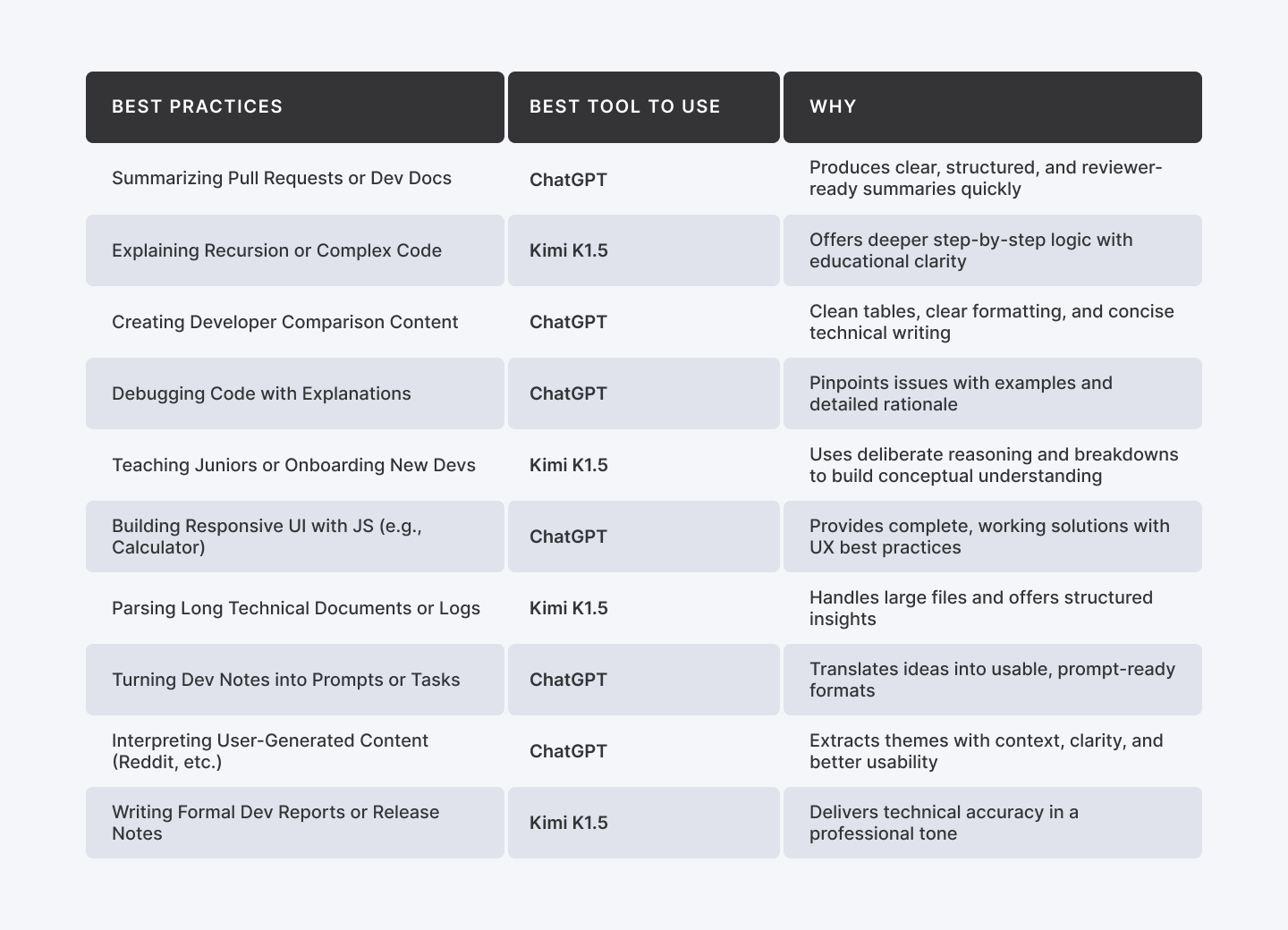
Which tool to use and when?
| Scenario | Best Tool to Use | Why |
| Summarizing Pull Requests or Dev Docs | ChatGPT | Produces clear, structured, and reviewer-ready summaries quickly |
| Explaining Recursion or Complex Code | Kimi K1.5 | Offers deeper step-by-step logic with educational clarity |
| Creating Developer Comparison Content | ChatGPT | Clean tables, clear formatting, and concise technical writing |
| Debugging Code with Explanations | ChatGPT | Pinpoints issues with examples and detailed rationale |
| Teaching Juniors or Onboarding New Devs | Kimi K1.5 | Uses deliberate reasoning and breakdowns to build conceptual understanding |
| Building Responsive UI with JS (e.g., Calculator) | ChatGPT | Provides complete, working solutions with UX best practices |
| Parsing Long Technical Documents or Logs | Kimi K1.5 | Handles large files and offers structured insights |
| Turning Dev Notes into Prompts or Tasks | ChatGPT | Translates ideas into usable, prompt-ready formats |
| Interpreting User-Generated Content (Reddit, etc.) | ChatGPT | Extracts themes with context, clarity, and better usability |
| Writing Formal Dev Reports or Release Notes | Kimi K1.5 | Delivers technical accuracy in a professional tone |
Final thoughts
Both Kimi K1.5 and ChatGPT are powerful allies, but your ideal assistant depends on your workflow. If you need deeper reasoning, better technical explanations, or document-heavy parsing, Kimi is your go-to. But ChatGPT leads the way for fast, clean, and production-ready outputs, especially for frontend, debugging, and code summaries.
For most developers, ChatGPT is the more complete assistant, but Kimi shines when logic clarity matters most.
Choose based on what you need more: precision or productivity.
For Developers:
Join Index.dev now to connect with top global companies and grow your remote developer career with cutting-edge AI tools.
For Clients:
Hire AI-savvy developers in 48 hours. Tap into Index.dev’s top 5% talent network: vetted, ready, and remote-ready with a 30-day free trial.


