
Reliable code isn't just nice to have anymore - it's essential, and any irregularities in the code can be disastrously detrimental. That's why experienced developers rely on Python assertions to catch bugs early and document code's intentions right in the source.
Working in today's CI/CD environments means we need to be extra confident in our code's behavior. Assertions help validate our assumptions during development, and when used creatively, can implement sophisticated design patterns.
We'll walk you through both basic and advanced assertion techniques in this article. We'll cover practical approaches like custom decorators and logging integration that can save countless debugging hours.
Work on innovative remote projects with top global companies at Index.dev!
What Are Assertions?
Simply put, assertions are checkpoints in your code that verify conditions you expect to be true. If an assertion fails, it means something is fundamentally wrong with the program's logic. The basic syntax is: assert condition, "Error message if condition is False"
Explanation
- condition: A boolean expression you expect to be True.
- "Error message if condition is False": An optional message displayed when the assertion fails.
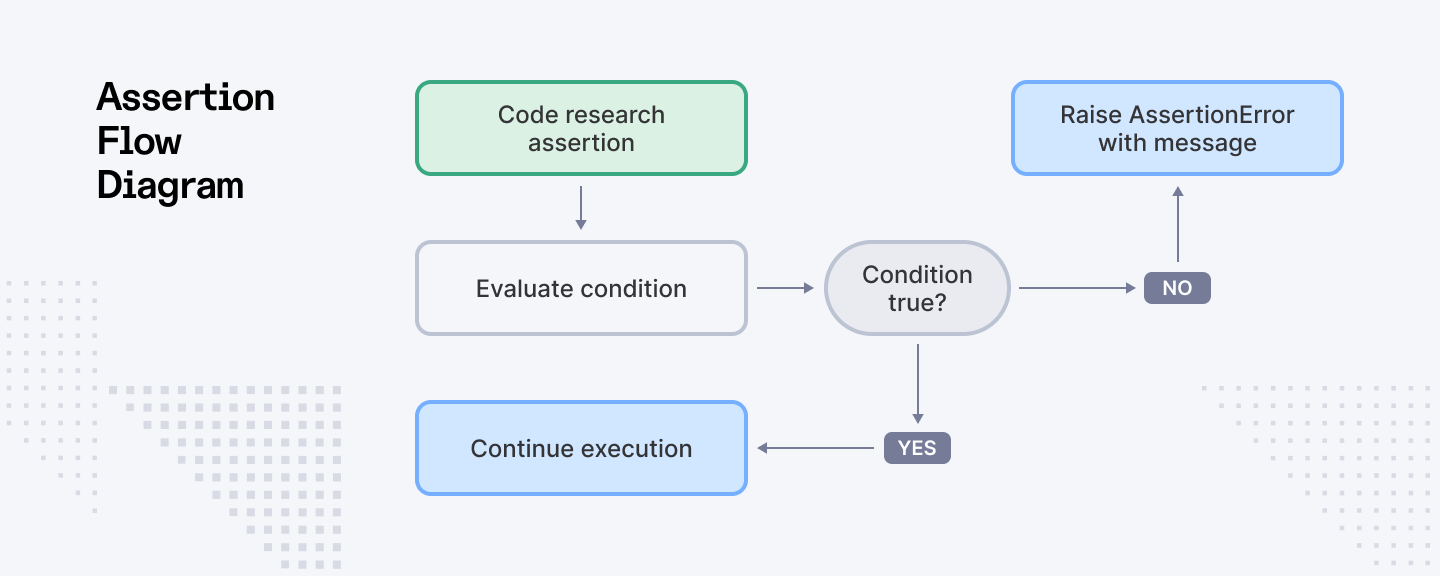
How They Work
When an assertion fails (i.e., the condition evaluates to False), Python raises an AssertionError with the provided message. This mechanism is primarily used during development to catch logic errors early and is invaluable for debugging and ensuring that your code’s invariants remain intact. However, do keep in mind that assertions can be globally disabled with Python’s -O (optimize) flag, so they should not replace robust error handling in production environments.
Why Use Assertions?
- Early Bug Detection: Assertions catch violations of assumed conditions as soon as they occur.
- Self-Documentation: They serve as living documentation by making the programmer's assumptions explicit.
- Enhanced Debugging: When combined with logging and testing frameworks, assertions make pinpointing failures easier.
- Design by Contract: They can be used to enforce both preconditions and postconditions, ensuring that functions are used correctly.
Example 1: Validating Function Inputs
Now if we consider a function that calculates the square root of a number, it’s a good idea to ensure that the input is non-negative:
import math
import logging

def calculate_square_root(x):
    """Calculate the square root of a number after validating it's non-negative."""
    # Setup logging for debugging purposes
    logging.debug(f"Calculating square root of {x}")

    # Validate input - must be non-negative for real square roots
    assert x >= 0, f"Input must be non-negative, received: {x}"

    result = math.sqrt(x)
    logging.debug(f"Square root result: {result}")
    return result

# Example usage
try:
    print(f"Square root of 16: {calculate_square_root(16)}")
    print(f"Square root of 0: {calculate_square_root(0)}")
    # This will fail the assertion
    print(f"Square root of -4: {calculate_square_root(-4)}")
except AssertionError as e:
    print(f"Assertion failed: {e}")
Explanation
We import the math module to access the sqrt function and the logging module to add helpful debug information. The calculate_square_root function first logs the input value, then uses an assertion to verify that the input is non-negative - a mathematical requirement for real square roots.
The error message is specific - it shows exactly which value caused the problem. This saves so much time when debugging larger systems where errors might happen far from where they're detected.
If the assertion fails (like when trying to calculate the square root of -4), Python raises an AssertionError with our custom message, preventing the invalid calculation and clearly indicating what went wrong. If the assertion passes, the function proceeds to calculate the square root, log the result, and return it.
The logging statements help track the function's execution flow, which is particularly valuable when debugging complex applications. The try-except block demonstrates how we can handle assertion failures in production code. Instead of crashing, we can respond to validation problems gracefully.
Example 2: Ensuring Data Integrity
Assertions can also verify the integrity of data structures. Suppose you're working with a list of dictionaries representing user data, and you want to ensure each dictionary contains specific keys:
import logging

# Configure logging
logging.basicConfig(level=logging.INFO,
                    format='%(asctime)s - %(levelname)s - %(message)s')

def process_user_data(users):
    """Process user data after validating each user record has required fields."""
    processed_users = []

    # First validate the users list itself
    assert isinstance(users, list), f"Expected list of users, got {type(users).__name__}"

    for i, user in enumerate(users):
        # Validate each user dictionary has required fields
        assert isinstance(user, dict), f"User at index {i} is not a dictionary"
        assert 'name' in user and 'email' in user, \
               f"User at index {i} missing required fields. Required: 'name', 'email'. Found: {list(user.keys())}"

        # Log successful validation
        logging.info(f"Processing user: {user['name']}")

        # Process user data (example: normalize email)
        processed_user = user.copy()
        processed_user['email'] = processed_user['email'].lower().strip()

        processed_users.append(processed_user)

    logging.info(f"Successfully processed {len(processed_users)} users")
    return processed_users

# Example usage
try:
    users = [
        {'name': 'John Doe', 'email': 'John.Doe@example.com', 'age': 30},
        {'name': 'Jane Smith', 'email': 'jane.smith@company.org'},
        # This would fail validation:
        # {'name': 'Missing Email'},
    ]

    processed_data = process_user_data(users)

except AssertionError as e:
    logging.error(f"Data validation failed: {e}")
Explanation
In this example, we use multiple assertions to validate our data structure at different levels. First, we verify that users is a list. Then, for each item in the list, we check that it's a dictionary and contains the required fields ('name' and 'email').
What makes this approach powerful is the detailed error messages. If validation fails, we know exactly which user (by index) caused the problem and what fields were missing. This saves considerable debugging time when working with complex data structures.
The function also demonstrates a practical application: normalizing email addresses by converting them to lowercase and removing extra whitespace. This shows how assertions can be integrated into data processing workflows to ensure data quality at the entry point.
Example 3: Enforcing Function Contracts with Decorators
For more complex applications, you can use decorators to enforce both preconditions and postconditions, embodying a design-by-contract approach. This method ensures that not only are inputs valid, but outputs are as expected.
import functools
import logging
import time

# Configure logging
logging.basicConfig(level=logging.DEBUG,
                    format='%(asctime)s - %(levelname)s - %(message)s')

def contract(pre=None, post=None, invariant=None, enable_timing=False):
    """A decorator to enforce function contracts."""
    def decorator(func):
        @functools.wraps(func)
        def wrapper(*args, **kwargs):
            function_name = func.__name__

            # Start timing if enabled
            start_time = time.time() if enable_timing else None

            # Check invariant before execution
            if invariant and args:
                assert invariant(args[0]), \
                    f"Invariant violated before executing {function_name}"

            # Check precondition if provided
            if pre:
                logging.debug(f"Checking precondition for {function_name}")
                condition_met = pre(*args, **kwargs)
                assert condition_met, \
                    f"Precondition failed for {function_name} with args {args} and kwargs {kwargs}"
                logging.debug("Precondition passed")

            # Execute the function
            result = func(*args, **kwargs)

            # Check postcondition if provided
            if post:
                logging.debug(f"Checking postcondition for {function_name}")
                condition_met = post(result)
                assert condition_met, \
                    f"Postcondition failed for {function_name} with result {result}"
                logging.debug("Postcondition passed")

            # Check invariant after execution
            if invariant and args:
                assert invariant(args[0]), \
                    f"Invariant violated after executing {function_name}"

            # Log timing information if enabled
            if enable_timing:
                execution_time = time.time() - start_time
                logging.info(f"{function_name} executed in {execution_time:.6f} seconds")

            return result
        return wrapper
    return decorator

# Example: Safe division function with contract
@contract(
    pre=lambda x, y: y != 0,           # Ensure divisor is non-zero
    post=lambda result: result != 0,    # Ensure the result is non-zero
    enable_timing=True                  # Enable performance monitoring
)
def safe_divide(x, y):
    """Divides x by y with contract enforcement."""
    return x / y

# Example usage
try:
    # Test the safe_divide function
    print(f"10 / 2 = {safe_divide(10, 2)}")

    # Uncomment to see precondition failure
    # print(f"10 / 0 = {safe_divide(10, 0)}")

except AssertionError as e:
    logging.error(f"Contract violation: {e}")
Explanation
This advanced example demonstrates how to implement a contract system using Python decorators. The contract decorator allows us to specify:
- Preconditions: Conditions that must be true before the function executes
- Postconditions: Conditions that must be true after the function executes
- Invariants: Conditions that must hold true throughout the function's execution
- Performance monitoring: Optional timing to measure execution performance
The decorator uses assertions to enforce these conditions. If any condition fails, an AssertionError is raised with a detailed message specifying which contract was violated.
In our safe_divide example, we use a precondition to ensure the divisor (y) is not zero, preventing division by zero errors. The postcondition checks that the result is non-zero as well, demonstrating how contracts can validate both inputs and outputs.
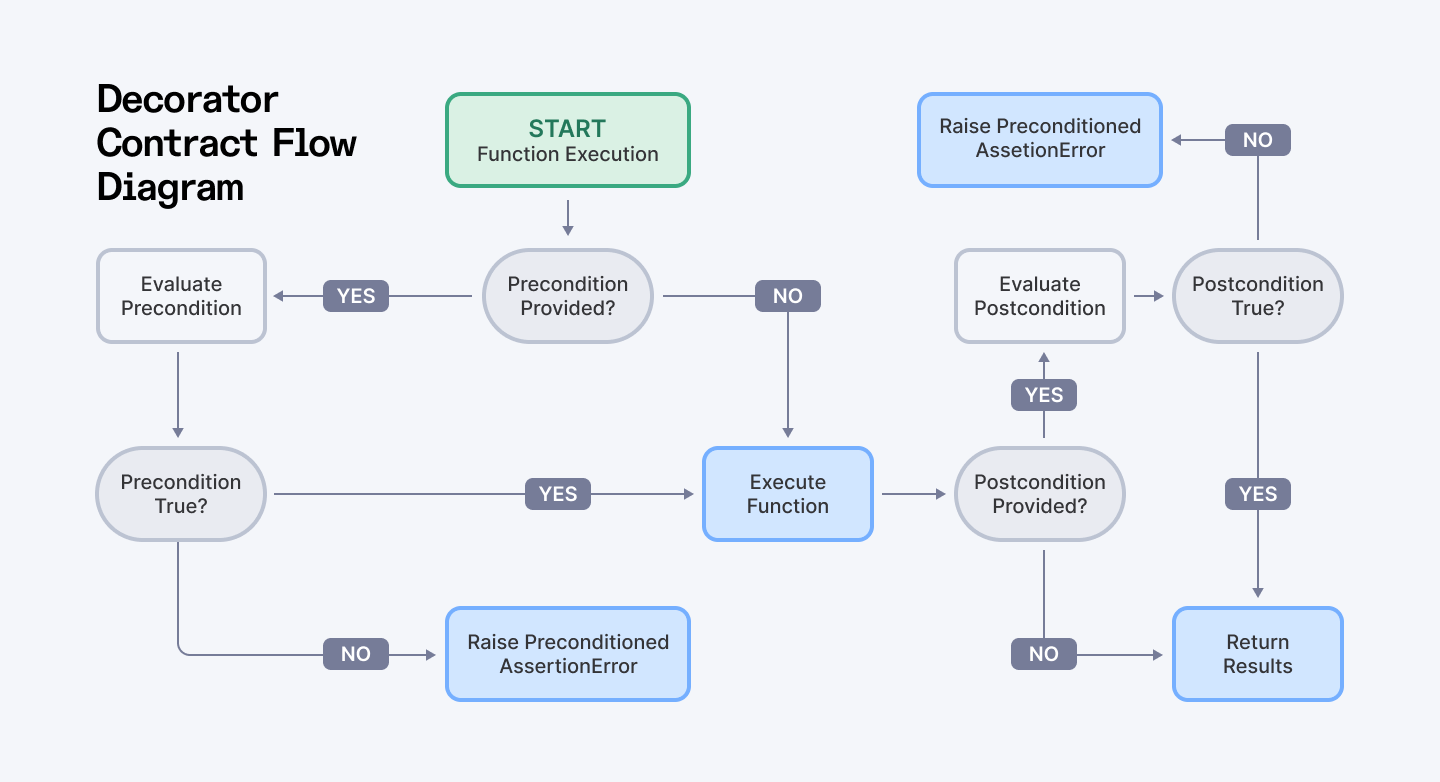
This approach is particularly valuable in larger codebases where functions may be called from many different places. By centralizing validation logic in contracts, we reduce code duplication and make it easier to maintain consistent validation rules.
Real-World Application: Bank Account Management
Let's examine a more comprehensive real-world example using the contract system:
class BankAccount:
    def __init__(self, owner, initial_balance=0):
        self.owner = owner
        self.balance = initial_balance
        self._transaction_log = []
        if initial_balance > 0:
            self._transaction_log.append(("initial", initial_balance))

    def invariant(self):
        """Verify the account state is valid"""
        # Balance should never be negative
        if self.balance < 0:
            return False

        # Balance should match sum of transactions
        expected_balance = sum(amount for _, amount in self._transaction_log)
        return self.balance == expected_balance

    @contract(
        pre=lambda self, amount: amount > 0,
        post=lambda result: result is True,
        invariant=lambda self: self.invariant()
    )
    def deposit(self, amount):
        """Deposit money into the account"""
        self.balance += amount
        self._transaction_log.append(("deposit", amount))
        return True

    @contract(
        pre=lambda self, amount: 0 < amount <= self.balance,
        post=lambda result: result is True,
        invariant=lambda self: self.invariant()
    )
    def withdraw(self, amount):
        """Withdraw money from the account"""
        self.balance -= amount
        self._transaction_log.append(("withdraw", -amount))
        return True

# Example usage
try:
    # Create a new account
    account = BankAccount("John Doe", 1000)

    # Perform transactions
    account.deposit(500)
    account.withdraw(200)
    print(f"Final balance: ${account.balance}")

    # Uncomment to see precondition failure (withdrawal > balance)
    # account.withdraw(2000)

except AssertionError as e:
    logging.error(f"Account operation failed: {e}")
Explanation
This example implements a BankAccount class with contract-enforced methods. The class maintains an invariant that the account balance must always be non-negative and must match the sum of all transactions.
Both the deposit and withdraw methods have specific preconditions:
- Deposits must be positive amounts
- Withdrawals must be positive amounts and cannot exceed the current balance
The contract decorator checks the invariant before and after each method call, ensuring the account remains in a valid state. This demonstrates how assertions can be used to implement robust business logic that maintains data integrity throughout an object's lifecycle.
Best Practices for Using Assertions
1. Development and Testing Only
Keep assertions for development and testing. They're disabled with Python's -O (optimize) flag, so don't rely on them for production error handling, which removes all assert statements.
2. Write Clear and Descriptive Messages
Every assertion should include a detailed message that explains what invariant was violated. Something like "Expected positive value" is okay, but "Customer age must be positive, got -5" is much more helpful when you're debugging at 2 AM.
3. Avoid Side Effects
Never put side effects in assertions. Take it from us or learn this the hard way - they should check conditions without changing program state.
4. Informative Messages
Write clear, concise messages that explain why the assertion failed. This practice helps to debug and maintain the code.
5. Not for User Input Validation
Don't use assertions for validating user input or API responses. Instead, you can handle such cases with proper error handling mechanisms (e.g., raising exceptions) to ensure the code remains robust.
6. Integrate with Unit Testing
Test framework (pytest) works great with assertions, since they let you validate function behavior across a range of inputs. Unit tests using assertions ensure that every function behaves as intended under various conditions.
7. Combine with Type Hints for Clarity
Since Python 3.5, type hints have been available to improve code clarity and enable static type checking. Using type hints in conjunction with runtime assertions creates a dual-layered safety net, one that catches errors both during development and in production testing.
8. Monitor Performance in High-Load Systems
Although assertions are lightweight, in high-performance code, you can profile occasionally to make sure assertions aren't impacting speed, especially in critical paths.
For further insights, check out the Python Assert Statement Documentation and the Python Exceptions Documentation.
Use Cases and Applications
- Enforcing Invariants in Complex Algorithms: During complex algorithm development, assertions can help verify your assumptions during computation or recursive calls, helping to isolate subtle bugs.
- Implementing Design by Contract: If you are an experienced developer, you can implement contract-based design patterns, with rigorous preconditions and postconditions, using custom decorators to ensure that modules interact correctly.
- Debugging in CI/CD Pipelines: Integrate assertions into your automated testing suites to catch errors early, speeding up debugging cycles in continuous integration workflows.
- Self-Documenting Code: Assertions serve as in-code documentation, making the codebase easier to understand and maintain over time (specially helpful for training new team members on code's requirements).
Conclusion
Python assertions can be a game-changer for your coding workflow. They're like having a second pair of eyes watching your code as it runs, catching mistakes before they cause real problems. Our in-house developers have found that they work best as internal guardrails rather than user-facing validation.
When developers first start using assertions, they make the mistake of putting them everywhere. Here’s how you avoid this blunder: keep them for internal logic checks, avoid any side effects, write clear error messages, and never use them for validating user input.
The cool part is when you start using more advanced techniques. In this article, we’ve experimented with contract-based programming using decorators, and it's completely changed the code’s structure as you can see! Everything becomes more self-explanatory and robust.
Remember though, assertions are mainly development tools. They work best as part of a bigger quality strategy alongside your unit tests, code reviews, and static analysis tools.
For Developers:
Grow your Python career with top global companies. Index.dev connects you with long-term, high-paying remote jobs that match your skills. Skip job hunting, get paid on time, every time, with full career support.
For Companies:
Looking for Python developers who understand error handling best practices? Hire pre-vetted developers fast. Index.dev delivers elite talent in 48 hours, ready to integrate into your team. Scale your team quickly with zero recruitment overhead.


