
Python is everywhere these days.
You can build a simple script, scrape a website, train a model, automate a task, maybe even spin up a Flask app in a weekend. And that’s great.
But here’s the catch: knowing Python basics isn’t the same as knowing Python’s core. The deeper stuff, the kind of stuff that makes you pause, scratch your head, or question everything you thought you knew.
That’s also where most people get stuck.
If you’ve ever stared at some weird bug and thought, “Wait, why is this happening?”, or had an interviewer ask you a question that made your brain freeze, this one’s for you.
This guide dives into 7 key Python questions that will seriously test your Python skills. If you can confidently answer these questions, you’re not just good, you’re well on your way to becoming a Python pro.
Let’s get into it.
Ready to work on challenging projects? Join Index.dev and get matched with top global companies, fast. Remote, high-paying, and built for pros.
Q1: Can You Explain Python’s GIL (Global Interpreter Lock)?
Ah, the GIL. This one comes up in interviews, especially for backend or performance-heavy roles.
So what’s the GIL?
In simple terms, the GIL is a mutex (basically a lock) that prevents multiple threads from executing Python bytecodes at once.
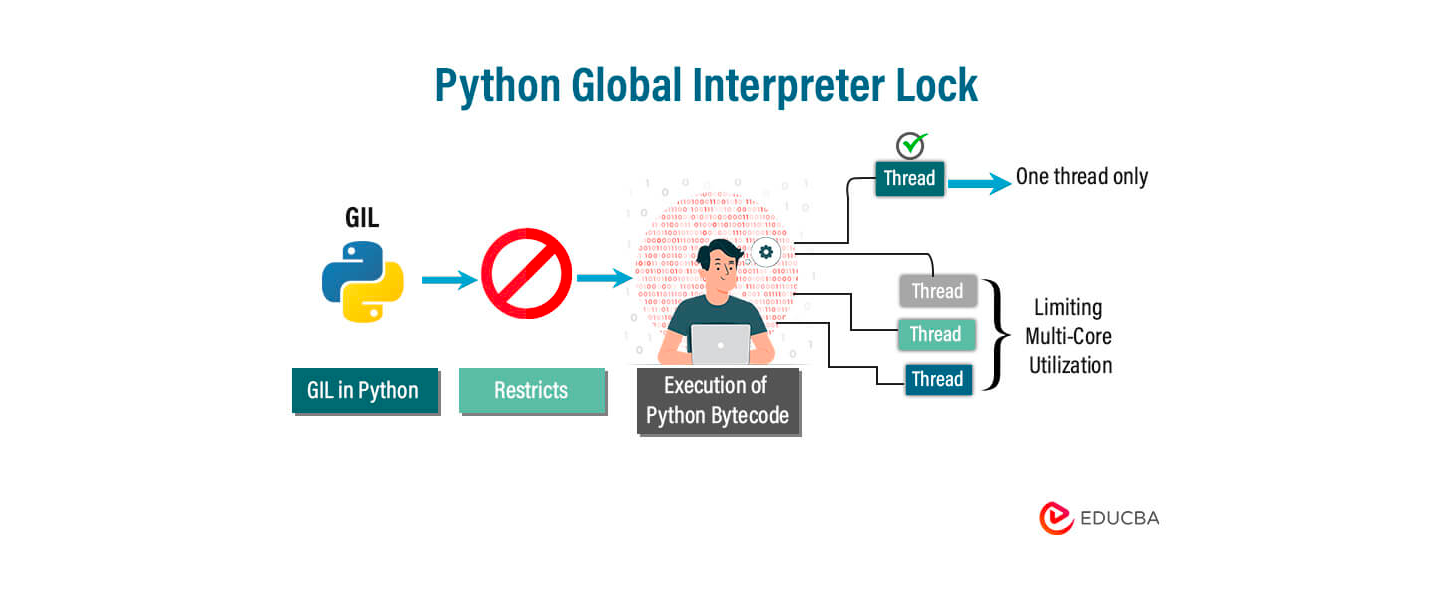
It’s basically a rule that says:
“Only one thread can run Python code at a time.”
Even if you have a computer with 8 cores, Python will still run just one thread at a time when it comes to Python code. That’s what the GIL does, it locks things so only one thread is doing work.
Now, this becomes a problem when you’re doing CPU-heavy stuff, like math or data crunching. You might think using threads will speed things up. But in Python, they won’t.
Here's why:
Code Example
import threading

def count():
    x = 0
    for _ in range(10**7):
        x += 1

thread1 = threading.Thread(target=count)
thread2 = threading.Thread(target=count)

thread1.start()
thread2.start()

thread1.join()
thread2.join()
You’d expect this to run twice as fast, right? But it doesn’t. It runs about the same as doing it one by one.
Why? Because of the GIL, only one thread is actually working at any moment.
So what do you do instead?
If you want real speed and parallelism for CPU work, use multiprocessing, not threading.
from multiprocessing import Process

def count():
    x = 0
    for _ in range(10**7):
        x += 1

p1 = Process(target=count)
p2 = Process(target=count)

p1.start()
p2.start()

p1.join()
p2.join()
This runs on two separate CPU cores, no GIL blocking, so it’s much faster.
Use Cases
It matters when you’re doing CPU-bound stuff like:
- Big math calculations
- Data processing
- Image or video processing
For that kind of work, threading in Python won’t help much because of the GIL. Use multiprocessing, or tools like NumPy that skip the GIL behind the scenes.
Q2: What Happens When You Modify a Mutable Default Argument?
This one’s a classic Python trap. And honestly, it messes with a lot of developers, even the experienced ones.
Let’s say you write a function like this:
def add_item(item, my_list=[]):
    my_list.append(item)
    return my_list

print(add_item('a'))  # ['a']
print(add_item('b'))  # ['a', 'b']  ← Wait, what?
print(add_item('c'))  # ['a', 'b', 'c']
At first, it looks fine. But then… weird stuff starts happening.
You keep adding items, and somehow they all end up in the same list, even across different calls.
So what’s going on?
The Gotcha
When you use something mutable (like a list or a dictionary) as a default argument, Python creates it once, when the function is defined, not every time you call it.
So that default list just… hangs around. It’s reused every time you call the function.
That’s why the list keeps growing.
It’s not resetting with each call, it’s the same list being reused.
Code Example (The Fix)
Here’s how you fix it, and it’s super simple:
def add_item(item, my_list=None):
    if my_list is None:
        my_list = []
    my_list.append(item)
    return my_list
Now every time you call it, it starts with a fresh list. No surprises.
Use Case
This bug shows up all the time in functions that collect data, like:
- Logging stuff
- Tracking form input
- Storing session values
- Building APIs
If you’re not careful, you’ll end up with shared state across different calls, and that leads to bugs that are really hard to track down.
So, just remember:
Never use a mutable default argument unless you really know what you're doing.
Use None and create the object inside the function. Easy win.
Q3: Can You Explain Python Decorators (In a Way That Makes Sense)?
You’ve probably seen weird lines like @something above functions and thought, “What does that even do?”
Here’s the simplest way to explain it:
A decorator is just a function that wraps another function to change or extend what it does, without touching its code.
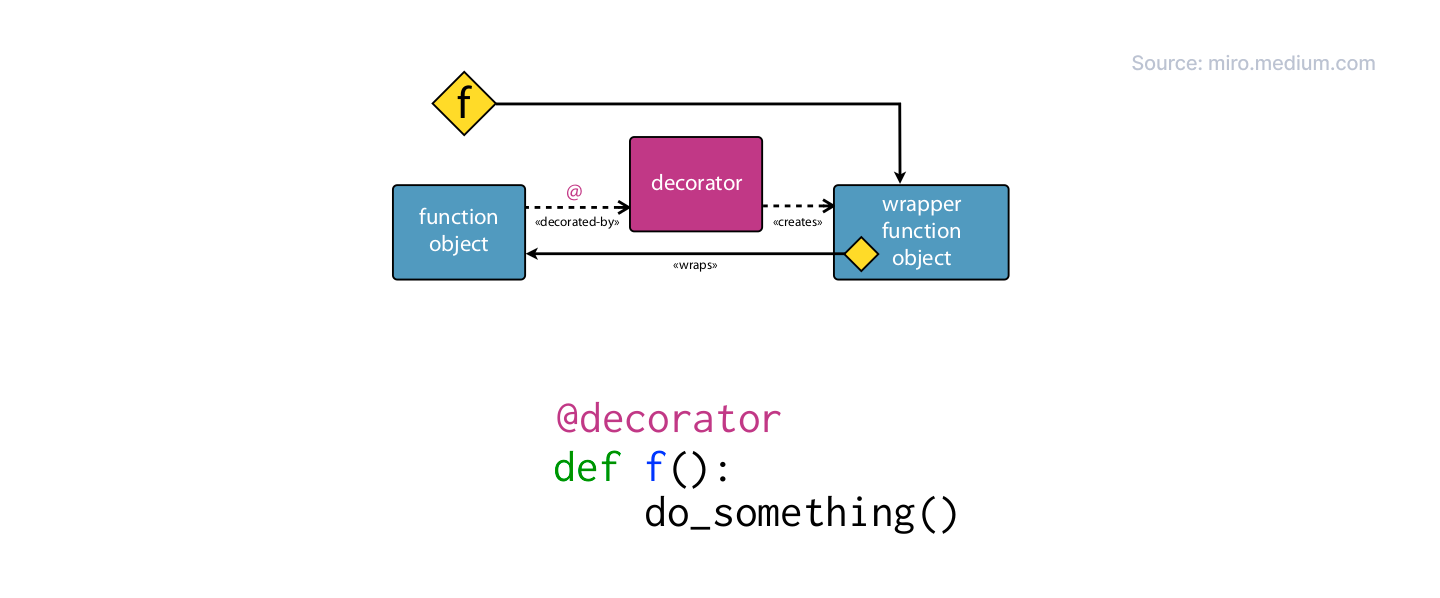
Let’s look at a quick example:
Code Example
def my_decorator(func):
    def wrapper():
        print("Before the function runs")
        func()
        print("After the function runs")
    return wrapper
Now, we use it like this:
@my_decorator
def say_hello():
    print("Hello!")

say_hello()
And this prints:
pgsql
Before the function runs
Hello!
After the function runs
The line @my_decorator is just a shortcut for writing this:
Why Should You Care?
Because decorators are everywhere in real-world Python. Here are just a few places you’ve probably seen or used them:
- @app.route('/') in Flask or FastAPI → for routing
- @login_required → for authentication
- @lru_cache → to speed things up with caching
- @timer, @log, @retry → for performance, logging, retries, etc.
They’re super useful when you want to add behavior to functions, like logging, timing, checking permissions, without rewriting the actual function.
Use Case
Let’s say you want to track how long your function takes to run.
You could do this:
import time

def timer(func):
    def wrapper():
        start = time.time()
        func()
        end = time.time()
        print(f"Function took {end - start:.2f} seconds")
    return wrapper

@timer
def slow_function():
    time.sleep(2)
    print("Done!")

slow_function()
Output:
Done!
Function took 2.00 seconds
Now you can reuse @timer on any function without touching its logic.
Q4: Can You Explain How Python's Memory Management Works?
Alright, memory management sounds scary, but Python actually makes it pretty painless.
You don’t have to manually allocate or free memory like in C or C++. Python handles most of it for you.
But here’s the key to understanding what’s going on under the hood:
Python uses reference counting and a garbage collector to manage memory.
Let’s break that down:
What’s Reference Counting?
Every time you create an object in Python, it keeps track of how many things are pointing to it. This is called the reference count.
If no one’s using the object anymore, meaning the count drops to zero, Python deletes it and frees the memory.
Here’s an example:
import sys

my_list = [1, 2, 3]
print(sys.getrefcount(my_list))  # Output: 2 → one from 'my_list', one from getrefcount()

another_ref = my_list
print(sys.getrefcount(my_list))  # Output: 3 → now two variables point to it

del another_ref
print(sys.getrefcount(my_list))  # Output: 2 → back to one reference
So, when nothing is pointing to an object anymore, Python cleans it up.
What About Circular References?
Now here’s where it gets tricky.
What if two objects are pointing to each other? Even if nothing else is referencing them, their count never drops to zero, they’re stuck.
That’s called a circular reference.
Example:
class Node:
    def __init__(self, value):
        self.value = value
        self.ref = None

node1 = Node(1)
node2 = Node(2)

node1.ref = node2
node2.ref = node1  # Uh-oh — circular reference!

del node1, node2  # But... the memory isn't freed immediately
Even though we deleted both, they’re still stuck in memory… pointing to each other. Reference counting alone can’t fix this.
That’s where Python’s garbage collector comes in.
Python has a built-in cycle detector that runs in the background.
It checks for these kinds of loops (like the one above), and when it finds them, it cleans them up.
You don’t usually have to worry about this. But it’s good to know what's happening behind the curtain.
Use Case
You don’t need to manage memory manually, but if you’re:
- Working with huge data structures
- Seeing memory usage spike for no reason
- Creating lots of temporary objects
- Or writing long-running apps like servers or APIs
…it helps to know how Python cleans things up, especially to avoid memory leaks from circular references or holding onto data too long.
Tip: del can remove variables, but it won’t always free the memory instantly. Python does that when it’s safe.
Q5: What’s the Difference Between List and Generator Comprehensions?
This is super useful once you get it.
Both list comprehensions and generator comprehensions look pretty similar, but there’s one key difference: memory efficiency.
You’ve probably seen this before:
# List comprehension
lst = [x**2 for x in range(10)]

# Generator comprehension
gen = (x**2 for x in range(10))
They look almost the same, right?
But here’s the key difference:
- A list comprehension builds the whole list in memory.
- A generator gives you one item at a time.
So when you do this:
print(lst)
# Output: [0, 1, 4, 9, 16, 25, 36, 49, 64, 81]

print(gen)
# Output: <generator object ...>  ← not the values!
You only get the actual values from gen when you loop over it:
for num in gen:
    print(num)
Why Does This Matter?
Because generators don’t store everything in memory. They’re lazy, and that’s a good thing when you’re dealing with:
- Huge files
- Streams of data
- Long computations
Anything where you don’t need everything all at once.
Use Case
Let’s say you’re reading a massive log file line by line.
You don't want to load the whole file into memory, that could crash your app.
So instead of this:
lines = [line for line in open('big_file.txt')]You do this:
lines = (line for line in open('big_file.txt'))Now your program reads one line at a time. It’s fast, clean, and won’t eat up your RAM.
Use list comprehensions when the dataset is small or you need all the values right now.
Use generator comprehensions when the data is big and you want to save memory.
Q6: What’s the Purpose of args and kwargs in Python?
If you've ever written functions, you’ve seen *args and **kwargs. But do you really understand them?
- *args lets your function take any number of positional arguments.
- **kwargs lets it take any number of keyword arguments.
That’s it.
Let’s see it in action:
Code Example
def my_func(*args, **kwargs):
    print("Arguments:", args)
    print("Keyword Arguments:", kwargs)

my_func(1, 2, 3, name="John", age=30)
Output:
Arguments: (1, 2, 3)
Keyword Arguments: {'name': 'John', 'age': 30}
What’s happening here ?
- *args takes all the extra positional arguments (1, 2, 3) and puts them in a tuple.
- **kwargs takes all the extra keyword arguments (name=John, age=30) and puts them in a dictionary.
You don’t have to know how many arguments are coming, Python handles it for you.
Use Cases
Use *args and **kwargs when you're writing functions that need to handle flexible inputs, like when you’re building APIs or creating wrappers around existing code where you don’t know exactly how many arguments might be passed.
Let’s say you’re:
- Writing a function that wraps another one (like a decorator)
- Building an API that accepts lots of optional parameters
- Creating utility functions that should work in many different situations
You don’t want to hard-code every possible argument.
That’s where *args and **kwargs shine.
Example (wrapping another function without breaking it):
def logger(func):
    def wrapper(*args, **kwargs):
        print(f"Calling {func.__name__} with", args, kwargs)
        return func(*args, **kwargs)
    return wrapper
This will work with any function, no matter what arguments it takes.
Use *args when you want a function to accept any number of positional args.
Use **kwargs when you want it to handle any number of keyword args.
Use both when you want maximum flexibility.
Q7: Explain Metaclasses in Python and When They are Useful.
Okay. Deep breath. This one’s a brain-stretcher. You already know that classes create objects.
Well, guess what?
Metaclasses create classes.
That’s it. Seriously. Let’s break it down:
- You write a class to make objects.
- Python uses a metaclass to make your class.
- By default, that metaclass is just type.
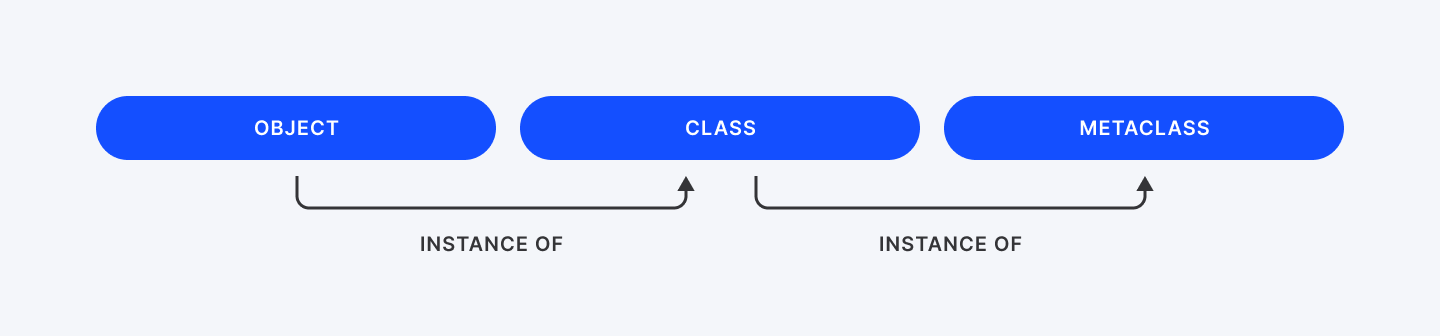
So yeah, in Python, even classes are objects, and metaclasses are the things that build those class objects.
If classes are blueprints for objects, then metaclasses are blueprints for classes.
You usually don’t need to mess with metaclasses. But when you do, they’re powerful.
Code Example
Here’s a pointless example just to show how metaclasses work. Let’s create one that automatically converts all method names to UPPERCASE.
class UpperMethodMetaclass(type):
    def __new__(mcs, name, bases, attrs):
        new_attrs = {}
        for attr_name, attr_value in attrs.items():
            if callable(attr_value) and not attr_name.startswith('__'):
                new_attrs[attr_name.upper()] = attr_value
            else:
                new_attrs[attr_name] = attr_value
        return super().__new__(mcs, name, bases, new_attrs)

class MyClass(metaclass=UpperMethodMetaclass):
    def my_method(self):
        return "Hello from my_method!"

    def another_one(self):
        return "Another one bites the dust!"

obj = MyClass()
print(obj.MY_METHOD())     # Works
print(obj.ANOTHER_ONE())   # Works
Try calling obj.my_method()? It’ll throw an error. That method name no longer exists.
What’s going on here?
- We define UpperMethodMetaclass, which inherits from type.
- We override the __new__ method. This gets called when the class (like MyClass) is being created.
- Inside __new__, we loop through all the methods and rename them to uppercase.
- Then we hand it off to the normal type to build the class using our modified attributes.
So when Python builds MyClass, it uses our metaclass to tweak the class before it's even born.
Use Cases
Metaclasses power some of the most powerful Python frameworks and tools:
- API Validation & ORM:
- Django's model classes use metaclasses to auto-generate database tables from your code.
- Auto-Registering Plugins:
- Want every class that inherits from a base to automatically register itself? Metaclass.
- Enforcing Rules in Subclasses:
- Abstract Base Classes (ABCs) use metaclasses to make sure subclasses implement certain methods.
- Custom DSLs and Clean APIs:
- Libraries can transform class definitions into something much smarter than plain old Python objects.
Metaclasses are like factories for classes.
You don’t need them every day, but when you do, they’re insanely powerful.
They let you hook into class creation and change behavior at the class level, not just object level.
Think you’re a senior Python dev? Prove it with these 15 concepts.
The Bottom Line
Interviewers at companies like Atlassian, Amazon, or Dropbox love to throw these at you, not to trick you, but to see how well you can write code that works, scales, handles edge cases and doesn’t crash when things get bad.
Here’s where these concepts pop up:
- GIL & threading?
- You’ll get that if you're applying for backend, DevOps, or any performance-heavy job.
- Deep vs shallow copy?
- That shows up when you’re manipulating data structures or working with APIs and you don’t want bugs hiding in shared references.
- *args and **kwargs?
- That’s your bread and butter if you’re building frameworks, writing decorators, or designing clean, reusable functions.
- Generators?
- Think big data, file streams, APIs that return lots of data, this is about writing efficient code that doesn’t eat all your RAM.
You’ve got to know this. Pick one concept and explain it to someone who doesn't code. If they get it, you've mastered it. Don't just memorize these answers. Understand the why behind them. That's what separates developers who get hired from those who get passed over.
Ready to put your Python skills to work? Join Index.dev's talent network and get matched with global companies that value deep technical knowledge.


