
Python is everywhere right now. It’s super popular because it’s easy to pick up, has a clean syntax, and a huge community ready to help you out.
You can build almost anything with it. Build backends for web apps. Create AI and machine learning models. Crunch and visualize data. Run scientific computations and simulations. Automate boring stuff. Make games (yes, seriously).
The thing is that lots of folks learn the basics (loops, functions, classes) and stop there. That’s cool for small stuff, but if you want to be a senior Python developer, you’ve got to dig deeper. Knowing how to write a for loop doesn’t make you a senior developer.
Knowing how to write production-ready, efficient, scalable Python using functions, decorators and closures: that’s what gets you hired and trusted.
At Index.dev, we work with companies who need senior Python developers. That means our engineers are tested, vetted, and trusted on these deeper concepts.
I’ve organized these concepts in a way that’s easy to follow. Each one comes with a quick heads-up on what you should know first (Prerequisites), what you can explore next (Related Concepts), and code examples you can try yourself.
Let's go!
Ready to go beyond the basics? Join Index.dev to work on real-world Python projects with top global companies.
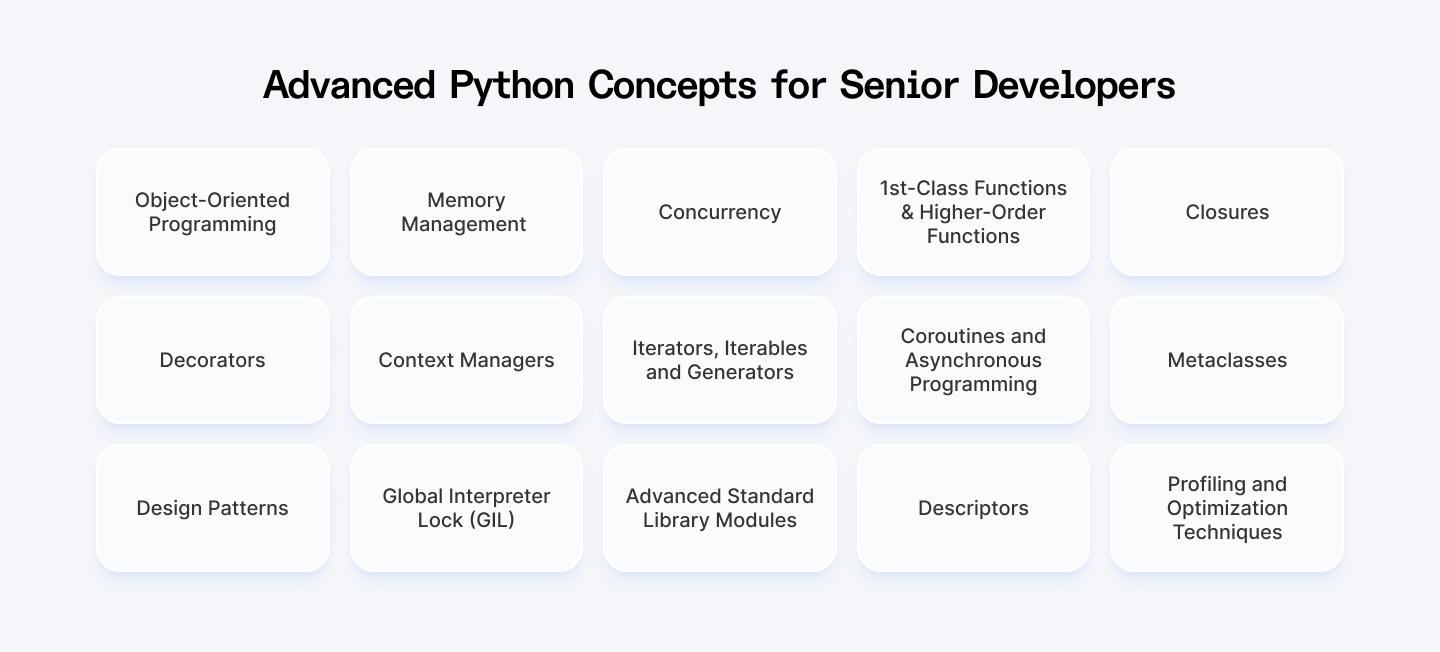
1. Object-Oriented Programming (OOP)
- Prerequisites: Basic Python syntax, functions
- Related concepts: Classes, inheritance, polymorphism, encapsulation
Alright, let’s start with the classic — OOP. If you only think OOP is about making classes and objects… you’re missing the point.
OOP is about organizing your code around real-world things. It’s about modeling behavior and structure so your code is easier to build, extend, and understand. It’s what makes large apps sane to work with.
Even though Python isn’t strict about OOP like Java, it supports it fully — and you’ll use it a lot in production code.
Code Example:
Let’s say you’re building a simple game. Here’s OOP in action:
class Player:
    def __init__(self, name, health):
        self.name = name
        self.health = health

    def attack(self):
        print(f"{self.name} attacks with power!")

# Creating objects
p1 = Player("Knight", 100)
p1.attack()
OOP lets you:
- Reuse code (inheritance)
- Hide complexity (encapsulation)
- Change behavior without breaking stuff (polymorphism)
You’ll need it in literally every serious project.
2. Memory Management
- Prerequisites: Basic understanding of variables and object creation
- Related concepts: Garbage collection, reference counting, weak references, sys.getrefcount()
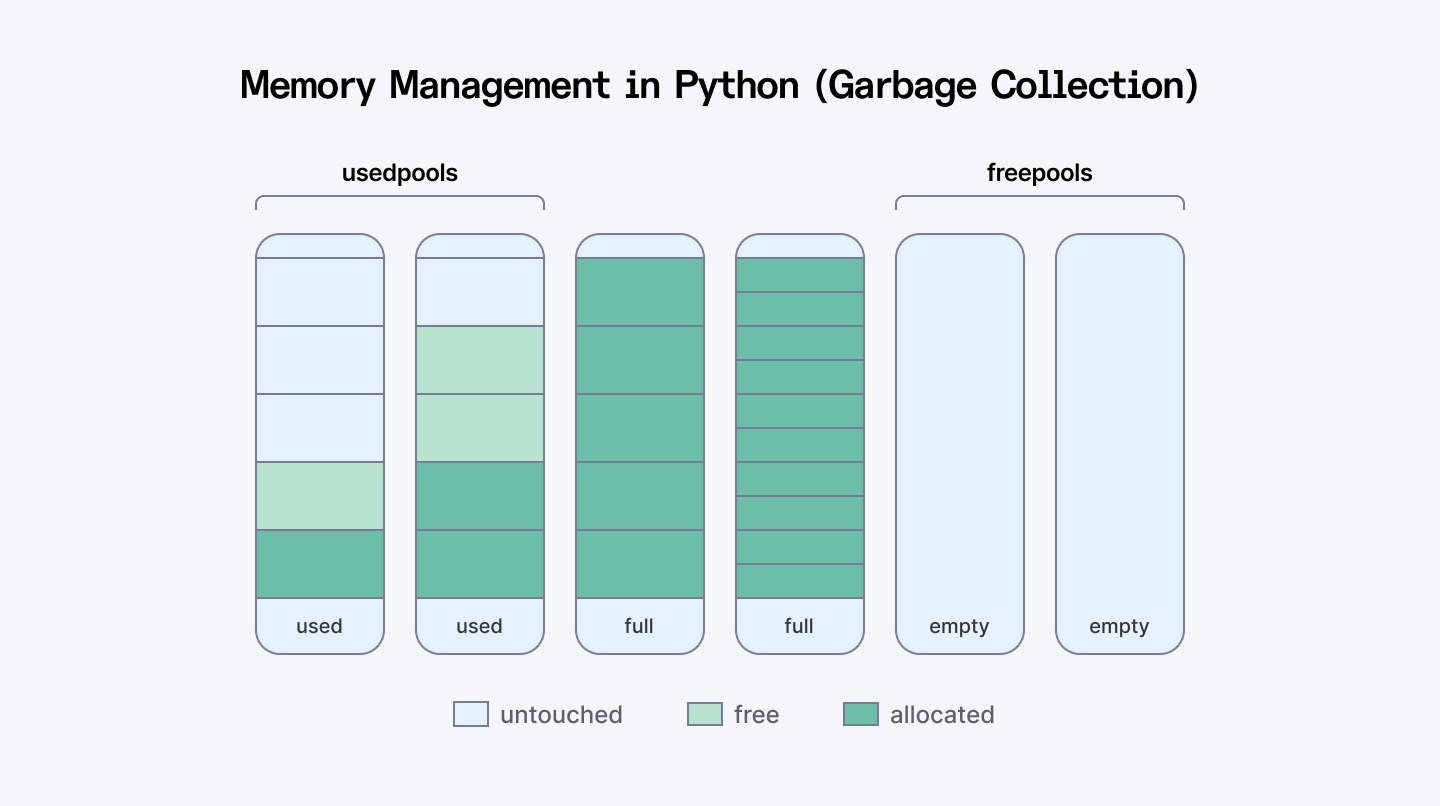
As a high-level language, Python abstracts away many of the details of memory management. But as you grow, understanding what happens "under the hood" becomes critical, especially when debugging memory issues or optimizing performance.
Key Concepts
1. Memory Allocation
Python manages memory using a private heap where all objects and data structures are stored.
- Static memory (stack) is used for fixed-size data like function calls.
- Dynamic memory (heap) is used for variable-sized objects created at runtime.
2. Memory Pools
Python uses a pool allocator for small objects to improve performance and reduce fragmentation. If no suitable block is found in the pool, it requests memory from the OS.
3. Reference Counting & Garbage Collection
- Reference Counting: Each object keeps track of how many references point to it. When the count hits zero, it’s deallocated.
- Garbage Collection (GC): Python also has a cyclic GC that detects and removes unreachable objects involved in circular references.
4. Generational Garbage Collection
Objects are grouped into:
- Young Generation: Recently created objects
- Old Generation: Objects that survive multiple GC passes
This generational system allows Python to optimize GC by focusing on short-lived objects first.
Code Example
The key thing to remember is that Python uses reference counting. When an object has zero references to it, Python automatically frees that memory.
import sys

# Create a list and check its reference count
my_list = [1, 2, 3]
print(f"References to my_list: {sys.getrefcount(my_list) - 1}")  # Subtract 1 because getrefcount creates a temporary reference

# Create another reference to the same list
another_reference = my_list
print(f"References now: {sys.getrefcount(my_list) - 1}")

# Remove the original reference
del my_list
print(f"References after del: {sys.getrefcount(another_reference) - 1}")

# After this code block, when another_reference goes out of scope,
# the list will be garbage collected

# Let's look at a memory leak example with circular references
def create_cycle():
    x = {}
    y = {}
    x['y'] = y  # x references y
    y['x'] = x  # y references x
    return "Cycle created"

# Without garbage collection, this would leak memory
# But Python's GC catches these cycles
Memory issues usually come from holding onto data longer than needed. A common mistake is appending inside loops without clearing:
import tracemalloc

# Start tracking memory
tracemalloc.start()

# Bad practice - keeps growing the list
def process_data_badly(items):
    results = []
    for item in items:
        # Process the item
        processed = item * 2
        # Append to results - this list keeps growing
        results.append(processed)
    return results

# Better practice - use generator
def process_data_well(items):
    for item in items:
        # Process and yield immediately
        yield item * 2

# Compare memory usage
big_list = list(range(1_000_000))

# Snapshot before
snapshot1 = tracemalloc.take_snapshot()

# Run the bad function
result1 = process_data_badly(big_list)

# Snapshot after bad function
snapshot2 = tracemalloc.take_snapshot()

# Run the better function
result2 = list(process_data_well(big_list))

# Final snapshot
snapshot3 = tracemalloc.take_snapshot()

# Compare and display difference
print("Memory increase with bad approach:")
for stat in snapshot2.compare_to(snapshot1, 'lineno')[:3]:
    print(stat)

print("\nMemory increase with better approach:")
for stat in snapshot3.compare_to(snapshot2, 'lineno')[:3]:
    print(stat)

# Stop tracking
tracemalloc.stop()
3. Concurrency
- Prerequisites: Basic understanding of program execution flow
- Related concepts: Threading, multiprocessing, asynchronous programming, GIL, race conditions, deadlocks
If your application needs to run multiple tasks simultaneously, whether for performance or responsiveness, concurrency becomes essential.
Key Approaches
There are three major approaches to concurrency in Python:
Threading
- Allows concurrent execution using threads within the same process.
- Due to the Global Interpreter Lock (GIL), only one thread executes Python code at a time.
- Best for I/O-bound tasks (e.g., file operations, network requests).
Tools: threading, concurrent.futures.ThreadPoolExecutor
Multiprocessing
- Runs separate processes, each with its own Python interpreter and memory space.
- Bypasses the GIL, enabling true parallelism—great for CPU-bound tasks.
Tools: multiprocessing, concurrent.futures.ProcessPoolExecutor
Asynchronous Programming (asyncio)
- Runs tasks asynchronously on a single thread using non-blocking I/O.
- Ideal for high-latency operations like making multiple network requests.
- Key concepts: async / await, event loops, task scheduling
Tools: asyncio, aiohttp, asyncpg
Libraries & Frameworks
- concurrent.futures – Abstracts threading and multiprocessing
- asyncio – Built-in async framework
- gevent, Twisted – For more complex async scenarios
Common Challenges
- Dealing with GIL limitations
- Avoiding deadlocks and race conditions
- Debugging multi-threaded or async code
- Choosing the right concurrency model based on the task type (CPU vs I/O bound)
Code Example
Let's compare all three approaches by downloading multiple websites:
import time
import requests
import threading
import multiprocessing
import asyncio
import aiohttp

URLS = [
    "https://www.python.org",
    "https://www.github.com",
    "https://www.stackoverflow.com",
    "https://www.wikipedia.org",
    "https://www.reddit.com"
] * 2  # Duplicate to have 10 requests

# 1. Sequential approach (no concurrency)
def download_sequential(urls):
    start = time.time()

    results = []
    for url in urls:
        print(f"Downloading {url}...")
        response = requests.get(url)
        results.append(len(response.content))

    end = time.time()
    print(f"Sequential download took {end - start:.2f} seconds")
    return results

# 2. Threading approach
def download_threaded(urls):
    start = time.time()

    results = [None] * len(urls)

    def download(i, url):
        print(f"Thread downloading {url}...")
        response = requests.get(url)
        results[i] = len(response.content)

    threads = []
    for i, url in enumerate(urls):
        thread = threading.Thread(target=download, args=(i, url))
        threads.append(thread)
        thread.start()

    for thread in threads:
        thread.join()

    end = time.time()
    print(f"Threaded download took {end - start:.2f} seconds")
    return results

# 3. Multiprocessing approach
def download_one(url):
    print(f"Process downloading {url}...")
    response = requests.get(url)
    return len(response.content)

def download_multiprocessing(urls):
    start = time.time()

    with multiprocessing.Pool(processes=min(len(urls), 5)) as pool:
        results = pool.map(download_one, urls)

    end = time.time()
    print(f"Multiprocessing download took {end - start:.2f} seconds")
    return results

# 4. Asyncio approach
async def download_async(urls):
    start = time.time()

    async def fetch(url):
        print(f"Async downloading {url}...")
        async with aiohttp.ClientSession() as session:
            async with session.get(url) as response:
                content = await response.read()
                return len(content)

    tasks = [fetch(url) for url in urls]
    results = await asyncio.gather(*tasks)

    end = time.time()
    print(f"Async download took {end - start:.2f} seconds")
    return results

# Let's compare them all
print("Starting sequential download...")
sequential_results = download_sequential(URLS)

print("\nStarting threaded download...")
threaded_results = download_threaded(URLS)

print("\nStarting multiprocessing download...")
mp_results = download_multiprocessing(URLS)

# For asyncio, we need to run the event loop
print("\nStarting async download...")
loop = asyncio.get_event_loop()
async_results = loop.run_until_complete(download_async(URLS))
Quick summary:
- Use threads for I/O-bound tasks (network, file operations)
- Use processes for CPU-bound tasks (calculations, data processing)
- Use asyncio for highly concurrent I/O (handling lots of simultaneous connections)
Also Check Out: Concurrency vs Parallelism | When to Use Each
4. First-Class Functions and Higher-Order Functions
- Prerequisites: Know how to define and use functions in Python
- Related concepts: Lambda functions, functional programming
In Python, functions are treated like any other object. You can pass them around, store them in variables, and return them from other functions. That’s what first-class functions means.
Higher-order functions either take functions as arguments or return functions as results (or both).
This is where Python starts feeling really powerful.
Code Example:
def shout(text):
    return text.upper()

def whisper(text):
    return text.lower()

def speak(style_func, message):
    return style_func(message)

print(speak(shout, "Hey there!"))   # Output: HEY THERE!
print(speak(whisper, "Hey there!")) # Output: hey there!
Why this matters:
- You can write cleaner, reusable, abstract code
- You can plug logic into other logic
- You unlock tools like map(), filter(), and decorators
5. Closures
- Prerequisites: Higher-order functions, viriable scope
- Related concepts: Lexical scoping, nonlocal keyword
Closures are one of those things that look weird until you see why they're useful. Simply put, a closure is when a function "remembers" variables from its parent scope, even after that parent function has finished.
A closure happens when:
- You have a function inside another function.
- The inner function uses something from the outer function's "space."
- The outer function gives you back the inner function.
Code Example
A practical use case: creating a counter without global variables
def create_counter(start=0):
    count = start

    def increment(step=1):
        nonlocal count
        count += step
        return count

    def decrement(step=1):
        nonlocal count
        count -= step
        return count

    def get_count():
        return count

    # Return a dictionary of functions that all share the same "count" variable
    return {
        "increment": increment,
        "decrement": decrement,
        "get_count": get_count
    }

# Create a counter
counter = create_counter(10)

# Use it throughout your code
print(counter["get_count"]())  # 10
print(counter["increment"](5))  # 15
print(counter["decrement"](2))  # 13
print(counter["get_count"]())  # 13
Closures let you:
- Maintain state without global variables
- Write custom logic that's reusable
- Build decorators (you’ll see that next)
6. Decorators
- Prerequisites: Closures, higher-order functions
- Related concepts: Function decorators, class decorators, functools.wraps
Decorators are like superpowers for your functions. They let you modify or improve functions without changing their code. Once you get comfortable with them, you'll find yourself using them everywhere. Logging stuff, check permissions, modify outputs — literally anything.
If you're serious about Python, you need to understand:
- How to create decorators
- How to make decorators with arguments
- How to chain multiple decorators
- How to preserve function metadata with @wraps
Code Example
A practical decorator: retry logic for flaky operations
import time
from functools import wraps

def retry(attempts=3, delay=1):
    def decorator(func):
        @wraps(func)  # This preserves metadata about the original function
        def wrapper(*args, **kwargs):
            for attempt in range(1, attempts + 1):
                try:
                    return func(*args, **kwargs)
                except Exception as e:
                    if attempt == attempts:
                        raise
                    print(f"Attempt {attempt} failed: {e}")
                    print(f"Retrying in {delay} seconds...")
                    time.sleep(delay)
        return wrapper
    return decorator

# Using our decorator
@retry(attempts=3, delay=2)
def flaky_network_call(url):
    import random
    if random.random() < 0.7:  # 70% chance of failure
        raise ConnectionError("Network unavailable")
    return f"Data from {url}"

# Try it out
try:
    result = flaky_network_call("example.com/api")
    print(f"Success: {result}")
except ConnectionError:
    print("All attempts failed")
What decorators are great for:
- Logging
- Authentication
- Input validation
- Performance tracking
If you see @something above a function, you’re looking at a decorator.
7. Context Managers
- Prerequisites: Basic understanding of resource management, try/except/finally blocks
- Related concepts: with statement, __enter__ and __exit__ methods, contextlib.contextmanager decorator
Context managers are one of those Python features that make you go "wow" once you really get them. They're the magic behind the with statement.
Think of them as automatic resource handlers. They set things up when you need them and clean up when you're done — no matter what happens in between.
You can use context managers for more than files:
- Managing database connections
- Locking resources in multi-threaded code
- Temporarily changing directories
- Timing how long code takes to run
Code Example
Here’s a practical context manager for database connections:
import sqlite3
from contextlib import contextmanager

@contextmanager
def database_connection(db_path):
    # Setup phase - acquire resource
    print(f"Connecting to database at {db_path}")
    connection = sqlite3.connect(db_path)
    try:
        # Yield control back to the with block
        yield connection
    finally:
        # Cleanup phase - always runs, even if there was an error
        print("Closing database connection")
        connection.close()

# Using our context manager
with database_connection("example.db") as conn:
    # Create a cursor and execute queries
    cursor = conn.cursor()

    # Create a table
    cursor.execute('''
    CREATE TABLE IF NOT EXISTS users (
        id INTEGER PRIMARY KEY,
        name TEXT,
        email TEXT
    )
    ''')

    # Insert some data
    cursor.execute("INSERT INTO users (name, email) VALUES (?, ?)",
                  ("Alice", "alice@example.com"))

    # Commit changes
    conn.commit()

    # Query the data
    cursor.execute("SELECT * FROM users")
    print(cursor.fetchall())

# Connection is automatically closed when we exit the with block
You can also create class-based context managers. Here’s a code snippet for a timing context manager to measure code execution time:
import time

class Timer:
    def __init__(self, operation_name="Operation"):
        self.operation_name = operation_name

    def __enter__(self):
        self.start_time = time.time()
        print(f"Starting {self.operation_name}...")
        return self

    def __exit__(self, exc_type, exc_val, exc_tb):
        self.end_time = time.time()
        self.execution_time = self.end_time - self.start_time
        print(f"{self.operation_name} completed in {self.execution_time:.4f} seconds")

        # If we return True here, exceptions in the with block are suppressed
        # Return False (or None) to let exceptions propagate
        return False

# Using our context manager
with Timer("Data processing"):
    # Simulate some work
    total = 0
    for i in range(1_000_000):
        total += i
    print(f"Result: {total}")
Why use context managers?
- They handle setup and cleanup of resources for you, so nothing gets left open or leaked.
- They make sure resources are released even if errors happen, reducing bugs and crashes.
- The with statement makes your code shorter and easier to read.
8. Iterators, Iterables and Generators
- Prerequisites: Basic loops, functions
- Related concepts: yield statement, iter() and next() functions, itertools module
In Python, iterators and iterables are closely related concepts that underpin the way we loop over data.
- Iterables are objects that hold data you want to loop over (like lists, tuples, or custom containers).
- Iterators control the actual iteration process—fetching values one at a time while keeping track of the current state.
To be considered an iterator, an object must follow the iterator protocol, which requires two methods:
- __iter__() – Initializes and returns the iterator object.
- __next__() – Returns the next item in the sequence and raises StopIteration when the iteration is over.
Code Example:
Let's create a practical iterator for paginated API results:
class APIPageIterator:
    def __init__(self, base_url, page_size=10):
        self.base_url = base_url
        self.page_size = page_size
        self.current_page = 0
        self.total_pages = None
        self.current_data = []
        self.position = 0

    def __iter__(self):
        return self

    def __next__(self):
        # If we've gone through current page data, fetch next page
        if self.position >= len(self.current_data):
            self._fetch_next_page()

        # If there's no more data, we're done
        if not self.current_data:
            raise StopIteration

        # Return the next item
        item = self.current_data[self.position]
        self.position += 1
        return item

    def _fetch_next_page(self):
        # In real code, this would make an HTTP request
        # For this example, we'll simulate API results
        self.current_page += 1

        # Simulate end of results after page 3
        if self.current_page > 3:
            self.current_data = []
            return

        print(f"Fetching page {self.current_page} from API...")
        # Simulate data from API
        self.current_data = [f"Item {i}" for i in range(
            (self.current_page-1) * self.page_size,
            self.current_page * self.page_size
        )]
        self.position = 0

# Using our iterator - notice it only fetches pages when needed
results = APIPageIterator("https://api.example.com/data")
for i, item in enumerate(results):
    print(f"Processing: {item}")
    # Only process first 15 items to demonstrate pagination
    if i >= 14:
        break
Generators make creating iterators dead simple. Just use the yield keyword instead of return and you've got an iterator.
Here’s a Generator version of a paginated API fetcher:
def api_results(base_url, page_size=10, max_pages=None):
    page = 1

    while max_pages is None or page <= max_pages:
        print(f"Fetching page {page} from API...")
        # In real code, this would be an API request
        # Simulate data from API
        items = [f"Item {i}" for i in range(
            (page-1) * page_size,
            page * page_size
        )]

        # If no more results, stop iteration
        if not items:
            break

        # Yield each item individually
        for item in items:
            yield item

        page += 1

        # For demo purposes, stop after 3 pages
        if page > 3:
            break

# Using our generator - looks much cleaner!
for i, item in enumerate(api_results("https://api.example.com/data")):
    print(f"Processing: {item}")
    # Only process first 15 items
    if i >= 14:
        break
3 key reasons why you need Iterators, Iterables, and Generators in Python:
- Save memory: Handle big data without loading it all at once.
- Lazy work: Generate values only when needed, boosting speed.
- Simple code: Write easy, clean loops with yield instead of complex classes.
9. Coroutines and Asynchronous Programming
- Prerequisites: Generators, basic understanding of concurrency
- Related concepts: async/await syntax, event loops, asyncio module, non-blocking I/O
.png)
Async is all about not wasting time while waiting. Imagine you’re ordering coffee. In synchronous code, you wait at the counter until your drink is ready. Nobody else gets served. It’s a bottleneck.
In asynchronous code, you order, step aside, and let someone else go. When your coffee is ready, you get notified. Everyone wins.
This is the idea behind async / await in Python. It’s perfect for I/O-bound tasks like hitting APIs, reading from a database, or handling thousands of connections.
Code Example
A practical example of async IO for web scraping:
import asyncio
import aiohttp
import time

async def fetch_page(session, url):
    print(f"Starting fetch for: {url}")
    async with session.get(url) as response:
        # Wait for the response
        html = await response.text()
        print(f"Finished fetch for: {url}, got {len(html)} bytes")
        return len(html)

async def main():
    urls = [
        "https://python.org",
        "https://github.com",
        "https://stackoverflow.com",
        "https://news.ycombinator.com",
        "https://reddit.com"
    ]

    start = time.time()

    # Create a single session for all requests
    async with aiohttp.ClientSession() as session:
        # Create tasks for all URLs
        tasks = [fetch_page(session, url) for url in urls]

        # Wait for all tasks to complete
        results = await asyncio.gather(*tasks)

        print(f"Downloaded {sum(results)} bytes in {time.time() - start:.2f} seconds")

# Run the async function
asyncio.run(main())

# Compare with synchronous version using requests
import requests

def fetch_sync():
    urls = [
        "https://python.org",
        "https://github.com",
        "https://stackoverflow.com",
        "https://news.ycombinator.com",
        "https://reddit.com"
    ]

    start = time.time()
    total_bytes = 0

    for url in urls:
        print(f"Starting fetch for: {url}")
        response = requests.get(url)
        page_size = len(response.text)
        total_bytes += page_size
        print(f"Finished fetch for: {url}, got {page_size} bytes")

    print(f"Downloaded {total_bytes} bytes in {time.time() - start:.2f} seconds")

# Uncomment to run the synchronous version
# fetch_sync()
Key components of async in Python:
- Event Loop: The central manager that runs async code and handles I/O operations
- Coroutines: Functions defined with async def that can be paused and resumed
- Tasks: Wrappers around coroutines to track their execution
- await: The keyword that yields control back to the event loop while waiting
10. Metaclasses
- Prerequisites: Advanced OOP, class creation process
- Related concepts: type function, __new__ method, class customization, dynamic class creation
Metaclasses are Python’s way of letting you customize class creation itself. Think of classes as blueprints for objects. A metaclass is the blueprint for those blueprints. It controls how classes behave, before they even exist.
You don’t need metaclasses every day, but if you’re building a framework or decorator system, they’re pure power.
Code Example
Automatic property creation for database models:
class ModelMeta(type):
    def __new__(mcs, name, bases, attrs):
        # Add getters and setters for all fields
        fields = attrs.get('fields', [])

        for field in fields:
            # Create getter
            getter_name = f'get_{field}'
            if getter_name not in attrs:
                attrs[getter_name] = lambda self, field=field: getattr(self, f'_{field}')

            # Create setter
            setter_name = f'set_{field}'
            if setter_name not in attrs:
                attrs[setter_name] = lambda self, value, field=field: setattr(self, f'_{field}', value)

        # Call the original __new__ method
        return super().__new__(mcs, name, bases, attrs)

class Model(metaclass=ModelMeta):
    """Base class for database models"""
    fields = []

    def __init__(self, **kwargs):
        # Initialize all fields
        for field in self.fields:
            setattr(self, f'_{field}', kwargs.get(field))

# Create a model class
class User(Model):
    fields = ['id', 'name', 'email']

# Create a user instance
user = User(id=1, name='John', email='john@example.com')

# Use the auto-generated getters
print(user.get_name())  # John
print(user.get_email())  # john@example.com

# Use the auto-generated setters
user.set_name('Johnny')
print(user.get_name())  # Johnny
Another common use for metaclasses is creating singletons or registering classes:
class PluginRegistry(type):
    plugins = {}

    def __new__(mcs, name, bases, attrs):
        # Create the class
        cls = super().__new__(mcs, name, bases, attrs)

        # Register the class if it's not the base Plugin class
        if name != 'Plugin':
            plugin_type = attrs.get('plugin_type')
            if plugin_type:
                mcs.plugins[plugin_type] = cls
                print(f"Registered plugin: {name} for type: {plugin_type}")

        return cls

    @classmethod
    def get_plugin(mcs, plugin_type):
        return mcs.plugins.get(plugin_type)

class Plugin(metaclass=PluginRegistry):
    """Base class for plugins"""
    plugin_type = None

# Create some plugins
class TextPlugin(Plugin):
    plugin_type = 'text'

    def process(self, data):
        return f"Processed text: {data.upper()}"

class ImagePlugin(Plugin):
    plugin_type = 'image'

    def process(self, data):
        return f"Processed image: {data} with filters"

# Use the plugin registry
text_processor = PluginRegistry.get_plugin('text')()
print(text_processor.process("hello world"))  # Processed text: HELLO WORLD

image_processor = PluginRegistry.get_plugin('image')()
print(image_processor.process("sunset.jpg"))  # Processed image: sunset.jpg with filters
Why would you use them?
- Automatically register classes
- Modify or inject class methods
- Enforce coding patterns
11. Design Patterns
- Prerequisites: Solid understanding of OOP
- Related concepts: Singleton, Factory, Observer patterns, SOLID principles
Design patterns are basically reusable solutions to problems that pop up all the time when writing code. They’re not magic tricks. They’re just smart ways to structure your code.
But fair warning: not every pattern fits every situation — using the wrong one just creates a mess.
Here are a few design patterns worth learning and applying in Python:
- Singleton Pattern: Ensures a class has only one instance.
- Factory and Abstract Factory Patterns: Encapsulate object creation to promote loose coupling.
- Decorator Pattern: Dynamically adds behavior to objects without modifying them.
- Observer Pattern: Defines a one-to-many dependency so that when one object changes state, all its dependents are notified.
- Strategy Pattern: Enables selecting an algorithm’s behavior at runtime.
Understanding when and how to use these patterns helps you write cleaner, more extensible software.
Code Example
Singleton Pattern
Super useful for things like configuration managers or database connections.
pythonclass DatabaseConnection:
    _instance = None

    def __new__(cls):
        if cls._instance is None:
            cls._instance = super().__new__(cls)
            cls._instance.connection = "Connected to DB at 192.168.1.1"
        return cls._instance

# Both point to the same instance
db1 = DatabaseConnection()
db2 = DatabaseConnection()
print(db1 is db2)  # True
print(db1.connection)  # "Connected to DB at 192.168.1.1"
Factory Pattern
When you need to create objects but don't want to specify the exact class - just tell the factory what you want.
pythonclass AnimalFactory:
    def create_animal(self, animal_type):
        if animal_type == "cat":
            return Cat()
        elif animal_type == "dog":
            return Dog()
        else:
            raise ValueError(f"Unknown animal type: {animal_type}")

class Cat:
    def speak(self):
        return "Meow"

class Dog:
    def speak(self):
        return "Woof"

# Usage
factory = AnimalFactory()
my_pet = factory.create_animal("cat")
print(my_pet.speak())  # Meow
Decorator Pattern
Want to add functionality to objects without changing their code? Decorators let you wrap an object with new behaviors.
pythondef timing_decorator(func):
    def wrapper(*args, **kwargs):
        import time
        start = time.time()
        result = func(*args, **kwargs)
        end = time.time()
        print(f"{func.__name__} took {end - start:.5f} seconds to run")
        return result
    return wrapper

@timing_decorator
def slow_function():
    import time
    time.sleep(1)
    return "Done"

# The function is now automatically timed
slow_function()  # slow_function took 1.00123 seconds to run
12. Global Interpreter Lock (GIL)
- Prerequisites: Understanding of concurrency, basic knowledge of Python internals
- Related concepts: Thread-safe operations, GIL workarounds, multi-processing, C extensions
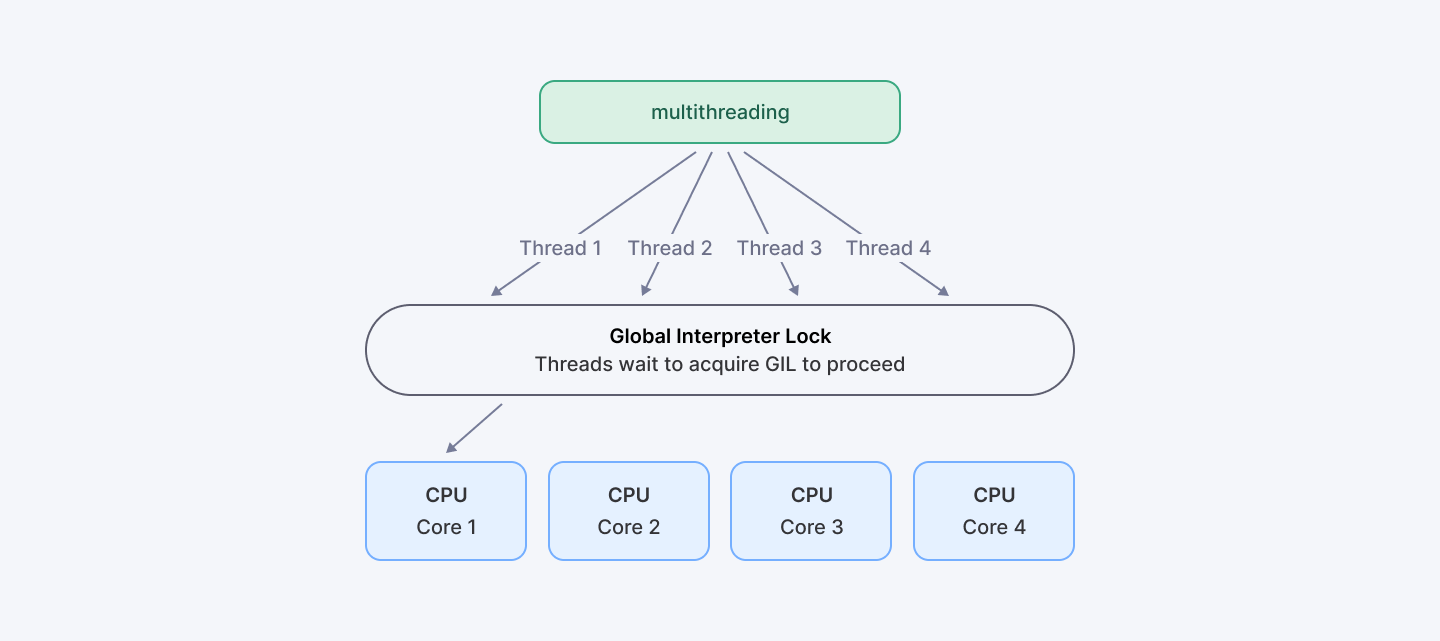
Let’s get this out of the way: Python isn’t great at true multithreading. And the reason is the Global Interpreter Lock (GIL).
The GIL is a lock that allows only one thread to run Python code at a time in CPython (the standard Python interpreter). Even if you have 8 CPU cores, only one thread can execute Python bytecode at once.
Sounds dumb? Well, it kinda is… but it’s also necessary.
Here’s why: Python's memory management isn’t thread-safe. So to avoid crashes and bugs from multiple threads messing with shared memory, Python just… locks it. One thread at a time. Safe, but slow for CPU-bound stuff.
So when does the GIL not hurt? If your program is mostly I/O-bound — reading files, hitting APIs, talking to databases — the GIL isn’t much of a problem. But for CPU-heavy tasks like crunching numbers or image processing? The GIL is your enemy.
Code Example
Demonstrating GIL limitations with CPU-bound tasks:
import threading
import time

def cpu_bound_task(n):
    # A simple CPU-intensive calculation
    count = 0
    for i in range(n):
        count += i
    return count

def run_in_threads(n_threads, n_calculations):
    threads = []

    start = time.time()

    # Create and start threads
    for _ in range(n_threads):
        t = threading.Thread(target=cpu_bound_task, args=(n_calculations,))
        threads.append(t)
        t.start()

    # Wait for all threads to complete
    for t in threads:
        t.join()

    end = time.time()
    return end - start

def run_sequentially(n_threads, n_calculations):
    start = time.time()

    # Run the same calculation sequentially
    for _ in range(n_threads):
        cpu_bound_task(n_calculations)

    end = time.time()
    return end - start

# Let's compare performance
n_threads = 4
n_calculations = 10_000_000

thread_time = run_in_threads(n_threads, n_calculations)
sequential_time = run_sequentially(n_threads, n_calculations)

print(f"Time with {n_threads} threads: {thread_time:.2f} seconds")
print(f"Sequential time: {sequential_time:.2f} seconds")
print(f"Speedup: {sequential_time / thread_time:.2f}x")
# You'll notice there's barely any speedup, maybe even slower with threads!
So how do you work around the GIL? You've got a few options:
- Use multiprocessing instead of threading for CPU-bound tasks
- Use asyncio for I/O-bound tasks (network, file operations)
- Use Cython or C extensions for performance-critical code
- Consider alternative Python implementations like PyPy or Jython
Same task using multiprocessing:
import multiprocessing

def run_in_processes(n_processes, n_calculations):
    processes = []

    start = time.time()

    # Create and start processes
    for _ in range(n_processes):
        p = multiprocessing.Process(target=cpu_bound_task, args=(n_calculations,))
        processes.append(p)
        p.start()

    # Wait for all processes to complete
    for p in processes:
        p.join()

    end = time.time()
    return end - start

# Now let's compare with multiprocessing
process_time = run_in_processes(n_threads, n_calculations)

print(f"Time with {n_threads} processes: {process_time:.2f} seconds")
print(f"Sequential time: {sequential_time:.2f} seconds")
print(f"Speedup: {sequential_time / process_time:.2f}x")
# With processes, you should see close to n_threads times speedup on a multi-core system
13. Advanced Standard Library Modules
- Prerequisites: Familiarity with Python’s standard library
- Related concepts: collections, functools, itertools modules
You don’t always need third-party packages. Python comes with tons of built-in functionality that most devs never use. These modules can save you hours of work.
Key Modules
Here are a few worth diving deeper into:
- collections – Provides specialized data types like defaultdict, deque, Counter, and OrderedDict.
- functools – Offers higher-order functions and decorators like lru_cache, partial, and reduce.
- itertools – Supplies fast, memory-efficient tools for working with iterators and building complex iteration logic.
By mastering these modules, you reduce the need to reinvent the wheel, write less boilerplate, and gain performance benefits from their optimized implementations.
Code Example
Collections Module
Need specialized containers? Collections has you covered.
pythonfrom collections import Counter, defaultdict, namedtuple

# Count elements in a list
colors = ["red", "blue", "red", "green", "blue", "blue"]
color_count = Counter(colors)
print(color_count)  # Counter({'blue': 3, 'red': 2, 'green': 1})
print(color_count.most_common(1))  # [('blue', 3)]

# Dictionary with default values
group_by_age = defaultdict(list)
people = [("Alice", 25), ("Bob", 30), ("Charlie", 25)]
for name, age in people:
    group_by_age[age].append(name)
print(group_by_age)  # defaultdict(<class 'list'>, {25: ['Alice', 'Charlie'], 30: ['Bob']})

# Named tuples for readable code
Person = namedtuple("Person", ["name", "age", "job"])
alice = Person("Alice", 30, "Developer")
print(alice.name)  # Alice
print(alice.job)   # Developer
Functools Module
Writing functional-style code? Functools gives you the tools.
pythonfrom functools import lru_cache, partial

# Cache expensive function calls
@lru_cache(maxsize=128)
def fibonacci(n):
    if n <= 1:
        return n
    return fibonacci(n-1) + fibonacci(n-2)

print(fibonacci(30))  # Fast even for large numbers!

# Partial functions let you pre-fill arguments
def power(base, exponent):
    return base ** exponent

square = partial(power, exponent=2)
cube = partial(power, exponent=3)

print(square(4))  # 16
print(cube(4))    # 64
Before you Google for a third-party library, check the standard one. It might already do what you need—and do it better.
14. Descriptors
- Prerequisites: OOP, properties
- Related concepts: __get__, __set__, __delete__ methods, property protocol, attribute access
If you’ve ever used @property, you’ve already used a descriptor.
Descriptors give you fine-grained control over attribute access. They're like super-charged properties that can validate data, compute values on the fly, or manage access to resources.
Key Methods
Descriptors use three methods:
- __get__(self, instance, owner)
- __set__(self, instance, value)
- __delete__(self, instance)
Code Example
Type validation for class attributes:
class Validator:
    def __init__(self, type_, error_msg=None):
        self.type = type_
        self.error_msg = error_msg or f"Value must be of type {type_.__name__}"
        self.name = None  # Name will be set later

    def __set_name__(self, owner, name):
        # This is called when the descriptor is assigned to a class
        self.name = name

    def __get__(self, instance, owner):
        if instance is None:
            return self
        return instance.__dict__.get(self.name)

    def __set__(self, instance, value):
        if not isinstance(value, self.type):
            raise TypeError(self.error_msg)
        instance.__dict__[self.name] = value

# Using our descriptor
class Person:
    name = Validator(str, "Name must be a string")
    age = Validator(int, "Age must be an integer")

    def __init__(self, name, age):
        self.name = name
        self.age = age

# Create a person
person = Person("Alice", 30)
print(f"{person.name} is {person.age} years old")

try:
    person.age = "thirty"  # This will raise TypeError
except TypeError as e:
    print(f"Error: {e}")
Another example: Lazy-loaded properties
class LazyProperty:
    def __init__(self, function):
        self.function = function
        self.name = function.__name__

    def __get__(self, instance, owner):
        if instance is None:
            return self

        # Compute the value, store it, and return it
        result = self.function(instance)
        instance.__dict__[self.name] = result
        return result

class DataAnalysis:
    def __init__(self, data):
        self.data = data

    @LazyProperty
    def processed_data(self):
        print("Processing data... (expensive operation)")
        result = [x * 2 for x in self.data]
        return result

    @LazyProperty
    def summary(self):
        print("Calculating summary... (expensive operation)")
        return {
            'min': min(self.data),
            'max': max(self.data),
            'avg': sum(self.data) / len(self.data)
        }

# Using lazy properties
analysis = DataAnalysis([1, 2, 3, 4, 5])

# First access calculates the value
print("First access to processed_data:")
print(analysis.processed_data)

# Second access uses the cached value
print("\nSecond access to processed_data:")
print(analysis.processed_data)

# First access to summary
print("\nFirst access to summary:")
print(analysis.summary)
15. Profiling and Optimization Techniques
- Prerequisites: Basic Python performance knowledge
- Related concepts: cProfile, memory_profiler, Big O notation
You can't improve what you don't measure. Profiling tells you where your code is slow, and optimization makes it faster.
Here’s what to focus on:
- Use cProfile to measure where your code spends time.
- Use memory_profiler to track memory usage line by line.
- Understand Big O notation to evaluate algorithm complexity and scalability.
Once you’ve identified slow or memory-intensive parts, optimize them through better algorithms, lazy evaluation, or efficient data structures. Always measure before and after. You can’t optimize what you don’t profile.
Code Example
Using cProfile
pythonimport cProfile

def slow_function():
    result = 0
    for i in range(1000000):
        result += i
    return result

# Run with profiling
cProfile.run('slow_function()')
This will show you exactly where your code spends its time. Once you know what's slow, you can focus on fixing just those parts.
A big part of optimization is choosing the right algorithm from the start. If you're working with large datasets, the difference between an O(n²) and O(n log n) algorithm is huge.
Remember: premature optimization is the root of all evil. Profile first, then optimize where it matters.
Explore More: Build Your First AI Agent | Simple Guide with LangGraph
Final Thoughts
Python is huge. You’re not going to master it all overnight. And you don’t have to. What you do need is focus.
Learn the stuff that actually helps you write cleaner, faster, smarter code:
- Start with one design pattern that solves a problem you're facing right now.
- Play around with a collections module that could replace your clunky custom solution.
- Profile your code and fix that one bottleneck that's been driving you crazy.
The truth is, even top developers Google stuff. They forget syntax. They check docs. Everyone does. That's normal.
The secret isn't knowing everything — it's knowing when to reach for the right tool. That one-liner from functools that saves you 50 lines? That’s not cheating. That’s being efficient.
Python’s a journey. There’s no “done.” Just better.
For Developers: Master these 15 Python skills and join Index.dev’s elite talent network—get matched with top global companies building cutting-edge tech.
For Clients: Hire senior-level Python developers from Index.dev’s elite network. Vetted, ready to code, matched in 48h — with a 30-day risk-free trial.


