
Building your own AI agent isn't all that far off in the future. It might sound complex, but it’s actually pretty simple once you get the hang of it.
There are already a bunch of tools that make building AI agents easier than ever. For example:
- Devin: The world’s first AI software engineer, which launched last year.
- Cursor: A cool alternative to VS Code that lets you access AI while working.
- LLMs like Claude and GPT-4: These can help you write and fix code.
And if you're looking for frameworks to build these agents, here are some options:
- LangGraph from LangChain: A great tool for building agent-based systems.
- Amazon Bedrock's AI Agent framework: A powerful, scalable option.
- Rivet: A drag-and-drop tool for building workflows.
- Vellum: Another easy-to-use GUI for testing and building complex systems easily.
Basically, these tools help you connect the dots, tell the AI what to do, and make it actually do it.
Over the past year, we’ve helped many teams hire qualified AI/LLM experts to build powerful agents. Now, we’re here to guide you through the process of building a simple AI agent, using LangGraph as an example.
Let’s get started with the basics and break down the steps to create your first AI agent. Whether you want to automate something or create a coding assistant, we’ll make it easy for you.
Stick with us, and you'll be building your very first AI agent in no time at all.
Want to build cutting-edge AI systems? Join Index.dev’s elite talent network and get matched with top global companies working on AI-driven projects!
What’s an AI Agent?
Let’s keep it simple. An AI agent is basically software that just doesn't just sit around waiting for your questions. Instead, it thinks, acts, and improves as they go (well, sort of).
At their core, AI agents do three things:
- Think step-by-step – They break down problems and figure out the best approach.
- Use external tools – Need to look up info? Analyze data? They’ll grab the right tool for the job.
- Learn and adapt – The more they work, the smarter they get.
Think of it like this: A chatbot tells you how to analyze data. An AI agent actually does it for you. Big difference, right?
Explore More: AI Agents in Software Engineering
From Models to AI Agents
Before AI agents, we had a mess. Different AI models for different tasks. One model processed text, another generated code, another handled images. They didn’t talk to each other, so:
- You had to do all the manual work to connect them.
- Context got lost when switching between systems.
- Custom integrations were a headache to build.
AI agents change all that. Instead of isolated models, one smart system that handles everything.
It remembers what it's doing, and it uses the right tools at the right time.
Let’s say you’re working on an AI project, and your assistant isn’t loading when the user picks the Mistral model. Normally, you’d:
- Dig through code files to find where the model loads.
- Check if a function or variable is the issue.
- Trace dependencies across different files to pinpoint the bug.
A regular AI model? It can’t help much. You’d have to manually find the file, then ask the model to fix it.
An AI agent? It does the detective work for you. It finds the right files, understands the issue, and figures out the next steps, just like you would.
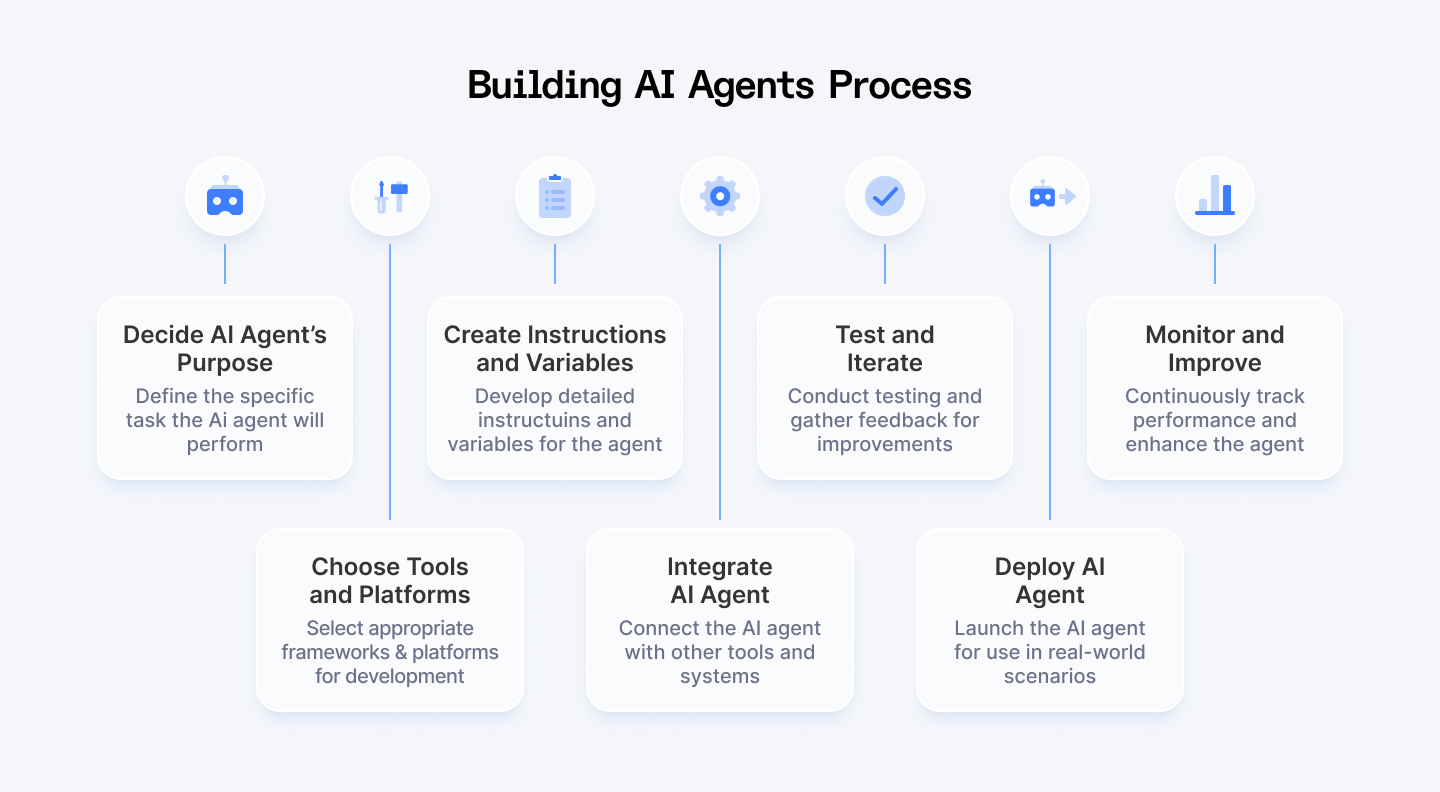
Step-by-Step Plan for Building AI Agents
1. Decide What Your AI Agent Will Do
First things first — what do you want your AI agent to actually do? The clearer your goal, the easier the process.
Different AI agents handle different tasks. Here are some examples to get your brain working:
- Sales AI Agent: Answers product questions, recommends options, compares features, gives pricing info.
- Customer Support AI Agent: Solves customer problems, shares helpful resources, troubleshoots technical issues. That's essentially the AI customer support agent category a purpose-built agent instead of something wired together from scratch.
- Knowledge Management AI Agent: Retrieves company policies, summarizes documents, and helps employees find information fast.
- Lead Generation AI Agent: Sends follow-up messages, captures prospect info, syncs with your CRM.
- HR AI Agent: Handles employee queries, assists with onboarding, and processes PTO requests.
- E-commerce AI Agent: Tracks orders, checks inventory, recommends products you might like.
You can even build agents that handle multiple related tasks.
For example, a real estate agent could suggest properties, manage paperwork, and keep track of client conversations all in one.
A hotel agent could handle bookings, housekeeping requests, and upsell extra services.
Almost any repetitive task can be automated with an AI agent. Once you know what yours will do, you’re ready for the next step: choosing a platform.
2. Pick Your Tools
Now that you know what your AI agent will do, it’s time to choose the right tools to build it.
There are plenty of good frameworks out there that will help you structure and manage your agent’s workflow:
- LangGraph & LangChain – Great for building multi-step AI workflows.
- CrewAI – Ideal for multi-agent collaboration.
- RASA – A solid choice for chatbot-style AI with conversational abilities.
And several platforms that package these tools together:
- IBM's watsonx
- KoreAI
- Amazon Flex
When choosing your platform, look for these three things:
- Good learning resources: You're going to hit roadblocks, so make sure there are tutorials and docs to help you out.
- Matches what you're building: If you need a sales bot, don’t pick a platform built for customer service.
- Has a free tier: Test the waters before spending money. Most good platforms let you build something basic for free.
If you prefer open-source (meaning free and customizable), you've got plenty of options there too.
Don't just grab the first thing you see. Do your homework. The right tools make building way easier.
3. Create Instructions and Variables
Now it's time to tell your agent what to do and how to do it. This is where things get interesting!
Start with an Autonomous Node
Here's something most people won't tell you: not all "AI agent platforms" actually build true agents. Many just create fancy chatbots.
Real AI agents should decide on their own when to follow a structured flow and when to rely on an AI model (LLM).
For example, with a true autonomous node, you can:
- Define your agent’s purpose in plain language
- Let the agent decide when to follow a structured flow vs. when to think creatively
- Define your agent's personality, purpose, and boundaries in minutes
For example, a sales AI agent might have a structured intro pitch, but use AI to personalize recommendations.
Create Variables to Collect Information
Your agent needs to gather info from users. These are your variables. The pieces of information your agent collects to do its job.
For example:
- A travel AI agent might ask: "What city are you visiting?" (city variable)
- A mental wellness AI agent might ask: "How are you feeling today?" (mood variable)
- A customer service AI agent will ask: "What do you need help with?" (issue variable)
Depending on what you're building, you might need just a few variables or dozens of them.
A travel agent might collect:
- Destination
- Trip dates
- Number of travelers
- Budget
- Preferred activities
The more specific your instructions and variables, the smarter and more useful your AI agent becomes.
4. Integrate Your AI Agent
An AI agent without integrations is just ChatGPT with a different name. The real power comes from connecting your agent to other tools and systems.
Knowledge Bases (What Your AI Knows)
This is where you feed your agent the specific information it needs to be useful:
- Product details
- Company policies
- Technical documentation
- Anything your agent needs to "know"
This can be a simple document, a database, or a full search system.
A good setup uses RAG (Retrieval-Augmented Generation) to find and deliver the most relevant info. That way, your AI gives accurate, up-to-date answers, not generic ones.
Channels (Where Users Talk to Your AI)
Channels are just the places your agent can talk to people:
- Website chat widget
- Slack
- Discord
- SMS
Your agent isn't limited to one channel. It can receive a message on Facebook and notify you on Slack. Or send updates to customers across multiple platforms at once.
Webhooks (How Your AI Triggers Actions)
Webhooks let your agent take action based on triggers. Think of them as automatic notifications that make things happen.
For example:
- When a new lead appears in Salesforce, your agent jumps in to score and assign it.
- When a support ticket comes in, your agent categorizes it by urgency.
- When an order ships, your agent sends an update to the customer.
- When a security alert happens, your agent notifies the IT team.
Platforms (The Big League Integrations)
This is where things get really powerful. Connecting your agent to other business systems lets it do meaningful work:
- CRMs like Hubspot or Salesforce to track leads
- Helpdesks like Zendesk or similar alternatives for handling support tickets
- Email tools like Mailchimp for marketing campaigns
- Analytics tools (Google Analytics) to measure how well your agent is performing
For example, an HR agent connected to your policy documents can instantly answer employee questions about vacation time or benefits. When connected to your calendar system, it could even schedule meetings or approve time-off requests.
5. Test and Iterate
Now comes the part that makes it actually good.
Test It Yourself
Most platforms have a built-in simulator where you can chat with your agent before letting anyone else see it. This is your chance to spot obvious problems:
- Does it understand basic questions?
- Is it following your instructions?
- Does it know how to use your knowledge base?
Play around with different questions, even weird ones. It's better if you find the problems first.
Get Feedback From Others
Once you're happy with it, share a test version with a few friends or coworkers. They'll use it differently than you expect and find issues you missed.
Give them a simple URL and ask for honest feedback:
- Was it helpful?
- Did it understand what they were asking?
- Did it feel natural to talk to?
Never Stop Improving
Here's the thing about AI agents: they're never really "done." Even after you launch, you'll keep making them better. Look for:
- Common questions it struggles with
- Places where conversations get stuck
- Features people wish it had
6. Deploy Your AI Agent
Time to put your agent to work.
Pick a Deployment Method
You’ve got options:
- Website widget – Add it to your site for instant user access.
- Shareable link – Let users interact via a direct URL.
- Messaging apps – Connect it to WhatsApp, Telegram, Facebook Messenger, Slack, etc.
- Custom platforms – Embed it into internal systems or proprietary software.
Announce It
Your AI agent is useless if no one knows about it.
Promote it through emails, website banners, or social media so people can start using it.
Multi-Agent Systems? Plan for Routing
If you have many agents, you’ll need:
- Routing: Directing the right tasks to the right agent.
- Evaluation: A system to track how well your agents collaborate.
7. Monitor and Improve
Okay, last step. Keep an eye on it. Your agent's work isn't done just because it's live.
Watch the Numbers
Good platforms show you who's using your agent, what they're asking, and where.
This tells you what's working and what's not.
Keep Improving
Use this data to fine-tune responses, fix gaps, and enhance performance. AI agents get smarter with time, but only if you keep improving them.
Don’t Overcomplicate Things
Start small and build up as you learn more. Experiment with different tools and frameworks until you find what works best for you. Ask for help when needed—online communities are full of people who’ve been where you are.
Use Case: Building an AI Agent with LangGraph
I'll show you how to create an AI agent that can actually do stuff for you. It’s easier than you think.
Why Use LangGraph?
LangGraph lets you visualize your AI's thinking process as a flowchart. Each step represents a specific skill (like analyzing code or writing explanations), and you control how information flows between these steps.

Your First Agent: Code Documentation Helper
Let's build an AI agent that:
- Analyzes code to understand what it does
- Breaks down complex functions
- Suggests documentation and improvements
Setting Up Your Environment
First, let's get your workspace ready:
Step 1: Create a project folder
mkdir code_helper_agent
cd code_helper_agent
Step 2: Set up a virtual environment
# Windows
python -m venv agent_env
agent_env\Scripts\activate
# macOS/Linux
python3 -m venv agent_env
source agent_env/bin/activate
Step 3: Install the necessary packages
pip install langgraph langchain langchain-openai python-dotenvStep 4: Get your OpenAI API key
You'll need an API key to power your agent's brain:
- Create an account at OpenAI
- Go to API Keys section
- Create a new key
- Copy it somewhere safe
Step 5: Create your environment file
# Create a .env file to store your API key
echo OPENAI_API_KEY=your-api-key-here > .env

(Replace 'your-api-key-here' with your actual key)
Step 6: Test your setup
Create a file called test_setup.py:
import os
from dotenv import load_dotenv
from langchain_openai import ChatOpenAI

# Load your API key
load_dotenv()

# Initialize the AI model
llm = ChatOpenAI(model="gpt-4o-mini")

# Quick test
response = llm.invoke("Can you hear me?")
print(response.content)
Run it:
python test_setup.pyIf you get a response, you're all set!
Building Your Code Helper Agent
Now for the fun part! Let's create our agent:
First, import what you need:
import os
from typing import TypedDict, List
from langgraph.graph import StateGraph, END
from langchain.prompts import PromptTemplate
from langchain_openai import ChatOpenAI
from langchain.schema import HumanMessage
from dotenv import load_dotenv

# Load environment variables
load_dotenv()
Create your agent's memory
Your agent needs to remember things as it works:
class State(TypedDict):
    code: str                # The code being analyzed
    language: str            # Programming language detected
    functionality: str       # What the code does
    documentation: str       # Generated documentation
Set up your agent's brain
# Set temperature=0 for consistent, logical responses
llm = ChatOpenAI(model="gpt-4o-mini", temperature=0)
Quick Note
Temperature controls how creative your AI gets:
- 0 = Focused, predictable responses (best for agents)
- 1 = More creative, varied outputs
- 2 = Wild, sometimes bizarre ideas
Add your agent's superpowers
Let's build three core capabilities:
1. Language Detection
def detect_language(state: State):
    """Identify what programming language the code is written in"""

    prompt = PromptTemplate(
        input_variables=["code"],
        template="What programming language is the following code written in? Answer with just the language name.\n\nCode: {code}\n\nLanguage:"
    )

    message = HumanMessage(content=prompt.format(code=state["code"]))
    language = llm.invoke([message]).content.strip()

    return {"language": language}
2. Code Analysis
def analyze_functionality(state: State):
    """Determine what the code does and how it works"""

    prompt = PromptTemplate(
        input_variables=["code", "language"],
        template="Analyze this {language} code and explain what it does in 2-3 sentences. Focus on the main purpose and functionality.\n\nCode: {code}\n\nFunctionality:"
    )

    message = HumanMessage(content=prompt.format(
        code=state["code"],
        language=state["language"]
    ))

    functionality = llm.invoke([message]).content.strip()

    return {"functionality": functionality}
3. Documentation Generation
def generate_documentation(state: State):
    """Create useful documentation for the code"""

    prompt = PromptTemplate(
        input_variables=["code", "language", "functionality"],
        template="""
        Based on this {language} code and its functionality, create documentation that includes:
        1. A brief description of what the code does
        2. Documentation for any functions (parameters, return values)
        3. Any potential improvements

        Code: {code}

        Functionality: {functionality}

        Documentation:
        """
    )

    chain = prompt | llm
    response = chain.invoke({
        "code": state["code"],
        "language": state["language"],
        "functionality": state["functionality"]
    })

    return {"documentation": response.content}
Connect everything together
Now let's wire up our agent's brain:
# Create the workflow graph
workflow = StateGraph(State)

# Add our capabilities as nodes
workflow.add_node("detect_language", detect_language)
workflow.add_node("analyze_functionality", analyze_functionality)
workflow.add_node("generate_documentation", generate_documentation)

# Set the workflow order
workflow.set_entry_point("detect_language")
workflow.add_edge("detect_language", "analyze_functionality")
workflow.add_edge("analyze_functionality", "generate_documentation")
workflow.add_edge("generate_documentation", END)

# Compile the agent
code_helper = workflow.compile()
Using Your New Agent
Let's try it out! Create a file called run_agent.py:
from your_agent_file import code_helper  # Import your agent

# Sample code to analyze
python_code = """
def fibonacci(n):
    if n <= 0:
        return 0
    elif n == 1:
        return 1
    else:
        return fibonacci(n-1) + fibonacci(n-2)
"""

# Initial state with the code
initial_state = {"code": python_code}

# Run the agent
result = code_helper.invoke(initial_state)

# Print results
print(f"Language: {result['language']}")
print(f"Functionality: {result['functionality']}")
print("\nDocumentation:")
print(result['documentation'])
And there you have it! Your very own AI coding assistant that can analyze, explain, and document code.
What's Next?
Once you're comfortable with this setup, you can strengthen your agent by:
- Adding more capabilities (like code improvement suggestions)
- Connecting to external tools (like GitHub)
- Building a user interface to make it easier to use
The possibilities are endless! Just add more nodes to your graph and connect them in new ways.
Also Check Out: 5 Best AI Agents for Software Development Right Now
The Limits of AI Agents
AI agents aren't perfect. They've got some limits. Here’s what you need to know:
- They're robots. They follow our rules—the nodes and connections we built. If something unexpected happens, they get stuck. They can't adapt like we do.
- They don't "get" everything. They understand words, but not the context. They miss subtle meanings and common sense that humans pick up naturally. Like, sarcasm or cultural stuff. And, they need internet access to supplement their knowledge.
- The ‘black box’ problem. We see what goes in and what comes out, but we can’t fully see how the agent makes decisions inside. Newer models like GPT-4o and DeepSeek R1 show their reasoning process, which helps, but we still don’t have full control.
- They need us. They aren't fully autonomous. They need us to check and validate their work. The best results always come from AI and humans working together, not AI working alone.
When you know what your agent can't do, you'll make better decisions about when YOU need to step in.
Final Thoughts
Here's the super simple version!
- Pick your goal. What do you want the AI to do? Automate tasks? Answer questions? Be specific.
- Grab a tool. LangGraph is a good start. It's like Lego bricks for AI.
- Break it down. Your goal is just a series of small steps. Tell the AI what to do at each step.
- Connect the steps. That's where the framework comes in. It helps the AI move from one step to the next.
- Test and improve. Does it work? If not, tweak it. That’s part of the process.
Why LangGraph? It's designed for these kinds of "chains" of actions. It helps you manage the flow of information, so the AI knows what to do next. But you can choose other frameworks too!
So, you don't need to be a genius to build an AI agent. Use the tools available. Start small, think simple, and test often. You got this. You're basically teaching a really smart robot how to follow instructions. And with the right tools, it's way easier than you think.
Go build something cool!
For Developers:
Ready to build more than just AI agents? Join Index.dev's talent network to put your development skills to work with global companies hiring AI specialists.
For Clients:
Need AI agent developers for your next project? Access the top 5% of vetted AI specialists through Index.dev. Get matched in 48 hours and start with a 30-day risk-free trial.


