
String reversal in JavaScript might seem trivial at first glance. Just flip those characters around and you're done, right? Not so fast. What looks like a no-brainer operation actually hides some nasty gotchas, especially when Unicode characters and performance concerns enter the picture.
Text reversal comes up everywhere, from building editors and data processors to creating URL slugs and testing palindromes. Getting it right means your app won't face embarrassing bugs when users from Thailand, India, or anywhere else start typing in their native scripts. Plus, with JavaScript running on everything from high-end workstations to budget smartphones, how you implement string reversal can make a real difference in performance.
Let's dig into several approaches, from quick hacks to bulletproof solutions, so you can pick the right tool for each specific job. Just practical techniques that work in production code.
Love solving tricky JavaScript problems? Join Index.dev and work on global projects that challenge and grow your coding skills.
Concept Explanation
Before jumping into code examples, we need to understand why string reversal gets tricky in JavaScript. The root issue? JavaScript stores strings as sequences of 16-bit code units - not as complete characters.
This matters because many characters - especially emojis and symbols from non-European writing systems—characters outside the Basic Multilingual Plane (BMP)—don't fit into a single 16-bit unit. Instead, they use two units called 'surrogate pairs' working together. Naively reversing at the code-unit level will break these pairs, resulting in invalid characters.
Explore More: How to Check if a Variable is Undefined in JavaScript
Core Methods of String Reversal
1. Built‑in Array Methods
1.1 split() → reverse() → join()
function reverseWithSplit(str) {
  // Split into array, reverse it, then join back to string
  return str.split('').reverse().join('');
}

// Example usage
console.log(reverseWithSplit("Hello World")); // "dlroW olleH"
This is probably the most common way you'll see string reversal implemented in the wild. Here's what's happening: first, we break our string into individual characters with split('') (creating an array of UTF-16 code units), flip the entire thing backwards using JavaScript's built-in reverse() method, and then glue everything back together with join(''). Pretty straightforward!
From a performance standpoint, we're looking at O(n) time complexity where n is just the string length, and O(n) space complexity since we need to store that intermediate array.
The catch? This approach falls apart when dealing with emoji and other special characters. Since JavaScript strings are UTF-16 encoded, characters outside the Basic Multilingual Plane (emojis like 😊) will be incorrectly reversed because they're treated as two separate code units.
1.2 ES2023 toReversed()
const reverseWithToReversed = (str) => {
  // Create array from string and use non-mutating reverse
  return Array.from(str).toReversed().join('');
}

// Example usage
console.log(reverseWithToReversed("JavaScript 😊")); // "😊 tpircSavaJ"
The toReversed() method, introduced in ES2023, returns a new array in reversed order without mutating the original array. This makes it ideal for functional programming patterns where immutability is preferred.
When combined with Array.from(), this approach handles Unicode characters correctly because Array.from() respects full code points rather than splitting surrogate pairs.
2. Unicode‑Safe Iterators
2.1 Spread Operator
const reverseWithSpread = (str) => {
  // Convert to array using spread, reverse, then join
  return [...str].reverse().join('');
}

// Example usage
console.log(reverseWithSpread("Hello 🌎")); // "🌎 olleH"
The spread syntax (...) uses the string's iterator, which yields complete Unicode code points rather than raw code units. This makes it one of the simplest ways to handle Unicode characters correctly in modern JavaScript.
This approach is concise and readable, making it ideal for most applications where Unicode support is needed during quick one‑liner with modern syntax support.
2.2 Array.from()
function reverseWithArrayFrom(str) {
  // Create array respecting Unicode code points
  return Array.from(str).reverse().join('');
}

// Example usage
console.log(reverseWithArrayFrom("👋 World")); // "dlroW 👋"
Similar to the spread operator, Array.from() properly splits the string by full code points, safeguarding surrogate pairs. This approach has the added benefit of making it easy to insert pre- or post-processing steps through mapping functions if needed.
3. In‑Place and Functional Techniques
3.1 Two‑Pointer Swap
function reverseWithTwoPointers(str) {
  const arr = Array.from(str);
  let left = 0, right = arr.length - 1;

  // Swap characters from ends toward middle
  while (left < right) {
    [arr[left], arr[right]] = [arr[right], arr[left]];
    left++;
    right--;
  }

  return arr.join('');
}

// Example usage
console.log(reverseWithTwoPointers("Algorithm")); // "mhtiroglA"
This approach uses a two-pointer technique, swapping elements from both ends inward. By using Array.from() first, we ensure Unicode safety. This method avoids multiple array allocations and has predictable memory usage.
While it doesn't significantly improve performance over the simpler methods in JavaScript (due to the initial array creation), it demonstrates an important algorithmic pattern often used in other languages and contexts.
3.2 reduceRight()
function reverseWithReduce(str) {
  // Traverse characters from end to beginning
  return Array.from(str).reduceRight((acc, char) => acc + char, '');
}

// Example usage
console.log(reverseWithReduce("Functional")); // "lanoitcnuF"
This functional approach uses reduceRight() to traverse the array from the last element to the first, accumulating characters into a new string. It's an elegant solution, especially if you're already working with functional patterns in your codebase. Just keep in mind that string concatenation in each iteration can be a bit slower than array operations followed by a single join. You might notice the difference when working with very long strings.
4. Advanced Unicode Handling
4.1 Using Intl.Segmenter for Grapheme Clusters
function reverseWithSegmenter(str) {
// Create a segmenter that identifies grapheme clusters
const segmenter = new Intl.Segmenter(undefined, { granularity: 'grapheme' });
// Convert to array of complete grapheme clusters
const graphemes = Array.from(segmenter.segment(str), segment => segment.segment);
// Reverse and join
return graphemes.reverse().join('');
}
// Example usage
console.log(reverseWithSegmenter("é👨👩👧👦")); // "👨👩👧👦é"Intl.Segmenter gives us the most accurate handling of Unicode text by working with grapheme clusters—essentially what our eyes recognize as single characters. When you use this approach, complex characters like family emojis or letters with accent marks don't get broken apart during reversal.
You'll want to reach for this method when building applications where Unicode precision really matters—think text editors, translation tools, or any app that needs to handle international text correctly. While it's a bit more involved than other methods, the payoff in correctness makes it worth considering for these specialized cases. It’s supported in modern browsers since April 2024; although fallback is needed for older environments.
Performance Considerations
- Time Complexity: All methods run in O(n); toReversed() and two‑pointer swaps avoid extra passes.
- Memory: Split/join and iterator methods allocate O(n) arrays; two‑pointer uses the same array for swapping, minimizing transient allocations.
- Measuring: When optimizing string operations, it's important to use the Performance API (performance.now(), to measure()) performance in your specific context. Here's how you can benchmark these methods:
function benchmarkReversal(str, reverseFn, iterations = 1000) {
const start = performance.now();
for (let i = 0; i < iterations; i++) {
reverseFn(str);
}
const end = performance.now();
return (end - start) / iterations;
}
// Test string with various Unicode characters
const testString = "Hello World! 👋🌎👨👩👧👦";
// Benchmark different methods
console.log("Split/reverse/join:",
benchmarkReversal(testString, reverseWithSplit).toFixed(6), "ms");
console.log("Spread operator:",
benchmarkReversal(testString, reverseWithSpread).toFixed(6), "ms");
console.log("Array.from:",
benchmarkReversal(testString, reverseWithArrayFrom).toFixed(6), "ms");
console.log("Two pointers:",
benchmarkReversal(testString, reverseWithTwoPointers).toFixed(6), "ms");
console.log("Segmenter:",
benchmarkReversal(testString, reverseWithSegmenter).toFixed(6), "ms");This benchmark function allows you to compare the performance of different reversal methods on the same input. In most cases, the simpler methods (split/reverse/join or spread operator) perform well for basic ASCII text, while the more sophisticated approaches like Intl.Segmenter may be slightly slower but provide better correctness for complex Unicode text.
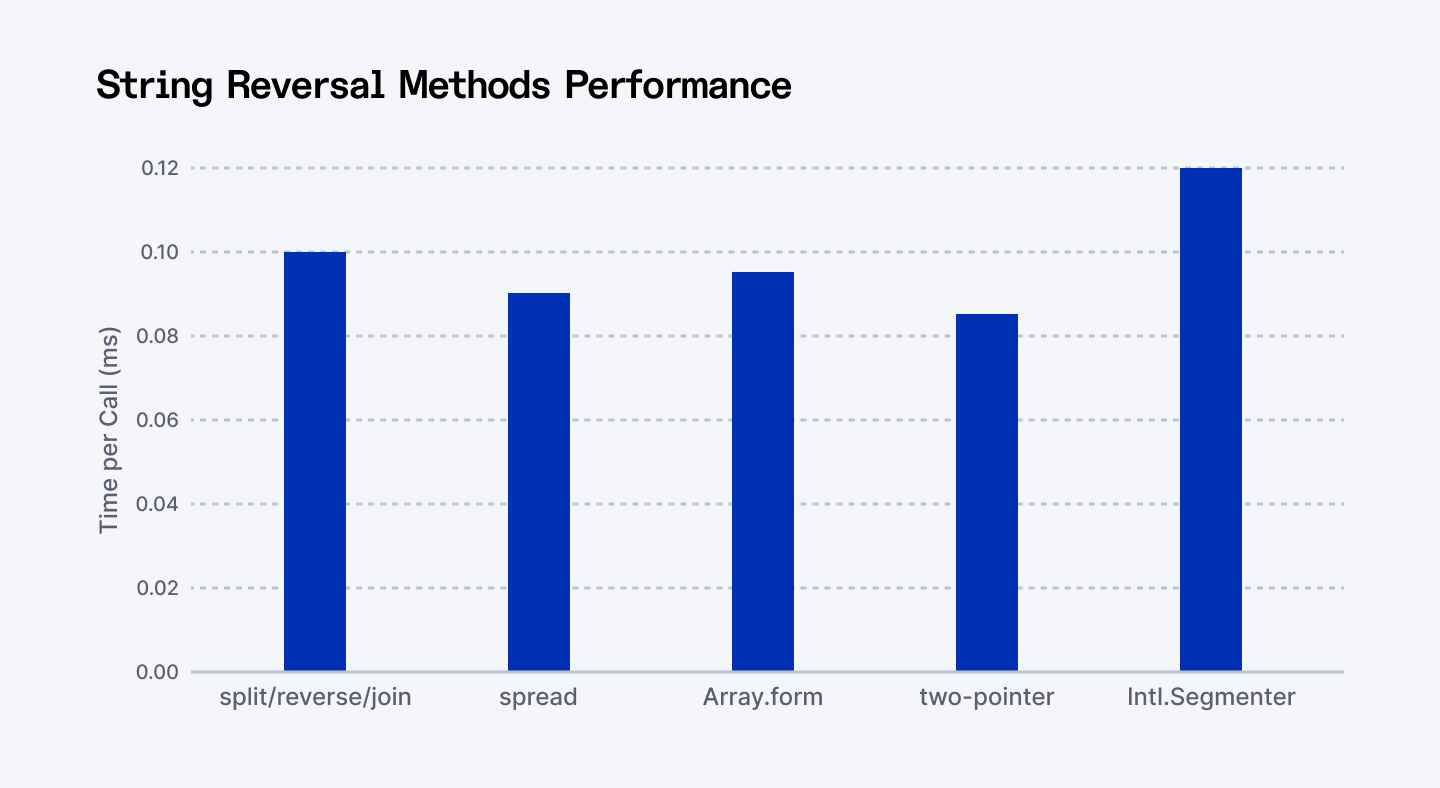
Benchmark of JavaScript String Reversal Methods (ms per call) comparing the five main string‑reversal methods
Security Best Practices
When implementing string reversal in production applications, consider these security practices:
- Never use eval() on reversed strings to avoid potential code injection vulnerabilities
- Sanitize any user-generated text before reversing or injecting into the DOM—consider using a library like DOMPurify
- Validate input length to prevent denial-of-service attacks from extremely long inputs
function safeReverse(input) {
  // Validate input
  if (typeof input !== 'string') {
    throw new TypeError('Input must be a string');
  }

  // Set reasonable limits
  if (input.length > 100000) {
    throw new RangeError('Input string too long');
  }

  // Use Unicode-safe method
  return [...input].reverse().join('');
}
Choosing the Right Method
When deciding which string reversal approach to use in your application:
- For basic Latin or BMP-only text where Unicode correctness isn't critical, use the simple split/reverse/join approach
- For Unicode safety with modern JavaScript support, use the spread operator ([...str]) or Array.from()
- For complete grapheme cluster awareness (combining characters, ZWJ sequences), use Intl.Segmenter
- For functional programming patterns, prefer toReversed() to maintain immutability
- If minimizing memory allocations is critical, consider the two-pointer approach
Also Check Out: Sorting Strings in Java & JavaScript
Conclusion
Working with string reversal in JavaScript is straightforward until you hit Unicode characters—then things get tricky fast. Each approach has its sweet spot: basic split/reverse/join works for simple text, the spread operator ([...str]) offers excellent Unicode support with clean syntax, and Intl.Segmenter handles even the most complex character combinations.
For most real-world projects, the spread operator approach strikes that perfect balance between code readability and proper character handling. When you need to support those complex emoji sequences or international text, reach for Intl.Segmenter. Whatever your project demands, with these patterns in your toolkit, your string reversal logic will be both correct and performant, ready for any production-grade JavaScript application.
So the next time someone casually mentions "just reverse that string" – you'll know there's more to the story than meets the eye!
For Developers: Take your JavaScript skills further with advanced guides and real‑world challenges at Index.dev. Join us to hone your craft, access remote opportunities, and level up your workflow.
For Companies: Need JavaScript experts who write production-ready code? Index.dev connects you with top‑tier, vetted developers—and offers a risk‑free 30‑day trial to make sure they fit your team.


