
In the past few years, there has been a trend where developers and organizations are gradually switching their front-end applications from Vue.js to React. There are also several reasons why this transition is happening, such as the size of the React ecosystem, performance advantages, and the need for React developers in the labour market.
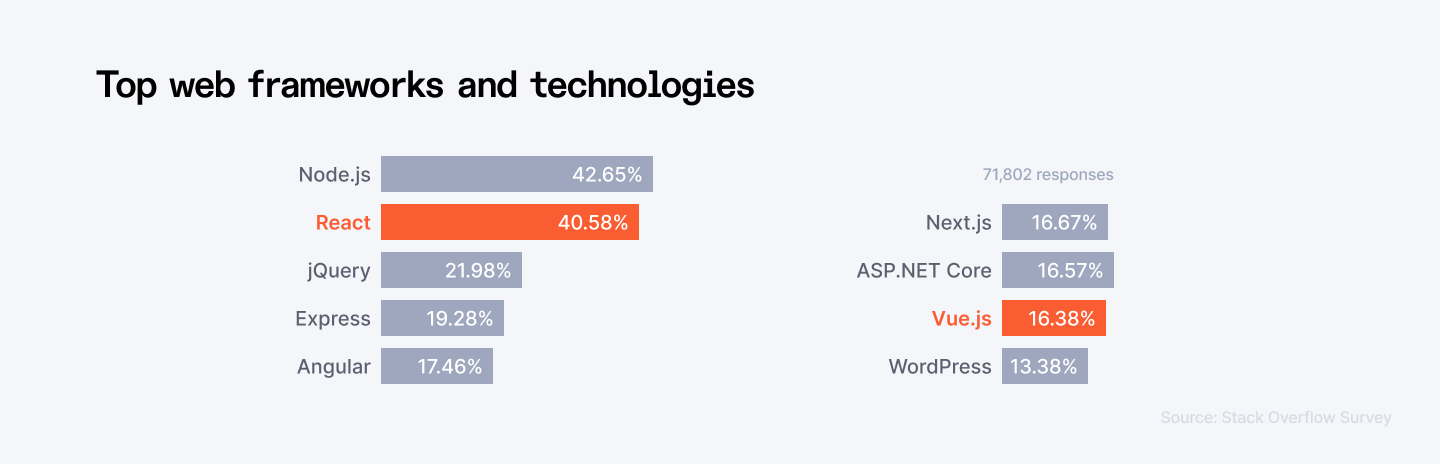
Based on the Stack Overflow Developer Survey, React emerged as the most popular web framework, with 40.14% of developers using it, while Vue.js was utilized by 18.97% of respondents. Additionally, 25.12% of developers indicated that they wanted to use React in the future, compared to 16.69% for Vue.js. This trend suggests that React is likely to maintain its status as the preferred choice among front-end developers in the coming years, reflecting its strong community support and extensive ecosystem of tools and libraries.
There are several reasons to consider moving from Vue to React, but perhaps the most compelling is the size and richness of the React ecosystem. The strength of React is that it has a large community of developers, a great variety of third-party libraries, and detailed documentation. This makes it possible to get solutions to the common issues and be very confident that React will be supported and upgraded in the future.
The third factor that is making people migrate to React is its performance. While Vue. has a slightly better start time, React is more efficient at runtime, especially when the app is large-scale. One of the features of React is the usage of virtual DOM that makes updates and renders of the elements faster and more effective for the user.
The demand for React developers within the marketplace is also high. A report published by Hired in 2021 showed that out of all the frontend development frameworks, React emerged as the most popular one with a usage growth of 50% higher than 2020. This trend will probably persist as more businesses use React for front-end development requirements in the future.
However, moving from Vue to React is not always easy because the popularity of the framework is increasing. This in turn means that the migration process cannot occur without proper planning, precise knowledge of the fundamentals and standards in the React framework, and a clearly defined migration plan. The principles that should be taken into consideration include the size and the complexity of the current Vue application, the availability of resources for migration and the impact that migration could have on the developers and or project schedule.
Vue to React migration is one of the emerging trends due to the larger ecosystem, higher performance, and iOffer demand in the job market. Despite this migration process being rigorous, it can provide enhancement in performance, easy maintenance and access to a large number of developers. But toward such a migration, particular caution is required focusing on the intent as well as on the approach to achieve such an outcome.
This blog talks about the strategies to migrate Vue to React app. Let’s dive in.
Ready to put your ReactJS skills to work? Join Index.dev and work remotely on high-paying projects in the UK and US!
Top Reasons for Migration
1. Component-based Architecture: Reusability and Modularity
Defining all components as separate entities is one of the primary reasons for moving from Vue to React: Reusability and modularity are far more effective when all existing components are treated as independent participants. A React component represents a reusable unit of the application that accomplishes certain objectives and helps avoid the repetition of code. This not only minimized the replication but also it maintained the sameness in the areas of design and functionality.
Since reusable components are used to minimize the time and effort that a developer spends coding this is an advantage since the developer has to spend little time coding because most of the work has already been done. Reusability aims at improving the rate of development, and also ensuring that the codes are consistent as well as easy to maintain. It also allows for facilitating inter-team cooperation and creates modularity in the development process.
2. Performance Improvements: Virtual DOM and Optimization
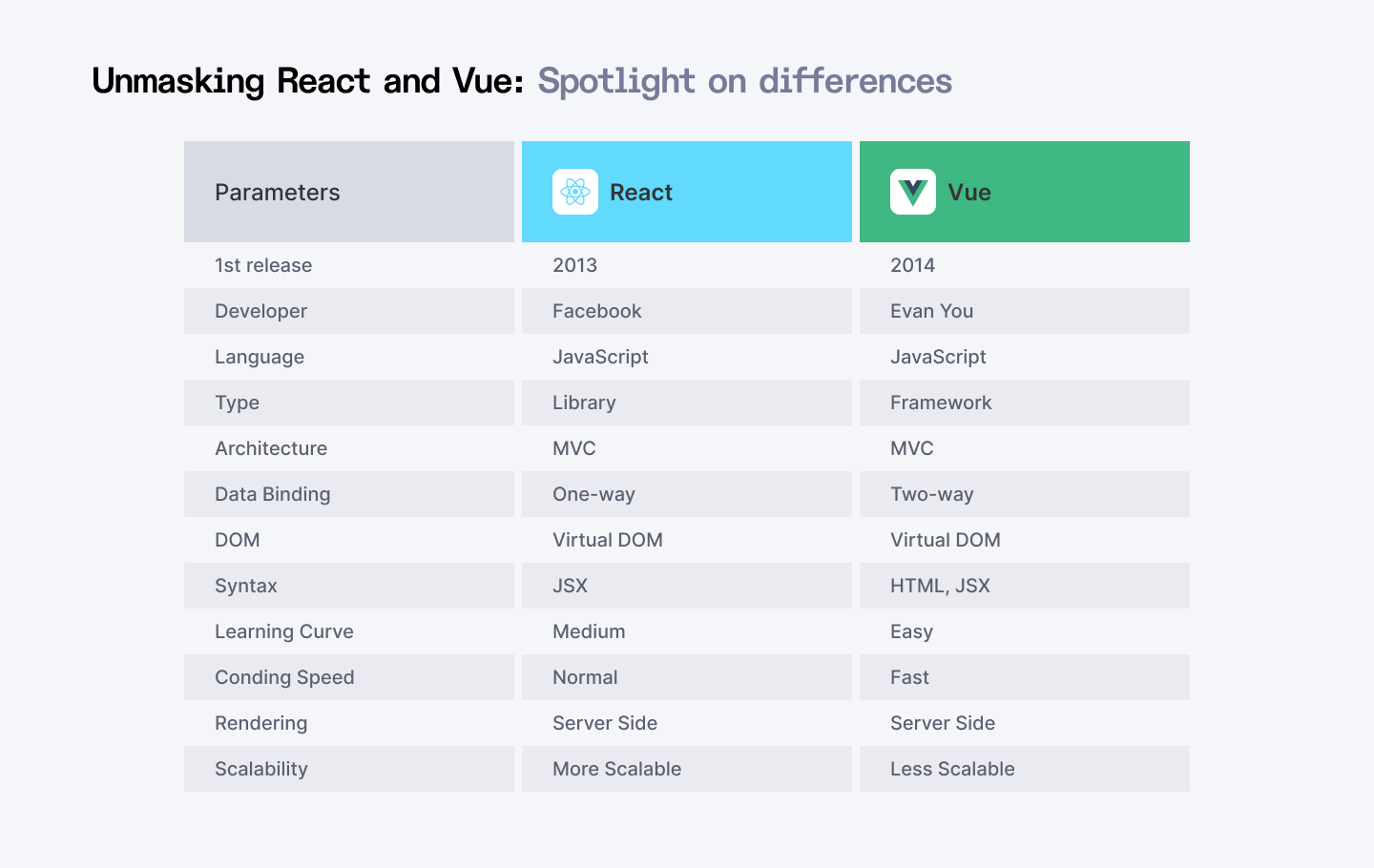
Another reason that highlights the shift of developers from Vue to React is performance. While Vue. startup performance is slightly better in js compared to React in the runtime scenario, React outperforms itself especially while designing large-scale applications. The second important feature of React is that it has the capability of a virtual DOM (Document Object Model), thanks to which the updates and renders can result in improved performance and user perception.
React’s virtual DOM works as a buffer that helps the framework find out what changes need to be made to the actual DOM and delivers only those. It minimizes the number of costly operations that need to be performed on DOM and therefore it is more efficient than directly manipulating the browser’s DOM.
Moreover, React has original features including memoization and code splitting which can be used in large-scale applications to achieve more performance. These help in eliminating the cases where the resource is rendered again, and also in loading of such resources that have not changed yet.
3. Developer Community and Resources
The React developer community is yet another source of change from Vue to React as well as the upcoming version of Vue, Vue 3. React uses a lot of resources, libraries and tools and has a wide and active community. This ecosystem offers different solutions to most problems that may arise to offer developers the best experience in developing and maintaining applications.
As such, React has gained a significant market share amongst giant corporations including Facebook, Netflix, Airbnb and many more entities. Besides, this adoption not only confirms React’s potential but also guarantees its further support and progression.
Also Read: React vs Angular: Which is Better for Large-scale Projects?
Planning the Migration from Vue to React
The transition from Vue to React is not easy, and it should be well-planned and executed. Before embarking on the migration process, there is a need to evaluate the current application, select an efficient method to migrate the application and also to understand whether the migration is going to have any impact on the bigger architecture of the application. Following are some of the areas of decision that need to be addressed when planning the migration:
Assessment of Current Application
To migrate Vue into a native app, it is important to start with an evaluation of the current Vue application. This assessment should focus on several key areas:
1. Understanding the Existing Architecture:
Take a closer look at the global layout of the Vue application, that is, how it varies and what is built into it, the program’s navigation, the state management, and the components’ interaction.
This will help in documenting the architecture with a view of finding out more of the challenges and spotting some of those areas that are likely to need much focus during the migration.
2. Component Structure:
Looking at the existing component hierarchy, check and isolate the components that can be ported to React. Knowledge of the components’ structure will be useful when one is planning to replace them or design how it will be done.
This would involve the assessment of the complexity of the individual components to gauge the amount of effort that would be needed in the migration process.
3. Dependencies:
The third-party libraries and dependencies found in the Vue application are as follows: Determine a fit with React or if other solutions have to be sourced.
The identification of dependencies will be useful in determining how they will be handled across the migration to allow the new application to be stable and functional.
Choosing a Migration Strategy
After the assessment, one should identify the right migration type most suitable for their project. Here are three common approaches:
1. Incremental Migration
Overview:
Incremental migration involves gradually replacing the Vue components with React components. This approach makes the transition easier by giving the developers a chance to develop both frameworks at a go.
Benefits:
- Reduced Risk: With this approach, developers can transfer one part of the system at a time with the possibility of testing and fixing problems before transitioning to the next part of the system.
- Continuous Delivery: This approach helps the team to keep on adding features and updates to the application as the migration goes on.
- Familiarity: This approach can help developers to keep using Vue in the project while gradually getting acquainted with React, which is comfortable for the development team.
Considerations:
It involves a lot of planning to achieve a desirable integration of Vue and React components. This may cause complexity in the code base since two frameworks are used.
2. Greenfield Approach
Overview:
When implementing the greenfield approach, one has to create a new React application that gradually replaces the main Vue application. This strategy is useful when making a change or upgrading a project from one version to another.
Benefits:
- Clean Slate: What this means is that developers can begin creating the application architecture and both major and minor components from scratch, leaving out any dependency on the current working Vue application.
- Best Practices: It means the team can start working on best practices and the use of the modern techniques in a software development that will make the application more maintainable as well as more scalable.
- Performance Optimization: Web application development is the process of building new applications from the scratch with an aim of improvised performance and usability.
Considerations:
This may be costly and time-consuming compared to other techniques and it may also be more laborious to carry out. The majority of work involved in developing an application has to do with copying features and functionalities that are already in use.
3. Micro Front-end Architecture
Overview:
The micro front-end architecture for our current project means that you need to use tools such as Webpack Module Federation to build an application that integrates Vue and React Widgets. They make it possible for teams to adopt the two frameworks as they work towards the goal.
Benefits:
- Flexibility: It is possible to have some of the new features developed using React while keeping the rest of the application built with Vue.
- Independent Development: This ensures that different teams can work on different parts of the application using the framework of their choice and productivity is enhanced due to specialization.
- Reduced Downtime: This means that users can still use the application as usual without being interrupted frequently during the migration process.
Considerations:
Needs an effective strategy for synchronization of the state and inter-component communication when some or all components are developed with different frameworks. This may cause difficulties and complications in the deployment and building methods.
The process of migration from Vue to React is planning for migrating the existing application, evaluating the features of the migration, and realizing the architectural impact. As with other software, it is possible to assess what the architecture of the system is at the moment, which components exist and depend on what. Regardless of the decision to make incremental migration start anew through a greenfield process or implement the micro front-end architecture, the goal is to create the best conditions for a seamless transition and to reap all the potential benefits of engaging with React.
Migration Process from Vue to React
When transitioning an application from Vue to React, several important steps need to be taken which would make the process smooth while keeping the app functional and high-performing. This section describes the general steps of the migration process such as learning React basics, configuring the environment, moving components, switching the state, changing routing, and selecting a testing approach.
1. Learning React
Before performing the migration, one should learn about React basics to use it correctly in the development process. Some of the reasons are to understand the basic ideas to improve the new application and to avoid the difficulty as part of the migration process.
- JSX: React composes the UI using JSX which is a syntax that makes JavaScript look like XML. Developers should have a way of writing JSX syntax, which is the capability of writing HTML structures using JavaScript.
- Component Lifecycle: A knowledge of the lifecycle component methods (i.e. componentDidMount, componentDidUpdate, componentWillUnmount) is crucial when it comes to handling side effects and performances in React applications.
- Hooks: React Hooks, introduced in version 16.8, allow developers to use state and other React features without writing a class. Key hooks include:
- useState: For managing component state.
- useEffect: For managing side effects and lifecycle events.
- useContext: For accessing context without prop drilling.
2. Setting Up the React Environment
As the foundation to create new reaction applications, developers can utilize Create React App (CRA) which helps to set up the base for development.
Instructions for Creating a New React App
Step 1: Install Node.js:
Ensure Node.js is installed on your machine. You can download it from nodejs.org.
Step 2: Create a New React App:
Open a terminal and run the following command in Bash:
npx create-react-app my-appReplace my-app with your desired application name.
Step 3: Navigate to the Project Directory:
bash
cd my-appStep 4: Start the Development Server:
npm startThis command will launch the React application in your default web browser.
3. Component Migration
One of the most sensitive areas during migration is components. To avoid complexity, it is recommended to begin with small, distinct parts of the project.
Steps for Component Migration
Identify Components:
To start with, it is essential to determine which components are the simplest and work with the minimum scope in the Vue application. The above components are more portable and will go a long way in making developers comfortable when using React.
Document the Migration:
For each migrated component, maintain thorough documentation that includes:
- Features of the layout of the primary Vue component based on the first model.
- The specific code in React and the syntax using JSX along with any Hooks that may be needed for the given task.
- Any problems that emerged and how they were solved.
Test Each Component:
While porting a component of an application, the component has to be tested to ensure that it performs well on its own and then can be added to the large framework.
4. State Management Transition
Transitioning from Vuex to React means comparing the architecture and usage of Vue’s state management library to React’s one.
Vuex:
Vuex is the centralized state management structure and implementation approach for Vue applications. It utilizes a store to capture the state, and actions to transform this state.
React State Management Options:
- Redux: A feature-rich state management library which uses a global state and follows the unidirectional flow of data. It is well suited for large applications, particularly when there is an issue of state management.
- Context API: It is a React feature which enables the sharing of states across separate components, without the need to drill them through other components. It is favourable for the basic state management requirements.
Considerations:
- Evaluate if your application requires a lot of state management and choose the type that will be fine for your project.
- If using Redux, ensure you can understand what is an action, a reducer or even middleware.
5. Routing Changes
When migrating from Vue Router to React Router there is a change of structure for routing and a general idea of how routing is done in React.
Steps for Transitioning Routing
Step 1: Install React Router:
npm install react-router-dom1. Set Up Routing: Replace Vue Router with React Router by creating a routing structure using BrowserRouter, Route, and Switch components. For example:
2. jsx
import { BrowserRouter as Router, Route, Switch } from 'react-router-dom';

function App() {
  return (
    <Router>
      <Switch>
        <Route path="/about" component={About} />
        <Route path="/" component={Home} />
      </Switch>
    </Router>
  );
}
3. Adjust Route Structures: Go through the views configurations in Vue Router and recreate them in React Router while maintaining the nesting and parameters.
6. Testing New Components
It is advisable to put measures for testing to check the efficiency of the new React components that have been developed. For this purpose, testing tools like Jest and React Testing Library are employed by developers.
Testing Strategies
- Jest: A testing framework designed to provide anybody using it with a single Application Programming Interface, or API to use when writing tests. It can be used for the testing of functions, components and different integration cases.
- React Testing Library: A library that is designed to allow testing of components in a manner that is as close to the usage as can be. In this productive library, there are specific utilities for rendering components and getting the DOM.
Example of a Simple Test:
import { render, screen } from '@testing-library/react';
import MyComponent from './MyComponent';

test('renders MyComponent', () => {
  render(<MyComponent />);
  const linkElement = screen.getByText(/my component/i);
  expect(linkElement).toBeInTheDocument();
});
Vue to React migration is a complex process that has to be approached in a step-by-step manner: understanding the basics of React, configuring the development environment, migrating components, changing state management, adapting routing, and implementing testing methodologies. If these steps are followed, developers can easily migrate the application that will perform better, be easier to maintain and more user-friendly.
Also Read: Building Scalable API Integrations in ReactJS - How-to Guide
Post-Migration Steps
There are several things to do after migrating an application from Vue to React as follows, To know if the React application is working as expected, there are some checks that need to be performed. This phase sees the application going through extensive testing to avert all possible failures while others are attended to; the development team should be well aware of the new architecture and practices. The following are the main things to consider after migration.
1. Thorough Testing
Importance of Testing the Entire Application:
- Comprehensive Validation: When a program has been migrated, there is a need to perform comprehensive testing on the whole application to confirm that all the functions are working as intended. These are unit testing, integration testing, and end-to-end testing.
- Identifying Issues: The testing phase ensures that any bugs or discrepancies that could have been caused by the migration process are detected. It made sure that the initial render of new React components was correct and that the business logic remained the same.
- User Acceptance Testing (UAT): Engage the participants and the users of the application in the testing process to gain feedback and to be certain that the application was fully developed to fit their needs. Even though the processes explained above will help already during development, UAT is essential for checking what the user experience is and whether all the verified functionality works as intended.
Testing Strategies:
- Automated Testing: Use tools like Jest and React Testing Library to automate tests for components and application logic.
- Manual Testing: Conduct manual testing for user interfaces and critical workflows to catch issues that automated tests may miss.
- Performance Testing: Assess the application's performance under various conditions to ensure it meets performance benchmarks.
2. Bug Fixing and Optimization
Strategies for Addressing Issues:
- Prioritize Bugs: All the bugs that have been identified should be grouped depending on the level of importance and relevance. Concentrate on those problems that are essential for the proper work of a program or seem to influence the process most of all from the user’s standpoint.
- Use Debugging Tools: Use debugging tools and browser developer tools to follow problems and determine performance problems. The React DevTools can also be used to inspect component trees and states.
Optimization Techniques:
- Code Splitting: Use code splitting with React’s React. lazy and Suspense to load components on the fly to decrease the time of loading in the first instance.
- Memoization: Use React. memo and useMemo to reduce the frequency of rendering the components to gain better performance.
- Performance Monitoring: Install performance testing tools that will help you measure the speed of your applications, for example, Google Lighthouse application or New Relic.
3. Documentation and Knowledge Transfer
Ensuring Team Members Are Updated:
- Comprehensive Documentation: Make comprehensive documentation which includes new architecture, components, management of state and routing in detail. It should also be noted that this documentation shall be used only as a guide by the current and the subsequent team.
- Knowledge Sharing Sessions: Arrange a presentation or training in which the team members can learn about the new React application. Tackle tactics, guideline protocols and the application of new frameworks and languages.
- Onboarding Materials: Create documentation regarding the tutorial for the new developers coming to the team with React, some example codes and links to learn React.
Continuous Improvement:
- Feedback Loop: Build feedback where members of the team can share their experience and or difficulties experienced with this new architecture. It will also enable us to identify specific facets that require additional efforts and fine tune.
- Regular Code Reviews: Regular code review would be necessary to check compliance with espoused standards besides keeping the code integrity when the project is progressing.
Specific actions that take place after migration are important to guarantee a successful transition from Vue to React. The testing process confirms the working of the said application while bug fixes along with other optimization techniques further impart a better feel to the application. Furthermore, the documentation contributes towards positive knowledge transfer and makes the development team capable of working on the new architecture. In this way, the different areas mentioned above will allow organizations to get the most out of migration and build a maintainable, efficient, and stable React application.
Challenges and Solutions in Migrating from Vue to React
When moving from Vue to React, an application offers several issues that have to be solved in order to make the transition as smooth as possible. Below defines general problems such as technical debt, employees’ skill deficiency, and performance issues with the best solutions.
1. Technical Debt
Challenge:
It is important to note that there would be several challenges that one would come across when migrating from one application to another and in this case a Vue application: This can be in the form of libraries that need to be updated, a bad layout of the components or a bad state management that has to be fixed.
Solutions:
- Code Refactoring: During or before migration, it is important to optimize the structure of the application by refactoring the older codes. Divide large components into smaller parts and the enhancement of the general architecture of a computer program. This makes the migration process easier and leads to cleaner-looking React applications.
- Incremental Migration: It is recommended to gradually transform Vue components into React as well as perform technical debt repayment. This is advantageous as it enables the team to make improvements on particular sections of the application without great pressure.
- Technical Debt Inventory: Make a list of known technical debts and categorise them according to their potential to affect the migration. Any business-critical task should ideally be completed before starting with agile, to reduce the disruption that may ensue during their integration.
2. Team Skill Gaps
Challenge:
Each member of the development team may vary in terms of proficiency with React; therefore, when migrating to this framework, one is likely to encounter skills gaps. Vue developers will find it hard to learn and apply React due to the latter’s paradigms and best practices.
Solutions:
- Structured Training Programs: Elective courses should be developed and organized to offer a focus on understanding React basics, its further advancements, and recommendations. It is recommended to use online courses, workshops, or boot camps since they present a complete learning experience.
- Mentorship and Pair Programming: Whether you’re pairing less experienced devs with those who know React inside and out. Here, the mentorship promotes the sharing of ideas while at the same time enabling the learners to gain practical experience.
- Internal Knowledge Sharing: Ensure that the colleagues care about what is happening with React and prompt them to express it in presentations, lunch-and-learn sessions or internal documentation. This results in the creation of a shared understanding within a team about what is React in the context of the project or application.
3. Performance Concerns
Challenge:
After migration, there might be problems in rendering, state management, and component lifecycle because of the difference between React and Vue. Control and improvement of the application’s performance should be kept in check to help minimize user-related issues.
Solutions:
- Performance Monitoring Tools: Use application performance monitoring software like Google Lighthouse, New Relic or Sentry to measure features such as speed. These tools help us get information about the load times, the performance of the renders and the probable areas of delay.
- Profiling and Optimization: Understand when and how frequently a component renders using React’s profiling utilities to measure its performance. Simplify sections within the components that are re-rendering too often so that they don’t need to be re-rendered at all the time, use optimization like memo (React.memo or useMemo).
- Code Splitting: Make usage of code splitting through the feature of dynamic imports in React as well as the React. Suspense and lazy to load all the components collectively which makes this approach more effective. This makes the initial bundle smaller, and that means better loading times and general performance.
- Regular Performance Audits: Carry out performance audits frequently to evaluate the performance of the application in the long term. This may be done to carry on with the process of optimization and make certain that the application is still reactive and fine-tuned.
Moving from Vue to React brings different issues in technological debt, team abilities, and output speed. If these challenges are well addressed by the use of proper solutions like code refactoring, properly structured training and proper performance monitoring, then the migration process will be a success. Forcing and driving constant change and knowledge management will assist the teams in the adaptation of the new framework and sustaining a high-performing application in the long run.
High-paying jobs, flexible work, and top companies await! Become part of Index.dev’s elite 5% talent network and secure remote projects with excellent pay!
The Bottom Line
Transitioning from Vue to React can be a challenging process, but utilizing resources like Index.dev can greatly facilitate this migration. Index.dev provides a platform that fosters a supportive community where developers can share experiences and best practices, ask questions about React’s component-based architecture, and receive guidance from those who have successfully navigated similar transitions. This combination of resources and community support makes Index.dev an invaluable tool for anyone looking to migrate their Vue applications to React smoothly and efficiently.
For Developers: Mastering the migration from Vue to React is a powerful skill that's in high demand. Sign up on Index.dev today and connect with companies seeking top React talent.
For Clients: Don't let your legacy app hold you back. Streamline your transition to React with skilled developers from Index.dev. Find your best-fit Vue.js and React.js migration expert in 48 hours:
- Receive 3 to 5 interview-ready candidates
- Achieve a 97% trial-to-hire conversion rate
- Benefit from 3x higher retention rates


