
This isn’t another love letter to Python.
It’s a wake-up call for developers who want to build faster, smarter, and work on the most exciting tech out there.
Sure, Python is still huge, and useful, but it’s no longer the only path to great work or great pay.
Today, the language you choose should match what you want to build. Want to create mobile apps? Launch powerful web tools? Hack on game engines? Dive deep into AI or blockchain? Each goal needs the right tool, and not all of them are named Python.
In this post, we're diving into 7 languages that companies are throwing money at right now.
Languages that solve real-world problems. That groundbreaking AI, high-frequency trading, data pipelines, and world-class apps.
So, if you’re an experienced developer ready to level up, these are the languages that will help you stand out, earn more, and build almost anything in 2025.
Want to get matched with high-paying remote jobs using top programming languages? Join Index.dev and build the global career you deserve.
1. Rust
Rust is first on our list. The language that keeps popping up in tech Twitter threads, GitHub stars, and even job descriptions at Google and Amazon. And it’s one of the most admired languages among developers.
If you're tired of C++ giving you trust issues (hello, segmentation faults), Rust is your new best friend. It’s like C++, but with safety nets, so you don’t break stuff every time you move a pointer.
Rust is about speed, performance, and peace of mind. It won’t let you shoot yourself in the foot, even if you try.
What Rust Is Really Good At
Rust shines when you're building things that need to be:
- Fast
- Secure
- And not crash
Real-world uses?
- Operating systems
- Embedded devices
- Web servers
- Blockchain clients
- Game engines
Companies like Amazon, Dropbox, and Cloudflare are already shipping production code with Rust.
When You’d Really Need Rust
You're working on a blockchain node, where speed and security are everything. One bug could crash your node, or even worse, open a security hole. That’s where Rust becomes your safety-first power tool.
You get low-level control without the constant fear of memory leaks or buffer overflows.
Quick Code Example
Notice how Rust handles memory? It just… takes care of it. No surprise bugs.
fn main() {
    let msg = String::from("World-Class Developer");
    say_hi(&msg);
}

fn say_hi(name: &str) {
    println!("Hey there, {}!", name);
}
Here, Rust makes sure name is always valid.
What’s the Job Market Saying?
Rust developers are in demand. Companies are literally fighting over Rust developers. We're talking about a language where junior developers with 2 years of experience are getting senior-level offers.
In 2025, average salaries range between $120K–$170K depending on your region and niche. And it’s not slowing down, especially in AI infrastructure, systems programming, and embedded tech.
.png)
Pro Tip for Learning Rust
Don't fight the borrow checker. It'll yell at you for the first few weeks. But once you "get it," you'll never want to go back to other languages.
Start with small projects. Build a command-line tool. Make a simple web server. The moment ownership and borrowing click for you, you'll understand why Rust developers have this weird smile when they talk about their code.
2. TypeScript
JavaScript runs the web. That’s a fact. But it’s also the language that can be unpredictable and full of "why the heck did that just happen?"
That’s where TypeScript steps in. It’s like JavaScript, but grown up, sober, and wearing a seatbelt. Researchers found that TypeScript detects 15% of common bugs at the compile stage. You still write JS, but now it tells you when you're doing something dumb. Before it breaks production.
What TypeScript Is Perfect For
TypeScript is your go-to when:
- You're building complex frontend apps (React, Vue, Angular)
- You want fewer bugs
- You're working with big teams
- You like modern tooling, autocompletion, and real-time feedback
It’s used on both frontend and backend. Even serverless functions, cloud-native tools, and the latest edge computing platforms are making TypeScript their top choice.
When You’d Really Need TypeScript
Say you're building a dashboard in React, and it’s pulling data from an API. One field in the response gets renamed. Now half the app breaks. With TypeScript? That problem doesn’t even make it past your code editor. It catches those silent bugs before they ship.
Quick Code Example
function greet(name: string): string {
    return `Hey, ${name}!`;
}

console.log(greet("TypeScript Hero"));
If you try calling greet(42) or greet(undefined), TypeScript will stop you right there. No more undefined-is-not-a-function nonsense. It’s like having a QA tester living inside your IDE.
What’s the Job Market Saying?
TypeScript is now the default for serious frontend teams.
Most JavaScript jobs are becoming TypeScript jobs. Companies aren't even posting separate listings anymore. They just assume if you know modern JavaScript, you know TypeScript.
Salaries? Around $100K–$140K depending on experience and location.
Even junior roles are asking for TS skills. You don’t need to master it right away, but you do need to start.
Pro Tip for Learning TypeScript
Don’t try to “learn TypeScript” in isolation. Instead, take an existing JavaScript project and slowly convert it file by file. Use the --strict mode, it’ll teach you a ton.
3. Julia
Julia is not so noisy. It doesn’t trend on Twitter. But behind the scenes? It’s quietly powering rocket science, biotech breakthroughs, and quantum finance.
If Python feels too slow and C feels too painful, Julia gives you the best of both worlds:
- Easy like Python
- Fast like C
That’s by design.
Where Julia Really Shines
Julia is built from scratch for heavy numerical work:
- Machine learning and AI models
- Large-scale simulations (physics, climate, engineering)
- Financial modeling
- Scientific research
- High-performance computing (HPC)
It’s the perfect tool when performance is non-negotiable.
When You’d Really Need Julia
Let’s say you're modeling stock market volatility with millions of data points, and Python just isn’t cutting it anymore. Or maybe you're simulating airflow over a rocket wing and need precise performance.
Julia’s just as easy to write, but runs much faster and uses less memory.
Quick Code Example
function greet(name)
 println("Hey there, $name!")
end

greet("Data Pro")
Looks like Python, right? But under the hood, it compiles to lightning-fast machine code. So you can do number crunching without switching languages or gluing together C extensions.
What’s the Job Market Saying?
Julia is still niche, but growing fast in research labs, hedge funds, AI startups, and government projects.
In 2025, salaries for Julia devs in these fields range from $120K–$180K, often higher in finance or biotech.
It’s not the most common language, but that’s also your edge. Fewer devs means more opportunities for those who master it.
Pro Tip for Learning Julia
Don't learn Julia first if you're new to data science. Learn Python, get comfortable with pandas and scikit-learn, then add Julia when you hit Python's performance walls.
Focus on Julia's multiple dispatch system – it's weird at first but incredibly powerful. And definitely learn the macro system.
Use Julia for things like matrix operations, modeling systems, or visualizing data.
And check out JuliaHub. It’s packed with packages, tutorials, and high-performance libraries.
See also 5 best programming languages for artificial intelligence (AI).
4. Go (Golang)
Go isn’t flashy. It won’t blow your mind with wild features.
Go is the language you reach for when you just want to get stuff done: fast and clean.
No weird syntax. No 300-line config files. No waiting 10 minutes for your build to finish.
Just you, some clean code, and a single binary ready to ship.
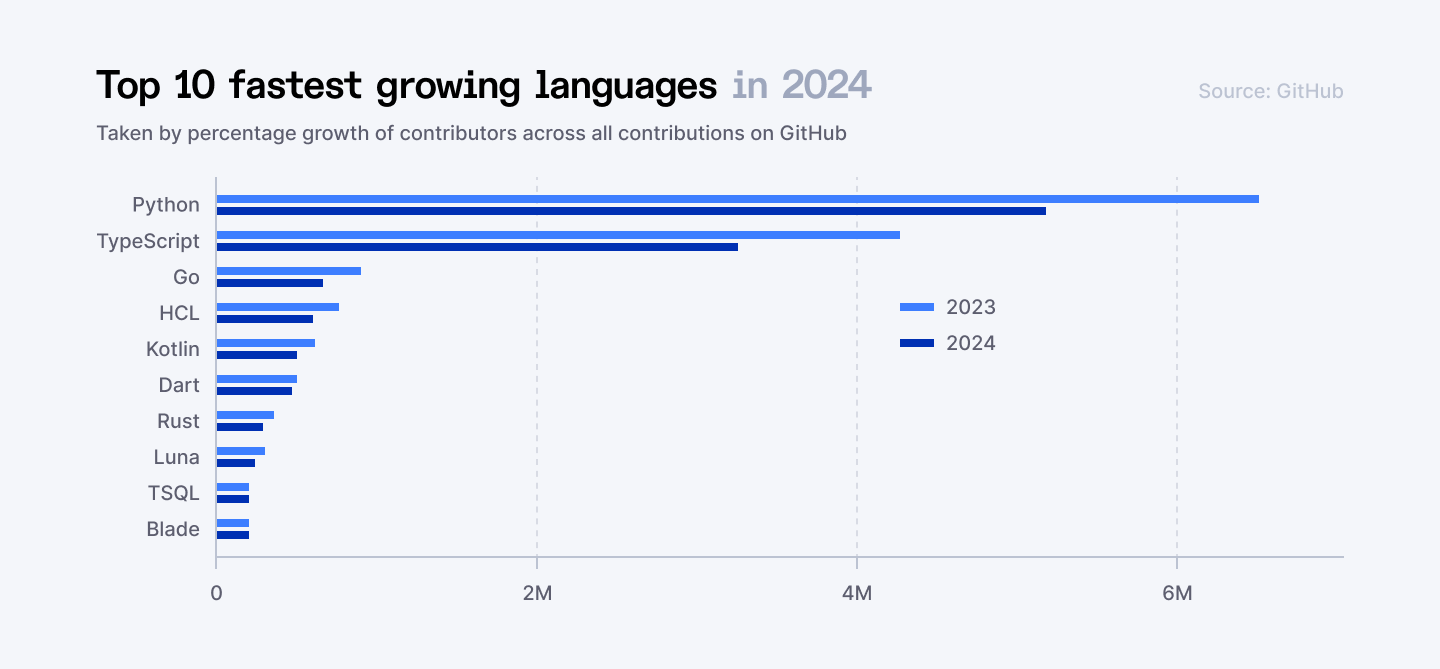
What Go Is Really Good At
Go is the behind-the-scenes engine for many things you already use:
- Cloud-native apps
- Backend APIs
- CLI tools
- DevOps workflows
- Containers (yep, Docker and Kubernetes are written in Go)
Anything that needs to run fast, scale huge, and stay simple? Go is there.
When You’d Reach for Go
You need to spin up a backend that handles thousands of requests per second. You want it to be simple, maintainable, and fast. But you don’t want to fight the language.
Go is perfect here. Its built-in concurrency (via goroutines) means it handles high loads without breaking a sweat. And because it compiles to a single static binary, deployment is a breeze.
Quick Code Example
package main

import "fmt"

func main() {
    fmt.Println("Go makes life easier!")
}
See how neat that is? One file. One command. Clean and fast.
What You’ll Earn With Go
You’ll find Go jobs at companies like Uber, Stripe, Dropbox, and basically any team doing cloud, DevOps, or infrastructure work.
Average salary? $115K–$160K, depending on experience and region.
Even better: Go teams tend to be small and efficient, which often means more ownership and faster growth for you.
Pro Tip for Learning Go
Start by building a tiny web server using the built-in net/http package. Forget frameworks. The Go standard library is powerful enough on its own.
Also, dig into Go’s approach to goroutines (super-lightweight threads) and channels.
Here is a useful step-by-step guide to learning Go.
5. Swift
Swift was never meant to stay locked inside Apple's ecosystem. Sure, it started as the "better Objective-C," but Apple had bigger plans. They're quietly pushing Swift into server-side development, machine learning experiments, and even cross-platform projects.
What Swift Is Really Good At
Swift is great for:
- Building iOS, macOS, and watchOS apps
- Creating modern, fast UI with SwiftUI
- Server-side apps (thanks to Vapor)
- Exploring ML with Swift for TensorFlow (still early, but exciting)
Basically, if you’re in the Apple ecosystem, or planning to be, Swift is the go-to choice.
When You’d Want Swift
You’re building a mobile banking app that needs to feel rock solid. You want animations, security, performance, and an App Store badge. That’s Swift’s home turf.
Quick Code Example
func greet(name: String) {
    print("Hey, \(name)! Welcome to Swift.")
}

greet(name: "iOS Dev")
It’s concise, clear, and safe. No semicolons. No null-pointer chaos.
Swift makes modern development feel easy, especially with features like optionals, pattern matching, and strong type safety baked in.
What’s the Job Market Saying?
In 2025, Swift is still king for iOS. But now it’s gaining traction beyond just mobile.
The demand for Swift developers spans:
- Mobile-first startups
- Fintech companies
- Health & wellness apps
- Even enterprise-level backend teams using Vapor
Average salary? $100K–$150K, with top-tier mobile engineers earning even more, especially if you know SwiftUI, Combine, or have shipped apps at scale.
Pro Tip for Learning Swift
Don’t just write code. Build a full app. Use SwiftUI: it’s the modern, reactive way to create UI and it’ll teach you Swift naturally.
Also, dig into Combine and async/await. They’ll change how you think about data flow and concurrency.
6. Prolog
If most languages are about telling the computer what to do, Prolog is the opposite. You tell it what you know, and Prolog figures out how to get to the answer.
That’s logic programming.
And in a world leaning more into AI, reasoning engines, and symbolic computation, Prolog’s weirdness is paying off.
Where Prolog Is Surprisingly Useful
Prolog is ideal when your app needs to:
- Reason through complex rules (like an expert system)
- Model relationships and logic chains
- Search through decision trees
- Interpret natural language or symbolic data
It’s used in AI labs, legal rule engines, NLP tools, and games like Sudoku solvers or chess AIs.
When You’d Reach for Prolog
Imagine you’re building a smart chatbot that can reason about rules like:
"If a person is a parent, and their child is under 18, they are eligible for benefit X."
With most languages, that would be a pile of if statements and data wrangling. With Prolog? It’s a fact + a rule. You query it like a brain.
Quick Code Example
parent(jane, emma).
age(emma, 16).

eligible_for_benefit(X) :-
    parent(X, Y),
    age(Y, A),
    A < 18.
Now just ask:
?- eligible_for_benefit(jane).It returns true.
You didn’t write the logic, you declared it. Prolog figured out the rest.
Prolog in the Job Market
You won’t often see “Prolog Developer Wanted” on most job boards. But here’s the twist: symbolic reasoning, the core of Prolog, is making a quiet comeback in AI, especially as it’s used alongside LLMs and neural networks.
You’ll find Prolog (or tools inspired by it) in niche but important areas like research, government, defense, legal tech, and advanced AI systems. If you're into building your own AI models, chatbots, or logic-based systems, Prolog gives you a powerful foundation for structured reasoning.
While Prolog roles are rare, they often pay well. Senior AI engineers or researchers with Prolog skills can earn $120K–$160K+, depending on the field and location.
Pro Tip for Learning Prolog
Start with solving puzzles: family trees, mazes, rules, constraints. You’ll see how Prolog solves instead of executes.
It’ll feel upside down at first, but once it clicks, it unlocks a whole new way to think about programming.
7. Dart + Flutter
Remember the old days? You'd write your app in Swift for iOS, then rewrite the whole thing in Kotlin for Android. Then someone asks for a web version. Then the desktop. Before you know it, you're maintaining four different codebases that do the same thing.
Dart with Flutter is Google's answer to that nightmare, an all-in-one toolkit for building lean and fast apps across mobile, web, and desktop. One codebase. One language. All platforms.
What Dart + Flutter Are Great At
Dart is the language. Flutter is the UI framework. Together, they let you build:
- iOS and Android apps from the same code
- Web apps with modern UI
- Desktop apps for macOS, Windows, Linux
- Even experimental embedded UIs (for IoT)
Perfect for startups, agencies, or anyone who needs to ship fast.
When You’d Reach for Dart
You’re building a product MVP and want it live on both App Stores next month. You don’t have the time or budget to hire two development teams: one for Swift, one for Kotlin.
With Flutter, you write once and deliver everywhere. And the UI looks awesome, thanks to Flutter’s custom rendering engine. No more "it looks weird on Android." Same animations, same UI, same everything.
Quick Code Example
import 'package:flutter/material.dart';

void main() {
  runApp(MyApp());
}

class MyApp extends StatelessWidget {
  @override
  Widget build(BuildContext context) {
    return MaterialApp(
      home: Scaffold(
        appBar: AppBar(
          title: Text('Multi-Platform App'),
          backgroundColor: Colors.deepPurple,
        ),
        body: Center(
          child: Column(
            mainAxisAlignment: MainAxisAlignment.center,
            children: [
              Icon(Icons.rocket_launch, size: 100, color: Colors.orange),
              SizedBox(height: 20),
              Text(
                'This runs on iOS, Android, Web & Desktop!',
                style: TextStyle(fontSize: 18, fontWeight: FontWeight.bold),
                textAlign: TextAlign.center,
              ),
              SizedBox(height: 20),
              ElevatedButton(
                onPressed: () {
                  print('Button pressed on any platform!');
                },
                child: Text('Tap Me Anywhere'),
              ),
            ],
          ),
        ),
      ),
    );
  }
}
This exact code creates a native-feeling app on iOS, Android, web browsers, Windows, macOS, and Linux. No platform-specific rewrites needed.
What’s the Job Market Like?
Dart devs with Flutter skills are in high demand in 2025, especially in:
- Startups
- Mobile agencies
- Fintech
- Emerging markets
Salaries range from $100K–$150K, with freelance Flutter devs earning 30-40% more thanks to fast delivery and low overhead. Plus, there’s a massive open-source and global community behind it.
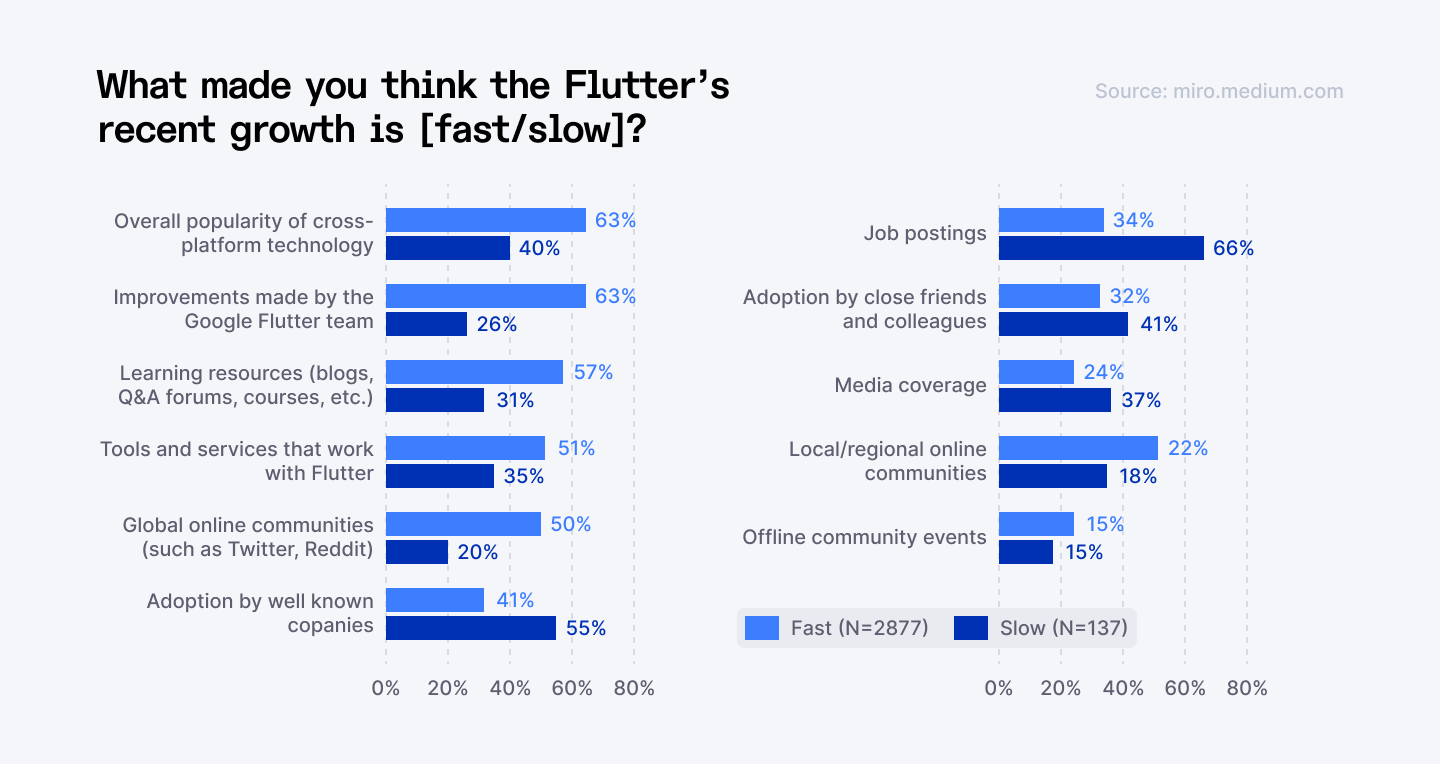
Pro Tip for Learning Dart
Start with the Flutter documentation. Build something visual immediately. Start with a simple mobile app. Then try running it in the browser or on your laptop. Same code, new platform.
Flutter is all about widgets, so think of everything as building blocks. Focus on understanding the widget tree and state management early. Hot reload will spoil you.
Check out FlutterFlow if you want to prototype visually, then dig into Dart for custom logic.
Explore 20 most popular programming languages in 2025 based on developer demand and real-world usage.
Four More Wildcard Picks
8. Lisp
Lisp isn’t just a programming language. It’s a mindset. One of the oldest high-level languages, it’s the original champion of functional programming.
- What makes Lisp powerful?
- You write code that can write more code. That’s not just clever, it’s efficient.
- You write code that can write more code. That’s not just clever, it’s efficient.
- The job market:
- Niche but incredibly well-paid. Think $160K+ at research institutions.
- Niche but incredibly well-paid. Think $160K+ at research institutions.
9. R
If you deal with data like charts, predictions, trends, you’ll love R.
- What makes R powerful?
- It’s built for statistics and data analysis. Clean syntax. Lots of libraries. Visualizations that pop.
- It’s built for statistics and data analysis. Clean syntax. Lots of libraries. Visualizations that pop.
- Pro tip:
- R isn’t just for statisticians. If you touch data at all, it’s worth knowing.
- R isn’t just for statisticians. If you touch data at all, it’s worth knowing.
10. Scala
Scala runs on the JVM, so it plays nice with Java. But it's also modern, expressive, and concise. Best of both worlds.
- What makes Scala powerful?
- You write less, do more, and enjoy the perks of strong typing with cleaner syntax.
- You write less, do more, and enjoy the perks of strong typing with cleaner syntax.
- The job market:
- If you see "big data" in the job description, they probably need Scala. $150K+ is normal.
- If you see "big data" in the job description, they probably need Scala. $150K+ is normal.
11. Elixir
When WhatsApp handled 2 billion messages with just 32 servers, they used Erlang. Elixir brings that same fault-tolerance with modern syntax. That means it’s really good at handling lots of users, at once, without crashing.
- What makes Elixir powerful?
- It's built for web apps, real-time systems, and anything that needs to scale smoothly.
- It's built for web apps, real-time systems, and anything that needs to scale smoothly.
- The job market:
- Rare but valuable. Real-time systems and IoT companies pay premium for Elixir developers.
- Rare but valuable. Real-time systems and IoT companies pay premium for Elixir developers.
Pick Your Path
You don't need to learn everything. Here’s a super-clear table to match your coding goals with the best languages to learn.
Use this as a cheat sheet to plot your next move:
| Your Goal | Programming Languages to Learn |
| Build AI/ML models | R, Julia, Scala |
| Build lightning-fast, safe systems (OS, embedded) | Rust |
| Create scalable cloud apps, DevOps tools, CLIs | Go |
| Bulletproof your web/frontend or large JS codebase | TypeScript |
| Crunch big data, do serious data science or ML | Julia, R |
| One codebase for mobile, web, desktop apps | Dart (with Flutter) |
| Build apps that reason and solve logic problems | Prolog, Lisp |
| Advanced AI, unique algorithms, code-as-data | Lisp, Scala |
| Stats visualizations, pure statistical analysis | R |
| Rock-solid, real-time apps (chat, trading, etc.) | Elixir |
| Scalable backends and functional programming | Scala, Elixir |
Final Thoughts
The best developers today aren’t loyal to one tool. They get the job done, however it takes.
- Rust for safety.
- Go for speed.
- TypeScript for sanity.
- Julia for the numbers.
- Dart for everywhere.
- Prolog for mind games.
- R, Lisp, Scala, Elixir… there’s a flavor for every challenge.
Sure, Python is still great, but it’s not the only one. The future belongs to developers who adapt.
Pick one. Pick three. Switch when you need to. In the end, it’s not about memorizing more syntax. It’s about always lining up your next win.
And remember:
Depth beats breadth every time.
Join Index.dev now and turn these in-demand languages into your next big opportunity.


