
Handling text that includes non-ASCII characters is not only a technical necessity but also a business imperative. This is because developers often handle text from diverse character sets and the web utilizes non-ASCII characters extensively, particularly in languages that require accents or symbols beyond the basic Latin alphabet.
Whether you are processing user input, parsing data from web APIs, or reading files with mixed encodings, you need robust strategies to decode non-ASCII characters. In this guide, we’ll explore both basic and advanced decoding techniques in Python, discuss common pitfalls and best practices, and take a look at future trends in character encoding. So let’s dive in!
Want to work on global projects with top companies? Join Index.dev and get matched with high-paying remote opportunities today!
1. Introduction to Character Encoding
What Is Character Encoding?
Character encoding is the process of converting bytes (raw data) into characters (text) that we can understand. Traditional ASCII is a 7-bit encoding standard that represents 128 characters, which is sufficient for basic English text but falls short for many other languages and symbols.
From ASCII to Unicode
- ASCII (7-bit): Limited to 128 characters.
- Non-ASCII (8-bit or more): Can represent thousands of characters.
- Unicode: The universal standard that supports over 143,000 characters across scripts worldwide. Python 3’s default encoding is UTF-8, a popular Unicode encoding that handles virtually all characters used globally.
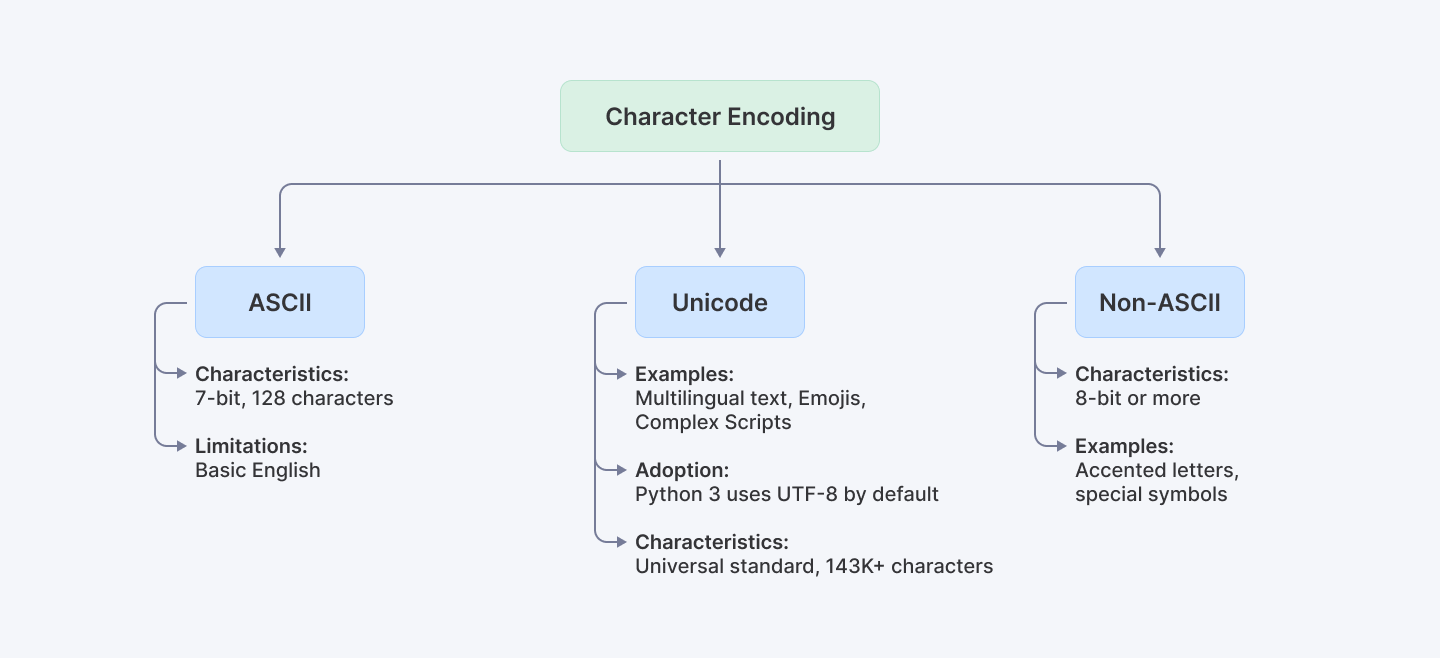
Understanding these concepts is crucial because the web and many modern applications rely heavily on non-ASCII text. And when we say heavily, we mean approximately 98.5% of web content now includes such characters!
2. Understanding Python’s String Handling
Python 3 treats strings as sequences of Unicode characters, which simplifies working with international text. This is a significant improvement over Python 2, where strings were ASCII by default, often leading to encoding errors. By default, Python 3 uses UTF-8 encoding, making it naturally capable of handling a wide variety of characters.
3. Common Issues with Non-ASCII Characters
Even with Python 3’s powerful Unicode support, you might encounter certain issues such as:
- UnicodeDecodeError: This is raised when Python cannot decode a byte sequence with the specified encoding.
- UnicodeEncodeError: This occurs when you convert a Unicode string into bytes, and some characters cannot be encoded in the target encoding.
These errors often appear when reading files, processing CSV data with mixed encodings, or dealing with legacy systems. For example:
# Example: Triggering a UnicodeDecodeError
try:
    # Suppose file.txt contains non-UTF-8 encoded content.
    with open('file.txt', 'r', encoding='utf-8') as f:
        content = f.read()
except UnicodeDecodeError as e:
    print("Decoding error:", e)
Explanation:
The try block attempts to read a file using UTF-8. If the file contains byte sequences that aren’t valid UTF-8, a UnicodeDecodeError is raised, and the exception block prints an error message. This basic error handling prepares us to implement more robust strategies.
By understanding these issues, we can adopt strategies in order to make our code resilient and robust.

Learn More: How to Check If a Set Is Mutually Exclusive in Python
4. Decoding Techniques
Now that you have a better understanding of the what and why’s of Character Encoding as well as String Handling along with any probable issues that may crop up while tackling non-ASCII characters, let’s move on.
Let us now explore various methods for decoding non-ASCII characters, starting from basic to more advanced techniques.
4.1 Basic Decoding with the decode() Method
When you know the encoding, converting bytes to a string is straightforward using the decode() method:
# Basic decoding with improved error handling and validation
def decode_text(byte_string: bytes, encoding: str = 'utf-8') -> str:
    """
    Safely decode a byte string with proper error handling.

    Args:
        byte_string: The bytes to decode
        encoding: Target encoding (default: utf-8)
    Returns:
        Decoded string
    """
    if not byte_string:
        return ""

    try:
        return byte_string.decode(encoding)
    except UnicodeDecodeError:
        # Fallback to a more permissive error handler
        return byte_string.decode(encoding, errors='replace')

# Example usage
byte_string = b'\xe2\x98\x83'  # Unicode snowman
decoded_string = decode_text(byte_string)
print("Decoded string:", decoded_string)  # Output: ☃
Explanation:
- Input Validation: The function first checks for empty input, preventing unnecessary processing of null data.
- Primary Decoding: The decode() method attempts to convert the byte sequence into a Unicode string using the specified encoding (UTF-8 by default).
- Fallback Handling: If the primary decoding fails, it automatically retries with the 'replace' error handler, ensuring the program continues running while marking problematic characters.
4.2 Decoding with Error Handling
Sometimes, the byte stream might contain unexpected or corrupted bytes. You can handle these gracefully using error strategies like replace, ignore, or surrogateescape.
# Enhanced error handling with multiple strategies
def decode_with_fallback(byte_data: bytes,
                        primary_encoding: str = 'utf-8',
                        fallback_encodings: list = ['ascii', 'latin1']) -> tuple[str, str]:
    """
    Attempt to decode bytes with multiple fallback options.

    Args:
        byte_data: Input bytes
        primary_encoding: First encoding to try
        fallback_encodings: List of fallback encodings
    Returns:
        Tuple of (decoded_string, encoding_used)
    """
    # Try primary encoding first
    try:
        return byte_data.decode(primary_encoding), primary_encoding
    except UnicodeDecodeError:
        # Try fallback encodings
        for encoding in fallback_encodings:
            try:
                return byte_data.decode(encoding), encoding
            except UnicodeDecodeError:
                continue

        # If all fails, use replace error handler with primary encoding
        return byte_data.decode(primary_encoding, errors='replace'), f"{primary_encoding} (with replacement)"

# Example usage
corrupted_bytes = b'Hello \xff World'
text, encoding = decode_with_fallback(corrupted_bytes)
print(f"Decoded text: {text}")
print(f"Encoding used: {encoding}")
Explanation:
- Corrupted Data: The corrupted_bytes variable contains \xff, which is not a valid byte in a proper UTF-8 sequence.
- Multiple Encoding Support: The function tries multiple encodings in sequence, starting with the primary encoding.
- Fallback Strategy: If the primary encoding fails, it systematically attempts each fallback encoding before using replacement characters.
- Transparency: The function returns both the decoded text and the encoding used, making it clear how the data was processed.
5. Advanced Decoding Techniques
When tackling more complex scenarios, such as processing data streams or handling uncertain encoding, these advanced methods may just be the solution you were looking for:
5.1 Using the surrogateescape Error Handler
When you need to round-trip data (decode and later re-encode) without losing any original bytes, the surrogateescape error handler is invaluable.
def handle_with_surrogateescape(byte_data: bytes) -> tuple[str, bytes]:
    """
    Decode and re-encode data using surrogateescape to preserve original bytes.

    Args:
        byte_data: Input bytes to process
    Returns:
        Tuple of (decoded_string, re-encoded_bytes)
    """
    # Decode with surrogateescape to preserve undecodable bytes
    decoded = byte_data.decode('utf-8', errors='surrogateescape')

    # Re-encode to demonstrate round-trip preservation
    re_encoded = decoded.encode('utf-8', errors='surrogateescape')

    # Verify round-trip integrity
    assert byte_data == re_encoded, "Round-trip conversion failed!"

    return decoded, re_encoded

# Example usage
with open('example.txt', 'rb') as f:
    byte_data = f.read()

# Process with surrogateescape
decoded_text, recovered_bytes = handle_with_surrogateescape(byte_data)
Explanation:
- Binary File Read: The file is opened in binary mode ('rb') so that we can inspect the raw bytes without any preliminary decoding.
- Strict Decoding Attempt: The first decoding attempt with errors='strict' will raise a UnicodeDecodeError if any byte sequences are invalid.
- Surrogateescape Handling: The surrogateescape handler maps undecodable bytes into a private Unicode range. This means that while these bytes appear as unusual characters, they can be later recovered exactly by re-encoding using the same error handler.
- Round-Trip Safety: This approach is particularly useful when you need to read, process, and then re-save data without altering its original byte structure.
5.2 Incremental Decoding with the codecs Module and Generators
For streaming data or processing large files chunk by chunk, combining Python's codecs module with generators provides both correct character handling and memory efficiency. This approach ensures that multi-byte characters split across chunks are handled properly while maintaining optimal resource usage.
import codecs
from typing import Generator, BinaryIO
from contextlib import contextmanager

class IncrementalStreamDecoder:
    """
    Handles incremental decoding of byte streams using codecs and generators.
    """
    def __init__(self, encoding: str = 'utf-8', chunk_size: int = 8192):
        self.encoding = encoding
        self.chunk_size = chunk_size
        self._decoder = None

    @contextmanager
    def decoder_context(self) -> Generator[codecs.IncrementalDecoder, None, None]:
        """Provides a managed context for the incremental decoder."""
        decoder = codecs.getincrementaldecoder(self.encoding)()
        try:
            yield decoder
        finally:
            decoder.reset()

    def decode_stream(self, stream: BinaryIO) -> Generator[str, None, None]:
        """
        Decodes a binary stream incrementally, yielding decoded chunks.
        """
        with self.decoder_context() as decoder:
            while True:
                chunk = stream.read(self.chunk_size)
                if not chunk:
                    # Get any remaining decoded data
                    final = decoder.decode(b'', final=True)
                    if final:
                        yield final
                    break

                decoded = decoder.decode(chunk)
                if decoded:
                    yield decoded

# Example usage
decoder = IncrementalStreamDecoder('utf-8')

# Simulate receiving data in chunks
chunks = [b'\xe2', b'\x98', b'\x83']  # Split snowman character
with open('example.txt', 'rb') as f:
    decoded_text = ''.join(decoder.decode_stream(f))
print("Decoded text:", decoded_text)
Explanation:
- Codec Integration: Uses Python's codecs module for reliable incremental decoding while maintaining state between chunks.
- Generator Pattern: Implements a memory-efficient generator that yields decoded chunks as they become available.
- Resource Management: Uses context managers to ensure proper cleanup of decoder resources.
- Chunk Processing: Handles both complete and partial multi-byte characters correctly, buffering incomplete sequences between chunks.
You can check out the Python Codecs Module Documentation to read more about codecs.
5.3 Normalizing Unicode Data
Different systems or input methods may represent the same character using different byte sequences. Unicode normalization ensures consistency, which is critical for string comparison and storage.
import unicodedata
from typing import Literal

NormalizationForm = Literal['NFC', 'NFKC', 'NFD', 'NFKD']

def normalize_text(text: str,
                  form: NormalizationForm = 'NFC',
                  clean_control_chars: bool = True) -> str:
    """
    Normalize Unicode text with optional cleaning.

    Args:
        text: Input text
        form: Unicode normalization form
        clean_control_chars: Whether to remove control characters
    Returns:
        Normalized text
    """
    # Normalize the text
    normalized = unicodedata.normalize(form, text)

    if clean_control_chars:
        # Remove control characters except whitespace
        return ''.join(char for char in normalized
                      if not unicodedata.category(char).startswith('C')
                      or char.isspace())
    return normalized

# Example usage
text = "Café\u0301"  # 'é' composed of 'e' and combining acute accent
normalized = normalize_text(text)
print(f"Original:", text)
print(f"Normalized:", normalized)
print(f"Length before/after: {len(text)}/{len(normalized)}")
Explanation:
- Why Normalize? The same visual text can be encoded differently. For example, an accented character can be a single code point or a combination of a base character and an accent.
- Normalization Process: unicodedata.normalize('NFC', text) converts the string into a standard canonical form, ensuring that equivalent strings have the exact same binary representation. The function converts text into a standardized form while optionally removing problematic control characters.
- Outcome: This is particularly useful when comparing strings, storing data in databases, or ensuring consistency across different systems.
5.4 Auto-Detecting Encodings with chardet
When the encoding is unknown, libraries like chardet or its faster variant cchardet can be used:
import chardet

# Open a file in binary mode to work with raw data.
with open('file.txt', 'rb') as f:
    raw_data = f.read()

# Use chardet to detect the encoding of the raw data.
detection_result = chardet.detect(raw_data)
encoding = detection_result['encoding']
print("Detected encoding:", encoding)

# Decode the data using the detected encoding, with error handling to replace any problematic characters.
decoded_data = raw_data.decode(encoding, errors='replace')
print("Auto-detected decoded data:", decoded_data)
Explanation:
- Raw Data Inspection: Reading the file in binary mode ensures that no decoding is applied before we determine the correct encoding.
- Detection Process: chardet.detect(raw_data) analyzes the byte patterns and returns a dictionary that includes the most likely encoding (and confidence level).
- Decoding Step: The byte data is then decoded using the detected encoding. Specifying errors='replace' ensures that any undetected anomalies are handled gracefully.
- Benefit: This method is indispensable when dealing with data from diverse or legacy sources where the encoding is not known in advance.
6. Best Practices for Decoding Non-ASCII Characters
To ensure robust and error-free applications, you can consider these best practices:
- Know Your Data: Always verify the encoding of your input data. Use libraries like chardet when in doubt.
- Prefer UTF-8: Python 3’s default encoding is UTF-8. When possible, standardize your data streams to UTF-8 for compatibility.
- Graceful Error Handling: Choose the right error handler (replace, ignore, or surrogateescape) based on the context.
- Normalize Unicode: Use normalization (via the unicodedata module) to ensure consistency across text inputs.
- Incremental Decoding: For large or streaming data, incremental decoding helps maintain performance and accuracy.
7. Real-World Case Studies & Use Cases
File I/O and Data Processing
Imagine you’re processing log files from multiple systems with varying encodings. By implementing robust decoding and normalization, you can:
- Avoid crashes due to unexpected byte sequences.
- Ensure consistency in stored data, making downstream analytics more reliable.
Web Scraping and API Data
When scraping web pages or consuming APIs, non-ASCII characters abound. Using auto-detection libraries such as chardet ensures that the text is correctly decoded and presented, regardless of the source’s encoding.
Enterprise Applications
Companies that rely on multilingual data streams, like international e-commerce platforms or social media analytics tools, benefit from using these techniques to maintain data integrity and improve overall software performance. Techniques like incremental decoding facilitate processing large volumes of data efficiently.
8. Future Outlook and Trends for 2025
Looking ahead, we expect continued evolution in text encoding:
- Enhanced Libraries: Future versions of Python and third-party libraries will likely offer even more efficient handling of mixed-encoding data.
- Broader Standards: As global digital communication increases, further standardization and enhancements in Unicode support are on the horizon.
- AI-Enhanced Detection: Machine learning may soon play a role in automatically detecting and correcting encoding anomalies, making text processing even more robust.
Staying ahead of these trends means continually refining your decoding practices and keeping an eye on the latest developments in the Python ecosystem.
Explore More: Top 18 Open-Source Apps Every Developer Should Know in 2025
9. Afterword
Decoding non-ASCII characters in Python is both a technical challenge and a critical skill in today’s diverse software landscape. By mastering the basics - such as using the decode() method - and adopting advanced techniques like incremental decoding, surrogate escape handling, normalization, and auto-detection, you can build robust applications that gracefully handle global text.
For Developers: Take your Python development skills to the next level by exploring more advanced tutorials and resources at Index.dev. Join us to access exclusive content, job opportunities, and professional growth tools.
For Companies: Looking to hire Python developers who excel at robust text handling and Unicode processing? Index.dev connects you with vetted professionals skilled in modern data processing and application resilience. Discover how our talent network can speed up your hiring process and drive your projects to success.


