
Zero-downtime deployment represents the pinnacle of DevOps practices—where code changes seamlessly transition from development to production without users experiencing any service disruption. This approach not only maintains uninterrupted user experience but also enables organizations to respond quickly to market demands, security vulnerabilities, and performance issues without scheduling maintenance windows.
After working with dozens of enterprise teams struggling with service interruptions (and researching references from industry leaders such as Atlassian, AWS, and Red Hat), we've identified five battle-tested approaches that consistently deliver results. These are practical DevOps strategies we've seen transform deployment pipelines from anxiety-inducing events into non-events.
Let's break down these methodologies that have helped our clients maintain seamless operations even during complex updates.
Hire vetted DevOps through Index.dev’s talent network—access the top 5% of engineers, get matched in 48 hours, and try risk-free for 30 days.
1. Blue-Green Deployment
Concept
Blue-Green Deployment involves running two identical environments—commonly referred to as the "blue" and "green" environments. One environment (say, blue) handles live traffic while the other (green) is updated with new features. Once the green environment is fully tested, traffic is seamlessly switched over. This approach is particularly effective for systems with complex dependencies that can't afford even brief service interruptions since it minimizes risk and allows for rapid rollbacks if necessary.
Benefits
- Fast Rollback: If issues arise, you can quickly revert to the stable blue environment.
- Minimal Downtime: Users remain largely unaffected as updates are implemented on the standby system.
- Thorough Testing: New features are fully vetted in the green environment before going live.
According to the 2020 State of DevOps Report by DORA (DevOps Research and Assessment), elite performers who implement strategies like Blue-Green deployments have 973x more frequent code deployments.
Many companies have reported a significant reduction in downtime-related costs using this method, as outlined in Zero Downtime Deployment Strategies - Informatica. Automation with Infrastructure as Code (IaC) tools further streamlines this process.
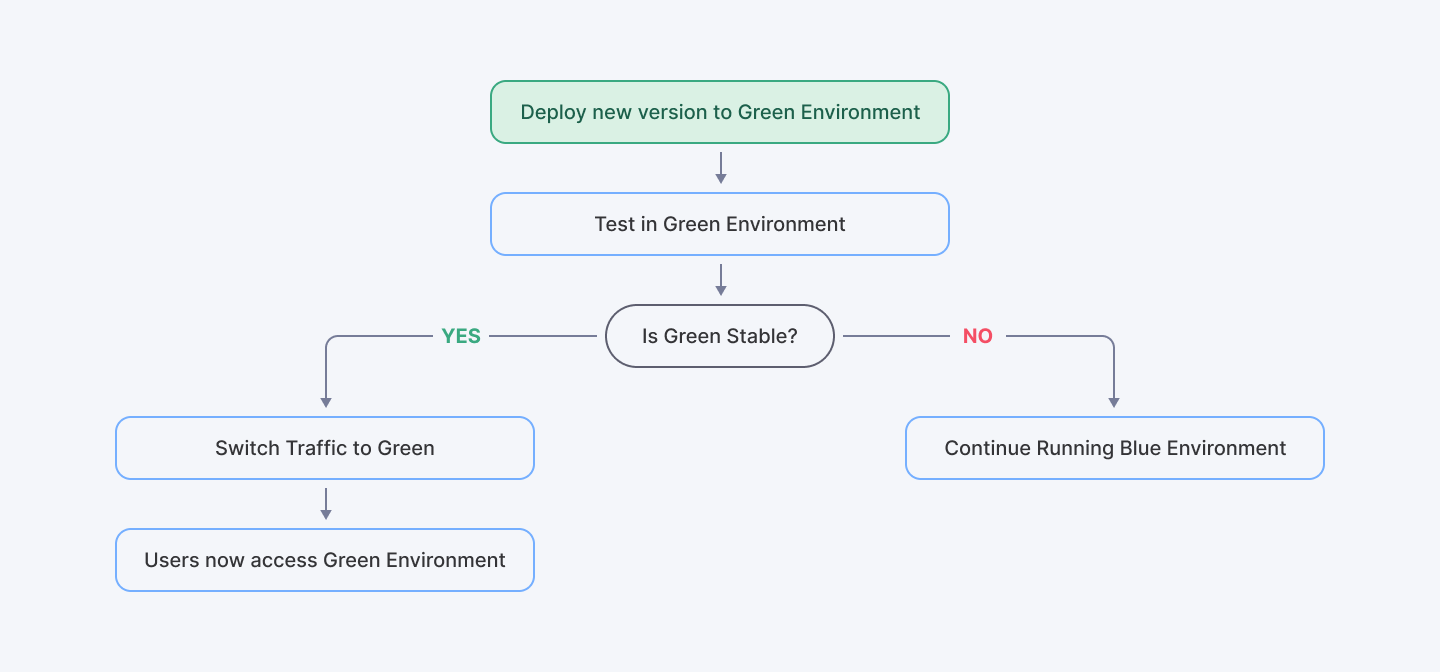
An overview of the Blue-Green Deployment process.
Pro Tip
Watch out for database synchronization challenges. You'll need clear migration paths to avoid data inconsistencies between environments during the transition period.
Also Read: Top 5 Programming Languages DevOps Automations
2. Canary Releases
Concept
When solving API timeout and latency problems, canary deployments have proved invaluable. Rather than hope everything works, canary releases acknowledge reality: despite our best testing efforts, production is a different beast. By exposing new code to just 5-10% of traffic initially, teams gain invaluable performance data without risking widespread outages.
The name comes from actual coal mining history, where canaries would show signs of distress before humans when dangerous gases were present. In software terms, your canary users experience issues first, giving you time to roll back before affecting your entire user base. We've seen canary deployments particularly shine when solving API timeout and latency problems. Small traffic samples make performance anomalies obvious before they impact the entire system.
Benefits
- Risk Mitigation: By gradually increasing traffic to updated services, you can closely monitor performance metrics and spot regression issues before they affect your entire user base and only a subset of users encounters potential bugs, making issues easier to contain.
- Real-World Testing: Live feedback from a small group ensures the new release performs as expected.
- Quick Rollbacks: If performance metrics dip, you can swiftly revert to the previous version.
Tools like Kubernetes make it easier to implement these DevOps deployment strategies by providing robust monitoring and automated rollbacks. Numerous success stories highlight improved reliability and enhanced user satisfaction when canary releases are part of the deployment plan.
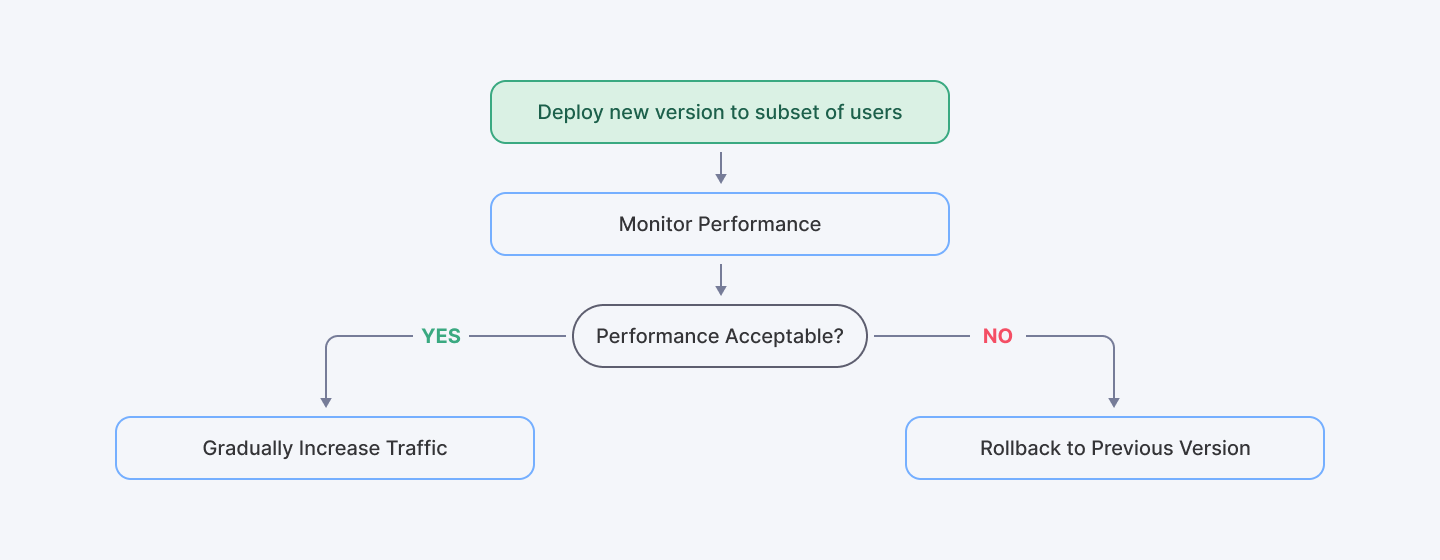
The flowchart illustrates the gradual rollout in Canary Releases.
Pro Tip
Combine canary deployments with robust observability tools to create automated rollback triggers if key metrics drift beyond acceptable thresholds.
3. Rolling Updates
Concept
Rolling Updates involve a methodical approach to deployment where you gradually refresh instances one batch at a time across different servers or clusters. Instead of a complete shutdown, only a portion of the system is updated at a time while the rest continues to serve users. While seemingly simple, executing this strategy effectively requires careful capacity planning and session management.
Benefits
- Continuous Service: The system remains operational throughout the update process. This approach has proved particularly valuable for teams solving API timeout and latency problems in distributed systems.
- Improved Engagement: By keeping most instances live, user experience is maintained.
- Incremental Improvement: Performance retention and faster deployment times are typical outcomes.
Effective traffic mapping during rolling updates ensures that user sessions are maintained without disruption. This method is an essential part of modern DevOps strategies that help companies maintain system continuity even during critical updates.
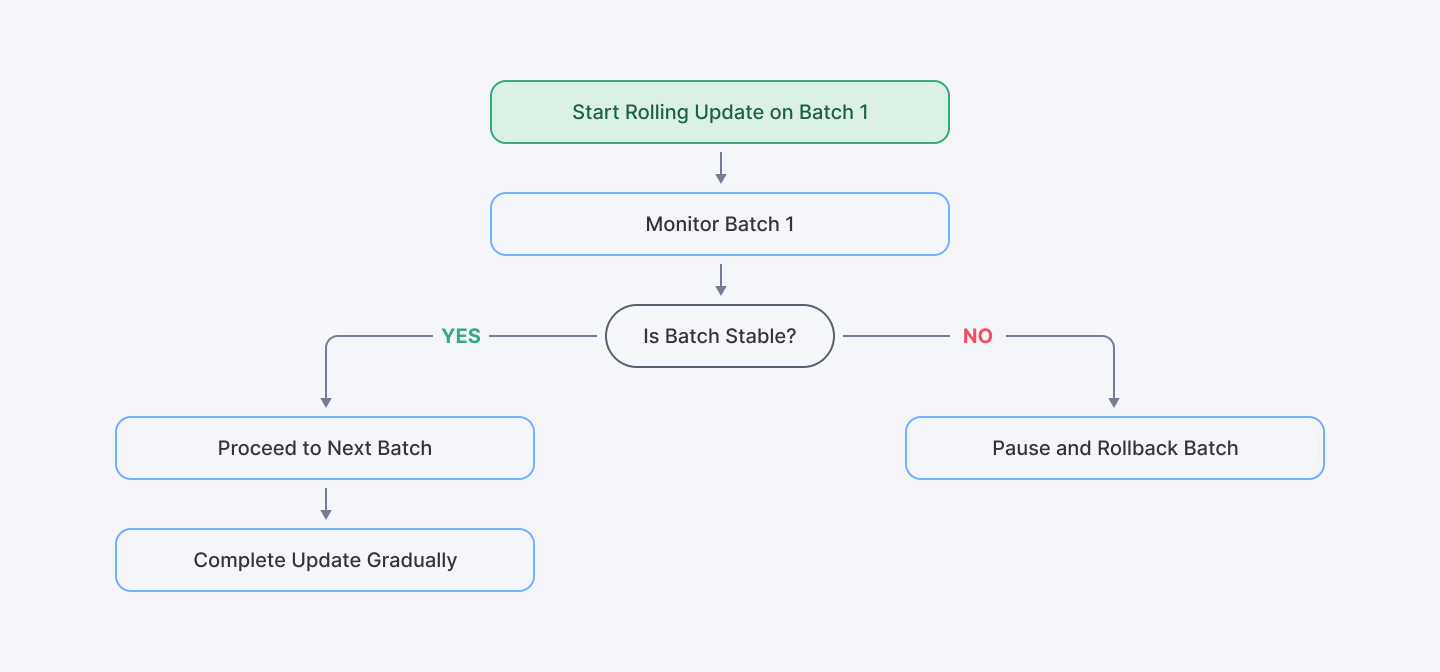
This flowchart showcases the incremental update process in Rolling Updates.
Pro Tip
Session stickiness becomes critical during rolling updates. Ensure your load balancer configuration maintains user sessions on the same server version throughout their interaction.
4. Feature Toggles (Feature Flags)
Concept
Feature toggles (sometimes called feature flags) fundamentally change the deployment equation by allowing you to control the visibility of new features without deploying new code. This approach allows you to push code to production without activating new functionality until you're ready. This strategy supports gradual rollouts and A/B testing, ensuring that any risks associated with new features are minimized.
Benefits
- Controlled Exposure: Toggle features on or off without needing a new deployment cycle. You can deploy code during low-traffic periods but activate features during business hours.
- Risk Mitigation: Target features to specific user segments for feedback, allowing you to test new features with a small audience and switch off problematic ones instantly.
- Enhanced Deployment Frequency: Companies using feature flags have reported increased release velocity and improved service stability, as noted in Feature Flags: Benefits, Challenges and Solutions - Configu as it is particularly valuable for maintaining stable performance during complex feature rollouts.
Popular tools like LaunchDarkly and Optimizely empower teams to manage these flags efficiently, integrating seamlessly into broader DevOps deployment strategies.
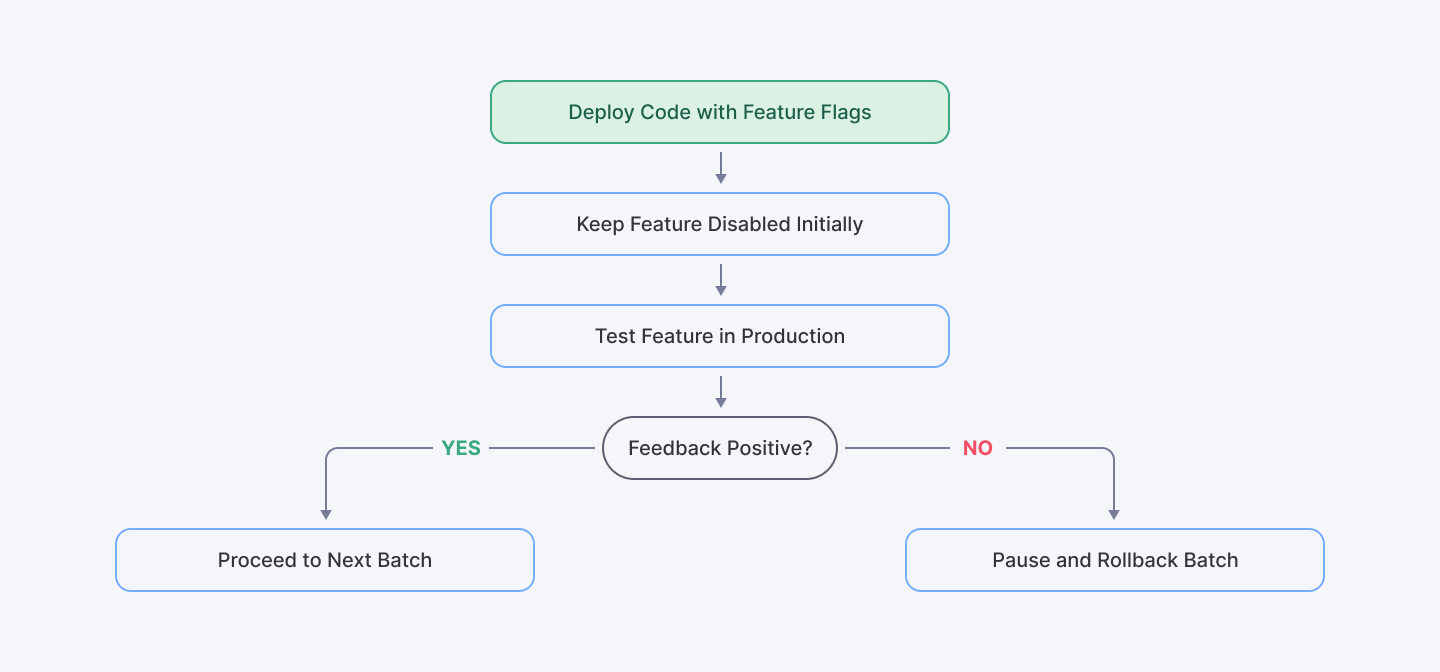
This flowchart explains how feature flags manage feature exposure.
Pro Tip
Maintain a rigorous toggle clean-up process. Technical debt accumulates quickly when toggles remain in your codebase longer than necessary. Setting explicit expiration dates for each toggle during creation helps maintain code quality.
5. Automated Testing and CI/CD Pipelines
Concept
While the previous strategies focus on deployment mechanics, none work effectively without comprehensive automated testing integrated into your Continuous Integration/Continuous Deployment (CI/CD) pipeline. We've lost count of how many teams claim to have CI/CD but are really just doing continuous integration with manual deployment approvals and haphazard test coverage. There's nothing wrong with taking a cautious approach, but let's not mislabel it.
Real CI/CD pipelines catch problems before human eyes ever need to look at the code. They're unforgiving—failing builds for even minor test failures—but that strictness pays dividends when production stays stable despite aggressive delivery schedules. When building DevOps deployment strategies for high-stakes environments, investment in automated testing consistently produces significant ROI.
Benefits
- Early Issue Detection: Automated tests catch potential issues before they impact end users.
- Enhanced Reliability: Consistent testing improves overall system stability. Conduct performance tests to catch regression in response times
- Efficiency Gains: Automation speeds up deployment, with recent trends showing that AI-driven CI/CD processes can predict and mitigate failures effectively (The Future of DevOps: Key Trends, Innovations and Best Practices).
By embedding automated testing in your DevOps strategies, you can maintain zero-downtime deployments while significantly boosting deployment speed and reliability.

This flowchart represents a CI/CD pipeline integrated with automated testing.
Pro Tip
Create dedicated test environments that accurately mirror production. Testing against simplified environments frequently misses critical issues that emerge only under real-world conditions.
Also check out how Glopal onboarded Python and DevOps engineers with maximum accuracy and efficiency.
Conclusion
As you evaluate your current deployment practices, consider these questions:
- Which of these strategies would address your most frequent deployment challenges?
- What automation gaps exist in your current testing approach?
- How quickly can you currently roll back problematic deployments?
Zero-downtime deployments won't happen overnight. Many teams struggle for months trying to implement everything at once—only to create more chaos. Start small—maybe with feature toggles on a non-critical service—then build from there. Successful DevOps teams don’t just follow playbooks—they adapt strategies to fit their architecture. Some focus on automated rollbacks, while others prioritize canary testing.
The most resilient organizations don't rely on a single approach. They combine these DevOps strategies based on their specific needs and risk profiles.
For example, a financial services company might use:
- Feature toggles for gradual functionality exposure
- Blue-green deployments for major platform updates
- Canary releases for performance-sensitive service changes
- Continuous automated testing throughout their pipeline
Tech is always evolving—your deployment practices should too. Keep experimenting, measuring, stumbling, and improving.
The difference between deployment anxiety and deployment confidence? Execution expertise. At Index.dev, our senior DevOps specialists help engineering teams implement these best practices seamlessly.
For Tech Companies:
Hire senior DevOps engineers from Index.dev’s vetted talent network. Get the right match in 48 hours—30-day free trial included!
For DevOps Engineers:
Join Index.dev to work remotely with top global companies. Get matched with high-paying DevOps roles today!


