
If you work on a site and do not review it properly and carefully, something wrong can happen in future, money, customers and even reputation of the site can be lost.
A research done by the National Institute of Standards and Technology-NIST reveals that unduly insufficient testing of software leads to nearly 70% software failures. These failures may lead to simple inconsistencies to total system breakdowns, thus affecting business processes and user interaction tremendously.
To minimize these risks, there must be a scanning and testing document for all aspects of a full-stack web application before release. By following this guide, development teams can minimize the risks that come with post-release problems and have a seamless release.
Let us go through the most important stages of preparing your application for the launch success.
Full-stack web app launch? Hire top full-stack developers fast with Index.dev's talent network.
Section 1: Development and Code Quality
Code quality is often considered to be the basis of having a durable and easily maintainable software application. It has immediate implications on development efficiency, product quality, and sustainability. This section delves into critical practices that contribute to exceptional code quality: includes peer code reviews, unit/integration tests, code coverage information, code quality checks, dependencies, and source control.
Code Reviews and Peer Feedback
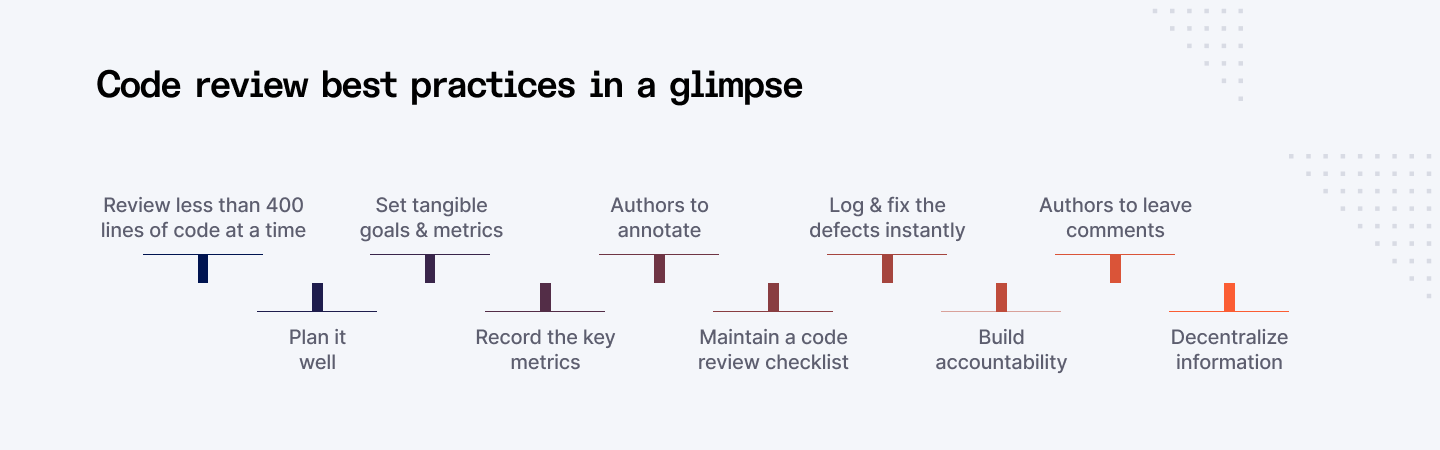
The code review is a process wherein two or more developers go through the code, analyze it for errors, and assess the design and coding standards. Peer feedback is an integral component, fostering knowledge sharing and skill development.
Benefits:
- Early defect detection: Identifying issues before they reach production.
- Knowledge sharing: Promoting knowledge transfer within the team.
- Code improvement: Enhancing code readability, maintainability, and efficiency.
- Adherence to standards: Ensuring consistency and compliance with coding guidelines.
Best Practices:
- Establish clear code review guidelines.
- Encourage constructive feedback.
- Use code review tools for efficient management.
- Prioritize code reviews for critical code paths.
Deep Dive:
- Code review techniques: Pair programming, over-the-shoulder reviews, asynchronous reviews.
- Code review metrics: Measuring code review effectiveness (defect detection rate, review time).
- Code review tools: Comparing popular code review platforms (GitHub, GitLab, Bitbucket).
Unit and Integration Testing
In unit testing, the testing of each component that is developed in the program is carried out separately while in integration testing the testing of these components as they are integrated.
Benefits:
- Increased code reliability: Ensuring code correctness at the unit level.
- Faster development cycles: Enabling quicker regression testing.
- Improved code maintainability: Facilitating refactoring with confidence.
- Better code design: Encouraging modular and testable code.
Best Practices:
- Write unit tests for all critical code paths.
- Aim for high test coverage.
- Use mocking and stubbing effectively.
- Prioritize unit tests for complex or critical components.
Deep Dive:
- Test-driven development (TDD): Writing tests before code implementation.
- Unit testing frameworks: Comparing popular unit testing frameworks (JUnit, NUnit, Jest).
- Test code coverage analysis: Measuring the effectiveness of unit tests.
Code Coverage Analysis
Code coverage analysis is defined as the measure of the amount of code that is exercised by the test cases. In other words, it enables one to understand which parts of the codebase are less tested.
Benefits:
- Identifying untested code: Revealing potential vulnerabilities.
- Improving test effectiveness: Focusing on areas with low coverage.
- Assessing code quality: Correlating code coverage with code reliability.
Best Practices:
- Set code coverage targets based on project risk.
- Prioritize coverage for critical code paths.
- Use code coverage tools to measure and track coverage.
Deep Dive:
- Code coverage metrics: Line coverage, branch coverage, function coverage.
- Code coverage tools: Comparing code coverage tools (Jacoco, Istanbul, Coveralls).
- Code coverage trade-offs: Balancing code coverage with test maintenance costs.
Linting and Formatting
Code formatting and indentations facilitates in making code more readable and easier for other members of the team to manage.
Benefits:
- Improves code readability: Promoting consistent code formatting.
- Reduces errors: Catching potential syntax errors and style violations.
- Improves collaboration: Facilitating code sharing and understanding.
Best Practices:
- Define clear coding standards.
- Use linting tools to enforce style rules.
- Configure linters to match team preferences.
- Automate linting as part of the build process.
Deep Dive:
- Popular linting tools: ESLint, Pylint, TSLint.
- Code formatters: Prettier, Black.
- Integrating linting and formatting into CI/CD pipelines.
Dependency Management and Security
Dependencies must be managed well because failure to do that leads to conflicts, security breaches and poor performances.
Benefits:
- Resolves dependency conflicts: Ensuring compatibility between libraries.
- Improves build reproducibility: Guaranteting consistent build results.
- Enhances security: Identifying and mitigating vulnerabilities.
Best Practices:
- Use dependency management tools (npm, pip, Maven).
- Regularly update dependencies.
- Conduct security audits.
- Prioritize open-source software security.
Deep Dive:
- Dependency vulnerability scanning: Tools and techniques for identifying vulnerabilities.
- Dependency lock files: Ensuring consistent dependency versions.
- Dependency management strategies: Centralized vs. decentralized approaches.
Version Control Best Practices
Version control is necessary to control the changes of codes, to work collectively, and to deal with several versions of the codes.
Benefits:
- Enables collaboration: Multiple developers can work on the same codebase simultaneously.
- Facilitates code rollback: Reversing changes to previous versions.
- Supports branching and merging: Managing different code features and releases.
- Provides code history: Tracking code evolution over time.
Best Practices:
- Use a robust version control system (Git, SVN).
- Commit code frequently with clear messages.
- Branch effectively for feature development.
- Merge code carefully to avoid conflicts.
- Utilize code review and pull requests.
Deep Dive:
- Git workflows: Centralized, distributed, and feature branching.
- Git branching strategies: Gitflow, GitLab Flow, GitHub Flow.
- Version control best practices: Commit message guidelines and branching conventions.
Following these practices keenly, development teams are not only able to come up with improved code quality, fewer defects but also a better software development process.
Explore the essential stages of a robust Software Development Life Cycle.
Section 2: Functionality Testing
Functionality testing is crucial in the SDLC process since it ensures that the application fulfils its intended purpose.
User Story Testing
User story testing is one of the black-box testing types that check whether the developed software corresponds with the information from the user stories. It is useful to know how exactly the application is seen by the final consumers, and whether they get the value which is expected.
Key focus: Verifying that the application fulfills the user's needs as described in user stories.
Techniques:
- Acceptance criteria-based testing
- Scenario-based testing
- Exploratory testing
Challenges:
- Ensuring comprehensive coverage of all user stories.
- Balancing depth and breadth of testing.
Best practices:
- Involve product owners and business analysts in test case creation.
- Prioritize user stories based on business value and risk.
- Use test management tools to track user story coverage
Smoke Testing
Smoke testing is a preliminary testing level, through which it is checked that the software application works properly. Its main purpose is to check whether the critically important elements of the system are in order or not.
Key focus: Verifying the buildability and stability of the application.
Techniques:
- High-level functional testing
- Sanity checks
Challenges:
- Determining the scope of smoke tests.
- Balancing speed and effectiveness.
Best practices:
- Automate smoke tests for faster execution.
- Include smoke tests in the CI/CD pipeline.
Functional Testing
Functional testing confirms satisfaction of a given software application with respect to the functions that are required of it. It ensures that when an input is entered to the application then the application provides the right output.
Key focus: Validating the application's behavior against functional requirements.
Techniques:
- Equivalence partitioning
- Boundary value analysis
- Decision table testing
- State transition testing
Challenges:
- Designing comprehensive test cases.
- Identifying all possible input combinations.
Best practices:
- Use test case management tools to organize test cases.
- Prioritize test cases based on risk.
- Automate repetitive test cases.
API Testing
API testing is all about ensuring the Operational efficiency, effectiveness of the APIs of the application. It makes sure that APIs achieve the right levels of performance and reliability.
Key focus: Verifying API responses, error handling, performance, and security.
Techniques:
- REST API testing
- SOAP API testing
- GraphQL API testing
Challenges:
- Handling complex API structures.
- Ensuring adequate test coverage.
Best practices:
- Use API testing tools for efficient test execution.
- Consider API security testing.
- Implement API versioning.
Performance Testing
Performance testing assesses the ability of the system to respond in terms of time, stability and how well it can handle loads of users at a go. It enables one to know areas of slowness and enhance the application.
Key focus: Measuring system performance under various conditions.
Techniques:
- Load testing
- Stress testing
- Endurance testing
- Volume testing
Challenges:
- Setting realistic performance goals.
- Identifying performance bottlenecks.
Best practices:
- Use performance monitoring tools to gather data.
- Analyze performance metrics to identify improvement areas.
- Conduct performance testing regular
Security Testing
Security testing is used to find out gaps in the application so that it cannot be attacked. It assists in protecting the continuity, security, and confidentiality of the system.
Key focus: Assessing the application's security posture.
Techniques:
- Vulnerability scanning
- Penetration testing
- Security audits
- Risk assessment
Challenges:
- Keeping up with evolving threats.
- Balancing security with usability.
Best practices:
- Conduct regular security assessments.
- Implement security best practices throughout the development lifecycle.
- Stay informed about the latest security threats.
Accessibility Testing
Accessibility testing is a process to ensure that applications can be used by the disabled persons. Admission and non-discrimination policy is present, it also follows accessibility standards.
Key focus: Evaluating the application's usability for people with disabilities.
Techniques:
- Manual testing
- Automated testing tools
- User evaluation
Challenges:
- Covering all accessibility standards.
- Ensuring compatibility with assistive technologies.
Best practices:
- Follow accessibility guidelines (WCAG, ADA).
- Involve users with disabilities in testing.
- Use accessibility testing tools.
Browser Compatibility Testing
Browser compatibility is a process that ensures that the interaction with the application goes smoothly across different browsers and their versions. It helps to achieve a high degree of identity in them throughout the client’s campaigns and prevent the untidy appearance of various identities across the marketing channels.
Key focus: Checking application behavior in different browsers.
Techniques:
- Manual testing
- Automated testing tools
- Browser compatibility matrix
Challenges:
- Keeping up with browser updates.
- Addressing browser-specific issues.
Best practices:
- Prioritize popular browsers.
- Use responsive design principles.
- Test on different browser versions.
Cross-Device Testing
Cross-device testing makes sure that the application will run properly on different devices (desktop, tablet, mobile). It keeps the IOS user's experience of the product constant irrespective of the device they use.
Key focus: Verifying application functionality on different devices.
Techniques:
- Emulator and simulator testing
- Real device testing
- Responsive design testing
Challenges:
- Different screen sizes and resolutions.
- Varying operating systems and browsers.
Best practices:
- Use responsive design principles.
- Test on a wide range of devices.
- Prioritize popular devices and operating systems.
Through the integration of these testing techniques, it is possible to improve the overall quality, functionality, and performance of full stack web applications.
Section 3: Deployment and Infrastructure
There are various components of a software delivery environment, but each has to be properly structured to support the deployment process. It has separate phases so as to cover all the testing and validation processes before the application goes into the production phase.
- Development Environment: Where developers write and test code. It should be isolated from other environments to prevent conflicts.
- Testing Environment: Replicates the production environment as closely as possible for comprehensive testing.
- Staging Environment: A pre-production environment for final testing and user acceptance.
- Production Environment: The live environment where the application is accessible to end-users.
Best practices:
- Use configuration management tools to standardize environment setup.
- Employ infrastructure as code (IaC) to automate environment provisioning.
- Implement environment-specific configurations to avoid conflicts.
Continuous Integration and Continuous Deployment (CI/CD) Pipeline
CI/CD is a process strategy in software development that relies on the use of tools that automatically build, test and release software. It allows software delivery to be more frequent and, at the same time, more trustworthy.
- Continuous Integration (CI): Software developers merge code modifications into a common repository regularly. Automated builds and tests ensure that the code is high quality.
- Continuous Deployment (CD): Pushes code to production instantly after testing is complete.
Key components:
- Version control system (Git, SVN)
- Build server (Jenkins, GitLab CI/CD, CircleCI)
- Test automation framework
- Deployment tools (Ansible, Puppet, Chef)
- Configuration management tools
Benefits:
- Faster time-to-market
- Improved software quality
- Increased deployment frequency
- Reduced manual errors
Infrastructure as Code (IaC)
IaC sees infrastructure as an actual code that can be managed and provisioned through code. This approach leads to improvement of efficiency, accuracy and repeatability when various activities are performed.
Key benefits:
- Increased infrastructure reliability
- Faster provisioning and updates
- Improved collaboration
- Enhanced version control
Popular tools:
- Terraform
- Ansible
- Puppet
- Chef
- CloudFormation
Best practices:
- Use modular and reusable code.
- Implement configuration management for consistency.
- Test infrastructure code thoroughly.
Load Testing
Load testing establishes or indicates how or to what extent a system responds under anticipated traffic situations. It assists to find out inefficiencies in application and to improve it.
Key metrics:
- Response time
- Throughput
- Error rate
Tools:
- Apache JMeter
- Gatling
- LoadRunner
Best practices:
- Simulate realistic user behavior.
- Monitor system resources during testing.
- Analyze performance metrics to identify improvement areas.
Disaster Recovery Planning
DRP defines strategies and approaches of how the IT systems can be recovered and restored in case of a disaster. They make sure the operations of the business are not interrupted, and there is minimum time when they are not operational.
Key components:
- Business impact analysis (BIA)
- Data backup and recovery strategies
- Disaster recovery site (hot, warm, cold)
- Incident response plan
- Testing and drills
Best practices:
- Regularly update the disaster recovery plan.
- Conduct disaster recovery drills.
- Test backup and restore processes.
Beyond DRP, invest in cloud incident response planning that outlines roles, playbooks, centralized log sources, and automated containment across accounts and regions. Clear runbooks for detection, investigation, containment, and recovery tighten MTTR for cloud-native failures and security incidents.
Monitoring and Logging
The use of application and infrastructure monitoring tools is critical to detecting and rectifying problems immediately. Logging helps give great information concerning the status of the system.
Key metrics:
- Application performance
- System resource utilization
- Error rates
- User behaviour
Tools:
- Application performance monitoring (APM) tools (New Relic, AppDynamics)
- Infrastructure monitoring tools (Nagios, Zabbix)
- Logging platforms (Elasticsearch, Logstash, Kibana (ELK stack))
Best practices:
- Define clear monitoring objectives.
- Set up alerts for critical issues.
- Analyze logs to identify trends and patterns.
In this way, applying the above-mentioned practices helps organizations to create a reliable, easily scalable, and highly available base for the deployment of full-stack web applications.
Find expert full-stack developers quickly through Index.dev’s vetted talent pool. Hire in under 48 hours.
Section 4: User Experience (UX) and User Interface (UI)
Any web application should have a good user interface because this has an impact on how many people will visit this application.
Usability Testing
Usability testing seeks to establish the level of facility or the degree of difficulty that the users experience when using a certain application.
Key focus: Determining the level of satisfaction, performance and usability of the users.
Techniques:
- User observation
- Task-based testing
- Heuristic evaluation
- A/B testing
Challenges:
- Recruiting representative users
- Designing effective test tasks
- Analyzing qualitative and quantitative data
Best practices:
- Create detailed test scripts.
- Observe users without interference.
- Conduct usability tests early and often.
User Feedback Analysis
Collecting and evaluating feedback is the crucial step for both identifying users’ requirements and understanding their expectations as well as difficulties. It allows us to see where improvements can be made, and what features should be added next.
Key focus: Identifying user needs, preferences, and pain points.
Techniques:
- Surveys
- Interviews
- User reviews and ratings
- Social media monitoring
Challenges:
- Collecting sufficient and representative feedback.
- Analyzing qualitative and quantitative data.
- Prioritizing feedback for implementation.
Best practices:
- Create multiple feedback channels.
- Use feedback analysis tools.
- Involve stakeholders in feedback review.
Design Consistency
Consistent design elements create a cohesive and recognizable brand identity. It enhances user experience by reducing cognitive load and improving usability. For deeper insights, a social listening tool helps centralize brand mentions, automatically analyze sentiment, and surface emerging trends that often don’t appear in surveys or reviews.
Key focus: Maintaining visual and interaction consistency throughout the application.
Elements:
- Color palette
- Typography
- Iconography
- Layout and spacing
Challenges:
- Balancing consistency with innovation.
- Ensuring consistency across different platforms and devices.
Best practices:
- Develop a comprehensive design system.
- Use style guides and design libraries.
- Conduct design audits regularly.
Responsiveness and Adaptability
Responsive design ensures that the application adapts to different screen sizes and devices, providing an optimal user experience across platforms.
Key focus: Creating a seamless user experience on various devices.
Techniques:
- Fluid grids
- Flexible images
- Media queries
Challenges:
- Balancing design elements for different screen sizes.
- Ensuring optimal performance on various devices.
Best practices:
- Test on a wide range of devices.
- Prioritize content over design.
- Use responsive design frameworks.
Performance Optimization
Performance optimization is crucial for delivering a fast and responsive user experience. It involves identifying and eliminating performance bottlenecks.
Key focus: Improving application load time, responsiveness, and scalability.
Techniques:
- Image optimization
- Code minification
- Caching
- Content delivery networks (CDNs)
- Performance profiling
Challenges:
- Balancing performance with features.
- Measuring performance accurately.
Best practices:
- Set performance goals and KPIs.
- Conduct regular performance tests.
- Optimize for mobile devices.
By focusing on these areas, development teams can create web applications that are not only functional but also delightful to use.
Discover key product design interview questions and answers to find the perfect candidate.
Section 5: Security and Data Protection
A robust security posture is essential for protecting user data and maintaining trust. This section outlines key security and data protection practices.
Vulnerability Assessment
A vulnerability assessment identifies potential weaknesses in the application, infrastructure, and network. It helps prioritize remediation efforts.
Key focus: Discovering vulnerabilities and weaknesses.
Techniques:
- Static code analysis
- Dynamic application security testing (DAST)
- Vulnerability scanning
Challenges:
- Identifying all potential vulnerabilities.
- Prioritizing vulnerabilities for remediation.
Best practices:
- Conduct regular vulnerability assessments.
- Integrate vulnerability scanning into the CI/CD pipeline.
- Use vulnerability management tools.
Penetration Testing
Penetration testing simulates real-world attacks to identify and exploit vulnerabilities. It helps assess the overall security posture of the application.
Key focus: Identifying exploitable vulnerabilities.
Techniques:
- Black-box testing
- Grey-box testing
- White-box testing
Challenges:
- Balancing security with business impact.
- Ensuring ethical and legal compliance.
Best practices:
- Develop a penetration testing plan.
- Involve security experts.
- Prioritize critical vulnerabilities.
Data Encryption
Data encryption protects sensitive information by converting it into an unreadable format. It safeguards data both at rest and in transit.
Key focus: Protecting data confidentiality.
Techniques:
- Symmetric encryption
- Asymmetric encryption
- Hashing
Challenges:
- Selecting appropriate encryption algorithms.
- Managing encryption keys.
Best practices:
- Use strong encryption algorithms.
- Implement key management practices.
- Encrypt data at rest and in transit.
Secure Authentication and Authorization
Authentication verifies user identity, while authorization determines user access privileges. Strong authentication and authorization mechanisms protect against unauthorized access.
Key focus: Protecting user accounts and data access.
Techniques:
- Multi-factor authentication (MFA)
- Role-based access control (RBAC)
- Single sign-on (SSO)
Challenges:
- Balancing security with user convenience.
- Implementing effective password policies.
Best practices:
- Enforce strong password requirements.
- Implement MFA for critical systems.
- Regularly review and update access controls.
Data Privacy Compliance
Adhering to data privacy regulations is crucial for protecting user data and avoiding legal penalties.
Key focus: Complying with data protection laws (GDPR, CCPA, etc.).
Requirements:
- Data subject rights (access, rectification, erasure)
- Data breach notification
- Privacy by design and default
- Data minimization
Challenges:
- Understanding complex regulations.
- Implementing data protection measures.
- Staying updated with regulatory changes.
Best practices:
- Conduct data privacy impact assessments (DPIAs).
- Appoint a data protection officer (DPO).
- Train employees on data privacy.
By implementing these security measures, organizations can significantly reduce the risk of data breaches and protect the privacy of their users.
Section 6: Legal and Compliance
Terms of Service and Privacy Policy
A well-crafted terms of service (TOS) and privacy policy outline the rights and responsibilities of both users and the organization. These documents should be clear, concise, and legally compliant.
Key elements:
- User rights and responsibilities
- Service description and limitations
- Intellectual property rights
- Payment terms and conditions
- Dispute resolution
- Privacy practices and data collection
- Cookie policy
Best practices:
- Review and update regularly.
- Use plain language.
- Obtain legal advice.
- Make them easily accessible to users.
Copyright and Intellectual Property
Protecting intellectual property (IP) is essential for maintaining a competitive advantage. Ensure that all original content is copyrighted and that appropriate measures are taken to prevent unauthorized use or infringement.
Key areas:
- Copyright registration
- Trademark protection
- Patent applications
- Licensing agreements
- Copyright notices and attribution
Best practices:
- Identify and document IP assets.
- Use copyright and trademark symbols.
- Take action against infringement.
- Consider licensing opportunities.
Legal and Regulatory Compliance
Adhering to legal and regulatory requirements is crucial for avoiding penalties and maintaining a positive reputation. Stay informed about relevant laws and regulations, such as:
- Data protection laws (GDPR, CCPA)
- Consumer protection laws
- Intellectual property laws
- Anti-discrimination laws
- Industry-specific regulations
Key considerations:
- Conduct regular compliance audits.
- Implement necessary controls and procedures.
- Train employees on compliance requirements.
- Seek legal advice when needed.
Data Retention and Deletion Policies
Establish clear data retention and deletion policies to manage data storage and disposal effectively. This helps ensure compliance with legal requirements, reduce storage costs, and minimize security risks.
Key factors:
- Data classification
- Retention periods
- Deletion procedures
- Data backup and recovery
Best practices:
- Regularly review and update policies.
- Implement data retention management tools.
- Securely destroy sensitive data.
- Comply with applicable data retention laws.
Section 7: Final Checks and Release Planning
Staging Environment Testing
Before deploying to the production environment, conduct thorough testing in a staging environment that closely mimics the production environment. This helps identify and address any potential issues before they impact real users.
Key areas to focus on:
- Functional testing
- Performance testing
- Security testing
- Integration testing
- User acceptance testing (UAT)
Best practices:
- Use automation tools to streamline testing.
- Involve stakeholders in UAT.
- Monitor and address any performance bottlenecks.
Rollback Plan
Develop a comprehensive rollback plan to revert to a previous stable state in case of a critical issue or unexpected failure. This plan should include detailed instructions and procedures for reversing changes, restoring data, and minimizing downtime.
Key elements:
- Backup procedures
- Rollback scripts
- Communication plan
- Incident response procedures
Best practices:
- Test the rollback plan regularly.
- Maintain up-to-date backups.
- Communicate the rollback plan to relevant stakeholders.
Communication and Change Management
Effective communication and change management are essential for a successful release. Inform stakeholders about the release schedule, key changes, and potential impacts. Manage changes carefully to minimize disruptions and risks.
Key areas:
- Stakeholder communication
- Change enablement process
- Change management process
- Release communication plan
- Incident management procedures
Best practices:
- Use a change management tool.
- Provide clear and timely communication.
- Manage changes effectively to minimize risks.
Release Notes and Documentation
Create detailed release notes that document the changes, improvements, and bug fixes included in the release. This helps users understand the new features and address any questions or issues.
Key elements:
- Release summary
- New features
- Bug fixes
- Known issues
- Installation instructions
Best practices:
- Make release notes easily accessible to users.
- Use clear and concise language.
- Provide contact information for support.
Post-Release Monitoring and Feedback
Continuously monitor the application's performance, stability, and user experience after the release. Gather feedback from users to identify any issues or areas for improvement.
Key areas:
- Performance monitoring
- Error tracking
- User feedback
- A/B testing
Best practices:
- Use analytics tools to track performance.
- Respond promptly to user feedback.
- Conduct regular post-release reviews.
Learn how to estimate and optimize costs for your AI project.
In a Nutshell
In order to successfully launch a full stack web application, it is crucial to go through a series of checklists before deploying the application. Such areas as the design’s robustness, functionality check, performance tuning, security features, and compliance to SEO requirements should not be left out on this checklist. These all contribute to the most important thing we aim at achieving; providing a reliable and robust application we need to see on the end-users’ screen, with a renewed sense of purpose to meet business objectives.
Index. dev greatly helps in this by providing businesses with freelance full stack developers of the highest caliber. This talent network provides teams the simplified way to find qualified candidates to tackle any of the items on the project’s checklist.
Build a strong talent pipeline by posting a job description now:
- Zero hiring fees: Access the Index platform for free – no fees, no barriers, just expertly-vetted talent.
- 30-day trial: Pay nothing for the first 30 days after onboarding. Our trial means you only pay when you hire.
- Free replacement: 19/20 talent complete their projects. If things don’t work out, get a replacement at no added cost.
Receive 3 to 5 interview-ready candidates in 48hrs!

