
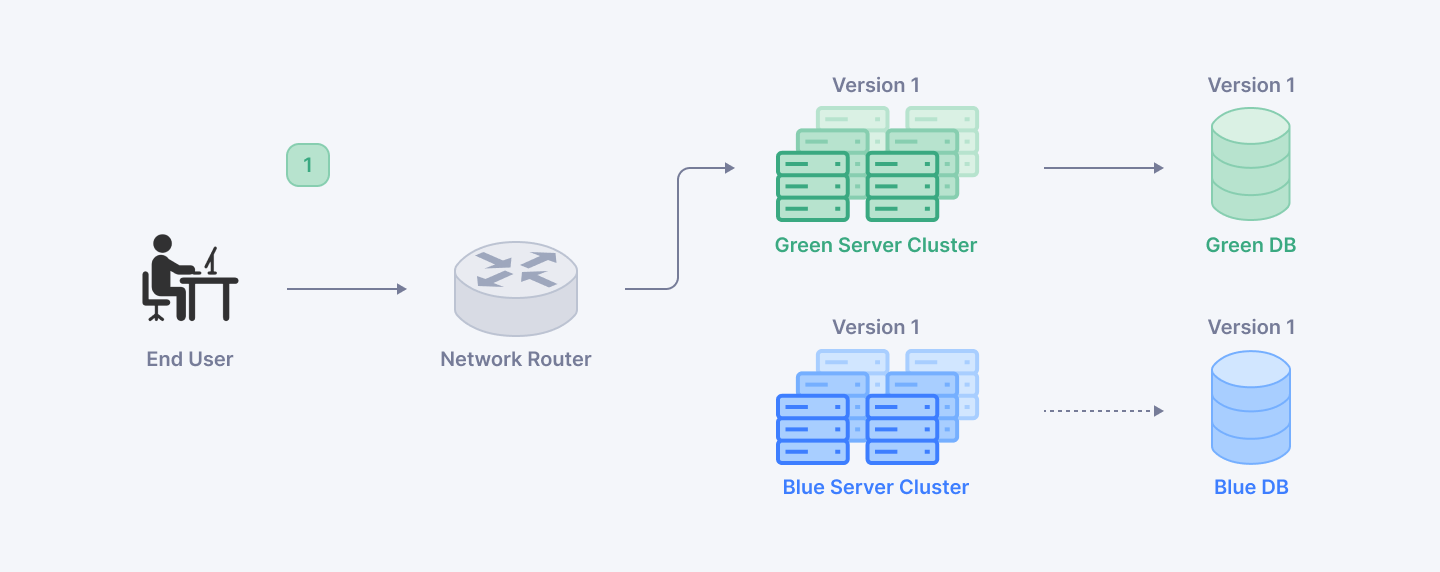
Blue-green deployment comprises a software release management approach that keeps two identical production environments, labelled the 'blue' and 'green' environments. This solution permits organisations to issue new application editions with few interruptions and lowered risk. In the blue environment, we see the current live version, and the green environment is the location for deployment and testing of updates. If the new version in the green environment passes verification for its stability, the switchover from the blue to the green environment ensures that users do not experience service interruptions during the transition.
Deploying blue-green offers major benefits. Initially, it supports accelerated releases because changes can be made and analysed in a green environment without disturbing users. This functionality enables teams to confidently make changes more often. In addition, it simplifies rollbacks; if any complications surface after rerouting traffic to the green environment, reversion to the blue environment is easy, which helps reduce likely disruptions. Furthermore, using blue-green deployment lets us test in production, given that the green environment can be verified with genuine user traffic before it goes live. This tactic greatly minimises the risks involved in launching new features or updates, making it an effective solution for companies focused on high availability and dependability.
This blog discusses blue-green deployment as a method for safely updating applications in production while minimising downtime and risks. It highlights how this strategy works by utilizing two identical environments, allowing for quick rollbacks and thorough testing before full deployment. The blog emphasizes the advantages of faster releases, easier rollbacks, and the ability to test in production, ultimately showcasing blue-green deployment as a valuable approach for modern software development practices.
Join the Index.dev talent network and work remotely on exciting projects for top global companies, with competitive pay and growth opportunities.
Understanding Blue-Green Deployment
Blue-green deployment is an approach to software release management that utilises two similar production environments called the "blue" environment and the "green" environment. The blue environment illustrates the present live edition of the application, in contrast to the green environment which is the area for updates to be tested and deployed. This methodology keeps both environments as alike as possible, permitting a smooth deployment of new changes. The procedure is initiated by launching the latest version of the application to the inactive environment (green) and thoroughly verifying it in production conditions. With the validation of the new version, traffic transitions from the blue environment to the green environment, enabling users to use the updated application with no downtime.
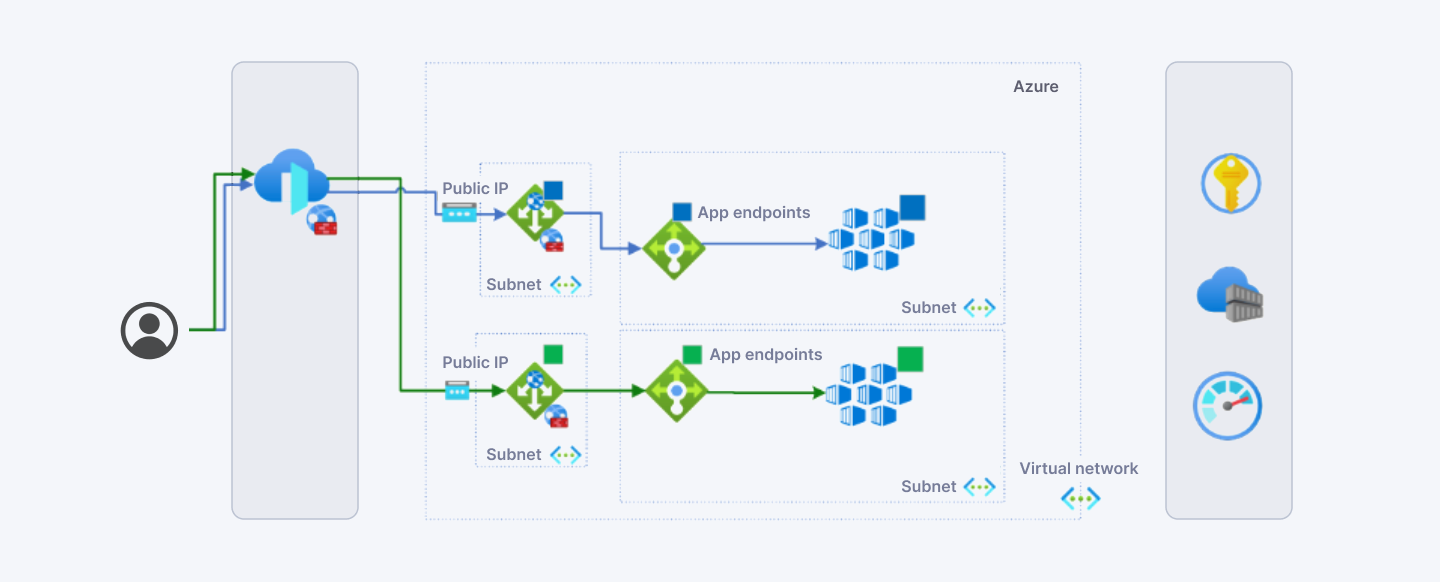
The switching of traffic between the two environments depends on key components of blue-green deployment like load balancers or routers. By enabling this, it ensures that there are no interruptions when moving from blue to green immediately. In addition, one of the important benefits of this deployment strategy is its rollback feature; if any complications crop up after directing traffic to the green environment, returning to the blue environment is as simple as redirecting traffic back. This feature greatly diminishes the threats associated with deploying new updates, since teams have the ability to rapidly restore service to a stable version when necessary.
In essence, deploying blue-green improves the processes for application release by minimising downtime, allowing for faster releases, and furnishing a resilient facility for testing in proceedings environments, while still maintaining a smooth user experience.
Setting Up Blue-Green Deployment
Planning Your Infrastructure
For setting up blue-green deployment, it’s necessary to guarantee the availability of the resources needed to keep two identical production environments. This involves ensuring there is enough computing power, storage, and networking capacity to run the blue and green environments in parallel.
Consider solutions like cloud virtual machines (VMs) or containers to help lower expenses. With cloud platforms, it’s simple to launch and eliminate resources as required, which guarantees you only pay for what you consume. Technologies for containerization like Docker and Kubernetes improve resource utilization by bundling applications into reusable and independent modules.
Defining Your Workflow
Necessary steps for deploying to the green environment and thoroughly testing the new version before switching traffic.
This workflow should include:
- Deploying the updated application to the green environment
- Conducting comprehensive testing in the green environment, including:
- Functional testing
- Performance testing
- Security testing
- Compatibility testing
- Verifying the green environment meets all quality and performance criteria
- Planning for the traffic switchover from blue to green, including:
- Updating load balancers or routers to redirect traffic
- Monitoring the green environment for any issues after the switchover
- Defining the rollback procedure in case problems arise after the switchover:
- Updating load balancers or routers to redirect traffic back to the blue environment
- Restoring any necessary data or configurations to the blue environment
Automating as much of this workflow as possible using CI/CD pipelines can help streamline the process and reduce the risk of manual errors.
Considerations for Stateful Applications
You will have to thoughtfully handle the synchronisation of data within the blue and green environments if your application keeps state (e.g., user sessions, shopping carts).
This may involve:
- Using either a common database or a caching layer that is reachable from both environments
- Putting into action a session replication mechanism to synchronise user sessions.
- Structuring the application to exist as a stateless entity that keeps state data outside itself (in a database or message queue)
Smoothly performing a blue-green deployment requires effective management of stateful data.
Defining a clear workflow and planning your infrastructure will allow you to create a solid blue-green deployment framework that encourages fast, low-risk modifications to your application.
Read More: 10 Best Cross Platform Mobile App Development Frameworks
Best Practices for Blue-Green Deployment
Blue-green deployment is a strategy that allows organizations to minimize downtime and reduce risk during application updates by maintaining two identical environments: one live (blue) together with one still (green). Here are best practices for the management of database state, making use of feature flags, and rolling out chaos engineering in blue-green deployments.
Managing Database State
Challenges of Keeping Databases in Sync:
- Preserving the synchronisation of databases in the blue and green environments is important. Inconsistencies can introduce important reliability problems, particularly during transitions where user traffic goes from one environment to another.
- Putting into practice database versioning is fundamental. To accomplish this, one must ensure all change documentation through version control and give each developer a separate database instance to mitigate the risk of collisions. Decoupling changes to schema from those to code can also assist in keeping consistency across different environments.
Techniques:
- Schema Changes: Deploy incremental schema modifications that are compatible with no service interruptions. This makes it so that both environments can use compatible database versions while making the transition.
- Staging Data: Think about applying a single shared database along with the right data management methods for handling state during the transition, guaranteeing both environments can obtain current data without conflicts.
Using Feature Flags
Leveraging Feature Flags:
- There is an option with feature flags to enable and disable features without the need for fresh code deployment. This adaptability permits teams to assess features in the green environment prior to activating them for users in the blue environment.
- Controlled Rollouts: By using feature flags, organisations have the ability to roll out new features incrementally, while monitoring their performance, collecting user feedback, and not fully enabling them until they are ready. This technique decreases the danger of bringing bugs into the live environment.
Testing Features:
- Fully evaluate new features in the green environment without disrupting stability in the blue environment. This means that any problems can be solved without disrupting end users.
Chaos Engineering
Practicing Chaos Engineering:
- Chaos engineering is the practice of deliberately introducing failures systematically to evaluate system resilience. In a blue-green deployment, we can practise this in a green environment without disruption to live users.
- Identifying Issues: Teams can recognise weaknesses in the system by simulating failures and watching how the application responds, thereby preparing ahead of switching traffic to the green environment. Such a proactive method helps confirm reliability as the new version goes online.
Limitations:
- Although chaos engineering can offer useful knowledge, it might not reproduce all actual world situations because of the missed user interactions found in testing scenarios. Configuration tests can still lead to important advantages.
Applying these best practices—managing database state wisely, making use of feature flags for managed rollouts, and practising chaos engineering—enables organisations to refine their blue-green deployment strategy, improving their application updates reliability and efficiency.
Implementing Blue-Green Deployment with Kubernetes
Blue-green deployment reduces downtime and risk during software releases through the strategy of running two parallel environments, which we refer to as 'blue' and 'green.' This way of operating permits smooth changes between application versions, aiding in testing and rollback functions.
Kubernetes and Blue-Green Deployment
The orchestration platform known as Kubernetes simplifies how users manage applications built on containers. The features, load balancing, rolling updates, and service routing, make it ideally suited for carrying out blue-green deployments.
Load Balancing:
While the new version (green) is progressing, Kubernetes services can send traffic to the active environment (blue). After the validation of the green environment, traffic may be changed over without any downtime.
Rolling Updates:
Blue-green deployments emphasise the separation of environments, but Kubernetes also supports rolling updates which permit gradual deployment of new releases. This can prove helpful in circumstances where a total change isn't possible.
Example of a Blue-Green Deployment Workflow in Kubernetes
1. Create the Blue Deployment: Start with the current version of the application running in the blue environment. Here's a Kubernetes deployment configuration in YAML format:
   apiVersion: apps/v1
   kind: Deployment
   metadata:
     name: demo-app-blue
   spec:
     replicas: 3
     selector:
       matchLabels:
         app: demo-app
         release: v1
     template:
       metadata:
         labels:
           app: demo-app
           release: v1
       spec:
         containers:
         - name: nginx
           image: nginx:alpine
           ports:
           - containerPort: 80
2. Create the Blue Service: Set up a service that routes traffic to the blue deployment.
   apiVersion: v1
   kind: Service
   metadata:
     name: demo-app-blue
   spec:
     selector:
       app: demo-app
       release: v1
     ports:
     - protocol: TCP
       port: 80
       targetPort: 80
3. Deploy the Green Version: When ready, create a new deployment for the green version.
   apiVersion: apps/v1
   kind: Deployment
   metadata:
     name: demo-app-green
   spec:
     replicas: 3
     selector:
       matchLabels:
         app: demo-app
         release: v2
     template:
       metadata:
         labels:
           app: demo-app
           release: v2
       spec:
         containers:
         - name: nginx
           image: nginx:new-version  # New version image here.
           ports:
           - containerPort: 80
4. Switch Traffic: Update the service to point to the green deployment once it has been validated. This workflow allows for thorough testing of the green environment before switching over production traffic, ensuring minimal disruption to users.
Challenges and Solutions
While blue-green deployments offer significant advantages, they also present challenges:
Managing Multiple Databases:
When access to the database is necessary for both, preserving data consistency can prove to be a complicated endeavour. You can use database migrations or feature flags in order to manage access to new capabilities until they have completed their testing.
Ensuring Environment Parity:
The variations between blue and green ecosystems can cause surprising behaviours. To reduce this problem, take advantage of tools including Helm or Customize for uniform configuration management across diverse environments.
Strategies to Overcome Challenges
Stateful Sets:
Kubernetes StatefulSets help to manage database instances efficiently, making sure that each instance keeps its identity throughout deployment changes.
Declarative Deployments:
The application of declarative configurations in YAML files allows teams to configure both environments alike, which helps to eliminate discrepancies and likely issues during deployment.
The use of blue-green deployment within Kubernetes results in a strong environment for application releases with little risk of downtime. Utilising the features of Kubernetes and confronting typical challenges with smart planning allows organisations to improve their deployment procedures considerably.
Read More: ChatGPT vs Claude for Coding: Which AI Model is Better?
Conclusion
Implementing blue-green deployment comes with many perks, notably in mitigating downtime and bettering the overall reliability of software launches. When organisations maintain two parallel environments, they can smoothly move between application versions for comprehensive testing and fast rollbacks if issues should occur. This approach improves how users interact with the service by limiting service interruptions, while also building a culture of continuous improvement and innovation amongst development teams.
Using blue-green deployment within a Continuous Integration/Continuous Deployment (CI/CD) pipeline allows organisations to realise quicker and safer releases. This method permits teams to deploy new characteristics and updates with confidence, being aware that they can swiftly undo a stable version when required.
For Developers: Ready to level up your skills and work on cutting-edge projects? Join the Index.dev talent network and work remotely on exciting projects for top global companies, with competitive pay. Sign up now!
For Clients: Looking to hire senior developers? Get access to vetted experts in 48 hours with Index.dev and accelerate your projects with the top 5% of remote talent who excel in techniques like blue-green deployments.
FAQ’s
Q1: What does Blue-Green Deployment stand for?
The software release strategy blue-green deployment keeps two parallel production environments identical, which are known as 'blue' and 'green.' At each moment, one environment focuses on all production traffic (the active environment), leaving the other environment idle, specially reserved for staging the new version of the application. This method facilitates uninterrupted updates that have few risks and little downtime during the release procedure.
Q2: What methods does the Blue-Green Deployment use to cut down on downtime?
The method reduces downtime by permitting updates to occur in the inactive setting (green) as the active setting (blue) keeps providing services to users. After completing the full testing and validation in the green environment, the changeover from blue to green can happen nearly instantaneously, enabling users to face no interruption.
Q3: What constitutes the main advantages of using Blue-Green Deployment?
- Zero Downtime: The move between environments takes place instantly, stopping any downtime for those using the system.
- Easy Rollback: If problems arise after deployment, going back to the blue environment is an easy process, permitting rapid recovery.
- Risk Mitigation: Testing in an environment reminiscent of production cuts down the chances of delivering broken updates to users.
Q4: How does one execute Blue-Green Deployment?
- Setup Environments: Produce environments that are the same in hue of blue and green.
- Deploy Updates to Green: Put the green environment into action.
- Testing and Validation: Carry out full tests on the green environment.
- Switchover: Send traffic from blue to green once it has undergone validation.
- Monitoring: Keep a constant eye on the green environment after deployment is over.
- Rollback if Needed: Instantly change back to blue if any problems show up.
- Promote Green to Blue: Once it is stable, make the green environment the substitute live version.
- Cleanup: Ready the old blue environment for updates coming in the future.
Q5: What hurdles might come up when employing Blue-Green Deployment?
- Resource Requirements: Maintaining both environments in exact parallel can be high in resources and might incur added infrastructure expenses.
- Database Management: Keeping databases in synchronisation across environments is complicated, particularly for stateful applications.
- Configuration Consistency: Preserving that both environments match exactly in configuration and performance can pose a difficulty as time goes on.
Q6: Does Blue-Green Deployment work together with container orchestration tools such as Kubernetes?
Certainly, Kubernetes promotes blue-green deployments by seamlessly managing resources and by offering its load-balancing capabilities. This gives rise to smooth transitions in traffic between environments and simplifies deployment rollbacks if issues should occur.
Q7: How does Blue-Green Deployment compare to Rolling Deployments?
While both strategies aim to minimize downtime, blue-green deployment provides a more straightforward approach by maintaining two complete environments. In contrast, rolling deployments gradually update instances of an application, which can lead to running multiple versions simultaneously during the update process.
Q8: Is Blue-Green Deployment suitable for all types of applications?
Not all applications may benefit from blue-green deployment due to varying uptime requirements and resource constraints. However, it is particularly effective for applications that require frequent updates with minimal disruption to users, especially in cloud-native or microservices architectures.


