
Low-code is dead. Long live Vibe Coding.
So, you’ve been coding for a while. 3, 5 years maybe. You’ve shipped products, maybe even tried launching your own thing or joined an early-stage startup.
Maybe you’ve noticed this buzz around ‘Vibe Coding’ and thought, “What even is that?”
Right now, you’re probably still using VS Code with Copilot helping you out auto-completing those boring React states or try/catch blocks in Express. For tougher problems, you chat with GPT, Claude, or DeepSeek as your "pair programmers." And that feels like enough, right? You’re still the one calling the shots, thinking through the architecture and making the big decisions.
But what if you've got it backwards? What if AI should take the first pass and you should become the reviewer instead? What if you should offload more and shift to quality control?
You've probably heard the whispers about Windsurf, Bolt, Replit, or Lovable. Even if you're skeptical about AI hallucinations and overly complex code, you're worried about falling behind. Maybe your experience is actually blinding you to what AI can already do today, not just what it might do someday.
That’s where vibe coding comes in. It’s a fresh way to work with AI that Silicon Valley CEOs say lets 10 engineers do the work of 100. Sounds wild, right? But how do you actually start vibe coding?
Let me walk you through it in this article. Step-by-step. No jargon. Just simple, practical advice to get you going.
Join Index.dev's talent network to get matched with forward-thinking companies that value AI-augmented developers.
So, What Is Vibe Coding?
Vibe coding started as a Silicon Valley buzzword (thanks, Andrej Karpathy) for "using AI tools for the heavy lifting in coding." Instead of typing every line yourself, you just communicate the "vibe" of what you want, and AI generates the actual code.
For example, you might say, "Make me a web page that shows weather for whatever city the user types in." This is your prompt.
The AI predicts and produces code matching your description — the HTML, CSS, and JavaScript needed for your weather app. You try it out. If something’s off, you tell the AI, “Make it look nicer,” or “Add error handling.” The AI tweaks the code. You keep going back and forth — prompt, test, fix — until it feels right.
You’re still in control. You’re not buried in syntax or stuck Googling for hours. You guide the direction, test things, and give feedback. But the AI does the repetitive grunt work.
At best, vibe coding is a gimmick for non-coders to fake it. At worst, it’s junior devs trying to punch above their weight and passing AI work as their own.
But in reality? This flips the old-school way of building software. And if you use it right, it can seriously speed you up, especially if you know what you’re doing.
Explore More: Top 14 Vibe Coding AI Tools: Bolt, Lovable, Cursor & More
How to Get Started with Vibe Coding (The Easy Way)
Let’s keep this super simple. You want to vibe code? Cool. Here's a step-by-step guide to jump in.
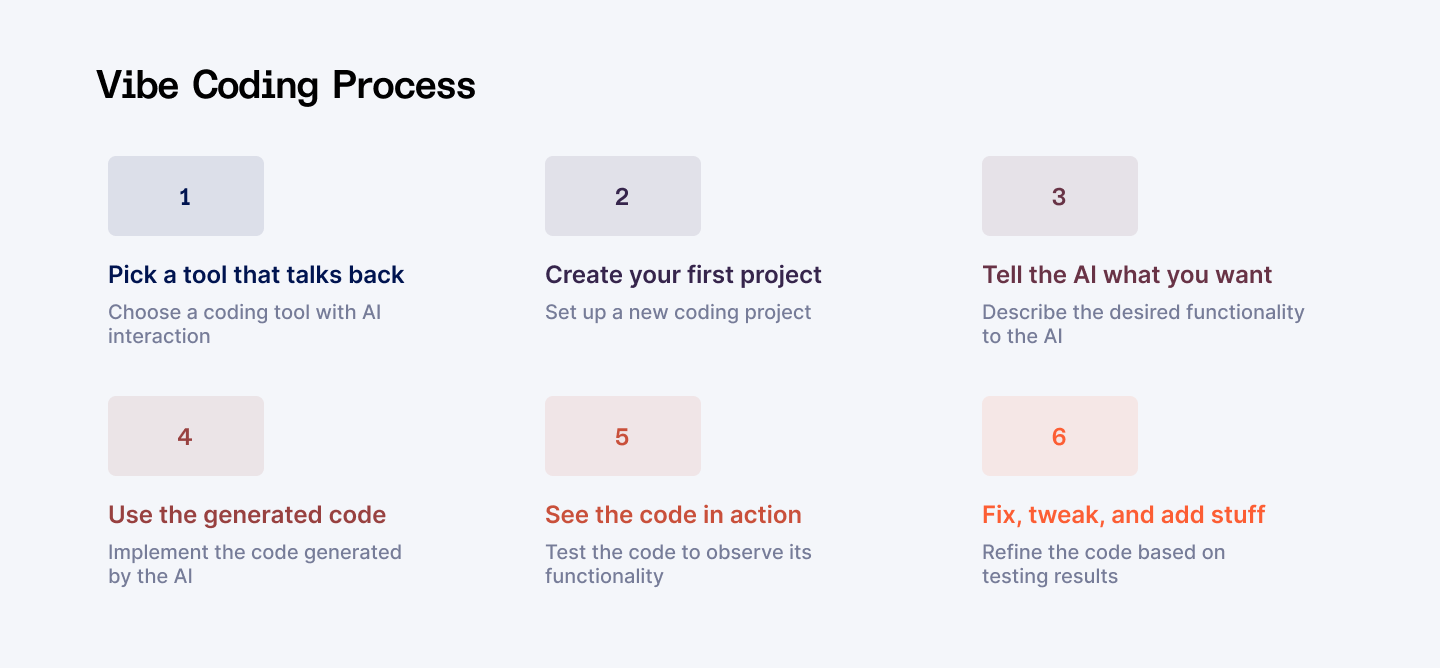
1. Pick a Tool That Talks Back
First things first. You need the right tool. Got two main options here:
- Browser-based: Go with Replit if you don't want to install anything. Just create a free account on their website and start a new "repl" project. Enable Ghostwriter (their AI assistant) — might need a subscription for full features.
- Desktop app: Cursor is your best bet here. It's basically VS Code with AI superpowers baked in. Download it from Cursor's website, install it like any other app, and you're set. When you open it, you'll see a familiar code editor with an AI chat panel built right in. Some tools might ask for your OpenAI API key, so have that handy if needed.
Most tools have a quick tutorial when you first open them. It’s pretty straightforward.
2. Create Your First Project
Keep it ridiculously simple for your first try. Think "Hello World" level simple. Open your chosen tool and start a new project. In Replit, pick a template like "HTML/CSS/JS" or "Python." In Cursor, just create a new folder and maybe a basic README file. You just need a space for the AI to drop your code in.
3. Tell the AI What You Want
This is where the fun begins! In the AI chat panel, describe what you're trying to build.
For example: "Create a webpage with a dark blue background, a centered heading that says 'My First Vibe Code Project', and a button that shows an alert when clicked."
Write it in plain English. Be clear but don't overthink it. The AI isn't psychic, but it's pretty good at translating human ideas into code.
4. Use the Generated Code
Within seconds, the AI will show you code that matches your description. In Cursor, you'll see a "diff view" showing what changes will be made. Just click "Accept Changes" to insert it. In Replit, it might add files directly or show code for you to copy/paste. Each tool handles this differently, but the idea is the same: get that AI-generated code into your project.
5. See It in Action
Always test what the AI gives you! In Replit, click the "Run" button to see a preview. In Cursor, you might need to open the HTML file in your browser, or you can run it through the HTML validator to check for markup errors. If it works — awesome, you just vibe coded your first thing. If it doesn’t, no stress. Rarely is the first try perfect. That’s what the next step is for.
6. Fix, Tweak, and Add Stuff
Here's where the conversation continues. Is something not quite right? Just tell the AI: "Make the heading text larger and change the button color to green."
- Got an error? Copy-paste it to the AI and ask "How do I fix this?" It'll diagnose the problem and suggest a solution.
- Want to add more features? Just ask: "Now add an input field where users can type their name, and make the button display 'Hello [name]' when clicked."
This back-and-forth is the heart of vibe coding. You're having a conversation about code rather than writing it line by line.
Stick with this cycle — describe, generate, test, refine — and you'll build your project piece by piece, all through conversation. The more you do it, the better you'll get at "speaking AI" and the faster you'll build things.
Example Workflow (Personal Budget Tracker)
Let's say you're building a personal budget tracker:
Prompt 1:
"Create a Python Flask app with a simple dashboard that tracks expenses. Include a form to add new expenses with fields for amount, category (dropdown with options like 'Food', 'Transportation', 'Entertainment'), and date."
AI generates a Flask app with routes, templates, and basic styling.
Test/Review:
The app runs, form displays correctly, but when you submit, nothing happens because we didn't specify how to store or display the data.
Prompt 2:
"Connect the app to SQLite database. When a user submits an expense, save it to the database and display all expenses in a table below the form, sorted by date with newest first."
AI adds SQLite connection, creates database models, updates routes to handle form submission, and adds code to display expenses.
Test:
You enter "Coffee - $4.50 - Food - Today" and it appears on the table. But you notice there's no data validation, and you can enter negative amounts.
Prompt 3:
"Add validation to make sure amounts are positive numbers and all fields are filled before submission. Show error messages if validation fails."
AI adds form validation in JavaScript and server-side checks with appropriate error messages.
Test:
It now blocks negative numbers and empty fields with helpful error messages. But you realize you need to visualize your spending patterns.
Prompt 4:
"Add a simple pie chart using Chart.js that shows spending by category. Also include a summary section showing total spent this month and the highest expense category."
AI integrates Chart.js, adds JavaScript to generate the pie chart from the data, and creates the summary calculation logic.
Test:
The chart appears and updates when you add expenses. The summary shows your spending patterns. But you realize you can't modify or delete mistakes.
Prompt 5:
"Add edit and delete buttons for each expense in the table. Clicking edit should populate the form with that expense's data. Make sure to update the chart when an expense is modified or deleted."
AI adds the edit/delete functionality with the appropriate routes and JavaScript.
And there you have it! A functional budget tracker created purely through conversation with AI. You described what you wanted, tested each iteration, and guided the AI to build exactly what you needed.
Best Tips for Vibe Coding
If you want the AI to deliver solid code, you’ve got to work with it, not against it. Here's how to get the most out of it:
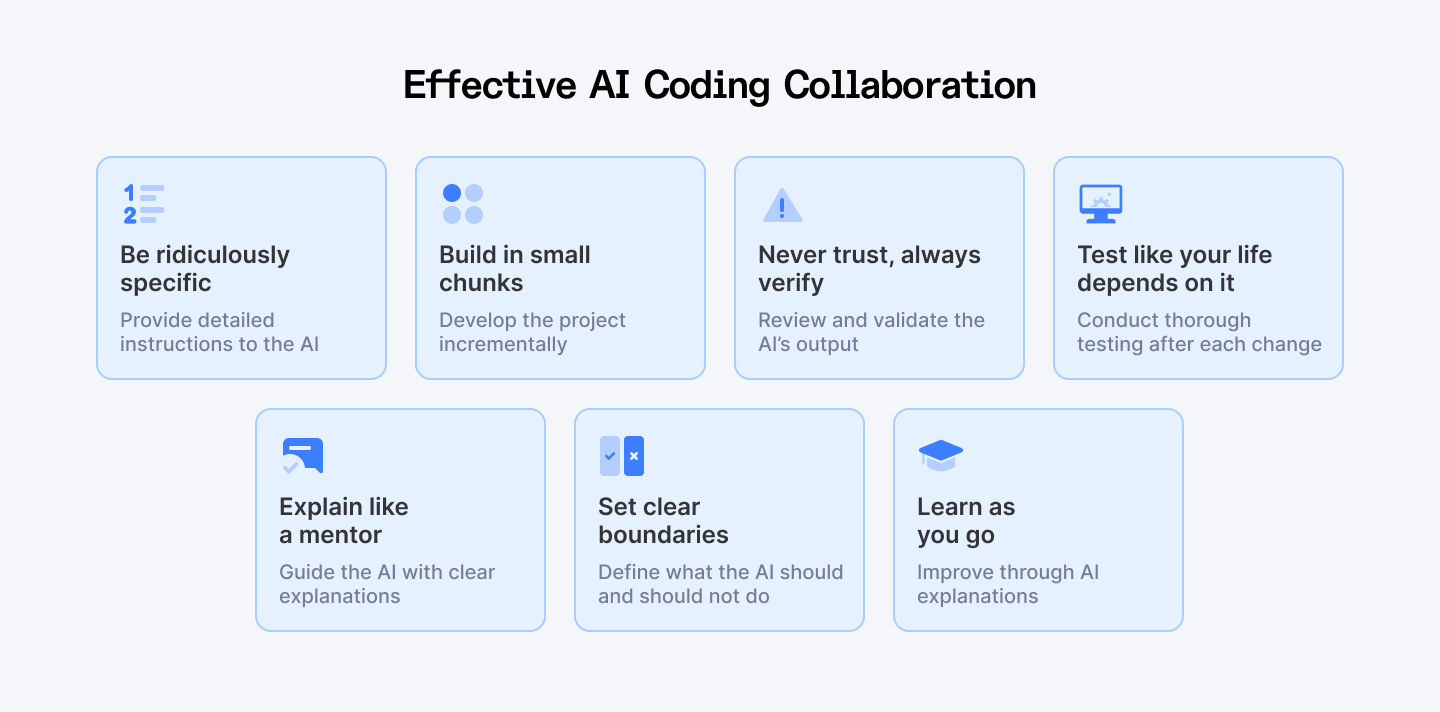
Be Ridiculously Specific
Start with tiny projects. Seriously, smaller than you think. Don't ask for a full social media app right away. That's setting yourself up for frustration. Instead, ask for a login page. But don't say "make a login page."
Say "Create a login form with email and password fields, validation for proper email format, and minimum 8-character passwords. Show error messages below each field when validation fails."
Think of AI as an eager but literal intern. It'll do exactly what you ask — nothing more, nothing less. If you don’t give it details, it’ll guess, and not always well.
Build in Small Chunks
Don't try to create an entire app in one prompt. It’ll mess it up.
Start with something tiny that works, then add features one by one. First make the login form, then add validation, then connect it to a database. Each step builds on the last.
Paste examples when you can. Say "I want something like this..." and show code snippets or screenshots. In Cursor, you can highlight existing code and ask "Make this work with async/await instead of promises." Visual cues help tremendously.
Never Trust, Always Verify
Always review what the AI gives you. Tools like Cursor and Bolt show you exactly what changed. Use this! Look for weird variable names, security issues, or overly complex solutions.
If something looks fishy, ask questions: "Why did you use a recursive function here instead of a loop?" You’ll catch bugs early and learn something in the process.
Test Like Your Life Depends On It
Don’t wait until you’ve added 10 features to hit “Run.” Run your code after every meaningful change. Found a bug? Fix it immediately before moving on.
When the AI adds a search feature, test it with normal input, empty input, and weird input. Testing frequently prevents small problems from becoming nightmares later.
Explain Like a Mentor
Instead of "This is wrong, fix it," try "The search isn't working when I enter special characters. Could you add some input sanitization?"
Explaining what's happening helps the AI understand the problem. Treat it like a dev who knows how to code but needs very specific instructions. That’s how you get good results.
Set Clear Boundaries
Tell the AI what you want AND what you don't want. "Please use React hooks, not class components" or "Don't use any external libraries for this."
You can also show examples: "Here's how I want the data formatted: {...}. Make your output match this structure." Boundaries help the AI stay on track.
Learn As You Go
Ask the AI to explain code you don't understand. Ask stuff like: “Why did you use map here instead of forEach?” or “Explain this regex pattern.”. AI can teach you HOWs and WHYs.
The more you learn, the better your prompts will get. Remember: you're still in charge. AI is your tool, not the other way around.
Also Check Out: Build Your First AI Agent | Simple Guide with LangGraph
The Bottom Line
Vibe coding is powerful, but it's not perfect. You still need to think like a developer (or at least act like one). Here’s the truth, plain and simple:
Know the Limits
- AI doesn't think like a programmer — it pattern matches from training data. This means it can write code that looks right but has hidden bugs or edge cases. Always test thoroughly!
- Unless you specifically tell it, the AI won’t follow best security practices. It might use old methods or leave holes big enough to drive a cybertruck through. If you're shipping code to users, double-check it. Use a security scanner or, better yet, ask someone who knows their stuff.
- AI tools have limited memory. In larger projects, they might "forget" what you discussed earlier and duplicate functionality or contradict previous code. Give it reminders. Work in small, clear steps.
- AI has its own interpretation. This gap can lead to frustration unless you're crystal clear about what you want. You're the project manager here — the AI is just following orders.
- AI-generated code often works but isn't always elegant. It might jam everything into one massive function instead of creating a clean, maintainable structure. For quick prototypes, this is fine. For something you'll build on later, you'll need to specifically ask for good architecture or get help with your vibe coding refactoring.
When to Call in a Human
For anything beyond personal projects or prototypes, get a developer to review your code. This is especially true if:
→ Real users will depend on it
→ It handles sensitive data
→ You plan to expand it significantly
→ Performance matters
→ You're putting it online where security matters
Wrapping Up
So, what's the final word on vibe coding? Vibe coding is like jamming with a talented-but-clueless assistant. Super fast. Super fun. Super risky if you’re not watching. You call the shots. You catch the bugs. You decide when to say “good enough” or “call in a developer.”
You’re the brains of the operation. The AI’s just here to assist. Use it wisely and you’ll build way more than you thought possible.
For Developers:
Ready to vibe code for top global companies? Join Index.dev, get matched fast, and build your remote career with the world’s best tech teams.
For Clients:
Hire elite coders in 48 hours with Index.dev—access the top 5% of vetted talent, risk-free for 30 days. Build smarter, faster, and better.


