
What is the difference between Kubernetes and Docker?
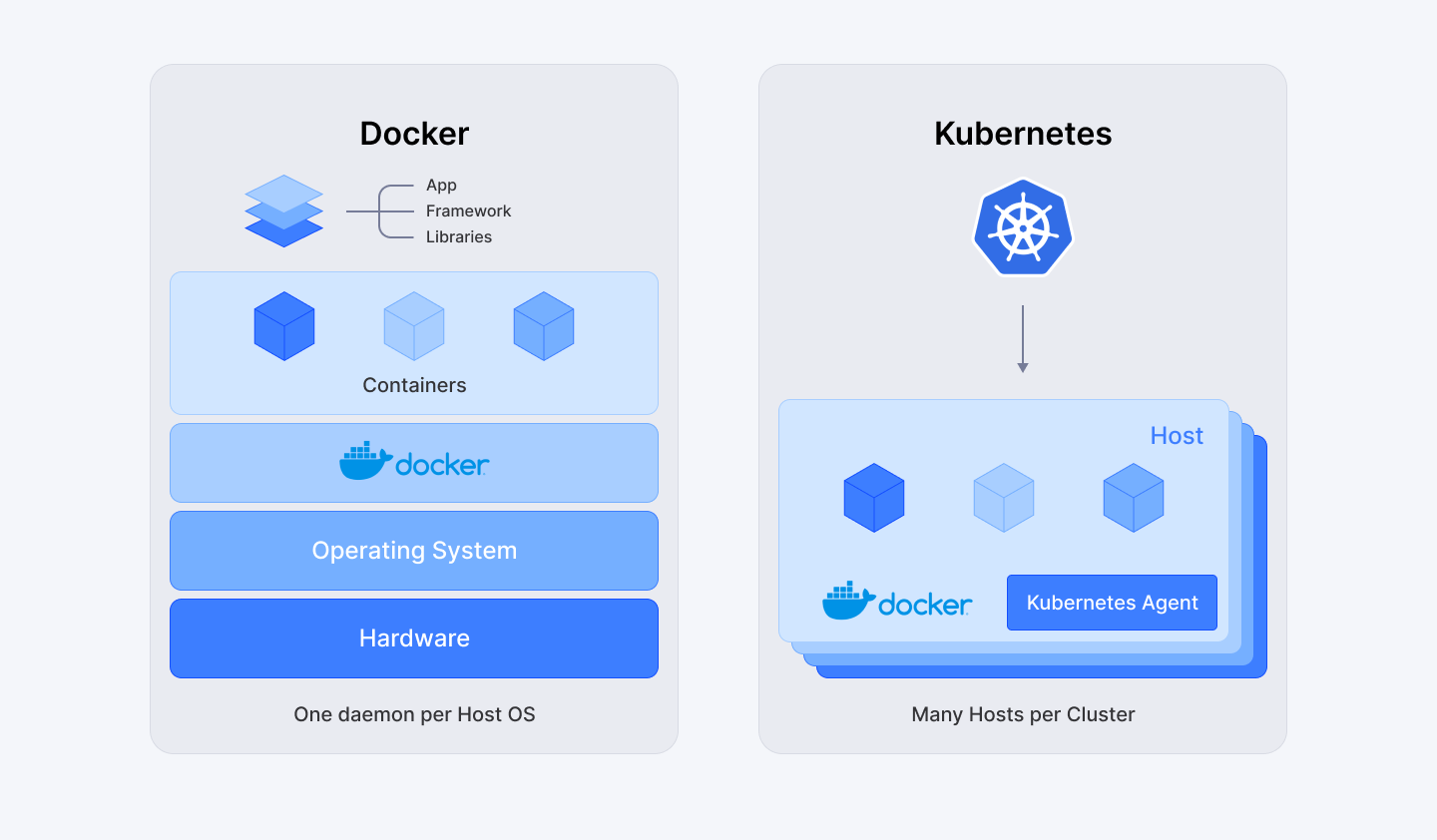
Docker, is a containerization platform that packages applications into portable containers. Kubernetes is a container orchestration platform that manages, scales, and deploys those containers across clusters. In short: Docker creates containers, Kubernetes runs them at scale.
While often compared as competitors, Docker and Kubernetes actually serve different purposes and are frequently used together. This guide explains the key differences, when to use each technology, and how they complement each other in modern DevOps workflows.
Join Index.dev for high-paying remote projects in the US, UK, and Canada. Work on innovative tech challenges and grow your career globally!
Kubernetes vs Docker: Quick Comparison Table
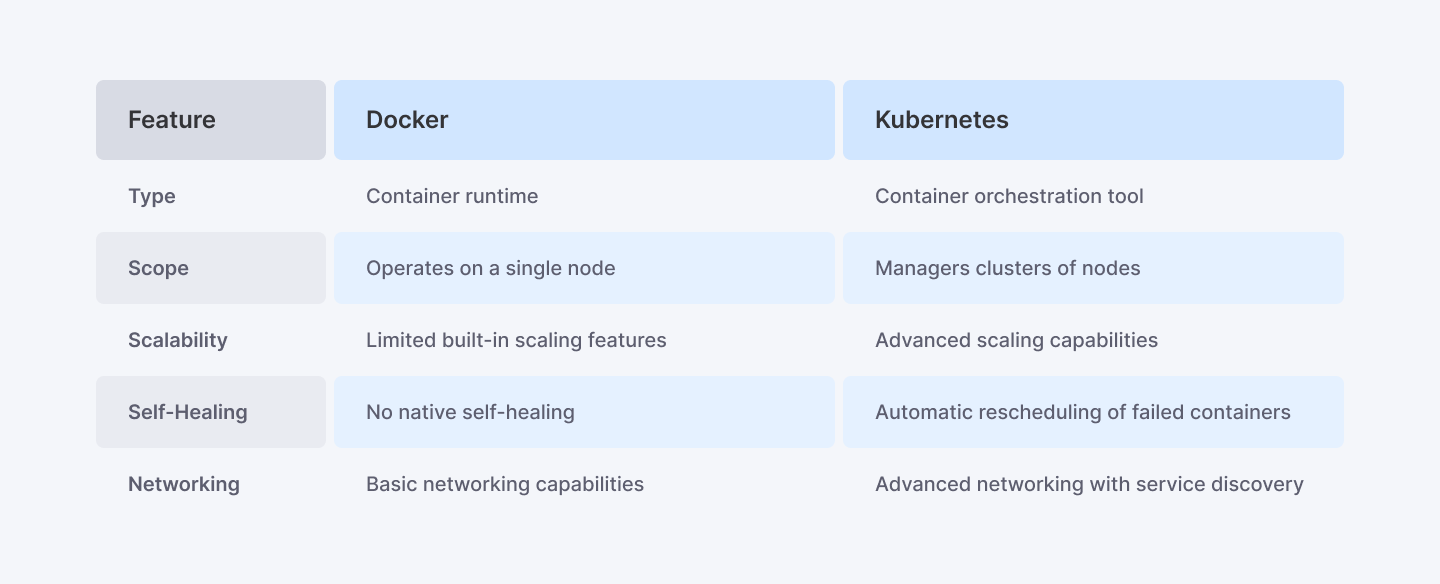
Feature | Docker | Kubernetes (K8s) |
|---|---|---|
Primary Function | Containerization | Container orchestration |
What It Does | Packages apps into containers | Manages containers at scale |
Scope | Single host/container | Multi-host clusters |
Scaling | Manual | Automated (auto-scaling) |
Load Balancing | Basic (via Compose) | Built-in advanced load balancing |
Self-Healing | No | Yes (auto-restarts failed containers) |
Release Year | 2013 | 2014 |
Created By | Docker, Inc. | Google (now CNCF) |
Learning Curve | Low to moderate | Moderate to steep |
Best For | Development, testing, simple deployments | Production, complex microservices |
Use Together? | Yes — Docker builds, Kubernetes deploys | |
Understanding Containerization
Containerization is a type of operating system virtualization where an application, along with all its dependencies—like libraries, files, and settings—is packaged together in a container to ensure it runs consistently across different environments. This makes the application portable in the sense that it can be operated on the cloud, a local server or even a PC without the need to be adjusted for the underlying infrastructure and operating system presentation. Each container utilizes the host operating system kernel but has a different user space to prevent the application from compromising the others.
Importance in Software Development
It is very critical to understand the role played by containerization in the development of software. It addresses several challenges traditionally faced by developers:
- Portability: Applications, which are bundled into a container, can operate on any platform regardless of the differences in the underlying OS. This helps to do away with the problems of compatibility that come about when you want to transfer applications between environments for instance developing and production environments.
- Consistency: The use of containers involves packing of all the requirements of an application to ensure that the same runs as required in the different environments available. This consistency helps to minimize the bugs which are likely to occur and general deployment mistakes.
- Efficiency: Containers are also lighter overall than VMs because a full operating system is not needed for each container created. This makes it easier to start the device and use the resources in the system properly.
- Scalability and Fault Tolerance: Containerized applications are very scalable, where constituents can add more containers, or reduce the number as needed. Also, if one container goes bad, the rest of the containers will not be brought down, thereby making the overall application robust.
How Containers Work
Containers encapsulate applications by bundling together everything needed for execution:
- Application Code: The functionalities that cannot be removed or downplayed by any user.
- Dependencies: Responsible for defining the necessary libraries and frameworks for the application to start.
- Configuration Files: Properties that define the behaviour of the application with which the object works.
This encapsulation allows the creation of a system where applications can run on their own, free from the host system settings.
The Mechanism of Encapsulation
The mechanism behind this encapsulation involves several key components:
- Container Images: These are read-only templates that dictate what constituents a container must have and what its constituents must contain. It defines the code of the application, any dependencies it requires, and the settings needed for the application to run.
- Container Runtime: This is the engine where containers run which make up the application as a whole. It controls resources and makes certain that every container executes in its context though each container utilizes the host OS kernel.
- Isolation Techniques: Both namespaces and control groups allow for the processes to be isolated within containers and resource management. lambda functioning happens at the pod level so this isolation causes multiple containers to run on the same host.
What Is Docker?
Docker is an open-source containerization platform that simplifies how applications are built, shipped, and deployed. Launched in 2013, Docker revolutionized software development by introducing a standardized way to package applications with all their dependencies into lightweight, portable containers.
How Docker Works:
- Dockerfile — A text file containing instructions to build an image
- Docker Image — A read-only template with application code and dependencies
- Docker Container — A running instance of an image
- Docker Hub — A registry for storing and sharing container images
Key Docker Features:
- Containerization — Package apps with dependencies into portable units
- Consistency — "Works on my machine" problem solved
- Isolation — Containers run independently from each other
- Docker Compose — Define multi-container applications in a single file
- Lightweight — Containers share the host OS kernel (unlike VMs)
Docker Use Cases:
- Local development environments
- CI/CD pipelines (build and test stages)
- Packaging microservices
- Creating reproducible environments
- Rapid prototyping and testing
Docker Limitations:
- Limited native orchestration capabilities
- Manual scaling required
- Best suited for single-host deployments
- No built-in self-healing or load balancing
Explore More: How to Set Up and Optimize CI/CD Pipelines for Faster Development and Deployment
What Is Kubernetes?
Kubernetes (K8s) is an open-source container orchestration platform that automates deploying, scaling, and managing containerized applications. Originally developed by Google and released in 2014, Kubernetes is now maintained by the Cloud Native Computing Foundation (CNCF) and is the industry standard for container orchestration.
How Kubernetes Works:
- Cluster — A set of nodes (machines) running containerized workloads
- Control Plane — Manages the cluster (scheduling, scaling, updates)
- Nodes — Worker machines that run containers
- Pods — The smallest deployable unit (contains one or more containers)
- Services — Expose applications to network traffic
Key Kubernetes Features:
- Auto-Scaling — Automatically scale containers based on demand
- Load Balancing — Distribute traffic across containers
- Self-Healing — Restart failed containers automatically
- Rolling Updates — Deploy updates with zero downtime
- Service Discovery — Automatic DNS and networking between pods
- Storage Orchestration — Mount storage systems automatically
Kubernetes Use Cases:
- Production deployments at scale
- Complex microservices architectures
- Multi-cloud and hybrid cloud deployments
- High-availability applications
- CI/CD continuous deployment pipelines
Kubernetes Limitations:
- Steep learning curve
- Complex setup and configuration
- Can be overkill for simple applications
- Requires dedicated expertise to manage
- Higher operational overhead
Kubernetes requires a certain amount of expertise to use well. If you need Kubernetes expertise for your team, explore hiring DevOps engineers through Index.dev.
Explore More: Choreography vs. Orchestration: Understanding the Key Differences in Microservices
Key Differences: Docker vs Kubernetes
1. Containerization vs Orchestration
Docker focuses on containerization — creating and running individual containers. Kubernetes focuses on orchestration — managing, scaling, and coordinating multiple containers across clusters.
Think of it this way: Docker is like building a car, Kubernetes is like managing a fleet of cars.
2. Scope: Single Host vs Cluster
Docker operates primarily on a single host. While Docker Swarm enables multi-host deployments, it's limited compared to Kubernetes.
Kubernetes is designed from the ground up for distributed systems, managing containers across dozens or hundreds of nodes in a cluster.
3. Scaling Approach
Aspect | Docker | Kubernetes |
|---|---|---|
Manual scaling | Yes | Yes |
Auto-scaling | No (native) | Yes (built-in) |
Horizontal Pod Autoscaler | N/A | Yes |
Cluster Autoscaler | N/A | Yes |
4. Self-Healing
Docker doesn't automatically restart failed containers or redistribute workloads.
Kubernetes continuously monitors pod health and automatically:
- Restarts crashed containers
- Replaces unresponsive pods
- Reschedules pods to healthy nodes
- Kills containers that don't pass health checks
5. Networking and Load Balancing
Docker provides basic networking between containers on the same host.
Kubernetes offers:
- Automatic service discovery via DNS
- Built-in load balancing across pods
- Network policies for security
- Ingress controllers for external traffic
6. Learning Curve
Level | Docker | Kubernetes |
|---|---|---|
Basic usage | Hours | Days |
Proficiency | Days | Weeks |
Mastery | Weeks | Months |
Networking (Kubernetes)
Defining a network policy using YAML:
apiVersion: networking.k8s.io/v1
kind: NetworkPolicy
metadata:
  name: allow-ingress
spec:
  podSelector:
    matchLabels:
      app: my-app
  policy:
    egress:
    - to:
      - ipBlock:
          cidr: 0.0.0.0/0
    ingress:
    - from:
      - ipBlock:
          cidr: 0.0.0.0/0
When to Use Docker vs Kubernetes
Use Docker (without Kubernetes) When:
- You're running a simple application with few containers
- Local development and testing environments
- Learning containerization for the first time
- Small projects without high-availability requirements
- You need fast iteration and don't need auto-scaling
- Budget or team size doesn't support Kubernetes operations
Use Kubernetes When:
- Running 10+ containers in production
- Complex microservices architectures
- High-availability is critical (99.9%+ uptime)
- You need auto-scaling based on traffic
- Multi-cloud or hybrid cloud deployments
- Large teams with dedicated DevOps/SRE resources
Use Both Together When:
- Enterprise production environments
- CI/CD pipelines (Docker builds, K8s deploys)
- Cloud-native application development
- You need the simplicity of Docker for dev + power of K8s for production
Decision Framework:
Scenario | Recommendation |
|---|---|
Solo developer, simple app | Docker only |
Small team, <10 containers | Docker Compose |
Medium team, 10-50 containers | Kubernetes (managed) |
Large team, 50+ containers | Kubernetes (self-managed or managed) |
Enterprise, multi-cloud | Kubernetes + service mesh |
Docker and Kubernetes: How They Work Together
Docker and Kubernetes aren't competitors — they're complementary technologies that work together in most modern DevOps pipelines:
The Typical Workflow:
- Develop — Write code locally with Docker containers
- Build — Create Docker images with Dockerfile
- Push — Store images in a container registry (Docker Hub, ECR, GCR)
- Deploy — Kubernetes pulls images and runs them as pods
- Scale — Kubernetes auto-scales based on traffic/load
- Monitor — Kubernetes manages health, restarts, and updates
Example Architecture:
Developer Machine Container Registry Kubernetes Cluster
───────────────── ────────────────── ──────────────────
[Docker Build] ───────> [Docker Hub/ECR] ───────> [K8s Deployment]
│
┌───────┴───────┐
│ │
[Pod 1] [Pod 2]
(container) (container)
Important Note: Kubernetes No Longer Requires Docker
As of Kubernetes 1.24 (2022), Docker is no longer the default container runtime. Kubernetes now uses containerd or CRI-O directly. However:
- You can still use Docker to build images
- Docker images work with any Kubernetes cluster
- Docker Desktop includes a built-in Kubernetes cluster
This change means Kubernetes removed Docker's overhead while maintaining full compatibility with Docker-built images.
Docker Swarm vs Kubernetes
Docker Swarm is Docker's native orchestration tool. Here's how it compares to Kubernetes:
Feature | Docker Swarm | Kubernetes |
|---|---|---|
Setup Complexity | Simple | Complex |
Scaling | Manual + basic auto | Advanced auto-scaling |
Load Balancing | Built-in (basic) | Built-in (advanced) |
Self-Healing | Yes (basic) | Yes (advanced) |
Rolling Updates | Yes | Yes (more control) |
Market Share | ~5% | ~90%+ |
Community/Ecosystem | Smaller | Massive |
Learning Curve | Easy | Steep |
Best For | Small-medium deployments | Large-scale production |
When to Choose Docker Swarm:
- Simpler orchestration needs
- Already invested in Docker ecosystem
- Smaller teams with limited K8s expertise
- Quick setup with minimal configuration
When to Choose Kubernetes:
- Enterprise-scale deployments
- Complex microservices
- Multi-cloud strategies
- Long-term investment in container orchestration
Explore More: How to Migrate from Monolithic Architectures to Microservices
Conclusion
Docker and Kubernetes aren't competitors — they're complementary technologies that solve different problems in the containerization ecosystem.
Quick Summary:
Technology | Use For |
|---|---|
Docker | Building and packaging containers |
Kubernetes | Orchestrating and scaling containers |
Both Together | Production-grade containerized applications |
Recommendations:
- Startups/Small Teams: Start with Docker and Docker Compose. Add Kubernetes when you hit scaling challenges.
- Growing Companies: Use managed Kubernetes (EKS, GKE, AKS) to reduce operational overhead.
- Enterprise: Invest in Kubernetes expertise with custom configurations, service mesh, and GitOps workflows.
The container ecosystem continues to evolve, but Docker and Kubernetes remain foundational technologies for modern software development. Understanding both is essential for any DevOps engineer or platform team.
Need container expertise? Hire pre-vetted DevOps developers through Index.dev to implement Docker and Kubernetes in your infrastructure.
For teams looking to implement containerization strategies, hire pre-vetted backend developers with Docker and Kubernetes experience through Index.dev.


