
In Python development, environment variables are used to store settings like API keys, database URLs, and other sensitive data. This keeps your code clean and prevents exposing important information. Instead of hardcoding values, you can store them outside your code and access them when needed.
Python provides the os module to work with environment variables. You can read them using os.getenv("VAR_NAME"). If you're working locally, you can also use a .env file and load it with a tool like python-dotenv.
Setting environment variables depends on your system. On macOS and Linux, you can export them in the terminal. On Windows, use the set command or the system settings.
This guide will show you how to set, read, and manage environment variables in Python. It’s a simple way to make your code more secure and flexible across different environments like development, staging, and production.
Join Index.dev talent network today and get matched with global companies seeking environment-conscious Python developers.
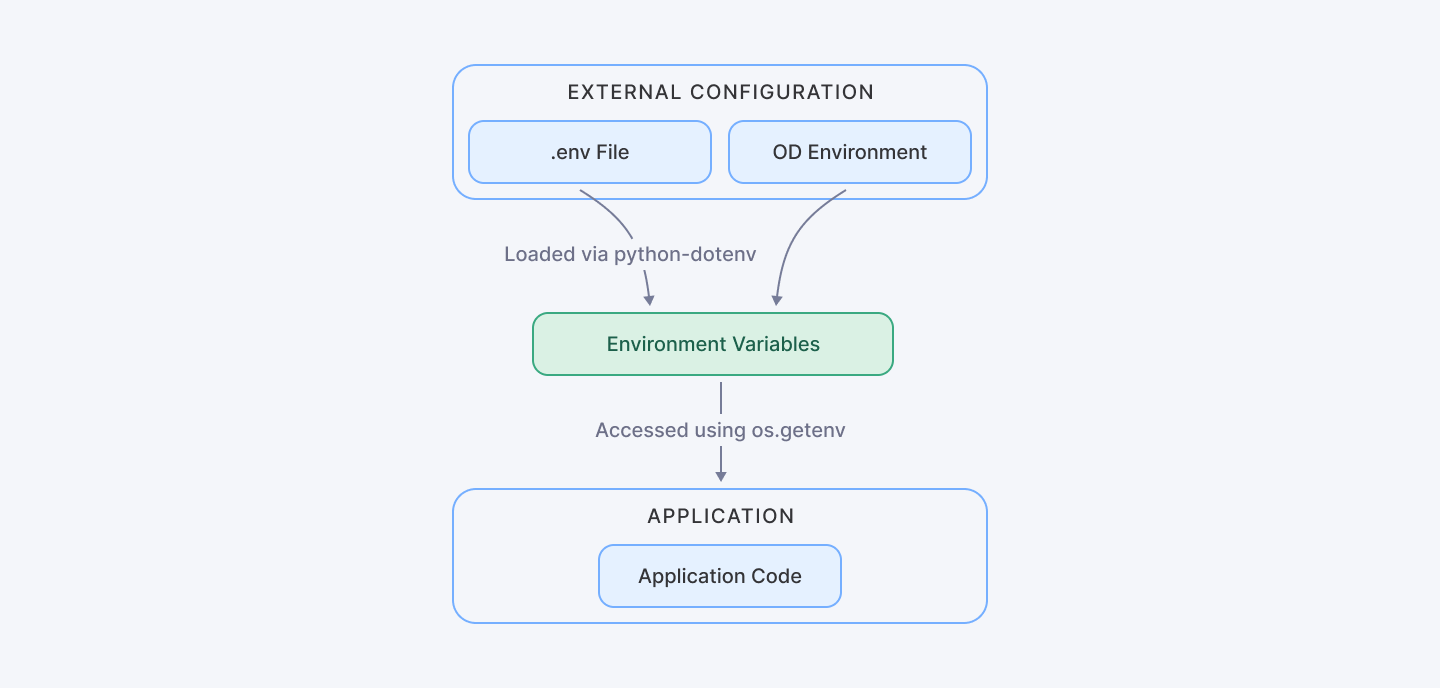
This diagram illustrates the separation between code and configuration, emphasizing how environment variables Python integrate with application code.
Why Use Environment Variables Python?
Using environment variables Python offers several significant benefits:
- Security: Organisations can significantly mitigate accidental exposure risks by decoupling sensitive credentials from source code. This approach creates a critical security barrier, preventing inadvertent credential leakage through traditional code distribution channels.
- Flexibility: Easily modify configurations for different environments (development, staging, production) without changing the code. This architectural approach eliminates the need for manual code modifications, promoting a more agile and responsive development ecosystem.
- Portability: Modern application architectures demand adaptable deployment strategies. Simplify application migration across various platforms and infrastructures.
Recent industry reports for 2025 indicate that over 70% of developers now rely on externalized configurations to minimize security breaches. Furthermore, numerous security incidents have shown that poor management of sensitive data can lead to severe vulnerabilities—issues that can be effectively mitigated with proper use of Python environment variables.
Read Also: How to Debug Python Scripts Using PDB (Python Debugger)
Best Practices for Managing Environment Variables Python
When dealing with environment variables Python, adhering to best practices is key to ensuring a robust and maintainable system. Here are some essential strategies:
Avoid Hardcoding Sensitive Information
Hardcoding secrets like API keys directly in your source code is a major risk. Instead, store these as environment variables in Python.
For example:
import os

# Avoid hardcoding secrets
# Bad practice:
API_KEY = "hardcoded_api_key"

# Best practice:
API_KEY = os.getenv("API_KEY")
Use Descriptive Naming Conventions
Adopt clear, uppercase names with underscores (e.g., DATABASE_URL, SECRET_KEY) for all environment variable Python entries. This practice minimizes confusion and maintains consistency.
Document Your Python Environment Variables
Maintain detailed documentation outlining each environment variable Python needed by your application, including its purpose and expected format. This step is crucial, especially when working with outsourced teams or in a collaborative environment.
Recommendations
- Always use environment-specific configurations
- Never hardcode sensitive information
- Implement robust validation mechanisms
- Use secret management tools in production environments
- Ensure the separation of configuration from code
- Secure secret management
- Establish environment-specific configurations
- Engage in comprehensive error handling
- Logging for configuration issues
Methods to Python Set Environment Variable
There are several methods to Python set environment variable values, depending on your development and deployment environments.
Using the os Module
Python’s built-in os module provides a straightforward way to interact with environment variables Python:
import os

# Set an environment variable temporarily
os.environ['MY_SECRET_KEY'] = 'super_secret_value'

# Retrieve the environment variable
secret_key = os.getenv('MY_SECRET_KEY')
print(f'Secret key: {secret_key}')
Using .env Files with python-dotenv
For local development, storing Python environment variables in a .env file is a best practice. Use the python-dotenv package to load these variables.
1. Installation:
# Command to install python-dotenv
# Run this in your terminal or command prompt
# pip install python-dotenv
We recommend using pip install python-dotenv to set up the library. This package provides a straightforward method to load environment variables from a .env file.
2. Create a .env file:
# Create a file named .env in your project root
# Content of .env file:
"""
SECRET_KEY=super_secret_value
DATABASE_URL=postgres://user:password@localhost/dbname
API_TOKEN=your_api_token_here
"""
The .env file serves as a central repository for sensitive configuration details. Key characteristics include:
- Stores key-value pairs of environment variables
- Kept out of version control (typically added to .gitignore)
- Contains sensitive information like API keys, database credentials
3. Load the file in your code:
from dotenv import load_dotenv
import os

def load_environment_variables():
    """
    Load and manage environment variables securely.

    This function demonstrates:
    - Secure loading of environment variables
    - Safe retrieval of sensitive configuration
    - Error handling for missing variables
    """
    try:
        # Load variables from .env file into environment
        load_dotenv()

        # Retrieve specific environment variables
        secret_key = os.getenv("SECRET_KEY")
        database_url = os.getenv("DATABASE_URL")
        api_token = os.getenv("API_TOKEN")

        # Validate critical variables
        if not all([secret_key, database_url, api_token]):
            raise ValueError("Missing critical environment variables")

        # Example of using retrieved variables
        print(f"Secret Key: {secret_key}")
        print(f"Database URL: {database_url}")

        # Return variables for further use if needed
        return {
            "SECRET_KEY": secret_key,
            "DATABASE_URL": database_url,
            "API_TOKEN": api_token
        }

    except Exception as e:
        print(f"Error loading environment variables: {e}")
        return None

# Execute the function
if __name__ == "__main__":
    config = load_environment_variables()
Key Features:
- Uses load_dotenv() to read .env file
- Employs os.getenv() for safe variable retrieval
- Implements error handling for missing variables
- Provides a reusable function for environment variable management
Benefits:
- Separates configuration from code
- Enhances security by not hardcoding sensitive information
- Allows easy configuration across different environments
Setting Variables in the Deployment Environment
For production, setting the environment variable Python directly on your server or container platform (e.g., Docker, Kubernetes) is recommended.
Example in a Dockerfile:
```dockerfile
# Use an official Python runtime as a parent image
FROM python:3.9-slim

# Set environment variables for production
ENV APP_ENV=production
ENV SECRET_KEY=super_secret_value
ENV DATABASE_URL=postgres://user:password@dbserver/dbname

# Set work directory
WORKDIR /app

# Copy project files
COPY . /app

# Install system dependencies and Python packages
RUN pip install --no-cache-dir -r requirements.txt

# Command to run the application
CMD ["python", "app.py"]
```
The Dockerfile demonstrates a secure approach to setting environment variables:
- Uses a slim Python image for reduced image size
- Sets environment variables directly in the image
- Separates configuration from code
- Supports production-specific configurations
.png)
This flowchart demonstrates the various methods to Python set environment variable, linking the methods from local development to production deployment.
Managing Python Environment Variables with Libraries
Beyond the basics, libraries like Dynaconf provide advanced configuration management that integrates multiple sources—JSON, YAML, or even remote settings. Here’s an example:
```python
from dynaconf import Dynaconf
import logging

class ConfigurationManager:
    def __init__(self, settings_files=None):
        """
        Initialize configuration with multiple source support.

        Args:
            settings_files (list): List of configuration file paths
        """
        if settings_files is None:
            settings_files = ["settings.yaml", ".secrets.yaml"]

        try:
            self.settings = Dynaconf(
                settings_files=settings_files,
                environments=True,
                envvar_prefix="MYAPP"
            )
        except Exception as e:
            logging.error(f"Configuration loading error: {e}")
            raise

    def get_config(self, key):
        """
        Safely retrieve configuration values.

        Args:
            key (str): Configuration key to retrieve

        Returns:
            Value of the configuration key
        """
        return getattr(self.settings, key, None)

# Usage example
config_manager = ConfigurationManager()
secret_key = config_manager.get_config('SECRET_KEY')
```
Key features of the Dynaconf implementation:
- Supports multiple configuration sources
- Provides a robust configuration management class
- Implements error handling and logging
- Allows flexible configuration retrieval
- Supports environment-specific configurations
This approach ensures that your Python env variables remain consistent and manageable even in complex microservices architectures.
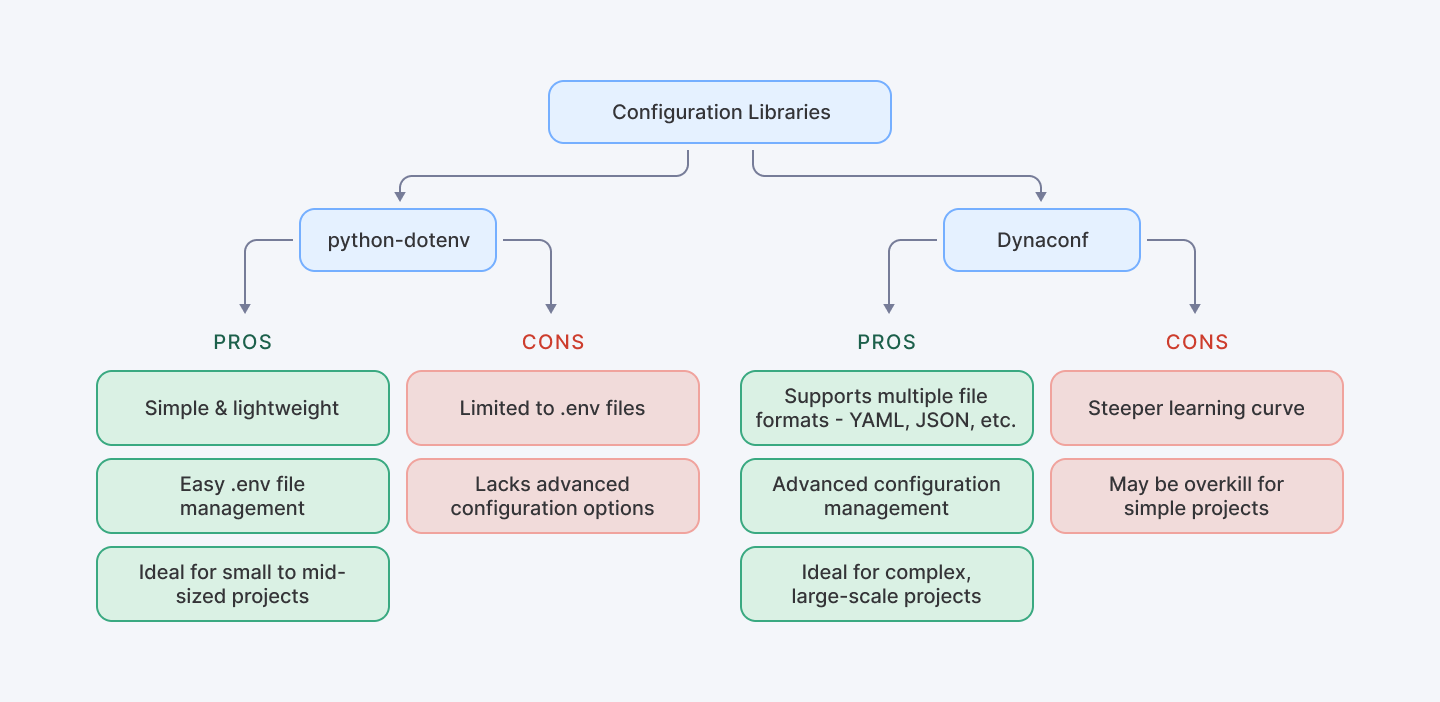
This flowchart comparing the use of python-dotenv versus Dynaconf shows the pros and cons of each method.
Common Pitfalls and Troubleshooting Env Variables Python
Despite their benefits, managing env variables Python can introduce challenges if not handled carefully. Common issues include:
- Missing Variables: Unverified configuration parameters represent a significant architectural risk. Runtime environments can experience catastrophic failures when critical variables remain unresolved. Strategic validation mechanisms must be implemented to preemptively identify and mitigate potential configuration gaps.
- Incorrect Scoping: Large-scale application architectures introduce intricate variable scoping challenges. Imprecise scope management can trigger cascading configuration conflicts, potentially compromising system integrity and introducing unpredictable behavioral anomalies across interconnected components.
- Improper Handling of Defaults: Robust configuration frameworks necessitate sophisticated default value and fallback mechanisms. Without comprehensive contingency planning, applications may encounter unexpected runtime behaviors, potentially disrupting critical operational workflows.
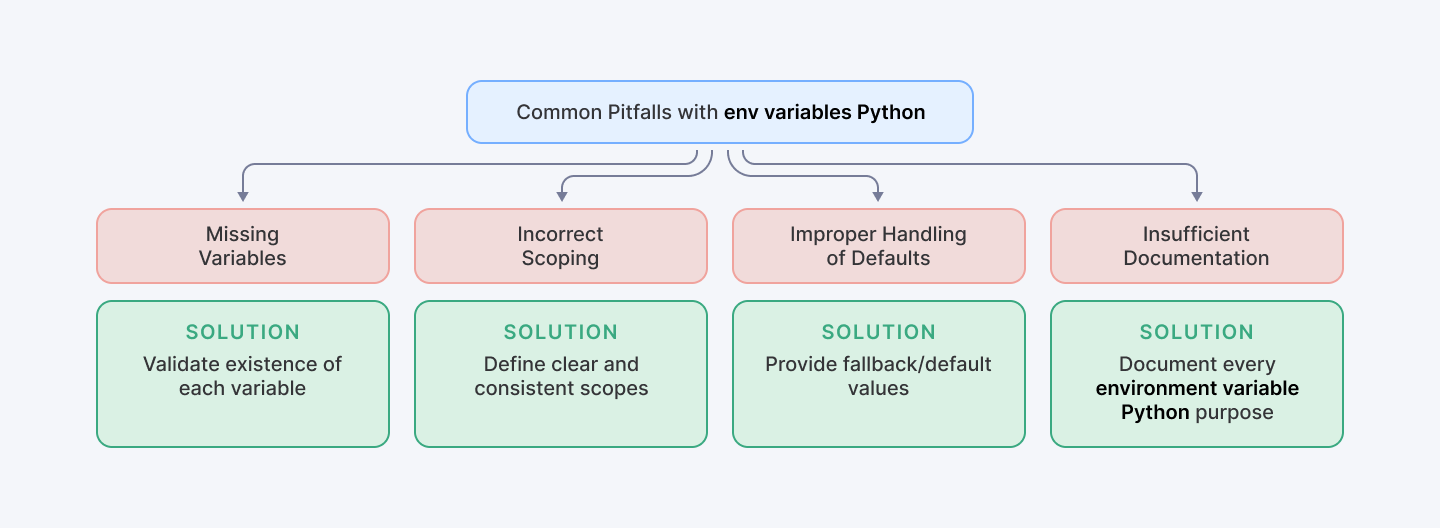
This troubleshooting checklist summarizes the common pitfalls and how to avoid them.
Example: Validating Environment Variables
```python
import os
import sys
import logging

def validate_environment_variables(required_vars):
    """
    Validate the presence of required environment variables.

    Args:
        required_vars (list): List of required environment variable names

    Raises:
        SystemExit: If any required variable is missing
    """
    missing_vars = []

    for var in required_vars:
        if not os.getenv(var):
            missing_vars.append(var)

    if missing_vars:
        logging.error(f"Missing required environment variables: {', '.join(missing_vars)}")
        sys.exit(1)

# Example usage
REQUIRED_VARS = ["SECRET_KEY", "DATABASE_URL"]
validate_environment_variables(REQUIRED_VARS)
```
This snippet ensures that your application checks for all environment variable Python before proceeding. The validation script:
- Checks for the presence of critical environment variables
- Provides detailed logging of missing variables
- Prevents application startup without required configurations
- Offers a fail-fast approach to configuration management
Also Check Out: How to Avoid Silent Failures in Python Code
Deploying Python Applications with Environment Variable Python
When deploying applications, it’s vital to handle environment variable Python appropriately across various platforms:
- Cloud Providers: Set environment variables through dashboards on AWS, Google Cloud, or Azure.
- Containerization: Use Docker Secrets or Kubernetes Secrets to securely manage Python environment variables.
For Kubernetes deployments, your manifest might look like this:
```yaml
apiVersion: v1
kind: Secret
metadata:
  name: python-app-secret
type: Opaque
stringData:
  secret_key: your-super-secret-key
  database_url: postgres://user:password@dbserver/dbname
apiVersion: apps/v1
kind: Deployment
metadata:
  name: python-app
spec:
  replicas: 3
  selector:
    matchLabels:
      app: python-app
  template:
    metadata:
      labels:
        app: python-app
    spec:
      containers:
      - name: python-container
        image: your-image:latest
        env:
        - name: SECRET_KEY
          valueFrom:
            secretKeyRef:
              name: python-app-secret
              key: secret_key
        - name: DATABASE_URL
          valueFrom:
            secretKeyRef:
              name: python-app-secret
              key: database_url
```
This method securely passes sensitive information and ensures that your environment variables Python are managed uniformly. The Kubernetes manifest:
- Demonstrates secure secret management
- Separates sensitive information from deployment configuration
- Allows dynamic injection of secrets into container environment
- Supports scalable and consistent secret distribution
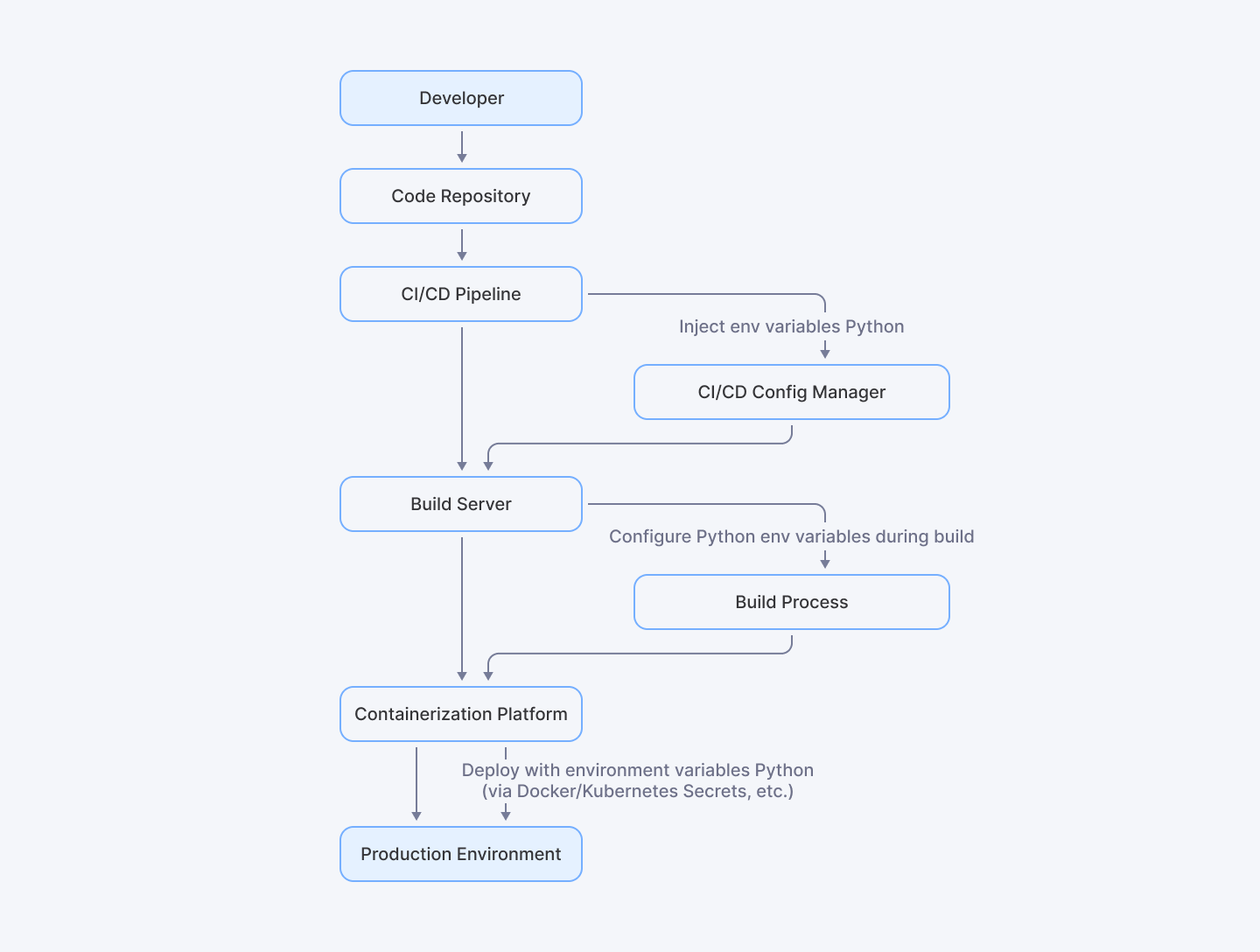
This diagram shows the deployment pipeline where the environment variable Python is integrated—from the CI/CD pipeline to the production environment.
Conclusion
The contemporary software engineering ecosystem demands nuanced approaches to configuration management. Organizations leveraging both internal development teams and global talent networks like Index.dev, recognize the paramount importance of standardized configuration practices.
Ultimately, these approaches transcend technical implementation, offering a holistic framework for modern software development challenges. From temporary local environment configurations to complex production deployments, the principles discussed provide a comprehensive blueprint for creating resilient, maintainable Python applications with sophisticated configuration management capabilities.
For Python Developers:
Ready to implement secure Python practices in your next project? Join Index.dev talent network today and get matched with global companies seeking environment-conscious Python developers.
For Clients:
Need Python developers who understand secure configuration management? Hire top 5% of vetted developers through Index.dev and find environment-variable experts in just 48 hours with our 30-day free trial.


