
Software as a Service (SaaS) is one of the delivery models that has received a lot of attention in the current world. SaaS is another service delivery model in which applications are hosted within the cloud and accessed by users over the Internet on a subscription model. This makes this model highly scalable, flexible and cheap making SaaS to be among the most modern types of software solutions.
One of the key components of any SaaS product is the user interface (or front-end) and the user experience the front-end provides. While a good UI makes an application aesthetic and easy to navigate, a better UX aims at providing valuable and pleasant interactions. This combination of UI, UX and SaaS marketing strategies are critical in promoting user interaction, engagement, and finally business expansion.
This article focuses on the essence of what is unique to SaaS design and offers examples and practical advice. It is essential to grasp these concepts to design a SaaS product that not only fulfils the customer’s requirements but also goes beyond their expectations to compete effectively in today’s world.
Learn how Index.dev helped a SaaS platform Poq hire front-end and QA experts quickly!
Understanding SaaS Design Principles
When it comes to designing SaaS, there may be a specific approach that might not work for design in other types of software.
There are five principles that apply specifically to SaaS: Usability where the design of the product is centered on user friendly interfaces; ease of access where the product designed for those with impairments; standardization, where the product has to look and feel similar to other products of its kind; and speed where tasks are to be completed as fast as possible.
Other elements which are also rather essential are feedback, that contains data about users’ activity and preferences as to the use of the certain website, and versatility of the certain website to the various users and their preferences.
Unlike traditional software where it is likely to be used for a specific group of employees within the same industry, SaaS products can target anyone. This means that there is a greater need to invest more resources on and to pay adequate attention to on-boarding, customization and the iterative approach. Web based SaaS solutions run from web browsers and or portable devices, therefore, issues to do with screen size or input mechanisms must be considered.
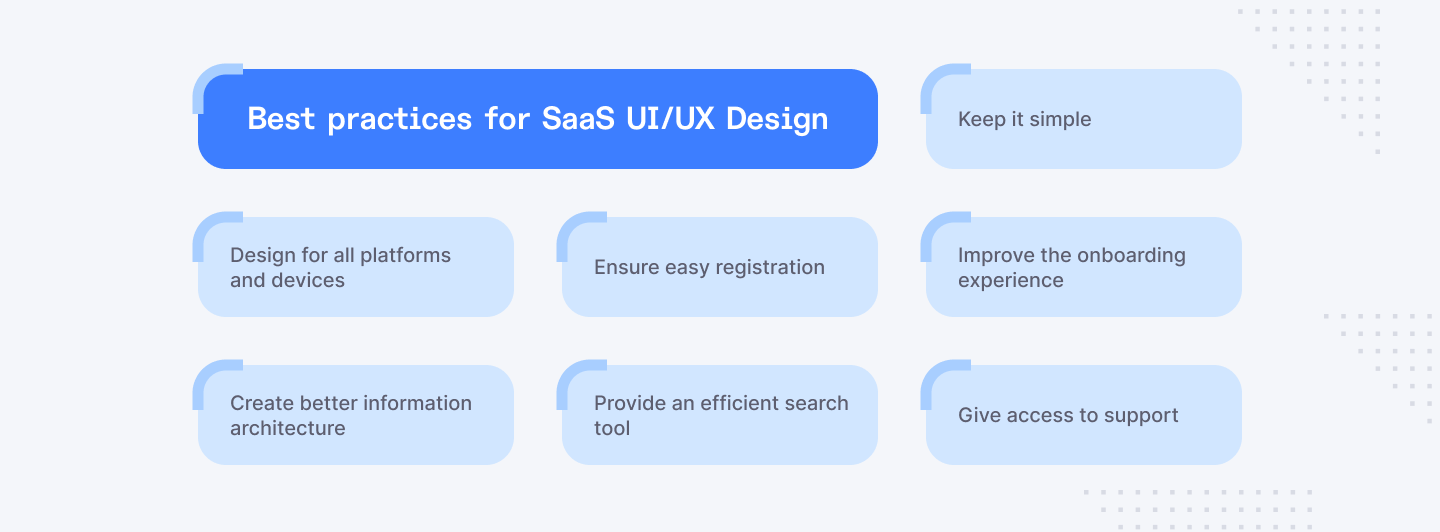
However, the very concepts that account for the functioning of the SaaS business model with a focus on operating under subscriptions also need a highly complex and customer-focused approach to construction.
Hire skilled Product Designers to boost your SaaS projects. Get started today!
Core SaaS Design Principles
Usability
In SaaS design, usability is one of the most crucial aspects of a given product. It helps the user to avoid frustration when working through the application and work through their objectives successfully.
Intuitive Interfaces:
User interface should be intuitive, meaning the interface layout should be easily understandable without too much direction from the user’s side. The graphics, labels, and icons should be well-designed and easy to recognize to enable users to follow them instinctively.
Clear Navigation and Information Hierarchy:
Navigation plays a crucial role and is a critical factor for improving the ease of exploration. Content should be hierarchically structured and thus, distinguish principal and subordinate content. It is just necessary to put an emphasis on the fact that effective information hierarchy allows users to obtain the required information easily.
Examples of Well-Designed SaaS Navigation Menus:
- Horizontal navigation bars: Present in many SaaS products, these provide a general orientation on basic areas.
- Vertical navigation menus: Meant for detailed application, these can support a lot of content but still, appear neat.
- Hamburger menus: Advertiser-oriented, takes less space and is placed more frequently in mobile or secondary navigation.
- Breadcrumb navigation: Helps to organize the content and enables users to find it and navigate it easily.
By prioritizing usability, SaaS products can significantly improve user satisfaction and reduce frustration.
Accessibility
Accessibility is a fundamental aspect of inclusive design. It ensures that SaaS products can be used by people with disabilities.
Inclusive Design Considerations:
To design with accessibility in mind, one must consider impaired users, including vision, hearing, physical, and learning impairments. This means developing work that can be sensed, manipulated, comprehended and traversed in ways which are easily understood by all.
Adherence to Accessibility Standards:
It is important to adhere to practiced accessibility guidelines such as; web content accessibility guidelines (WCAG). These guidelines offer clear headlines that mark the standards of creating content that is accessible to disabled persons.
Examples of Accessible SaaS Products:
Many SaaS companies prioritize accessibility.
Examples include:
- Zoom: Provides capabilities like captions, share your screen, and keyboard control.
- Slack: Supports high contrast mode, keyboard-only navigation, and image descriptions.
- Salesforce: WCAG compatible and provides features like Screen reader and keyboard only navigation.
By making accessibility an integral part of the product, SaaS software can expand a circle of users while making their experience more adaptive.
Consistency
Consistency is the cornerstone of a seamless user experience. It ensures predictability and reduces cognitive load.
Maintaining Visual and Interaction Consistency:
Describing the visual language policy there is a need to identify such elements as a typography, colors, images, and icons. Interaction consistency outlines the type of behaviors of buttons; forms and any other interactives.
Benefits of Consistent Design Patterns:
When applied systematically, these design patterns lead to fast learning and improved usability, as well as increase the level of trust in a given application. They make up a consistent brand image and help in smooth brand development.
Examples of Consistent SaaS Design Elements:
- Buttons: Design patterns that entail shape, size, color, and hover states that are uniform throughout the app.
- Forms: Consistency in input fields, label texts, error messages and validations.
- Navigation: Duplication of the position and activity of menus, bread crumbs, and search boxes.
- Typography: Specific font types, sizes, and weights being used all over the graphical user interface.
By following consistency principles, SaaS products set certain expectations and frequency which makes using the product satisfying.
Efficiency
Effectiveness can be defined as designing users’ actions to be maximally effective and requiring as little thinking as possible. It allows users to execute tasks conveniently and as fast as possible.
- Streamlining User Workflows: The user tasks should also be mapped and analyzed in a way to look for optimal paths that can do away with some steps. Reduce the number of operations and come up with dependencies of operations.
- Reducing Cognitive Load: Guarantee a clear and concise language, smooth layouts, and include navigation cues and hints. Avoid putting too much information at the viewer’s or reader’s discretion, all at once.
Examples of Efficient SaaS Task Completion:
- One-click actions: Save time for the user and permit multiple operations in one click, for instance, in commands or preferences.
- Keyboard shortcuts: Offer better solutions to mouse based operations.
- Progress indicators: Permit users to be updated on the status of tasks and also be given feedback.
- Predictive text and autocomplete: Make recommendations on how data entry can be done faster.
By focusing on efficiency, SaaS products can significantly improve user satisfaction and productivity.
Feedback:
Effective feedback is crucial for guiding users and building trust.
- Providing Clear and Timely Feedback: Make sure that users are informed on the result of their actions instantly. The feedback should be specific and relevant as well as understandable.
- Using Visual and Auditory Cues: Use icons, bars and colour changes, in conjunction with auditory signals such as confirmation sounds and error messages.
Examples of Effective Feedback Mechanisms in SaaS:
- Confirmation messages: Specific and brief messages that inform about the successful completion of a particular action.
- Error messages: Constructive and diagnostic error messages which lead the users to the solution.
- Progress indicators: Graphic animations that show animated processes being in progress (loading bars, spinners, etc.).
- Tooltips and help text: Additional information can be also given to the user in form of context or instruction as the user hovers or clicks on the icon.
- System sounds: Sound signals for important incidents (beeping, ringing).
- Microinteractions: Little pleasant animations or transitions that give feedback to users.
By providing clear and timely feedback, SaaS products can enhance user confidence and satisfaction.
Discover key product design interview questions and answers to find the perfect candidate.
Additional SaaS Design Considerations
Onboarding
When it comes to the relations with the clients, it is critical if the relevant platform offers a smooth experience for first-time users to become its fans. This is the initial opportunity people will have to interact with your product, and it will launch their experience. According to the research, 88% of software-as-a-service users will not return as customers after a poor experience. Depending on the design, UX can increase conversion rates by up to 400%. These statistics shown above establish the fact that user experience is a very influential factor in determining whether a SaaS product will be successful or not. SaaS UX design is a method of designing everything with and around the user in mind, especially in Software-as-a-Service (SaaS).
Importance of a Smooth Onboarding Process:
A good onboarding programme reduces user’s frustration and makes them better improve the use of the product hence increase customer loyalty. It is quite basic but should anyone assist the users in grasping what you offer and how to make good use of it, then you end up having their trust and they always come back to you.
Effective Onboarding Techniques:
- Interactive tutorials: Engaging users through step-by-step guided experiences.
- Product tours: Highlighting key features and benefits in a structured manner.
- Progress bars: Indicating completion and motivating users to continue.
- Tooltips and hints: Providing contextual information and guidance.
- Personalized onboarding: Tailoring the experience based on user roles or goals.
- Onboarding checklists: Breaking down tasks into manageable steps.
Examples of Successful SaaS Onboarding Experiences:
- Slack: Utilizes a combination of interactive tutorials, product tours, and in-app messaging for a comprehensive onboarding experience.
- Trello: Offers a clear and concise onboarding process with step-by-step guidance and visual aids.
- Dropbox: Provides a simple and intuitive onboarding experience focusing on core features and value proposition.
Microinteractions
Microinteractions, on the other hand, are the small, positive experiences that add value to the big picture of using a certain product or application. They bring character, help explain, and develop feelings.
Improving User Experience Through Small Details:
Microinteractions can play the role in increasing the level of interactions, their relevance and entertainment to the users. It can also aid in decreasing the amount of load required and to increase the overall performance on tasks.
Examples of Engaging Microinteractions in SaaS:
- Animated loading indicators: Visually appealing and informative while waiting for content to load.
- Haptic feedback: Providing tactile sensations for mobile devices to reinforce actions.
- Progress bars with character: Adding personality to loading screens with animations or playful elements.
- Delightful sound effects: Providing auditory feedback for actions, such as completing a task or unlocking a feature.
- Transition effects: Creating smooth and visually appealing transitions between screens or states.
Mobile Optimization
Given the growing popularity of smartphones and tablets, it is critical to make SaaS products more suitable for mobile platforms. Mobile and Tablet enroll a higher percentage of web traffic which points towards the confirmation that a large number of users access SaaS products through mobiles.
Responsive design makes the page view pleasant and similar in every device one uses to access the website.
Designing for Different Screen Sizes:
Knowledge of what working with certain devices brings in the way of constraints and opportunities is important. Learn to adapt your content and the positioning of different elements to fit applications viewed on a range of display sizes.
Responsive Design Principles:
- Fluid grids: Layouts that adapt to different screen widths.
- Flexible images: Images that resize proportionally to maintain quality.
- Media queries: Conditional styles based on screen size and device capabilities.
- Touch optimization: Designing interactions for touchscreens, considering tap targets and gestures.
Our clients benefit greatly from the flexibility of hiring vetted Product Designers to build scalable SaaS projects. Get started and hire in under 48 hours!
Examples of Well-Optimized SaaS Mobile Apps
Evernote:
Offers a seamless mobile experience with clean layout, intuitive navigation, and touch-optimized interactions.
Dropbox:
Provides a responsive design that adapts to different screen sizes while maintaining core functionalities.
Slack:
Offers a dedicated mobile app with features tailored for smaller screens and touch interactions.
By carefully considering these additional design considerations, you can create SaaS products that not only meet user needs but also exceed expectations.
Case Studies
Case Study: Slack - A Masterclass in Usability and Efficiency

Slack, the communication and collaboration tool and platform is a sterling example of how SaaS design can be excellent in terms of usability, simplicity, convenience and productivity.
Usability:
Organization and overall ease of use of this application are great since Slack follows recommended design patterns when it comes to navigation.The channels and threads organization provides a clear information flow hierarchy which is helpful for communication.
Efficiency:
Slack also has the capacity of managing different workflows based on some features such as shortcuts, drag and drop files, slash commands, and reactions. Through real-time communication and notification, this platform makes it easier for the users to be informed and also gain productivity.
Accessibility:
Slack offers the features of keyboard control, compatibility with Screen Reader, in addition to configurable display options. It helps to improve the user experience of all and boosts commitment to inclusiveness.
Onboarding:
New users of Slack can easily navigate through the app owing to the well-structured onboarding process which gives the client a quick tour through the app’s main features.
Key Takeaways:
One of the primary reasons Slack has been rapidly growing is that the platform is not only easy to use but also provides a lot of often overlooked/informative features. This priority on the users and on efficiency has made the platform to become part of the working environment.
Case Study: Notion - A Model of Flexibility and Customization

Notion, the all-in-one workspace, brings the message of flexibility, customization, and visual design to the world of SaaS.
Usability:
Notion’s work space is highly flexible and you can structure your notes and information in a manner that will suit your needs best. The library of the platform has been designed for treating it as a basis of a content management system, and abilities to drag and drop objects improve ease of use.
Customization:
With Notion, users have the option of following their preference as the platform allows for setting of themes, colors and even fonts. The ability to create, edit or delete templates and databases add to the customization ability.
Visual Design:
Another advantage of Notion is its user interface; with no messy backgrounds or aggressive colors, it has one of the best looks to it. There is effective use of white gaps and correct typeface simplifies comprehension.
Onboarding:
Notion has a slow and guided approach where users are able to navigate through the website at their own pace and comfort. Clients are accompanied through basic features by written and video tutorials, as well as helpful tips.
Microinteractions:
Notion uses tiny animations and transitions to make using it as pleasant as possible. For instance, the expanding and collapsing blocks offer visual information on the feedback.
Key Takeaways:
Combining firm organization with a well-rounded and balanced approach to our tools has been another significant factor that has enabled Notion to address the needs of our users in various capacities. This flexibility is highly customizable, which makes it suitable for use by simple individuals and teams who are looking for a platform that they can control to the small details.
Case Study: Trello - The Epitome of Simplicity and Efficiency

Trello is one more project management tool which proves that software as a service should not be complicated and, on the contrary, should work effectively.
Usability:
Trello works in the system of cards, which are easy to navigate and comprehend. One of them is motivated by the possibility to rearrange tasks with the help of a drag-and-drop system.
Efficiency:
Trello provides significant improvements in organization and various collaboration features that are useful in improving productivity. The workflow is enhanced because users can be added, comments, attachments, and due dates to a card.
Accessibility:
The customizations include, but are not limited to, keyboard-only navigation as well as none-screen reading tools, thus accustoming the platform to use in a broader community.
Onboarding:
Onboarding in Trello is quite simple, and when the user is registered, he is presented with boards, lists, and cards as the primary components upon which they are likely to work.
Microinteractions:
Trello provides delicate animations, including card moves and loading messages, which improve the usability of the product.
Key Takeaways:
Trello also gains success from the way it addresses people and helps them manage complex tasks. Its design approach, which eliminates distractions and provides only the essential set of features, has earned the platform a wide user base that includes students and professionals, as well as small and large teams.
Use this 2026 template to create a comprehensive Design Director job description.
The Bottom Line
The one thing that determines the success of a particular SaaS product is the satisfaction that it provides to the end users. Through compliance with the main guidelines like usability, accessibility, the principle of consistency, efficiency, and feedback, SaaS vendors can build products that are easy, open, and a joy to use.
In other words, SaaS design can be best described as a user-oriented or user-centered approach as a key to success. As the focus of design thinking is in addressing problems from the user perspective it is easy to develop products that solve problems to the user’s satisfaction. This entails market research, an understanding of the users, and creating new designs depending on the users’ insight.
Through the examples of case studies we have met Slack, Notion and Trello that all proved how viable is an efficient SaaS design. Comparing those strategies, you can receive the main points of how to apply such principles in your initiatives. As a rule, we recommend you to focus on these design principles and make some more attempts to recognize which of them will be more effective for the targeted audience. Paying for great design ensures you deliver a SaaS product that goes beyond expectations, hence customers’ satisfaction, retention, and expansion.
Keep in mind that design is never complete and is a process that can go on indefinitely. Ask for feedback, monitor user engagement and update the interface to drive further growth and relevance of your SaaS product. Do you want to focus on definite design issues in your SaaS project or certain possibilities?
For employers:
Are you facing design challenges in your SaaS project? Sign up on Index.dev today to hire product designers who can help you improve your product’s user experience and create a product that stands out.
For UI/UX designers:
Are you a skilled product designer looking for great projects? Join Index.dev to connect with companies that need your product design talent. Sign up now to find remote opportunities that match your skills!


