
Confused about software design patterns vs software architecture patterns? You're not alone—these terms are often used interchangeably, but they solve different problems.
Software design patterns address code-level structure (think Factory, Singleton, Observer), while software architecture patterns define system-level organization (microservices, event-driven, layered). Both matter. Both scale. But they're different weapons for different battles.
Here's the thing: most developers treat architecture like an afterthought. They ship the MVP as a monolith, then watch it collapse under its own weight at scale. Or they over-engineer from day one and spend six months refactoring service boundaries. The right pattern depends on your specific situation: team size, growth trajectory, deployment constraints, and business timeline.
In this 2025 guide, we'll walk through 9 types of software architecture patterns with real examples, when to use each, and how they fit into the bigger picture of building software that works today and scales tomorrow.
The goal? Choose an architecture that matches your actual needs—not the architecture someone wrote a blog post about two years ago.
Join Index.dev and work on global projects that need your architecture skills. Build software that actually scales.
Software Design Patterns vs Software Architecture Patterns: What's the Difference?
Before diving into specific patterns, let's clarify a fundamental distinction that trips up many developers:
Aspect |
Software Design Patterns |
Software Architecture Patterns |
|---|---|---|
Scope |
Code-level, within a single component |
System-level, across multiple components |
Focus |
How objects and classes interact |
How services, modules, and layers communicate |
Examples |
Factory, Singleton, Observer, Decorator |
Microservices, Event-Driven, Layered, Monolith |
Problem Solved |
Reusable code structures |
Scalable system organization |
Application |
During coding/implementation |
During system design/planning |
Software design patterns (like those from the Gang of Four book) help you write cleaner, more maintainable code.
Software architecture patterns help you structure entire applications for performance, scalability, and maintainability.
For business applications, you'll typically need both: architecture patterns to organize your system, and design patterns to implement individual components cleanly. This guide focuses on architecture patterns—the foundation that determines how your entire system behaves.
Types of Software Architecture: Quick Reference
Here's an overview of the 9 software architecture types we'll cover, with their primary use cases:
Architecture Pattern |
Best For |
Scalability |
Complexity |
Monolithic |
MVPs, small teams, simple apps |
Low |
Low |
Layered (N-Tier) |
Enterprise apps, traditional systems |
Medium |
Low-Medium |
Client-Server |
Web apps, email, databases |
Medium |
Low |
Microservices |
Large-scale apps, distributed teams |
High |
High |
Event-Driven |
Real-time systems, IoT, e-commerce |
High |
Medium-High |
Microkernel (Plugin) |
Product-based apps, IDEs, browsers |
Medium |
Medium |
Service-Oriented (SOA) |
Enterprise integration, legacy systems |
High |
High |
Serverless |
Variable workloads, cost-sensitive apps |
Very High |
Medium |
Space-Based |
High-volume transactions, social platforms |
Very High |
Very High |
Each pattern trades off simplicity against scalability. Choose based on your team size, expected growth, and business requirements.
1. Monolithic Architecture
Overview
Old-school applications? Almost all monoliths.
A monolithic architecture is exactly what it sounds like – one big chunk of code. Everything your application does – user interface, business logic, data access – it’s all packed into a single program.
It’s simple to start with. But as the app grows, things can get messy fast. You change one thing, and suddenly three other things break.
Advantages
Don't let anyone tell you monoliths are all bad. One codebase means one thing to understand, build, test, deploy, and debug.
- Easy to understand. Everything’s in one place, so new devs can get the hang of it fast.
- Good performance. Internal calls are fast because everything runs in the same process.
- Less infrastructure overhead. No need to manage multiple services or communication protocols.
Shortcomings
- Hard to scale. You can’t scale parts independently-you scale the whole app, which can be costly.
- Tough to maintain. Especially when the codebase gets huge.
- Tightly coupled. Changes in one module can break others, making updates risky and slow.
- Slower development for big apps. As the app grows, the codebase becomes huge and complex.
- Deployment risk. A small change means redeploying the entire app, increasing downtime chances.
Usage
Monoliths make sense when:
- You're building an MVP or proof of concept
- Your application is relatively simple and unlikely to grow much
- Your team is small and needs to move fast initially
- You don't have clear boundaries between different parts of your application yet
- You don't need to scale different parts independently
Use Case
Take WordPress – it's a classic monolith that powers about 40% of the internet. The entire application – admin dashboard, content management, plugin system, theme rendering, affordable funnel builder and checkout platform is packaged into one deployable unit.
When you set up WordPress, you're deploying the whole thing at once. This makes it incredibly easy to get started. One installation process and you're up and running.
For most WordPress sites with moderate traffic, this works perfectly fine. You deploy your WordPress instance, maybe add some caching, and you're good to go.
But there's a reason why high-traffic WordPress sites often move to more sophisticated architectures - when you start hitting millions of visitors, that boulder starts to show its limitations.
2. Layered Architecture
Overview
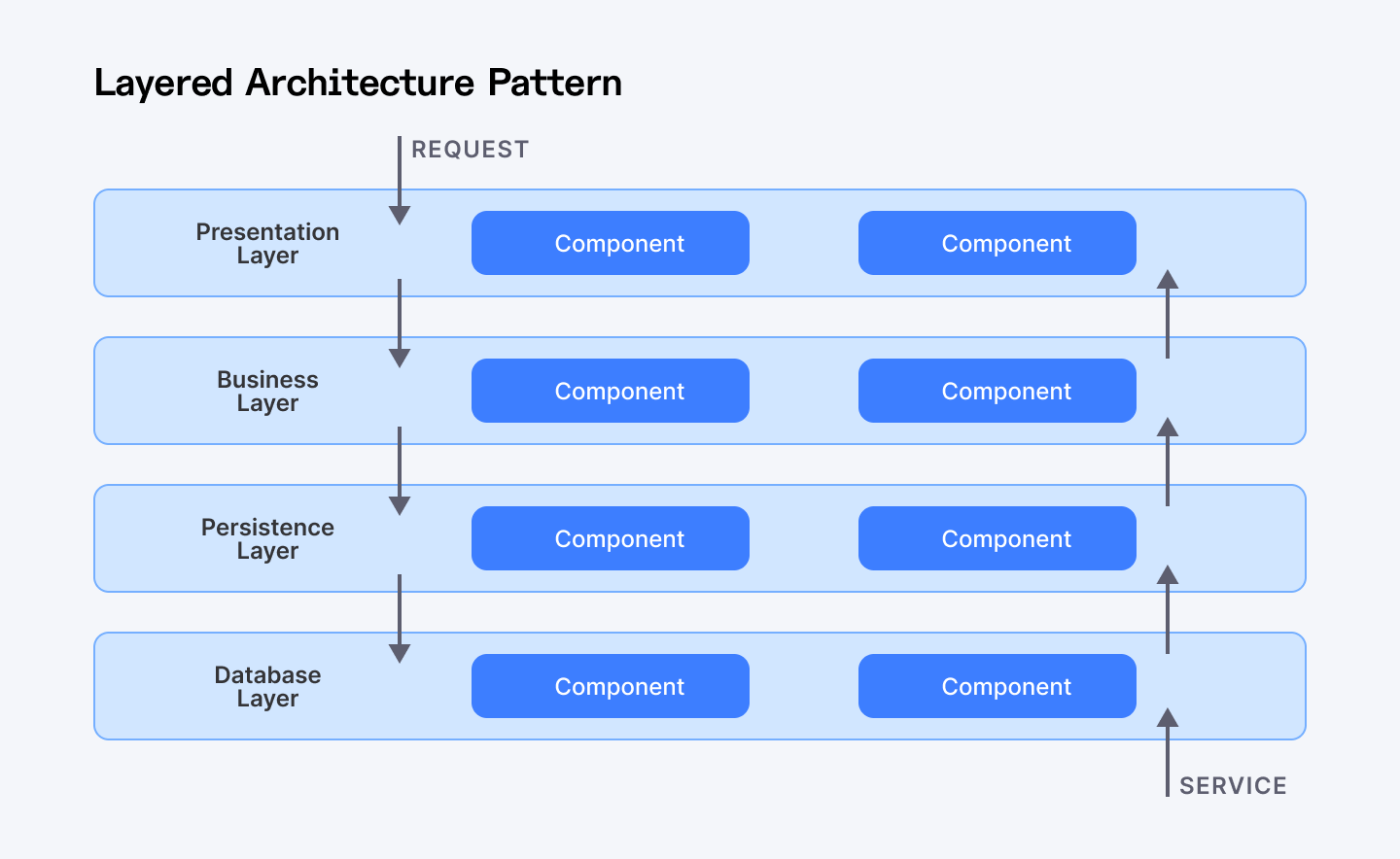
This one’s a classic. You’ve probably used it without even realizing it. Layered (or tiered) architecture splits your app into chunks or layers, like:
- Presentation (what users see)
- Business logic (rules, calculations)
- Persistence (saving/retrieving stuff)
- Database (where data lives)
Each layer only talks to the one directly below it. No shortcuts. This makes things clean and easy to manage.
Advantages
- Super straightforward. Easy to build, explain, and debug.
- Great for new devs or teams starting out.
- You can change one layer (like how data is saved) without messing up the others.
- Easy to test and maintain, especially in enterprise apps.
Shortcomings
- Can get messy. If you’re not careful, code can end up everywhere.
- Slow changes. Sometimes, a tiny fix means redeploying the whole app.
- Tight coupling risk. If you skip layers, things get tangled fast.
Usage
Use layered architecture when:
- You need to build something fast
- Your team is still learning the ropes of software design
- You're building a traditional enterprise app
- You want a pattern that's easy to test and maintain over time
Use Case
You're building an online store. When a customer adds items to their cart, the request starts at the presentation layer (the website). This passes down to the business layer, which calculates totals and applies discounts. The business layer then asks the persistence layer to save the cart data, which ultimately gets stored in the database layer.
Each layer does its job without needing to know how the others work internally. The website doesn't need to understand database queries, and the database doesn't need to know HTML.
3. Microservice Architecture
Overview
Microservices is a different breed: instead of one giant system, you split your app into dozens (or hundreds) of small, independent services. Each service owns one responsibility: user authentication, payment processing, recommendation engine, notification delivery. Each scales independently. Each deploys independently. Each can crash without taking down your entire system.
Advantages
- Scalable. Scale only what you need. If your product catalog is busy, just scale that service-not the whole app.
- Fast development. Teams work on different services at the same time. You ship features quicker.
- Resilient. If one service fails, the rest keep running. No more total meltdowns.
- Tech freedom. Each team can use the best tools or languages for their service. Want Python here and Java there? Go for it.
- Easy updates. You can update or replace one service without touching the rest.
Shortcomings
Microservices come with headaches too. Figuring out how to divide your app into services is surprisingly hard.
- Complex setup. More moving parts means more things to manage and monitor.
- Hard to split. Sometimes it’s tough to figure out what should be its own service.
- Performance. Lots of services talking over the network can slow things down.
- Not for everything. Some apps just don’t break up nicely.
Usage
Use microservices when:
- You want to move fast and release often
- Your app is getting big and hard to manage
- You’ve got multiple development teams working in parallel
- You're building a platform with clear module boundaries
- You need different parts of your app to scale independently
Use Case
Netflix bet big on microservices, and it paid off. They broke their streaming platform into hundreds of small services. One handling your user recommendations, another managing video playback, another handling billing.
When millions of people hit Netflix simultaneously on a Friday night, they can scale up just the services under pressure. If the recommendation engine goes down, you can still watch your shows. And their engineering teams can work independently, each owning their own services from development to deployment.
Building microservices requires strong system design fundamentals. Learn more in our article on system design patterns.
Also Check Out: How to Implement Microservices Architectures for Better Scalability and Maintainability
3.5 Scalable Architecture Patterns: Building for Growth
If scalability is your priority, three architecture patterns stand out:
3.5.1. Microservices for Horizontal Scaling
Netflix runs 700+ microservices. Each can scale independently—when Friday night streaming demand spikes, they scale video delivery without touching authentication or billing systems.
3.5.2. Event-Driven for Throughput Scaling
Amazon processes millions of events per second. When you click "Buy Now," events cascade through inventory, payment, shipping, and notification services—all asynchronously, all independently scalable.
3.5.3. Space-Based for Elastic Scaling
Trading platforms and gaming systems use space-based architecture to handle unpredictable load spikes. Data lives in distributed memory grids, eliminating database bottlenecks entirely.
For most business applications, microservices or event-driven architectures offer the best balance of scalability and manageable complexity. Space-based is reserved for extreme cases where traditional databases can't keep up.
4. Event-Driven Architecture
Overview
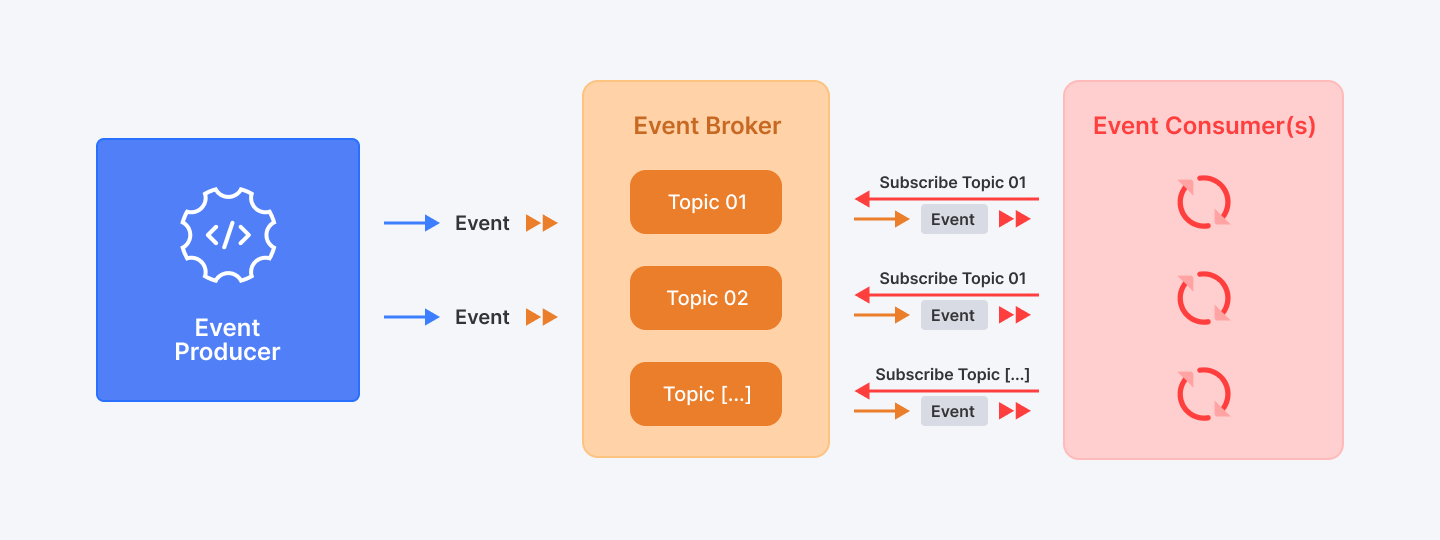
This pattern is all about reacting to events — fast, smart, and without everything being tightly glued together. Services don’t wait around; they do their job when something happens (an event) and then move on. Everything runs asynchronously, and components are loosely connected, which makes it flexible and scalable.
There are two common ways to set this up:
Mediator: A central traffic controller that orchestrates what happens when events occur.
Broker: A more free-form approach where events flow directly between components
Advantages
Event-driven systems don't waste resources checking for updates - they spring into action only when needed.
- Highly scalable and responsive. Handles lots of events without slowing down. Works well under pressure like during Black Friday traffic.
- Flexible. Components work independently, so you can add or change parts easily.
- Real-time reactions. Perfect for apps that need to respond instantly to user actions or system changes.
Shortcomings
- Testing can be tricky. If components aren’t independent, you need the whole system to test properly.
- Error handling gets complex. When many parts react to the same event, managing failures is tough.
- Consistency is hard. Keeping data in sync across independent modules can get complicated.
- Design challenge. Defining event structures and workflows takes careful planning.
Usage
Event-driven architecture works best when:
- You’re building real-time systems (e.g. trading apps, live dashboards)
- You want to respond quickly to user actions
- Your system needs to stay up and scale fast during spikes
- Components need to process events differently or at different times
Use Case
Imagine an e-commerce site during a flash sale. A customer places an order, triggering an "OrderCreated" event. This single event sets off multiple independent reactions:
- The inventory service reduces the stock count
- The payment service processes the credit card
- The notification service sends a confirmation email
- The recommendation engine updates to suggest related products
- The analytics service logs the purchase for reporting
During peak traffic, this approach prevents bottlenecks. Each service handles its own workload without waiting on others, and the system can scale each component independently based on demand.
If the email service gets backed up, orders still process. If the analytics system crashes, customers still get their confirmations. The whole system becomes more resilient.
5. Client-Server Architecture
Overview
This one’s simple: one side asks (the client), the other side answers (the server). It's like the restaurant model of software. You have customers (clients) who order food, and a kitchen (server) that prepares and delivers it.
They don’t need to live in the same place (or network), but they need to understand each other.
One server can handle many clients, and one client can talk to many servers. It’s flexible and easy to scale.
Advantages
This pattern is everywhere because it just works.
- Flexible. One server can serve many clients, and one client can connect to multiple servers.
- Centralized control. Servers manage data and resources, making it easier to secure and maintain.
- Improves user experience. Clients get quick responses, like fetching your emails or loading a webpage.
- Widely used. Powers everything from email and online banking to gaming and file sharing.
Shortcomings
- Single point of failure. If the server crashes, clients lose access until it’s fixed. Scalability can suffer if too many clients overload one server.
- Server bottleneck. If the server goes down, everything breaks.
- Maintenance-heavy. Servers need regular upkeep and can be costly to manage.
- Hard to change. Switching to a different architecture is complex and expensive.
Usage
Reach for client-server when building:
- Email applications (Gmail, Outlook)
- Online banking services
- Web browsers talking to websites
- File sharing systems
- Multiplayer games
- Any app where centralized resources need to be accessed by many users
Use Case
Think of your email app. When you search for an email, your device (the client) sends a request to the email server. The server looks up your emails and sends back the results. This back-and-forth keeps your inbox updated and responsive without you having to manage the data yourself.
6. Plugin-Based Architecture
Overview
WordPress, Chrome extensions, or VSCode – they all follow this pattern. Think of it like this: you’ve got a core app (the foundation), and then you plug in extra features like Lego blocks. The core handles the basics, while the plugins add new stuff without messing with the core system.
You only load what you need, when you need it. Super flexible. Super smart.
Advantages
The big win here is extreme customization without complexity. Users get exactly the features they want and nothing more.
- Modular and flexible. Each plugin does one thing well and works independently.
- Easy to extend. Add new features without touching the core system.
- Better maintainability. Fix or update plugins without risking the whole app.
- Customizable. Users or developers can tailor the app by choosing which plugins to use.
- Scalable. As your app grows, just add more plugins or improve existing ones.
Shortcomings
- Plugin coordination. Plugins need to “check in” properly with the core to work smoothly.
- Core changes are tricky. If many plugins depend on the core, changing it can be risky.
- Design upfront. You have to plan well what stays in the core and what goes into plugins.
- Potential complexity. Choosing what goes in the core vs plugin can be tough.
Usage
Plugin architecture shines when:
- Users have widely varying needs that you can't predict
- You want to foster a developer ecosystem around your product
- Core functionality should remain stable while allowing extensions
- You need a marketplace of optional features
- Different users need different capabilities from the same base product
Use Case
Visual Studio Code is the perfect example. At its core, it's a decent but basic text editor. What makes it amazing is the extension marketplace.
As a developer, you start with the bare editor and add exactly what you need. Working with Python? Add the Python extension. Need Git integration? There's an extension for that. Want your editor to look like a neon-soaked cyberpunk dreamscape? Yep, theme extensions have you covered.
Microsoft maintains the stable core that handles basic editing, the extension API, and the marketplace. Everything else comes from a massive community of extension developers who've created thousands of ways to customize the experience.
This approach has made VSCode one of the most popular development tools in the world. It can be exactly what each developer needs it to be, without becoming bloated for everyone else.
7. Hexagonal Architecture
Overview
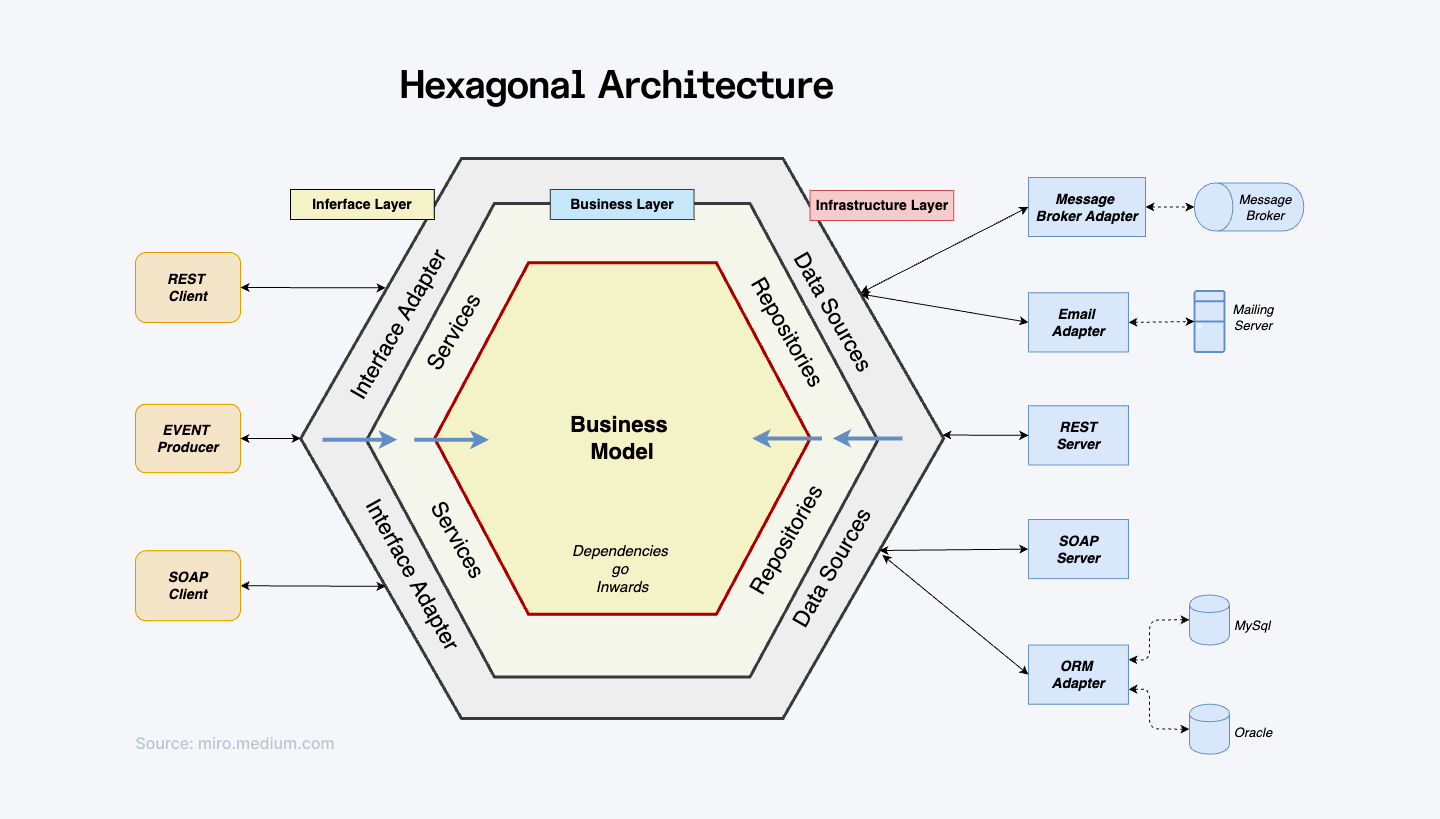
At its heart, Hexagonal Architecture is about keeping your core logic clean and separate from the outside world – like databases, UIs, or APIs. You put your core app in the middle and surround it with “ports” and “adapters” that handle communication with the outside.
The idea? Your core app shouldn't care who’s talking to it or how, as long as the message makes sense.
Advantages
- Loose coupling. Your core logic stays independent from external tech, so you can swap out tools without breaking things.
- Super testable. You can test your business logic without needing real databases or UIs by mocking the adapters.
- Flexible and maintainable. Changing external systems or adding new ones doesn’t mess with your core code.
- Clear separation. Keeps your app organized by separating domain logic, application logic, and infrastructure.
Shortcomings
Developers need to fully understand the separation — or it gets messy fast.
- More upfront setup. Lots of layers to build. You have to define clear ports and adapters, which takes planning.
- Can feel complex. For small apps, this pattern might be overkill.
- Extra layers. The adapters add some boilerplate code to translate between core and outside world.
Usage
Hexagonal architecture works best when:
- Business logic complexity justifies the additional architectural overhead
- You anticipate changing external systems (databases, UIs, etc.)
- Long-term maintainability is a priority over initial development speed
- You need to support multiple frontends or data sources for the same core logic
Use Case
Imagine a financial application that calculates loan eligibility. The core domain contains all the rules about income requirements, credit scores, and loan amounts – the real business value.
This core exposes ports (interfaces) for getting customer data, saving applications, and notifying users. But it doesn't care how these things happen.
On the outside, adapters handle all the specific implementations: a REST API adapter for the web frontend, a database adapter for storage, and a messaging adapter for notifications.
When regulations change, you modify just the core rules. When you decide to add a mobile app, you create a new adapter but the core stays the same. If you switch from email to SMS notifications, only the notification adapter changes.
This architecture keeps your essential business logic clean and protected from the chaos.
8. Space-Based Architecture
Overview
This one’s built for scale and speed. Imagine your app is under constant heavy traffic – millions of users, non-stop requests. Space-Based Architecture helps you deal with that chaos by spreading the workload across multiple processing units that all share a kind of "memory in the cloud" (called tuple space).
There are two key parts:
Processing Unit – runs parts of your app (like frontend stuff or backend logic).
Virtualized Middleware – acts like a traffic cop, handling data sync and requests behind the scenes.
Apps can have one processing unit (small app) or many (for big, high-traffic systems). And everything shares a central space – a kind of memory everyone can dip into without clogging a database.
Advantages
Built to handle massive traffic and loads.
- Super scalable. Add more processing units to handle more users or data without slowing down.
- Low latency. Data is stored in memory across nodes, so reads and writes are really fast.
- Fault-tolerant. If one unit fails, others keep running, so your app stays up.
- Efficient data handling. Data is partitioned and replicated smartly to keep everything available and consistent.
Shortcomings
This isn't a beginner-friendly pattern. Get it wrong, and things can go south quickly.
- Complex caching. Keeping multiple copies of data in sync without conflicts is tricky.
- Not for all apps. Works best for apps needing massive scalability and real-time speed, less so for big relational databases.
- Complex setup. Middleware and clustering add complexity to your system.
Usage
Space-based architecture shines when:
- You’re building bidding sites, flash sales platforms and high-load apps
- You're dealing with thousands (or millions) of concurrent users
- Your application needs to scale elastically during traffic spikes
- Traditional database approaches can't keep up with your volume
- You need real-time processing with minimal latency
Use Case
Picture an online auction platform during the final seconds of a hot item's bidding. Thousands of users are frantically placing last-second bids, and each bid needs to be:
- Recorded with a precise timestamp
- Checked against current highest bid
- Updated in the system
- Reflected to all other users in real-time
A traditional architecture would likely collapse under this load. But with space-based architecture, the system distributes these requests across multiple processing units. Each unit has access to the shared "space" with the current bid data.
When a bid comes in, any available processing unit can handle it, update the shared space, and the new data is instantly available to all other units. No database locking, no bottlenecks.
9. Microkernel Architecture
Overview
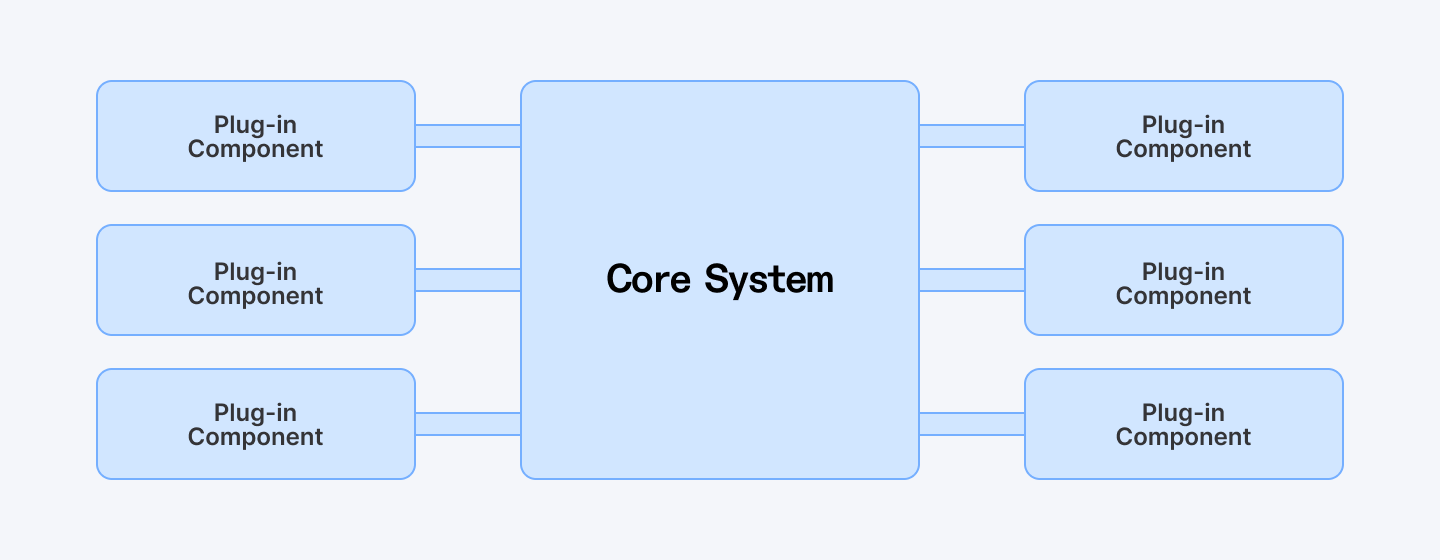
Microkernel architecture splits your system into two parts:
- A tiny core (the microkernel): Minimal but stable logic. Handles the fundamental operations with minimal code.
- A bunch of plug-in modules: Optional, specialized functions that plug into the core to add specific functionality or change behavior.
The core handles just the essential stuff-basic system management and common tasks, while the plug-ins add specialized features or custom logic. The plug-ins talk to the core through well-defined interfaces, so the core doesn’t need to know the nitty-gritty details of each plug-in.
Advantages
- Light and stable core. Keeps things simple and reliable by limiting what the core does.
- Easy to extend. Add or update plug-ins without touching the core system.
- Better isolation. Faulty plug-ins won’t crash the whole system.
- Flexible. Plug-ins can be swapped or updated independently.
- Modular. Encourages clean separation between basic and advanced features.
Shortcomings
- Plug-in coordination. Plug-ins need good “handshaking” code so the core knows they’re ready.
- Core changes are tough. Once many plug-ins depend on the core, changing it becomes risky and complex.
- Granularity challenge. Deciding what goes into the core vs. plug-ins upfront is tricky and can get messy later.
Usage
Microkernel works best for:
- Applications with clear separation between basic operations and special features
- Systems that need a stable core but frequently changing capabilities
- Products that need to be customized for different customers or environments
- Applications where plug-ins might be developed by third parties
Use Case
Take a task scheduler app:
- The microkernel schedules and triggers tasks.
- The plug-ins define what each task actually does (e.g., backup a file, send an email, run a report).
- Each plug-in only needs to follow the API, and the kernel handles the rest.
Table Comparison
Here’s a quick comparison of the 9 software architectures:
Architectural Pattern |
Best For |
Key Benefit |
Monolithic Architecture |
Small to medium apps with tight teams |
Simple to develop and deploy |
Layered Architecture |
Enterprise apps needing clear separation |
Easy to maintain and test |
Microservice Architecture |
Large, fast-growing apps with distributed teams |
Independent scaling and deployment |
Event-Driven Architecture |
Systems reacting to high-volume, real-time inputs |
Highly responsive and loosely coupled |
Plugin-Based Architecture |
Apps needing frequent feature updates |
Easy to extend without breaking core |
Hexagonal Architecture |
Long-term maintainable systems with multiple interfaces |
Clean separation of core and external systems |
Space-Based Architecture |
High-throughput apps with heavy, distributed traffic |
Handles load and concurrency exceptionally well |
Microkernel Architecture |
Systems with stable core and dynamic features |
Extensible via plug-ins without core changes |
Software Architecture Essentials for Business Applications
Here's what every business owner and CTO should know: architecture isn't just about technology. It's about your business.
Start with Business Requirements, Not Technology
The best architecture pattern depends entirely on your situation:
- How many users will you have in 12 months?
- How fast do you need to deploy new features?
- What's your operational budget?
- How experienced is your engineering team?
- What are your compliance/security requirements?
A billion-dollar enterprise with strict compliance needs requires different architecture than a funded startup pivoting fast.
Real-World Business Scenarios
Business Need |
Recommended Pattern |
Why |
Rapid MVP development |
Monolithic |
Ship fast, refactor later |
Enterprise with compliance needs |
Layered |
Clear separation, easy auditing |
E-commerce with traffic spikes |
Event-Driven + Microservices |
Scale for Black Friday, optimize costs otherwise |
SaaS product with plugins |
Microkernel |
Let customers extend functionality |
Legacy modernization |
SOA (transitional) → Microservices |
Gradual migration path |
Startup with unpredictable growth |
Serverless |
Pay only for what you use |
The Evolution Path
Here's what actually happens in successful companies:
1. Year 1-2: Start with a clean monolith. One codebase, minimal infrastructure, easy to deploy.
2. Year 2-3: Grow into layered architecture. Separate concerns, organize into tiers, but still one deployable unit.
3. Year 3+: As team scales and traffic grows, gradually adopt microservices or event-driven patterns. Migrate incrementally, not overnight.
The companies that fail at architecture are the ones that skip straight to microservices from day one. They waste 6 months building infrastructure they don't need yet.
The rule: Don't over-architect for the future. Architect for your actual current needs, with a path to evolve.
Final Thoughts
Here's the thing about software architecture – there's no "best" pattern that works for everything. Each pattern we've covered has its sweet spot. Monoliths are perfect for getting started fast. Microservices shine when you need to scale specific components independently. Event-driven architectures handle real-time processing beautifully. The right choice depends entirely on your specific needs.
But remember this: software architecture isn't just a technical decision. It's about your team, your business, and how you want to grow. The fanciest pattern in the world will fail if your team can't maintain it or if it doesn't align with how your organization actually works.
Whether you're implementing software design patterns at the code level or choosing software architecture patterns at the system level, the goal is the same: build software that works today and scales tomorrow.
Start with the simplest architecture that meets your needs—a clean monolith or layered design. As your business grows, evolve toward scalable architecture patterns like microservices or event-driven. Don't let "software architecture patterns 2025" trend articles pressure you into complexity you don't need yet.
…
At Index.dev, we’re a global talent network always on the lookout for qualified software architects who can spot gaps in the dev teams, guide effective training and help shape solution-driven vision to our clients’ projects.
For clients: Need expert guidance on custom software architecture for your business application? Index.dev connects you with senior software architects who've built scalable systems for Fortune 500 companies and fast-growing startups alike. Get matched with vetted architects in 48 hours

