
Becoming an exceptional software engineer isn't about knowing everything. It's about knowing the right things and having a strategic approach.
This roadmap is your hands-on blueprint to build a strong foundation in the most essential areas of software engineering.
Who is this for?
- If you've already got solid frontend and backend skills
- If you're hungry to level up your engineering game
- If you're tired of scattered, overwhelming advice
We’ll dive into everything that matters: AI tools, cloud services, system design, performance optimization, security, and more. We'll break down complex concepts into digestible, actionable steps. Just practical knowledge that can transform your career. Let's get started.
Join Index.dev’s talent network to connect with global companies and build a thriving remote career as a software engineer.
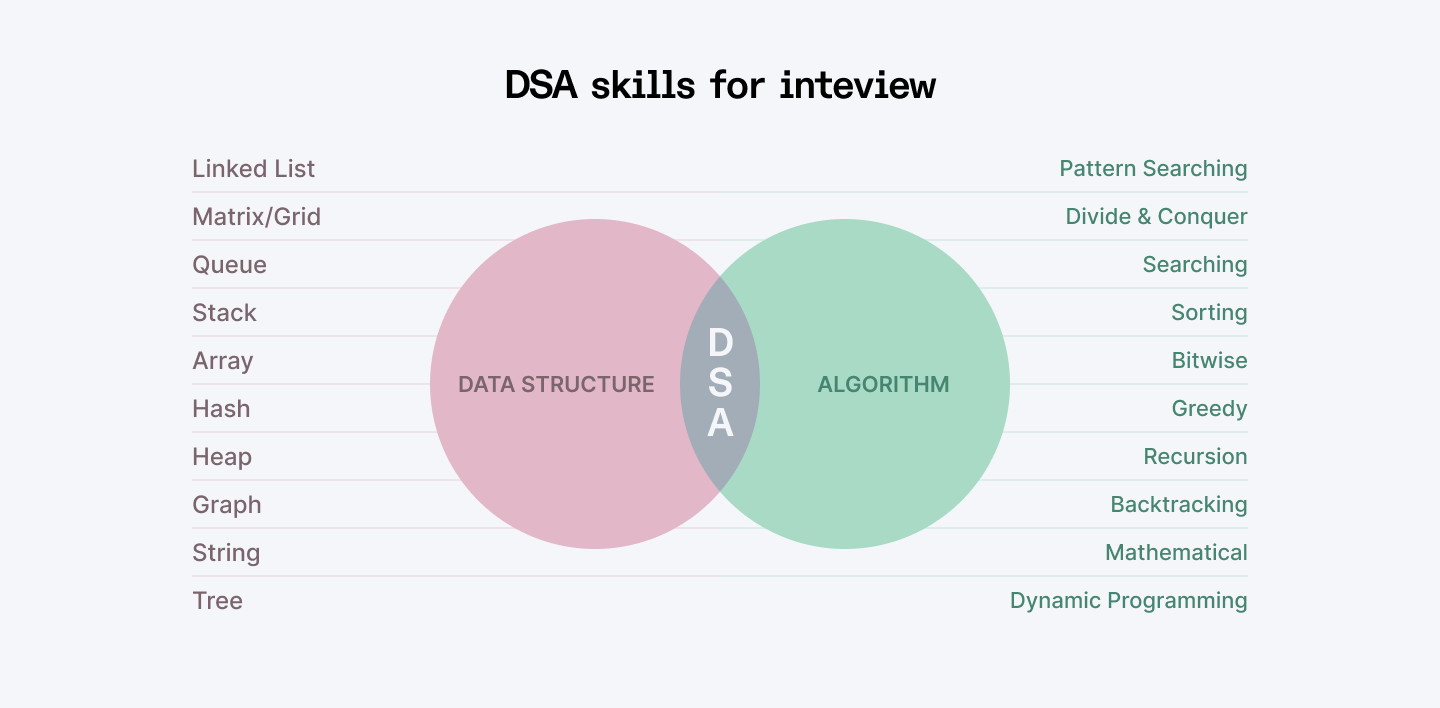
1. Data Structures and Algorithms
Think of DSA as the secret sauce of software engineering. They're the difference between code that crawls and code that flies. Here’s how to sharpen your skills:
- Big-O Notation: First things first. Understanding time and space complexity is crucial. Big-O notation tells you how your code will perform as the input size grows. This means you’ll write code that’s not just functional, but efficient too.
- Core Data Structures: Hash Tables, Trees, Graphs are the bread and butter of most data structures. Hash tables let you store and access data quickly, trees organize data in a hierarchical way, and graphs help manage complex relationships between data.
- Sorting & Searching Algorithms: Sorting and searching are some of the most basic but important algorithms you’ll use. Master the likes of quicksort, mergesort, and binary search. They’ll also come in handy in real-world applications, like searching through massive datasets.
- Dynamic Programming, Recursion: Once you get the hang of them, they’ll become your go-to tools for solving tricky problems. Dynamic programming helps you break down problems into smaller chunks, while recursion lets you solve problems by calling functions within themselves.
Pro Tip:
- Forget rote learning. True mastery comes from understanding principles, not just remembering syntax.
- Coding interviews aren't about knowing every single algorithm. They're about showing how you think, break down problems, and find elegant solutions.
- Practice on LeetCode. Think of it as your coding gym. Start with “warm-up sets” (easy problems). Solve at least one problem daily. Don't just find the solution – understand WHY it works.
Explore More: Key Algorithms Developers Should Learn in 2025 | Top 11 Picks
2. AI Tools
Let’s face it: if you’re not using AI tools right now, you’re missing out big time. And honestly, you’ll likely be overtaken by developers who are using these tools to their advantage. So, let’s break down how you can leverage these tools effectively and make your work easier:
- Conversational AI Assistants: At the very least, ChatGPT, Claude, Gemini, and DeepSeek should be in your toolkit. They can help you write boilerplate code, suggest optimizations, and even spot bugs.
- Copilots (GitHub Copilot, Tabnine, etc.): GitHub Copilot and Tabnine can help auto-suggest code as you work, speeding up your process and making sure you’re coding accurately. It’s like having a second pair of eyes constantly improving your work.
- AI Code Editors: Tools like Cursor AI and Windsurf are pushing boundaries generating entire code structures, squashing bugs, and suggesting architectural improvements and feature development. These aren't just editors. They're your personal code optimization team.
- AI Project Generators (Bolt, v0, etc.): Platforms like Bolt and v0 do something mind-blowing: they can spin up entire projects with a simple prompt. Want a full-stack React app with authentication? Type it out, and watch the magic happen. What used to take days now takes minutes.
- Automated Documentation: No more outdated, crusty documentation. AI tools now generate comprehensive docs automatically, keep your documentation fresh and accurate, and save you hours of tedious writing.
- AI in CI/CD Pipelines: In the world of continuous integration and deployment, AI can predict failures and optimize pipeline execution to help you avoid deployment disasters.
Pro Tip:
Embrace, don’t replace. Remember, your unique human skills—creativity, strategic thinking, and problem-solving—remain irreplaceable. AI is your amplifier, not your replacement.
Also Check Out: 15 Best AI Tools for Developers To Improve Workflow
3. CI/CD
CI/CD (Continuous Integration and Continuous Deployment) is a way to automate the process of writing, testing, and deploying code. It helps developers release software faster with fewer errors and ensures new updates don’t break existing code.
Learn:
Environments
- Development Environment: Where you build and test your code locally.
- Staging Environment: A replica of production where you test before deploying.
- Test (QA) Environment: Where automated tests run to ensure stability.
- Production Environment: Where your application meets the users.
CI/CD Pipelines
- Continuous Integration (CI): Developers merge code changes into a central repository frequently. Automated builds and tests catch bugs early, ensuring the codebase is always stable.
- Continuous Deployment (CD): Every change that passes automated tests is automatically deployed to production, reducing manual intervention and speeding up feedback loops.
Common CI/CD Tools
- GitHub Actions: Works directly with GitHub repositories.
- Jenkins: A popular tool that supports many different technologies.
- GitLab CI/CD: A built-in solution for GitLab projects.
Infrastructure as Code (IaC)
- Instead of manually setting up servers, developers use code to create and manage infrastructure.
- Tools like Terraform and Pulumi help automate this process.
Pro Tip:
CI/CD isn't just a toolset. It's a philosophy of continuous improvement and automation. Key principles:
- Automate everything possible
- Fail fast, recover faster
- Treat infrastructure like software
- Never stop optimizing
4. Testing
Testing isn't about finding fault. It's about building confidence—in your code, your product, and yourself as a developer.
- Unit testing: Think of unit tests as your code's personal health checkup. Top tools like Jest, Vitest, Mocha, and Chai are your go-to here. They let you test individual pieces of code in isolation, so you can catch problems early.
- Integration Testing: This is where you test how different parts of your application work together. Using tools like Supertest and Jest, you can verify if your modules communicate seamlessly and connect the dots between different parts of your application.
- End-to-End (E2E) Testing: E2E testing is like walking through your app as a user would. Tools like Cypress and Playwright simulate real user interactions to make sure everything functions properly from start to finish.
- API Testing: Your APIs are like international borders. They need strict, reliable checkpoints. Whether you’re working with RESTful APIs or GraphQL, tools like Postman and Newman let you validate that your APIs are working correctly.
- Performance Testing: No one likes slow apps, right? JMeter and k6 are tools you can use to analyze how your application performs when it’s under pressure.
- Test-Driven Development (TDD): TDD is a practice where you write your tests before writing the actual code. It helps catch bugs before they become monsters, ensure code reliability from the get-go, and force yourself to think about edge cases.
Pro Tip:
Break things before they break in production. Remember: great developers don't just write code. They write code that stands up to any challenge.
5. Design Patterns
Think of design patterns as tried-and-tested solutions to common software design challenges. They're like the LEGO instruction manuals of the programming world—proven ways to build something complex from simple, repeatable pieces. Design patterns fall into three main categories, each solving a specific type of problem:
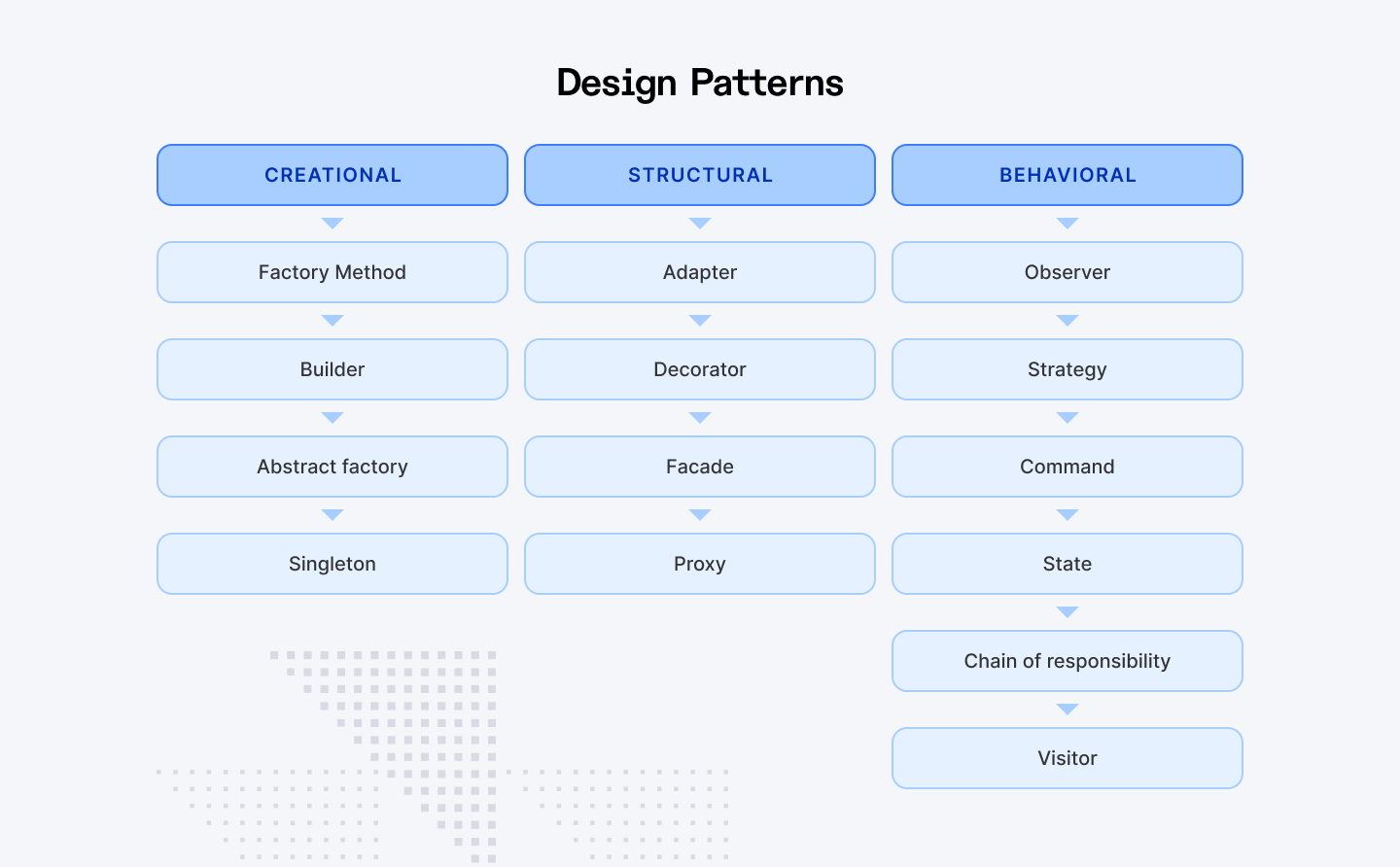
Creational Patterns (How Objects Are Created):
These help manage how objects are created in your code.
- Factory Pattern: Lets you create objects without specifying their exact type. Makes your code more flexible.
- Singleton Pattern: Ensures only one instance of a class exists. Useful for things like a database connection or app configuration.
Structural Patterns (How Code Is Organized):
These help simplify complex systems and improve structure.
- Proxy Pattern: Acts as a middleman between objects. Helps control access, improve security, or delay expensive operations until needed.
- Facade Pattern: Provides a simpler interface to a complex system. Think of it as a remote control with a few buttons instead of a complicated dashboard.
Behavioral Patterns (How Objects Interact):
These focus on communication between objects.
- Observer Pattern: Allows one object to notify multiple others when something changes. Used in event listeners, notifications, and real-time updates.
- Iterator Pattern: Lets you loop through a collection (like an array) without knowing its internal structure.
Pro Tip:
Good developers write code. Great developers design solutions. Not every problem needs a design pattern. Use patterns when they genuinely simplify your code. Don’t force them into your code if they don’t fit the problem.
6. Cloud Services
Cloud computing makes it easy to run, scale, and manage applications without worrying about physical servers. It helps businesses grow faster, cheaper, and more efficiently.
Top Cloud Providers:
Three major players dominate cloud computing.
- AWS (Amazon Web Services): The most widely used, offering a broad set of tools for all kinds of applications.
- Azure (Microsoft): Best for enterprises, with strong security and seamless Microsoft integrations.
- GCP (Google Cloud Platform): Excels in data analytics and AI, making it great for machine learning projects.
Compute Services:
They allow you to run your applications without needing to manage servers.
- AWS EC2: Scalable virtual machines, great for flexible computing needs.
- AWS Lambda: Serverless computing, meaning you only pay for the time your code runs.
- Azure App Service: Makes deploying web and mobile apps easier.
- GCP App Engine: Fully managed service that automatically scales your application.
Storage Solutions:
Cloud storage keeps your data secure, accessible, and scalable.
- Amazon S3: Reliable object storage for large-scale workloads.
- Azure Blob Storage: Flexible, integrates well with Microsoft tools.
- Google Cloud Storage (GCS): Fast and great for big data applications.
Serverless Computing:
Serverless services run your code automatically, so you don’t have to manage infrastructure:
- AWS Lambda: Scales automatically based on events.
- Azure Functions: Great for event-driven applications.
- Cloud Security: Protecting Your Applications
Pro Tip:
Pick one provider (AWS, Azure, or GCP) and learn its basics. Create a free-tier account and try deploying a small project. Explore serverless functions (e.g., set up an AWS Lambda function). Learn basic cloud security practices to protect your applications.
7. System Design
System design is about planning and building software that can handle large amounts of users and data efficiently. It helps software handle high traffic without crashing and makes applications easy to maintain and upgrade. Key system design concepts include:
Caching (Faster Data Retrieval)
- Redis: Stores frequently used data in memory for quick access.
- Varnish: Speeds up web applications by caching content.
Content Delivery Networks (CDN)
- Stores copies of content in multiple locations worldwide.
- Reduces delay for users by serving content from the nearest location.
Networking Basics (How Systems Communicate)
- TCP: Reliable but slower, ensures all data is received in the correct order.
- UDP: Faster but unreliable, useful for live streaming and gaming.
Proxy Servers (Managing Web Traffic)
- Forward Proxy: Hides user identity and protects requests.
- Reverse Proxy: Protects and optimizes server responses.
- Load Balancer: Distributes traffic across multiple servers.
Application Architecture (Monolithic vs. Microservices)
- Monolithic: Single codebase, easier to develop but harder to scale.
- Microservices: Breaks software into smaller, independent services, making scaling easier.
Messaging Systems (Efficient Communication Between Services)
- Kafka: Handles large amounts of real-time data.
- RabbitMQ: Manages and routes messages efficiently.
- Amazon SQS: A cloud-based messaging service for scalability.
Database Scaling (Handling Large Data Efficiently)
- Replication: Copies data across multiple databases for reliability and speed.
- Sharding: Splits data into smaller pieces across multiple servers to handle high traffic.
Pro Tip:
Plan for system failures and recover quickly. Design for horizontal scaling (adding more servers) instead of vertical scaling (upgrading a single server). Use caching and load balancing for better performance. And keep systems modular to make future upgrades easier.
8. Performance Optimization
Ever clicked on a website and it took forever to load? Or used an app that felt sluggish? That’s where performance optimization comes in—it makes everything run faster, smoother, and more efficiently. The three main areas to focus on: Frontend, Backend, and Network Optimization.
Frontend Optimization
Your app’s first impression matters. If it loads too slowly, users leave. So, how do you fix that?
- Minimize JavaScript & CSS with Code Splitting & Lazy Loading
Load only the necessary parts of the application to reduce initial load time.
- Reduce Re-renders with Memoization & Virtualization
Tools like React.memo and PureComponent prevent unnecessary re-renders, keeping your UI smooth even when handling huge data lists.
Backend Optimization
Even the best UI can’t fix a slow backend. Here’s how to speed it up:
Optimize Database Queries
- Indexing: Speed up database lookups by creating efficient shortcuts.
- Query Optimization: Fetch only required data, avoid redundant queries.
- Caching: Store frequently used data in memory (e.g., Redis, Memcached) to reduce database load.
Network Optimization
- Compression (Gzip, Brotli): Smaller files = faster loading times. Reduce data size, making transmission quicker, especially on slow connections.
- Modern Protocols (HTTP/2, HTTP/3): Improve speed by handling multiple requests in one connection.
Pro Tip:
- Measure first, optimize second – Use tools like Chrome DevTools to find bottlenecks.
- Focus on quick wins – Fix the slowest parts first for instant improvements.
- Small changes add up – Even tiny optimizations can make a big difference over time.
- User experience is key – Speed matters most when it improves how users interact with the app.
9. Security
Ever heard the saying, "Your app is only as strong as its weakest security flaw"? Well, it’s true. One tiny loophole can open the door to hackers, data breaches, and a very bad day for you and your users. So, how do you keep your applications secure?
API Security
- Rate Limiting: Prevent brute-force and DoS attacks by restricting request rates.
- CORS (Cross-Origin Resource Sharing): Control which domains can access your API.
- JWT (JSON Web Tokens): Secure, tamper-proof authentication mechanism.
- OAuth: Delegate authentication securely to trusted third-party providers.
Web Security
Common web vulnerabilities and how to prevent them:
- CSRF (Cross-Site Request Forgery): Use anti-CSRF tokens to verify legitimate requests. Validate request origins.
- XSS (Cross-Site Scripting): Sanitize user inputs.CUse Content Security Policy (CSP) to restrict allowed sources.
- SQL Injection: Use parameterized queries to prevent injection attacks.
Authentication & Authorization
Your authentication system is the first line of defense.
- Multi-Factor Authentication (MFA): Require additional verification steps.
- Strong Password Policies: Enforce password complexity and expiration.
- Secure Password Hashing: Never store plain-text passwords; use bcrypt or Argon2.
const bcrypt = require('bcrypt');
async function hashPassword(password) {
  const saltRounds = 10;
  return await bcrypt.hash(password, saltRounds);
}
Monitoring & Logging
Stay ahead of attacks by tracking security events.
- Comprehensive Logging: Record security-related actions and create audit trails.
- Anomaly Detection: Use real-time monitoring to detect unusual access patterns.
Pro Tip:
- Always assume you're under attack.
- Update and patch regularly.
- Never trust user input.
- Follow the principle of least privilege.
Charting Your Career Path from Junior to Tech Lead
Ever wondered what it takes to move up the engineering ladder? What separates a junior developer from a software architect? Climbing the ranks in software development isn’t just about writing more code. It’s about growing your technical expertise, leadership skills, and strategic thinking. Here’s how you can level up your career step by step.
Junior Engineer (1-2 Years)
Where You Are: Fresh, eager, absorbing everything like a sponge.
Your Mission:
- Master coding fundamentals
- Learn to ship features confidently
- Build your communication muscle
- Embrace the beginner’s mindset
Daily Playbook:
- Ask questions (lots of them!)
- Follow established patterns
- Practice, practice, practice
- Build a solid technical foundation
Mid-Level Engineer (2-4 Years)
Where You Are: Gaining confidence and becoming a domain expert.
Your Transformation:
- Own features from start to finish
- Deep dive into a specialized area: Front-end mastery, back-end architecture, DevOps sorcery, and data engineering.
Level-Up Strategies:
- Take on increasingly complex tasks
- Start mentoring junior developers
- Build your professional brand
- Contribute to open-source projects
Senior Engineer (4-7 Years)
Where You Are: The go-to problem solver and technical decision-maker.
Your Goals:
- Make architectural decisions
- Navigate complex cross-team dynamics
- Mentor and grow other engineers
- Lead critical projects
Leadership Toolkit:
- Communicate technical concepts clearly
- Drive system-wide improvements
- Optimize team processes
- Become a force multiplier
Software Architect (7+ Years)
Where You Are: Organizational game-changer.
Your Strategic Impact:
- Enable entire engineering teams
- Make high-level technical decisions
- Align technology with business goals
- Create learning cultures
Organizational Influence:
- Collaborate with executive leadership
- Shape product roadmaps
- Foster continuous learning
- Be the bridge between technology and strategy
Pro Tip:
Look, this isn't a race. It's a journey. Everyone's path is different. But if you focus on these key areas, you'll be well on your way to a successful and fulfilling career. And remember, keep learning. The tech world is constantly changing, so you need to be constantly adapting.
Closing Thoughts
So, there you have it. You've got the roadmap. You know what skills are going to be crucial in 2025. You know what it takes to level up your career.
It's going to take time. Real time. You'll need patience, dedication, and, most importantly, a genuine hunger to learn. Some days will be tough. You'll hit walls, debug code that makes no sense, and wonder if you're cut out for this. But those moments? They're where the real growth happens.
If you stay committed, if you keep pushing your boundaries, you're not just going to be another developer. You'll be the person building tomorrow's technology. The innovator. The problem-solver. The one who turns crazy ideas into reality.
But whether you choose to go it alone or get some help, just remember: keep learning, keep building, and keep pushing yourself. The future of software engineering is in your hands.
For Software Engineers:
Join Index.dev and get matched with global companies offering top-tier remote roles tailored for your skills.
For Clients:
Hire elite software engineers through Index.dev—access top 5% talent with fast matching and a risk-free 30-day trial.


