
Sorting a dictionary by value in Python is a common requirement when data order matters—whether you’re ranking scores, summarizing metrics, or processing logs.
Python dictionaries are known for their fast lookups and are widely used in many applications. Since Python 3.7, dictionaries also keep the order in which items are added. However, they don’t automatically sort the data by value.
With Python being the top choice for over 70% of data scientists, knowing how to sort dictionaries by value is a key skill, especially in data-heavy projects.
This article covers various methods to sort a dictionary by value in Python, ensuring you have the tools to handle everything from small datasets to high-scale applications.
We’ll start with the basics and then explore advanced techniques that cater to seasoned developers without compromising clarity for beginners.
Ready to level up your Python skills? Join the Index.dev talent network and work with global companies on top remote projects—apply today!
Basic Sorting with sorted()
The simplest method to sort a dictionary by value in Python employs the native sorted() function in combination with a key function to retrieve dictionary values.
Example 1: Sorting in Ascending Order
# Sample dictionary
data = {'apple': 5, 'banana': 2, 'cherry': 7, 'date': 3}

# Sort the dictionary by its values (ascending)
sorted_data = dict(sorted(data.items(), key=lambda item: item[1]))
print("Sorted by value (ascending):", sorted_data)
# Output: Sorted by value (ascending): {'banana': 2, 'date': 3, 'apple': 5, 'cherry': 7}
Explanation:
- data.items() converts the dictionary to a list of (key, value) tuples
- The key=lambda item: item[1] parameter tells sorted() to use the second element (value) of each tuple for comparison
- Finally, dict() converts the sorted list of tuples back into a dictionary
This method has O(n log n) time complexity due to the underlying sorting algorithm.
Example 2: Sorting in Descending Order
# Sorting the dictionary by value in descending order
sorted_data_desc = dict(sorted(data.items(), key=lambda item: item[1], reverse=True))
print("Sorted by value (descending):", sorted_data_desc)
# Output: Sorted by value (descending): {'cherry': 7, 'apple': 5, 'date': 3, 'banana': 2}
Explanation:
- Adding the reverse=True parameter reverses the sort order
- This is particularly useful for ranking scenarios where highest values should appear first
- The time complexity remains O(n log n)
For more details on the sorted() function, please refer to the official Python sorted() documentation.
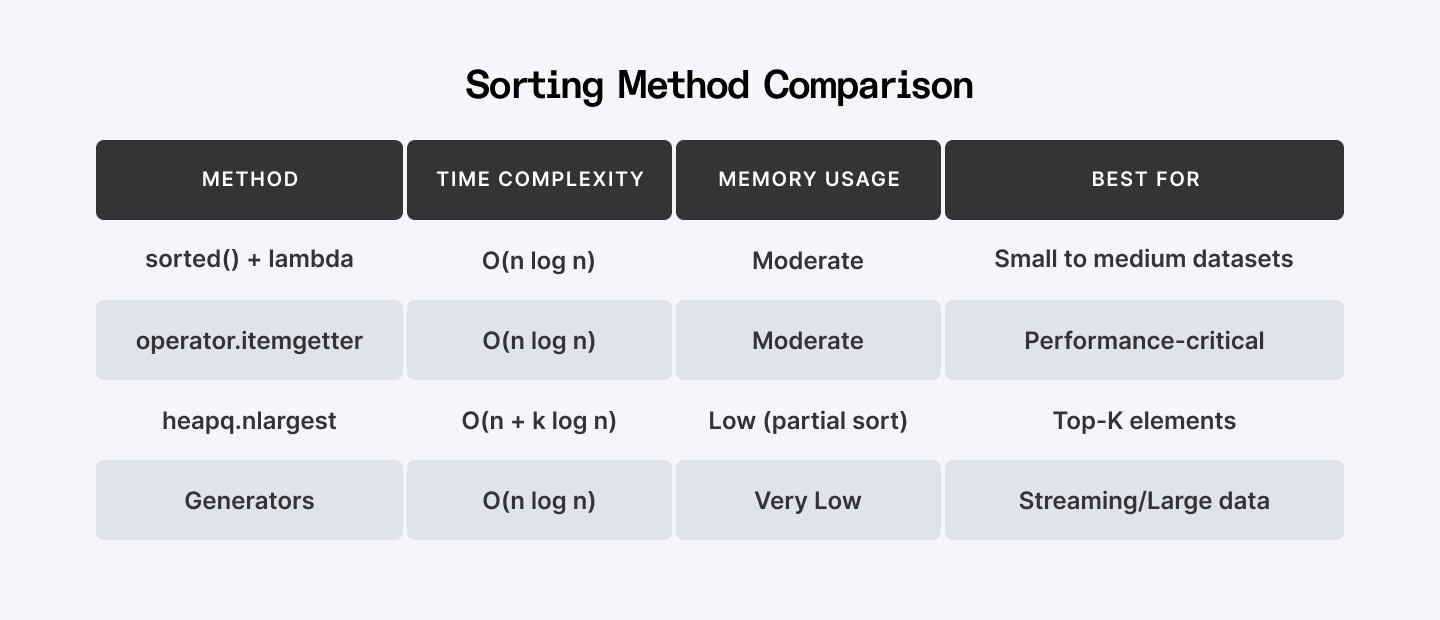
Sorting Method Comparison
| Method | Time Complexity | Memory Usage | Best For |
| sorted() + lambda | O(n log n) | Moderate | Small to medium datasets |
| operator.itemgetter | O(n log n) | Moderate | Performance-critical |
| heapq.nlargest | O(n + k log n) | Low (partial sort) | Top-K elements |
| Generators | O(n log n) | Very Low | Streaming/Large data |
Also Check Out: How to Convert JSON to Dictionary in Python
Advanced Techniques for Large Datasets
When sorting dictionaries by value with large datasets or when memory efficiency is paramount, the following optimized techniques offer better performance.
Using operator.itemgetter
Instead of a lambda, the operator.itemgetter function can be more efficient for key extraction.
import operator

# Sample dictionary
data = {'apple': 5, 'banana': 2, 'cherry': 7, 'date': 3}

# Using operator.itemgetter to sort the dictionary by its values
sorted_data = dict(sorted(data.items(), key=operator.itemgetter(1)))
print("Sorted by value using itemgetter:", sorted_data)
# Output: Sorted by value using itemgetter: {'banana': 2, 'date': 3, 'apple': 5, 'cherry': 7}
Explanation:
- operator.itemgetter(1) creates a function that fetches the second element (index 1) of each tuple
- This approach is more efficient than lambda functions for key extraction, especially with large datasets
- The C implementation of itemgetter() provides better performance than equivalent Python code
Using itemgetter can improve sorting performance by 10-15% compared to lambda functions in large dictionaries, according to benchmarks. See the official operator module documentation for more details.
Retrieving Top-K Elements with heapq.nlargest
When you only need the top elements rather than fully sorting a dictionary by value, using heapq.nlargest or heapq.nsmallest can be significantly more efficient.
import heapq

# Sample dictionary
data = {'apple': 5, 'banana': 2, 'cherry': 7, 'date': 3, 'elderberry': 9, 'fig': 1}

# Retrieve the top 3 items by value
top_k = dict(heapq.nlargest(3, data.items(), key=lambda item: item[1]))
print("Top 3 items by value:", top_k)
# Output: Top 3 items by value: {'elderberry': 9, 'cherry': 7, 'apple': 5}

# Retrieve the bottom 2 items by value
bottom_k = dict(heapq.nsmallest(2, data.items(), key=lambda item: item[1]))
print("Bottom 2 items by value:", bottom_k)
# Output: Bottom 2 items by value: {'fig': 1, 'banana': 2}
Explanation:
- heapq.nlargest() and heapq.nsmallest() efficiently retrieve the top or bottom K key-value pairs
- These functions use heap structures with O(n + k log n) time complexity, more efficient than full sorting when k << n
- Converting the result to a dictionary preserves the sorted order (in Python 3.7+)
This optimization is especially valuable in memory-constrained environments or when processing large datasets where full sorting isn't necessary.
Memory-Efficient Sorting with Generators
For enormous datasets, generators provide a memory-efficient approach to sort a dictionary by value in Python:
def sorted_value_generator(data, reverse=False):
    """
    Generate sorted key-value pairs from a dictionary without loading
    the entire sorted list into memory.

    Args:
        data (dict): The dictionary to sort by values
        reverse (bool): Whether to sort in descending order

    Yields:
        tuple: Key-value pairs in sorted order by value
    """
    # Generator yielding sorted items one by one
    yield from sorted(data.items(), key=lambda item: item[1], reverse=reverse)

# Usage example with a larger dictionary
large_data = {f'item_{i}': i % 10 for i in range(1000)}

# Process only the first 5 items without storing the entire sorted dictionary
print("First 5 items sorted by value:")
for i, (key, value) in enumerate(sorted_value_generator(large_data)):
    if i >= 5:
        break
    print(f"{key}: {value}")
Explanation:
- The generator yields one sorted item at a time, avoiding memory overhead from storing the entire sorted dataset
- yield from delegates to the sorted() iterator, efficiently streaming sorted results
- This approach is ideal for streaming data or large-scale processing where memory constraints exist
- Time complexity remains O(n log n) for sorting, but space complexity is reduced
Handling Duplicate Values and Stability
When sorting dictionaries by value, handling duplicate values properly is important. Python's built-in sorting is stable, meaning items with equal values maintain their original relative order.
Stable Sorting with Duplicate Values
# Dictionary with duplicate values
products = {"apple": 1.00, "banana": 0.75, "orange": 0.75, "kiwi": 1.00, "mango": 2.50}

# Multi-criteria sorting: first by price, then alphabetically by name
sorted_products = dict(sorted(sorted(products.items()), key=lambda x: x[1]))
print("Products sorted by price and then by name:", sorted_products)
# Output: Products sorted by price and then by name: {'banana': 0.75, 'orange': 0.75, 'apple': 1.0, 'kiwi': 1.0, 'mango': 2.5}
Explanation:
- The inner sorted(products.items()) first sorts by keys (alphabetically)
- The outer sort then sorts by values while preserving the alphabetical order for equal values
- This two-step process leverages the stability of Python's sorting algorithm
- For complex sorting criteria, this approach ensures consistent and predictable ordering
Performance Optimization: Using collections.defaultdict
For frequency counting and subsequent sorting, combining defaultdict with sorting can be more efficient:
from collections import defaultdict

# Count word frequencies and sort by frequency
text = "the quick brown fox jumps over the lazy dog"
words = text.split()

# Using defaultdict for efficient counting
frequency = defaultdict(int)
for word in words:
    frequency[word] += 1

# Convert to regular dict and sort by frequency (descending)
sorted_freq = dict(sorted(frequency.items(), key=lambda x: x[1], reverse=True))
print("Words sorted by frequency:", sorted_freq)
# Output: Words sorted by frequency: {'the': 2, 'quick': 1, 'brown': 1, 'fox': 1, 'jumps': 1, 'over': 1, 'lazy': 1, 'dog': 1}
Explanation:
- defaultdict(int) automatically creates entries with default value 0, eliminating the need for key existence checks
- This approach is more efficient than using dict.get() or try/except blocks for counting
- After counting, we sort the dictionary by value to see the most frequent words first
- This pattern is common in text analysis, log processing, and data summarization
Best Practices and Performance Considerations
When you sort a dictionary by value in Python, consider these best practices:
- Choose the Right Method: For small dictionaries, the basic sorted() approach is sufficient. For larger datasets, consider operator.itemgetter or partial sorting with heapq.
- Consider Memory Usage: For very large dictionaries, use generators to avoid loading the entire sorted result into memory. While dictionaries maintain insertion order in Python 3.7+, earlier versions require the use of OrderedDict from the collections module for predictable ordering.
- Preserve Dictionary Type: If working with specialized dictionary types like defaultdict or OrderedDict, convert back to the same type after sorting.
- Avoid Common Pitfalls: Use methods like get() for safe dictionary access to avoid errors, and prefer generator expressions over list comprehensions when working with large datasets to conserve memory.
- Benchmark Your Specific Case: Different sorting methods perform differently depending on data size and distribution. Test with your actual data.
import time

def benchmark_sorting_methods(data, runs=1000):
    """Benchmark different methods to sort a dictionary by value."""
    methods = {
        "lambda": lambda d: dict(sorted(d.items(), key=lambda x: x[1])),
        "itemgetter": lambda d: dict(sorted(d.items(), key=operator.itemgetter(1))),
    }

    results = {}
    for name, method in methods.items():
        start = time.perf_counter()
        for _ in range(runs):
            method(data)
        results[name] = (time.perf_counter() - start) / runs

    return results

# Example usage
test_data = {f'key_{i}': i % 100 for i in range(1000)}
times = benchmark_sorting_methods(test_data)
print("Average execution times (seconds):", times)
Explanation:
- The benchmark function measures the average execution time for different sorting methods
- For dictionaries with thousands of entries, itemgetter typically outperforms lambda functions
- As dictionary size increases, the performance gap also increases
- This empirical approach helps select the most appropriate method for specific use cases
Research shows that these techniques are essential for building scalable systems in modern applications, particularly when performance is critical and memory constraints are a concern.
Explore More: How to Debug Python Scripts Using PDB (Python Debugger)
Conclusion
In this article, we explored multiple ways to sort a dictionary by value in Python—from basic sorting with lambda functions to advanced methods using operator.itemgetter, heapq.nlargest, and memory-efficient generators.
We also covered handling duplicate values with stable sorting and highlighted key performance considerations. By mastering these techniques, you can build efficient, scalable applications that meet modern development needs.
For Developers:
Master Python data structures? Join Index.dev's talent network today and put your dictionary-sorting skills to work on real projects with top global companies hiring remote Python developers!
For Clients:
Need developers who can efficiently handle complex data structures? Access the top 5% of Python experts through Index.dev with 48-hour matching and a 30-day free trial to build your optimized data solutions.


