
AI agents in software development are task-specific, intelligent assistants that go beyond general LLMs or automation scripts. Unlike chatbots or code generators, these agents integrate directly into your tools, like Postman, VS Code, or GitHub, to perform focused tasks such as writing tests, generating docs, or simulating data.
Why do they matter now? Because development cycles are tighter, teams are leaner, and the demand for clean, testable code is higher than ever. AI agents offer real-time support, reduce repetitive work, and help catch issues early.
In this guide, we’ll show 6 real use cases where AI agents boost productivity and how you can apply them today.
Note: This article showcases real-world AI agent use cases using Postman as the primary platform. All examples, tasks, and workflows were created and tested within Postman to demonstrate how AI can improve software development, from test generation to documentation and integration checks.
Build smarter with AI-powered tools. Join Index.dev to work on cutting-edge software projects with top global companies, remotely.
What are AI agents in software development?
AI agents in software development are intelligent software tools designed to perform specific coding-related tasks autonomously or collaboratively with developers. Powered by large language models (LLMs), these agents can write, debug, refactor, test, or document code by understanding prompts, project context, and development goals.
Unlike general-purpose AI, they are task-focused and integrated into IDEs, APIs, or CI/CD workflows. Developers can assign them roles, like frontend builder, test writer, or API integrator, to speed up delivery, reduce manual errors, and maintain code quality.
Essentially, they act as virtual teammates that assist or automate parts of the software development lifecycle.
Explore the five most powerful AI agents of 2025.
Here are the important use cases of AI agent models for software developers:
1. Auto-generate API test scripts
What it is
This use case focuses on using Postman to prototype APIs and automatically generate test scripts during the API design phase, before the real backend exists. By setting up a mock server with example responses, teams can simulate how the API behaves and write test scripts that validate response structure, status codes, and payload formats.
What it does
In technical terms, this use case enables teams to auto-generate API test scripts based on predefined mock responses in a Postman collection. These tests validate the structure, data types, and status codes of API responses, ensuring consistency between frontend expectations and backend delivery before the actual service is built.
Using Postman and its Mock Server, developers simulate real API behaviour using example responses. The environment variable {{url}} dynamically routes requests to the mock server. Test scripts written in JavaScript within the Tests tab verify each response for correctness.
AI Agent action and outcome
An AI agent (like Postbot inside Postman or external tools like ChatGPT) analyses the request structure, example response, and your testing intent. Based on that, it generates JavaScript test scripts automatically, covering status checks, key validation, and data type assertions.
Outcome for developers:
- Developers no longer need to write repetitive test logic manually.
- They gain reliable, standardised API validation from the planning phase itself.
- It improves collaboration between frontend and backend teams and catches mismatches before integration begins.
Benefits for software developers
- Write once, test forever: Same scripts work for mock and live APIs
- Faster prototyping: Mock + test = immediate feedback before backend is built
- AI-powered test generation: Use Postbot or ChatGPT to create test logic
- Validate structure & reliability: Ensure consistent keys and types
- CI-ready: Export tests to run in CI tools using Newman
Example task(s)
Here are tasks that fit this use case:
- Generate test scripts for GET /transactions to check that it returns a list of transactions with fields like id, fromAccountId, and amount.
- Validate that POST /accounts returns an object with account.id and a 201 status code.
- Add a 403 forbidden response for PATCH /accounts/:id and write a test to check the error message content.
- Simulate creation of a transaction and use the returned id in a follow-up GET request.
How it works
Example task we’ll demonstrate: Test that the mock response for GET /api/v1/accounts/:id includes owner, balance, and currency, and that the status code is 200.
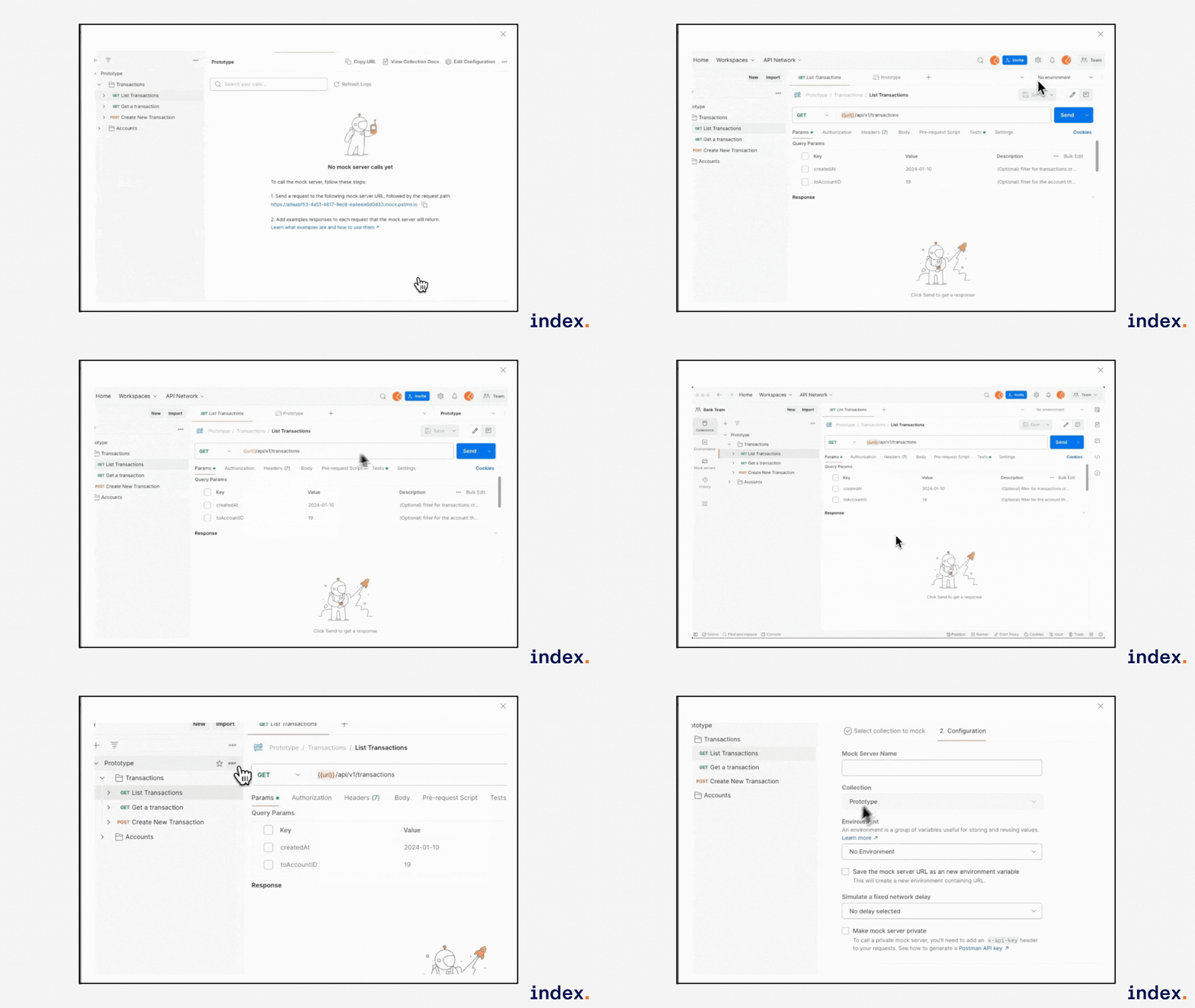
Step 1: Create and configure the mock server
- In your API Prototyping collection, click ⋮ > Mock collection.
- Name your mock server (e.g., Bank API Mock).
- Check “Save the mock server URL as a new environment variable”.
- Postman will create the mock and link {{url}} to it.
Step 2: Add an example response to GET /accounts/:id
- Go to the GET /accounts/:id request in the Accounts folder.
- Under Examples, define the mock response:
{
  "account": {
    "id": 26,
    "owner": "Nova Newman",
    "balance": 5100,
    "currency": "COSMIC_COINS"
  }
}
Step 3: Auto-generate test script
In the Tests tab of the same request, you can paste this:
pm.test("Status code is 200", () => {
  pm.response.to.have.status(200);
});
const data = pm.response.json();
pm.test("Has account object", () => {
  pm.expect(data).to.have.property("account");
});
pm.test("Owner is present", () => {
  pm.expect(data.account.owner).to.be.a("string");
});
pm.test("Balance is a number", () => {
  pm.expect(data.account.balance).to.be.a("number");
});
Step 4: Run using collection runner
- Click the Runner tab (top right).
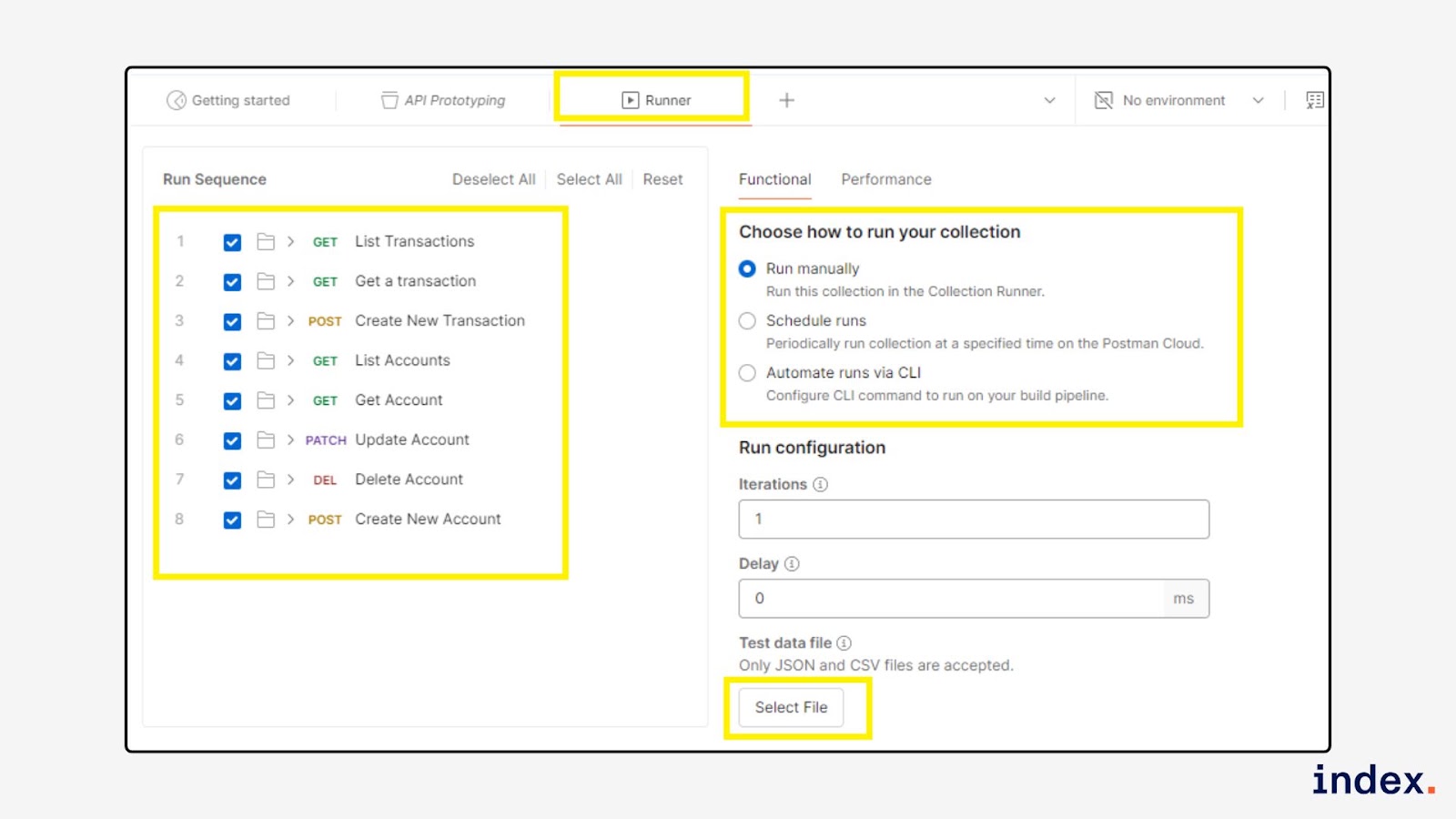
- Select API Prototyping and choose your new environment with the mock URL.
- Run the test for GET /accounts/:id.
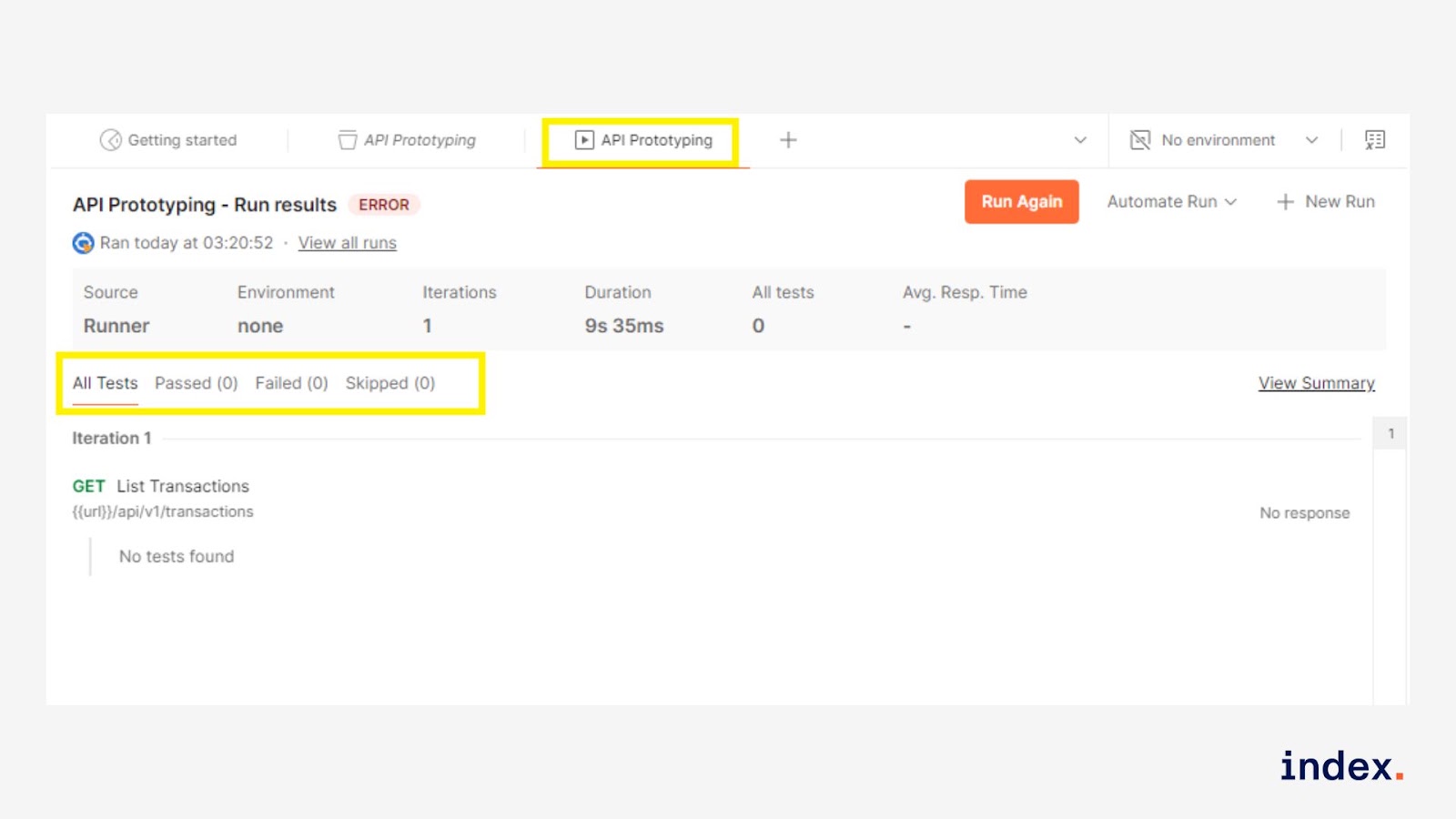
- You’ll see all test results in the Runner output.
2. Blueprint documentation
What it is
Blueprint Documentation refers to the process of auto-generating, maintaining, or enhancing API documentation using AI agents. Instead of manually writing every request detail or example, AI agents assist developers by filling in descriptions, summarising API behaviour, and generating test-ready collections. This is especially useful when working in environments like Postman or SwaggerHub.
What it does
AI agents help automate the creation and upkeep of internal API documentation by:
- Extracting endpoint info (method, URL, parameters, auth) from a schema or collection.
- Generating natural language descriptions for each endpoint.
- Suggesting request/response examples based on sample payloads.
- Writing test scripts (e.g. response validation, status checks).
- Explaining headers, query params, or error codes.
Tools used
- Postman Collections or OpenAPI specs
-
AI coding agents like:
- Postbot (Postman AI)
- ChatGPT (code interpreter mode)
- GitHub Copilot (for docs in codebases)
- JSON schema parsers or Swagger interpreters
AI Agent action and outcome for developers
Action:
The AI agent analyses your existing Postman collection, OpenAPI schema, or API spec. It intelligently interprets request methods, parameters, authorisation headers, and response formats.
Based on this analysis, it generates clear, human-readable documentation for each endpoint, including summaries, usage instructions, and input/output examples.
In more advanced setups, it can even auto-generate test scripts or suggest improvements in documentation consistency.
Outcome:
Developers no longer need to manually document each endpoint, which drastically reduces effort and the chances of inconsistency or outdated instructions.
With AI-generated documentation, onboarding new developers becomes faster, API usage becomes clearer, and internal or partner teams can confidently interact with your APIs without frequent hand-holding from the backend team.
Benefits for software developers
- Speeds up internal API onboarding for new devs or testers.
- Auto-writes endpoint summaries, usage instructions, and expected responses.
- Clarifies authorisation mechanisms using AI interpretation of headers or tokens.
- Generates Postman test scripts (e.g. check 200 status, schema validation).
- Reduces manual effort in documenting evolving APIs.
- Prepares ready-to-fork, AI-enriched documentation collections.
Example task(s)
-
Get a list of all accounts
→ GET /accounts with optional filters (owner, createdAt) -
Fetch details of a specific account
→ GET /accounts/:accountId -
Create a new account
→ POST /accounts with body containing owner, balance, and currency -
Create a transaction between two accounts
→ POST /transactions with fromAccountId, toAccountId, and amount - Track usage limits via headers like X-RateLimit-Remaining
How it works
Task Goal: Use the template to get account details using the GET /accounts/:accountId endpoint
Step 1: Open blueprint documentation
- Go to your Postman workspace.
- In the left sidebar under Collections, click on Blueprint Documentation.
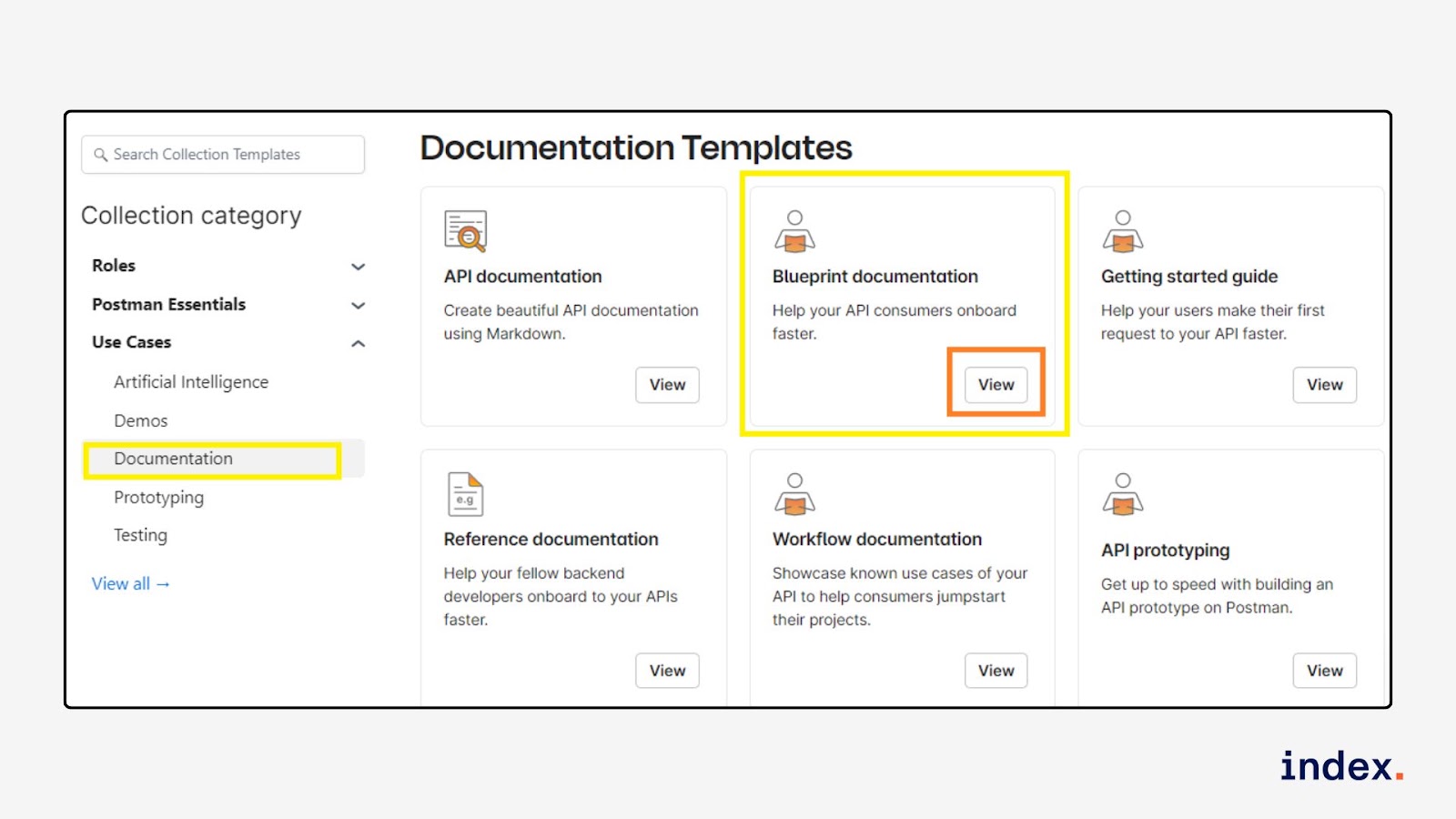
- Expand the Accounts folder.
Step 2: Get a valid account ID
We need an accountId to use in the next step.
- Click on: GET List Accounts
- Click the Send button.
- Look at the response, find an id field (example: 1669042)
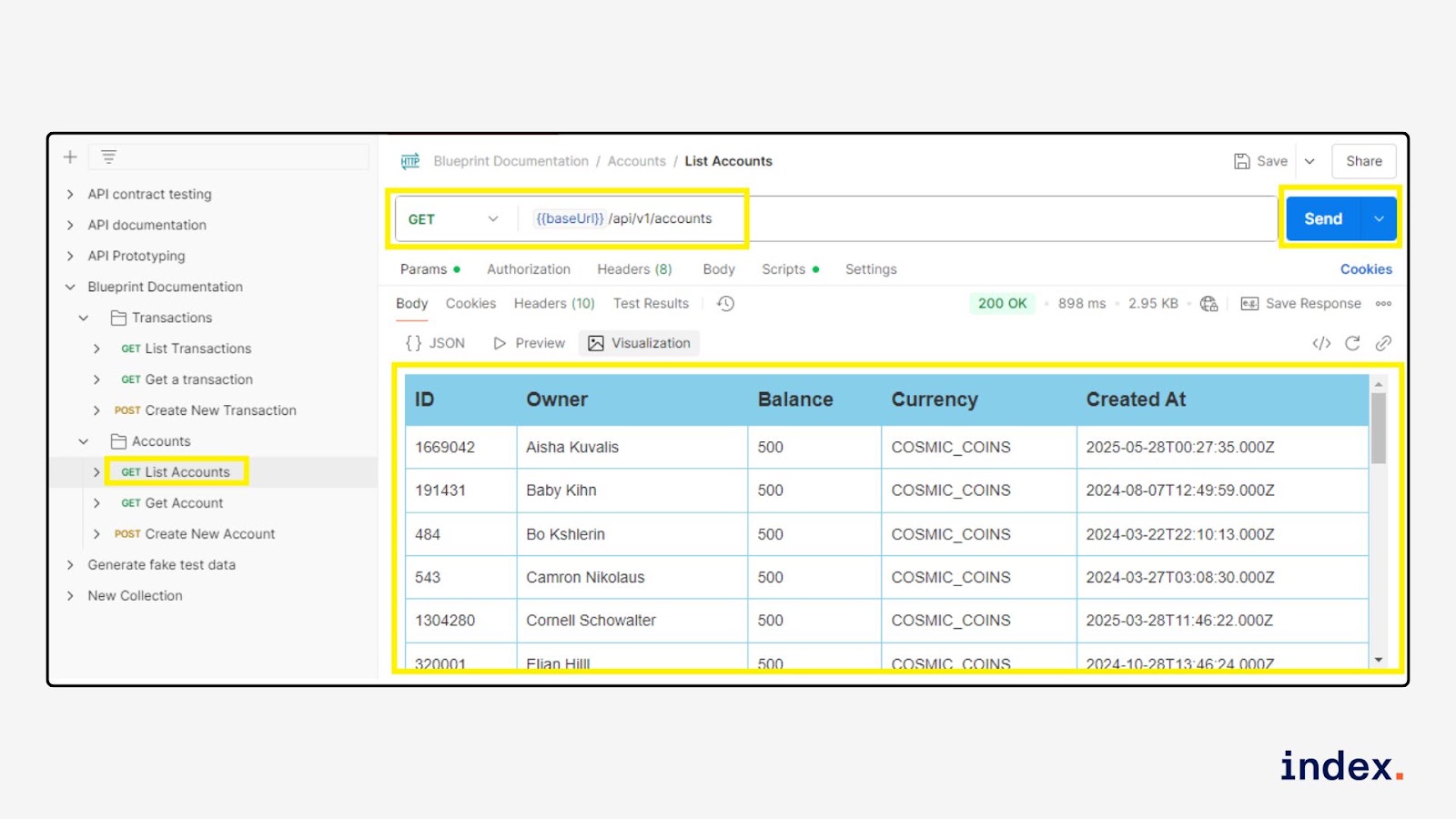
Step 3: Open “GET Get Account” request
- Click on: GET Get Account
-
Look at the URL, you’ll see something like:
{{baseUrl}}/api/v1/accounts/:accountId
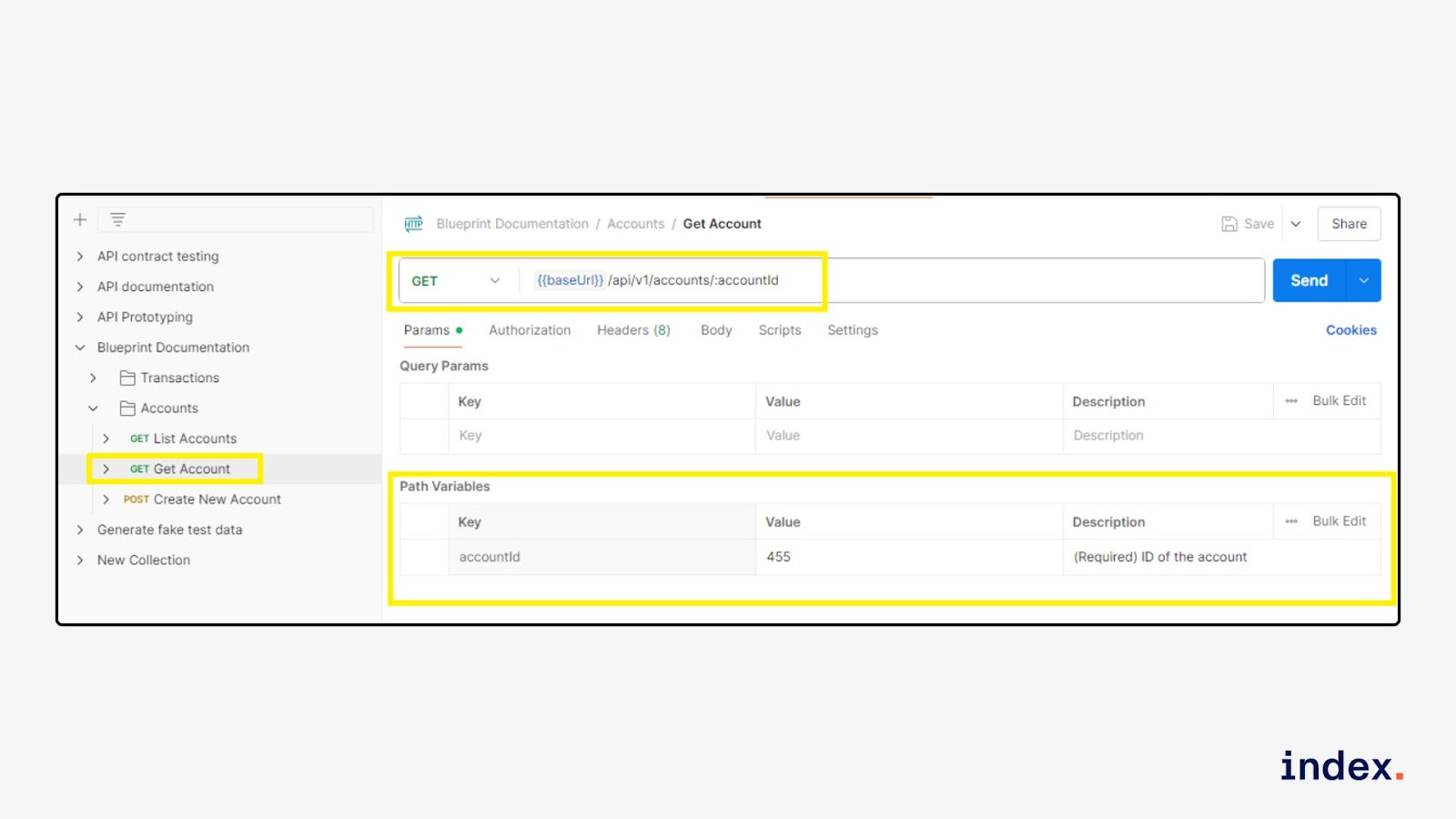
Step 4: Send the Request
-
Click Send.
Check if the response shows the account’s details.
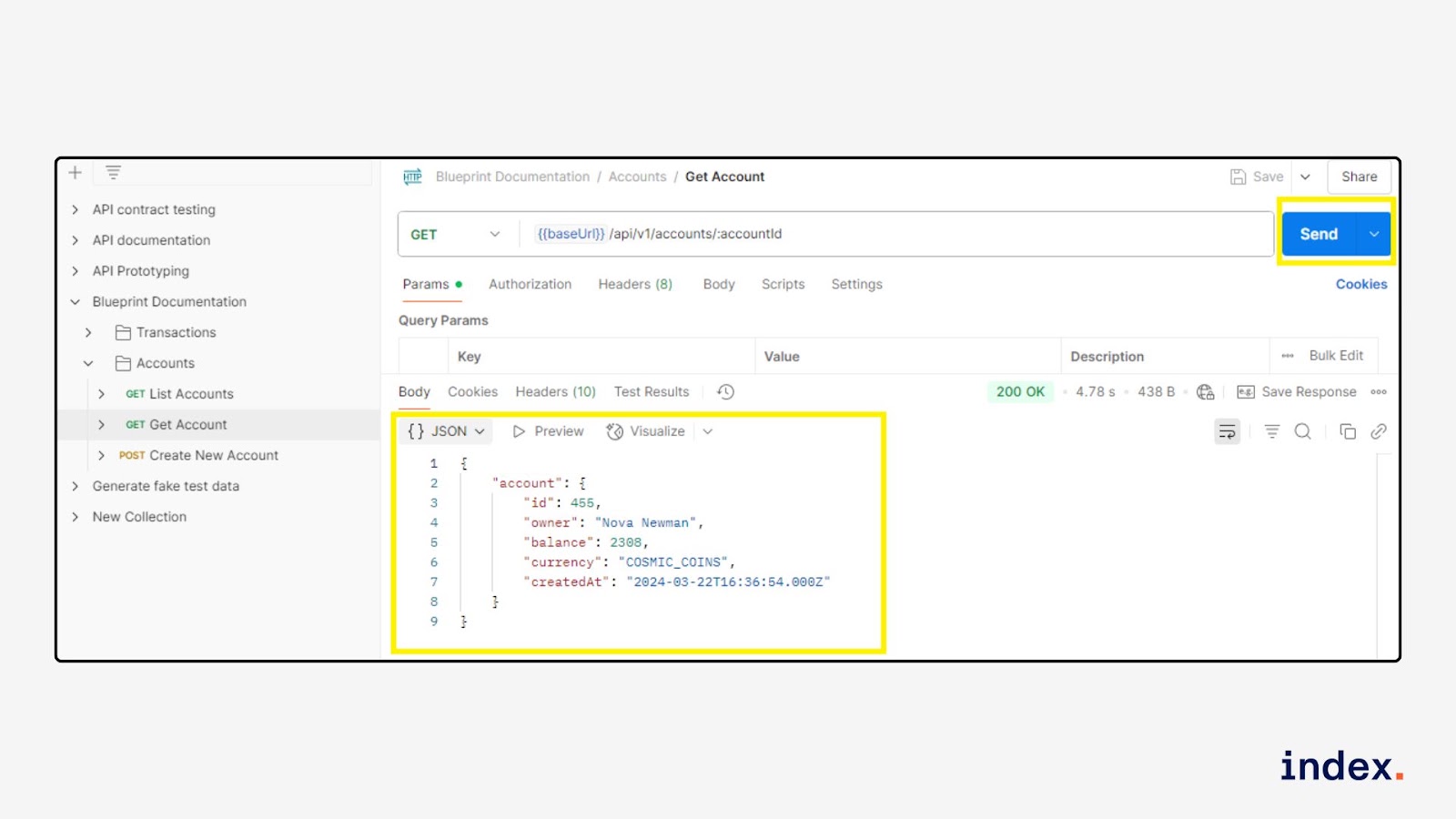
3. Generate fake test data (with AI)
What it is
This use case shows how to simulate real-world scenarios in API testing using Postman's dynamic variables, powered by the Faker library. It helps developers and testers quickly create randomised data such as names, emails, addresses, and dates without manually entering values.
What it does
Technically, this process uses AI tools and scripting environments (e.g., Postman + Postbot, ChatGPT, Faker.js) to auto-generate structured JSON or form data. These tools can produce randomised values for names, emails, phone numbers, product info, dates, and more. The AI agent interprets prompts and programmatically builds datasets tailored to your schema, which can then be injected into API calls or testing workflows.
AI Agent action
AI agents respond to natural language prompts like “Generate 10 sample user profiles with names, emails, and cities” and return fully formatted data. Developers can copy, customise, or loop through this data in automated test environments or mock servers.
Tools you can use:
- Postman + Dynamic Variables ({{$random*}})
- Postbot (AI assistant inside Postman)
- ChatGPT + Faker.js or Mockaroo
- Test automation frameworks (e.g., Cypress, Playwright, JMeter)
Benefits for software developers
- Eliminates repetitive data entry with on-demand generation
- Creates test data specific to API schemas or edge cases
- Improves security by avoiding real user data
- Speeds up integration and regression testing
- Simulates a wide range of real-world scenarios (locations, time zones, languages)
- Boosts test coverage across UI, API, and backend layers
- Customisable through AI prompts and scripting logic
Example task(s)
- Create 20 mock users with diverse ages, countries, and signup timestamps for registration API testing
- Generate a list of fake products with randomised prices and inventory counts for an e-commerce platform
- Simulate blog post data with AI-generated titles, tags, and timestamps
- Generate invalid or malformed inputs to test the API validation logic
How it works
You’ll learn how to send a request, generate random data, validate the response using a test script, and even visualise the result.
Step 1: Open the template collection
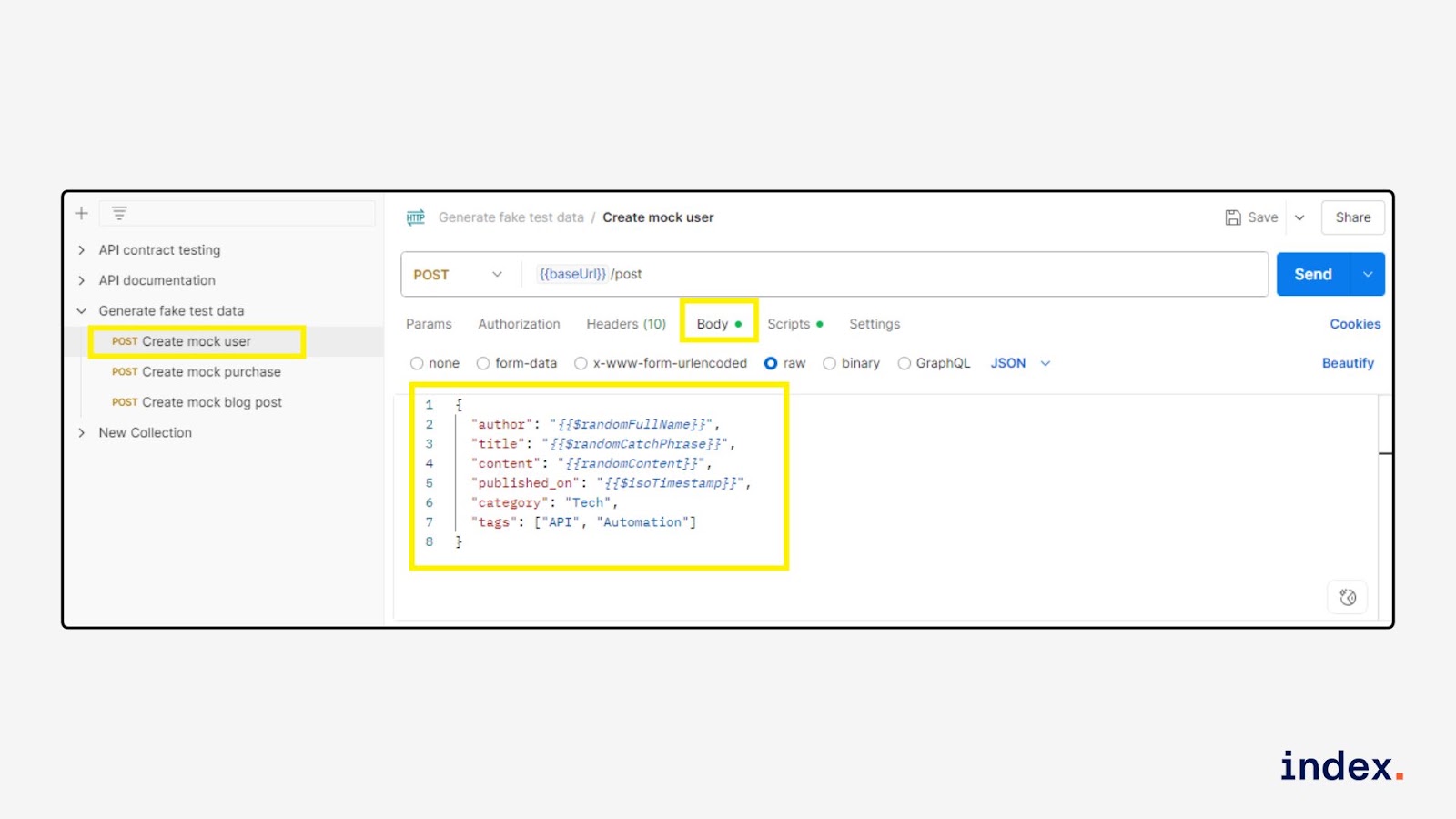
In your Postman workspace, go to Collections → Backend Developers → Generate fake test data → POST Create mock blog post.
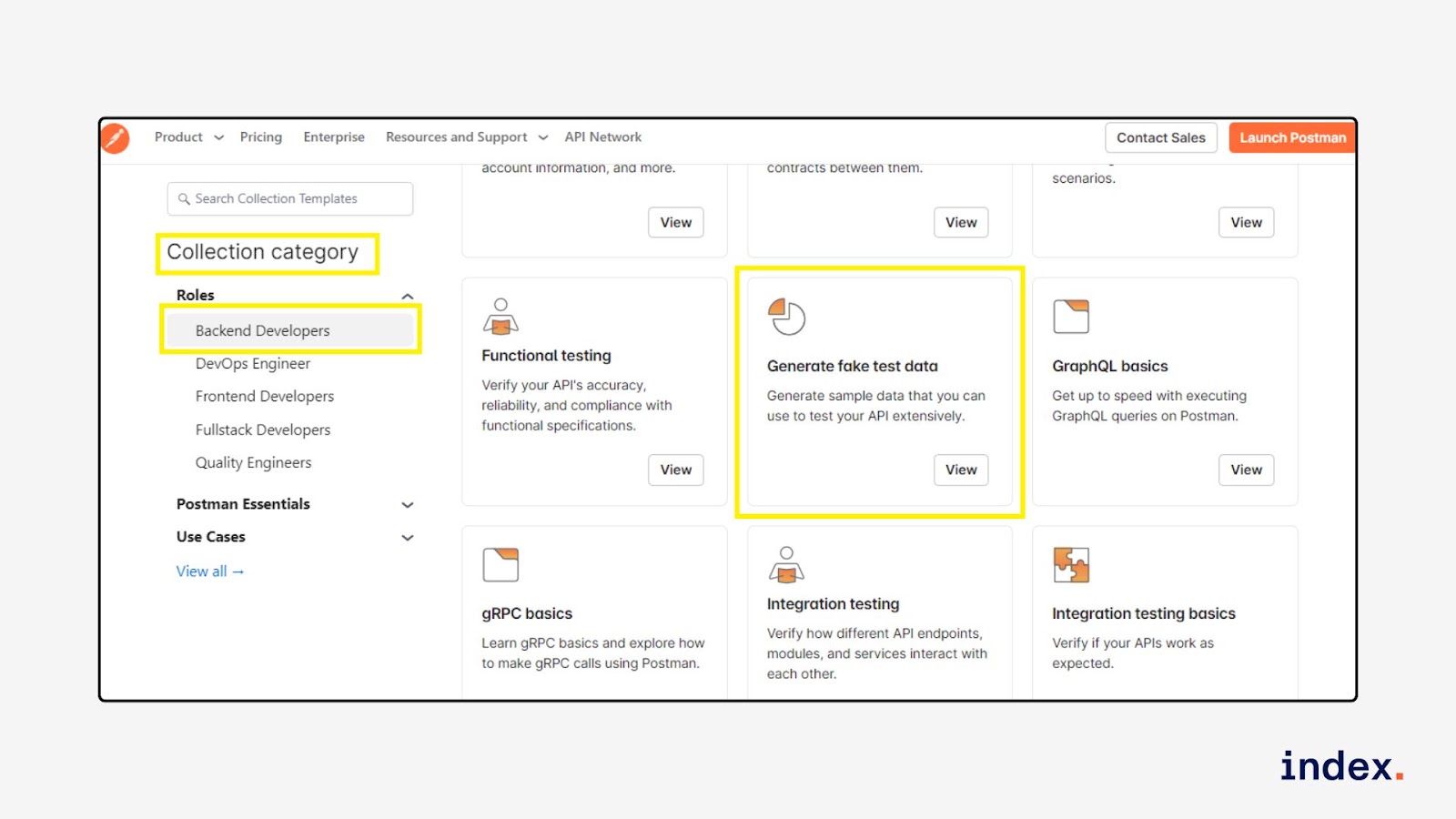
Step 2: Set up the request body
Go to the Body tab → Select raw → JSON, and use dynamic variables:
{
  "author": "{{$randomFullName}}",
  "title": "{{$randomCatchPhrase}}",
  "content": "{{randomContent}}",
  "published_on": "{{$isoTimestamp}}",
  "category": "Tech",
  "tags": ["API", "Automation"]
}
These {{$random*}} values will change each time you send the request.
Step 3: Add a test script (optional but recommended)
Click on the Tests tab and paste the following code to validate the response:
For Pre-Request,
pm.variables.set("randomContent", "This is a fake blog paragraph: " + Math.random().toString(36).substring(7));
For Post-Response,
var template = `
<canvas id="myLineChart" height="75"></canvas>

<script src="https://cdnjs.cloudflare.com/ajax/libs/Chart.js/2.5.0/Chart.min.js"></script>

<script>
    var ctx = document.getElementById("myLineChart");

    var myLineChart = new Chart(ctx, {
        type: "line",
        data: {
            labels: ["First Name", "Last Name", "Created At", "Country"],
            datasets: [{
                label: "User Data",
                data: [], // Initially empty, will be updated in getData()
                backgroundColor: "rgba(75, 192, 192, 0.2)",
                borderColor: "rgba(75, 192, 192, 1)",
                borderWidth: 1
            }]
        },
        options: {
            scales: {
                yAxes: [{
                    ticks: {
                        beginAtZero: true
                    }
                }]
            }
        }
    });

    // Access the data passed to pm.visualizer.set() from the JavaScript
    pm.getData(function (err, value) {
        myLineChart.data.datasets[0].data = value.response.data;
        myLineChart.update();
    });

</script>`;

// 👇 Fix: use optional chaining and fallback defaults
function constructVisualizerPayload() {
    var res = pm.response.json();

    var visualizerData = {
        data: [
            (res.data?.firstName || "").length,
            (res.data?.lastName || "").length,
            (res.data?.createdAt || "").length,
            (res.data?.address?.country || "").length
        ]
    };

    return { response: visualizerData };
}

pm.visualizer.set(template, constructVisualizerPayload());
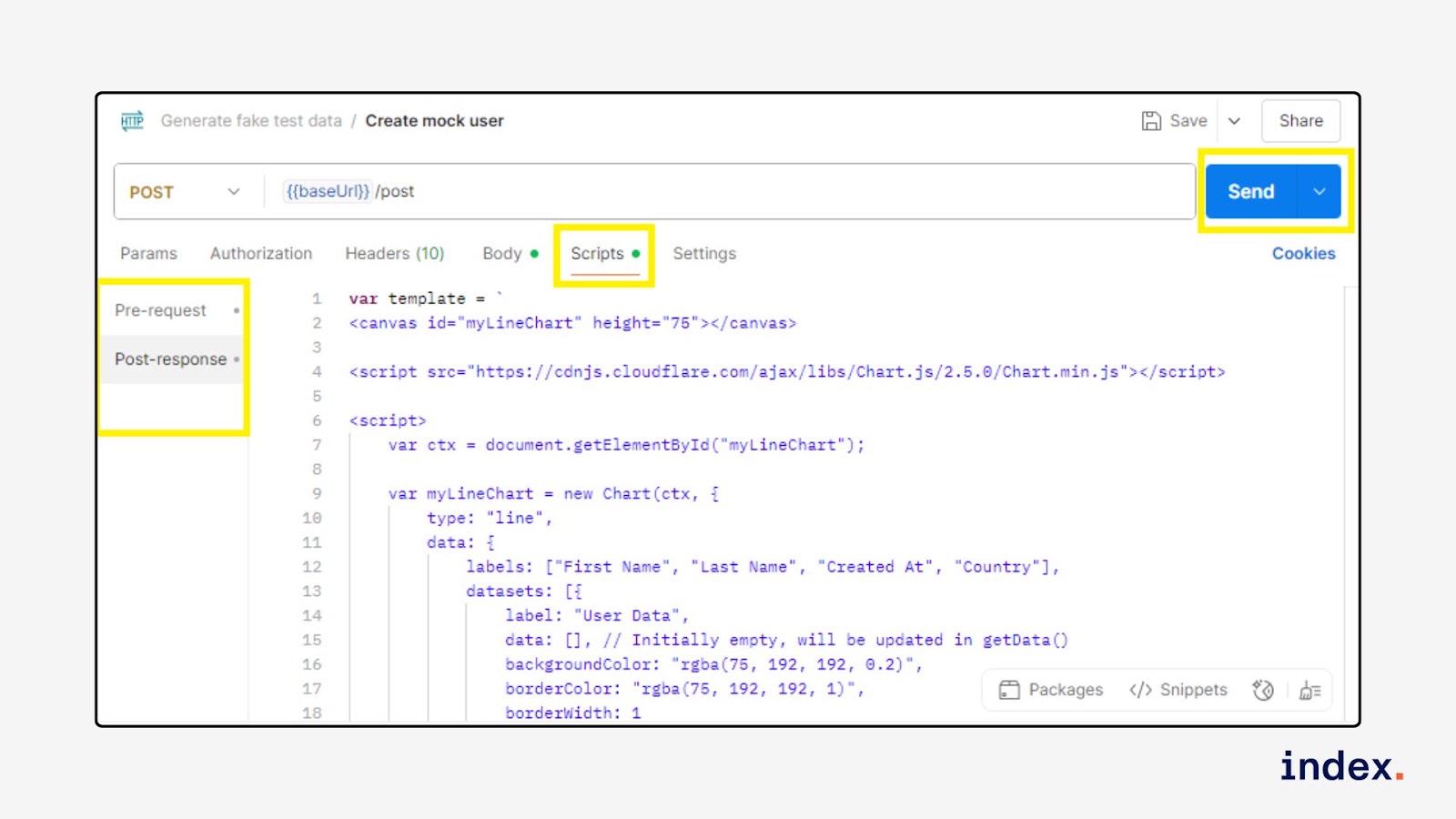
You can add more tests as needed, for example, checking for a valid ISO date format or tag count.
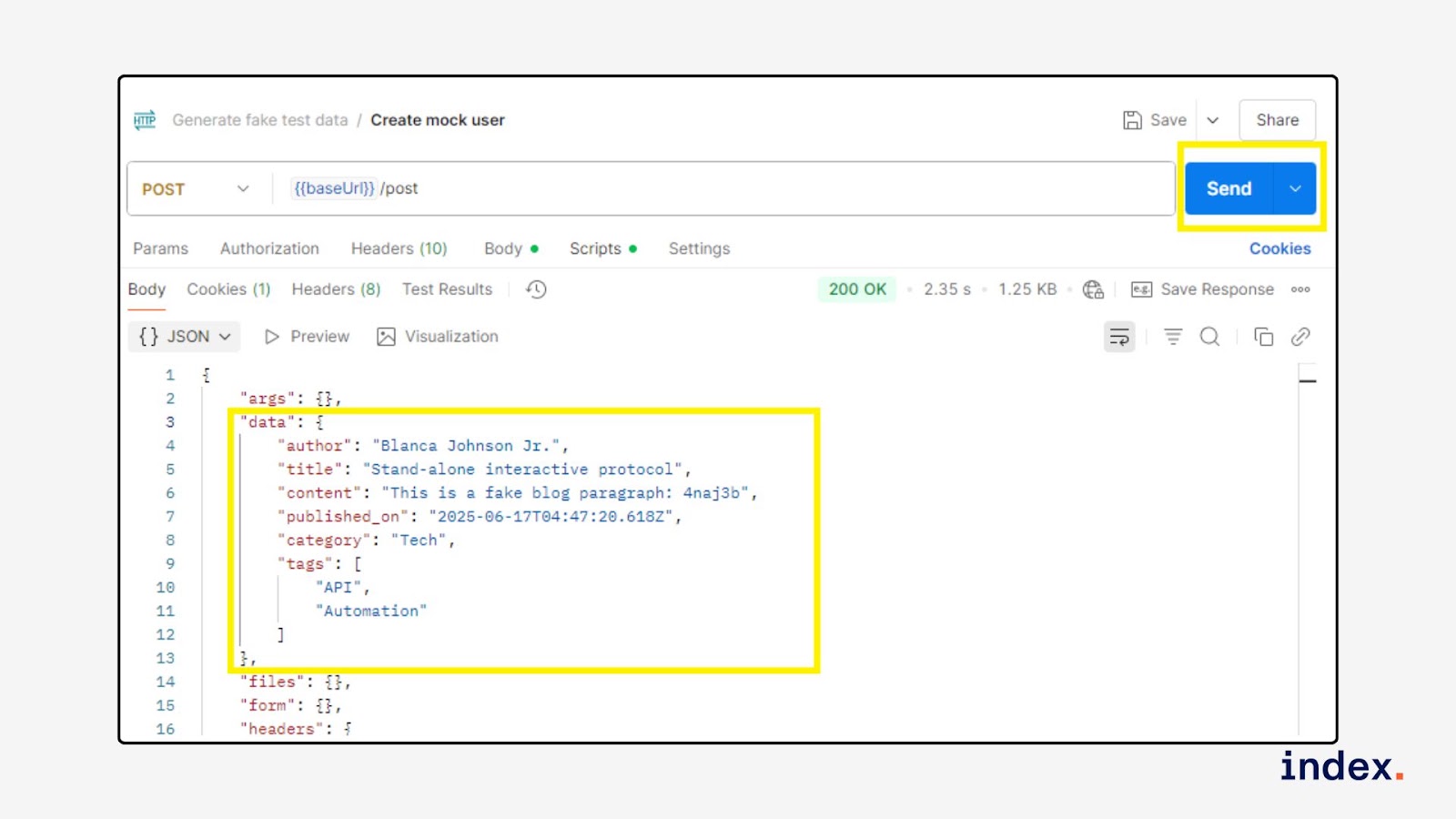
Step 4: Send the request
Click the blue Send button. Postman will generate and replace all dynamic variables with fake data.
4. AI-powered API documentation
What it is
AI-Powered API Documentation refers to the use of artificial intelligence to generate or enhance documentation for APIs automatically. It removes the need for manual writing by transforming API definitions or request collections into developer-friendly docs that are always up-to-date, accurate, and easy to understand.
What it does
This use case leverages AI to analyse structured API metadata, such as OpenAPI/Swagger files, Postman collections, or GraphQL schemas, and auto-generate:
- Endpoint titles, descriptions, and grouping
- Request/response parameter breakdowns
- Example requests in multiple languages (e.g., cURL, Python)
- Authentication instructions and rate limit details
Tools that support this use case include:
- Postman + AI Assist
- ChatGPT (with API schema input)
- Mintlify DocWriter
- ReadMe + AI Enhancer
- Docusaurus with GPT plugins
AI agent action
The AI parses structured schema files or API definitions, identifies endpoint logic and data structure, and converts that into natural language explanations, code snippets, and formatted docs. The outcome is high-quality, publish-ready documentation that helps both internal teams and external developers understand and use the API efficiently.
Benefits for software developers
- Faster documentation: Save hours of manual writing by auto-generating docs.
- Consistent language and formatting: AI maintains a standardised tone and structure.
- Multi-language code snippets: Instantly generate examples in Python, JavaScript, or cURL.
- Auto-sync with API changes: Regenerate docs every time the schema is updated.
- Reduced support tickets: Clearer docs reduce onboarding time and API misuse.
- Localisation-ready: Translate API documentation into other languages via AI.
Example task(s)
Here are common tasks that fall under this use case:
- Generate full Markdown documentation from a Postman collection.
- Convert a Swagger/OpenAPI spec into a developer portal using AI.
- Rewrite outdated or unclear endpoint descriptions.
- Generate code samples and usage examples for each endpoint.
How it works
- Example: Generate full documentation from a Postman collection that includes 3 endpoints (GET, POST, DELETE) for a sample blog API.
- Goal: Auto-generate documentation using ChatGPT and a Postman Collection
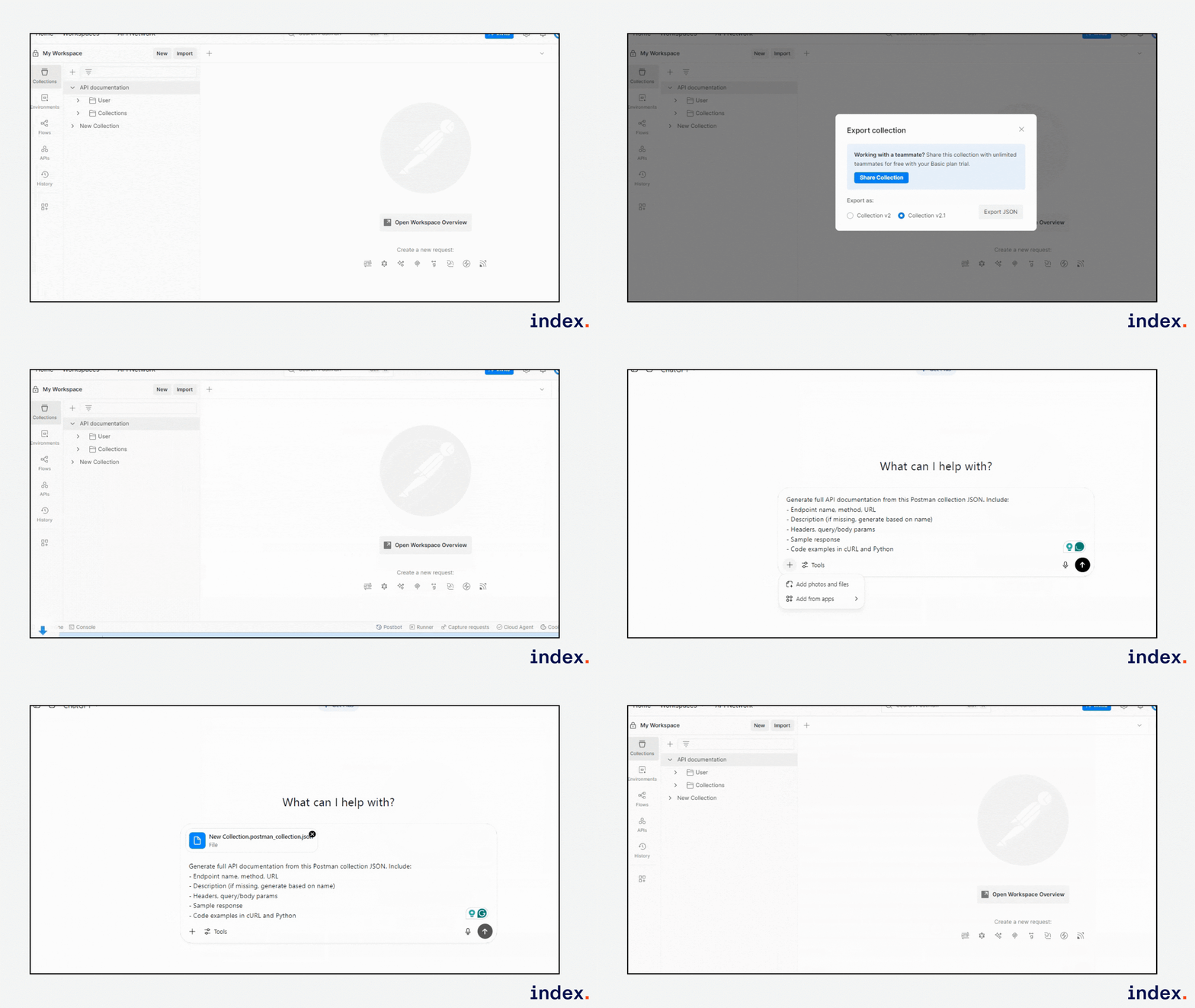
Step 1: Create or export your collection
- In Postman, define your API requests (e.g., GET /posts, POST /posts, etc.).
- Save them under a collection.
- Export it using Collection v2.1 format.
Step 2: Feed it to ChatGPT (or another AI agent)
- Use a prompt like:
“Generate clean API documentation from this Postman collection. Include endpoint details, sample responses, request structure, and code snippets in Python and cURL.”
Step 3: Review the output
-
AI will return:
- Endpoint name, method, and URL
- Request/response schemas
- Example request and response
- Human-readable description
- Multi-language code snippets
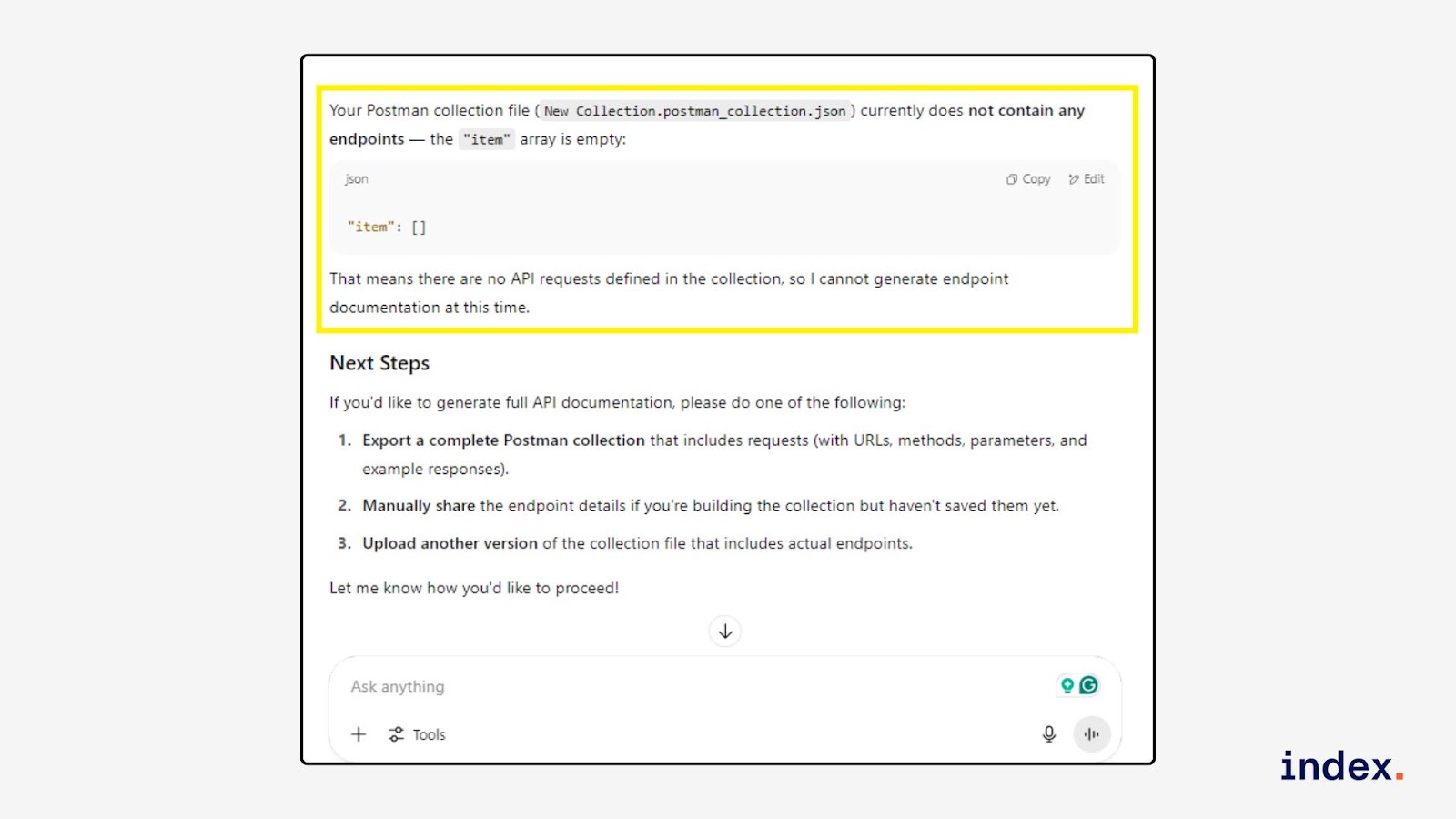
Here, we didn’t define API requests in the collection, so ChatGPT cannot generate endpoint documentation.
Step 4: Publish or share
Use the output in your developer portal, internal Wiki, Notion, or export it as Markdown for your GitHub repo.
5. AI for contract testing setup
What it is
This use case focuses on using AI to automate the setup and maintenance of API contract tests. Instead of writing manual test scripts and assertions, AI agents can analyse API specifications, generate test cases, and detect mismatches between expected and actual responses. It reduces manual overhead and speeds up integration testing in distributed systems.
What it does
Technically, this use case involves:
- Parsing OpenAPI specs, GraphQL schemas, or example requests/responses.
- Automatically generating API test cases that validate contracts.
-
Writing Postman test scripts (in JavaScript) to assert:
- Status codes
- JSON schema conformance
- Required headers or query parameters
- Deprecated or missing fields
Tools that can be used:
- Postman (with scripting support and AI assistant)
- Newman (for CI/CD test execution)
- OpenAI API or Claude AI (for schema parsing and script generation)
- AI Agent Builders (like Postman’s Postbot or custom LangChain agents)
AI Agent Action
The AI agent can:
- Ingest your API schema or example requests
- Understand the required request structure and expected responses
- Generate ready-to-run Postman collections with request definitions and validation tests
- Auto-update test scripts when schema changes
- Highlight contract mismatches (e.g., missing fields, type mismatches)
Outcome:
Coders get an automated test suite for API contract validation without writing a single assertion manually. Teams save time during integration phases, and developers get early feedback on interface changes.
Benefits for software developers
- Automated test generation from specs or traffic logs
- Quick detection of schema violations
- Hands-free maintenance of tests as APIs evolve
- Consistent and reusable validation logic across environments
- CI-ready test scripts for faster feedback in pipelines
- Improved collaboration between frontend, backend, and QA
Example task(s)
- Generate a contract test for a GET /users endpoint using an OpenAPI spec
- Validate that all required fields (id, name, email) are present and correctly typed
- Check if response codes match expected values (e.g., 200, 404, 500)
How it works
This guide shows how to validate API response status codes using Postman’s built-in contract testing template. You’ll learn how to apply status code checks on three preloaded requests: a simple GET request, a query parameter-based GET request, and a form-based POST request.
These tests help ensure that each API behaves as expected and returns the correct status, a critical part of API contract testing.
Step 1: Validate status code in GET Test response
-
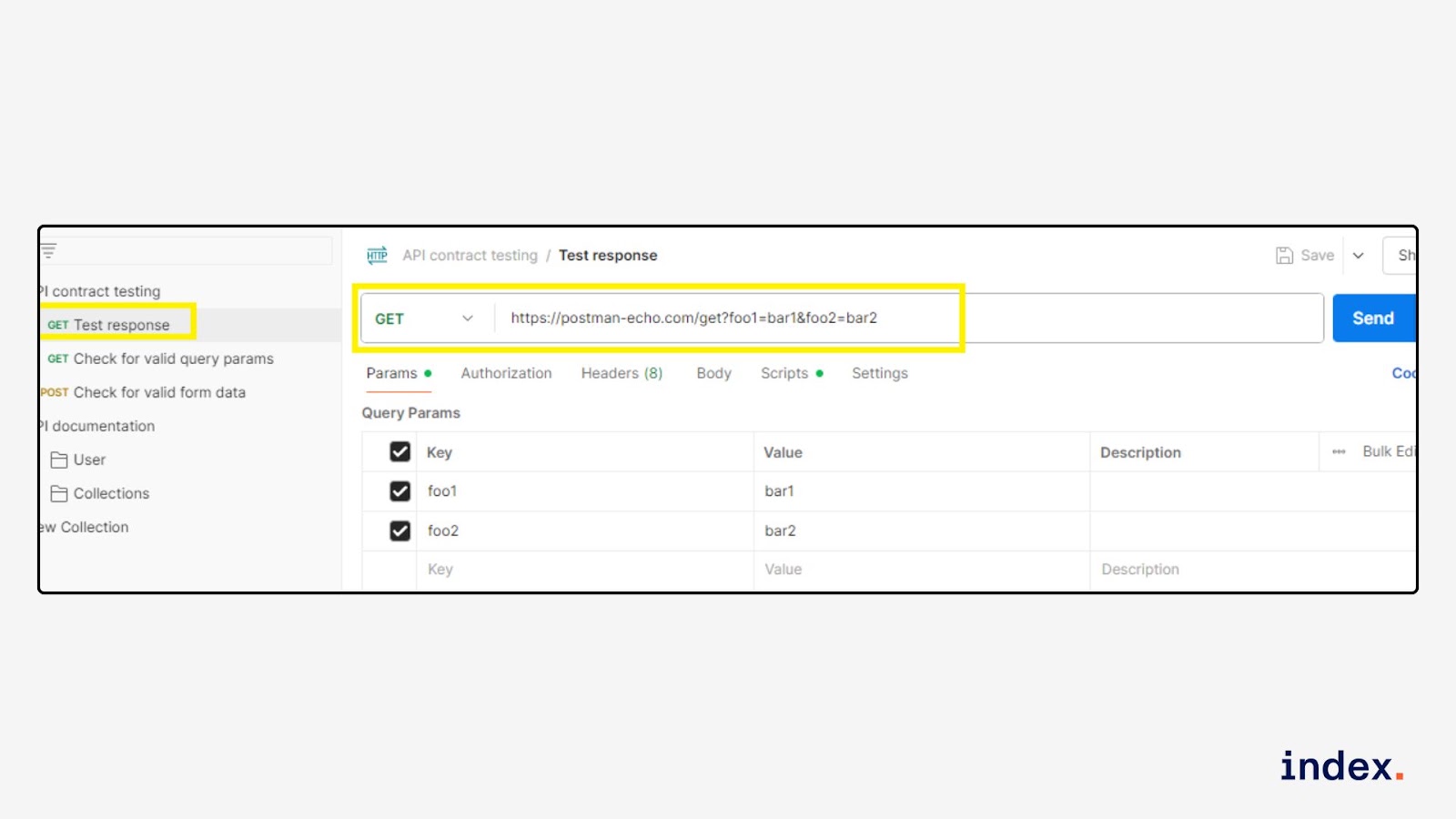
Open the request. From your Postman collection titled “API contract testing”, select the request named GET Test response.
-
This request sends data to:
https://postman-echo.com/get?foo1=bar1&foo2=bar2
-
This request sends data to:
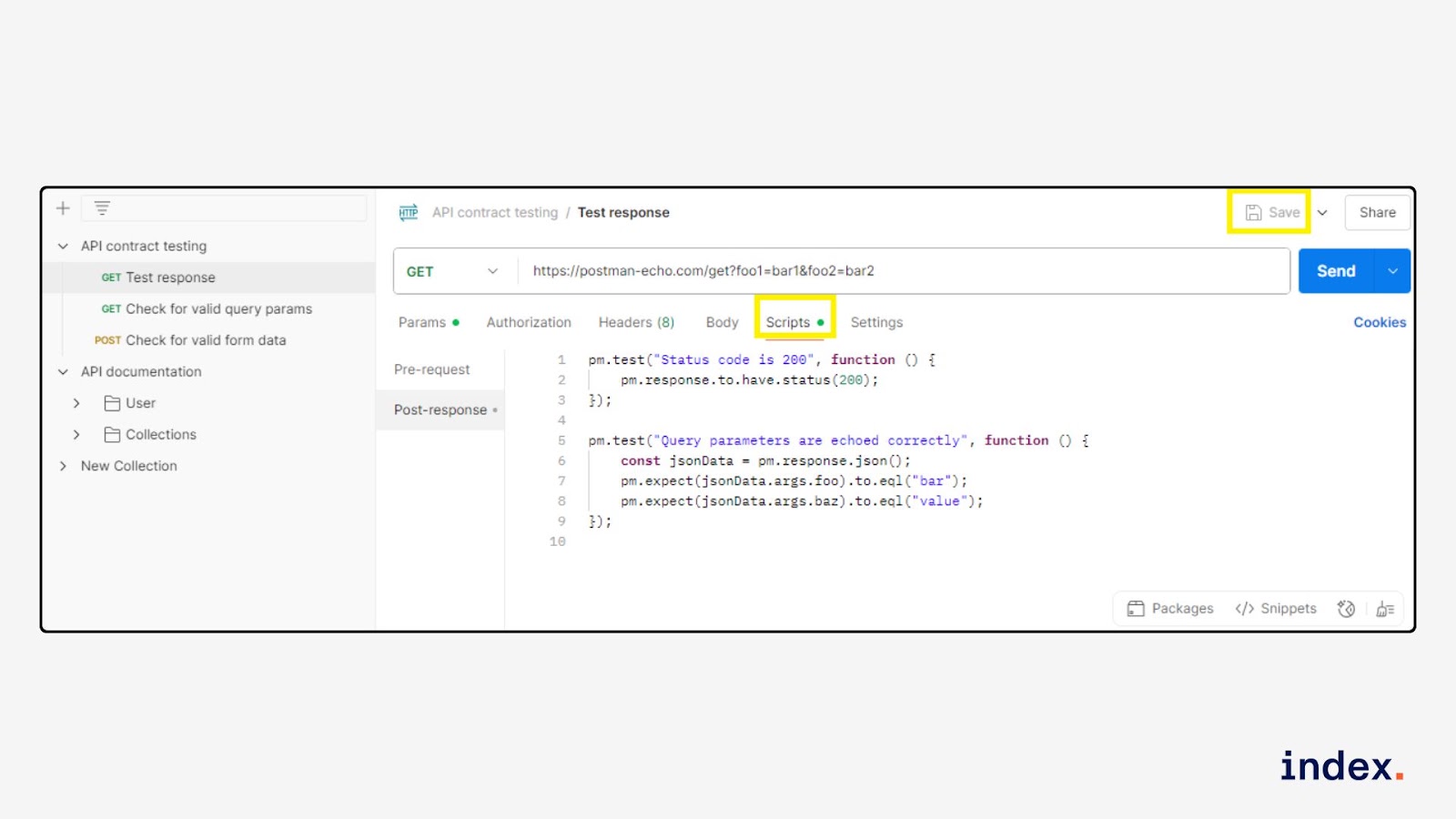
- Open the “Tests” tab. Click on the Tests tab (next to Body, Headers, Params, etc.).
- Add the status code validation script
Paste the following code into the test editor:
pm.test("Status code is 200", function () {
    pm.response.to.have.status(200);
});

pm.test("Query parameters are echoed correctly", function () {
    const jsonData = pm.response.json();
    pm.expect(jsonData.args.foo).to.eql("bar");
    pm.expect(jsonData.args.baz).to.eql("value");
});
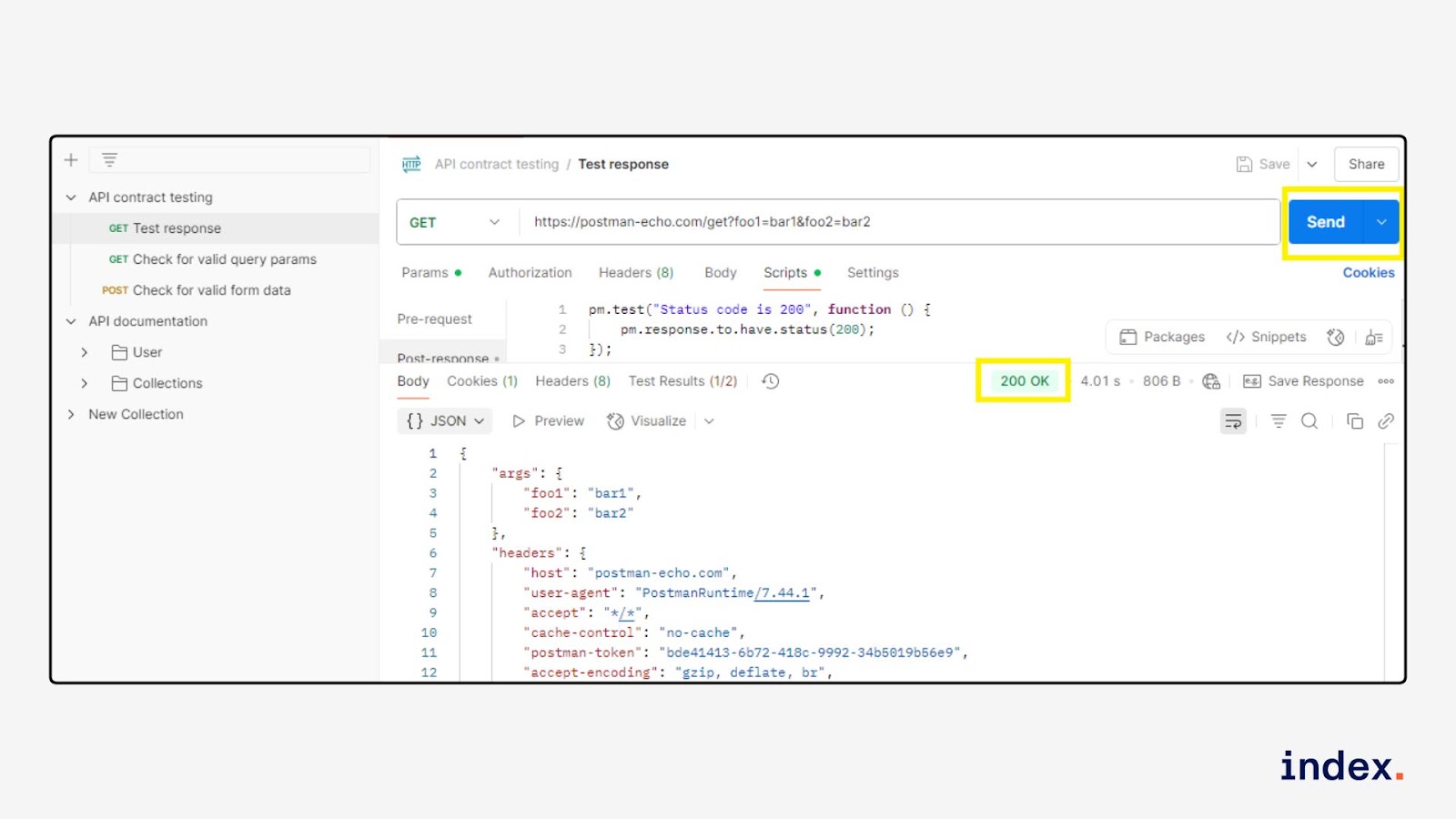
- Run the request. Click Send, and check the Test Results tab below the response.
You should see a Status code is “200 OK” in green colour, indicating the test passed.
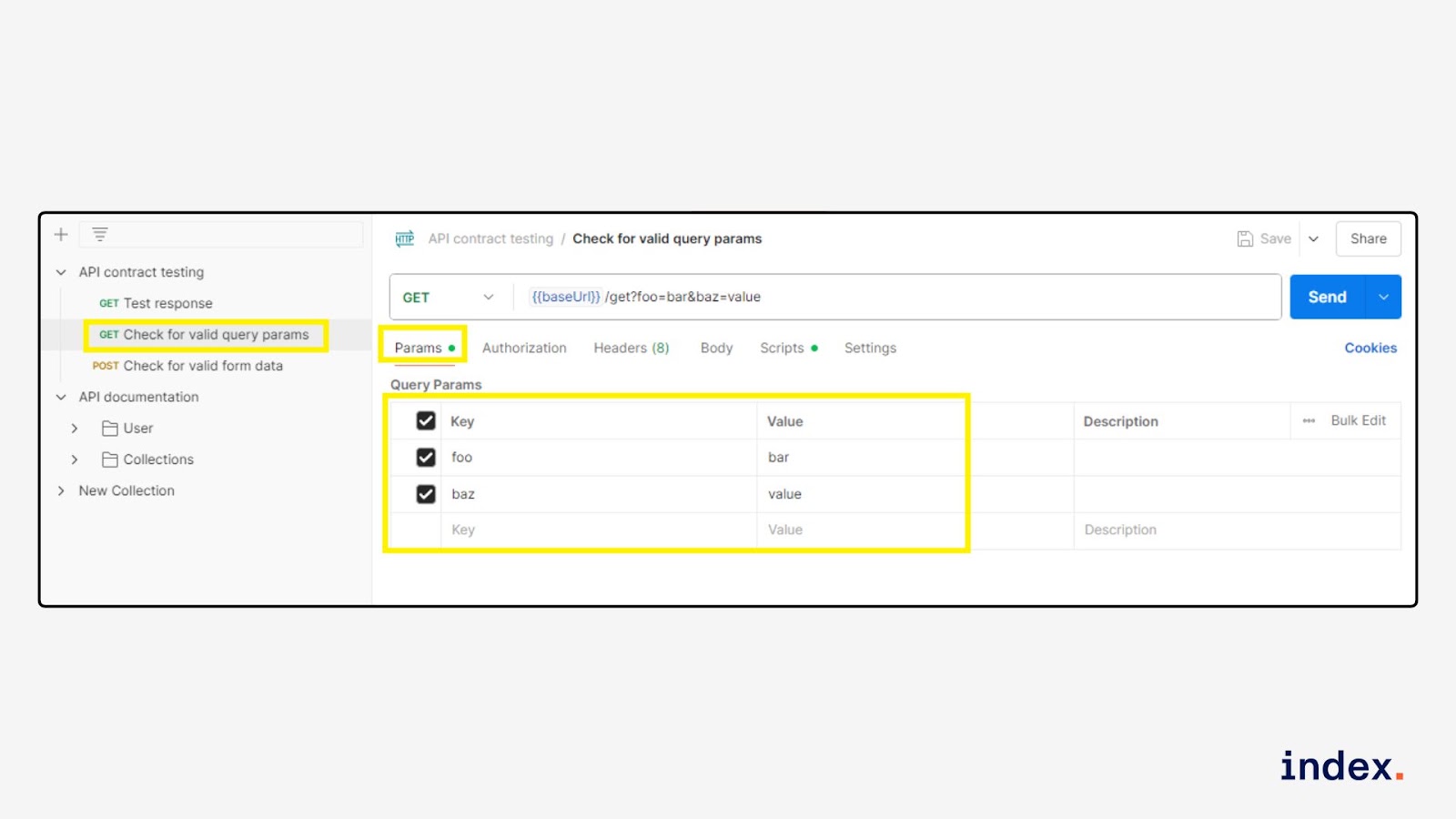
Step 2: Validate status code in GET Check for valid query params
-
Open the request. Click on GET Check for valid query params.
-
This request hits:
https://postman-echo.com/get?foo=bar&baz=value
-
This request hits:
- Confirm the query parameters. Go to the Params tab and confirm the values:
- foo = bar
- baz = value
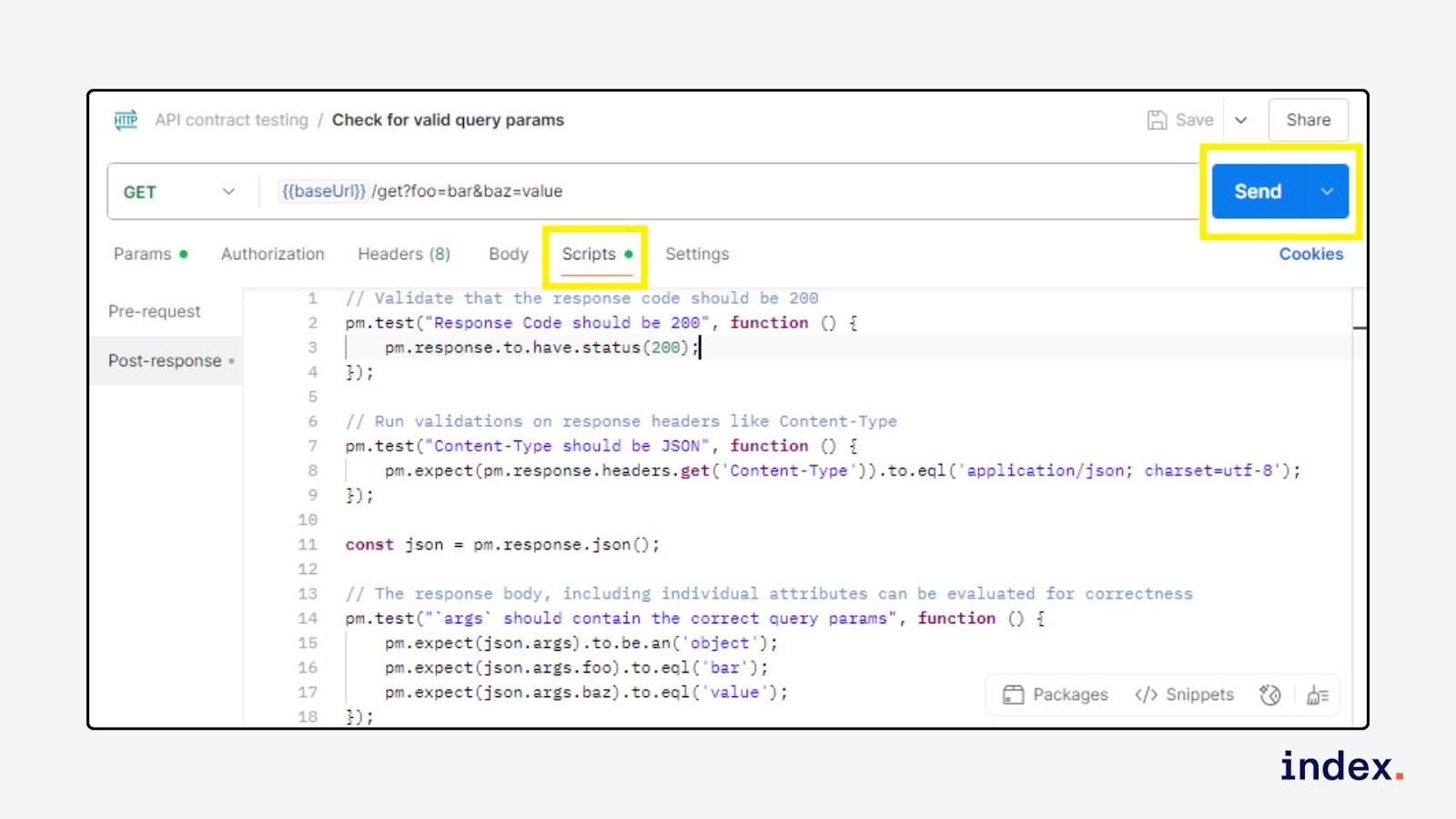
- Open the “Tests” tab and add validation. Paste this in the Tests editor:
// Validate that the response code should be 200
pm.test("Response Code should be 200", function () {
    pm.response.to.have.status(200);
});

// Run validations on response headers like Content-Type
pm.test("Content-Type should be JSON", function () {
    pm.expect(pm.response.headers.get('Content-Type')).to.eql('application/json; charset=utf-8');
});

const json = pm.response.json();

// The response body, including individual attributes, can be evaluated for correctness
pm.test("`args` should contain the correct query params", function () {
    pm.expect(json.args).to.be.an('object');
    pm.expect(json.args.foo).to.eql('bar');
    pm.expect(json.args.baz).to.eql('value');
});
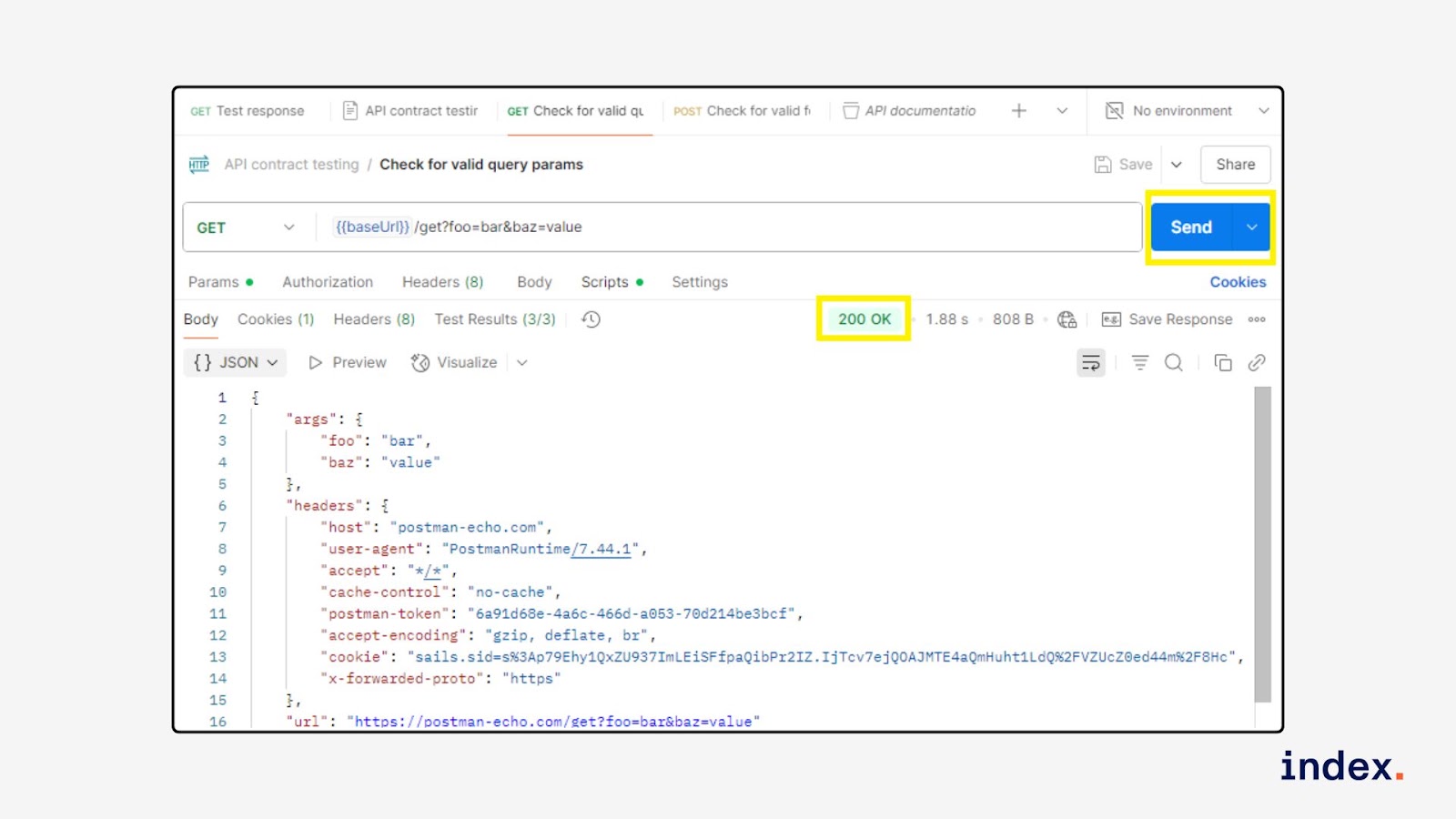
- Send the request and review the results. Click Send and scroll to the Test Results section.
The status code should be 200, and the test should pass.
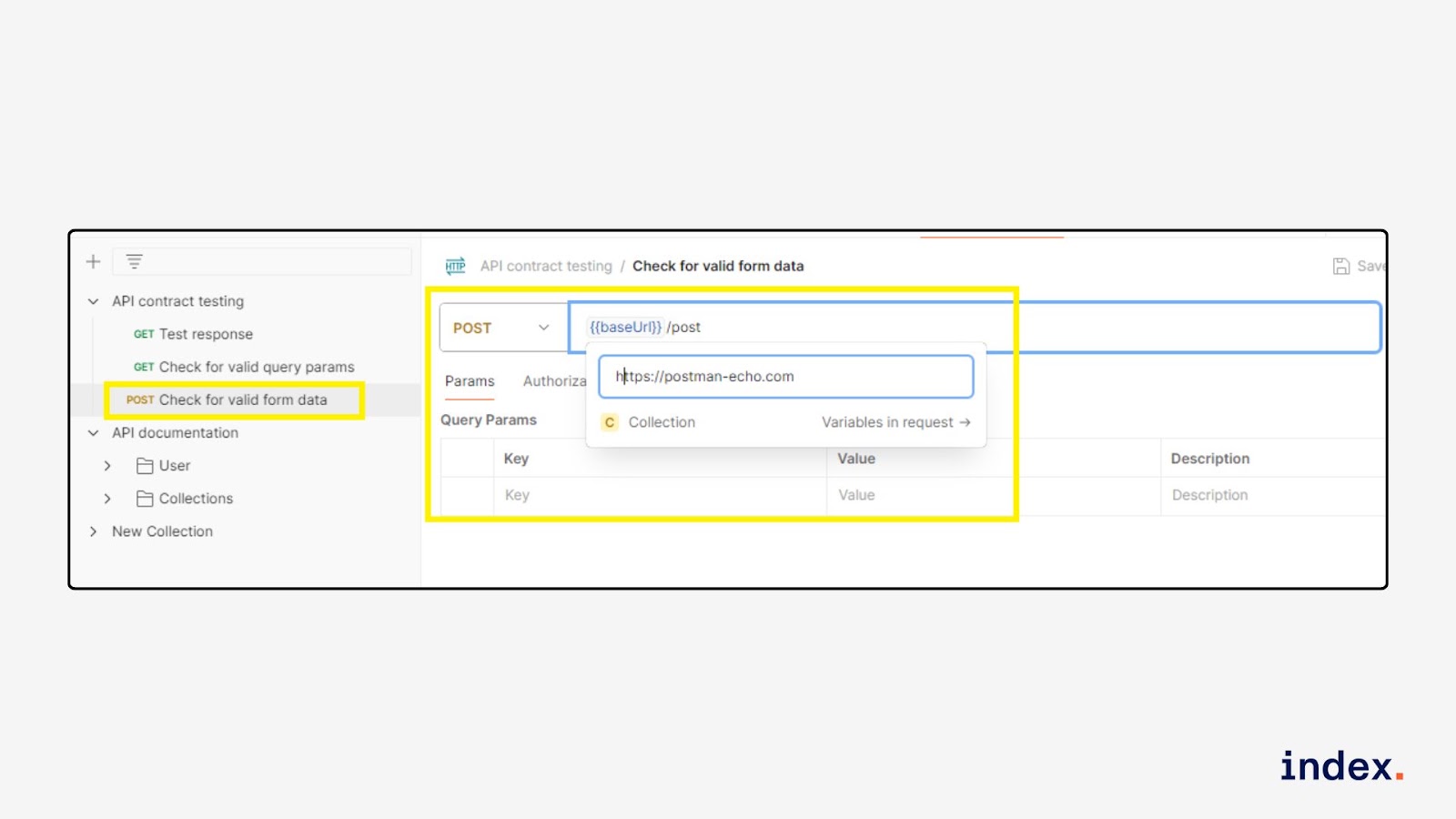
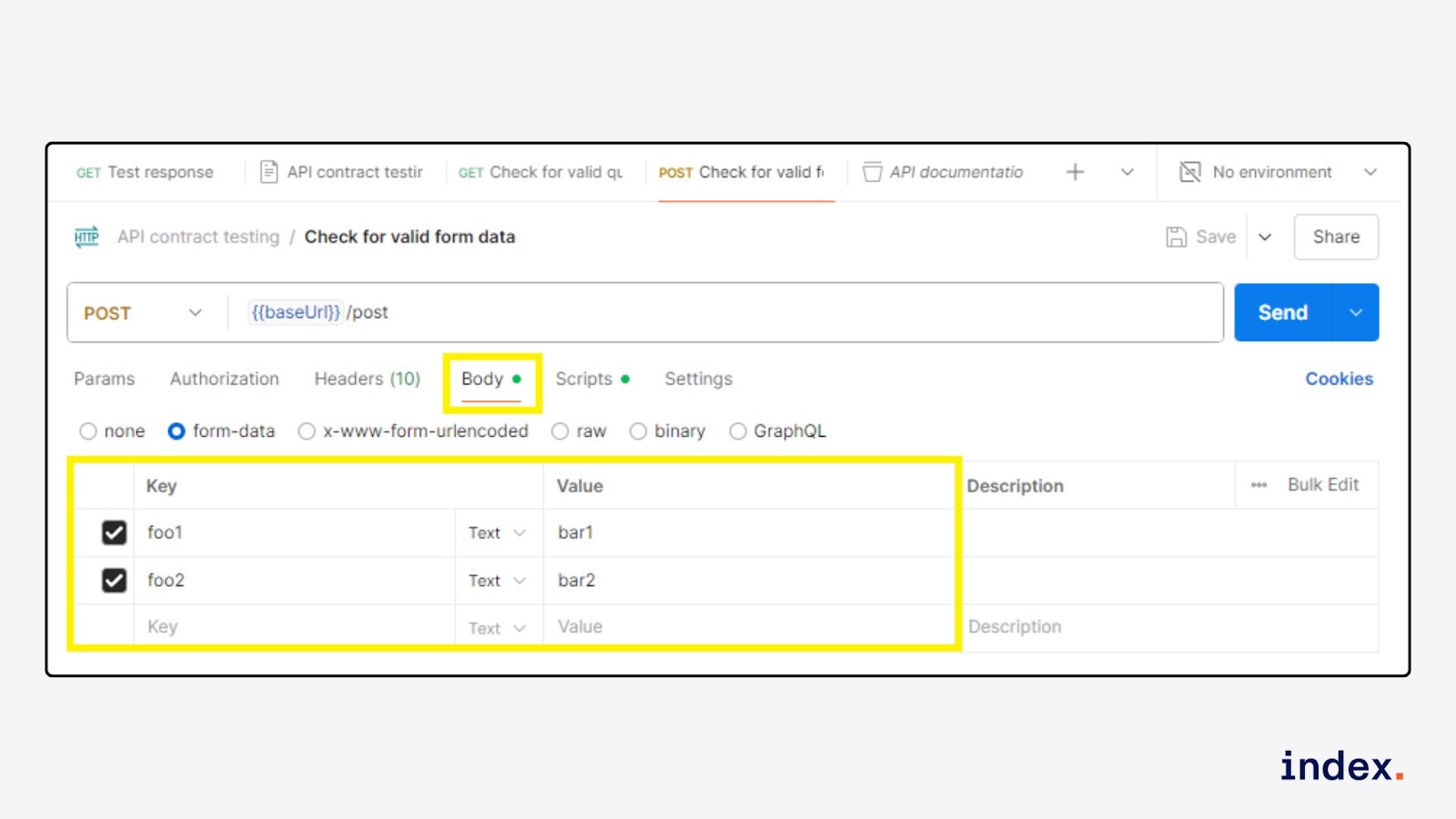
Step 3: Validate status code in POST Check for valid form data
-
Open the request. Click on POST Check for valid form data.
- Endpoint: https://postman-echo.com/post
-
Review form data in the Body tab. Go to the Body tab and confirm the type is form-data with:
- foo1 = bar1
- foo2 = bar2
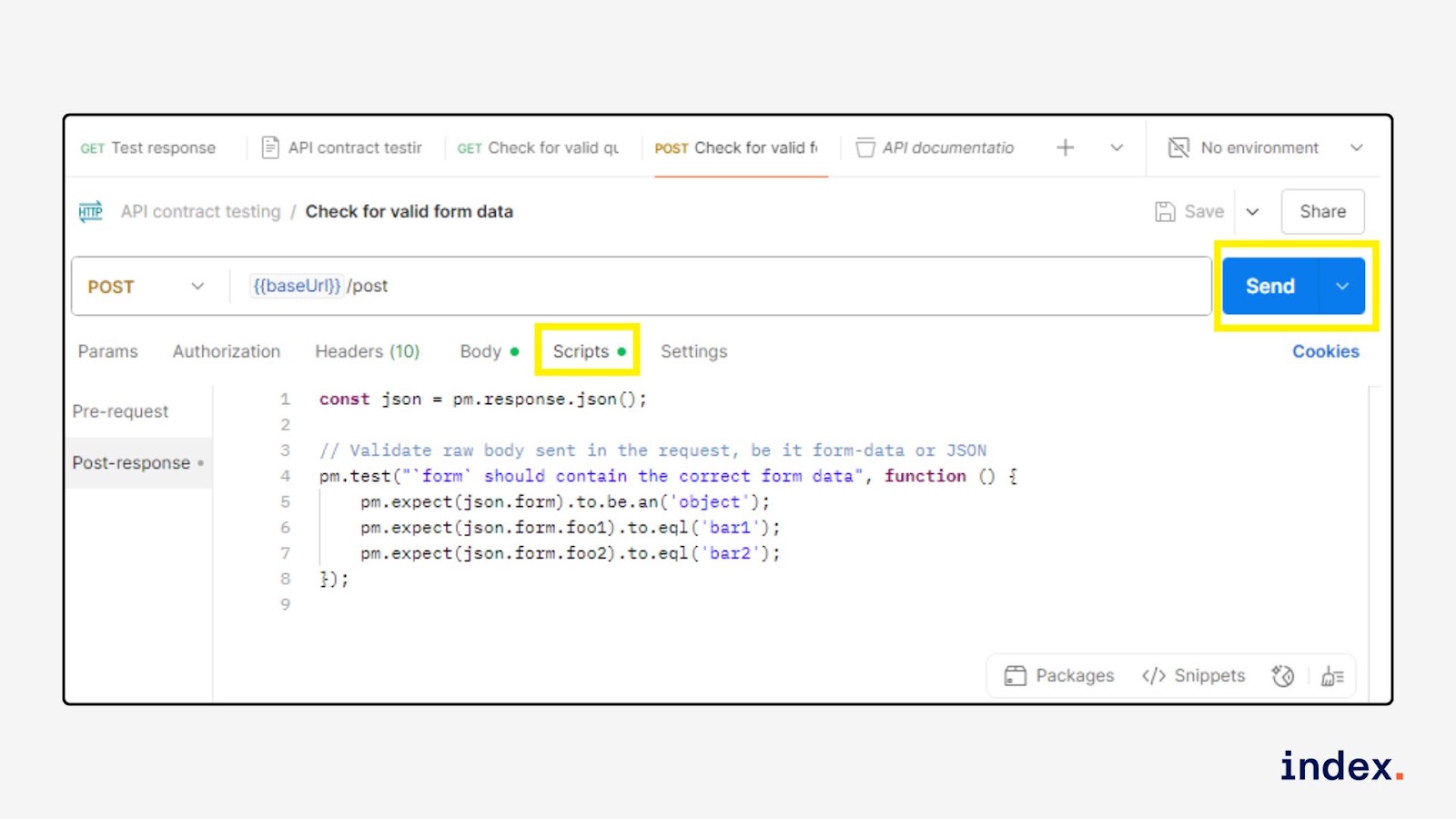
- Open the “Tests” tab and add a status test. Paste this code:
const json = pm.response.json();

// Validate raw body sent in the request, be it form-data or JSON
pm.test("`form` should contain the correct form data", function () {
    pm.expect(json.form).to.be.an('object');
    pm.expect(json.form.foo1).to.eql('bar1');
    pm.expect(json.form.foo2).to.eql('bar2');
});
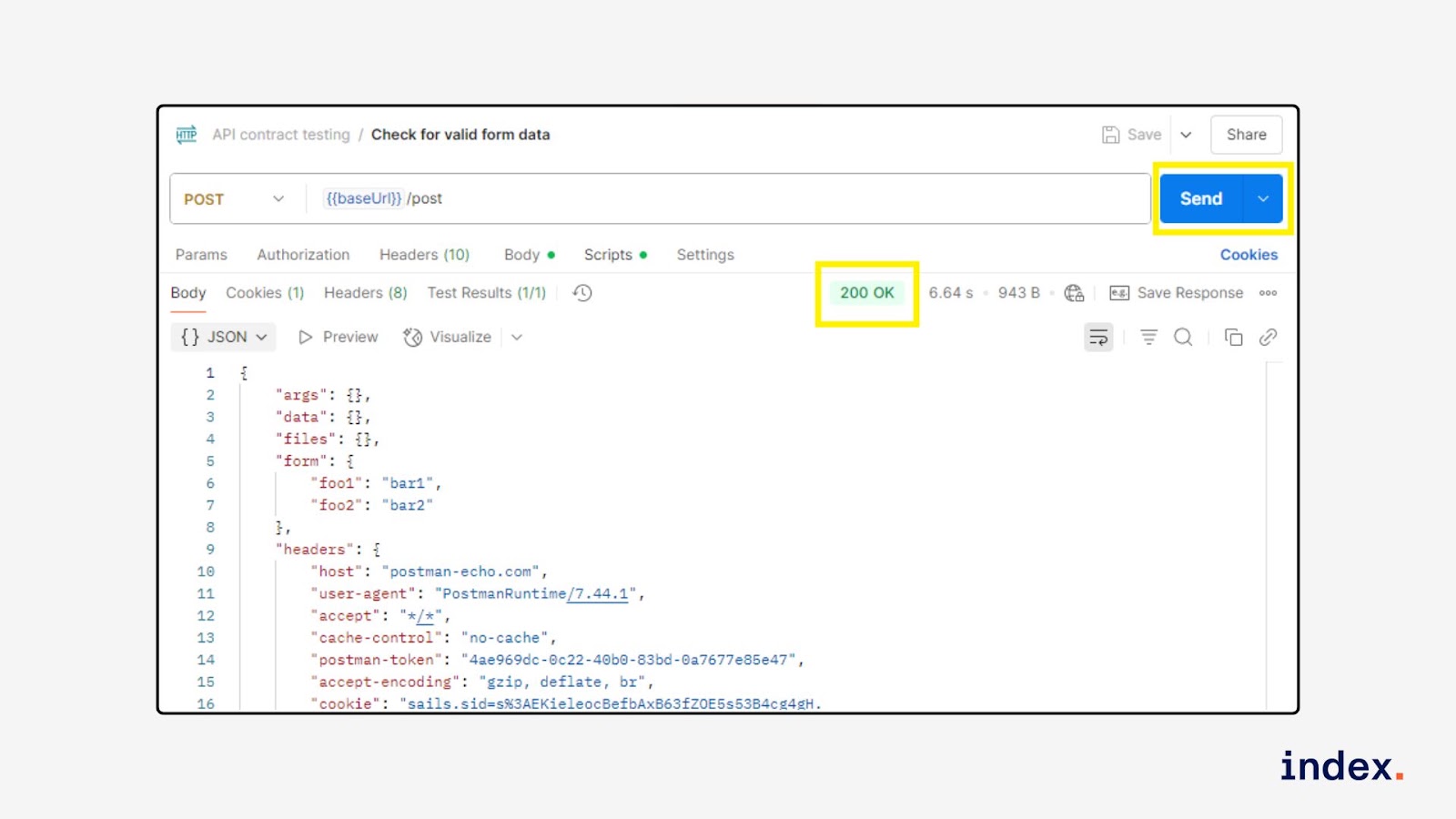
- Send the request and check the results. Click Send and review the Test Results panel.
You should see a Status code is “200 OK”.
What you’ve achieved
You now have automated status code checks added to all three contract test requests. Each time the requests are run:
- Postman will verify if the correct status code is returned
- You’ll get pass/fail feedback instantly
- Any contract-breaking changes will be caught early
6. LLM integration testing via Postman
What it is
LLM Integration Testing via Postman is the process of verifying that Large Language Model APIs (like OpenAI, Claude, or Groq) integrate correctly with your system by simulating real-world API calls, validating response structure, latency, and output accuracy.
What it does
This use case enables you to automate API-level tests for LLMs using Postman. You can validate:
- Endpoint availability and authentication (e.g., OpenAI or Anthropic APIs)
- Response structure compliance (e.g., presence of choices, message, tokens)
- Latency thresholds and token usage
- Output quality against prompts (optional via manual or script-based evaluation)
Tools used:
- Postman
- Postman’s Collection Runner
- Pre-request & test scripts (JavaScript)
- JSON schema assertions
- API keys from AI providers (OpenAI, Claude, etc.)
AI Agent action and outcome for developers
Action: The Postman AI agent or test script sends predefined prompts to an LLM API and checks that the response is valid, timely, and matches the expected output structure.
Outcome: Developers can confidently integrate LLM APIs into their apps, knowing each call meets technical and functional standards.
Benefits for software developers
- Repeatable API tests for various prompts, parameters, and models
- Error detection for malformed payloads or auth issues
- Performance monitoring for latency and throughput
- Contract validation using response schema tests
- Integration health checks during CI/CD
- Secure testing with Postman Vault storing API keys
Example task(s)
Compare how different LLMs respond to the same prompt and validate their integration by checking:
- Response status
- Output structure
- Latency
- Token usage
How it works
You’ll run a test prompt (e.g., “What does Postman do?”) on selected models, view structured results (tokens, latency, content), and optionally export the output.
Step 1: Prepare your test file
Create a .json file with your prompt, models to test, and benchmark metrics.
Example 1 (prompt-test.json):
[
  {
    "name": "Small Models",
    "prompt": "What does Postman do?",
    "context": "I'm researching developer tools and I need the shortest answers possible",
    "temperature": 1,
    "max_tokens": 1000,
    "top_p": 1,
    "models": ["gemma2-9b-it", "gpt-4o-mini"],
    "tests": {
      "content_length": 2000,
      "response_time": 5000,
      "prompt_tokens": 500,
      "completion_tokens": 500,
      "total_tokens": 2000,
      "tokens_per_second": 100
    }
  }
]
Example 2:
[
  {
    "name": "Small Models",
    "prompt": "What does Postman do?",
    "context": "I'm researching developer tools and I need the shortest answers possible",
    "temperature": 1,
    "max_tokens": 1000,
    "top_p": 1,
    "models": ["gemma2-9b-it", "gpt-4o-mini", "titan-text-lite", "claude-3-haiku"],
    "tests": {
       "content_length": 1000,
       "response_time": 2500,
       "total_tokens": 1000
    }
  },
  {
    "name": "Large Models",
    "prompt": "What does Postman do?",
    "context": "I'm researching developer tools",
    "temperature": 1,
    "max_tokens": 1000,
    "top_p": 1,
    "models": ["llama3-70b-8192", "gpt-4o", "titan-tg1-large", "mistral-large"],
    "tests": {
      "content_length": 2000,
        "response_time": 5000,
        "total_tokens": 2000
    }
  }
]
Step 2: Launch Collection Runner
- In Postman, go to the LLM Model Evaluation collection
- Click Run (top-right)
-
In the Collection Runner:
- Click Select File and upload prompt-test.json
- Click Run LLM Model Evaluation
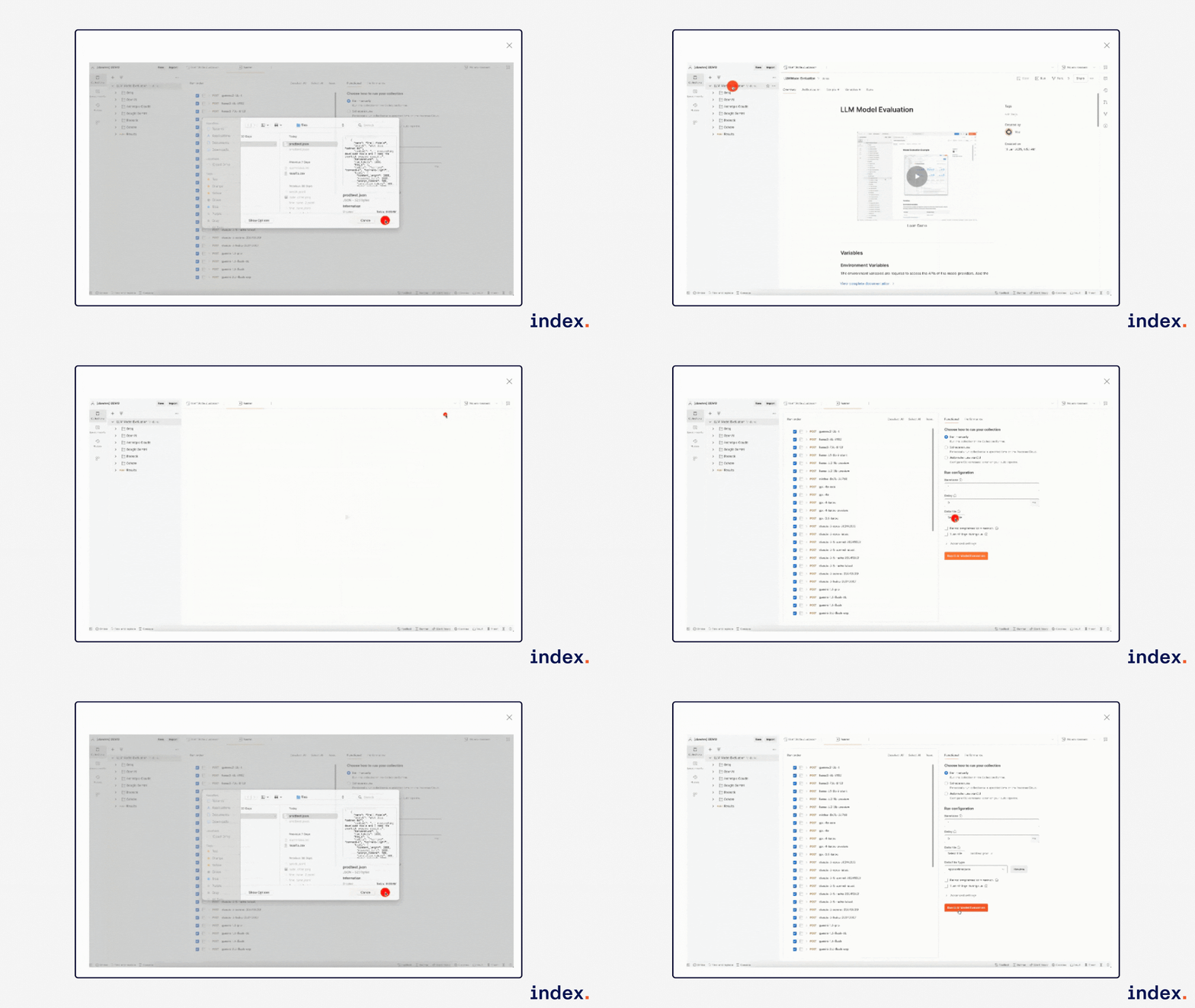
Postman will send your prompt to each selected model.
Step 3: View results in Visualizer
- Open the final Results request in the collection
- Click Send
- Switch to the Visualizer tab in the response panel
-
Explore each model's output grouped by run name:
- Output content
- Tokens used
- Latency
- Pass/fail badge for each benchmark
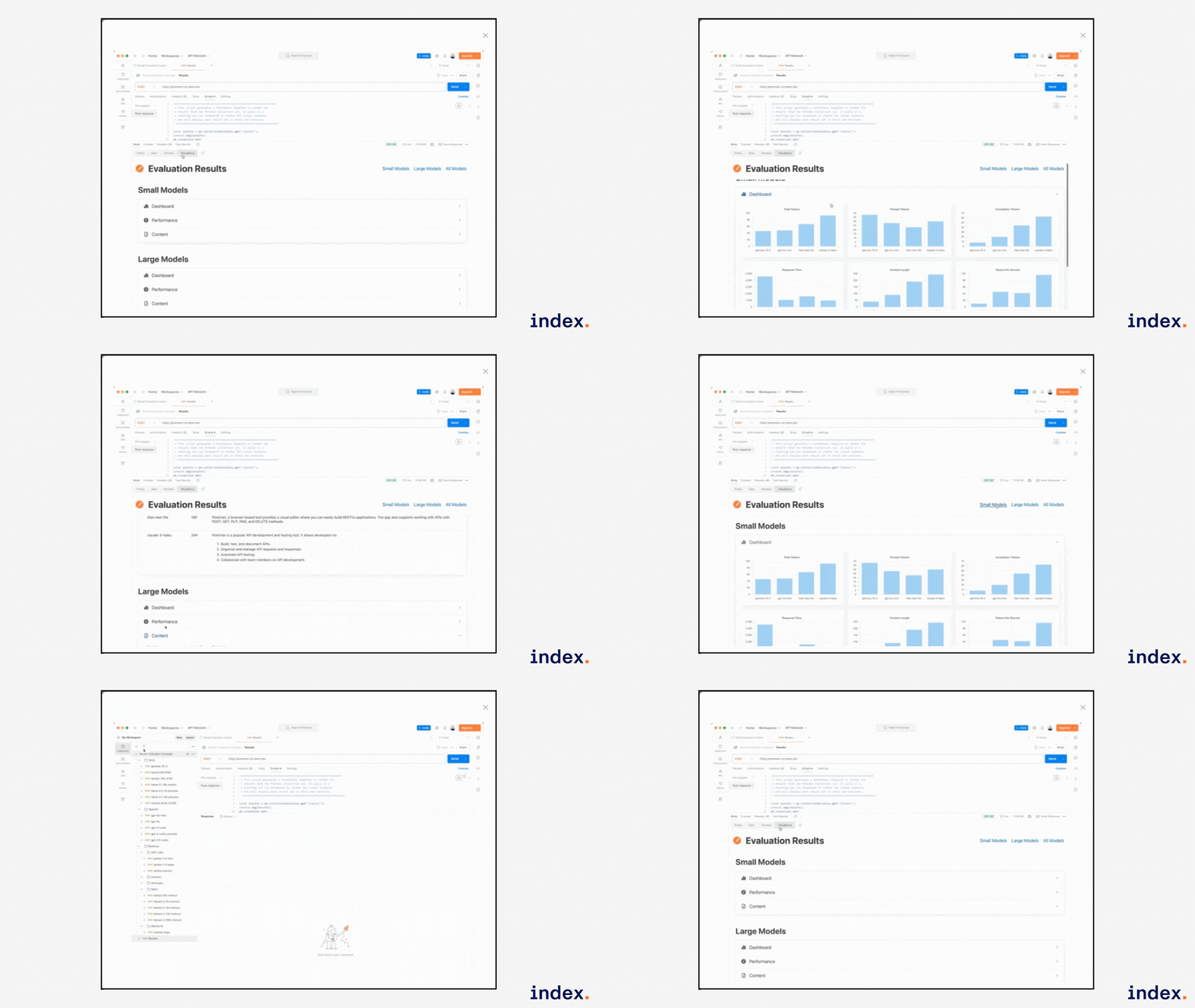
Step 4: Export results as CSV
- In the same Results request
- Click the dropdown next to Send
- Choose Send and Download
- A .csv file will download containing the full test results for all models
Can AI agents replace software developers?
AI agents are transforming software development, but they’re not replacing developers, at least not yet. These agents can write boilerplate code, generate tests, detect bugs, and even refactor logic, making them powerful productivity boosters.
However, software development involves creativity, architecture design, problem-solving, and collaboration across systems, skills that AI still struggles with. Developers provide critical judgment, context, and innovation that current AI lacks.
Instead of replacing developers, AI agents act more like intelligent assistants, handling repetitive tasks so engineers can focus on high-impact work.
In the future, as agents become more autonomous, the role of developers may shift toward supervision, orchestration, and validation. So, rather than elimination, we’re likely to see augmentation, where developers and AI agents co-create faster, cleaner, and smarter software together.
Read more about how to build your first AI agent using LangGraph.
Final words
AI agents are redefining how software development happens, automating routine tasks, enhancing code quality, and accelerating delivery. As we’ve seen, whether it’s generating test scripts, writing documentation, or simulating test data, these agents act as tireless collaborators that improve developer productivity.
While they won’t replace human creativity or architectural thinking, they’re powerful tools that help teams ship better code, faster. By embracing these use cases today, developers can focus on what truly matters: building innovative solutions.
You can explore, experiment, and integrate AI agents into your workflow to stay ahead in the fast-evolving world of software development. The future is already here; start coding smarter.
FAQs
1. What are the top AI agent use cases in software development?
The top AI agent use cases in software development include automated code generation, bug detection, test case generation, continuous integration support, documentation writing, code review automation, and intelligent task management. These use cases reduce manual work and accelerate development timelines.
2. How do AI agents assist with automated code generation?
AI agents assist with automated code generation by interpreting natural language prompts and converting them into functional code. They use trained models to understand syntax, structure, and logic patterns across programming languages, reducing development time and minimising human error.
3. How do AI agents improve bug detection in development?
AI agents improve bug detection by analysing code patterns, identifying anomalies, and learning from historical bug data. They predict potential issues before runtime, enabling developers to fix bugs early and improve software reliability and performance.
4. What role do AI agents play in test case generation?
AI agents generate test cases by understanding code behaviour and user requirements. They simulate inputs, identify edge cases, and ensure that all functionalities are tested automatically, improving coverage and reducing time spent on manual testing.
5. How do AI agents help with intelligent task management in software teams?
AI agents help with intelligent task management by prioritising tasks, assigning resources, tracking progress, and predicting delivery timelines. They integrate with project management tools to automate workflows and optimize productivity in agile software teams.


