
94% of workers want flexibility in when they work, and 80% want flexibility in where they work. Remote and hybrid work models have made this possible, but they’ve also created a new challenge – collaboration overload. Instead of deep, focused work, employees spend their days bouncing between meetings, responding to endless messages, and managing constant interruptions. The average Slack user, for example, sends around 200 messages a day.
This non-stop communication cycle can be a major drain on productivity and well-being. To counter this, many companies turn to asynchronous communication. When done right, it boosts productivity and knowledge sharing, reduces information overload, lowers stress, and improves cross-team collaboration. But if implemented poorly, it can lead to more confusion, delays, and disengagement.
At Index.dev, we’ve been remote-first since day one. Over the years, we’ve fine-tuned our approach to asynchronous communication to keep our globally distributed teams connected and productive. In this guide, we’ll share practical strategies, useful tools, and key takeaways to help tech leaders and managers implement async communication effectively in their own workplaces.
Let’s dive in.
Hire top 5% vetted developers with Index.dev – fast matching, 30-day trial, zero risk!
Asynchronous vs Synchronous Communication
There are many ways to define synchronous and asynchronous communication, but let’s keep it simple.
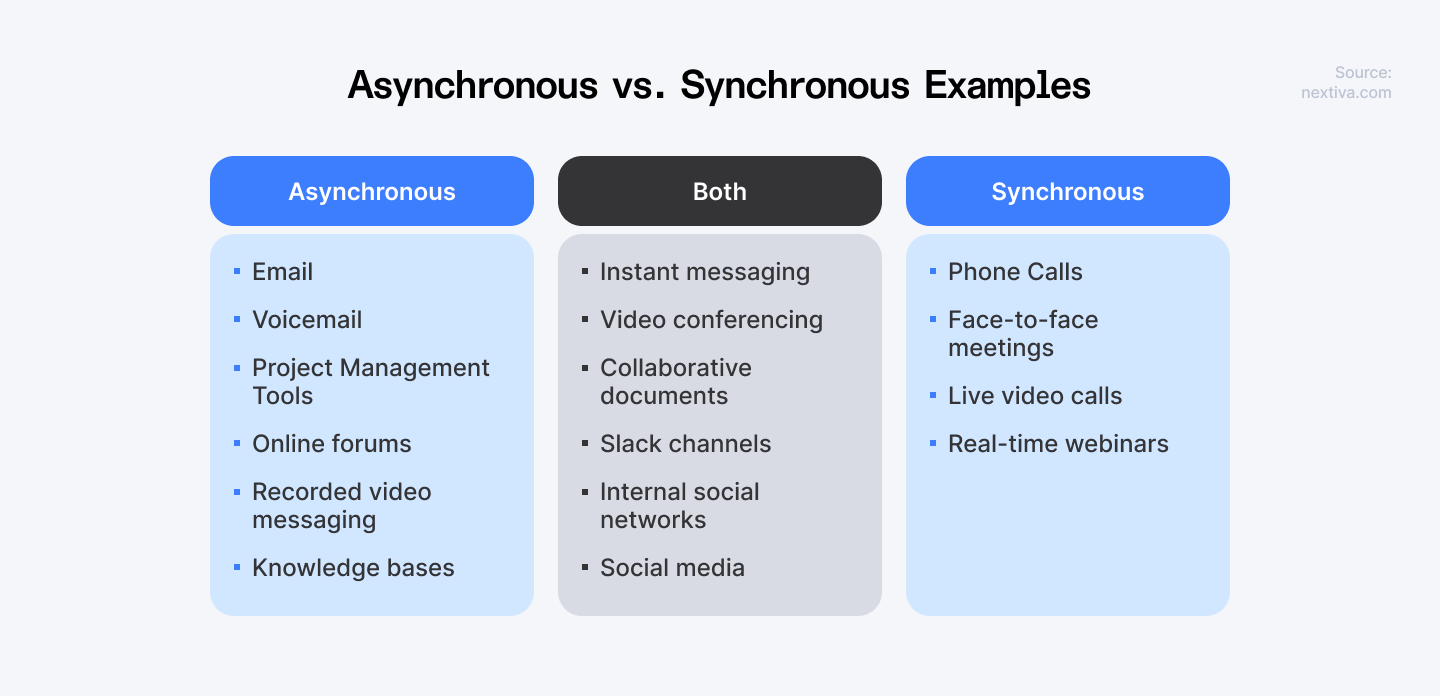
Synchronous communication happens in real-time. It’s when you have a face-to-face conversation, a live Zoom or Google Meet call, or an instant back-and-forth chat.
Asynchronous communication doesn’t require an immediate response. It allows people to communicate on their own schedule using tools like email, messaging apps, recorded video updates, project management platforms, shared documents, and digital whiteboards.
Many tech teams rely on async communication to minimize distractions and improve workflow. Here’s why more leaders are making the shift:
- 83% of employees spend up to 1/3 of their workweek in meetings
- 51% of employees regularly receive meeting invites that aren’t relevant to them.
- 42% of UK and U.S. employees experience virtual meeting fatigue.
- 65% of senior managers say meetings prevent them from completing their own work.
- Remote employees work 1.4 more days per month than their in-office counterparts—adding up to more than three extra weeks of work per year.
Asynchronous communication allows employees to focus on meaningful work while using meetings more intentionally.
Here are some hacks you can use to make asynchronous communication work:
| Feature | Description |
| Threaded conversations | Chat without interrupting others' work. Team members can leave messages in threads that others can answer when they have time. |
| Channel updates | Share key news and questions in specific channels. Everyone can read and reply when it fits their schedule. |
| Status updates | Show if you're free to talk by setting a custom status like "In a meeting" or "Out of office." |
| Voice/video messages | Send recordings instead of text when your message is complex or needs more feeling behind it. |
| Scheduled reminders | Set up automatic reminders or schedule messages to go out later, making follow-ups and check-ins easy. |
A Valuable Addition to Any Workplace
When companies first shifted to remote work, many simply replicated their in-office routines in a virtual setting. That often meant increasing synchronous, real-time communication. More Zoom meetings. Constant Slack messages. More attempts to recreate the spontaneous watercooler chats of an office environment. The same practices simply failed to work. Here’s why:
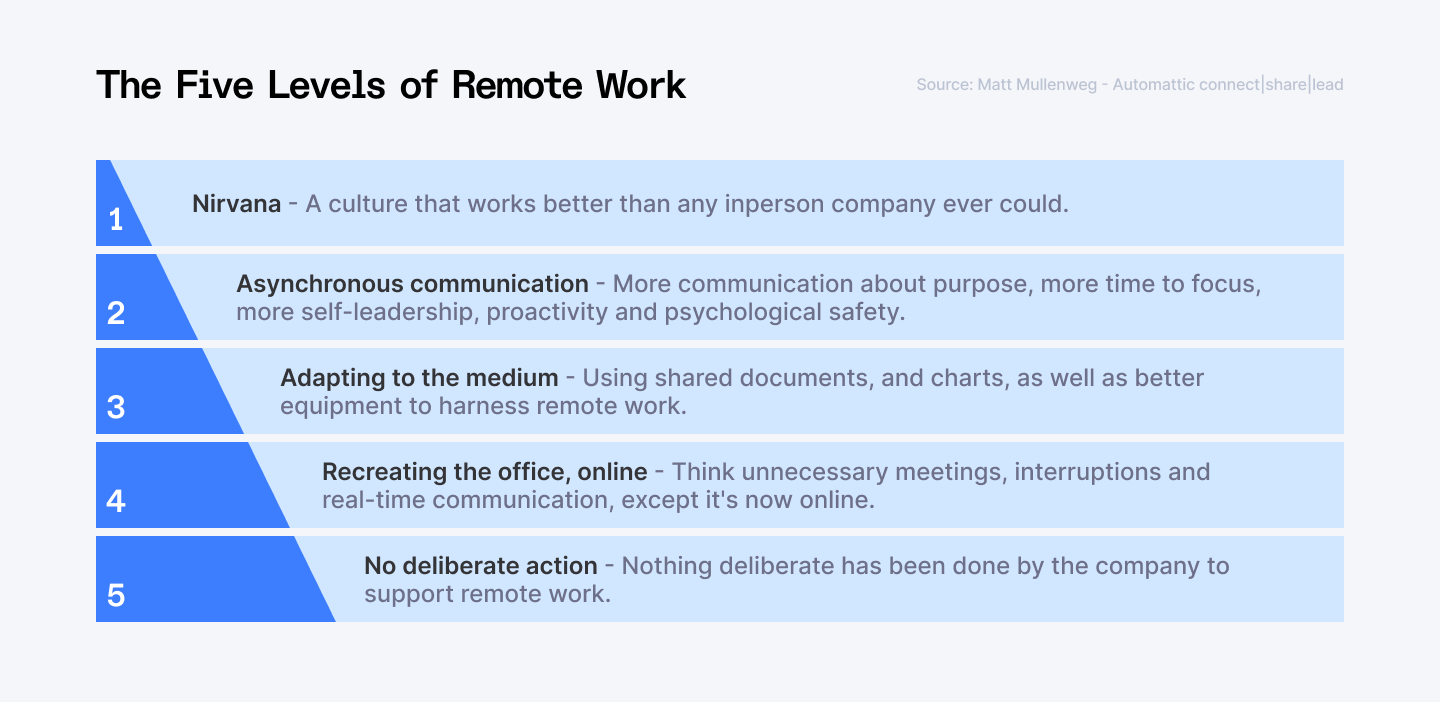
This approach has its downsides. Depending on the organization, you might run into:
- Conflicts between time zones. Scheduling meetings across multiple time zones can be a logistical nightmare. Remote teams are often spread across cities, countries, or even continents. Finding a time that works for everyone isn’t always feasible.
- Disputes over work schedules. Not everyone works a traditional 9-to-5. Some employees are early risers, while others do their best work at night. Many also juggle responsibilities at home, like caring for kids or coordinating with a spouse’s work schedule. Real-time communication forces everyone to be available at the same time, which isn’t always practical.
- Technology hiccups. We’ve all been there. A frozen screen, audio cutting out, or a spotty internet connection can derail a meeting in seconds. Even the most well-planned real-time discussions can fall apart due to tech issues.
This is where asynchronous communication becomes a valuable addition to your workplace. Instead of forcing everyone to be online at the same time, it allows people to receive, process, and respond to information when it suits them. It also creates a written record of discussions, reducing the need for repetitive follow-ups and ensuring that important details don’t get lost.
Also Check Out: 18 Indispensable Productivity Tools for Remote Development Teams
7 Ways to Implement Asynchronous Communication in Your Workplace
Packed calendars, employee burnout, and long working hours across different time zones – these are just a few reasons why productivity might be dropping in your team. When real-time communication becomes overwhelming, it can slow your organization down instead of driving it forward.
So how can you make asynchronous communication actually work?
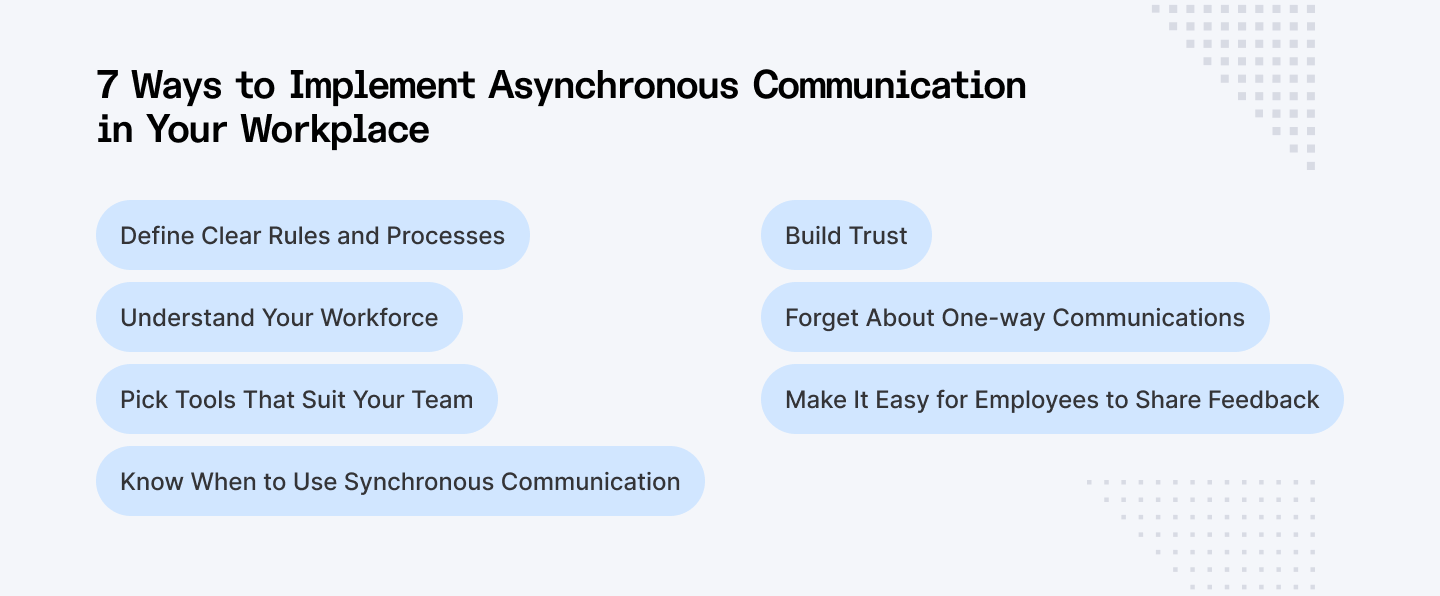
1. Define Clear Rules and Processes
Since they aren’t instant, asynchronous messages need well-defined guidelines to keep things moving. A popular tactic is setting response deadlines. Many companies, for example, require replies by the end of the next business day. This prevents bottlenecks while still allowing employees to work at their own pace.
Another key element is organizing your communication channels effectively. If you use Slack, create an “urgent” channel strictly for critical issues, while keeping separate channels for different projects or topics. You can also use email integrations or emoji-based prioritization to prioritize conversation threads.
Here’s what to define from the start:
- What goes where? Clearly specify what type of information belongs in each channel.
- Who should be included? If the right people are in the right conversation – no more unnecessary notifications.
- Public vs. private channels? Which discussions should be visible to all and which should stay confidential.
- Tagging etiquette? When to use @all (for major updates) versus @name (for direct tasks).
These details may seem small, but they can have a significant impact in reducing work stress and improving efficiency. Consider creating a "How We Communicate" guide, covering things like time zones, expected work hours, and overlapping availability for teams in different regions. A well-documented strategy helps everyone stay aligned without the chaos of constant pings.
2. Understand Your Workforce
Not every team operates the same way. It's essential to tailor your communication approach to fit different roles. While remote developers and project managers may thrive with asynchronous workflows, customer support teams often rely on real-time collaboration to assist clients quickly.
Before fully shifting to async communication, take a step back and analyze:
- Who depends on real-time interactions? Some roles, like IT support or customer service, require immediate responses.
- Who benefits from async workflows? Developers, designers, and writers often need deep focus time without constant interruptions.
- How tech-savvy is your team? Not everyone adapts to new tools at the same pace.
Even early adopters might not know how to make the most of a new platform. To bridge the gap, provide clear training materials, short explainer videos, and a go-to person who can answer questions. A smooth transition ensures your team feels empowered.
3. Pick Tools That Suit Your Team
Asynchronous communication is only as effective as the tools you use. Start by evaluating how your team currently communicates. Do they rely on emails, chat messages, or shared documents? Identify the most common types of communication and choose tools that support them in an async-friendly way. Some essential categories include:
- Messaging & Documentation: Slack, Microsoft Teams, Notion
- File Sharing & Collaboration: Google Drive, Dropbox, Confluence
- Project Management: Asana, Trello, Jira
- Meeting Alternatives: Loom for video updates, Otter.ai for transcriptions
- Surveys & Feedback: Typeform, Google Forms
- Security & Compliance: ISO & GDPR-certified platforms
However, jumping between multiple tools can be overwhelming for your employees. Whenever possible, integrate workplace technologies into a single, easy-to-use platform. This reduces friction, minimizes distractions, and helps employees focus on their work rather than scrolling through endless apps. For remote teams that also handle client calls, including a virtual phone number in that integrated stack means voice communication stays as streamlined as your messaging and project tools.
4. Know When to Use Synchronous Communication
Asynchronous communication is powerful, but it’s not a one-size-fits-all solution. Some situations require real-time interaction to keep work moving efficiently. The key is knowing when to switch to synchronous communication.
- Urgent issues. If a problem needs immediate resolution, a quick call can prevent delays.
- 1:1 meetings. Regular check-ins between managers and employees help strengthen relationships.
- Team bonding. Virtual coffee chats or social meetups maintain team culture and engagement.
- Complex discussions. When brainstorming or making strategic decisions, real-time conversations often lead to faster, clearer outcomes.
To balance both approaches, encourage employees to default to async where possible but recognize when a Zoom call or instant chat is the smarter choice.
5. Build Trust
Trust is the foundation of any successful remote work environment. Without it, asynchronous communication can quickly fall apart. Research from Harvard Business Review reveals that 34% of employees feel their managers lack confidence in their work skills. Even more worryingly, many employees feel pressured to be "always available," expected to respond to messages instantly or after hours.
When managers can’t see their team members in action, they often question whether work is being done. But trust isn’t just about monitoring and micromanaging work. Empowering your employees to take responsibility for their time and tasks is the essence of trust. If team members and leaders don’t trust each other, no amount of tools or processes will make async work successful.
So, build trust by:
- Allowing flexibility in response times.
- Showing confidence in your team's ability to deliver.
- Encouraging open, honest communication.
Learn More: Top 10 Mistakes in Managing Remote Developers and How to Fix Them
6. Forget About One-way Communications
The #1 expectation employees have is that their organization communicates effectively. However, 42% of employees say their company doesn’t do a good job of clearly communicating goals, expectations, and decisions. A lot of this comes down to the fact that many companies still rely on one-way communication.
Even in an asynchronous setting, communication should always flow both ways. If your organization still relies on intranets, company-wide newsletters, or other one-way channels, you’re missing a key opportunity for engagement.
When employees can’t give feedback, ask questions, or voice concerns, they’re likely to disengage. And disengagement leads to inefficiency. So, make sure that asynchronous communication is a two-way street. Allow your team to respond, interact, and contribute. This will help them take ownership.
7. Make It Easy for Employees to Share Feedback
Without the usual social interactions, it can be hard to gauge how people are really feeling. And this is a key reason why employee turnover is rising. Employees leave, but we often don’t fully understand why or what could have been done differently.
Asynchronous communication can make this even more challenging, but it also provides an opportunity to make feedback collection simpler and more effective.
Use short, regular surveys that are easy for employees to fill out. Make sure these surveys are intuitive – quick to complete, but insightful enough to give you real and consistent feedback. This will help you spot trends early, address concerns, and improve the overall workplace experience.
But remember: if you’re going to ask for feedback, be ready to act on it. Don’t create an open channel for employees to speak up if you’re not prepared to make real changes based on what you hear. Employees will lose trust if they feel their input is ignored, so ensure you have a clear plan for taking action on the feedback you collect.
Also Read: 5 Worrying Workplace Trends Managers Can’t Ignore in 2025
Final Thoughts
Asynchronous communication gives your team the freedom to work with fewer distractions and more flexibility. It tackles many of the challenges of remote work while boosting productivity. By choosing the right tools, getting everyone on the same page, and keeping track of how projects are flowing, you’ll be on your way to a more sustainable remote work setup.
So, how do you know if your asynchronous communication is actually working? There are two key signs to look for. First, if projects are moving faster and with less friction, that’s a win. Second, if your remote workers feel truly connected to the team, you’re definitely on the right track. You don’t need mountains of data to measure success – just keep an ear out for feedback, watch how smoothly projects progress, and remember, sometimes a quick phone call or video meeting is all it takes to clear things up when needed.
Struggling to find senior talent for your projects? Index.dev connects you with highly skilled software developers who are rigorously vetted and interview-ready. Scale fast, fill skill gaps, and access elite global talent – right when you need it.


