
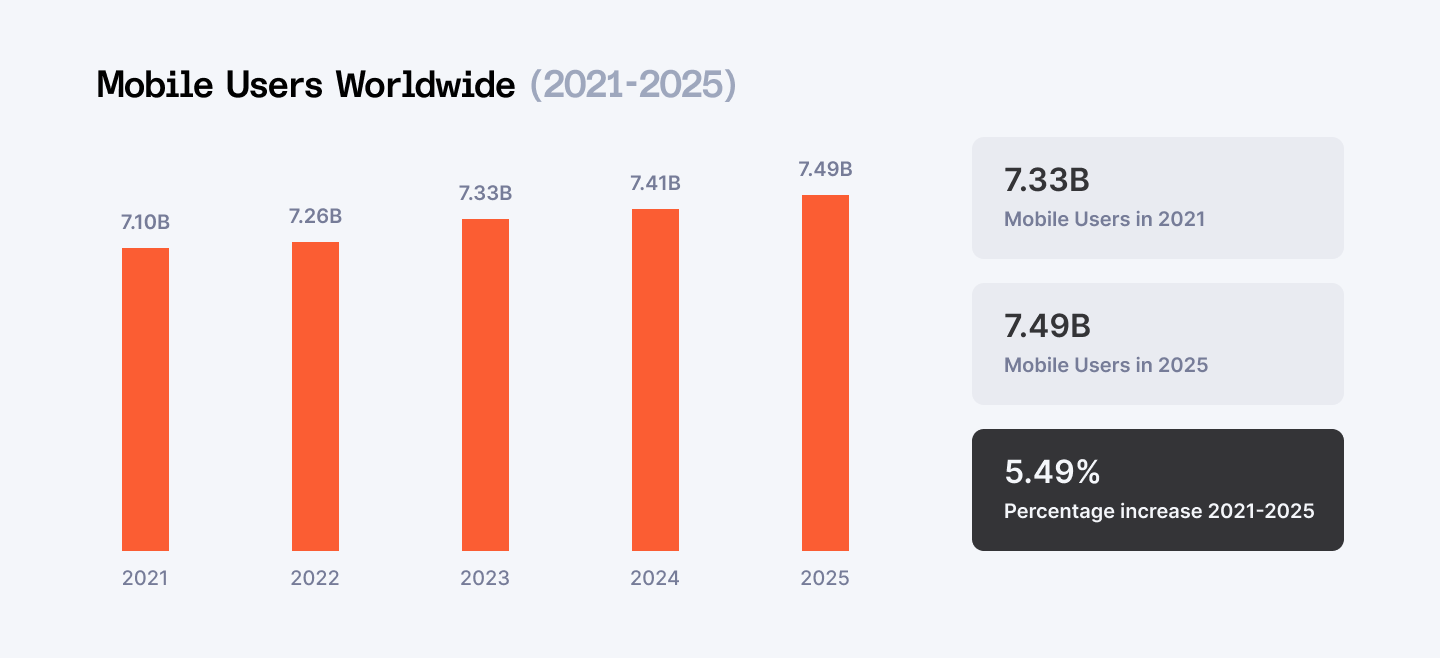
Looking ahead to 2025, it is probable that demand for mobile development will increase and numerous numerical indicators describe dynamic application landscapes, consumer needs, and app ecosystems for multiple platforms. As of 2023, there were over 6.3 billion smartphone users globally, and this figure is projected to exceed 7.7 billion by 2028. This growth shows that developers need to be proactive in their field of expertise more so due to global technological advancements. From creating the next big gaming sensation to creating a rock-solid business application or an attractive, efficient e-commerce application, having the right development tools can help improve your development cycle.
By 2025, the need for an app with great functionalities, and the possibility of its high performance on various platforms is higher. From recent surveys, 70% of the developers are of the view that the use of modern development tools improves their productivity as well as the quality of code. Moreover, 83% of businesses indicate that they have benefitted from improved customer interactions and satisfaction through mobile technology investment.
In this post, we’ll walk through 30 mobile development tools that will boost your app development workflow in 2025, covering everything from code editors and frameworks to performance optimizers and testing suites.
Join Index.dev talent network and work remotely with global companies on exciting mobile development projects.
Section 1: IDEs and Code Editors
Visual Studio Code
Beyond the Basics:
While Visual Studio Code is a powerhouse for general-purpose development, its true potential for mobile development lies in its vast ecosystem of extensions. Essential extensions for mobile developers include:
- React Native Tools: For seamless development and debugging of React Native apps.
- Flutter: For building and running Flutter apps directly from VS Code.
- Android Emulator: For testing Android apps without physical devices.
- Xcode: For integrating Xcode into VS Code for iOS development.
Remote Development:
VS Code's remote development capabilities allow you to work on your codebase from anywhere, even on low-powered devices. This is especially useful for mobile developers who often need to work on-the-go.
Customization:
VS Code's extensive customization options allow you to tailor the IDE to your specific workflow and preferences. This can help improve your productivity and reduce errors.
Android Studio
Jetpack Compose:
The declarative UI framework Jetpack Compose is a game-changer for Android development. It simplifies UI creation and makes it easier to write maintainable code.
IntelliJ IDEA Core:
Android Studio is built on the powerful IntelliJ IDEA platform, which offers features like code completion, refactoring, and debugging.
Emulator:
The Android Emulator is a reliable tool for testing your apps on various devices and Android versions. It has been continually improved over the years, and now offers features like quick boot and network virtualization.
Xcode
SwiftUI:
Apple's SwiftUI framework is a declarative way to build user interfaces for iOS, macOS, watchOS, and tvOS. It simplifies UI development and makes it easier to create responsive and adaptive designs.
Interface Builder:
Xcode's Interface Builder is a visual tool for designing user interfaces. It can be used in conjunction with SwiftUI or UIKit to create complex layouts.
Instruments:
Instruments is a powerful profiling tool that can help you identify performance bottlenecks in your iOS apps. It can be used to analyze CPU usage, memory usage, and network activity.
Section 2: Cross-Platform Development Tools
Flutter
Hot Reload and Hot Restart:
Flutter's hot reload feature allows you to see changes to your code instantly, without having to restart the entire app. This significantly speeds up development and iteration.
Material Design and Cupertino:
Flutter offers built-in support for Material Design and Cupertino design languages, making it easy to create beautiful and platform-appropriate user interfaces.
Performance:
Flutter's architecture provides excellent performance, with apps that feel native on both iOS and Android.
Dart Language:
Dart, Flutter's programming language, is a modern language that is easy to learn and has a strong focus on performance and productivity.
React Native
JavaScript Ecosystem:
React Native leverages the vast JavaScript ecosystem, giving developers access to a wide range of libraries and tools.
Live Reload:
Similar to Flutter, React Native offers live reload, allowing you to see changes to your code instantly.
Large Community:
React Native has a large and active community, providing extensive documentation, tutorials, and support.
Performance Improvements:
Recent versions of React Native have introduced performance improvements, making it a more competitive option for high-performance apps.
Kotlin Multiplatform Mobile (KMM)
Shared Business Logic:
KMM allows you to write shared business logic in Kotlin, which can then be used in both Android and iOS apps. This can significantly reduce development time and maintenance costs.
UI Autonomy:
KMM maintains UI autonomy for each platform, allowing you to write platform-specific code for the UI layer. This ensures that your apps have a native look and feel.
Interoperability:
KMM can be used with existing native codebases, making it easy to integrate into your existing projects.
Kotlin Ecosystem:
KMM leverages the Kotlin ecosystem, which includes a wide range of libraries and tools for building robust and scalable applications.
Read More: 10 Best Cross Platform Mobile App Development Frameworks
Section 3: UI/UX Design Tools
Figma
Mobile-Specific Components:
Figma offers a rich library of mobile-specific components, including buttons, text fields, and navigation elements. These components can be easily customized and reused, streamlining the design process.
Real-time Collaboration:
Figma's real-time collaboration features make it easy for designers and developers to work together on the same design file. This reduces communication overhead and ensures that everyone is on the same page.
Prototyping:
Figma's prototyping capabilities allow you to create interactive prototypes of your designs, making it easier to test and iterate on your ideas.
Design Systems:
Figma is a great tool for building and maintaining design systems, which can help ensure consistency across your products.
Adobe XD
Integration with Adobe Creative Cloud:
Adobe XD is tightly integrated with other Adobe Creative Cloud tools, such as Photoshop and Illustrator. This makes it easy to import assets and collaborate with designers who are familiar with these tools.
Timelines and Animations:
Adobe XD allows you to create interactive prototypes with timelines and animations, making it easier to visualise how your designs will look and feel in a real-world context.
UI Kit Integration:
Adobe XD can be used to create and share UI kits, which can help teams maintain consistency across their designs.
Sketch
Vector-Based Design:
Sketch is a vector-based design tool, which means that your designs can be scaled to any size without losing quality. This is important for mobile app design, where designs need to look good on a variety of screen sizes.
Symbol Libraries:
Sketch's symbol libraries allow you to create reusable design elements, which can help streamline the design process and ensure consistency.
Plugins:
Sketch has a large ecosystem of plugins, which can be used to extend its functionality and automate tasks. This can help you work more efficiently and create better designs.
Explore More: SaaS Design Principles for UI/UX
Section 4: Backend Services and APIs
Firebase
Real-time Database:
Firebase's real-time database is a powerful tool for building apps that require real-time updates. It allows you to store data in a JSON-like format and automatically sync changes across all connected clients.
Cloud Firestore:
Firestore is a scalable, NoSQL database that is optimized for mobile and web apps. It offers features like offline data persistence, document-level security, and powerful query capabilities.
Cloud Functions:
Cloud Functions allow you to run server-side code in response to events, such as database updates or HTTP requests. This can be used to implement custom business logic and integrate with third-party services.
Authentication:
Firebase provides a comprehensive authentication solution that supports multiple sign-in methods, including email and password, social login, and custom authentication.
AWS Amplify
Serverless Backend:
AWS Amplify allows you to build serverless backends for your mobile and web apps. This means you don't have to worry about managing servers or infrastructure.
Data Storage:
Amplify provides a variety of data storage options, including Amazon DynamoDB, Amazon S3, and Amazon Aurora.
GraphQL API:
Amplify can be used to create GraphQL APIs, which can be used to fetch and update data in your app.
Hosting:
Amplify also offers hosting for your static and dynamic content.
GraphQL
Flexible Data Fetching:
GraphQL allows clients to specify exactly what data they need, reducing over-fetching and under-fetching. This can improve performance and reduce network traffic.
Real-time Updates:
GraphQL can be used to build real-time applications by subscribing to data changes. This is particularly useful for mobile apps that need to display up-to-date information.
Strong Typing:
GraphQL uses a strongly typed schema, which can help prevent errors and improve code quality.
GraphiQL:
GraphiQL is a powerful tool for interacting with GraphQL APIs. It provides features like code completion, validation, and documentation.
Section 5: Testing and Debugging
Appium
Cross-Platform Compatibility:
Appium supports testing native, hybrid, and web apps across iOS and Android platforms. This makes it a versatile choice for mobile test automation.
Open-Source:
Appium is an open-source project, which means it's free to use and has a large and active community.
WebDriver Protocol:
Appium uses the WebDriver protocol, which is a standardised way to interact with web browsers. This makes it easy to integrate Appium with existing test automation frameworks.
Declarative Syntax:
Appium uses declarative syntax, which makes it easy to write test scripts that are easy to read and maintain.
Detox
End-to-end Testing:
Detox is an end-to-end testing framework that allows you to test your entire app workflow, from the initial launch to the final user interaction.
React Native Integration:
Detox is specifically designed for testing React Native apps. It integrates seamlessly with React Native and provides a simple API for writing tests.
Asynchronous Testing:
Detox uses asynchronous testing, which makes it easy to test asynchronous operations in your app.
Gray Box Testing:
Detox is a gray box testing framework, which means that it has access to the internals of your app. This allows you to write more robust and reliable tests.
Firebase Test Lab
Real Device Testing:
Firebase Test Lab allows you to test your apps on real devices, including a wide range of Android and iOS devices. This helps you identify issues that might not be apparent when testing on emulators or simulators.
Scalability:
Firebase Test Lab can scale to handle large numbers of tests, making it suitable for testing complex apps.
Integration with Firebase:
Firebase Test Lab integrates seamlessly with other Firebase services, such as Crashlytics and Performance Monitoring. This makes it easy to track the quality of your app and identify areas for improvement.
Automated Testing:
Firebase Test Lab can be used to automate your testing process, saving you time and effort. You can create test suites and run them on a schedule.
Section 6: Performance Monitoring and Analytics
Crashlytics
Real-time Crash Reporting:
Crashlytics provides real-time crash reporting, allowing you to quickly identify and address issues in your app.
Detailed Crash Information:
Crashlytics provides detailed crash information, including stack traces, device information, and user behaviour. This helps you pinpoint the root cause of crashes and fix them quickly.
Trend Analysis:
Crashlytics allows you to track crash trends over time, helping you identify recurring issues and measure the effectiveness of your bug fixes.
Integration with Firebase:
Crashlytics is fully integrated with Firebase, making it easy to use alongside other Firebase services.
New Relic Mobile
App Performance Monitoring:
New Relic Mobile provides comprehensive app performance monitoring, allowing you to track metrics such as CPU usage, memory usage, network activity, and battery consumption.
Custom Metrics:
You can create custom metrics to track specific aspects of your app's performance, such as the time it takes to load a particular screen.
Real-time Dashboards:
New Relic provides real-time dashboards that allow you to visualize your app's performance data. This makes it easy to identify trends and anomalies.
Cross-Platform Support:
New Relic Mobile supports both iOS and Android platforms, making it a versatile choice for mobile app monitoring.
Flipper
Debugging and Profiling:
Flipper is a powerful tool for debugging and profiling your mobile apps. It provides features such as network inspection, database inspection, and performance profiling.
Platform-Agnostic:
Flipper is platform-agnostic, meaning it can be used with iOS, Android, and React Native apps.
Extensibility:
Flipper is highly extensible, allowing you to create custom plugins to add new features and functionality.
Integration with Other Tools:
Flipper can be integrated with other development tools, such as Visual Studio Code and Android Studio. This makes it easy to use alongside your existing workflow.
Section 7: Continuous Integration and Delivery (CI/CD)
Bitrise
Wide Range of Integrations:
Bitrise supports a wide range of tools and services, making it easy to integrate into your existing mobile development workflow.
Visual Workflow Editor:
Bitrise's visual workflow editor makes it easy to create and manage your CI/CD pipelines without writing complex scripts.
Step Library:
Bitrise provides a large library of pre-built steps that can be used to automate various tasks, such as building, testing, and deploying your app.
Mobile-Specific Features:
Bitrise has a number of features that are specifically designed for mobile app development, such as code signing, provisioning, and distribution.
CircleCI
Faster Build Times:
CircleCI has made significant improvements to build times, making it a great choice for teams that need to deploy their apps frequently.
Improved Developer Experience:
CircleCI has a user-friendly interface and provides detailed feedback on build failures. This makes it easier for developers to troubleshoot and fix issues.
Orbs:
CircleCI's orbs are pre-configured workflows that can be used to automate common tasks. This can help you get started with CI/CD quickly and easily.
GitHub Actions
Native Integration with GitHub:
GitHub Actions is natively integrated with GitHub, making it easy to set up and manage your CI/CD pipelines.
Workflows:
GitHub Actions allows you to create workflows that can be triggered by various events, such as code pushes or pull requests.
Custom Actions:
You can create custom actions to automate specific tasks in your workflow. This gives you a high degree of flexibility and control.
Platform-Agnostic:
GitHub Actions can be used to build and test apps for a variety of platforms, including iOS, Android, and web.
Read More: How to Set Up and Optimize CI/CD Pipelines for Faster Development and Deployment
Section 8: Security and Compliance
Snyk
Vulnerability Scanning:
Snyk automatically scans your code for known vulnerabilities, including those in third-party libraries and dependencies.
Security Fixes:
When Snyk detects a vulnerability, it provides guidance on how to fix it. This can help you quickly address security issues and reduce your risk.
Continuous Monitoring:
Snyk can be integrated into your development workflow to provide continuous monitoring for vulnerabilities. This helps you stay on top of security threats as they emerge.
Open-Source Focus:
Snyk has a strong focus on open-source security, making it a popular choice for developers who use open-source components.
Veracode
Comprehensive Security Assessment:
Veracode offers a comprehensive security assessment that can help you identify and remediate vulnerabilities in your mobile apps.
Compliance Management:
Veracode can help you comply with industry standards and regulations, such as GDPR and HIPAA.
Developer Integration:
Veracode can be integrated into your development workflow, allowing you to scan code early and often.
Security Education:
Veracode provides security education and training to help your team understand security best practices.
Data Theorem
Runtime Protection:
Data Theorem provides runtime protection for mobile apps, helping to prevent data breaches and other security attacks.
Data Encryption:
Data Theorem can encrypt sensitive data at rest and in transit, protecting it from unauthorized access.
Malware Detection:
Data Theorem can detect and prevent malware attacks on your mobile apps.
Compliance Enforcement:
Data Theorem can help you enforce compliance with industry standards and regulations.
Section 9: Collaboration and Project Management
Jira Mobile
Mobile-Optimized Interface:
Jira Mobile provides a streamlined interface that is optimized for use on mobile devices. This makes it easy for team members to stay connected and updated, even when they are on the go.
Task Management:
Jira Mobile allows you to create, assign, and track tasks, making it easy to keep your team organized and focused.
Real-time Updates:
Jira Mobile provides real-time updates on task status and progress, ensuring that everyone is always on the same page.
Integration with Other Tools:
Jira Mobile integrates with other Atlassian tools, such as Bitbucket and Confluence, making it easy to manage your entire development workflow.
Slack
Real-time Communication:
Slack provides real-time communication channels, allowing team members to quickly share information and discuss projects.
File Sharing:
Slack makes it easy to share files, code snippets, and other documents with your team.
Integration with Other Tools:
Slack integrates with a wide range of other tools, including Jira, GitHub, and Trello. This makes it a central hub for team communication and collaboration.
Mobile App:
Slack's mobile app makes it easy for team members to stay connected and productive, even when they are not at their desks.
Trello
Kanban Boards:
Trello's Kanban boards provide a visual way to organize and track your project tasks. This makes it easy to see the progress of your team and identify potential bottlenecks.
Automation:
Trello's AI-powered automation features can help you automate repetitive tasks, such as assigning tasks or moving cards between columns. This can save you time and reduce errors.
Power-Ups:
Trello's power-ups allow you to extend the functionality of your boards with features like voting, calendars, and timers.
Integration with Other Tools:
Trello integrates with a wide range of other tools, including Jira, Slack, and GitHub. This makes it a versatile tool for project management.
Explore More: Top 18 Open-Source Apps Every Developer Should Know
Expanding Honorable Mentions
GitKraken
Intuitive Interface:
GitKraken's user interface is designed to be intuitive and easy to use, even for developers who are new to Git.
Powerful Features:
GitKraken offers a wide range of features, including branching, merging, rebasing, and history visualization.
Cross-Platform Support:
GitKraken is available for Windows, macOS, and Linux, making it a versatile choice for developers who work on multiple platforms.
Gitflow Integration:
GitKraken provides built-in support for Gitflow, a popular branching model for software development.
TestFairy
Real-time Feedback:
TestFairy allows you to collect real-time feedback from your testers, including crash reports, screenshots, and video recordings.
Over-the-Air Updates:
TestFairy makes it easy to distribute your app to testers over the air without requiring them to download a new version from the app store.
Analytics:
TestFairy provides analytics that can help you understand how your app is being used and identify areas for improvement.
Integration with Other Tools:
TestFairy integrates with other popular development tools, such as Jira and Slack.
Codemagic
CI/CD for Flutter:
Codemagic is a cloud-based CI/CD platform that is specifically designed for Flutter apps. It offers features such as automatic builds, testing, and deployment.
Custom Workflows:
Codemagic allows you to create custom workflows to automate your build and deployment process.
Integrations:
Codemagic integrates with popular tools such as GitHub, Bitbucket, and GitLab.
Scalability:
Codemagic can scale to handle large projects and high-traffic loads.
Conclusion
As the year 2025 approaches, companies will be offering more and stiffer competition to the mobile app market and developers require tools that can assist them in creating, testing and deploying their projects within the shortest time possible. All the tools discussed in this blog will help you embrace the market trends and also deliver the necessary performance, security and usability that today’s mobile applications require.
For Developers:
Unlock high-paying remote opportunities at Index.dev! Join Index.dev talent network and work remotely with global companies on exciting mobile development projects.
For Clients:
Hire senior mobile developers with Index.dev! Access vetted talent, benefit from risk-free trials, and build your app development team in just 48 hours.


