
AI coding assistants moved fast in 2026, but which one actually helps you ship better software? In this hands-on showdown we compare Gemini (by Google DeepMind) and Claude (by Anthropic) across five real coding tasks, from a live API tool and UI replication to debugging and code explanation. We tested current models: Gemini 3.1 Pro and Claude Opus 4.8, the flagship coding models from each lab as of mid-2026.
You will see how each model performs, where it shines, and when to use it. We score them on accuracy, code quality, responsiveness, clarity of explanation, and how well they follow instructions. If you are building, learning, or hiring engineers who work with these tools, this guide has the answers you need.
Join Index.dev to work on top global projects and grow your dev career, remotely.
5 Key Takeaways
- Claude Opus 4.8 leads accuracy. It scores 88.6% on SWE-bench Verified versus 80.6% for Gemini 3.1 Pro, an 8-point gap on real software issues.
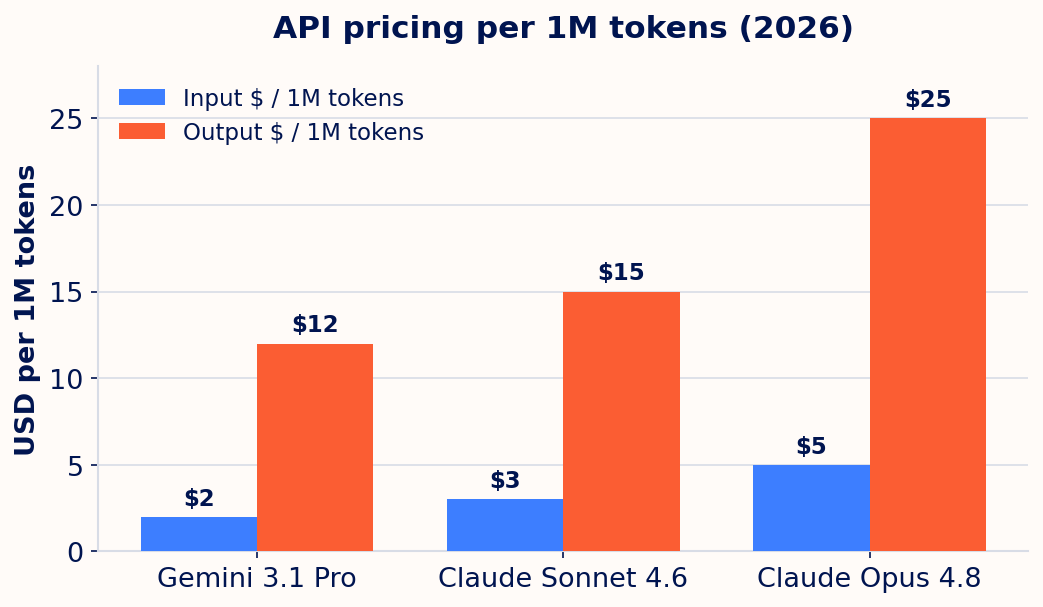
- Gemini is cheaper and faster. Gemini 3.1 Pro costs $2 input / $12 output per 1M tokens, against Claude Opus 4.8 at $5 / $25. For high-volume MVPs, that matters.
- Claude follows prompts more strictly. In our no-external-libraries task, Gemini added Tailwind CSS and broke the rule. Claude stayed fully compliant.
- Both ship 1M-token context windows. Gemini 3.1 Pro and Claude Opus 4.8 each handle 1M tokens, so large codebases fit for either model.
- Pick by workflow. Gemini suits fast, cost-sensitive prototyping. Claude suits production-grade code quality, debugging depth, and accessible, responsive UIs.
What is Gemini?
Gemini is a family of AI models developed by Google DeepMind, designed for reasoning, coding, writing, answering questions, and image understanding. It powers the Gemini app (a chatbot experience similar to ChatGPT) and is integrated across Google products such as Search, Docs, and Gmail.
The current flagship, Gemini 3.1 Pro, was released in February 2026. It brings a 1M-token context window, strong multimodal reasoning, and improved coding performance, scoring 80.6% on SWE-bench Verified, 94.3% on GPQA Diamond, and 77.1% on ARC-AGI-2. It is a strong fit for developers, researchers, and high-volume production use.
Highlights of Gemini
- Developed by Google DeepMind
- Powers the Gemini app for AI conversations
- Integrated into Google Workspace (Docs, Sheets, Gmail)
- Supports multimodal inputs (text, images, code, and audio)
- 1M-token context window in Gemini 3.1 Pro
- Strong at code generation, document analysis, and math reasoning
- Tuned for real-time use in Google Search and Android
What is Claude?
Claude is a family of AI models developed by Anthropic, named after Claude Shannon, the father of information theory. Claude is built around helpfulness, honesty, and harmlessness (HHH), which makes it a safer choice for business and engineering work. The current Claude 4.x family includes Claude Opus 4.8 (most capable), Claude Sonnet 4.6 (balanced speed and intelligence), and Claude Haiku 4.5 (fastest and cheapest).
The flagship, Claude Opus 4.8, was released in May 2026. It offers a 1M-token context window, up to 128K output tokens, and state-of-the-art results on agentic coding. It leads SWE-bench Verified at 88.6% and SWE-bench Pro at 69.2%, and it runs parallel subagents in Claude Code for long, autonomous coding sessions.
Highlights of Claude
- Developed by Anthropic, a safety-focused AI company
- Claude 4.x family: Opus 4.8, Sonnet 4.6, and Haiku 4.5
- Known for balanced, thoughtful, and careful responses
- Excellent for writing, research, coding, and summarization
- Available via claude.ai, the API, and Claude Code
- State-of-the-art on SWE-bench Verified (88.6%) and SWE-bench Pro (69.2%)
- Strong at long documents, multi-step instructions, and production code
What the benchmarks say
Hands-on testing tells you how a model behaves. Benchmarks tell you how it ranks. Here is where Gemini 3.1 Pro and Claude Opus 4.8 stand on the numbers that matter for coding in 2026.
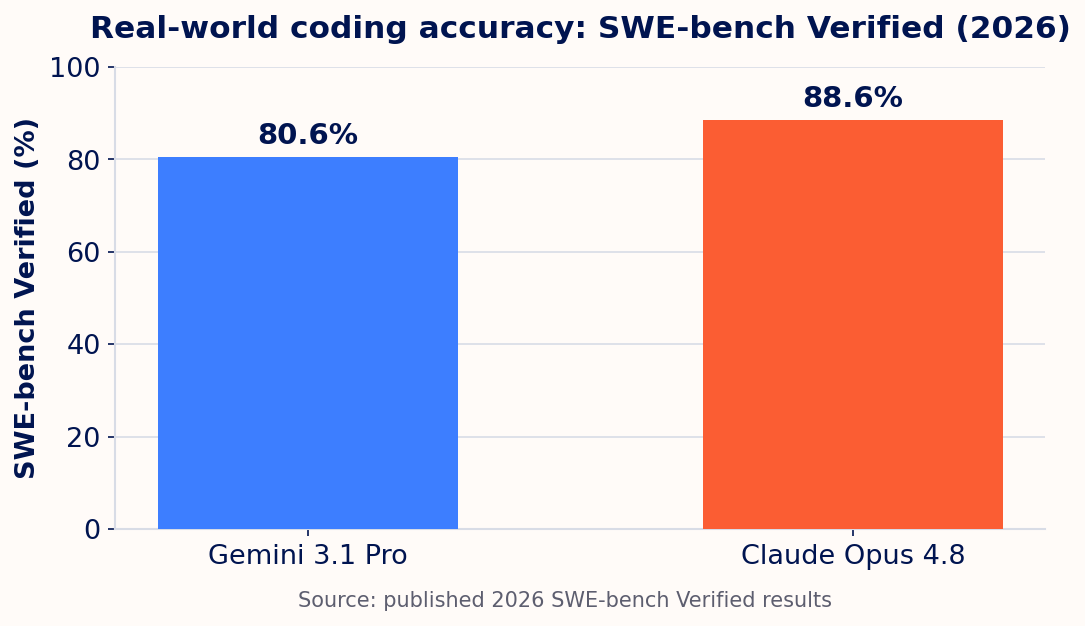
On SWE-bench Verified, which measures real fixes to real GitHub issues, Claude Opus 4.8 leads by about 8 points. Claude also reports 69.2% on the harder SWE-bench Pro, where Gemini has not published a comparable score. Gemini answers back on price and breadth.
| Spec (2026) | Gemini 3.1 Pro | Claude Opus 4.8 | Claude Sonnet 4.6 |
|---|---|---|---|
| Maker | Google DeepMind | Anthropic | Anthropic |
| SWE-bench Verified | 80.6% | 88.6% | Strong, mid-80s |
| SWE-bench Pro | Not published | 69.2% | Not published |
| Context window | 1M tokens | 1M tokens | 1M tokens |
| Input price / 1M | $2 | $5 | $3 |
| Output price / 1M | $12 | $25 | $15 |
| Best for | Speed, cost, scale | Top code quality | Balanced production use |
Takeaway: if cost per token is your constraint, Gemini wins. If correctness on hard, real-world code is your constraint, Claude wins. Claude Sonnet 4.6 sits in the middle as a value pick for high-volume production work.
How we compared (our testing process)
To compare Gemini and Claude fairly, we designed five real-world coding tasks across frontend, backend, and learning use cases. Each task used identical prompts for both models. We scored them on accuracy, code quality, responsiveness, clarity of explanation, and instruction-following.
We ran the outputs in live coding environments (such as Replit and OneCompiler) to confirm they worked. We looked beyond "does it run" to developer experience: how clean, readable, and maintainable the code was, and how useful each model's explanation would be to beginners and professionals.
Explore more: Gemini vs ChatGPT for coding.
The five coding tasks
Task 1, Currency converter with live exchange rates
Goal: Build a simple currency converter using real-time exchange rates from an API.
Prompt: Build a web-based currency converter that fetches real-time exchange rates using the ExchangeRate-API or Open Exchange Rates. Let users select a "from" and "to" currency and input an amount. Show the converted amount and handle errors (wrong API key or no internet).
We checked the live rate against XE.com as a reference.
Gemini's response
Gemini delivered a fully working converter with clean code, a simple UI, and live API integration using ExchangeRate-API. It is beginner-friendly, fast to build with, and returns real-time results with one key. The rate was slightly off, likely because it used free-tier data, hit rate limits, or did not handle decimal precision robustly. It also skipped cross-checking and fallback verification.
Verdict: Gemini excels at a fast MVP that works, great for simple use cases but not financial-grade precision.
Claude's response
Claude took a different approach. Instead of one API, it added multiple API fallbacks and offline rates to simulate real accuracy. The UI was sleek and the fallback system was robust, ideal for unreliable network environments. It still did not reach full real-time parity.
Verdict: Claude shines as a "failproof" solution, better for showing how a resilient system should behave than for exact real-time rates.
Final observation: choose Gemini for a real-time, working converter with a live API and clear setup. Choose Claude for a resilient, visually rich prototype.
Task 2, Bug fixing in a broken BMI calculator
Goal: Test how well each model debugs existing code and explains what is wrong.
Prompt: Here is a broken BMI calculator in JavaScript. It does not return correct results. Fix it and explain the error. (The bug: weight / height * height instead of weight / (height * height), an operator-precedence mistake.)
Gemini's response
Gemini handled the task with technical clarity. It correctly identified the formula bug and explained operator precedence well, something junior developers often miss. It fixed the logic with the correct BMI formula and tightened the range with >= 18.5. The explanation was concise but informative. Ideal for fast debugging when you want quick, correct, clean output.
Claude's response
Claude approached the same task with more depth. Like Gemini it pinpointed and fixed the formula, then went further: it added a real numeric example (BMI = 22.86) to show the bug's real impact, and enhanced the output logic with an "Obese" category that was not even requested. The response read like a code review from a senior developer.
Final observation: Gemini is a smart junior dev who fixes exactly what you ask. Claude is a senior peer who fixes, explains, and improves, even what you did not ask.
Task 3, Replicate a UI from a screenshot
Goal: Test the ability to build a frontend UI from a visual reference.
Prompt: Replicate this login form UI using only HTML and CSS. Center it on a soft gray background, with a bold "Login" heading, email and password fields, a "Remember Me" checkbox, and a blue "Login" button. Use rounded corners, a white box with a shadow, and clean, minimalist design. No external libraries or JavaScript.
Gemini's response
Gemini closely matched the screenshot with clean HTML and well-structured CSS. The form was centered, visually accurate, and used modern styles like accent color. However, the "Login" heading was left-aligned, and while the layout was desktop-friendly, it lacked full mobile responsiveness.
Claude's response
Claude emphasized visual accuracy, responsiveness, and accessibility. It included proper spacing, sound form structure, and mobile-friendly design. The result is ideal when accessibility and cross-device usability are priorities.
Final observation: both recreated the form cleanly. Choose Gemini for production-ready desktop design, Claude for responsiveness and accessibility.
Task 4, Explain a complex code snippet
Goal: Check how well each model explains code to a beginner.
Prompt: Explain this JavaScript debounce function to a beginner. Add inline comments to each line and keep the explanation clear and beginner-friendly.
Gemini's response
Gemini gave a thorough explanation with clear analogies and a step-by-step input example. It introduced key concepts like closures and .apply(), accurate but maybe a bit much for absolute beginners. Comments sat above each line, readable but not truly inline. Ideal for learners who want a deeper dive.
Claude's response
Claude nailed it with clean inline comments, simple language, and practical examples. It explained debouncing clearly without overloading on jargon, mirroring real-world teaching: concept first, then use case, then code. Very beginner-friendly and copy-paste ready.
Final observation: for explaining complex code to beginners, Claude edges out Gemini with a cleaner, more approachable response. Gemini offers more depth but leans more technical.
Task 5, Translate pseudocode to real code
Goal: Check how well each model turns plain-English logic into working code.
Prompt: Build a Markdown-to-HTML converter web app using only HTML, CSS, and JavaScript. Two side-by-side panels: a Markdown textarea on the left, a live HTML preview on the right. Support headings, bold, italic, links, and unordered lists. Write your own parser, no external libraries.
Gemini's response
Gemini's output was clean and functional, with a responsive two-panel layout and a working Markdown parser that updated live. However, it used Tailwind CSS, which violated the no-library rule. The UI looked modern, but under strict evaluation this disqualifies it. A solid build, but not fully compliant.
Claude's response
Claude's solution was fully compliant: zero external libraries, clean HTML/CSS, and a structured, class-based JavaScript parser. It handled every specified Markdown element, updated in real time, and added thoughtful UX touches like an empty state. The layout was responsive and the parser modular and scalable.
Final observation: Claude clearly outperformed Gemini here, not just by meeting the functional requirements but by respecting every constraint, including no external libraries.
Verdict at a glance
| Dimension | Gemini 3.1 Pro | Claude Opus 4.8 |
|---|---|---|
| Speed and MVPs | Faster, ideal for quick functional builds | Slightly slower, more detailed output |
| Code quality | Decent, may need polishing | High-quality, well-structured out of the box |
| Beginner support | More technical, assumes some knowledge | Clear, step-by-step, beginner-friendly |
| UI responsiveness | Desktop-first layouts | Mobile-friendly and accessible |
| Prompt compliance | Sometimes exceeds the prompt | Sticks closely to instructions |
| SWE-bench Verified | 80.6% | 88.6% |
| Price (in/out per 1M) | $2 / $12 | $5 / $25 |
When to pick Gemini vs Claude
| Your priority | Pick | Why |
|---|---|---|
| Lowest cost at scale | Gemini 3.1 Pro | $2/$12 per 1M tokens, cheaper for high-volume generation |
| Fast prototyping and MVPs | Gemini 3.1 Pro | Quick, functional builds with clean code |
| Production code quality | Claude Opus 4.8 | Highest SWE-bench Verified, strong engineering judgment |
| Debugging and code review | Claude Opus 4.8 | Explains root cause, improves beyond the ask |
| Strict spec compliance | Claude Opus 4.8 | Respects constraints like "no external libraries" |
| Accessible, responsive UI | Claude Opus 4.8 | Mobile-first and accessibility-aware by default |
| Best value middle ground | Claude Sonnet 4.6 | Near-Opus quality at $3/$15 per 1M tokens |
FAQs
1. Which is better for beginner developers, Gemini or Claude?
Claude is better suited for beginners. It explains code clearly with inline comments, simple language, and real-world examples. Gemini gives solid explanations too but leans more technical, which can be harder for non-coders to follow.
2. Can Gemini or Claude build responsive UIs with just HTML and CSS?
Yes, both can build clean UIs with only HTML and CSS. Claude generally produces more responsive and accessible layouts, while Gemini creates desktop-friendly designs that are fast to implement but may lack mobile optimization.
3. Which AI follows coding prompts more accurately?
Claude consistently sticks to prompt requirements, including constraints like "no external libraries." Gemini sometimes adds tools or styling frameworks that were not requested, which can hurt strict compliance.
4. Is Claude slower than Gemini when generating code?
Claude tends to be slightly slower but more thorough and detailed. Gemini is faster and excels at quick MVPs and prototypes with clean, functional code. Gemini is also cheaper per token.
5. How do Gemini and Claude compare on coding benchmarks in 2026?
Claude Opus 4.8 leads SWE-bench Verified at 88.6% versus Gemini 3.1 Pro's 80.6%, and reports 69.2% on the harder SWE-bench Pro. Gemini counters with lower pricing ($2/$12 vs $5/$25 per 1M tokens) and the same 1M-token context window.
For Developers
Want to work with the latest AI coding tools on real production projects? Index.dev connects the top 1% of senior engineers from a pool of 2.5 million professionals with global companies, a community of 30,000+ human-vetted engineers from LATAM and CEE. Roughly a 1.2% acceptance rate. Build your remote career on serious work.
For Clients
Hiring engineers who are fluent with Gemini, Claude, and modern AI tooling? Index.dev is an AI-first engineering talent platform with 30,000+ human-vetted engineers from LATAM and CEE, drawn from 2.5 million professionals and matched in 48 hours. Clients see 40-60% cost savings on engineering projects, and 97% return for a second engagement.


