
Most people googling "how to learn AI" get smacked in the face with scary terms like machine learning, deep learning, and neural networks. Then they run away thinking AI is only for MIT graduates.
Look around:
- Lucy Guo dropped out of Carnegie Mellon, hacked on chatbots, and now sits on a billion‑dollar fortune.
- Etched’s founders quit college, built a laser‑focused AI‑chip startup, and pulled in $120 million to take on Nvidia.
- Toby Brown, a 16‑year‑old London kid, skipped his GCSEs, flew to Silicon Valley, and raised seven figures for an AI desktop assistant.
None of them spent years grinding through linear‑algebra textbooks.
Right now, teenagers are making serious money with AI. Not by studying textbooks, but by actually using AI tools in smart ways. They're not asking "how do I learn AI?" They're asking "how do I make AI work for me?"
This guide will show you two paths to jump into AI in 2026: one that’s fast and hands-on, and another that’s a bit slower but builds serious skills for the long haul.
Just real, practical ways to get good with AI while everyone else is still reading Wikipedia articles about neural networks.
Ready to build with AI? Join Index.dev, match with global teams, and turn these paths into a paid remote career.
The Shortcut Path to Learning AI
1. Skip the Code, Master the Connections
Everyone says, "learn Python first!" Nope. Python is massive. You'll spend half a year just figuring out variables and loops. Meanwhile, three new AI tools launched this week.
Instead, start with APIs, tiny, simple pieces of code that let you use AI, not build it.
Think of APIs as the remote control for someone else's AI brain.
Let me break it down differently.
Imagine you want to order pizza. You don't need to know how to make dough, source tomatoes, or run a restaurant. You just call the pizza place, tell them what you want, and they deliver. That's exactly what an API does with AI.
The pizza place = AI company running the models
Your phone call = API request
The delivered pizza = AI results you wanted
You can do this on a basic laptop or even a Chromebook. No fancy GPU. No PhD needed. No setup hell.
So, ditch the “I need to learn Python first” myth. Open Postman or curl. Try OpenAI’s API, or Cohere, or Mistral. Type a few lines. And that’s it.
2. No Downloads. No Setups.
Yep, you read that right. You don’t need to install a single thing to start playing with AI.
Seriously, forget about cluttering your hard drive or dealing with setup headaches.
Instead, jump straight into platforms that let you code and run AI right from your browser.
Here are a few great ones:
- Google Colab – Think of it as a Jupyter Notebook in the cloud. No setup, just log in and start.
- Kaggle Notebooks – Run AI experiments, use free GPUs, and explore real datasets without lifting a finger.
- Replit – Super beginner-friendly. You can even build full web apps with AI inside a browser tab.
- Code Interpreter by OpenAI (via ChatGPT Plus) – Ask it to write and run Python for you. It’ll do it like a nerdy assistant with 10 Red Bulls in its system.
These platforms handle all the heavy lifting for you: the GPUs, the storage, the software.
You just log in, write your code or call APIs, and run your AI projects.
3. Use Hugging Face Like It’s Google for AI
AI moves crazy fast. Every week, there’s a new model, tool, or startup popping up. Blink, and you’ve missed five.
To keep up, use Hugging Face. It’s basically the search engine for AI models.
- Step 1: Go to huggingface.co/models. You’ll find thousands of AI models: chatbots, image generators, speech tools, etc. Don’t worry if you don’t know much. Just type in “text-to-image” or “LLaMA” or whatever sounds interesting. You’ll see what’s trending and what’s hot.
- Step 2: Check the trending tab. This shows you what everyone's talking about right now. See something called "Flux.1-dev"? That's probably the hot new image generator everyone's using.
- Step 3: Jump to huggingface.co/spaces. That’s where people have turned these models into live, interactive apps. You can try them out instantly, in your browser. No code, no setup. Just click and play.
Found a cool model? You can also use it via API. Hugging Face even gives you API access for most tools. If a model isn't available in Spaces, that's your signal to level up. Find free versions, public demos, or even open-source clones. They’re out there.
4. Hunt for Free Stuff
Sometimes, the exact AI model you want won’t be on Hugging Face Spaces. No big deal. This is where a little online digging pays off.
Just Google it. Seriously. Search something like:
"[model name] + free API" or "[model name] + free credits"
You'd be amazed what pops up. Then, look for words like: "Free tier," "$20 credit," "No credit card required," "100 free requests." These are your golden tickets.
Say you're obsessed with Claude-3.5-Sonnet but Anthropic's free tier isn't enough. A quick search might reveal platforms like:
- Poe.com (free daily messages)
- Perplexity Pro trial (free for students)
- Together.ai (often has startup credits)
Many AI platforms throw free credits at new users. Fireworks.ai might give you $25. Replicate could offer 100 free runs. That's plenty to test if a model is worth your time.
And yeah, 90% of the time, you'll find what you need on Hugging Face Spaces anyway. But when you don't, this skill is the fastest (and cheapest) way to explore real-world AI without paying a cent.
5. Learn Theory Only When You Need It
Here’s where most self-learners crash and burn: they try to learn everything before doing anything. Don’t do that. Instead, flip it.
1. First, find an AI product you’re curious about. Something you’d use. Don’t waste your time studying random models just because they’re trending. Most of them won’t matter to you.
2. Look up a technical blog about it (DataCamp usually has good stuff). Take that content and drop it into Gemini or Claude and say something like:
“Hey, explain this to me like I’m new to AI.”
The cool part? Gemini remembers more of your past messages than ChatGPT, so you can have longer, deeper convos without repeating yourself.
3. Ask follow-ups. Make it personal. If something doesn’t click, just ask again your way. That’s how real learning happens: when you’re curious, not cramming. Once you get the basics, then watch a YouTube breakdown. Or read more.
In short? Theory should answer questions you already have, not create new ones you don't care about. Chase the product first. Learn the theory only when it matters to you. That way, you won’t burn out.
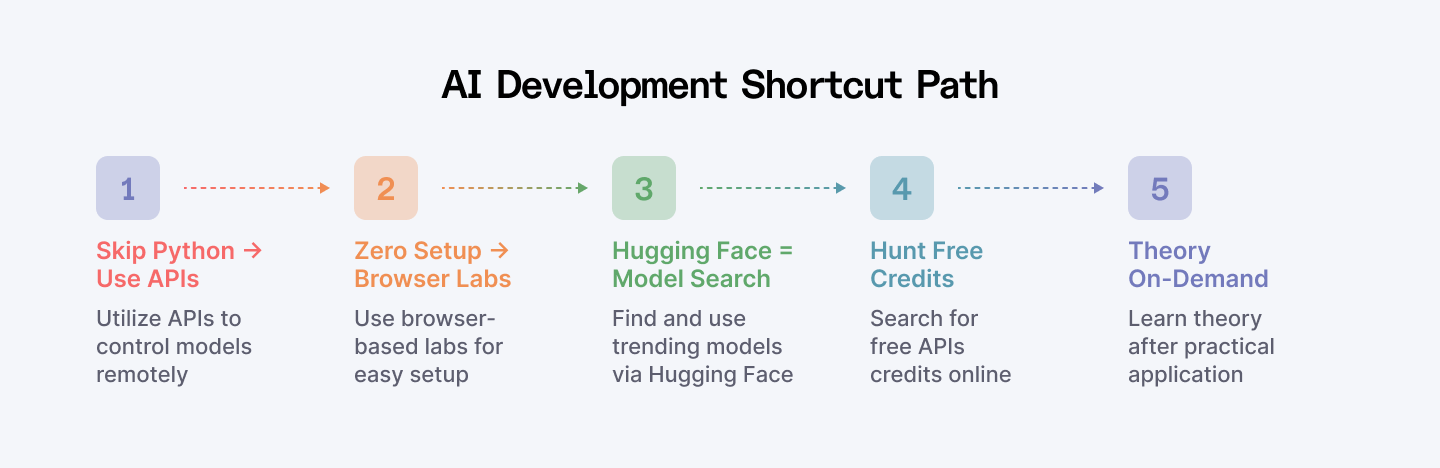
AI Learning Plan for the Shortcut Path
Let's stop talking and actually do this. I'm going to walk you through exactly how these steps work.
The scenario: You saw a TikTok where someone was chatting with their photos. Now you want to build something similar.
The Search
- Jump on Hugging Face. Search "vision language models" or just browse the trending section. You spot something called "LLaVA-1.5" – tons of downloads, looks promising.
- Click on it. See that little "UseI" button? Click it. You're now testing it right in your browser. Upload a photo of your dog, ask "What breed is this?" The model spits out an answer.
The Implementation
- Now you want to use this in your own project. Scroll down, find "Use via API." Copy that code snippet.
- Fire up Replit or Colab (remember, no downloads needed). Paste the code. Change the prompt to something fun like "Describe this image like a sports commentator."
- Hit run. You just built your first AI-powered app.
The Deep Dive
Now you're curious. "How does this thing actually see images?" Google "LLaVA model explanation." Find a decent blog post. Feed it to ChatGPT with the question: “Explain this like I'm 12 but still want to understand the cool parts.”
- The cycle: Find → Test → Build → Learn → Repeat.
- Time invested: 30 minutes.
This shortcut path isn’t perfect, but it works. You skip the boring theory upfront and learn only what matters to you.
Learn More: How to Get Started with Vibe Coding with AI (The Easy Way)
The Long Path to Learning AI
1. Get Your Basics Right
Before you dive into AI, you need three things: math, stats, and the right mindset. Let’s break it down.
Math
You don’t need to be a math genius, but you do need to get the basics. Learn stuff like:
- Linear algebra: matrices, vectors, dot products (these power most AI models).
- Calculus: mostly derivatives, gradients (don’t panic—you won’t be solving them by hand).
- Probability: helps you deal with uncertainty, which is basically what AI lives on.
These are the building blocks behind AI algorithms.
Stats
Stats help you make sense of data. You’ll want to understand:
- Mean, median, mode
- Distributions
- Correlation vs. causation
- Regression and statistical significance
It’s how AI makes smart guesses from messy info.
Curiosity & Grit
AI evolves fast. New tools, new models, new frameworks, all the time. If you’re the kind of person who Googles “how does this work?” just for fun, you’ll fit right in. Stay open, stay hungry.
You don’t need to know everything. Just go deep where your career goals lead.
2. Level Up Your AI Skills
Now that you’ve got the basics, it’s time to zoom in on the real stuff that makes AI tick. Different jobs need different skills, but here’s the core you want to know.
Programming
Python is the go-to language because it’s easy and has tons of AI libraries like TensorFlow or PyTorch. If Python isn’t your thing, R is another solid option, especially for stats-heavy work. Writing clean, efficient code is your ticket here.
Data Structures
Data is messy, so you need to know how to organize it. Arrays, lists, trees, graphs: these are ways to store and handle data smartly. For instance, if you’re building a recommendation system, picking the right data structure can speed up your results big time.
Data Manipulation
Before data feeds your AI model, it needs a good clean-up. This means sorting, filtering, and transforming raw data. Libraries like pandas in Python are lifesavers here.
Data Science
This is the “big picture” skill. Data science mixes stats, programming, and data handling to pull insights from raw info. You’ll learn how to spot patterns, build models, and tell stories with data.
Machine Learning
This is where AI learns from data and gets smarter over time. You’ll learn the main types of algorithms (like classification, regression, clustering) and when to use each.
Deep Learning
Deep learning is the fancy cousin of machine learning, using neural networks to handle super complex stuff like recognizing faces or driving cars. It’s all about stacking layers to get smarter models. You’ll play with tools like Keras, TensorFlow, and PyTorch here.
Pro tip:
Get your feet wet in all these areas, then double down on what excites you most.
- Want to build chatbots? Focus more on NLP and deep learning.
- Into data analysis? Lean into stats and data science.
Also Read: AI vs Machine Learning vs Data Science
3. Get Comfortable with AI Tools & Libraries
Knowing the right tools is key to building and deploying AI. Python and R are the go-to languages, but Python leads thanks to its huge ecosystem.
Pick what fits your path and get hands-on.
Top Python Libraries
pandas
The ultimate tool for data cleaning and transformation. Handles messy or incomplete data like a pro.
Try: Data Manipulation with pandas courses and tutorials.
NumPy
Foundation for scientific computing—fast math on arrays and matrices. Essential for AI math operations.
Try: Intro to NumPy and cheat sheets.
Scikit-Learn
Simple, versatile machine learning library with algorithms for classification, regression, clustering, and more.
Try: Scikit-Learn courses for practical ML.
PyCaret
Automates ML workflows—great for experimenting and comparing models quickly with minimal code.
Try: PyCaret beginner tutorials.
PyTorch
Flexible, fast deep learning library. Widely used for research and complex models like NLP and neural networks.
Try: PyTorch tutorials and deep learning courses.
Keras
User-friendly neural network library built on TensorFlow. Great for quick prototyping and building deep learning models.
Try: Keras beginner courses and cheat sheets.
Commercial AI APIs
Jumpstart your AI projects using APIs like OpenAI, Cohere, and Anthropic. They offer ready-to-use models for natural language, vision, and more without heavy coding.
Try: Tutorials on OpenAI API, GPT-4o, Claude, DeepSeek APIs.
Advanced AI Frameworks and Models
Hugging Face
The go-to place for pre-trained AI models (transformers) and tools to easily deploy them on GPUs/TPUs.
Try: Hugging Face courses and code-alongs.
LangChain
Popular framework to integrate large language models into applications and data pipelines seamlessly.
Try: LangChain tutorials and development courses.
LLaMA
Open-source LLMs that let you fine-tune and deploy powerful AI models locally or on cloud.
Try: LLaMA fundamentals and fine-tuning guides.
Pro tip:
Start small by mastering pandas, NumPy, and Scikit-Learn. Then explore deep learning with PyTorch or Keras. Finally, experiment with APIs and frameworks like Hugging Face and LangChain to build real-world AI apps faster.
Read Also: Build Your First AI Agent | Simple Guide with LangGraph
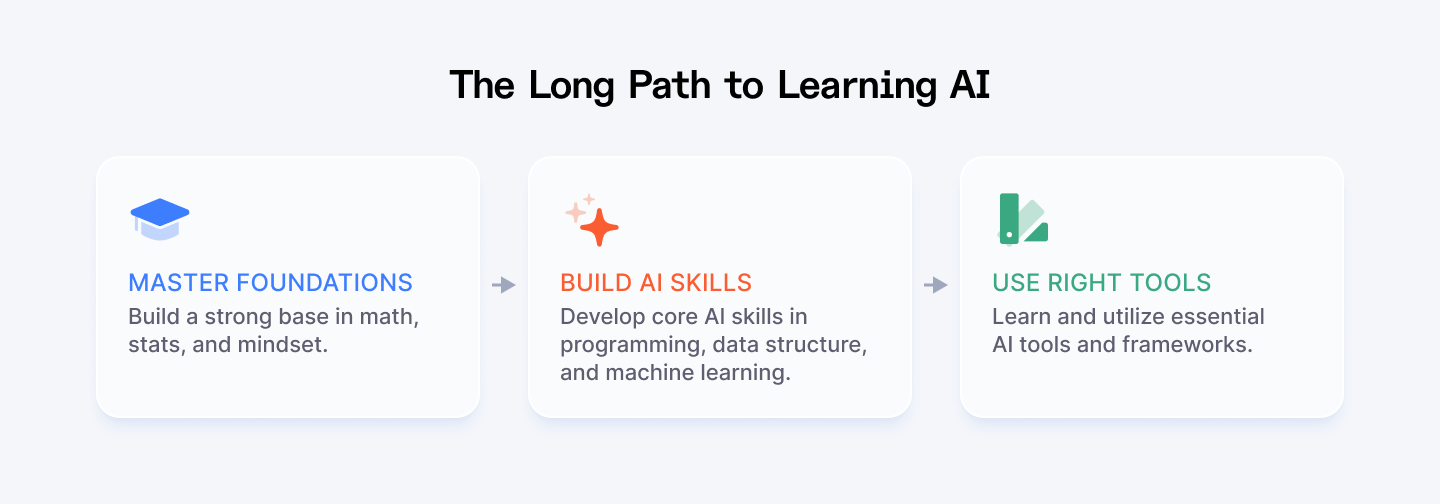
AI Learning Plan for the Longer Path
Fair enough, this isn't a 30-day challenge. You're looking at roughly a year to go from zero to competent. Here's a simple roadmap:
Months 1 to 3: Gear Up
Goal: Don’t freak out; focus on the essentials.
Python, fast.
Nail the basics: functions, lists, dictionaries. Then grab the big libraries: NumPy, pandas, matplotlib. Tip: Work through Automate the Boring Stuff in two weekends, then jump to Kaggle micro‑courses.
Get comfortable with Math.
Learn vectors, matrices, the dot product, basic probability. Skip the proofs; learn what they do.
Data wrangling.
Load a CSV, clean it, plot it. Do this until it’s muscle memory.
Result: You can write short scripts, poke at datasets, and read code without panicking.
Months 4 to 6: Build & Train
Goal: Understand how machines learn patterns.
Classic ML.
Decision trees, random forests, logistic regression. Train, test, repeat. Resource: “Hands‑On Machine Learning with Scikit‑Learn” (work the code, skip the essays).
Neural nets 101.
Single hidden layer, ReLU, backprop. Use TensorFlow or PyTorch; pick one and stick with it.
Mini‑projects.
Predict house prices, classify movie reviews, or flag spam emails. Ship them as notebooks on GitHub.
Result: You know the workflow. Data in, model out, evaluate, iterate.
Months 7 to 9: Pick a Lane
Goal: AI is huge. Time to specialize. Go deep in one domain and build something people can use.
NLP, Vision, or Biz AI.
Choose one: NLP (train a sentiment model on Twitter data), Vision (build a tiny object detector for webcam images), and Biz (create a churn predictor for a fake SaaS dataset).
Capstone project.
End‑to‑end: data pipeline, model training, simple web demo (use Streamlit or FastAPI).
Show your work.
Post the repo, write a short blog, share on LinkedIn. Feedback = free mentorship.
Result: A portfolio piece that proves you can solve a real problem, not just run tutorials.
Month 10 and Beyond: Stay on the Edge
Goal: Keep your skills from going stale.
Read one new paper a week.
Use Papers with Code. Skim the abstract, grok the diagram, move on.
Contribute.
Fix a doc typo, add a test, or open a tiny PR to an open‑source project. Baby steps count.
Explore advanced lanes.
Pick what excites you: MLOps, AI ethics, model compression.
Network.
Join Discords, local meetups, or online hackathons. Your next gig will probably come from someone you meet here.
Result: You’re in the loop, shipping code, and speaking the same language as working AI engineers.
Most people quit around month 2.
The ones who stick around? They're the ones landing six-figure jobs and building the next generation of AI tools.
Final Thoughts
The AI field is vast, but you don’t need to master everything at once. Your path should depend on your goals, your background, and the type of AI work you want to do.
Go Shortcut Path if:
You want to jump in right now. No waiting, no heavy theory first. You’re curious, hands-on, and ready to explore AI tools, APIs, and models today. This path is perfect if you want quick wins, to build cool projects fast, or start using AI in real life without getting bogged down in math or programming details.
Go Long Path if:
You’re aiming for a deep, solid understanding. Maybe you want to work as a data scientist, AI researcher, or build complex AI systems from scratch. This path takes time: months of learning math, programming, machine learning, and then specializing. It’s slower but builds a strong foundation that lasts.
Remember:
AI isn’t just for experts. With the right approach, you can start creating, experimenting, and even innovating today. So pick your path, stay curious, and keep pushing forward. The AI world is yours to explore.
For Developers:
Ready to jumpstart your AI career? Join Index.dev’s talent network and get matched with top global companies.
For Clients:
Need elite AI talent? Index.dev delivers top 5% AI talent in 48h, risk‑free for 30 days.


