
Choosing between LoRA vs QLoRA vs full fine-tuning depends on your GPU budget, accuracy requirements, and iteration speed.
This guide compares the three methods and reviews the best AI model fine-tuning tools for 2026—including platforms for AI model fine-tuning, tools for managing LoRA weights, and solutions for tracking QLoRA experiments. Whether you're fine-tuning chatbots, building domain-specific LLMs, or optimizing foundation models for production, you'll find the right method and toolchain for your use case.
Join Index.dev’s global network of AI engineers and work on cutting-edge LLM and model-optimization projects with top companies worldwide.
Which Tuning Method Should Be Used for My Product?
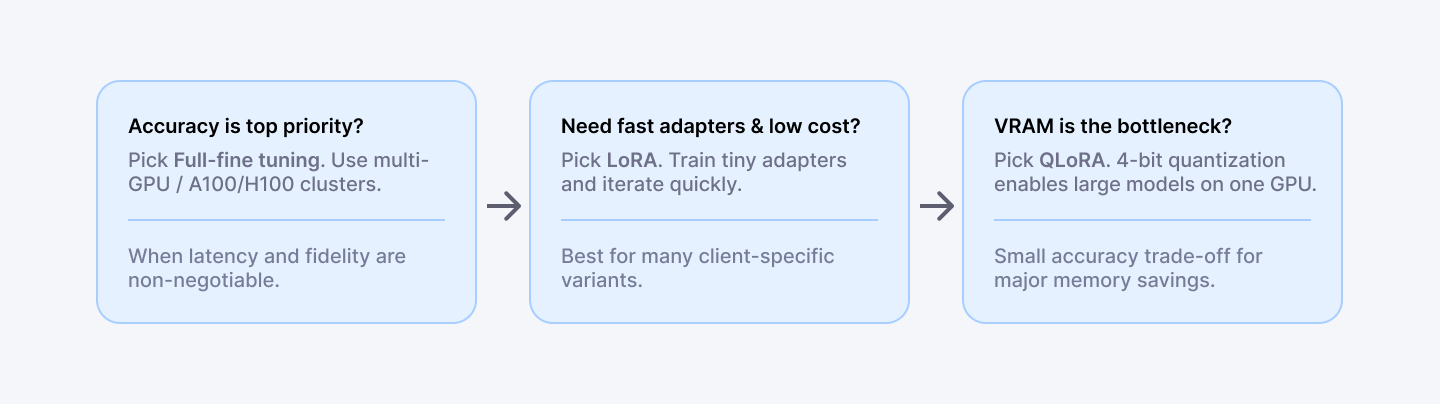
- If the product needs tiny latency loss and highest accuracy, go for full fine-tune.
- If fast experiments, multiple variants, or adapters per client are needed, then consider LoRA.
- If model size is large and VRAM is limited, then look for QLoRA.
- If the goal is production deployment with monitoring, add a lifecycle partner like Index.dev.
Which Method Should Developers Adopt?
Method | What it changes | Hardware | When to pick it |
| Full fine-tuning | Update all weights | Multi-GPU / A100 / H100 | Max accuracy; proprietary data; big budget |
| LoRA | Add low-rank adapter matrices (freeze base) | 1–2 GPUs (moderate VRAM) | Fast iteration; many adapters; low cost |
| QLoRA | LoRA + 4-bit quantized base model | Single 40-48GB GPU for very large models | Tight VRAM; large models on consumer hardware |
QLoRA achieves the efficiency to tune very large models using 4-bit quantization; it is the core trick enabling 2025 consumer-hardware fine-tuning workflows.
Fine-Tuning Methods: Full vs LoRA vs QLoRA
Use the right method for your resources and goals. The table below compares full fine-tuning, LoRA, and QLoRA across key factors.
Feature | Full Fine-Tuning | LoRA Fine-Tuning | QLoRA Fine-Tuning |
| Parameters updated | 100% of weights | Very few (often ~1-5%) | Same as LoRA (small %) but with quantization |
| GPU Memory (7B model) | Very high (tens of GB) | Low (a few GB) | Very low (2-6GB) thanks to 4-bit quantization |
| Compute (GPUs) | Multi-GPU or TPU for big models; expensive | 1-2 high-end GPUs often sufficient | Single 40-48GB GPU can handle 40-70B models |
| Training speed | Slow (long epochs) | Faster (less data to optimize, can use bigger batches) | Similar to LoRA, but quantization adds some overhead |
| Accuracy | Highest baseline | Comparable to full tuning | Slightly below full (minor drop from quant) |
| Ideal Use Case | Max performance, ample compute | Resource-limited setups (cloud GPUs, on-device) | Extreme resource limits, very large models, or lower cost cloud |
LoRA vs QLoRA: What's the Difference?
Here's the reality: you can't have it all with fine-tuning. The LoRA vs QLoRA debate really comes down to memory efficiency versus accuracy trade-offs. Both are parameter-efficient fine-tuning (PEFT) methods, but they take fundamentally different paths to solve the same problem.
LoRA (Low-Rank Adaptation)
Think of LoRA like training a specialized interpreter who sits alongside your base model—you're not retraining the entire person, just adding a new skill set. LoRA freezes the pretrained model weights and injects trainable low-rank decomposition matrices into transformer layers. Instead of updating billions of parameters, you train small adapter matrices (~1-5% of original parameters). This dramatically reduces memory requirements while preserving base model capabilities.
The numbers:
- Memory: 16-24GB VRAM for 7B models
- Accuracy: Near full fine-tuning quality
- Speed: 2-4x faster than full fine-tuning
- Output: Small adapter files (10-100MB) that can be swapped or merged
QLoRA (Quantized LoRA)
QLoRA takes LoRA further. It combines LoRA adapters with 4-bit quantization of the base model—imagine compressing that interpreter's background knowledge into ultra-dense storage while keeping their active thinking in high precision. The frozen weights are stored in 4-bit precision while LoRA adapters train in higher precision, then gradients backpropagate through the quantized model.
The trade-offs:
- Memory: 8-12GB VRAM for 7B models (can fit 70B on 48GB)
- Accuracy: Slight degradation vs LoRA (~1-2% on benchmarks)
- Speed: Similar to LoRA
- Output: Same small adapter files, requires quantized base for inference
When to Choose LoRA vs QLoRA
Scenario | Recommendation |
| Single consumer GPU (16-24GB) with 7B model | LoRA |
| Single GPU (24-48GB) with 70B+ model | QLoRA |
| Maximum accuracy required | LoRA (or full fine-tuning) |
| Many adapters per client/use case | LoRA (easier adapter management) |
| Limited hardware budget | QLoRA |
| Production inference at scale | LoRA (merged adapters) |
LoRA vs Full Fine-Tuning: When to Use Each
The LoRA vs full fine-tuning decision primarily depends on your compute budget, accuracy requirements, and deployment strategy.
Full Fine-Tuning:
Full fine-tuning updates every parameter in the model. It achieves the highest possible task-specific accuracy but requires multi-GPU clusters (A100/H100) and significantly more training time.
- Memory: 80GB+ VRAM per GPU, often multi-node
- Accuracy: Best possible for your task
- Speed: 5-10x slower than LoRA
- Output: Complete model checkpoint (tens of GB)
- Cost: $1,000-$50,000+ per training run
When full fine-tuning makes sense:
- Task requires maximum accuracy (medical, legal, safety-critical)
- You have dedicated ML infrastructure or cloud budget
- Model will serve millions of users (ROI justifies cost)
- You need to modify model behavior fundamentally
When LoRA is the better choice:
- Rapid experimentation and iteration cycles
- Multiple client-specific or use-case-specific adapters
- Limited GPU resources or cost constraints
- Preserving base model capabilities while adding specialization
- Easy rollback and version control of fine-tuned behaviors
Hybrid approach:
Many production teams use LoRA for experimentation, then full fine-tune the winning configuration for maximum production accuracy.
How they trade off
- Full = top accuracy, high cost, slow iterations
- LoRA = near-full accuracy, low cost, fast experiments
- QLoRA = slightly lower accuracy than LoRA, minimal VRAM, highest efficiency
Quick decision rules
- If accuracy is non-negotiable → Full fine-tune
- If iteration speed and many adapters matter → LoRA
- If you must fit a very large model on limited VRAM → QLoRA
Practical setups (examples)
- Prototype on a 7B model → LoRA on a single 24–48GB GPU
- Large-model prototype (40–70B) → QLoRA on one 48GB GPU
- Production-grade specialization → Full fine-tune across multi-GPU nodes or use LoRA adapters merged and served for cost-efficient inference
How to validate a fine-tune quickly?
Run 30–50 targeted prompts (behavioral tests), measure adapter size, VRAM, and wall-clock time, then compare to baseline. Use those numbers to decide whether to iterate with a different method.
Best Tools for Managing LoRA Weights
As teams scale LoRA fine-tuning, managing multiple adapters becomes critical. You can't just dump 50 adapters in a folder and hope for the best. Here are the best tools for managing LoRA weights in production environments:
1. Hugging Face Hub + PEFT
The de facto standard for LoRA weight management. Upload adapters to Hugging Face Hub, version them with Git-like commits, and load with a single line of code. The PEFT library handles adapter merging, swapping, and inference.
- Best for: Open-source workflows, community sharing
- Key features: Version control, model cards, automatic quantization
- Limitation: Requires internet access for Hub features
2. Weights & Biases (W&B)
Track LoRA experiments with full lineage—hyperparameters, training curves, adapter artifacts, and evaluation metrics in one dashboard. W&B Artifacts handle adapter versioning and team collaboration.
- Best for: Experiment tracking and team collaboration
- Key features: Experiment comparison, artifact versioning, reports
- Limitation: Paid tiers for larger teams
3. MLflow
Open-source MLOps platform for tracking LoRA experiments, packaging adapters, and deploying to production. MLflow Model Registry provides governance and approval workflows.
- Best for: Enterprise MLOps integration
- Key features: Model registry, deployment pipelines, audit trails
- Limitation: Requires infrastructure setup
4. DVC (Data Version Control)
Git-like versioning for LoRA weights and training datasets. DVC works alongside your existing Git repository to track large adapter files without bloating version control.
- Best for: Git-native teams, dataset + adapter versioning
- Key features: Storage-agnostic, pipeline DAGs, experiment tracking
- Limitation: Learning curve for non-Git users
5. LLaMA-Factory
All-in-one fine-tuning framework with built-in adapter management, training visualization, and export options. Particularly strong for managing LoRA weights across LLaMA family models.
- Best for: LLaMA-focused fine-tuning workflows
- Key features: Web UI, one-click training, adapter merging
- Limitation: Primarily focused on LLaMA ecosystem
Best Tools for Tracking QLoRA Experiments
QLoRA experiments require specialized tracking due to quantization configurations, memory profiling, and accuracy trade-off monitoring. You need visibility into how 4-bit quantization affects your results. Here are the best tools:
1. Weights & Biases (W&B)
The most comprehensive solution for tracking QLoRA experiments. Log quantization configs (bits, compute dtype, quant type), memory usage over time, and compare 4-bit vs 8-bit vs full precision runs side-by-side.
- Tracks: Quantization settings, VRAM usage, loss curves, adapter metrics
- Killer feature: Custom dashboards comparing memory/accuracy trade-offs
- Integration: Native support with Hugging Face Trainer
2. TensorBoard + Custom Logging
Free and flexible. Add custom scalars for VRAM monitoring, quantization loss, and adapter statistics. Works with any training framework.
- Tracks: Training metrics, custom scalars, profiling
- Killer feature: Free, works offline
- Integration: Universal (PyTorch, TensorFlow, JAX)
3. Neptune.ai
Strong experiment comparison features for QLoRA hyperparameter sweeps. Compare dozens of quantization configurations with interactive filtering and visualization.
- Tracks: All training metadata, system metrics, artifacts
- Killer feature: Powerful comparison queries
- Integration: Python SDK, framework callbacks
4. Comet ML
Production-focused tracking with model registry and deployment features. Track QLoRA experiments from development through production deployment.
- Tracks: Full experiment lineage, model performance
- Killer feature: Production monitoring integration
- Integration: Hugging Face, PyTorch Lightning
5. Axolotl + Built-in Logging
Axolotl (popular QLoRA training framework) includes built-in W&B integration and comprehensive logging. For quick QLoRA experiments, the native logging often suffices.
- Tracks: Training progress, configs, outputs
- Killer feature: Zero-config for Axolotl users
- Integration: W&B, local logging
Best Platforms for LoRA Fine-Tuning Chatbots
Fine-tuning chatbots requires conversation-aware training, safety alignment, and multi-turn evaluation. You're not just training a model—you're training it to have coherent, multi-turn conversations. These platforms specialize in exactly that:
1. Hugging Face AutoTrain + TRL
The TRL (Transformer Reinforcement Learning) library provides SFT (Supervised Fine-Tuning) and RLHF trainers optimized for chat models. AutoTrain offers a no-code interface for basic chatbot fine-tuning.
- Best for: Custom chatbots with conversation datasets
- Supports: LoRA, QLoRA, full fine-tuning
- Models: LLaMA, Mistral, Falcon, GPT-NeoX chat variants
2. OpenAI Fine-Tuning API
For GPT-3.5/GPT-4 fine-tuning, OpenAI's platform handles infrastructure, though it uses proprietary methods (not LoRA). Best for teams already committed to the OpenAI ecosystem.
- Best for: GPT-model chatbot customization
- Supports: Proprietary fine-tuning (not LoRA)
- Limitation: Vendor lock-in, no adapter portability
3. Anyscale Endpoints
Production-grade fine-tuning platform supporting LoRA on open models. Strong focus on serving fine-tuned chat models at scale with built-in evaluation.
- Best for: Production chatbot deployment
- Supports: LoRA fine-tuning + inference serving
- Models: LLaMA 2/3, Mistral, Mixtral
4. Together AI
Fine-tuning API with LoRA support and seamless deployment. Includes chat-specific evaluation metrics and conversation dataset formatting.
- Best for: API-first chatbot development
- Supports: LoRA, full fine-tuning
- Models: Open-source chat models
5. LLaMA-Factory
Open-source framework with explicit chatbot training modes, conversation templates, and multi-turn dataset handling. Web UI makes it accessible to non-ML engineers.
- Best for: Self-hosted chatbot fine-tuning
- Supports: LoRA, QLoRA, full fine-tuning
- Models: LLaMA, Mistral, Qwen, ChatGLM, Baichuan
Explore more: The best AI tools for deep research.
Important Supporting Libraries to Mention (Ops and Quant)
- bitsandbytes
- The standard runtime for k-bit quantization used by QLoRA and many 4-bit flows. Keep it in the stack when doing QLoRA.
- The standard runtime for k-bit quantization used by QLoRA and many 4-bit flows. Keep it in the stack when doing QLoRA.
- DeepSpeed
- Memory sharding and ZeRO techniques for very large models; pair with Composer or HF for multi-node training.
For deployment, monitoring, and staffing, pair any training tool with a full-lifecycle partner like Index.dev (AI development, deployment, and ongoing MLOps). Index.dev helps move tuned adapters or full models from experiment to production with monitoring and engineering support.
Tactical Evaluation Criteria (What to Measure)
- Cost per fine-tuning run (compute hours X instance price).
- Wall time to usable model (preprocessing -> testable adapter).
- VRAM footprint (peak GPU memory).
- Adapter size (MB — matters for many adapters).
- Inference latency after merging adapters.
- Operational overhead (how many steps to deploy, monitor, and roll back).
Future Trends and Checklists to Consider
The fine-tuning landscape is evolving fast. Expect even more automation (AutoML hyperparameter tuning and one-click adapters), larger context windows (tuning for 100k+ tokens), and hybrid methods (combining reinforcement feedback with LoRA-style tuning).
We’re also seeing innovations like dynamic sparse adapters and continuous on-device tuning. Sustainability is a focus too: hardware-efficient methods (LoRA/QLoRA variants) and carbon-aware training will grow.
Developer Playbook / Checklist
- Define the Task:
- Identify your domain and data volume. Small, specialized datasets? Lean PEFT (LoRA/QLoRA). Large corpora? Full fine-tuning might pay off.
- Identify your domain and data volume. Small, specialized datasets? Lean PEFT (LoRA/QLoRA). Large corpora? Full fine-tuning might pay off.
- Choose a Base Model:
- Pick a pre-trained LLM known to work for your domain (HuggingFace or custom).
- Pick a pre-trained LLM known to work for your domain (HuggingFace or custom).
- Select Tuning Method:
- Match resources to methods (use the table above). For budget GPUs, pick LoRA/QLoRA; for maximum quality and budget, full-tune or a hybrid.
- Match resources to methods (use the table above). For budget GPUs, pick LoRA/QLoRA; for maximum quality and budget, full-tune or a hybrid.
- Pick a Tool:
- If you need speed and ease, consider Axolotl or Ludwig. For maximum flexibility, use Transformers/PEFT or LLaMA-Factory. For end-to-end support, engage Index.dev’s AI Development services.
- If you need speed and ease, consider Axolotl or Ludwig. For maximum flexibility, use Transformers/PEFT or LLaMA-Factory. For end-to-end support, engage Index.dev’s AI Development services.
- Prepare Data & Config:
- Clean and format your dataset. Write config files or scripts (e.g. YAML for Ludwig/Axolotl).
- Clean and format your dataset. Write config files or scripts (e.g. YAML for Ludwig/Axolotl).
- Train & Monitor:
- Launch training. Watch metrics (loss, accuracy) and resource usage. Use logging (W&B, TensorBoard) for visibility.
- Launch training. Watch metrics (loss, accuracy) and resource usage. Use logging (W&B, TensorBoard) for visibility.
- Evaluate & Iterate:
- Validate the tuned model on held-out data. If performance lags, adjust hyperparameters or try a different method.
- Validate the tuned model on held-out data. If performance lags, adjust hyperparameters or try a different method.
- Merge & Optimize:
- With LoRA/QLoRA, merge adapters into the base model for inference speed. Optionally quantize further for deployment.
- With LoRA/QLoRA, merge adapters into the base model for inference speed. Optionally quantize further for deployment.
- Deploy & Maintain:
- Containerize the model, set up CI/CD for updates. Monitor drift and user feedback. Plan periodic retraining if data shifts.
- Containerize the model, set up CI/CD for updates. Monitor drift and user feedback. Plan periodic retraining if data shifts.
- Document & Scale:
- Track versions, configs, and results. As usage grows, scale up (more GPUs, multi-node) or roll out to cloud/edge.
- Track versions, configs, and results. As usage grows, scale up (more GPUs, multi-node) or roll out to cloud/edge.
- Engage Experts if Needed:
- If any step is a roadblock, leverage community tools or services. For example, you can hire AI developers from Index.dev to keep your AI projects on track.
Read next: Will AI agents replace software developers?
Choose Your Fine-Tuning Strategy
The LoRA vs QLoRA vs full fine-tuning decision ultimately comes down to your constraints and goals. Here's what each path gives you:
Full fine-tuning: Maximum accuracy, requires cluster-grade GPUs, best for high-stakes production models where you can justify the cost.
LoRA: The pragmatist's choice. Balance of quality and efficiency, works on single GPUs, ideal for experimentation and multi-adapter workflows.
QLoRA: Maximum memory efficiency, enables large model fine-tuning on consumer hardware, slight accuracy trade-off.
Quick Decision Framework
Your Situation | Recommendation | Why |
|---|---|---|
Limited budget, need to fine-tune 70B+ models | QLoRA | Only viable option on consumer hardware |
Fast iteration, multiple use-case adapters | LoRA | Experiment fast, deploy multiple versions |
Maximum accuracy, multi-GPU available | Full fine-tuning | Justify cost through production ROI |
Fine-tuning chatbots for production | LoRA + TRL/LLaMA-Factory | Conversation-aware, easy to manage |
Enterprise MLOps requirements | LoRA + MLflow/W&B | Governance + experiment tracking |
The best GenAI fine-tuning tools in 2025 combine efficient training methods (LoRA/QLoRA) with robust experiment tracking (W&B, MLflow) and scalable serving infrastructure. Start with Axolotl or LLaMA-Factory for quick experiments, graduate to Hugging Face PEFT for production control, and use W&B or MLflow for managing LoRA weights and tracking QLoRA experiments at scale.
Here's the catch: building a fine-tuned large language model is one thing. Shipping it to production without your ML ops falling apart? That's where most teams struggle. Index.dev's ML engineers help you move from experiment to production—with monitoring, deployment, and the infrastructure backbone so it actually works at scale.
Ready to move past LoRA experiments and ship something real? Hire AI developers from Index.dev.


