
Think about it: wouldn't you rather spend time creating amazing features instead of fighting with deployment issues or hunting down bugs? Picking the right DevOps toolset has a huge impact on the productivity of your software engineers on your teams and the functionality of the apps they develop.
In this guide, we'll explore the best DevOps tools of 2026 that are changing the game – ones that automate the tedious stuff, provide crystal-clear monitoring, and help your team deliver better code faster. Let’s jump right in!
Ready to level up your DevOps skills? Join Index.dev and get matched with top global companies for high-paying remote jobs.
What is DevOps?
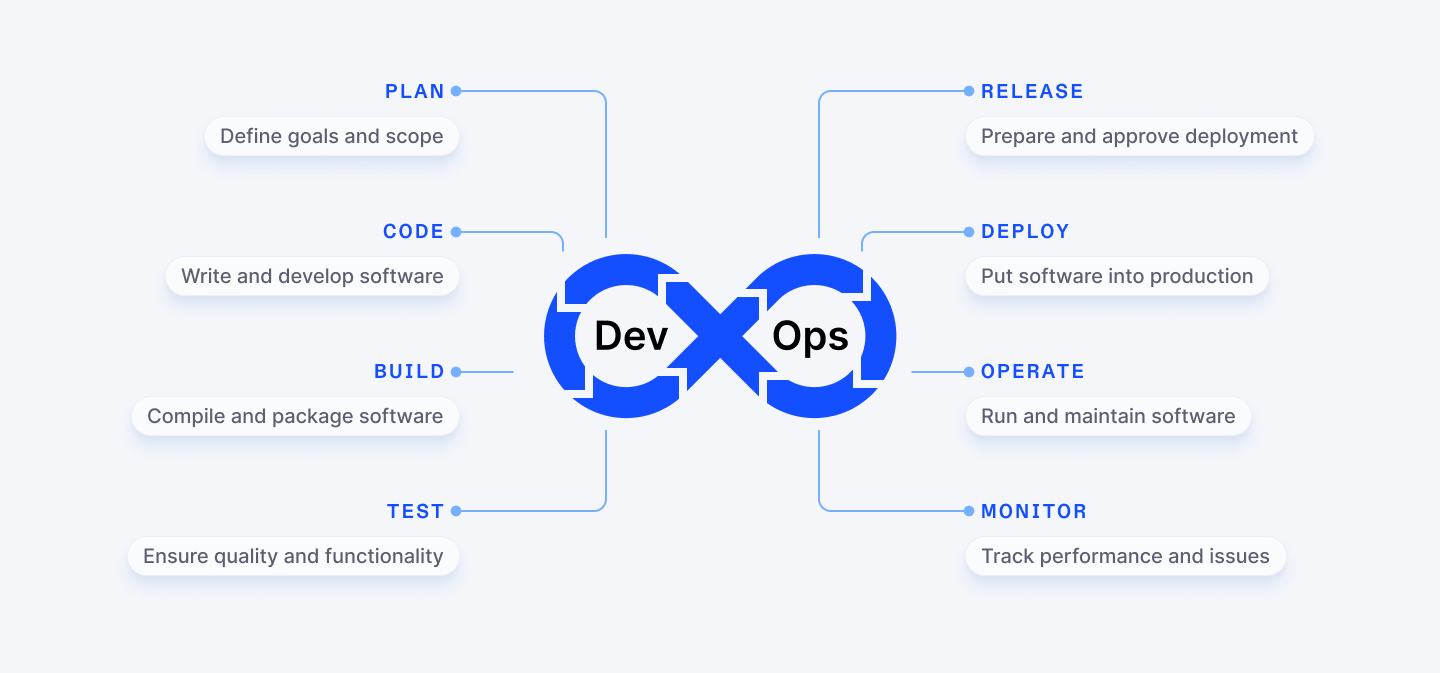
DevOps is a methodology designed to bridge the gap between software development (Dev) and IT operations (Ops). Imagine you’re building a house. The developers are the architects drawing up the plans, and the operations team are the builders bringing those plans to life. At its core, DevOps is about collaboration and automation. The goal is to make the development cycle faster, smoother, and more efficient.
Here are the most common phases in the DevOps workflow:
- Continuous Development: This is where you plan and write the code. Everything starts here.
- Continuous Integration: Developers commit their changes to the codebase frequently. This keeps everything updated.
- Continuous Testing: Automated tests check the code for issues to ensure nothing breaks as you build.
- Continuous Deployment (or Delivery): Once the code is tested and approved, it’s automatically pushed to production servers.
- Continuous Monitoring and Observability: Monitoring the software, collecting data, and spotting issues before they become problems.
- Continuous Feedback: The feedback loop kicks in. Data from software usage is sent back to the DevOps teams to improve future development.
- Continuous Operations: Automating the deployment process, making sure updates happen smoothly and without manual intervention.
Now, you might be wondering: how does this differ from Agile? While both focus on collaboration and flexibility, DevOps extends Agile by integrating automation and continuous feedback throughout the entire development lifecycle. Agile may focus more on planning and sprint cycles, while DevOps aims for a seamless flow of code from development to operations.
Also Check Out: Top 5 Programming Languages DevOps Automations
The Best DevOps Tools for End-to-End Software Development
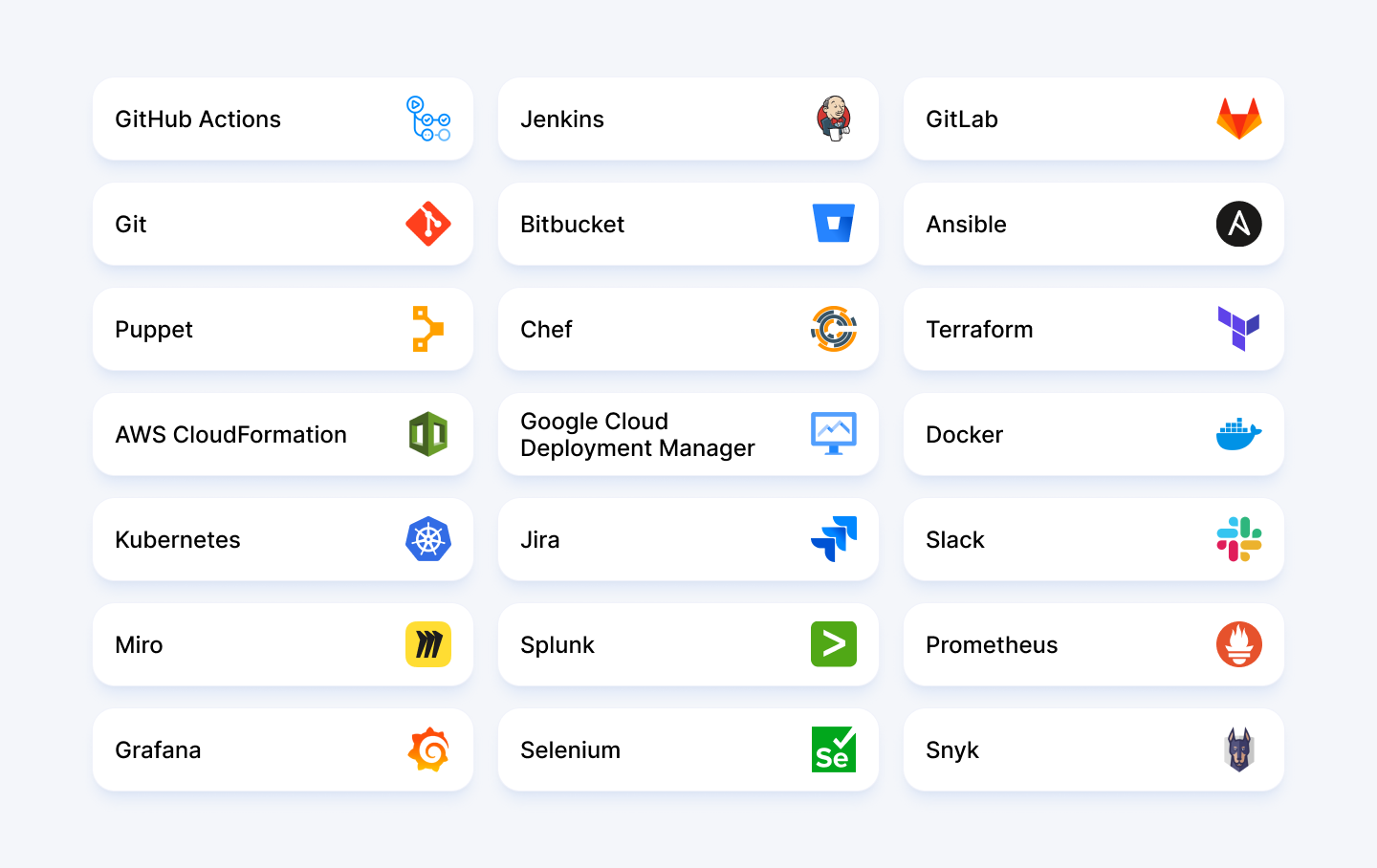
With that background in mind, here is a list of the top 21 DevOps tools today.
Continuous Integration and Continuous Delivery Tools
1. GitHub Actions
GitHub Actions is a powerful CI/CD tool integrated directly into GitHub. With native support for GitHub repositories, it simplifies automation, enabling tasks like building, testing, and deploying code all from within the platform. Want to test your code every time you push a change? GitHub Actions has got you covered. Need to deploy automatically when your tests pass? It can do that too.
Best for
- Small to large teams needing seamless CI/CD integrated with their code repository.
- Projects requiring distributed version control and easy integration with Git repositories.
- Teams looking for simplified security scanning and deployment automation.
Best Features
- Industry-standard for version control with CI/CD built right in
- Workflows defined in simple YAML files that live alongside your code
- Matrix builds that let you test across multiple platforms simultaneously
- AI-powered code suggestions with GitHub Copilot
- Massive marketplace of pre-built actions for almost any task imaginable
- Strong community support and regular updates
GitHub Pricing
Free tier for public repositories and small teams, Team plan at $4/month per user, Enterprise at $21/month per user. Most teams find the free tier surprisingly capable for their needs. For more details, visit the GitHub pricing page.
2. Jenkins
Jenkins is one of the most popular open-source automation servers used for building CI/CD pipelines. It helps automate the entire process of building, testing, and deploying software.
It's been around forever (in tech years), and, with over 1,500 plugins, there’s almost nothing it can’t do.
Best for
- Teams requiring highly customized build and deployment pipelines.
- Organizations with existing investments in Jenkins infrastructure.
- Projects needing to integrate with legacy systems or unusual tech stacks.
- Integration with version control systems like GitHub or GitLab.
Best Features
- Automated code testing, building, and deployment.
- Over 1,500 plugins for extended functionality
- Support for containerized environments like Docker and Kubernetes
- Flexible pipeline creation using Jenkinsfile
Jenkins Pricing
Completely free and open-source. Your only costs are the infrastructure to run it and the time to maintain it.
3. GitLab
Ever wished you could have your code repository, CI/CD pipeline, issue tracker, and deployment tools all in one place? That's GitLab in a nutshell. GitLab is an integrated platform that covers the entire DevOps lifecycle, from planning and building to deployment and monitoring. It allows you to set up CI/CD pipelines directly from the repository, making it easy to automate your software development tasks.
Best for
- Teams looking for a complete DevOps platform for automating end-to-end development tasks.
- Organizations wanting to reduce tool sprawl and integration headaches.
- Companies requiring advanced security scanning and compliance features.
- Projects with multiple contributors using shared repositories.
Best Features
- End-to-end DevOps platform including source code management, CI/CD, and deployment
- Built-in code quality analysis and vulnerability scanning
- Containerization support for Docker and Kubernetes
- Auto DevOps feature that automatically configures CI/CD based on your project
- Comprehensive project management with integrated issue tracking and wikis
GitLab Pricing
Free tier with core features, Premium at $19/month per user, Ultimate at $99/month per user. Each tier adds more DevOps capabilities, security features, and compliance tools. For more information, visit GitLab pricing page.
Version Control Tools
4. Git
Git is the gold standard for version control. Almost everything in modern software development is built on top of it. It allows developers to collaborate on projects by tracking and managing changes in the code, and offers several graphical user interfaces (GUIs), alongside its command-line interface (CLI). It’s a distributed version control system (VCS), which means every developer has their own local repository, making it easy to work offline and synchronize changes later.
Best for
- Teams of any size requiring robust version control
- Efficient collaboration on codebases with multiple developers
- Managing and tracking changes in code and other files
- Developers who need to work offline or in distributed environments
Best Features
- Distributed version control system that works offline
- Lightning-fast branching and merging for flexible workflows
- Integrations with GitHub, GitLab, and Bitbucket
- Robust data integrity through SHA-1 checksums
- Staging area that gives you fine-grained control over commits
Git Pricing
Git itself is free and open-source, but pricing may apply when using it with platforms like GitHub, GitLab, or Bitbucket, which offer various subscription plans.
5. Bitbucket
Bitbucket is a version control platform built on Git, designed for development teams, especially those using Atlassian’s Jira for project management. It provides built-in CI/CD tools for automating deployment workflows and is known for its strong collaboration features. Bitbucket is deeply integrated with Jira, making it a great choice for teams that use the Atlassian suite of tools.
Best for
- Teams already invested in the Atlassian ecosystem (Jira, Confluence)
- Organizations needing private repositories at an affordable price
- Complex projects with strong configuration and branching support
Best Features
- Tightly integrated with Jira for seamless issue tracking
- Modern and clean user interface that's easy to navigate
- Strong configuration tools for organizing complex projects, including branching
- Powerful code review tools with inline comments
- Built-in CI/CD with Bitbucket Pipelines
Bitbucket Pricing
Free tier for small teams (up to 5 users), Standard plan at $3/month per user, Premium at $6/month per user. The free tier includes unlimited private repositories, making it a sweet deal for small teams. Find more information here.
Configuration Management and Infrastructure as Code (IaC)
6. Ansible
Ansible is an open-source automation tool that lets you install, manage, and orchestrate both infrastructure and software with ease. Ansible uses YAML – a human-readable language – to create tasks and playbooks. Think of playbooks as recipes for your infrastructure: clear instructions that tell your systems exactly how they should be set up. And the best part? Ansible doesn't need agents installed on your target machines. It just works over SSH, making it super easy to get started.
Best for
- Automating the setup and configuration of servers and applications
- Managing configurations across multiple environments
- Deployment orchestration without complex coding
Best Features
- YAML-based playbooks anyone can understand
- Agentless architecture, simplifying configuration and management
- Extensive library of pre-built modules for integrations
- Supports both on-premises and cloud environments
- Idempotent operations (run commands multiple times without changing the result)
- Real-time feedback on task execution
Ansible Pricing
Ansible is open-source and free to use. For enterprise features, Ansible Automation Platform offers subscription-based pricing starting at $5,000 per year for 100 nodes.
7. Puppet
Puppet is an open-source configuration management tool used to automate the deployment, configuration, and management of software and infrastructure. It defines the desired state of your systems and makes sure they stay that way. If something drifts from your specifications, Puppet pulls it back in line. By managing infrastructure as code, it allows organizations to scale efficiently, ensuring consistency across servers, containers, and cloud instances.
Best for
- Consistency and scalability across complex infrastructures
- Automating configuration management and enforcement of security policies
- Supporting compliance and auditing of infrastructure configurations
Best Features
- Model-driven approach to infrastructure management
- Powerful reporting and compliance tools
- Cross-platform support (Windows, Linux, cloud providers)
- Robust community and extensive module forge
- Self-healing infrastructure that corrects configuration drift
Puppet Pricing
Puppet offers a free open-source version with limited features. Puppet Enterprise pricing starts at $120 per node per year, with volume discounts available.
8. Chef
Chef is a powerful automation platform that helps automate infrastructure management as code, enabling consistency and scalability across the environment. Chef allows the automation of tasks such as server provisioning, configuration, and maintenance. It integrates well with cloud providers, container technologies, and other DevOps tools, making it adaptable for complex infrastructures.
Best for
- Complex application deployments
- Automating the configuration and management of infrastructure
- Large-scale, dynamic environments that require frequent changes
Best Features
- Test-driven infrastructure development
- Highly customizable with Ruby-based DSL
- Comprehensive testing framework (InSpec)
- Excellent integration with cloud providers like AWS, Azure, and Google Cloud
- Robust community support and extensive cookbook library
Chef Pricing
Chef offers a free open-source version. Commercial offerings start at $72 per node per year, with enterprise-wide pricing available for larger deployments.
9. Terraform
Terraform is a leading infrastructure-as-code (IaC) tool that enables organizations to define, provision, and manage infrastructure across multiple cloud providers. It brings consistency, automation, and version control to infrastructure operations, strengthening DevOps workflows and ensuring predictable infrastructure deployments.
Best for
- Multi-cloud infrastructure deployments
- Infrastructure provisioning at scale
- Version-controlled infrastructure management
Best Features
- Provider-agnostic approach to infrastructure
- State management for tracking and rolling back infrastructure changes
- Modular and reusable configurations for consistent deployments
- Extensive community of providers and modules to integrate with other tools
- Plan-and-apply workflow for safe, predictable infrastructure updates
- Dependency management for proper resource creation order
Terraform Pricing
Terraform offers a free open-source version. HashiCorp also offers Terraform Cloud, which has paid plans starting at $20 per user per month for improved features like collaboration and security controls. Enterprise pricing is available for larger organizations.
10. AWS CloudFormation
AWS CloudFormation is a powerful service for managing infrastructure as code (IaC) on the Amazon Web Services (AWS) platform. It allows DevOps teams to model, provision, and automate the deployment of a wide range of AWS resources.
Think of CloudFormation as your infrastructure architect. You tell it what you want – EC2 instances, S3 buckets, databases, security groups – and it builds everything for you in the right order, with the right connections. No more clicking through the AWS console or writing custom scripts. Just define your infrastructure once, and deploy it consistently every time.
Best for
- Standardizing AWS environments across development, testing, and production
- Managing complex, interdependent AWS resources as a single unit
- Implementing infrastructure version control and change management
- Enabling CI/CD pipelines by integrating with AWS DevOps tools
Best Features
- Template-based infrastructure definition in JSON or YAML
- Automatic dependency management (resources created in the right order)
- Change sets to preview infrastructure modifications before applying
- Drift detection to identify manual changes to your infrastructure
- Stack updates that minimize disruption to running resources
AWS CloudFormation Pricing
CloudFormation itself costs nothing. You pay only for the AWS resources that CloudFormation provisions and manages, such as EC2 instances, RDS databases, and other services. No hidden fees, no extra charges.
11. Google Cloud Deployment Manager
Google Cloud Deployment Manager is a service that enables DevOps teams to automate the deployment, configuration, and management of Google Cloud resources. Need ten virtual machines, a few databases, and some storage buckets? Just describe them in YAML, Python, or Jinja2, and the Deployment Manager handles the rest. No more tedious clicking through the console or writing lengthy scripts.
Best for
- Building consistent environments across development, testing, and production in GCP
- Managing complex Google Cloud infrastructures with interdependent resources
- Implementing infrastructure as code practices within Google-centric organizations
Best Features
- Flexible templating with YAML, Python, and Jinja2 support
- Preview mode to check changes before deployment
- Automatic dependency resolution between resources
- Seamless integration with other Google Cloud services
- Version control for your infrastructure configurations
Google Cloud Deployment Manager Pricing
Google Cloud Deployment Manager itself is free to use. However, like AWS CloudFormation, users incur charges for the resources deployed using the service (e.g., virtual machines, storage, and network usage). The service allows efficient infrastructure management with no additional fees beyond the cost of the underlying Google Cloud resources.
Containerization and Orchestration Tools
12. Docker
Docker is a platform for containerizing applications. A container is a lightweight, isolated environment that lets software run the same way on any system. It packages everything the software needs to work, so it doesn’t matter what operating system or programming language was used. This eliminates the need for heavy virtual machines, making it faster and more efficient. Docker is particularly valuable for continuous integration, testing, and deployment within modern DevOps pipelines.
Best for
- Building, testing, and running applications in isolated containers
- Automating CI/CD pipelines and deployment
- Managing software dependencies across multiple environments
- Microservices architecture implementation and management
Best Features
- Lightweight containerization that starts in seconds
- Dockerfile for simple, repeatable container builds
- Extensive image library on Docker Hub for quick starts
- Multi-platform support (Windows, Linux, macOS)
- Docker Compose for multi-container application management
- Large library of pre-configured containers for fast development
- Integration with Kubernetes and other DevOps tools
Docker Pricing
Docker offers tiered pricing to fit different needs:
- Personal: Free for individual developers
- Pro: $9/month with advanced features for single developers
- Team: $15/month per user for collaborative development
- Business: $24/month per user with enterprise-grade security and support
You can start using Docker today without spending a dime. The free tier gives you everything you need to begin containerizing your applications.
13. Kubernetes
Kubernetes is an open-source platform designed to automate the deployment, scaling, and management of containerized applications. As a container orchestration tool, it facilitates managing large-scale, dynamic applications by handling tasks like load balancing, automated scaling, and resource management. Need to deploy hundreds of containers across multiple servers? Want them to automatically recover if something crashes? Need to scale up during peak hours and down during quiet times? Kubernetes handles all of this for you. Also it is particularly useful in environments that utilize microservices and cloud-native architectures.
Best for
- Running large-scale containerized applications in production
- Building resilient, self-healing systems that recover from failures
- Managing complex microservices architectures across multiple environments
Best Features
- Automated scaling based on resource usage or custom metrics
- Self-healing capabilities that restart failed containers
- Rolling updates and rollbacks for minimal downtime
- Service discovery and load balancing built-in
- Declarative configuration that defines your desired state
Kubernetes Pricing
Kubernetes itself is free and open-source! You only pay for the infrastructure it runs on.
Project Management, Collaboration, and Communication Tools
14. Jira
Jira is your go-to tool when it comes to project management and issue tracking. Think of it as the central hub where everything about your project – from bugs to development tasks – is neatly organized. Whether you're working on complex software development or tracking day-to-day tasks, Jira is built for teams who thrive on agility. It also integrates seamlessly with the Atlassian DevOps suite, making it perfect for managing sprints and collaborating with your team to stay on top of things.
Best for
- Managing tasks and progress during development
- Tracking and automating issue management
- Supporting agile methodologies like Scrum and Kanban
Best Features
- Built for agile with customizable workflows
- Powerful reporting to visualize progress and identify bottlenecks
- Robust issue tracking with custom fields and automation
- Integrates smoothly with other DevOps tools
Jira Pricing
- Free: $0 for up to 10 users (perfect for small teams)
- Standard: $7.53/month per user with more features
- Premium: $13.53/month per user for growing teams with advanced needs
- Enterprise: Contact for pricing (for large organizations with complex requirements)
Visit their pricing page for more information.
15. Slack
Have you ever wished all your team communications could happen in one place instead of being scattered across emails, texts, and different apps? That's exactly what Slack does. It’s like the digital water cooler for your team – a place to chat, share files, and keep everyone on the same page.
Working on a new feature? Create a channel for it. Need to chat with the marketing team? They've got their own channel. Want to share cat memes? There's probably a channel for that too (and if not, you can create one in seconds).
Its real-time messaging capabilities, channel organization, video calls, and integration with numerous apps simplify workflows and strengthen team productivity. Forget about the endless email chains; Slack allows you to get things done faster, whether you’re debugging an issue, holding a quick meeting, or collaborating on a big project.
Best for
- Real-time team collaboration across departments and locations
- Creating a searchable knowledge base of conversations and decisions
- Integrating notifications from your entire DevOps toolchain
- Reducing email overload and boosting team productivity
Best Features
- Channel-based messaging that keeps conversations organized
- Powerful search that finds messages and files instantly
- Huddles for quick audio/video calls without switching apps
- Integrations with 2,400+ tools and services
- Thread replies that keep discussions focused without cluttering channels
- Clips for asynchronous video updates that work across time zones
Slack Pricing
Slack offers tiered pricing to meet different team needs:
- Free: $0 with core features (perfect for small teams)
- Pro: $7.25/month per user with extended features and history
- Business+: $12.50/month per user with advanced security and compliance
- Enterprise Grid: Contact for pricing (for large-scale deployments)
16. Miro
Miro is like a digital whiteboard for your team to brainstorm, organize, and collaborate visually. Imagine you’re planning a project or discussing feedback. With Miro, you can do all of this on a giant virtual canvas, making it easy to see the big picture. It’s a perfect tool to bring your ideas to life with all your team members, whether they’re in the same room or across the globe. With templates, sticky notes, and even video conferencing, Miro makes team collaboration effortless.
Best for
- Brainstorming and organizing tasks during development
- Visualizing project workflows and plans
- Presenting and discussing results with your team
Best Features
- Infinite canvas for limitless brainstorming
- Supports a wide range of file types and media
- Built-in video conferencing while collaborating
- Interactive templates for agile workflows, mind maps, and Kanban boards
- Integrates with your favorite DevOps tools
Miro Pricing
- Free: $0
- Starter: $8/month per user
- Business: $16/month per user
- Enterprise: Contact for pricing
Free tier available; paid plans start at $8/month per user.
Monitoring and Logging Tools
17. Splunk
Using Splunk, you can keep track of all that machine generated data—everything from server logs, to application metrics, to security events—and make sense of it all. It indexes everything in real-time, making it searchable, analyzable, and visualizable. With Splunk, you can spot patterns, identify issues, and uncover insights that would otherwise remain buried in your data.
What makes Splunk special? It's designed to handle massive volumes of data from virtually any source. Whether you're monitoring application performance, investigating security incidents, or tracking business metrics, Splunk gives you a single pane of glass to see what's happening across your entire infrastructure.
Best for
- Analyzing log data across large infrastructures
- Improving security with robust monitoring
- Making data-driven decisions with powerful dashboards
- Troubleshooting complex system and application issues
Best Features
- Powerful search language for analyzing data
- Real-time alerting when specified conditions occur
- Visual dashboards that make complex data understandable
- Machine learning capabilities for predictive analytics
- Extensive app ecosystem for specialized use cases
Splunk Pricing
Splunk offers flexible pricing based on your data usage, with options for both cloud and on-prem solutions. It can get pricey depending on the scale. Get an estimate based on the solutions you use.
18. Prometheus
Prometheus is an open-source tool that excels in monitoring and alerting, especially when your app infrastructure gets complex—think microservices and containers. It collects metrics—numbers that tell you how your systems are performing—stores them, and lets you query and visualize them. CPU usage spiking? Memory leaking? API requests slowing down? Prometheus sees it all.
What sets Prometheus apart is its pull-based approach. Instead of waiting for your systems to push data to it, Prometheus actively scrapes metrics at regular intervals. This makes it incredibly reliable. Even if parts of your system go down, Prometheus keeps collecting data from everything it can still reach.
Best for
- Monitoring cloud-native environments and microservices
- Creating detailed alerting rules for proactive issue detection
- Collecting and querying data for deep performance analysis
Best Features
- Powerful query language (PromQL) for flexible data analysis
- Multi-dimensional data model with key-value labels
- Built-in alerting system that integrates with various notification channels
- Service discovery for dynamic environments
- Time-series database optimized for metrics storage
Prometheus Pricing
Prometheus is completely free and open-source! There are no licensing fees or subscription costs. You only pay for the infrastructure to run it.
19. Grafana
Now, picture this: You’ve got tons of data, but it’s just sitting there, hard to read and understand. Grafana steps in like a well-organized library, turning all that data into interactive dashboards that make complex information easy to grasp. It pulls data from various sources like Prometheus or Elasticsearch and lets you visualize trends, monitor system health, and make decisions faster.
Best for
- Creating unified dashboards across multiple data sources
- Real-time visualization of system performance
- Building shareable views for both technical and non-technical stakeholders
Best Features
- Stunning, customizable visualizations (graphs, heatmaps, tables, etc.)
- Support for over 100 different data sources
- Template variables for dynamic, reusable dashboards
- Built-in alerting system with multiple notification channels
- Powerful panel linking for drill-down exploration
Grafana Pricing
Grafana offers three main pricing tiers:
- Free:
- Ideal for individuals or small teams.
- Includes core Grafana features, up to 3 users, and 10k metrics.
- Pro ($8 per user/month):
- Designed for growing teams needing advanced capabilities.
- Features include unlimited users, advanced dashboards, and enhanced support options.
- Enterprise (Custom pricing):
- Tailored for large organizations with complex needs.
- Offers enterprise-grade security, scalability, and premium support.
For more details, visit Grafana's pricing page.
Testing and Automation Tools
20. Selenium
Ever wished you could hit a button and have someone test your entire web application for you? That’s exactly what Selenium does—except it’s not a person, it’s an open-source automation framework designed to mimic real user interactions in web browsers. It can log in, add items to a cart, fill out forms, and verify that everything works as expected. And it can do all this in multiple browsers, operating systems, and screen sizes.
Best for
- Automating repetitive web testing tasks across multiple browsers
- Creating end-to-end tests that simulate real user journeys
- Validating web application functionality after code changes
- Speeding up QA workflows with continuous testing
Best Features
- Support for all major browsers and operating systems (Chrome, Safari, Edge, etc.)
- Powerful WebDriver API for realistic browser automation
- Run multiple tests at once to save time
- Supports multiple programming languages like Python, Java, C#, and JavaScript
- Integration with testing frameworks like JUnit and TestNG and DevOps tools like Jenkins
Selenium Pricing
Selenium is completely free and open-source! There are no licensing fees or subscription costs. You just need to invest in the infrastructure to run your tests.
Security and Compliance Tools
21. Snyk
Today's applications rely on hundreds of open-source packages, each potentially bringing security risks to your doorstep. Snyk is a security tool designed to find and fix vulnerabilities in project dependencies before they become bigger problems. Instead of treating security as an afterthought, Snyk brings it right into your IDE, your repositories, and your CI/CD pipeline.
What makes Snyk different from traditional security tools is its developer-first approach. Rather than generating reports that nobody reads, Snyk provides actionable fixes and prioritizes issues based on their actual impact on your code. It doesn't just say "you have a problem." It tells you exactly how to solve it.
Best for
- Finding vulnerabilities in open-source dependencies
- Automating security patches within the development lifecycle
- Maintaining the integrity of your software supply chain
Best Features
- Real-time vulnerability detection in your code editor
- Integration with DevOps tools like GitHub, GitLab, and Bitbucket
- Automated fix recommendations and pull requests
- Container image scanning for Docker security
- Infrastructure as Code scanning for cloud security risks
- Comprehensive vulnerability database with expert analysis
Snyk Pricing
Snyk offers several pricing tiers:
- Free: For individual developers and small projects. Includes basic vulnerability scanning for open-source dependencies and container images.
- Team: Starting around $25/month per developer. Designed for small to medium-sized teams. Provides advanced features like integration with CI/CD pipelines, detailed reporting, and expanded scanning capabilities.
- Enterprise: Suitable for large-scale organizations with complex needs. Offers premium features like unlimited scanning, dedicated customer success managers, and advanced security controls.
For further details, visit Snyk's pricing page.
22. Aikido
Aikido brings several types of security scanning into one platform, so teams don't have to stitch together separate tools for code, dependencies, containers, and cloud. It runs in your pipeline and pulls requests, and its reachability analysis checks whether a flagged vulnerability is actually in a code path your app uses, which filters out noise and cuts false positives. The result is a developer-first approach: fewer reports nobody reads, more fixes that matter.
Best for
- Teams wanting code, dependency, container, and cloud scanning in one place
- Cutting false positives so developers focus on reachable, real risks
- Adding security scanning to CI/CD and pull-request workflows
Best Features
- Unified scanning across open-source dependencies (SCA), code (SAST), containers, and cloud (CSPM)
- Reachability analysis to prioritize vulnerabilities that are actually exploitable
- Autofix that opens ready-to-merge pull requests for many issues
- Integrations with GitHub, GitLab, and Bitbucket
- AI-powered pentesting and DAST for application testing
Aikido Pricing
Aikido offers a free tier for small teams and individual projects, with paid plans that add more scanning, integrations, and controls. For current details, visit Aikido's pricing page.
Learn More: Cloud Engineer vs DevOps Engineer | What’s the Difference?
How to Choose the Best DevOps Tools for Your Team
DevOps is all about collaboration, speed, and efficiency, and a well-built toolchain is at the heart of that. But with so many tools out there, how do you know which ones are right for your team? Here's what to look for:
1. Compatibility and Integration
Look for tools with robust APIs and pre-built integrations with your existing stack. When Jenkins connects with Docker, Docker syncs with Kubernetes, and Kubernetes feeds into Prometheus—that’s when everything just clicks.
2. Communication and Collaboration
The best code in the world is useless if teams can't collaborate effectively. Your tools should break down silos. This is why tools like Slack and Jira have become DevOps staples. They create shared spaces where developers, operations, and business teams can align.
3. Automation for Integration and Deployment (CI/CD)
Automation is the heart of DevOps, and CI/CD is its pulse. Tools that automate your integration and deployment processes (like Jenkins, GitLab, or CircleCI) allow for faster, more reliable code delivery. This means fewer manual interventions, fewer mistakes, and more time spent developing rather than testing and deploying.
4. Logging and Observability
When something breaks at 3 AM, can you quickly figure out what happened? Good DevOps tools leave breadcrumbs—detailed logs, metrics, and traces that help you understand system behavior.
5. Adaptability and Flexibility
No two teams are the same, and neither are their workflows. The tools you pick should adapt to your process, not force you to change the way you work. A great DevOps tool should be customizable to fit how you operate, whether you’re working on a microservices architecture or a monolithic app.
Remember, tools are just that—tools. They're means to an end, not the end itself. The best DevOps toolchain is the one that helps your team deliver better software faster, with fewer headaches along the way.
Final Thoughts
Let's be real. Tools don't make DevOps work—you do. The perfect DevOps stack? It's the one that solves your problems. Nothing more, nothing less.
Think about where your team gets stuck. Deployment bottlenecks? Try Docker and Kubernetes. Security nightmares? Snyk might be your new best friend. Can't figure out why your servers keep crashing? Prometheus and Grafana will shine a light on those dark corners. Don't chase every shiny new tool. Pick what matters. Mix and match. Break things (in staging, please). Learn what works for you.
Remember when you spent three days setting up that tool everyone was raving about, only to abandon it a week later? Yeah, don't do that again.
Start small. Fix what hurts most. Add tools that talk to each other. And make sure your team actually wants to use them.
For DevOps Engineers:
Ready to level up your DevOps skills? Join the Index.dev talent network today and get matched with global companies seeking your expertise for remote opportunities.
For Clients:
Need DevOps experts for your team? Access the top 5% of vetted developers through Index.dev's talent network with 48-hour matching and a 30-day free trial.


