
Imagine compressing 4,500 years of developer work into a single year. That is what Andy Jassy shared on LinkedIn when describing how Amazon used AI to accelerate code modernization.
Today, 76% of developers are already weaving AI into their workflows, and that number is climbing fast. It raises the bar for what one great developer can deliver. The mundane work shrinks. Boilerplate, refactoring, test scaffolding, documentation drafts. The cognitive space for architecture, product thinking, and real problem solving expands.
The latest State of Application Development report puts it plainly: 31% of organizations now treat AI-assisted development as a core part of how they build software, not an experiment, not a pilot, a practice.
And the shift is happening with or without you.
This article explores how AI-assisted development is reshaping software delivery, helping teams work faster, smarter, and with higher quality.
You’ll get practical insights of what AI-assisted development is, how it differs from traditional methods, the tools and technologies leading the way, and the benefits—and limitations—of integrating AI into your workflows.
Accelerate your software delivery with Codemotion (now part of Index.dev). AI handles the speed, senior engineers ensure quality.
What Is AI-Assisted Development (AIAD)
Let’s keep this simple. AI assisted development means you are no longer building software alone. You are working alongside machine learning models trained on millions of anonymized code patterns. These systems can suggest architecture approaches, generate code, write tests, summarize documentation, spot potential bugs, and even propose design alternatives. Not because they “understand” your business like you do, but because they have seen patterns at a scale no human ever could.
At its core, AI assisted development integrates large language models into every stage of the software lifecycle. Business analysis. System design. Coding. Testing. Deployment. Maintenance. Every phase where a developer used to stop and grind through a repetitive or complex task becomes a place where AI can step in and keep things moving.
You describe what you want. The model proposes structure. You refine. It expands. You review. It improves. Done well, this becomes a tight feedback loop between human judgment and machine acceleration.
“AI-assisted development is about being bold enough to let the machine handle the HOW so your experts can focus on the WHY.” – Mike Sokirka, CEO of Index.dev.
That is why 91% of engineering organizations have adopted AI coding assistants. But here is the catch. Adoption does not equal impact. Some teams see modest productivity gains. Others report dramatic cycle time reduction and better developer satisfaction. The difference is rarely the tool. It is how you enable your people to use it.
AI Assisted vs Traditional Development
Traditional development was already getting smarter before AI arrived. DevOps tooling automated integrations and deployments. Static code analyzers flagged compliance issues. Regression tests ran on their own. But here's what all of that tooling had in common: it followed rules. You defined the logic, it executed it. Same input, same output.
And most of the real thinking sat on your engineers. Understanding legacy systems. Designing new features. Refactoring messy code. Writing documentation no one wants to write.
AI assisted development changes that dynamic. Instead of following predetermined rules, AI tools learn from patterns. Trained on vast amounts of existing software engineering data, large language models understand context in a way no rule-based system ever could. That's what makes tools like GitHub Copilot capable of suggesting entire functions as your developer types, or why systems like Claude and Amazon Q can look at a complex codebase, understand what it's trying to do, and make meaningful changes based on nothing more than a plain-language instruction.
So what's the real difference? Traditional tools are deterministic. Predictable. Bounded. AI tools are probabilistic. The output can vary based on training data, prompt quality, and context. That's a feature and a risk at the same time. The quality of what you get out depends heavily on the quality of what you put in. Garbage prompts produce garbage code. Vague instructions produce vague results.
Here’s a head-to-head comparison table:
Traditional Development | AI-Assisted Development | |
| How it works | Rule-based, deterministic | Pattern-based, probabilistic |
| Output | Same input always produces same output | Output varies based on context, training data, and prompt quality |
| Automation | Handles repetitive tasks: CI/CD, testing, compliance checks | Handles cognitive tasks: code generation, refactoring, documentation |
| Code suggestions | Autocomplete based on syntax rules | Suggests entire functions based on context and intent |
| Human input required | Defining the rules and logic upfront | Crafting clear, high-quality prompts |
| Strengths | Predictable, consistent, auditable | Flexible, context-aware, adaptive |
| Risks | Rigid, can't handle what it wasn't programmed for | Output quality depends on prompt quality and training data |
| Legacy system handling | Manual, high-risk effort | Can analyze and suggest changes from plain-language instructions |
| Documentation | Manual, often skipped under time pressure | AI can generate and maintain automatically |
| Learning over time | Doesn't learn, rules stay static | Improves with better inputs and evolving models |
The Real Value of AI-Assisted Development
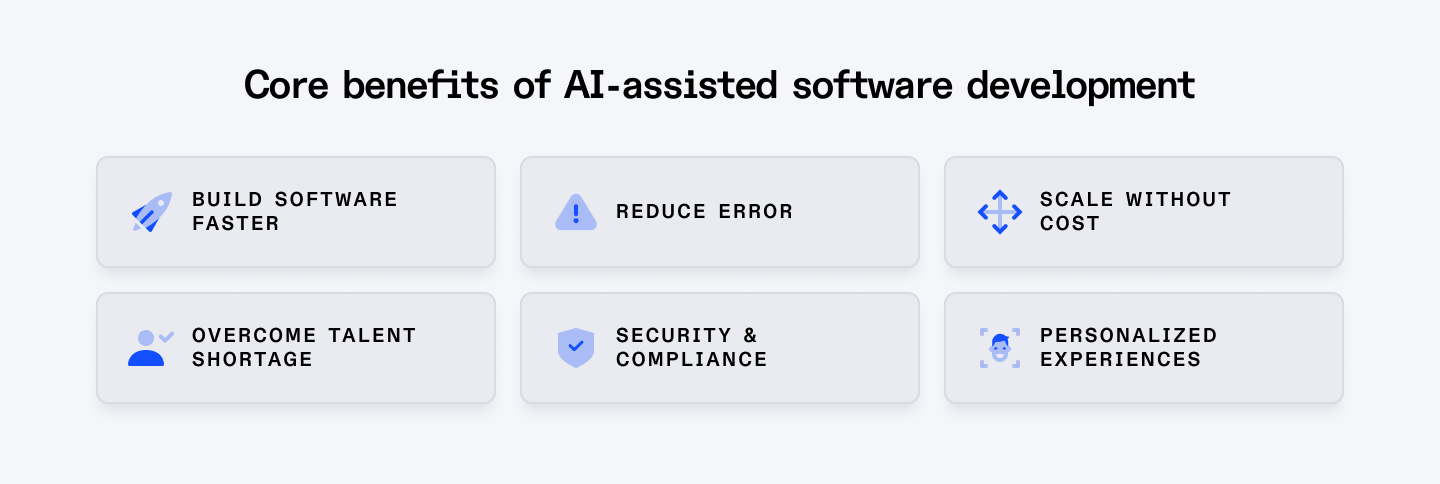
Many organizations already use AI for code suggestions, bug detection, or quick fixes. That is a start. But the opportunity space for value creation is much larger than that.
To see it clearly, you need to look honestly at what software development costs today. Software development is still heavy. Human heavy. Process heavy. Coordination heavy. Consider the challenges your teams are up against right now:
- Cross-disciplinary collaboration. Strategy, Product, Design, Engineering, and Data all need to move in sync. In theory, this is agile and iterative. In practice, complexity, scale, and endless handoffs slow everything down. Context gets diluted. Decisions take longer than they should.
- Cognitive overload. Your architects and senior engineers are expected to understand business goals, distributed systems, security, performance, compliance, and new frameworks all at once. They navigate dependencies, concurrency, integrations, and legacy constraints daily. That mental load is not sustainable. It leads to shortcuts and mistakes.
- Artifact overload. The SDLC produces a flood of documents, tickets, diagrams, test cases, scripts, and reports. Each artifact serves a purpose. Together, they create drag. Managing them becomes a job in itself.
- Quality gaps. Toolchains and frameworks help enforce standards, but they do not close every gap. Architecture drift, inconsistent patterns, and duplicated logic still slip through. Much of the alignment work remains manual.
- Time pressure. Deadlines compress design and testing. Review cycles get shortened. Technical debt quietly accumulates. You ship faster, but you also inherit risk.
- Legacy systems. Critical systems built years ago still power the business. They are fragile, poorly documented, and risky to change. Modernizing them is slow and expensive.
This is the environment AI steps into. And when you see it that way, the benefits stop being abstract. At the broadest level, AI-assisted development creates value in three powerful ways.
First, it democratizes development.
With over a million open developer roles in the US alone, the talent gap is a real constraint on what organizations can build. AI tools lower the barrier to entry, enabling people without deep coding expertise to contribute meaningfully, while simultaneously making experienced developers more productive. You get more output from the talent you have and you expand who can contribute in the first place.
Second, it raises the quality floor across the board.
AI tools don't just help you build faster. They help you build better. They identify best practices, catch security vulnerabilities early, flag potential bugs before they reach production, and promote consistent, maintainable code across your team. The result is software that's more resilient, more performant, and less likely to become tomorrow's legacy problem.
Third, it removes technical friction at every layer of the stack.
AI tools are language agnostic. Whether your team works in Python, Java, JavaScript, Go, or something more niche, AI adapts. It provides intelligent support regardless of the stack. Some models can even translate logic between languages, which matters more than people realize when you're working across diverse teams or modernizing systems built in languages your current developers didn't grow up with.
Documentation, that perennial casualty of every tight deadline, gets handled too. AI can auto-generate comments, explain functions in plain English, and keep documentation in sync with the codebase as it evolves. For globally distributed teams, AI tools that handle language itself like an audio translator extend that same accessibility to spoken communication, making onboarding smoother across language barriers.
It supports smarter code search, so engineers find what they need without digging through repositories for an hour. It assists with performance profiling, flagging bottlenecks that would otherwise surface only under production load. And it brings consistency to code reviews, catching patterns that human reviewers miss when they're moving fast.
Put all three of these together and you're not just compounding the value of every developer on your team. You're reducing the risk that comes with scale, complexity, and speed, while building the kind of technical foundation that doesn't fall apart six months after launch.
Tools and Technologies
AI coding tools are becoming part of the core stack. Tools like GitHub Copilot, Amazon Q Developer, Google Gemini Code Assist and ChatGPT use large language models trained on vast codebases to generate working code from natural language or partial inputs.
You describe intent. The model generates structure. Sometimes entire functions. Sometimes test suites. Sometimes refactoring suggestions across multiple files.
Here's a quick map of where the major players sit today:
- GitHub Copilot remains the most widely adopted. Built on OpenAI's Codex and trained on vast public code repositories, it delivers real-time suggestions and refactoring support directly inside the developer's editor. It's where most teams start.
- Claude goes beyond line-by-line assistance. It's designed for understanding complex codebases and handling sophisticated, multi-step tasks from high-level instructions.
- Amazon Q Developer (formerly CodeWhisperer) is purpose-built for cloud-native work. If your team lives in AWS, this is a natural fit with tight service integrations and security-aware recommendations.
- Google Gemini Code Assist brings Google's Gemini LLMs into the development workflow, handling both code generation and conversational prompts for teams embedded in the Google Cloud ecosystem.
- Tabnine takes a different angle, training on open-source code and offering stronger privacy controls. It's a popular choice for teams with stricter data governance requirements.
- Replit Ghostwriter runs entirely in the browser, making it accessible for rapid prototyping and teams that don't want to manage local environments.
The adoption is shifting too
Most developers today experiment with LLMs like ChatGPT for quick answers or snippets. But when it comes to long term workflow integration, embedded assistants such as GitHub Copilot tend to dominate daily usage. A few challengers like Codeium and Claude continue to grow their base, but the pattern is obvious.
The real question for your team isn't which tool is most popular. It's which tool fits your stack, your security requirements, and the way your developers actually work. The best AI tool is the one your team uses consistently and well.
→ Now see which AI coding agents actually hold up in practice. Read: 5 best AI agents for coding in 2026
How Does AI-Assisted Development Help Developers
The AI presence shows up across three distinct ways throughout the software development lifecycle.
1. Automation
Teams using AI for automation are seeing 20% to 50% productivity gains and up to 60% shorter release cycles.
Every developer has work they'd rather not be doing. Repetitive tasks. Boilerplate code. Running the same tests for the hundredth time. AI takes that off their plate. Similar exmaple would be marketing teams saving time using social media automation tools and analytics platforms.
ML models trained on millions of code patterns suggest the next best step, anticipate what comes next in a logic flow, and when something breaks, they tell your developer exactly where to look and why. That feedback loop alone dramatically shortens debugging cycles.
The downstream effect matters for your whole team. Senior developers get their attention back for the work that requires real judgment. Junior developers get a constant, patient teacher embedded in their workflow. Both get more done.
2. Validation
Speed without quality is just expensive chaos. This is where AI earns its keep on the quality side.
AI-powered discovery tools scan application dependencies, identify where components are assembled incorrectly, flag duplicate code, and enforce best practices automatically. The violations that used to slip through code reviews or surface in production get caught earlier, when they're cheapest to fix.
3. Guidance
Every developer hits a wall. The question is how long they stay there. AI shortens that time significantly. Contextual search pulls up the exact resources relevant to what a developer is working on without them having to leave their environment and go down a search engine rabbit hole. Next-step suggestions walk them through unfamiliar logic flows. It's the difference between a developer spending 45 minutes searching for an answer and getting back on track in five.
While the impact is massive, the 2025 Stack Overflow survey revealed a growing trust paradox. While 80% of developers use these tools, trust in their accuracy has dipped to 29%. Why? Because 45% of developers are frustrated by "almost right" code that requires meticulous debugging.
Don't let your team become ‘passive consumers’of AI. They must remain the orchestrators. AI provides the draft; the human provides the judgment.
The Everyday Applications
According to the recent survey from Stack Overflow, the top three ways developers use AI today are simple:
- Writing code
- Searching for answers
- Debugging
At the same time, 38% of developers say code assistants are inaccurate at least half the time. That is a serious signal. Tools like ChatGPT, GitHub Copilot and Claude dominate usage, but accuracy and oversight still matter.
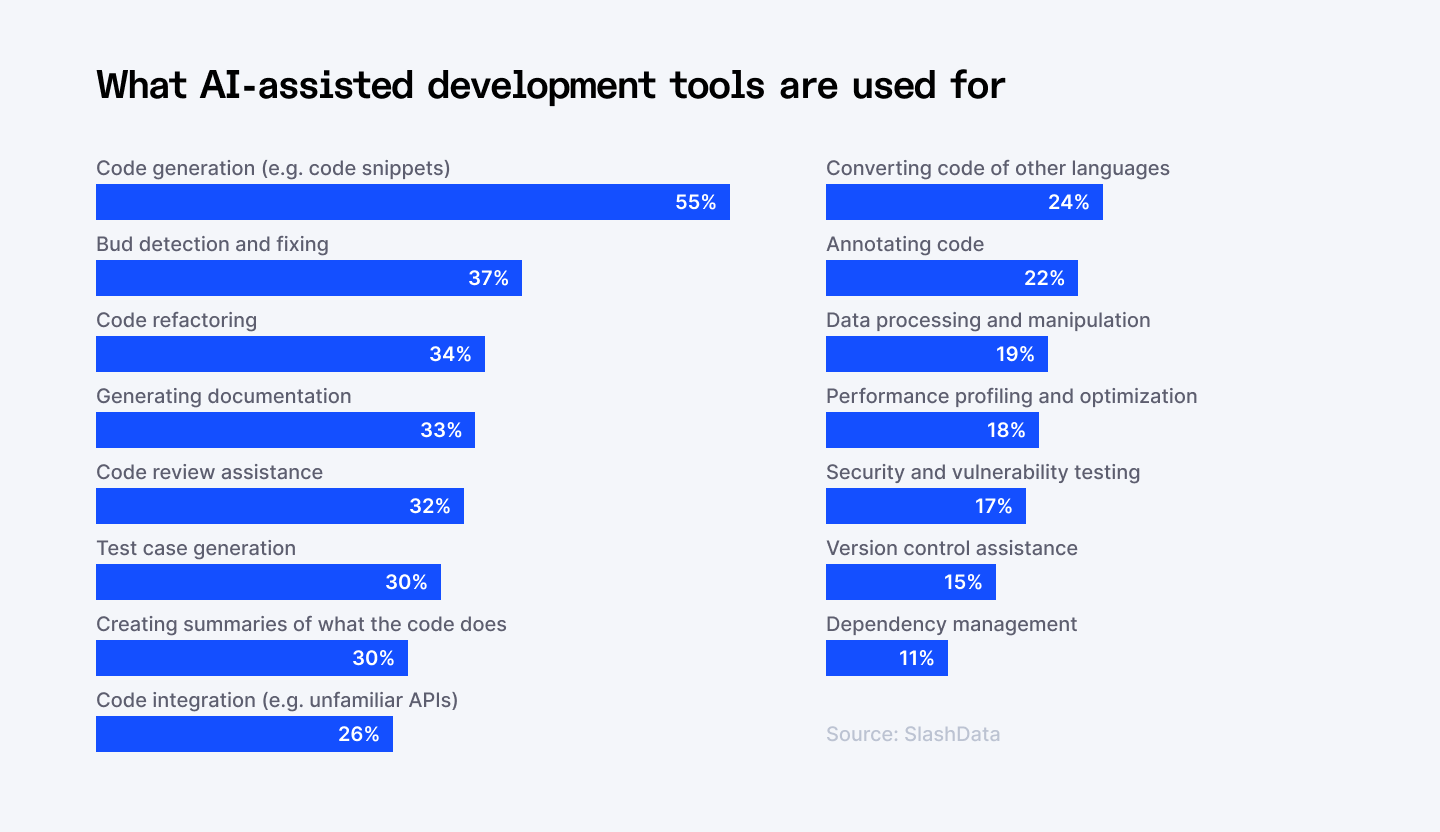
AI is also making a tangible difference in the following core areas:
- Automated code analysis scans source code continuously for vulnerabilities, bugs, and errors. What used to take hours of manual review now happens in the background, giving developers faster feedback and freeing senior engineers from hunting through code line by line.
- Automated testing frameworks let teams run tests more frequently and catch bugs earlier. Earlier in the cycle means cheaper to fix. It also means less of that sinking feeling when something breaks in production.
- Predictive analytics helps product and engineering teams get ahead of what customers and markets need, so you're building the right things, not just building things fast.
- Natural language processing changes how developers interact with their own applications and how end users interact with your products. From smarter chatbots to more intuitive interfaces, NLP is where AI touches your customer experience most directly.
- Computer vision opens up development possibilities that simply didn't exist at accessible cost or scale before, from facial recognition to object detection to the underlying infrastructure of autonomous systems.
- Automated machine learning accelerates model development significantly, compressing timelines that used to stretch for months and making accurate ML accessible to teams without deep data science expertise.
Beyond the headline use cases, research tracking self-reported developer time savings points to high-value activities where AI consistently delivers an hour or more back per week: stack trace analysis, refactoring existing code, mid-loop code generation, test case generation, learning new techniques, complex query writing, code documentation, brainstorming and planning, initial feature scaffolding, and code explanation.
→ AI-assisted development is just the beginning. See how AI agents are taking it even further. Read: AI agent use cases in software development
Incorporating AI Into Your Development
The biggest mistake teams make with AI tools is going too big too fast. They roll out a tool across the entire engineering org, expectations are sky-high, and when the results are messy or inconsistent, the whole initiative loses momentum.
Start Experimenting, But Start Smart
Start with a specific task, a single language, a controlled environment. Give yourself room to understand how the AI interprets your instructions, where it excels, and where it needs human correction. That learning phase is the foundation everything else is built on.
A few principles worth following:
- Never accept AI-generated code blindly. Set a quality bar and enforce it. Tools like Sonar work well here to validate reliability, security, and maintainability before anything gets merged. AI speeds up the process. It doesn't replace the standard.
- Invest time in prompt engineering. This is the skill most teams underestimate. The quality of what AI produces is directly tied to the quality of how you ask for it. Clear, specific instructions produce better output. Vague prompts create vague code. Teach your team to prompt well and you multiply the value of every tool you've bought.
- Be patient with adoption. Comfort with any new tool takes time. Educate your team on what AI assistants can and can't do. Set realistic expectations. These tools are collaborative by design, they make your developers better, they don't replace them.
Select What Fits Your Stack
Before you commit, run through these four filters:
- Does it support the languages your team uses?
- Does it integrate cleanly with your existing IDE and development environment?
- Does it have the specific capabilities you need, whether that's real-time suggestions, full code generation, or natural language to code?
- And does the pricing model make sense for your team size and workflow?
Once you know what you need, the landscape breaks down into a few clear categories:
- IDE-integrated assistants like GitHub Copilot, Gemini Code Assist, Tabnine, and Amazon Q Developer live inside your existing workflow. They deliver real-time, context-aware suggestions without asking your developers to change how they work.
- Standalone tools like Replit's AI Assistant handle on-demand code completion in browser-based environments. Ponicode focuses specifically on generating unit tests, a high-value, high-friction task that AI handles well.
- Natural language to code tools like ChatGPT and Google Gemini are where non-technical stakeholders can start participating in development conversations. They translate plain English descriptions into actual code, which opens up creative exploration and faster prototyping.
- LLM APIs from providers like OpenAI and Cohere give your engineering team programmatic access to build custom AI-powered features directly into your own tools and workflows. This is where teams with specific, proprietary needs start building their own advantage.
Be Aware of Potential Limitations
AI-assisted development is powerful, but it is not perfect. A major 2025 study found that 45% of AI-generated code contains OWASP Top 10 vulnerabilities. If you want real impact, you need to understand its limits.
Risk of Over-Dependency
The ability to reason about system architecture, trace complex logic, and make sound long-term engineering decisions comes from wrestling with hard problems. If AI handles too much of that wrestling, your team's technical judgment weakens over time. Speed today can cost you resilience tomorrow.
Accuracy and Hallucinations
AI tools can and do produce incorrect code. Sometimes subtly wrong, sometimes confidently wrong. This is known as hallucination, and it's one of the most important limitations to understand. AI doesn't know what it doesn't know. It generates plausible-looking output based on patterns, not understanding. Every AI output needs human review. Reviews, tests, and judgment remain essential.
Bias in, Bias out
AI models learn from the data they're trained on. If that data carries bias, the suggestions your team receives will too. This matters not just for fairness but for the quality and safety of what you build. When evaluating tools, look for transparency around training data and built-in fairness safeguards.
Ethical and Privacy Considerations
Enterprise adoption raises real governance questions around data privacy, model transparency, and the provenance of training data. Your legal, security, and compliance teams need a seat at the table when you're making AI tool decisions. Frameworks and accountability structures need to catch up with the speed of adoption.
Cost and Integration Overheads
Enterprise adoption isn’t free. Licensing, customization, and integration add complexity and cost. You need a plan, not just a tool.
Leadership here is simple: use AI to accelerate work, reduce friction, and scale expertise, but always keep control in human hands.
⭢ Before you go all-in on AI, make sure you know what can go wrong. Read: 14 AI risks leaders can't ignore
Wrapping Up
Marc Andreessen famously said in 2011 that “software is eating the world.” More than a decade later, many enterprises are still struggling to keep up with their own digital ambitions, caught between the pressure to transform and the reality of tighter budgets, accumulated technical debt, and systems that were never built to move at today's pace.
AI-assisted development offers a way forward. For the first time, you have a credible path to doing more with what you already have. Reducing decades of technical debt without blowing up your budget. Accelerating innovation without adding headcount. Closing the gap between what your business needs and what your engineering team can realistically deliver.
AI won't do the work for you. It won't replace the judgment, the creativity, or the accountability that great engineering requires. But used deliberately, with the right tools, the right practices, and the right culture around it, it becomes one of the most powerful levers you have.
Put It Into Practice With Codemotion (an Index.dev Company)
AI alone is not the answer. AI guided by senior engineers just might be.
Through our recent acquisition of Codemotion, we now offer AI-assisted product development as a hands-on service. The model is straightforward: AI handles 80% of the code generation, and senior engineers orchestrate, review, and validate every step of the way. You get the speed of AI without the risk of shipping something unstable.
The results speak for themselves. Codemotion's clients have seen delivery timelines compress by up to 235 times, development costs drop by 40 to 60%, and bug rates fall by 80% compared to traditional builds.
Why does it work? Because speed and quality aren't in conflict here. AI accelerates the build. Senior engineers own the architecture, catch what AI misses, and ensure what ships is stable, secure, and built to scale. That combination is hard to replicate any other way.
➡︎ If you’re planning a new product, an MVP, or a modernization effort and want to see how this approach could work inside your organization, let’s have a conversation.

