
Looking for the best API development tools in 2026?
Whether you need AI-powered testing, SDK generation from OpenAPI specs, unified API access across multiple providers, or tools for auditing AI API usage, this guide covers the top solutions. APIs are the backbone of modern software, and today's best API development tools use AI to automate testing, generate SDKs, and provide enterprise-ready integrations that scale.
We've tested the leading platforms—Postman, Keploy, Stoplight, Parasoft SOAtest, and Applitools—to help you choose the right tool for your workflow.
Join Index.dev to work on next-gen AI and API projects with top global tech teams.
What is AI-powered API development and testing?
AI-powered API development and testing uses artificial intelligence to design, generate, and validate APIs faster and with fewer errors. These tools automate tasks like test creation, mocking dependencies, debugging, and monitoring by learning from real traffic or specifications.
The result is smarter workflows that reduce manual effort, improve accuracy, and make APIs more reliable for both developers and end users, especially when implemented with AI development services.
Explore our guide on the 5 best AI tools for product analysis and research.
1. Keploy
Best for: Fast, realistic API test generation and built-in mocks for backend teams, microservices, and CI/CD pipelines.
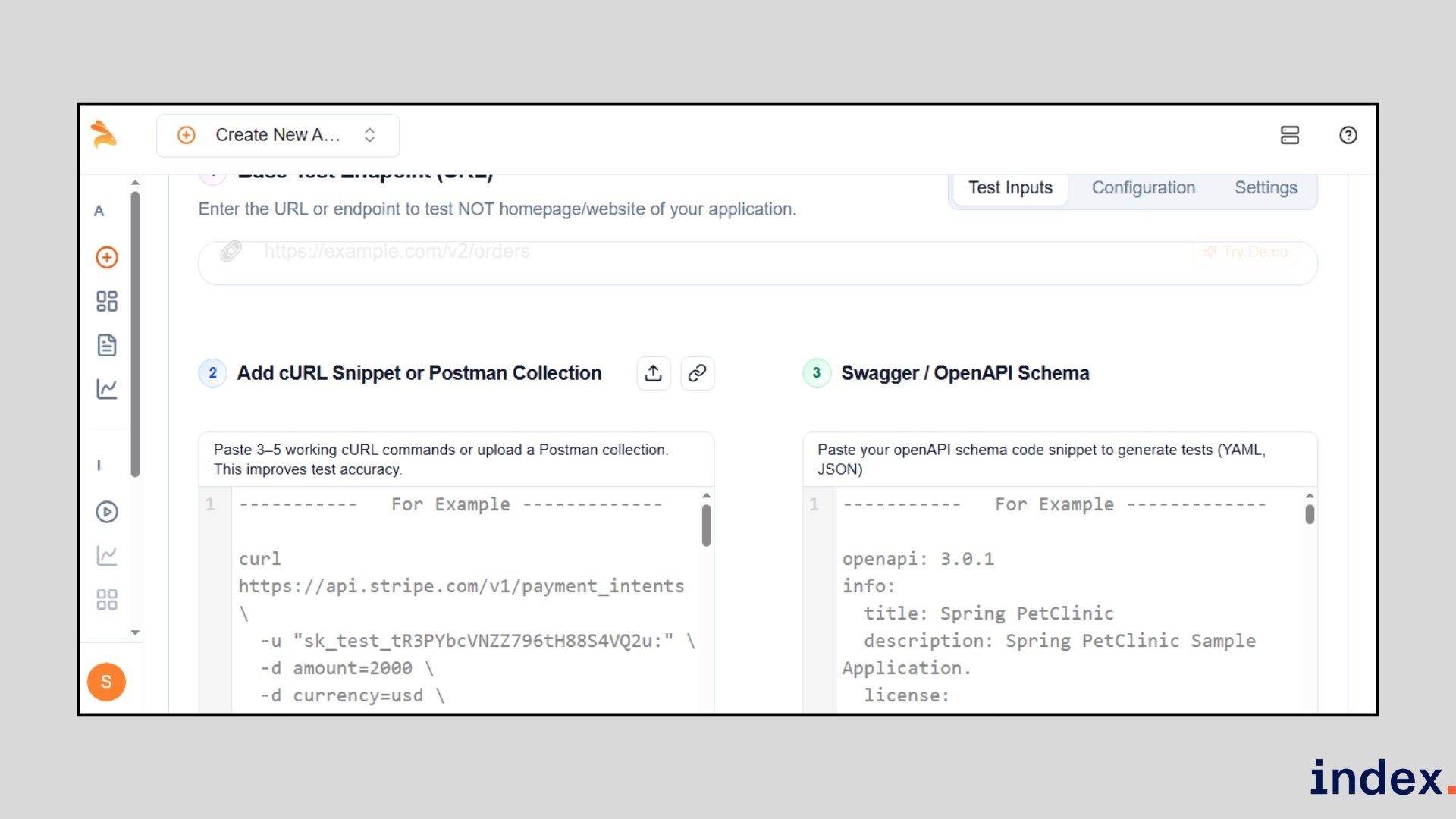
Keploy is an open-source platform that automatically records live application traffic and turns those recordings into reusable unit, integration, and API tests, with dependency mocks included. Instead of writing brittle tests or maintaining mock servers, Keploy captures real requests and downstream responses (DB calls, third-party APIs, etc.), generates stable test cases across multiple test frameworks, and replays them in test mode so you can validate behaviour without standing up full test environments.
It’s developer-focused, scales to teams, and has strong community traction (e.g., 10.2K+ GitHub stars and large extension adoption).
How it works
Keploy works by attaching to your running app (agent or app), recording unique network interactions, and replaying them as tests. The process is largely codeless and language-agnostic.
In our testing, the workflow looked like this:
- Install and start the Keploy agent or app on the same machine as your service and set the agent port (default 43900).
- Put Keploy into record mode and exercise your app using curl, Postman, or normal UI flows. Keploy records requests, responses, and dependency traffic.
- Keploy stores unique traces as test cases and auto-generates dependency mocks/stubs so external services aren’t needed later.
- Switch to test mode (or export tests into CI). Keploy replays recorded calls, returns the recorded dependency responses, and compares the current output to the baseline.
- Review generated test files (PyTest, Jest, go-test, JUnit), run them locally or in CI, and inspect Keploy’s diff reports for regressions and noisy-field removals.
AI-powered & technical features
-
eBPF-based, code-less instrumentation:
- Captures network interactions at the kernel level so Keploy can be language-agnostic and low-overhead.
-
Smart test generation across frameworks:
- Translates recorded traces into runnable tests for pytest, jest, go-test, junit, etc.
-
Noise detection/assertion sanitization:
- Automatically detects volatile fields (timestamps, random IDs) and removes them from strict assertions to reduce flakiness.
-
Test deduplication & grouping:
- Clusters similar traces so your suite stays compact (helpful for higher-traffic systems).
-
Auto mocks & stubs:
- Generates dependency mocks (DB responses, third-party APIs) so tests run offline in CI without extra infra.
-
PR integration & automation:
- GitHub PR agent can create tests for new pull requests to maintain coverage before merging.
-
Edge-case detection & reports:
- Surfaces unusual traffic patterns and differences that suggest missed scenarios or regressions.
We gave Keploy a few cURL calls, a GitHub base URL and a short OpenAPI spec, then asked it to generate 40 test flows.
In under a minute, it:
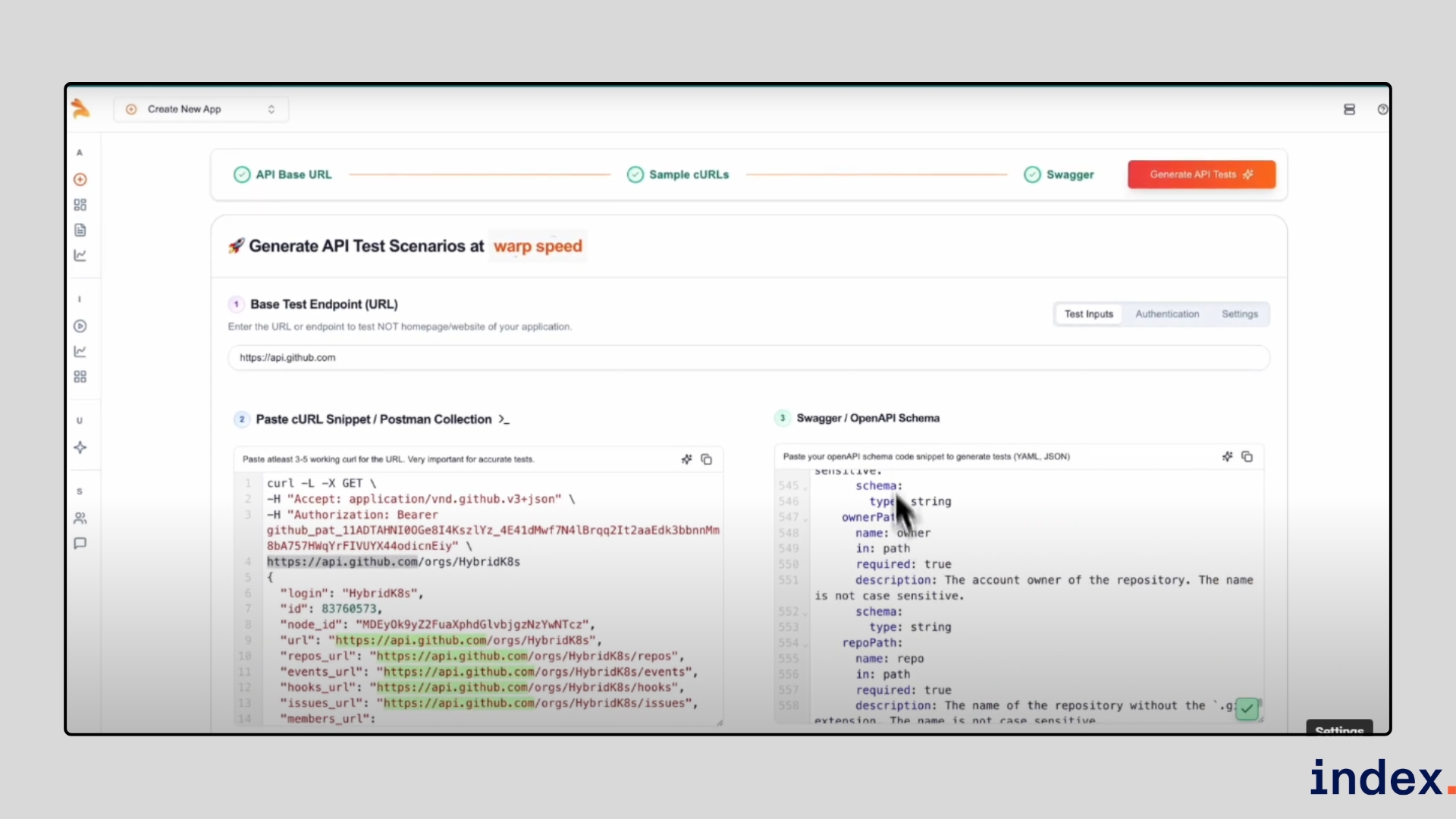
- Filtered 100+ candidate suites down to the stable ones.
- Linked six API calls into a full CRUD flow (create repo → create issue → cleanup).
- Auto-built assertions for status codes, JSON bodies and headers.
- Flagged a real GitHub bug and offered a one-click self-heal.
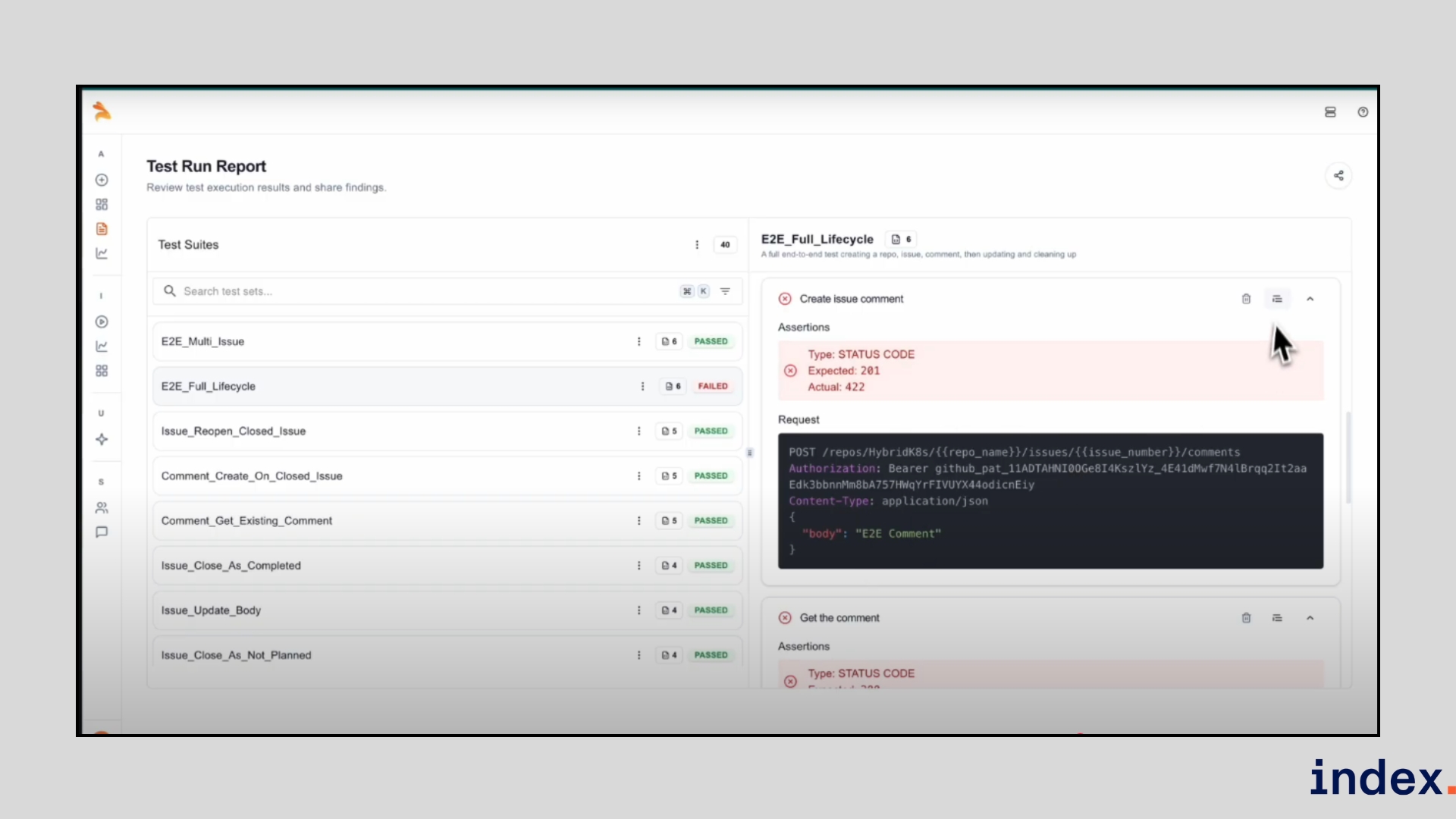
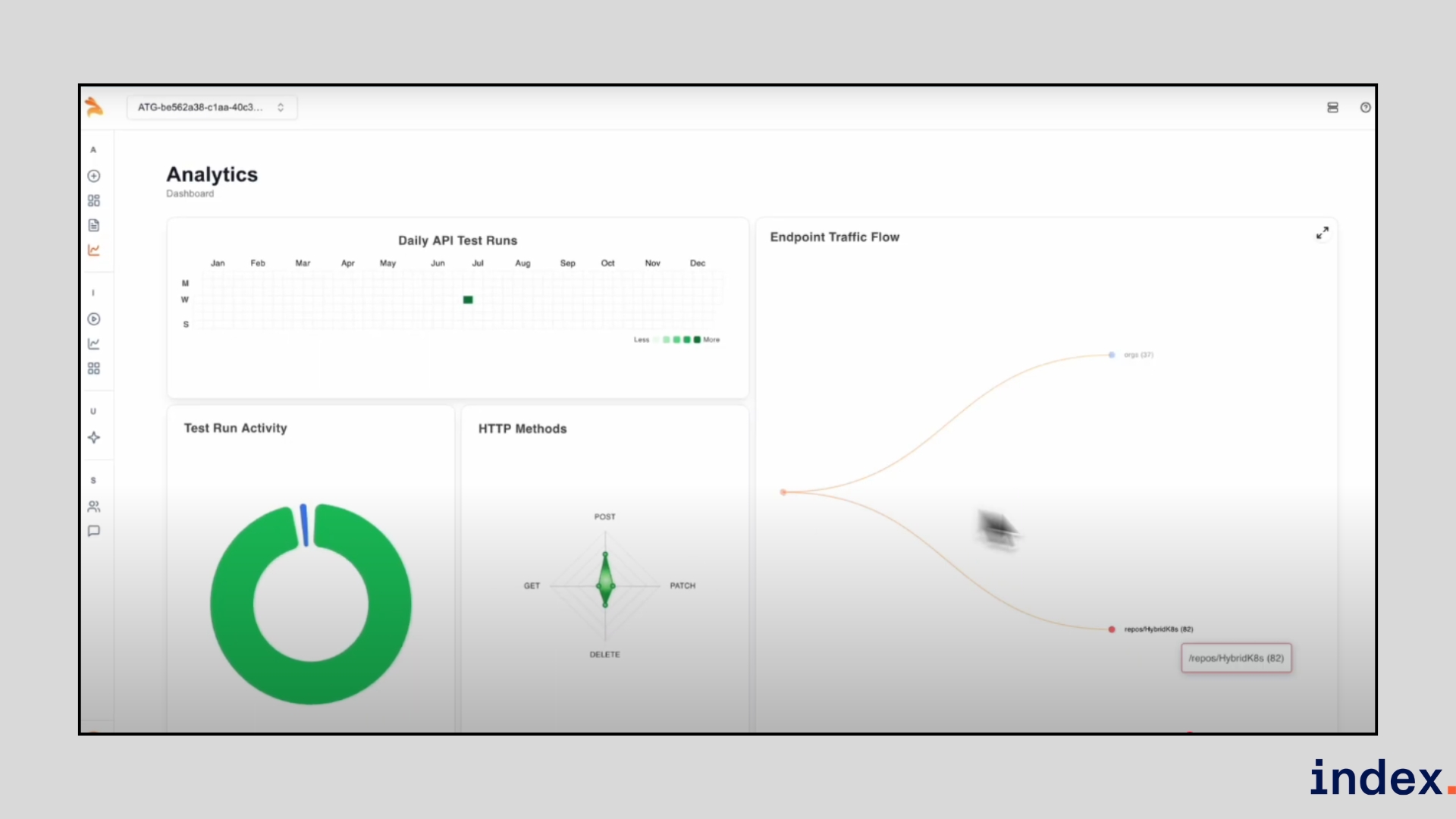
- Exported editable test files ready for CI and tracked daily run analytics and coverage.
Why we selected this tool
Keploy stood out because it produces realistic, low-flake tests quickly: recording real traffic gives you baseline tests that mirror production behaviour, including downstream interactions. Auto-mocking makes CI runs fast and reliable without spinning up external dependencies. Noise detection saves time by ignoring non-deterministic fields. Finally, being open-source with enterprise add-ons makes it low-risk to trial and practical to scale.
Pricing
Keploy offers a free plan to get started, a Team tier at $19 per user/month (3-seat minimum), a Go Scale plan at $499 per workspace/month (includes 15 seats), and custom Enterprise pricing.
2. Postman
Best for: Collaborative API design, testing, and ops, from single developers to large API teams building AI-ready services.
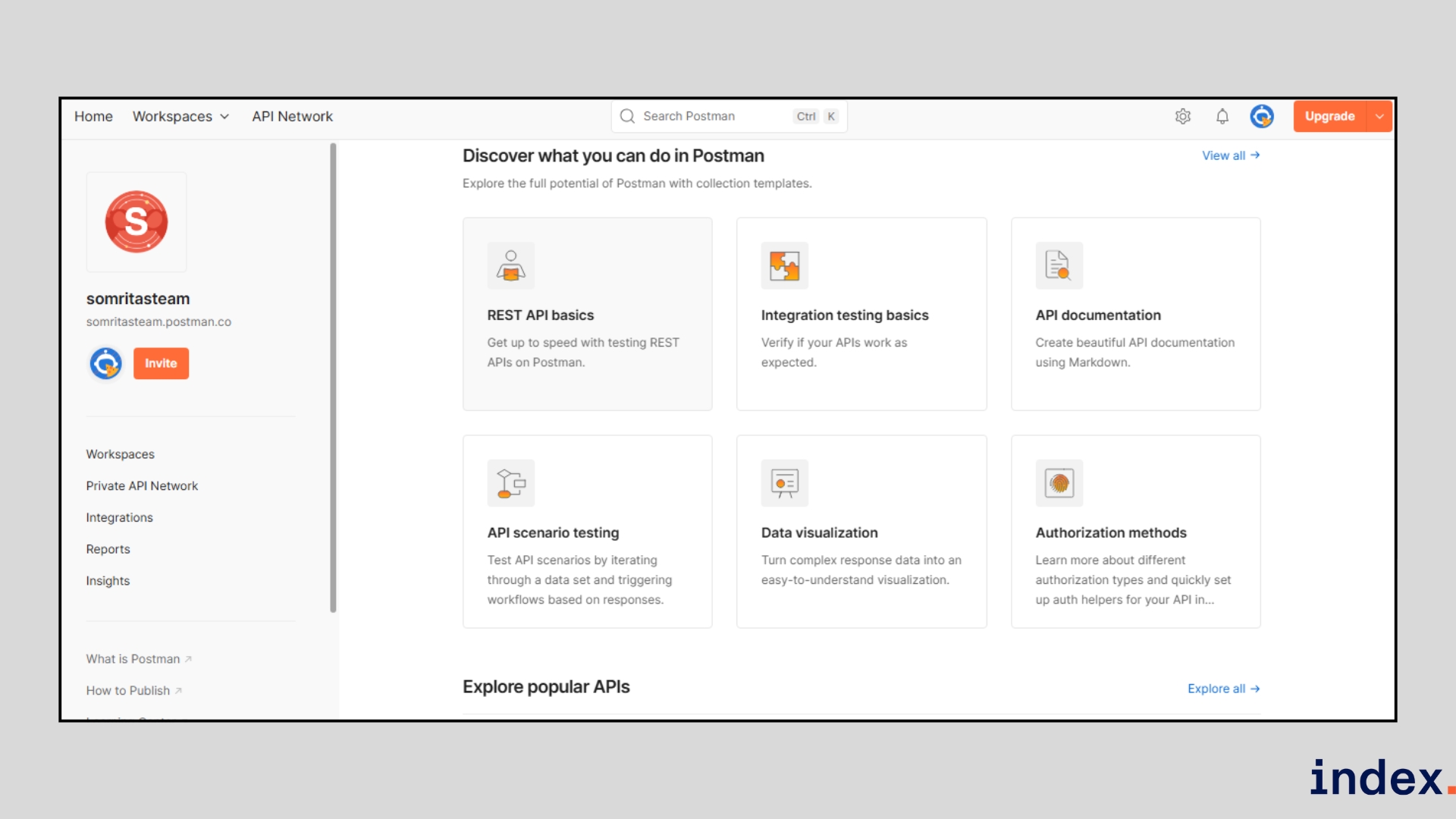
Postman is the industry-standard API platform where teams design, document, test, and monitor APIs in one place. It combines a powerful API client, collection-based workflows, mock servers, monitors, and observability so teams can move from prototype to production without context-switching.
With built-in support for AI workflows (MCP, AI Agent Builder, Postbot), Postman also helps teams make APIs that work reliably for humans and intelligent agents. This becomes especially useful when integrating external systems like CRMs, analytics tools, or a best email API for AI agents that can automate notifications and outbound communication flows.
How it works
Postman (also featured in our AI agents guide) streamlines the entire API lifecycle in one workspace. You can:
- Design: Start with Spec Hub to define your API contract (OpenAPI/Swagger), then spin up mock servers to validate behaviour before writing code.
- Build: Organize requests into Collections, set up Workspaces for collaboration, and create Flows to chain APIs into visual workflows.
- Test: Use the API Client, Collection Runner, or Postman CLI to send requests, add test scripts, and run automated suites.
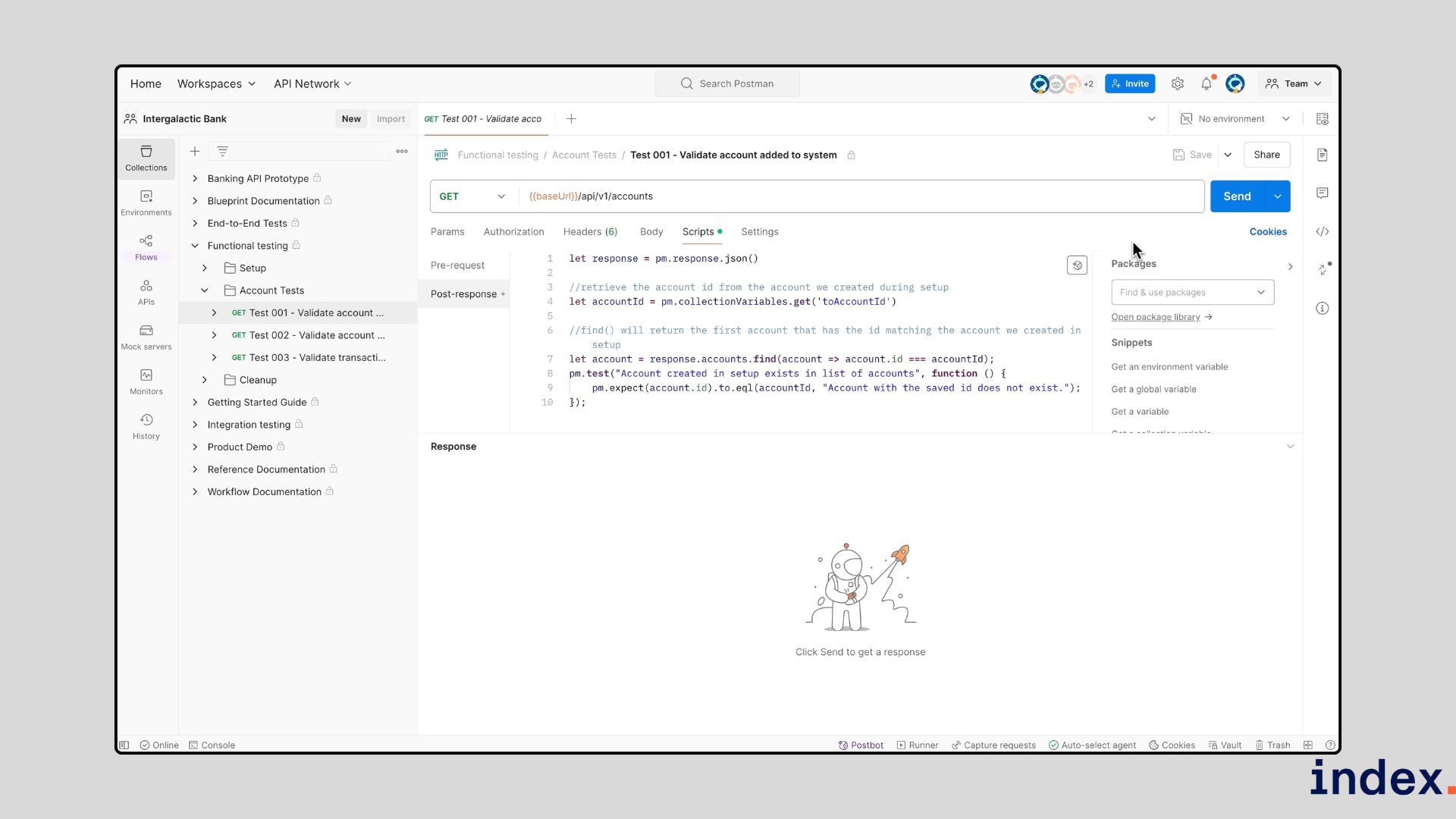
- Observe: Set up Monitors and Insights to track uptime, performance, and endpoint coverage.
- Distribute: Share APIs securely with teammates, partners, or the public via the Postman API Network.
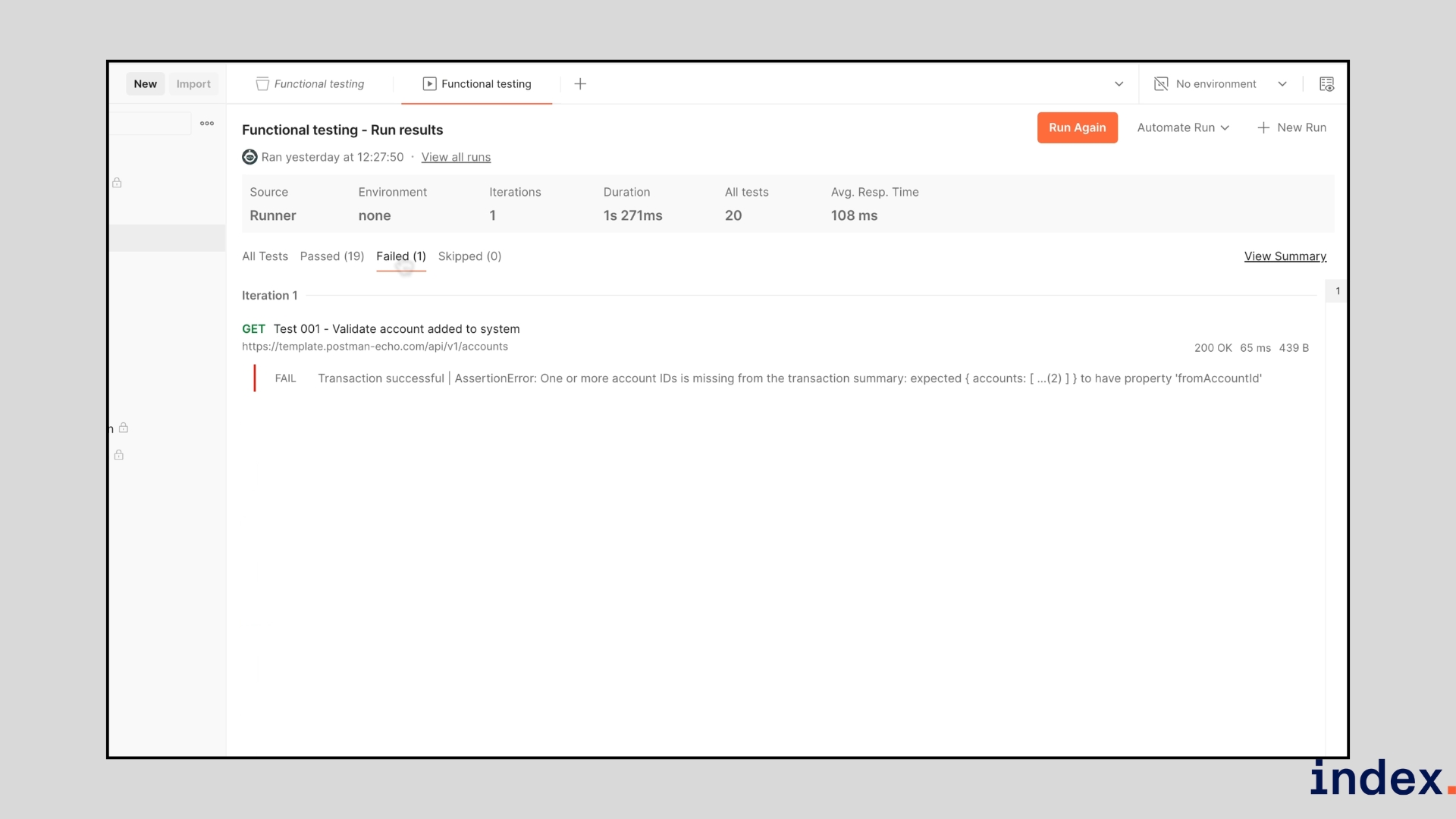
- Automate with AI: Leverage Postbot and the AI Agent Builder to generate tests, debug issues, and make your APIs integration-ready for intelligent agents.
In practice, this means you can move from API idea to production-ready endpoint without leaving Postman, while keeping documentation, tests, and monitoring in sync.
AI-powered & technical features
-
AI Agent Builder & Postbot:
- Create agents that automate API tasks, generate tests, or triage failures.
-
MCP (Model Context Protocol) support:
- Makes APIs easier to connect to LLMs and intelligent agents by standardizing context exchange.
-
Smart test generation & scripting:
- Auto-generate snippets and assertions inside the client; run tests via CLI or CI.
-
Mock servers & spec validation:
- Validate API contracts and catch changes early.
-
Monitors & Insights:
- Automated endpoint monitoring, performance tracking, and actionable analytics.
-
Extensible integrations:
- Native connectors for CI/CD, observability, and collaboration tools so AI-driven workflows can act on real signals.
Why we selected this tool
Postman makes API work a team sport. Its Collections and Workspaces dramatically reduce duplication, its mocks and monitors cut testing overhead, and the AI features speed up debugging and test authoring. For organizations, governance, reporting, and security integrations ensure APIs stay consistent and reliable at scale.
Pricing
Postman pricing starts with a Free plan, then Basic at $14/user/month, Professional at $29/user/month, and Enterprise at $49/user/month with add-ons and custom billing options.
3. Parasoft SOAtest
Best for: Enterprise-grade API, microservices, and end-to-end testing with AI-powered automation.
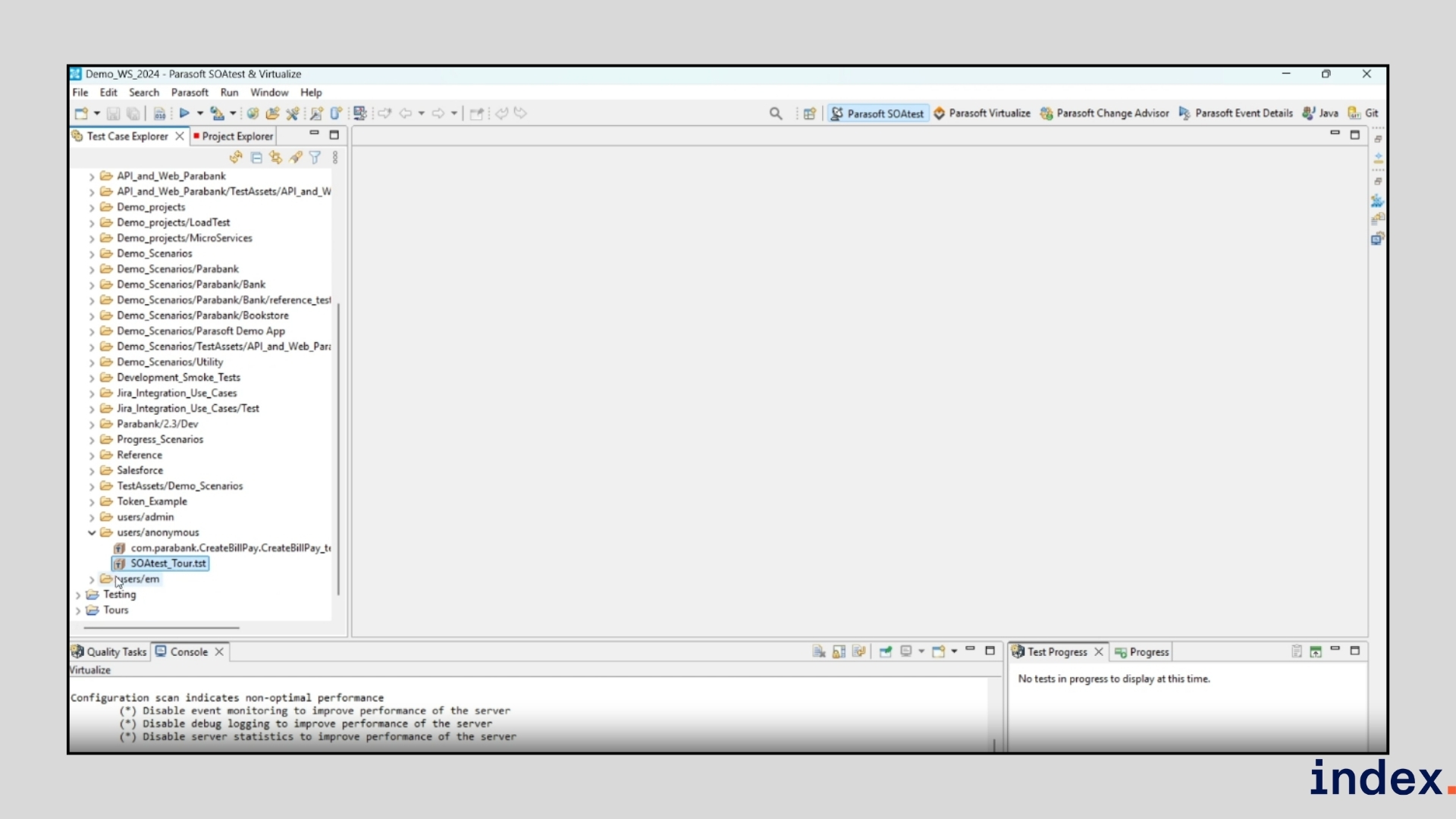
Parasoft SOAtest is a leading enterprise API testing platform built to handle the most complex testing needs across REST, SOAP, GraphQL, databases, microservices, and legacy systems. It provides scriptless test creation, codeless workflows, and AI-driven automation, making it possible for both technical and less-technical testers to design robust functional and performance tests. With support for over 120+ message formats and protocols, SOAtest helps enterprises validate every layer of their applications while ensuring compliance with strict industry standards like ISO 26262, OWASP, and DO-178C.
How it works
SOAtest accelerates API testing with its SMART API Test Generator, which records traffic (via the Parasoft Recorder Chrome plugin or other sources) and automatically converts it into reusable, scriptless API tests.
- Start by recording API calls or importing service definitions (OpenAPI, WSDL, Swagger, RAML, etc.).
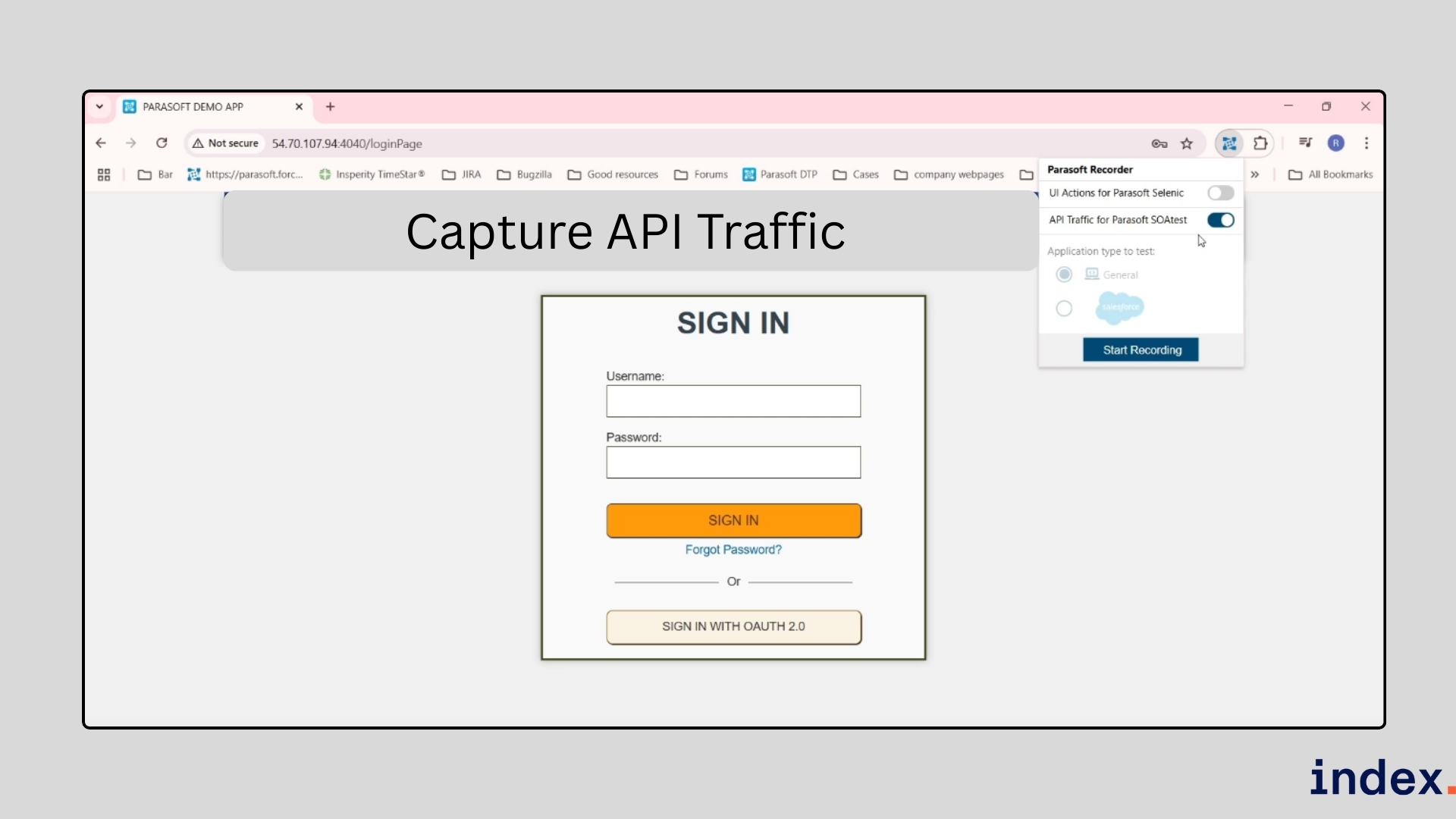
- AI analyzes request-response patterns and builds functional test scenarios with assertions, parameterization, and correlation.
- Complex flows (looping, conditional execution, error recovery) are assembled visually in the drag-and-drop interface.
- Tests are reusable across functional, load, regression, and security testing, and can be orchestrated directly in CI/CD pipelines with integrations for Jenkins, Bamboo, Azure DevOps, and more.
- The Change Advisor keeps your test suites up to date when APIs evolve, automatically detecting changes and updating impacted test cases.
AI-powered & technical features
-
Generative AI test creation:
- Uses LLMs (OpenAI, Azure OpenAI) to generate auto-parameterized workflows from natural language prompts.
-
ML-driven test impact analysis:
- Runs only the relevant tests affected by code changes, speeding up CI/CD feedback loops.
-
Scriptless testing:
- Build tests visually with drag-and-drop, no coding required.
-
End-to-end coverage:
- Validate APIs alongside databases, ESBs, mobile devices, and legacy mainframes.
-
Service virtualization:
- Simulate unavailable or costly systems for complete test environments.
-
Change Advisor:
- Automatically updates test suites when service definitions change.
Why we selected this tool
We included Parasoft SOAtest because it goes beyond basic API testing to cover end-to-end enterprise workflows. During evaluation, its SMART API Test Generator stood out, turning raw traffic into maintainable test cases without writing a line of code.
Its AI-powered Change Advisor and Test Impact Analysis make scaling test automation realistic for large enterprises, while compliance features ensure it’s enterprise-ready for regulated industries like automotive, finance, and healthcare.
Pricing
Parasoft doesn’t publish fixed pricing publicly. It offers customized enterprise licensing based on team size, integrations, and compliance requirements. Demos and quotes are available upon request.
4. Applitools
Best for: AI-powered functional, visual, and end-to-end testing across devices, browsers, and interfaces.
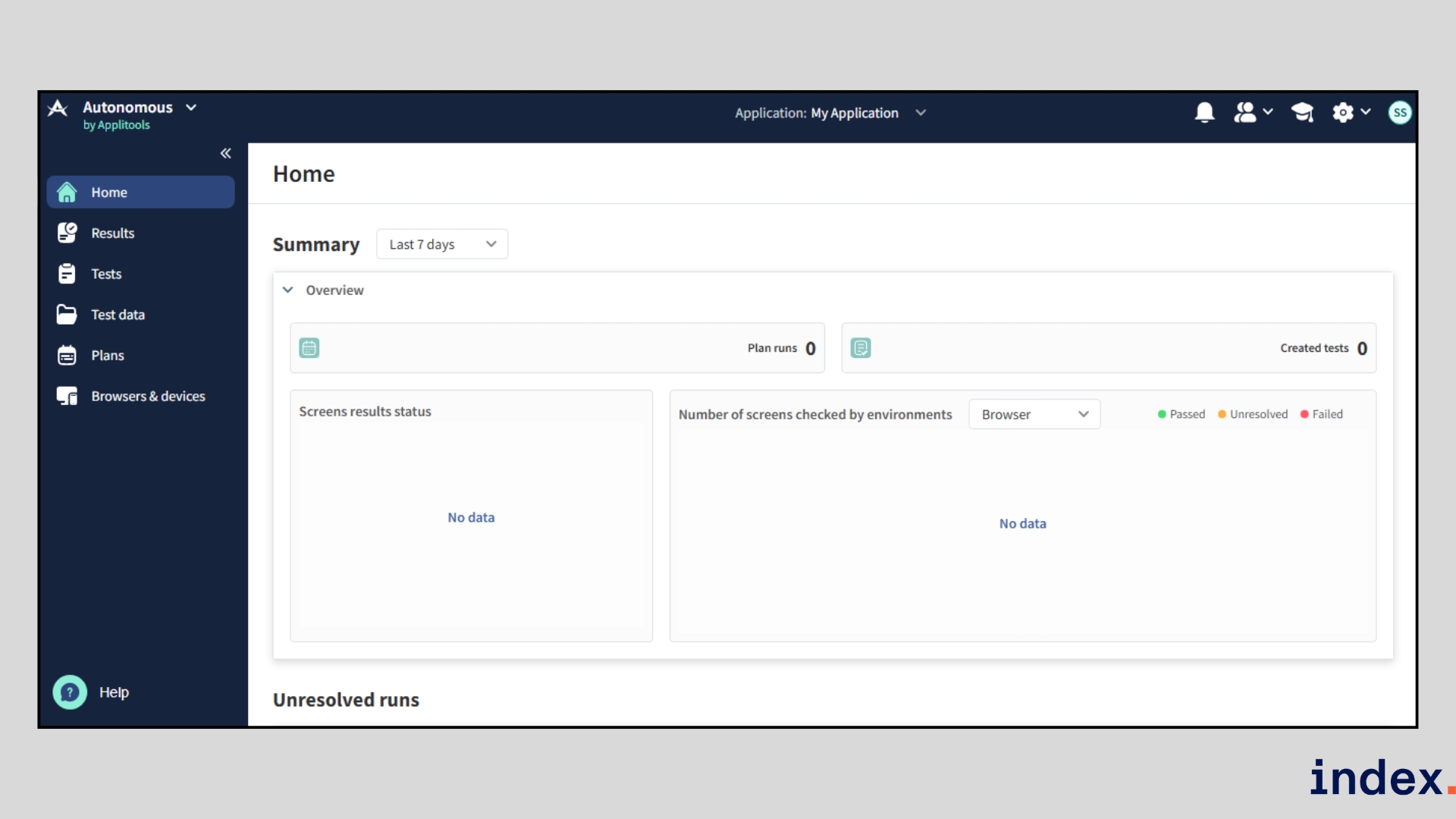
Applitools is an AI-first testing platform that goes beyond visual validation to cover the entire test lifecycle, from functional and accessibility testing to cross-browser and cross-device validation. Its proprietary Visual AI, trained on more than 4 billion UI screenshots, detects even subtle regressions while reducing false positives and test maintenance. With enterprise-grade scalability, Applitools enables teams to create fewer tests, achieve higher coverage, and release faster with confidence.
How it works
Applitools streamlines testing through four stages:
- Create – Write tests with code, record user flows, or auto-generate them using AI.
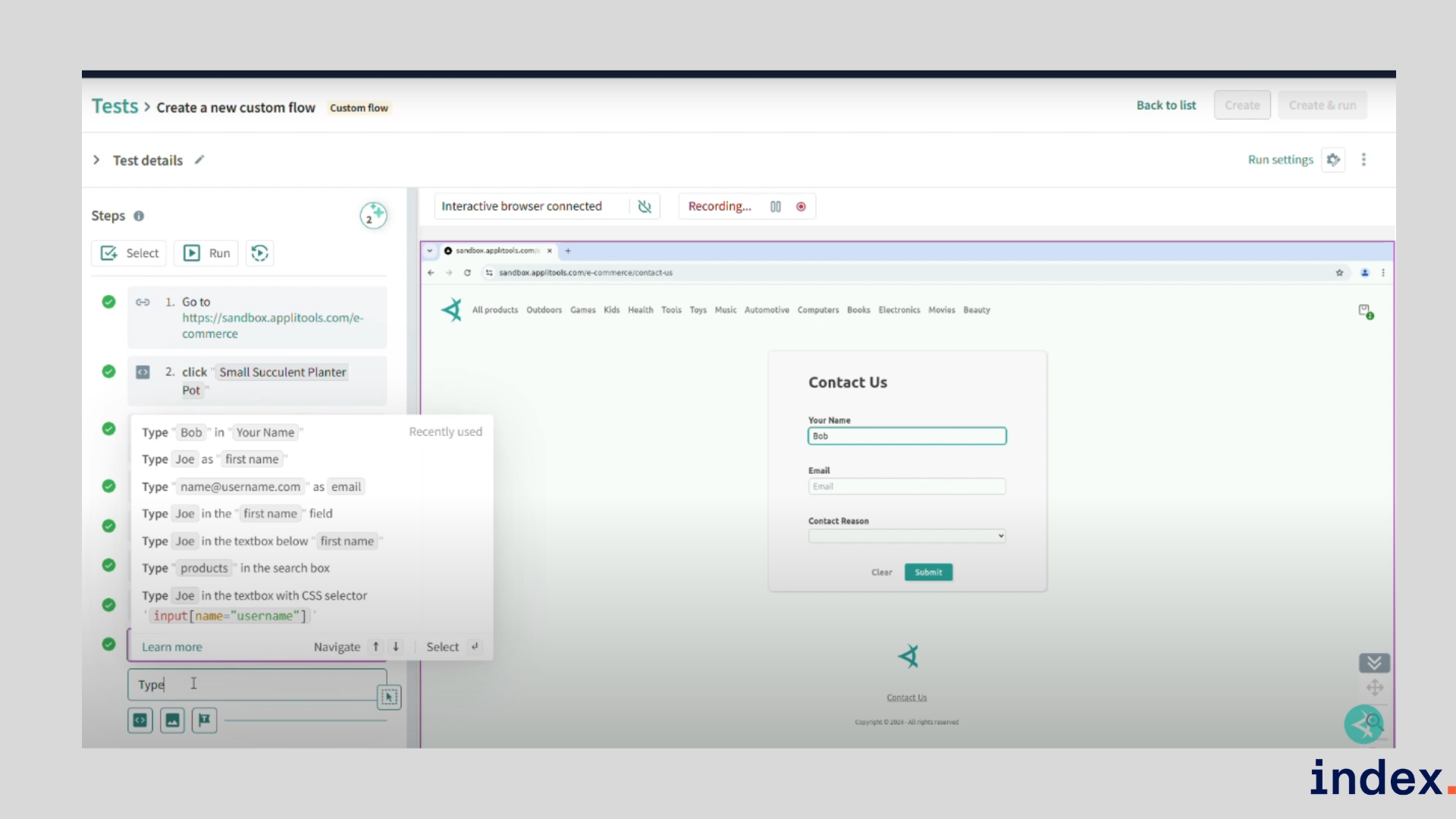
- Execute – Run tests in parallel on the Ultrafast Test Grid, integrated into your CI/CD pipelines.
- Validate – Compare results with Visual AI, set match levels, and manage baselines for dynamic content.
- Analyze – Review insights, spot bugs, and track cross-browser/device results from one dashboard.
AI-powered & technical features
- Visual AI for pixel-perfect validation across any screen, browser, or device.
- Autonomous self-healing tests that adapt to small DOM/layout changes.
- Ultrafast Test Grid to execute tests in parallel at a massive scale.
- Generative AI test creation via TestGenAI for frameworks like Cypress, Selenium, and Playwright.
- Built-in accessibility testing aligned with WCAG standards.
- Flexible deployment: SaaS, private cloud (AWS, Azure, GCP), or fully on-premises.
We created a URL List Test in Applitools to validate multiple web pages:
- Imported a CSV with key URLs to test.
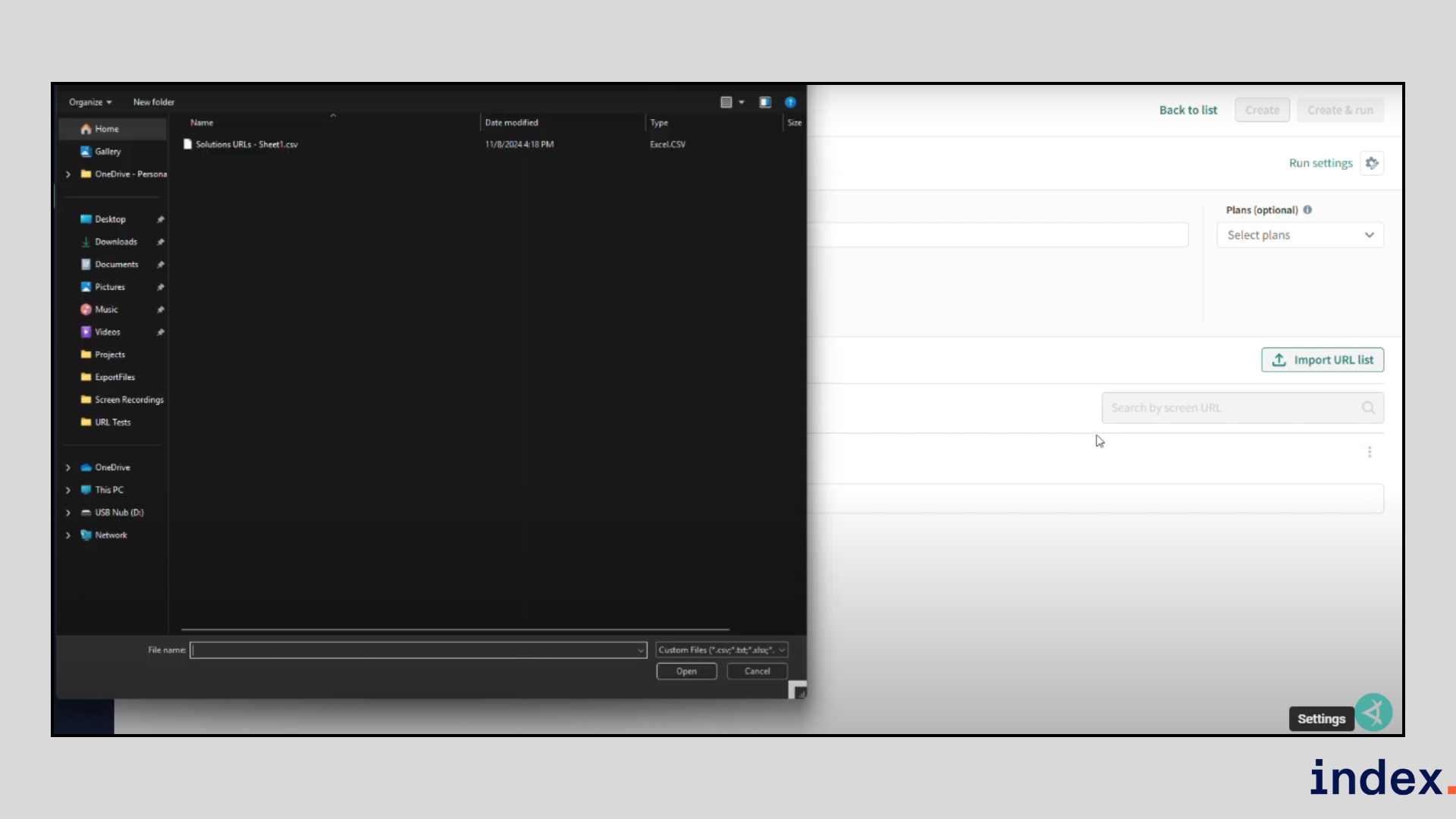
- Assigned the test to an application and selected browsers/devices.
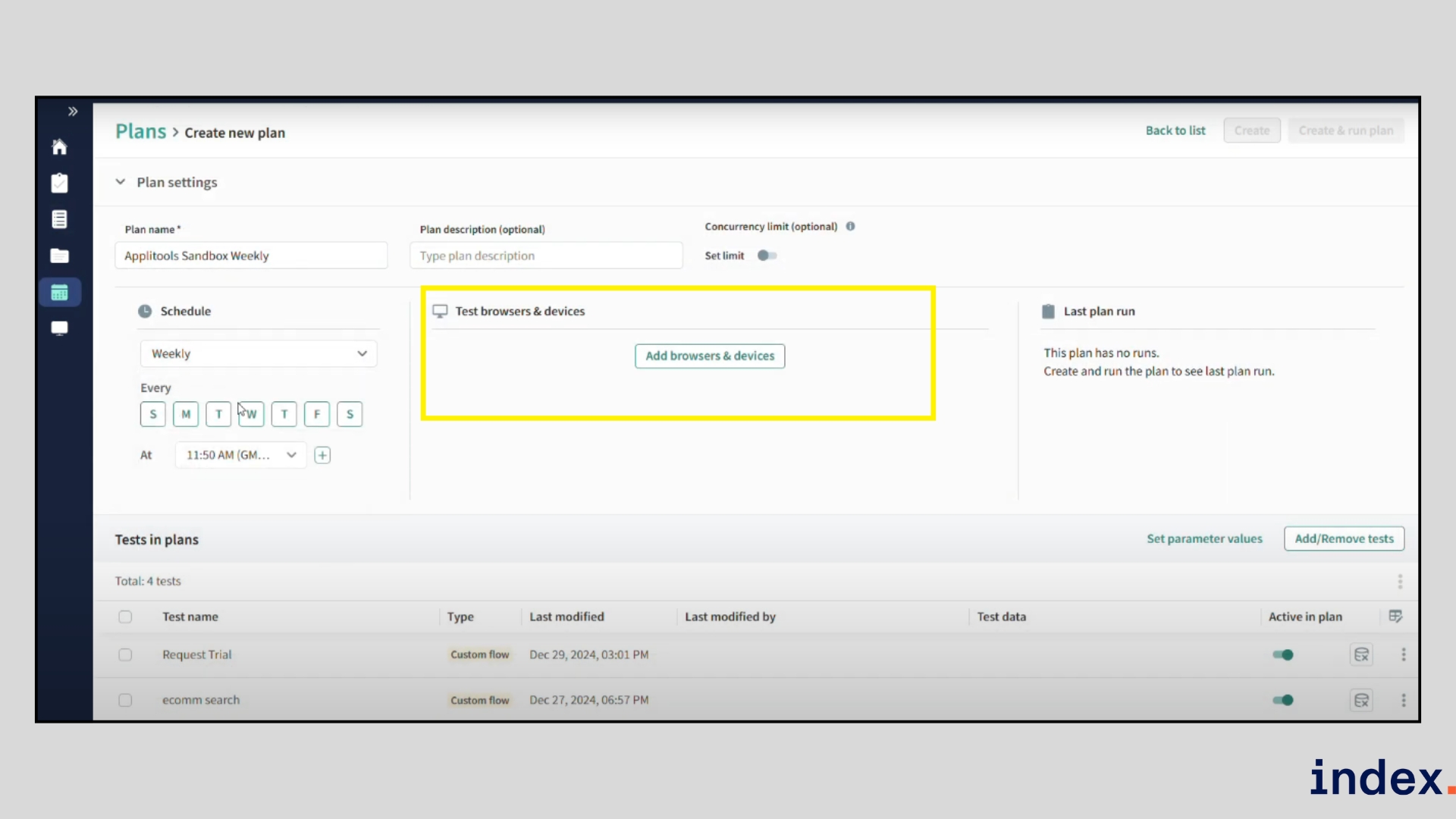
- Set match levels (Strict/Layout) and screenshot type (full page vs. viewport).
- Ran the test, which flagged visual differences, broken pages, and errors.
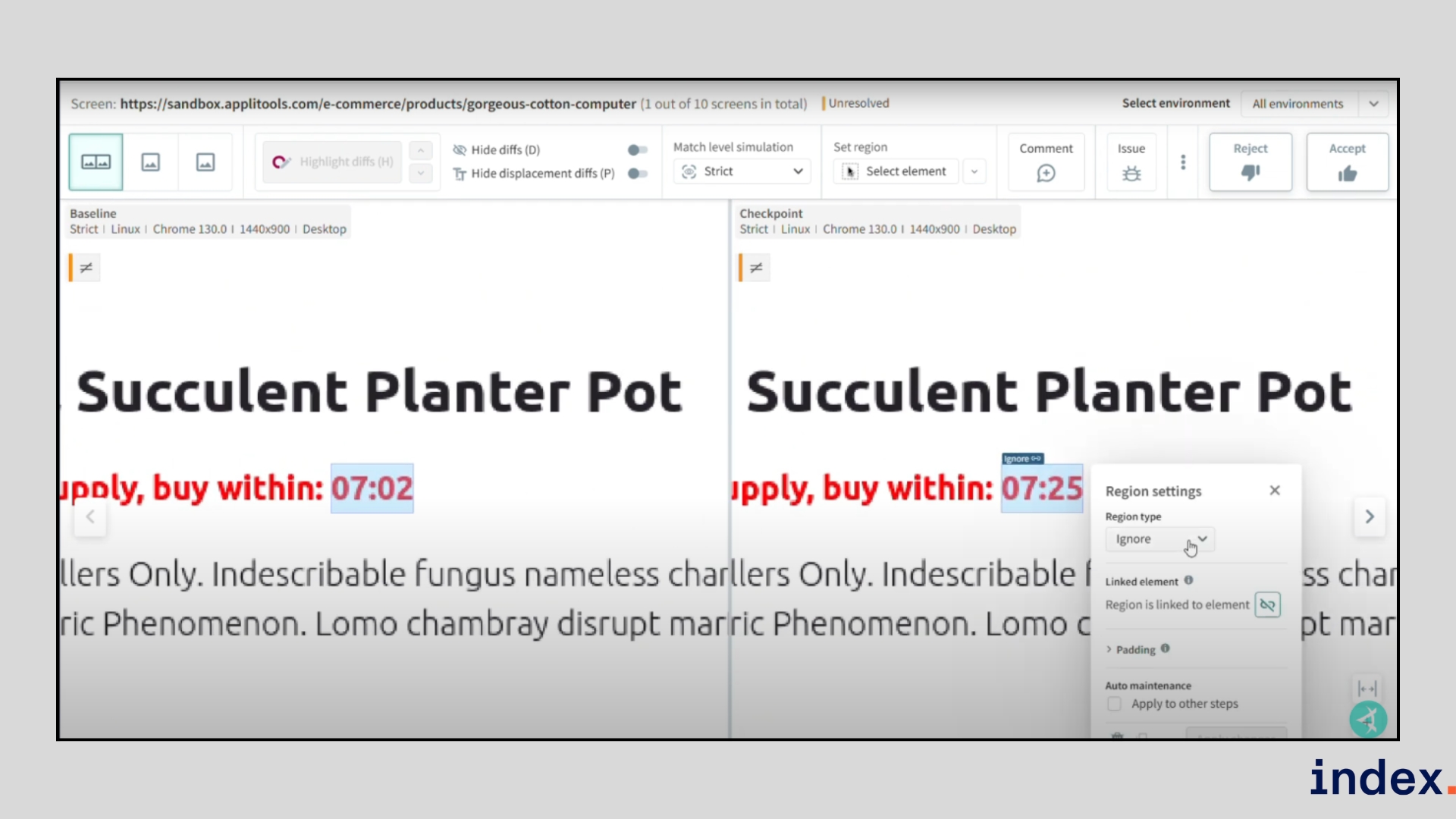
This gave us a reusable baseline for regression testing, without writing extra code.
Why we selected this tool
We picked Applitools because it combines functional and visual testing in one platform, eliminating the need for multiple tools. The Visual AI engine proved especially accurate during testing, catching subtle issues that slipped past code assertions. The ability to deploy anywhere, SaaS, private cloud, or on-prem, makes it suitable for both agile teams and large enterprises in regulated industries.
Pricing
Applitools pricing starts with a free 14-day trial, a $969/month Starter plan, and custom Enterprise options with advanced features and support.
5. Spotlight
Best for: Design-first API development, visual OpenAPI authoring, reusable components, mock servers, and team collaboration at scale.
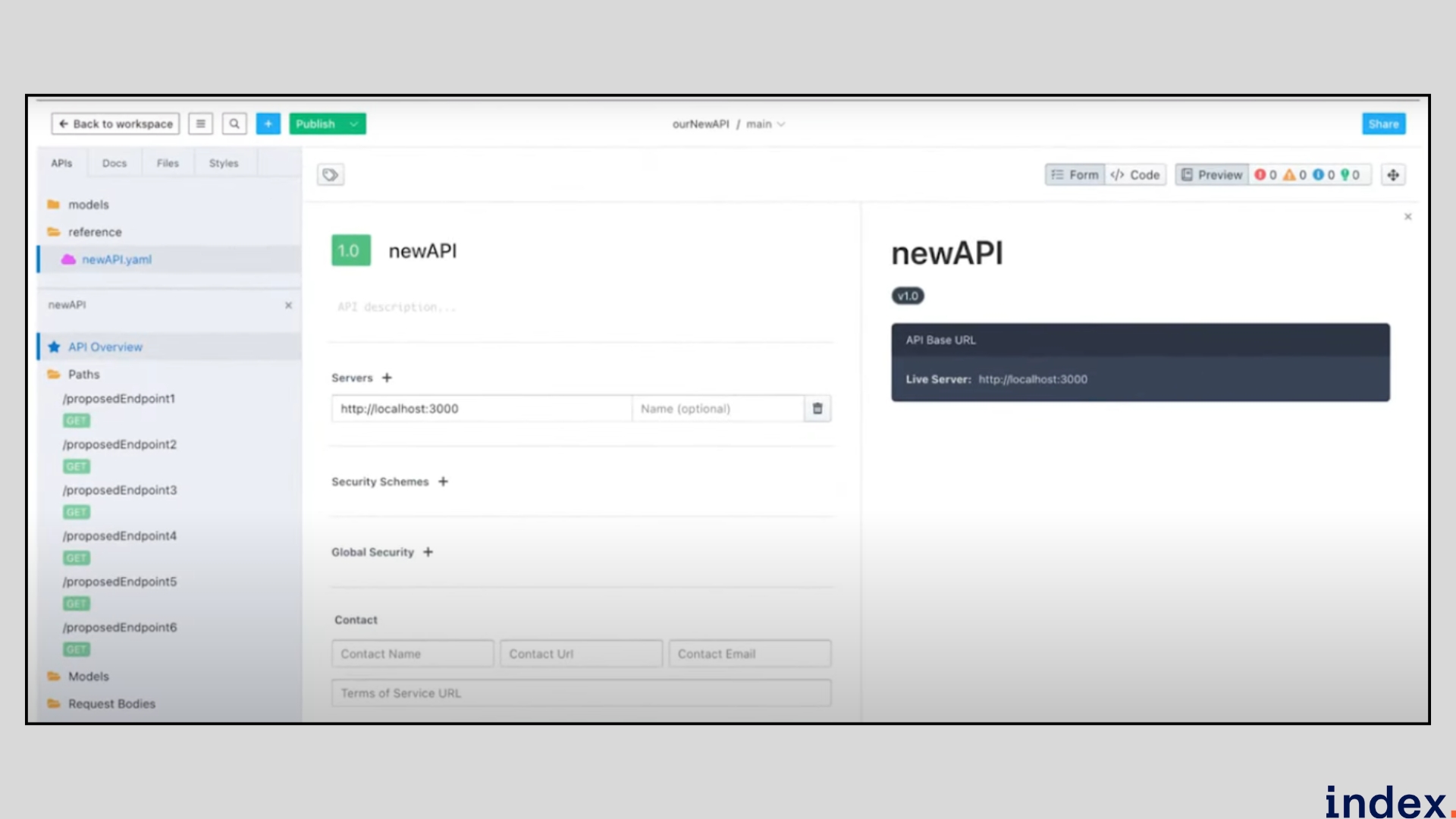
Stoplight is a design-centric API platform that helps teams model, document, mock, and govern APIs with a visual editor and OpenAPI-first workflows. It’s built for designers, product managers and engineers who want a single source of truth for API specs, reusable schemas, style guides, and interactive docs, all backed by Git-based versioning and team collaboration.
How it works
- Create or import an API — start a project and either paste an OpenAPI file or use Stoplight’s visual Form/Code editor to author a spec (you can switch between Form, Code and Preview).
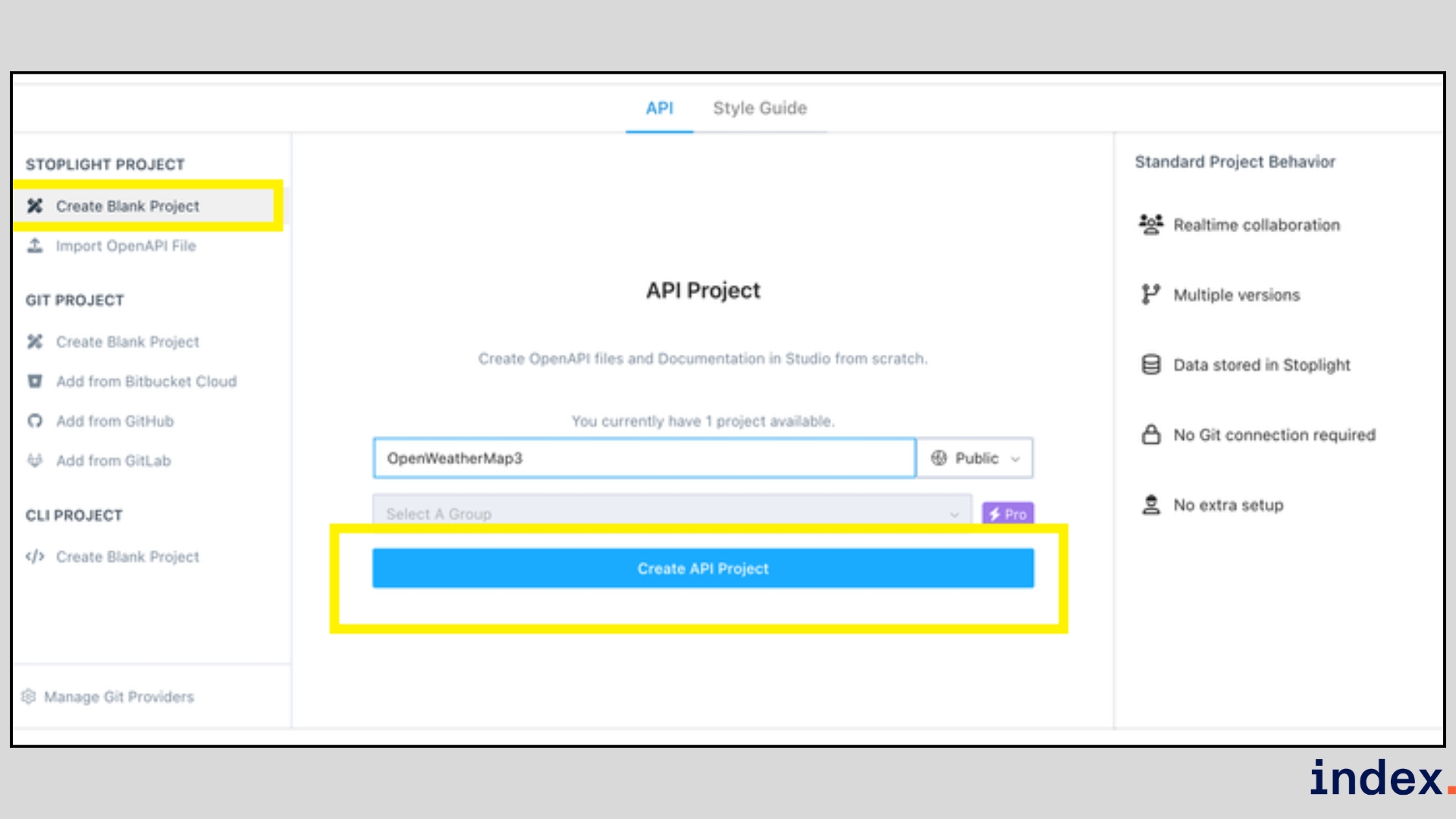
- Define endpoints & parameters — add paths, methods, query/path/header/body parameters and group endpoints with tags.
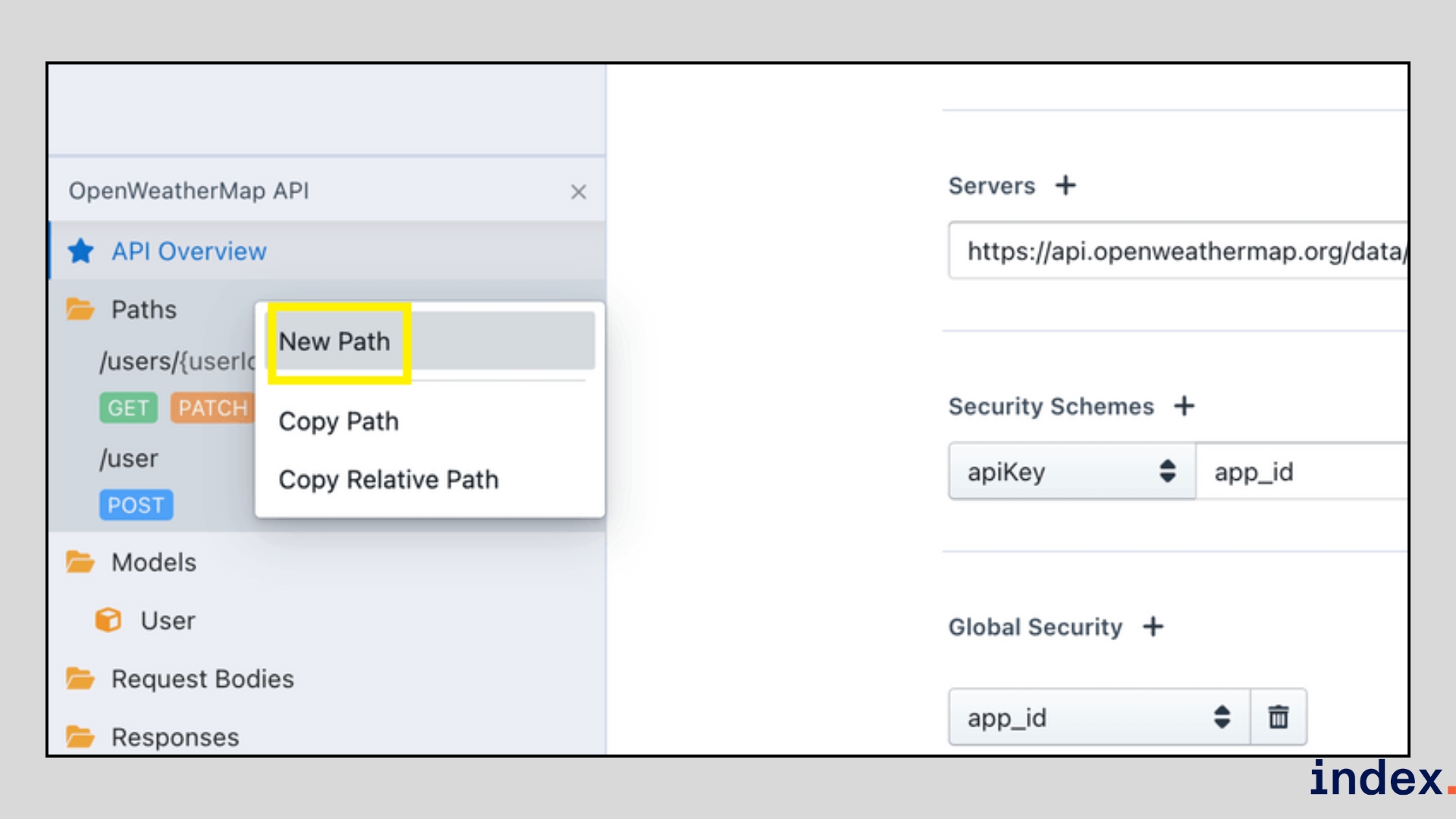
- Generate schemas from samples — paste a sample JSON response and Stoplight auto-generates the response schema (and lets you add descriptions/examples).
- Reuse components — promote parameters, responses, and models to components and reference them across the spec to enforce DRY design.
- Mock & test — spin up hosted mock servers from your OpenAPI so frontends can develop against stable contracts.
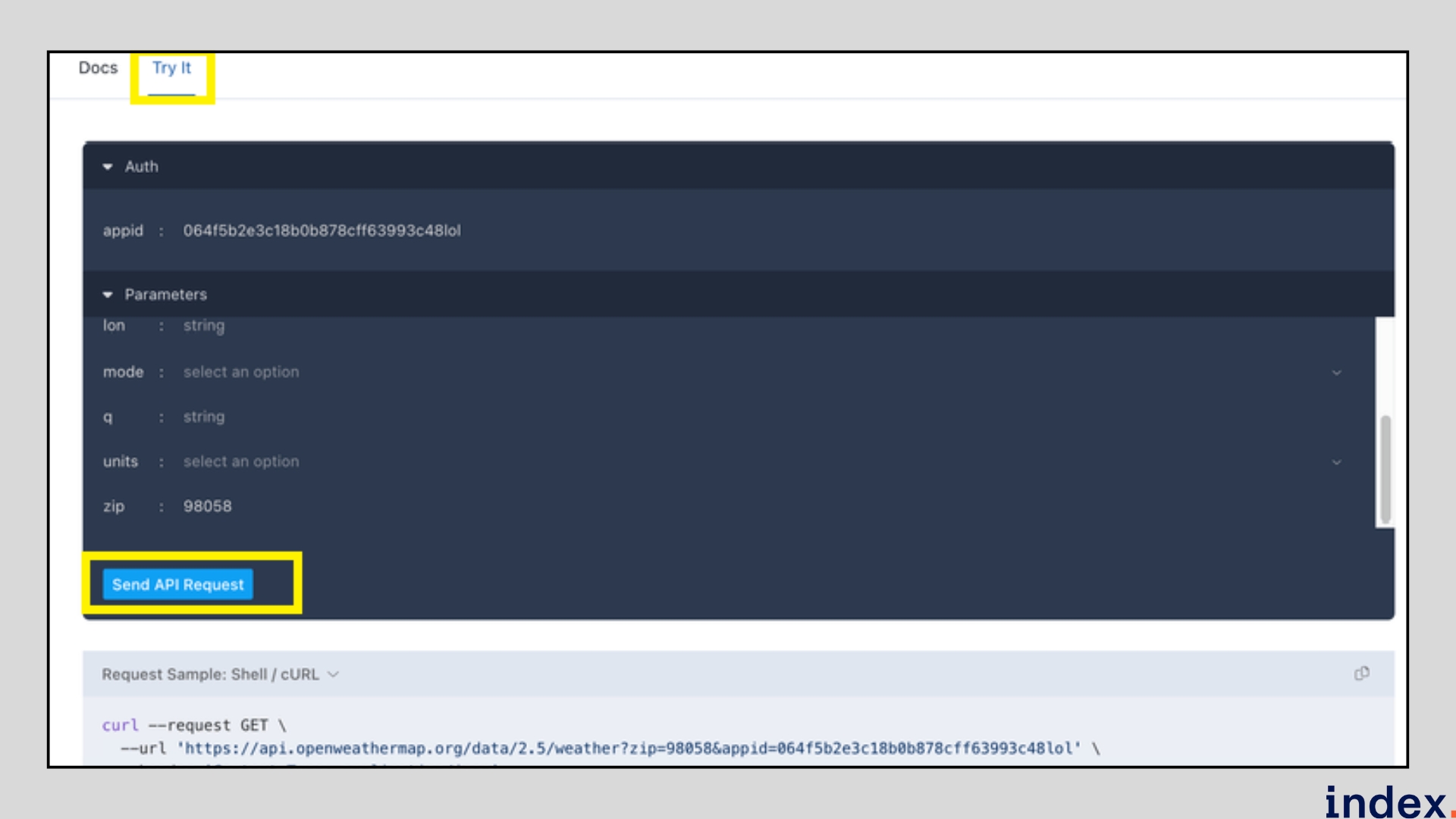
- Preview & publish — preview docs, run Try-It requests (or export cURL), then publish interactive docs for internal or public consumption.
- Collaborate & govern — use workspaces, style guides, comments, and Git workflows to keep API design consistent across teams.
AI-powered & technical features
- Schema generation from examples: auto-builds response schemas from sample JSON to speed authoring.
- Form - Code sync: instant visual - YAML editing reduces syntax errors and speeds onboarding.
- Reusable components & style guides: enforce consistency and reduce duplicated work across APIs.
- Hosted mock servers: auto-mock APIs from specs so front-end and QA work in parallel with back-end teams.
- Git integrations & export: commit specs to your VCS, export bundled or original OpenAPI files for other tools.
- Preview & interactive docs: live “Try it” experience for consumers and reviewers (with environment/API-key support).
Why we selected Stoplight
Stoplight makes API design approachable and repeatable: the visual editor removes authoring friction, schema generation and component reuse speed spec creation, and built-in mocks let teams develop in parallel. For organizations moving to API-first workflows, Stoplight reduces errors, enforces standards, and keeps documentation and specs in sync.
Pricing
Spotlight offers a Basic plan at $41/month for 3 users and $10 for every additional user, a Startup plan at $105/month for 8 users, a Pro Team plan at $338/month, and customized Enterprise plans.
Next up: Discover the best AI tools for deep research.
Which AI Detection Tool Offers the Best API Access for CMS Workflows?
Looking to plug an AI detection tool into your CMS workflow? Here are the top AI detection APIs with robust integrations:
Best AI Detection APIs for CMS Integration:
Tool |
API Access |
CMS Compatibility |
Key Features |
Originality.ai |
REST API |
WordPress, HubSpot, Custom |
AI content detection, plagiarism checking |
GPTZero |
REST API |
Any CMS via API |
Academic-focused, batch processing |
Copyleaks |
REST API + SDK |
LMS, WordPress, Custom |
Multi-language, real-time scanning |
Winston AI |
REST API |
WordPress, Webflow |
High accuracy, document analysis |
Sapling |
REST API |
CMS, Email, Chat |
Grammar + AI detection combined |
How to integrate AI detection into your CMS:
- WordPress: Use webhooks or custom plugins that call the detection API on content publish
- Headless CMS (Contentful, Strapi): Integrate via serverless functions (AWS Lambda, Vercel)
- Custom CMS: Direct REST API calls with authentication tokens
- HubSpot/Salesforce: Use Zapier or native integrations
Example API integration workflow:
Content Created → Pre-publish Hook → AI Detection API Call →
Score Returned → Conditional Publish/Flag for Review
Top pick for CMS integration: Originality.ai offers the most straightforward API with WordPress-specific documentation, batch processing, and competitive pricing at $0.01/100 words.
Which Generative AI Provider Has the Best Dev Tools and APIs?
Which generative AI provider offers the best developer tools and APIs? Here's a comparison of the top platforms for building AI-powered applications:
Generative AI Providers Ranked by Developer Experience:
Provider |
API Quality |
SDK Support |
Documentation |
Rate Limits |
Pricing |
OpenAI |
⭐⭐⭐⭐⭐ |
Python, Node, REST |
Excellent |
Tiered |
$0.002-0.06/1K tokens |
Anthropic (Claude) |
⭐⭐⭐⭐⭐ |
Python, TS, REST |
Excellent |
Generous |
$0.003-0.015/1K tokens |
Google (Gemini) |
⭐⭐⭐⭐ |
Python, Java, Go |
Good |
Tiered |
$0.00025-0.005/1K chars |
Mistral AI |
⭐⭐⭐⭐ |
Python, REST |
Good |
Flexible |
$0.001-0.008/1K tokens |
Cohere |
⭐⭐⭐⭐ |
Python, Go, REST |
Good |
Enterprise-friendly |
Custom pricing |
AWS Bedrock |
⭐⭐⭐⭐ |
AWS SDK |
Extensive |
IAM-based |
Variable by model |
Best generative AI APIs by use case:
Use Case |
Best Provider |
Why |
Chat/Conversational AI |
Anthropic Claude |
Best instruction-following, safety |
Code Generation |
OpenAI (GPT-4) |
Strongest coding benchmarks |
Enterprise/Compliance |
AWS Bedrock |
SOC-2, HIPAA, data residency |
Cost-Sensitive Apps |
Mistral AI |
Best price-performance ratio |
Embeddings/Search |
Cohere |
Specialized embedding models |
Multi-Modal (Text+Image) |
Google Gemini |
Native multi-modal support |
Developer tool comparison:
Feature |
OpenAI |
Anthropic |
Mistral |
|
Playground/Console |
✅ |
✅ |
✅ |
✅ |
Fine-tuning API |
✅ |
❌ |
✅ |
✅ |
Function Calling |
✅ |
✅ |
✅ |
✅ |
Streaming |
✅ |
✅ |
✅ |
✅ |
Batch API |
✅ |
✅ |
✅ |
❌ |
Vision/Image Input |
✅ |
✅ |
✅ |
❌ |
Verdict: OpenAI offers the most mature ecosystem with extensive SDKs, but Anthropic Claude provides superior API reliability and safety features. For enterprise deployments, AWS Bedrock gives you multiple models under one API with compliance guarantees.
Top Tools for Auditing AI API Usage and Access
What are the top tools for auditing AI API usage and access? As AI adoption grows, organizations need visibility into API consumption, costs, and security. Here are the leading solutions:
Best AI API Auditing & Monitoring Tools:
Tool |
Primary Function |
Key Features |
Pricing |
Helicone |
LLM observability |
Cost tracking, latency monitoring, prompt caching |
Free tier + $20/mo |
LangSmith |
LLM debugging |
Trace logging, evaluation, dataset management |
Free tier + paid |
Portkey |
AI gateway |
Multi-provider routing, rate limiting, fallbacks |
Free tier + usage |
Weights & Biases |
ML observability |
Experiment tracking, model monitoring |
Free + $50/user/mo |
Datadog AI |
Full-stack APM |
LLM traces, cost attribution, anomaly detection |
Custom pricing |
Arize AI |
ML observability |
Drift detection, explainability, performance |
Free + enterprise |
What to audit in AI API usage:
- Cost Tracking: Token consumption by user, feature, or endpoint
- Latency Monitoring: Response times, timeout rates, retries
- Rate Limit Management: Usage against quotas, burst patterns
- Error Analysis: Failed requests, model errors, safety triggers
- Access Control: Who's calling which APIs, permission audits
- Compliance Logging: Data retention, PII exposure, audit trails
AI API audit dashboard metrics:
Metric |
Why It Matters |
Tool to Use |
Tokens/day by model |
Cost optimization |
Helicone, Portkey |
P95 latency |
User experience |
Datadog, LangSmith |
Error rate by endpoint |
Reliability |
Any APM tool |
Unique users/API keys |
Access management |
Custom + IdP |
Cost per feature |
ROI analysis |
Helicone, custom |
Implementation approach:
API Request → AI Gateway (Portkey/Helicone) → LLM Provider →
Response → Logging (LangSmith) → Analytics Dashboard
Top pick for AI API auditing: Helicone for startups (generous free tier, easy setup) or Datadog AI Monitoring for enterprises needing full-stack observability with existing APM integration.
Top AI Solutions for Unified API Access 2025
What are the top AI solutions for unified API access in 2025? These platforms let you access multiple AI providers through a single API:
Unified AI API Platforms:
Platform |
Supported Models |
Key Features |
Pricing Model |
OpenRouter |
100+ models |
Single API, automatic routing, cost optimization |
Pay-per-use + margin |
Portkey |
OpenAI, Anthropic, Cohere, etc. |
Gateway, caching, fallbacks, load balancing |
Free + usage |
LiteLLM |
100+ providers |
Open-source, self-hosted, proxy server |
Free (open-source) |
Martian |
Major providers |
Automatic model selection, A/B testing |
Usage-based |
AWS Bedrock |
Claude, Llama, Mistral, Titan |
AWS-native, compliance, fine-tuning |
Per-model pricing |
Azure AI Studio |
OpenAI, Meta, Mistral |
Enterprise, compliance, Azure integration |
Per-model pricing |
Benefits of unified API access:
- Single Integration: Write once, access multiple models
- Automatic Failover: Switch providers on errors/downtime
- Cost Optimization: Route to cheapest model for task
- A/B Testing: Compare model performance easily
- Vendor Independence: Avoid lock-in to single provider
- Simplified Billing: One invoice instead of many
Unified API architecture:
Your Application
↓
Unified API Gateway (OpenRouter/Portkey/LiteLLM)
↓
┌──────────┬──────────┬──────────┐
│ OpenAI │ Anthropic │ Google │
└──────────┴──────────┴──────────┘
Comparison by use case:
Need |
Best Solution |
Why |
Cost optimization |
OpenRouter |
Transparent pricing, model comparison |
Self-hosted/privacy |
LiteLLM |
Open-source, on-prem deployment |
Enterprise compliance |
AWS Bedrock |
SOC-2, HIPAA, data residency |
Production reliability |
Portkey |
Caching, fallbacks, observability |
Experimentation |
Martian |
Auto model selection, A/B tests |
Top Providers for Enterprise-Ready, AI-Driven SDK Generation for RESTful APIs
What are the top providers for enterprise-ready, AI-driven SDK generation for RESTful APIs? These tools automatically generate client SDKs from your API specifications:
Best AI-Driven SDK Generators:
Tool |
SDK Languages |
AI Features |
Enterprise Features |
Pricing |
Speakeasy |
10+ languages |
AI-powered generation, auto-updates |
SOC-2, SSO, private repos |
From $250/mo |
Stainless |
TypeScript, Python, Go, Java |
AI-native, idiomatic code |
Enterprise support, SLAs |
Custom |
Fern |
7+ languages |
AI docs, SDK generation |
Private cloud, SSO |
Free + paid |
APIMatic |
10+ languages |
Code samples, SDKs, portals |
On-prem, white-label |
From $99/mo |
Swagger Codegen |
40+ languages |
Template-based |
Open-source, self-hosted |
Free |
OpenAPI Generator |
50+ languages |
Community templates |
Self-hosted |
Free |
Enterprise requirements checklist:
Requirement |
Speakeasy |
Stainless |
Fern |
APIMatic |
SOC-2 Compliance |
✅ |
✅ |
✅ |
✅ |
SSO/SAML |
✅ |
✅ |
✅ |
✅ |
Private Deployment |
✅ |
✅ |
✅ |
✅ |
SLA Guarantees |
✅ |
✅ |
✅ |
✅ |
Audit Logs |
✅ |
✅ |
✅ |
✅ |
Custom Branding |
✅ |
❌ |
✅ |
✅ |
What makes SDK generation "AI-driven"?
- Idiomatic Code: AI generates language-native patterns (not just templates)
- Smart Naming: Converts OpenAPI operations to natural method names
- Type Inference: Automatically handles complex nested schemas
- Error Handling: Generates appropriate exception types per language
- Documentation: AI-generated inline docs and examples
- Auto-Updates: Regenerates SDKs when spec changes
Top pick for enterprise SDK generation: Speakeasy for teams needing production-grade SDKs with automatic CI/CD updates, or Stainless for API-first companies wanting the most idiomatic TypeScript/Python output.
Top Solutions for AI-Driven SDK Generation from OpenAPI Specs
What are the top solutions for AI-driven SDK generation from OpenAPI specs? Here's how to automatically convert your OpenAPI/Swagger specifications into production-ready client libraries:
SDK Generation Workflow:
OpenAPI Spec (YAML/JSON)
↓
AI-Powered SDK Generator
↓
┌─────────────────────────────────────┐
│ TypeScript │ Python │ Java │ Go │
│ Ruby │ PHP │ C# │ Swift │ Kotlin │
└─────────────────────────────────────┘
↓
Published to npm/PyPI/Maven
Best tools for OpenAPI-to-SDK conversion:
Tool |
OpenAPI Support |
AI Enhancement |
Output Quality |
Speakeasy |
3.0, 3.1 |
⭐⭐⭐⭐⭐ |
Production-ready |
Stainless |
3.0, 3.1 |
⭐⭐⭐⭐⭐ |
Highly idiomatic |
Fern |
3.0, 3.1 + Fern spec |
⭐⭐⭐⭐ |
Clean, typed |
APIMatic |
2.0, 3.0, 3.1 |
⭐⭐⭐ |
Good, template-based |
OpenAPI Generator |
2.0, 3.0 |
⭐⭐ |
Basic, needs customization |
Swagger Codegen |
2.0, 3.0 |
⭐⭐ |
Basic, legacy |
OpenAPI spec best practices for SDK generation:
- Use descriptive operationIds: createUser not post-users
- Define schemas for all responses: Including error responses
- Add descriptions everywhere: AI uses these for documentation
- Use $ref for reusable schemas: Cleaner SDK types
- Specify authentication clearly: SecuritySchemes for all endpoints
- Include examples: Better generated tests and docs
Comparison: AI-native vs traditional generators:
Aspect |
AI-Native (Speakeasy, Stainless) |
Traditional (Swagger Codegen) |
Code quality |
Idiomatic, production-ready |
Template-based, needs cleanup |
Maintenance |
Auto-regenerates on spec change |
Manual regeneration |
Documentation |
AI-generated inline docs |
Basic comments |
Error handling |
Smart, language-appropriate |
Generic exceptions |
Setup time |
Minutes |
Hours of customization |
Best APIs for Complex Analysis Tasks 2026
What are the best APIs for complex analysis tasks in 2025? Whether you need data analysis, document processing, or advanced reasoning, these APIs handle sophisticated workloads:
Top APIs for Complex Analysis:
API |
Best For |
Key Capabilities |
Pricing |
Anthropic Claude API |
Document analysis, reasoning |
200K context, PDF analysis, structured output |
$0.003-0.015/1K tokens |
OpenAI GPT-4 API |
Multi-modal analysis |
Vision, code, 128K context |
$0.01-0.03/1K tokens |
Google Document AI |
OCR, form extraction |
Invoice parsing, ID verification |
$0.001-0.01/page |
AWS Textract |
Document extraction |
Tables, forms, handwriting |
$0.0015-0.015/page |
Wolfram Alpha API |
Mathematical computation |
Scientific queries, step-by-step |
$0.002-0.012/query |
Databricks AI |
Large-scale data analysis |
SQL generation, lakehouse |
Usage-based |
Complex analysis use cases by API:
Analysis Task |
Recommended API |
Why |
Financial document parsing |
Google Document AI |
Specialized invoice/receipt models |
Legal contract analysis |
Anthropic Claude |
Best at nuanced text understanding |
Scientific computation |
Wolfram Alpha |
Symbolic math, step-by-step |
Code analysis/review |
OpenAI GPT-4 |
Strongest code understanding |
Image + text analysis |
OpenAI GPT-4 Vision |
Native multi-modal |
Big data queries |
Databricks AI |
SQL generation at scale |
Building complex analysis pipelines:
Input Documents
↓
Document AI (OCR/Extraction)
↓
Claude/GPT-4 (Analysis/Reasoning)
↓
Structured Output (JSON/Tables)
↓
Downstream Processing
API selection criteria for complex tasks:
- Context length: How much data can you send per request?
- Structured output: Does it return reliable JSON/schemas?
- Accuracy: Benchmark performance on your task type
- Latency: Acceptable response time for your workflow?
- Cost at scale: Price per unit at your expected volume
Choosing the Best API Development Tools for Your Team
The best API development tools in 2025 combine AI-powered automation with enterprise-ready features:
Tool Selection Guide:
Need |
Best Tool |
Why |
API Testing |
Postman, Keploy |
AI-generated tests, collaboration |
API Design |
Stoplight |
Visual editor, OpenAPI-first |
Enterprise Testing |
Parasoft SOAtest |
Compliance, security testing |
Visual Regression |
Applitools |
AI-powered visual validation |
SDK Generation |
Speakeasy, Stainless |
AI-native, idiomatic output |
Unified AI Access |
OpenRouter, Portkey |
Multi-provider, cost optimization |
API Auditing |
Helicone, LangSmith |
Usage tracking, debugging |
Quick decision framework:
- Startup/small team: Postman (free tier) + Keploy (open-source)
- Design-first approach: Stoplight + OpenAPI Generator
- Enterprise compliance: Parasoft + Speakeasy + AWS Bedrock
- AI-heavy applications: Portkey + Helicone + Claude/GPT-4 APIs
Key takeaways:
- AI-powered tools reduce manual testing by 60-80%
- Unified API access prevents vendor lock-in
- SDK generators save weeks of client library development
- API auditing is essential for cost control and compliance
Whether you're building REST APIs, integrating generative AI, or scaling an API-first product, these tools help you ship faster with higher quality.
Need developers who know these tools?
Hire API developers from Index.dev who can build, test, and scale your API infrastructure.
Ready to work on large-scale API systems using AI tools?
Join the Index.dev network to collaborate on complex backend projects with global companies. Gain access to modern toolchains, competitive pay, and long-term projects in the US and Europe.
Want to learn more about how AI transforms software development?
Check out the best AI tools for deep research and data visualisation, explore top AI models for frontend development, learn about top UI/UX design trends, master various AI productivity tools, and compare ChatGPT vs Gemini for coding. Dive into our comprehensive collection of AI coding assistants, comparisons, and practical guides from Index.dev experts.


